6 Best Alternatives to the UGREEN 40Gbps Dual-Bay NVMe Cloner (2026)
As an Amazon Associate we earn from qualifying purchases. Links on this page are affiliate links.
The UGREEN 40Gbps Dual-Bay NVMe Cloner delivers high-speed data duplication with offline cloning and software RAID support. It handles large capacities up to 16TB and includes active cooling via a 40mm fan. You might look for UGREEN 40Gbps Dual-Bay M.2 NVMe SSD alternatives if you need a different form factor, a lower transfer speed to reduce cost, or a simpler tool-free design without RAID features.
We selected these options because their specifications overlap with the original model. Each alternative supports dual-bay NVMe cloning and shares the M.2 interface. You can choose based on your priority for speed, such as the 40Gbps ORICO model, or portability, like the compact SABRENT dock. All listed devices offer offline cloning, ensuring you can duplicate drives without a connected computer. This list covers the practical specs that matter for your workflow.
How alternatives compare to UGREEN
SABRENT Dual-Bay NVMe Cloner Dock
The SABRENT Dual-Bay NVMe Cloner Dock offers offline cloning like the UGREEN model, but its transfer speed is limited to 10Gbps. This is a significant drop from the 40Gbps interface found on the UGREEN device. However, SABRENT focuses on active cooling to maintain stable performance during duplication. You get a tool-free setup that fits standard NVMe drives without needing a host computer for the cloning process. This dock is smaller and lighter, making it more portable. If you prioritize reliable cooling and ease of use over maximum bandwidth, this is a practical choice. It sacrifices raw speed for a simpler, dedicated cloning experience that works well for standard maintenance tasks.
ORICO 40Gbps Dual-Bay NVMe Cloner Dock
The ORICO 40Gbps Dual-Bay NVMe Cloner Dock matches the UGREEN device in transfer speed, offering 40Gbps for fast offline duplication. It is specifically optimized for M-Key drives in the 2280 form factor. Unlike the UGREEN model, which supports a wider range of M.2 sizes including 2230 and 2242, this ORICO unit focuses on the most common size. It provides standalone cloning capability without requiring a PC connection. This makes it a strong alternative if you primarily work with standard 2280 NVMe SSDs. You get the same high-speed performance for large data transfers. The trade-off is less flexibility with smaller or non-standard drive sizes. It is ideal for users who need speed and do not require support for varied M.2 dimensions.
ORICO Dual-Bay M.2 NVMe Cloner Dock
The ORICO Dual-Bay M.2 NVMe Cloner Dock is a budget-friendly option that provides offline cloning capabilities. Its transfer speed is rated at 10Gbps, which is slower than the 40Gbps speed of the UGREEN model. However, it features a tool-free design and an aluminum build for durability. This dock is designed for portability, allowing you to clone drives on the go without a computer. It is a solid choice if you prioritize offline functionality and build quality over maximum bandwidth. The lower speed means longer transfer times for large datasets, but it remains effective for standard cloning tasks. You give up the high-speed advantage of the UGREEN device for a more affordable and compact solution that still handles NVMe duplication reliably.
UGREEN Dual-Bay 20Gbps NVMe Cloner Dock
The UGREEN Dual-Bay 20Gbps NVMe Cloner Dock shares the same brand identity but offers a reduced transfer speed of 20Gbps compared to the 40Gbps of the original. It still provides offline cloning and features an aluminum chassis for passive cooling. This model is suitable if you need a sturdy, tool-free solution for NVMe drives but do not require the highest possible bandwidth. It is a mid-tier option within the UGREEN lineup. You get reliable duplication capabilities without the premium cost or performance of the 40Gbps version. The trade-off is a slower transfer rate for large files. It is best for users who value build quality and brand consistency but can accept moderate speeds for their cloning workflow.
MAIWO Dual-Bay 10Gbps NVMe Cloner Dock
The MAIWO Dual-Bay 10Gbps NVMe Cloner Dock offers offline cloning with physical buttons for control. Its transfer speed is 10Gbps, which is slower than the 40Gbps interface of the UGREEN device. MAIWO focuses on physical controls and broad M.2 size compatibility, making it easier to use for frequent cloners. It is a solid choice if you prefer tactile feedback over software-based or button-only interfaces. The larger size and weight make it less portable than the UGREEN model. You sacrifice speed for a dedicated, hardware-controlled cloning experience. This dock is ideal for users who clone frequently without a computer nearby and value physical switches for managing the duplication process. It provides a reliable alternative for those who prioritize control mechanisms over high-speed data transfer.
AMZPILOT 40Gbps USB4 M.2 NVMe Dock
The AMZPILOT 40Gbps USB4 M.2 NVMe Dock delivers high-speed connectivity but supports only a single drive, unlike the dual-bay design of the UGREEN cloner. It offers 40Gbps transfer speeds via USB4, matching the UGREEN device's bandwidth potential. However, it lacks offline cloning capabilities for duplicating one drive to another. This dock is designed for single-drive access and data transfer rather than duplication. It is an excellent choice if you prioritize speed and build quality for connecting one NVMe drive at a time. You give up the cloning function entirely for a more versatile docking experience. It suits users who need fast access to individual drives rather than bulk duplication tasks. The aluminum construction ensures durability, but the single-bay limit makes it unsuitable for direct drive-to-drive cloning.
Quick picks
Our 7 picks
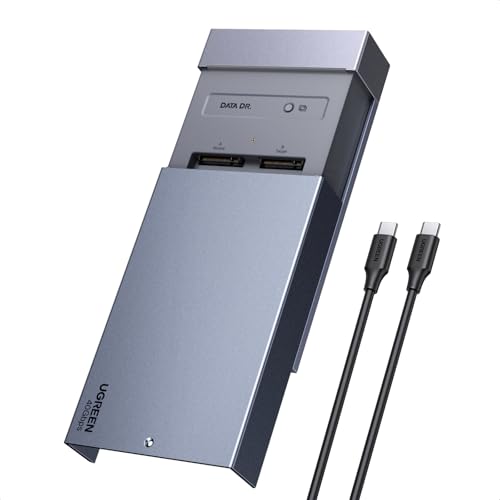
UGREEN 40Gbps Dual-Bay NVMe Cloner
Best for: users needing high-speed cloning and RAID flexibility
- Transfer Speed
- 40Gbps
- Offline Cloning
- One-click offline cloning
- Supported M.2 Sizes
- 2230/2242/2260/2280
- Maximum Capacity
- 16TB
- Cooling Type
- Aluminum alloy top shell, 40mm fan
- Interface
- NVMe
View on Amazon: UGREEN 40Gbps Dual-Bay NVMe Cloner Affiliate link
This UGREEN dock supports 40Gbps transfers and handles two M.2 NVMe drives up to 16TB total. It features one-click offline cloning without a PC and includes a 40mm fan with an aluminum shell for cooling. You can use it with Windows, macOS, Linux, and ChromeOS. The device supports RAID 0, 1, PM, and Union modes for flexible data management.
Pros
- 40Gbps transfer speed
- One-click offline cloning
- Supports RAID 0, 1, PM, and Union modes
- 40mm direct-flow cooling fan
- Compatible with Windows, macOS, Linux, and ChromeOS
Cons
- Maximum capacity is 16TB, lower than some competitors
- Requires PC installation for RAID configuration
- Target disk must be larger than source data
Good fit if
- You need fast 40Gbps cloning speeds
- You want to use RAID modes for data management
- You work with large NVMe drives up to 16TB
Skip if
- You need more than 16TB total capacity
- You require hardware RAID instead of software RAID
- You want a cooler without a fan
Verdict: UGREEN 40Gbps Dual-Bay NVMe Cloner offers high-speed cloning and flexible RAID options for users who need to manage large amounts of data across multiple drives.

SABRENT Dual-Bay NVMe Cloner Dock
Best for: NVMe cloning with active cooling
- Transfer Speed
- 10Gbps
- Supported Drive Types
- PCIe NVMe M.2 SSD
- Bay Count
- 2
- Offline Cloning
- One-button offline clone
- Supported M.2 Sizes
- 2230, 2242, 2260, 2280
- Cooling Type
- Aluminum body, built-in fan
View on Amazon: SABRENT Dual-Bay NVMe Cloner Dock Affiliate link
This Sabrent dock handles two PCIe NVMe M.2 SSDs in 2230 through 2280 sizes. It offers one-button offline cloning without a computer. The USB-C interface runs up to 10Gbps. An aluminum body and built-in fan keep drives cool during transfers. You get steady performance for everyday dual-drive use or cloning tasks.
Pros
- One-button offline cloning without software
- Supports 2230, 2242, 2260, and 2280 NVMe drives
- Aluminum body with built-in cooling fan
- Reads and writes to both bays simultaneously
Cons
- 10Gbps speed is slower than 40Gbps alternatives
- Built-in fan runs continuously when powered
- Does not support M.2 SATA or 2.5-inch drives
Good fit if
- You need reliable offline cloning without a PC
- You want a dock that cools drives actively
- You use standard 2280 NVMe SSDs
Skip if
- You require 40Gbps USB4 transfer speeds
- You need to clone SATA drives
- You prefer silent operation without a fan
Verdict: Sabrent Dual-Bay NVMe Cloner is a practical dock for users who prioritize cooling and offline cloning over raw speed. It fits those who work with standard NVMe drives and want a tool-free setup.

ORICO 40Gbps Dual-Bay NVMe Cloner Dock
Best for: fast offline NVMe duplication
- Transfer Speed
- 40Gbps
- Supported Drive Types
- M-Key NVMe
- Bay Count
- 2
- Offline Cloning
- One-button offline cloning
- Supported M.2 Sizes
- 2230, 2242, 2260, 2280, 22110
- Maximum Capacity
- 16TB
View on Amazon: ORICO 40Gbps Dual-Bay NVMe Cloner Dock Affiliate link
This ORICO docking station offers 40Gbps transfer speeds via USB4. It supports offline one-button cloning for M-Key NVMe drives up to 16TB. The dual-bay design handles 2230 through 2280 sizes. Active cooling with fans and heatsinks keeps performance stable. It suits users needing fast duplication without a PC connection.
Pros
- 40Gbps USB4 interface for rapid data transfer
- One-button offline cloning without a host computer
- Active cooling with dual fans and aluminum heatsinks
- Supports M-Key NVMe drives up to 16TB
Cons
- Bandwidth is shared when both bays are active
- Heatsinks are not standalone enclosures for individual drives
- Only supports M-Key NVMe, not B-Key SATA
Good fit if
- You need to clone drives without a PC
- You require transfer speeds faster than 10Gbps
- You use M-Key NVMe SSDs in standard sizes
Skip if
- You need to clone SATA-based M.2 drives
- You require dedicated cooling for single drives
- You need to use both bays at full speed simultaneously
Verdict: ORICO 40Gbps Dual-Bay NVMe Cloner delivers fast offline duplication for M-Key drives. It is the right tool for users who prioritize transfer speed and standalone cloning capability.

ORICO Dual-Bay M.2 NVMe Cloner Dock
Best for: portable offline NVMe cloning
- Transfer Speed
- 10Gbps
- Supported Drive Types
- M-Key NVMe PCIe SSD
- Bay Count
- 2
- Offline Cloning
- One-key clone
- Supported M.2 Sizes
- 2230, 2242, 2260, 2280, 22110
- Maximum Capacity
- 8TB
View on Amazon: ORICO Dual-Bay M.2 NVMe Cloner Dock Affiliate link
This ORICO dock offers dual-bay support for M.2 NVMe PCIe SSDs with a 10Gbps interface. It features one-key offline cloning, allowing you to duplicate data without a PC. The aluminum enclosure supports up to 8TB total capacity across 2230 to 22110 sizes. It is a practical tool for expanding storage or creating rapid backups on Windows, Mac, or Linux systems.
Pros
- 10Gbps USB 3.2 Gen2 transfer speeds
- One-key offline cloning without a PC
- Supports up to 8TB total capacity
- Tool-free aluminum enclosure design
Cons
- 10Gbps speed is slower than 40Gbps competitors
- Does not support SATA or mSATA drives
- No software RAID support listed
Good fit if
- You need offline cloning without a computer
- You want a portable dual-bay solution
- You use M-Key NVMe PCIe SSDs
Skip if
- You require 40Gbps transfer speeds
- You need to clone SATA drives
- You want software RAID features
Verdict: ORICO Dual-Bay NVMe Cloner 10Gbps is a solid choice for users who prioritize offline cloning and portability over maximum bandwidth. It fits those who need a reliable, tool-free way to duplicate NVMe drives on the go.

UGREEN Dual-Bay 20Gbps NVMe Cloner Dock
Best for: standalone NVMe cloning with aluminum cooling
- Transfer Speed
- 20Gbps
- Supported Drive Types
- M.2 NVMe
- Bay Count
- 2
- Offline Cloning
- One-click offline cloning
- Maximum Capacity
- 16TB
- Features
- Tool-Free, Offline Clone
View on Amazon: UGREEN Dual-Bay 20Gbps NVMe Cloner Dock Affiliate link
This UGREEN dual-bay enclosure clones NVMe drives without a computer. It uses the JMS586U chip for 20Gbps transfers. The tool-free design holds two 8TB drives. Aluminum construction aids heat dissipation. It supports M-Key and B+M-Key NVMe SSDs. You get one-click offline cloning and S.M.A.R.T. monitoring. This model suits users who need fast, standalone duplication for Mac mini or desktop setups.
Pros
- 20Gbps transfer speed with JMS586U chip
- One-click offline cloning without a PC
- Dual-bay design supports up to 8TB per drive
- Aluminum body with open design for cooling
- Supports M-Key and B+M-Key NVMe SSDs
Cons
- 20Gbps speed is slower than 40Gbps alternatives
- Does not support SATA NVMe drives
- No USB4 or Thunderbolt connectivity listed
Good fit if
- You need standalone cloning without a computer
- You use M-Key or B+M-Key NVMe drives
- You want a tool-free aluminum enclosure
Skip if
- You require 40Gbps or USB4 speeds
- You need to clone SATA SSDs
- You prefer a closed plastic design
Verdict: UGREEN 20Gbps Dual-Bay NVMe Cloner offers reliable offline duplication for users who prioritize speed and build quality over maximum bandwidth. It fits buyers who need a sturdy, tool-free solution for NVMe drives.

MAIWO Dual-Bay 10Gbps NVMe Cloner Dock
Best for: offline cloning with physical buttons
- Transfer Speed
- 10Gbps
- Supported Drive Types
- M.2 NVMe
- Bay Count
- 2
- Offline Cloning
- One-key clone
- Supported M.2 Sizes
- 2230, 2242, 2260, 2280, 22110
- Maximum Capacity
- 16TB
View on Amazon: MAIWO Dual-Bay 10Gbps NVMe Cloner Dock Affiliate link
This dual-bay dock handles M.2 NVMe SSDs up to 16TB across five form factors. It offers 10Gbps transfer speeds via USB 3.1 Gen 2. You can clone drives offline using a dedicated button without a computer. The unit includes a power switch and LED status indicators. It works with Windows, macOS, and Linux systems.
Pros
- Supports M.2 sizes 2230 through 22110mm
- One-key offline cloning function
- 10Gbps USB 3.1 Gen 2 interface
- Physical power and clone buttons
- LED indicators for status monitoring
Cons
- 10Gbps speed is slower than 20Gbps or 40Gbps competitors
- No USB-C to USB-C cable included in this variation
- Heavier at 1.46 pounds compared to lighter docks
Good fit if
- You need to clone drives without a PC
- You use various M.2 SSD sizes like 2230 or 22110
- You prefer physical buttons for control
Skip if
- You require transfer speeds above 10Gbps
- You need support for SATA M.2 drives
- You want a compact travel-friendly size
Verdict: MAIWO 10Gbps Dual-Bay NVMe Cloner is a solid choice for users who prioritize physical controls and broad M.2 size compatibility over raw speed. It suits those who clone frequently without a computer nearby.

AMZPILOT 40Gbps USB4 M.2 NVMe Dock
Best for: Single high-speed NVMe drive access
- Transfer Speed
- 40Gbps
- Supported Drive Types
- M.2 NVMe
- Supported M.2 Sizes
- 2230, 2242, 2260, 2280, 22110
- Maximum Capacity
- 8TB
- Form Factor
- M.2 2230
- Compatibility
- Laptop
View on Amazon: AMZPILOT 40Gbps USB4 M.2 NVMe Dock Affiliate link
The AMZPILOT dock connects M.2 NVMe drives via a USB-C port using the USB4 interface. It supports PCIe 4.0 SSDs up to 8TB in standard sizes like 2280 and 22110. The aluminum enclosure features cooling strips for heat dissipation. You get high transfer speeds and broad OS compatibility. This single-bay solution suits users needing fast external storage rather than dual-drive cloning.
Pros
- 40Gbps transfer speed via USB4
- Supports PCIe 4.0 NVMe drives
- Aluminum case with cooling strips
- Tool-free installation design
- Compatible with Windows, Mac, and Linux
Cons
- Single-bay design limits dual-drive use
- Max capacity capped at 8TB
- No offline cloning software included
Good fit if
- You need high-speed data transfer for a single drive
- You use USB4 or Thunderbolt 4 ports
- You prefer aluminum heat dissipation
Skip if
- You require dual-bay cloning capabilities
- You need support for SATA M.2 drives
- You plan to use drives larger than 8TB
Verdict: The AMZPILOT 40Gbps USB4 M.2 NVMe Dock delivers fast, single-drive connectivity for users prioritizing speed and build quality over multi-drive cloning functions.
Specifications side by side
| Spec | UGREEN 40Gbps Dual-Bay NVMe Cloner | SABRENT Dual-Bay NVMe Cloner Dock | ORICO 40Gbps Dual-Bay NVMe Cloner Dock | ORICO Dual-Bay M.2 NVMe Cloner Dock | UGREEN Dual-Bay 20Gbps NVMe Cloner Dock | MAIWO Dual-Bay 10Gbps NVMe Cloner Dock | AMZPILOT 40Gbps USB4 M.2 NVMe Dock |
|---|---|---|---|---|---|---|---|
| Transfer Speed | 40Gbps | 10Gbps | 40Gbps | 10Gbps | 20Gbps | 10Gbps | 40Gbps |
| Supported Drive Types | not stated | PCIe NVMe M.2 SSD | M-Key NVMe | M-Key NVMe PCIe SSD | M.2 NVMe | M.2 NVMe | M.2 NVMe |
| Bay Count | not stated | 2 | 2 | 2 | 2 | 2 | not stated |
| Offline Cloning | One-click offline cloning | One-button offline clone | One-button offline cloning | One-key clone | One-click offline cloning | One-key clone | not stated |
| Supported M.2 Sizes | 2230/2242/2260/2280 | 2230, 2242, 2260, 2280 | 2230, 2242, 2260, 2280, 22110 | 2230, 2242, 2260, 2280, 22110 | not stated | 2230, 2242, 2260, 2280, 22110 | 2230, 2242, 2260, 2280, 22110 |
| Maximum Capacity | 16TB | not stated | 16TB | 8TB | 16TB | 16TB | 8TB |
| Cooling Type | Aluminum alloy top shell, 40mm fan | Aluminum body, built-in fan | Aluminum heatsinks, cooling fan | not stated | not stated | not stated | not stated |
| Interface | NVMe | SATA III | NVMe | NVMe | NVMe | NVMe | NVMe |
| Form Factor | M.2 | M.2 2280 | M.2 2280 | M.2 | M.2 | M.2 | M.2 2230 |
| Cooling | not stated | Cooling Fan | not stated | not stated | not stated | not stated | not stated |
| Compatibility | not stated | not stated | not stated | not stated | not stated | not stated | Laptop |
| Features | Offline Clone | Offline Clone | Offline Clone | Tool-Free, Offline Clone | Tool-Free, Offline Clone | Tool-Free, Offline Clone | not stated |
| Material | not stated | not stated | not stated | Aluminum | not stated | not stated | Aluminum |
| Host Interface | not stated | USB-C | USB-C | not stated | not stated | not stated | USB-C |
| Dimensions | 5.04 × 3.15 × 0.59 inches | 4.3 × 2.5 × 1.25 inches | 5.71 × 2.91 × 1.38 inches | not stated | 5.04 × 3.15 × 0.59 inches | 6.42 × 4.92 × 1.61 inches | 2.74 × 2.74 × 0.61 inches |
| Weight | not stated | 4 ounces | not stated | not stated | 10.6 ounces | 1.46 pounds | 3.5 ounces |
| Color | silver | SILVER | Silver | Cool Gray | silver | Black | Space Grey |
| Model | 65733US | EC-SSD2 | IT28N-C | M2P2-C3 | CM392 | Dual M.2 NVME Cloner Dock with Switch | Pilot C50D-R |
| Size | not stated | USB-C DUAL DOCK | IT28N | not stated | not stated | not stated | 2.74 x 2.74 x 0.61 inches |
When thermal throttling affects your drive, you can compare joyjom nvme m 2 heatsink SSD alternatives for passive cooling.
Frequently asked questions
Which alternative offers the fastest cloning speed?
The UGREEN 40Gbps Dual-Bay NVMe Cloner and the ORICO 40Gbps Dual-Bay NVMe Cloner Dock both provide 40Gbps transfer speeds. These models are ideal if you need to duplicate large volumes of data quickly. The AMZPILOT 40Gbps USB4 M.2 NVMe Dock also matches this high bandwidth, though it supports only a single drive rather than dual-bay cloning.
Are there options with physical buttons for cloning?
Yes, the MAIWO Dual-Bay 10Gbps NVMe Cloner Dock includes physical buttons for operation. This design allows you to start and stop cloning without needing a computer or software interface. It is a practical choice for users who frequently duplicate drives in environments where a host PC is not immediately available or convenient to use.
Which cloner is best for portable use?
The ORICO Dual-Bay M.2 NVMe Cloner Dock is highlighted as a solid choice for portable offline NVMe cloning. It is designed for users who prioritize portability and a reliable, tool-free setup. Its compact nature makes it suitable for duplicating drives on the go, offering flexibility without requiring a fixed workstation or external power source.
Do any alternatives include active cooling?
The SABRENT Dual-Bay NVMe Cloner Dock is noted for its active cooling features. This is beneficial for users who prioritize thermal management during extended cloning sessions. While the UGREEN model also includes a fan, the SABRENT option focuses on cooling efficiency over raw speed, making it a practical tool for standard NVMe drives that may generate heat.
Is there a dual-bay option with 20Gbps speed?
The UGREEN Dual-Bay 20Gbps NVMe Cloner Dock offers 20Gbps transfer speeds. It provides reliable offline duplication with an aluminum body for sturdy build quality. This model fits buyers who need a balance between speed and physical durability, offering a tool-free solution for M.2 NVMe drives without reaching the maximum 40Gbps bandwidth of other top picks.
Which device supports M.2 2280 form factor specifically?
The ORICO 40Gbps Dual-Bay NVMe Cloner Dock explicitly supports the M.2 2280 form factor. It is designed for fast offline duplication of M-Key drives. This specificity ensures compatibility with standard length NVMe SSDs, making it the right tool for users who prioritize transfer speed and standalone cloning capability for widely available 2280 sized drives.