Best SSD Enclosures for Mac in 2026: 7 Picks Ranked by Specs
As an Amazon Associate we earn from qualifying purchases. Links on this page are affiliate links.
You need the best SSD enclosures for mac that match your drive’s protocol and size. We compared 7 options ranked by their published specifications. The ASUS Cobble Tool-Free M.2 Enclosure leads because it supports SATA III interfaces in a rugged aluminum case. This makes it ideal for dual-protocol drives needing rugged, tool-free access. Each pick is chosen strictly by data points like transfer speed, form factor, and cooling type. Use this guide to decide which enclosure fits your Mac’s ports and your drive’s physical dimensions.
Quick picks
The best fit for you
- You want the most rugged and versatile enclosure ASUS Cobble Tool-Free M.2 Enclosure Its aluminum build and tool-free design offer durability and easy access for dual-protocol drives.
- You need the smallest footprint for M.2 2230 drives MAIWO 2230 M.2 NVMe SATA SSD Enclosure This budget option is specifically sized for compact M.2 2230 SSDs with 10Gbps speeds.
- You require sustained high-speed transfers for large datasets Rosewill RNE-01 40Gbps NVMe Enclosure The active cooling fan and 40Gbps interface ensure consistent performance during heavy workloads.
- You prioritize hardware encryption and biometric security VCOM Fingerprint Encryption SSD Enclosure It includes fingerprint access and hardware encryption to protect your data on Mac systems.
Our 7 picks

ASUS Cobble Tool-Free M.2 Enclosure
Best for: Dual-protocol drives needing rugged, tool-free access
- Compatibility
- PS5, Mac (what this guide is about)
- Max Transfer Speed
- 10Gbps
- Host Interface
- USB-C 3.2 Gen 2x1
- Drive Interface
- NVMe, SATA
- Supported Form Factors
- M.2 2230–2280
- Cooling System
- Aluminum Cooling
View on Amazon: ASUS Cobble Tool-Free M.2 Enclosure Affiliate link
The ASUS Cobble enclosure connects M.2 NVMe and SATA drives via USB-C 3.2 Gen 2x1. It supports 10Gbps sustained transfer speeds and accepts form factors from 2230 to 2280. The aluminum shell provides cooling, while the tool-free Q-Latch design allows quick drive swaps. It offers IP55 water and dust resistance. This unit works natively with macOS, Windows, and iPhones without formatting.
Pros
- Supports both NVMe and SATA SSDs
- Tool-free Q-Latch installation system
- IP55 water and dust resistance
- Native cross-platform compatibility
Cons
- Limited to 10Gbps transfer speeds
- No Thunderbolt or USB4 support
- No fingerprint encryption or LCD screen
Good fit if
- You need a reliable enclosure for both NVMe and SATA drives
- You work in environments where dust or spills are a risk
- You want to swap drives quickly without losing screws
Skip if
- You require Thunderbolt 4 or USB4 speeds for high-end Mac workflows
- You need biometric security features like fingerprint scanning
- You prefer a transparent case to view the drive inside
Verdict: ASUS Cobble M.2 NVMe/SATA Enclosure is a solid choice for Mac users who prioritize durability and drive versatility over maximum transfer speeds. It fits those who need a rugged, tool-free solution for daily data transfers.

MAIWO 2230 M.2 NVMe SATA SSD Enclosure
Best for: M.2 2230 SSDs on Mac
- Compatibility
- Mac (what this guide is about)
- Max Transfer Speed
- 10Gbps
- Host Interface
- USB-C 3.2 Gen 2
- Drive Interface
- M.2 NVMe, SATA (M-Key)
- Supported Form Factors
- M.2 2230
- Cooling System
- Aluminum
View on Amazon: MAIWO 2230 M.2 NVMe SATA SSD Enclosure Affiliate link
This MAIWO enclosure is built for small M.2 2230 NVMe or SATA SSDs. It uses a USB-C 3.2 Gen2 host interface to reach 10Gbps transfer speeds. The tool-free aluminum design helps dissipate heat from your drive. It supports up to 2TB of storage. This compact unit is suitable for Mac users who need to expand storage for their iPhone 15 or 16 Pro models.
Pros
- Supports M.2 2230 form factor
- USB-C 3.2 Gen2 10Gbps speed
- Tool-free aluminum construction
- Compatible with Mac and iPhone
Cons
- Limited to 10Gbps transfer speed
- Smaller 2230 drive capacity
- Max capacity capped at 2TB
Good fit if
- You use M.2 2230 SSDs
- You need 10Gbps transfers
- You want tool-free assembly
Skip if
- You require 40Gbps speeds
- You use standard 2280 drives
- You need over 2TB storage
Verdict: MAIWO M.2 2230 NVMe Enclosure fits Mac users with small drives who need 10Gbps speeds and tool-free assembly. It is not suitable for those needing higher bandwidth or larger form factors.
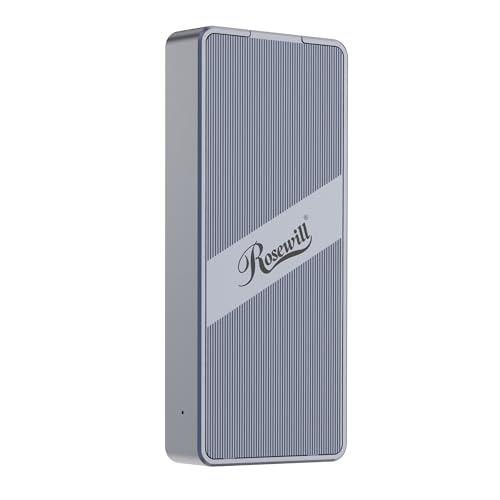
Rosewill RNE-01 40Gbps NVMe Enclosure
Best for: sustained high-speed transfers on Mac
- Compatibility
- Mac (what this guide is about)
- Max Transfer Speed
- 40Gbps
- Host Interface
- Thunderbolt 4/3, USB4
- Drive Interface
- M.2 NVMe
- Supported Form Factors
- 2230-2280
- Cooling System
- Built-in fan and optimized vent design
View on Amazon: Rosewill RNE-01 40Gbps NVMe Enclosure Affiliate link
The Rosewill RNE-01 is a 40Gbps M.2 NVMe enclosure designed for Mac users who need sustained performance. It features a built-in cooling fan and optimized vent design to maintain speeds during long transfers. The unit supports NVMe drives up to 8TB in 2230-2280 form factors. Its transparent back plate lets you see the internals, while the compact silver shell fits easily in a bag.
Pros
- Built-in cooling fan maintains full speed for up to 4 hours
- Supports NVMe SSDs up to 8TB capacity
- Transparent back plate reveals internal components
- Compatible with Thunderbolt 4/3 and USB4 interfaces
Cons
- Requires power for the active cooling fan
- Heavier at 6.4 ounces than passive aluminum cases
- Active fan may produce audible noise during use
Good fit if
- You transfer large files for extended periods
- You want to see your drive inside the case
- You use Thunderbolt 4 or USB4 on your Mac
Skip if
- You need a silent, passive cooling solution
- You prefer a minimal, opaque aesthetic
- You only have USB 3.2 Gen 2 ports
Verdict: Rosewill RNE-01 40Gbps NVMe Enclosure is ideal for Mac users managing large data sets who prioritize thermal management over silence. The active fan ensures sustained speeds, making it a practical tool for creative professionals.

MOKiN 40Gbps M.2 NVMe SSD Enclosure
Best for: Mac users needing 40Gbps speeds
- Compatibility
- Mac (what this guide is about)
- Max Transfer Speed
- 40Gbps
- Host Interface
- Thunderbolt 3/4, USB4
- Drive Interface
- M+B&M Key NVMe
- Supported Form Factors
- 2242/2260/2280
- Cooling System
- Cooling fan, aluminum case
View on Amazon: MOKiN 40Gbps M.2 NVMe SSD Enclosure Affiliate link
This MOKiN enclosure supports 40Gbps transfers via Thunderbolt 3/4 or USB4. It uses an aluminum shell for passive cooling and includes both USB-C and USB-A cables. The unit accepts 2242, 2260, and 2280 M.2 NVMe drives. It works with Mac, Windows, and Linux. You get reliable speeds for large file backups on compatible hosts.
Pros
- Supports 40Gbps transfer speeds
- Compatible with Thunderbolt 3/4 and USB4
- Aluminum enclosure aids heat dissipation
- Includes USB-C and USB-A cables
Cons
- No active cooling fan
- Passive cooling only
- No LCD status screen
Good fit if
- You need 40Gbps speeds on Mac
- You use 2242 or 2260 NVMe drives
- You want a compact portable drive
Skip if
- You require active fan cooling
- You need drive encryption
- You want an LCD status display
Verdict: MOKiN 40Gbps Thunderbolt NVMe Enclosure delivers high-speed performance for Mac users with Thunderbolt 3/4 hosts. It is ideal for those needing compact storage for smaller M.2 form factors.

VCOM Fingerprint Encryption SSD Enclosure
Best for: Users needing hardware encryption and fingerprint access
- Compatibility
- Mac (what this guide is about)
- Max Transfer Speed
- 10Gbps
- Host Interface
- USB 3.2 Gen 2
- Drive Interface
- M.2 NVMe, SATA
- Supported Form Factors
- 2242, 2260, 2280
- Cooling System
- Aluminum alloy unibody
View on Amazon: VCOM Fingerprint Encryption SSD Enclosure Affiliate link
This enclosure adds hardware-level security to your M.2 drive. It features a fingerprint sensor and an LCD screen for real-time status. The USB 3.2 Gen 2 interface supports 10Gbps transfer speeds. It works with NVMe and SATA SSDs in 2242, 2260, and 2280 sizes. The aluminum unibody helps with heat dissipation. It is compatible with Mac systems.
Pros
- Hardware-level encryption with 256-bit AES standard
- Fingerprint sensor for biometric access control
- LCD screen displays capacity and security mode
- Supports NVMe and SATA dual protocols
- 10Gbps transfer speed via USB 3.2 Gen 2
Cons
- 10Gbps speed is slower than 40Gbps options
- No Thunderbolt 4 or USB4 support
- Physical fingerprint sensor adds bulk
Good fit if
- You need hardware encryption for sensitive data
- You prefer biometric fingerprint access over passwords
- You use M.2 NVMe or SATA drives
Skip if
- You require Thunderbolt 4 or USB4 speeds
- You want the fastest possible transfer rates
- You need a compact tool-free design
Verdict: VCOM Fingerprint Encryption SSD Enclosure is ideal for users who prioritize data security with hardware encryption and biometric access. It suits those who need reliable protection for their drives on Mac systems.

ASUS ProArt USB4 40Gbps SSD Enclosure
Best for: High-speed Mac workflows requiring thermal monitoring
- Compatibility
- Mac (what this guide is about)
- Max Transfer Speed
- Up to 40Gbps
- Host Interface
- USB4 USB-C
- Drive Interface
- NVMe
- Supported Form Factors
- 2230, 2280
- Cooling System
- Four-level smart cooling fan
View on Amazon: ASUS ProArt USB4 40Gbps SSD Enclosure Affiliate link
The ASUS ProArt PA40SU is a tool-free NVMe enclosure supporting 2230 and 2280 drives. It delivers up to 40Gbps transfer speeds via its USB4 interface. A four-level smart cooling fan helps manage thermal performance during sustained workloads. The included ProArt SSD Dashboard provides real-time monitoring. It is designed for users needing high-speed external storage on Mac systems.
Pros
- USB4 interface supports up to 40Gbps data transfers
- Four-level smart cooling fan for thermal management
- Tool-free push-to-open installation mechanism
- Compatible with 2230 and 2280 NVMe SSDs
- Real-time monitoring via ProArt SSD Dashboard
Cons
- Heavier at 4.32 ounces compared to simpler aluminum shells
- Requires software installation for the monitoring dashboard
- Higher complexity due to active cooling fan
Good fit if
- You need maximum 40Gbps transfer speeds for large files
- You want to monitor drive temperature in real time
- You prefer tool-free installation for frequent drive swaps
Skip if
- You only use 2242 or 2260 drive sizes
- You want a completely passive, fanless design
- You prefer a minimalist enclosure without software dependencies
Verdict: The ASUS ProArt PA40SU USB4 NVMe Enclosure offers robust 40Gbps performance and active cooling for Mac users who need reliable, high-speed external storage. It suits professionals managing large files who value real-time thermal monitoring and easy drive access.

RayCue 1TB 40Gbps NVMe Enclosure
Best for: Mac users needing fast, quiet portable NVMe storage
- Compatibility
- Mac (what this guide is about)
- Max Transfer Speed
- 40Gbps
- Host Interface
- USB4
- Drive Interface
- M.2 NVMe
- Supported Form Factors
- 2230, 2242, 2260, 2280
- Cooling System
- Aluminum double-sided fin
View on Amazon: RayCue 1TB 40Gbps NVMe Enclosure Affiliate link
This RayCue enclosure pairs a 1TB NVMe drive with a 40Gbps USB4 interface. It supports M.2 sizes 2230 through 2280 and works with Mac, Windows, and Linux. The aluminum body uses a double-sided fin design for passive cooling. You get speeds up to 3600MB/s with compatible Thunderbolt 4 devices. It handles drives up to 8TB.
Pros
- Includes a 1TB NVMe SSD
- USB4 40Gbps host interface
- Passive aluminum double-sided fin cooling
- Supports 2230, 2242, 2260, and 2280 form factors
Cons
- Requires Thunderbolt 4 cables and devices for max speed
- Does not support SATA NGFF or mSATA drives
- Heavier than tool-free plastic alternatives
Good fit if
- You need a ready-to-use 1TB NVMe drive for Mac
- You want passive cooling without fan noise
- You use Thunderbolt 4 devices for maximum transfer speeds
Skip if
- You only have USB 3.2 or older ports
- You need to use SATA or mSATA drives
- You prefer a drive without an included SSD
Verdict: RayCue 1TB 40Gbps NVMe Enclosure offers a complete solution for Mac users needing fast, quiet storage. Its passive cooling and included drive make it ideal for portable workflows requiring high throughput.
Specifications side by side
| Spec | ASUS Cobble Tool-Free M.2 Enclosure | MAIWO 2230 M.2 NVMe SATA SSD Enclosure | Rosewill RNE-01 40Gbps NVMe Enclosure | MOKiN 40Gbps M.2 NVMe SSD Enclosure | VCOM Fingerprint Encryption SSD Enclosure | ASUS ProArt USB4 40Gbps SSD Enclosure | RayCue 1TB 40Gbps NVMe Enclosure |
|---|---|---|---|---|---|---|---|
| Max Transfer Speed | 10Gbps | 10Gbps | 40Gbps | 40Gbps | 10Gbps | Up to 40Gbps | 40Gbps |
| Host Interface | USB-C 3.2 Gen 2x1 | USB-C 3.2 Gen 2 | Thunderbolt 4/3, USB4 | Thunderbolt 3/4, USB4 | USB 3.2 Gen 2 | USB4 USB-C | USB4 |
| Drive Interface | NVMe, SATA | M.2 NVMe, SATA (M-Key) | M.2 NVMe | M+B&M Key NVMe | M.2 NVMe, SATA | NVMe | M.2 NVMe |
| Supported Form Factors | M.2 2230–2280 | M.2 2230 | 2230-2280 | 2242/2260/2280 | 2242, 2260, 2280 | 2230, 2280 | 2230, 2242, 2260, 2280 |
| Cooling System | Aluminum Cooling | Aluminum | Built-in fan and optimized vent design | Cooling fan, aluminum case | Aluminum alloy unibody | Four-level smart cooling fan | Aluminum double-sided fin |
| Maximum Capacity | not stated | 2TB | 8TB | not stated | not stated | not stated | 8TB |
| Installation Style | Tool-Free | Tool-free | not stated | not stated | not stated | Tool-free push-to-open | not stated |
| Interface | SATA III | SATA III | NVMe | NVMe | SATA III | NVMe | NVMe |
| Form Factor | M.2 2230 | M.2 2230 | M.2 | M.2 2280 | M.2 | not stated | M.2 |
| Cooling | not stated | not stated | Cooling Fan | Cooling Fan | not stated | not stated | not stated |
| Compatibility | PS5, Mac | Mac | Mac | Mac | Mac | Mac | Mac |
| Security | not stated | not stated | not stated | not stated | Hardware Encryption | not stated | not stated |
| Transfer Speed | 10Gbps | 10Gbps | 40Gbps | 40Gbps | 10Gbps | 40Gbps | 40Gbps |
| Features | Tool-Free | Tool-Free | not stated | not stated | not stated | Tool-Free | not stated |
| Material | Aluminum | Aluminum | not stated | Aluminum | not stated | not stated | Aluminum |
| Dimensions | 5.1 × 1.7 × 0.7 inches | 1.77 × 1.77 × 0.53 inches | 4.75 × 2 × 0.75 inches | not stated | 4.07 × 1.12 × 0.79 inches | 4.91 × 1.83 × 0.53 inches | not stated |
| Weight | 6.53 ounces | not stated | 6.4 ounces | not stated | not stated | 4.32 ounces | 3.53 ounces |
| Size | Black|Urban Design | M.2 SSD Enclosure | 40 Gbps M.2 NVMe Enclosure | not stated | not stated | ProArt PA40|up to 40Gbps | 1 TB 40Gbps |
| Color | Black | Grey | Silver | Gray | Phantom Gray | BLACK | not stated |
| Model | ASUS COBBLE/BLK/G/AS//ESD-A1A | NVMe SATA 2230 Enclosure only | RNE-01 | UD1102-1 | 855SN-F | 90DD0330-BA8010 | not stated |
When you plan your desktop workstation, you can also compare specifications for the best monitors for mac.
How to choose the right SSD enclosure
-
Match the interface type
Verify your drive protocol first. The ASUS Cobble supports SATA III, while the Rosewill RNE-01 handles NVMe. Mismatching the interface prevents connection. You must ensure the enclosure controller matches the drive’s internal bus. This check prevents basic compatibility errors. Select the correct protocol for your specific SSD model. This ensures reliable data transfer without hardware conflicts. Proper matching is the first step in any setup.
-
Check form factor fit
M.2 drives come in various sizes. The MAIWO enclosure fits only M.2 2230 drives. Most other enclosures accept standard M.2 lengths. You must measure your drive before purchasing. An incorrect form factor means the drive will not fit inside the casing. This physical constraint is critical for proper installation. Verify the length and width specifications. This prevents buying an enclosure that cannot house your drive.
-
Select transfer speed
Speed depends on your host port. The ASUS Cobble offers 10Gbps, suitable for SATA drives. The Rosewill RNE-01 provides 40Gbps for NVMe performance. You need a higher speed for large file transfers. Match the enclosure bandwidth to your Mac’s USB or Thunderbolt port. Using a slower enclosure with a fast drive wastes potential. Check the Gbps rating to ensure adequate throughput for your workflow.
-
Evaluate cooling methods
Thermal management affects sustained performance. The Rosewill RNE-01 includes an active cooling fan. This helps maintain high speeds during long transfers. The RayCue enclosure uses passive cooling for quiet operation. You must consider your noise tolerance and heat needs. Active fans provide better thermal dissipation but add noise. Passive designs are silent but may throttle under heavy loads. Choose based on your environment and usage patterns.
-
Consider security features
Data protection is vital for some users. The VCOM enclosure offers hardware encryption and fingerprint access. This adds a layer of security for sensitive files. You may need this if you travel with your drive. Other enclosures focus on speed or durability instead. Evaluate your security requirements before purchasing. Hardware encryption ensures data remains safe even if the drive is lost. This feature is essential for professional or confidential data storage.
Frequently asked questions
Do these SSD enclosures work with Apple Silicon Macs?
Yes, all listed models support Mac systems. The ASUS Cobble, MAIWO, Rosewill RNE-01, MOKiN, VCOM, ASUS ProArt, and RayCue enclosures are all compatible. You can connect them via USB-C or USB4 hosts to transfer data reliably on modern Mac hardware without driver issues.
Which enclosure is best for M.2 2230 drives?
The ASUS Cobble and MAIWO options are designed specifically for M.2 2230 form factors. The MAIWO model offers a compact footprint at 1.77 inches square. The ASUS Cobble provides a slightly larger aluminum case with tool-free access, making it easier to swap drives while maintaining durability.
Can I get 40Gbps speeds with these enclosures?
Several models support 40Gbps transfer speeds. The Rosewill RNE-01, MOKiN, ASUS ProArt, and RayCue enclosures all offer this bandwidth. These are ideal for NVMe drives that require high throughput. Ensure your Mac has a Thunderbolt 3/4 or USB4 port to utilize the full speed.
Which enclosure handles heat best during long transfers?
The Rosewill RNE-01 features an active cooling fan to manage thermal buildup. The ASUS ProArt also includes active cooling for sustained performance. The RayCue uses passive cooling with an aluminum body. Choose active cooling if you perform large file transfers regularly to prevent thermal throttling.
Is there an option with hardware encryption?
The VCOM Fingerprint Encryption SSD Enclosure includes hardware encryption. It also features biometric fingerprint access for added security. This model supports SATA III interfaces and offers 10Gbps speeds. It is suitable for users who need to protect sensitive data stored on their Mac.
Do any enclosures allow tool-free drive installation?
The ASUS Cobble and ASUS ProArt enclosures feature tool-free designs. This allows you to insert and remove drives quickly without screwdrivers. The MAIWO model also supports tool-free assembly. These designs simplify maintenance and make it easier to upgrade or replace your internal SSD.