10 Best 10Gbps SSD Docking Stations, Compared
As an Amazon Associate we earn from qualifying purchases. Links on this page are affiliate links.
A 10Gbps SSD docking station gives you fast external access to bare drives for backups, disk cloning, and high-capacity storage. We compared 10 models based strictly on the specifications published on their product listings. The SABRENT 4-Bay 10Gbps USB-C Dock earns the top spot because its four-bay design features active fan cooling for multi-drive 3.5-inch SATA desktop storage.
This guide helps you choose the right dock configuration for your drive setup, whether you need multi-bay desktop capacity, standalone offline cloning, or cross-format NVMe and SATA drive support.
Quick picks
The best fit for you
- You need high-capacity multi-drive SATA desktop storage. SABRENT 4-Bay 10Gbps USB-C Dock This dock features four SATA drive bays and individual drive controllers connecting over a 10Gbps USB-C link.
- You need standalone cloning between two NVMe drives. SABRENT Dual-Bay NVMe Cloner Dock It provides dual M.2 NVMe bays with standalone offline clone support and 10Gbps USB-C connectivity.
- You want a single-bay dock for SATA drives. SABRENT Single-Bay SATA SSD & HDD Dock It provides dedicated single-drive access for 2.5-inch and 3.5-inch SATA drives over a 10Gbps USB-C interface.
- You want an aluminum dock for cross-interface cloning. ORICO NVMe and SATA Dual-Bay Dock Its aluminum chassis supports bidirectional cloning between one 10Gbps NVMe slot and one 5Gbps SATA bay.
Our 10 picks

SABRENT 4-Bay 10Gbps USB-C Dock
Best for: multi-drive 3.5-inch SATA desktop storage
- Transfer Speed
- 10Gbps (what this guide is about)
- Supported Drive Types
- 3.5-inch SATA HDD/SSD
- Bay Count
- 4
- Maximum Capacity
- Up to 80TB (4 x 20TB)
- Cooling Type
- 92mm fan
- Host Interface
- USB-C
This SABRENT 4-Bay 10Gbps USB-C Dock is an external desktop enclosure designed for up to four 3.5-inch SATA hard drives or solid-state drives. It connects via a 10Gbps USB 3.1 Gen 2 Type-C interface, pairing each bay with an independent ASMedia ASM1351 controller. Active cooling comes from an internal 92mm fan. It suits you if you need high-capacity JBOD multi-drive access without hardware RAID.
Pros
- Four bays supporting up to 80TB total capacity (4 x 20TB)
- Dedicated ASMedia ASM1351 controller and power switch for each bay
- 10Gbps USB 3.1 Gen 2 Type-C host interface
- Built-in 92mm fan and aluminum housing for cooling
Cons
- Does not support hardware RAID configurations
- Accommodates 3.5-inch SATA drives only without built-in M.2 slots
- Substantial desktop footprint weighing 9 pounds
Good fit if
- You need to access up to four separate 3.5-inch SATA drives simultaneously.
- You manage individual drives via JBOD rather than hardware RAID configurations.
- You require active fan cooling and individual bay power switches for 24/7 drive operation.
Skip if
- You need built-in hardware RAID levels such as RAID 0, 1, or 5.
- You want a compact dock designed for M.2 NVMe SSDs.
- You require a lightweight, bus-powered portable drive adapter.
Verdict: SABRENT 4-Bay 10Gbps USB-C Dock provides high-capacity, multi-drive SATA connectivity with individual drive controllers and active fan cooling. It is an optimal desktop solution when you need dedicated JBOD access over a single 10Gbps link.

SABRENT Dual-Bay NVMe Cloner Dock
Best for: standalone NVMe cloning and dual-drive access
- Transfer Speed
- 10Gbps (what this guide is about)
- Supported Drive Types
- PCIe NVMe M.2 SSD
- Bay Count
- 2
- Offline Cloning
- One-button clone
- Supported M.2 Sizes
- 2230, 2242, 2260, 2280
- Cooling Type
- Aluminum body, built-in fan
This SABRENT dock gives you two M.2 PCIe NVMe slots operating at USB 3.2 10Gbps speeds. It features standalone offline cloning at the press of a button, letting you duplicate drives without a computer. An aluminum shell and integrated fan manage heat during long transfers, while both bays mount simultaneously for everyday storage access. It suits you if you frequently duplicate or swap bare NVMe SSDs.
Pros
- Standalone offline cloning works without host computer or software
- Dual bays read and write simultaneously at up to 10Gbps
- Tool-free enclosure fits 2230, 2242, 2260, and 2280 NVMe SSDs
- Aluminum body with built-in cooling fan prevents thermal throttling
Cons
- Does not support M.2 SATA, AHCI, or 2.5-inch and 3.5-inch SATA drives
- Cooling fan runs continuously while powered with no idle or sleep mode
Good fit if
- You need to duplicate PCIe NVMe drives directly without using a PC.
- You want simultaneous access to two bare NVMe SSDs over a single USB connection.
- You run sustained transfers that require active fan cooling.
Skip if
- You need compatibility with M.2 SATA SSDs or legacy SATA hard drives.
- You require a silent unit that powers off automatically when idle.
Verdict: SABRENT Dual-Bay NVMe Cloner Dock delivers high-speed dual-drive access and standalone duplication over a 10Gbps USB-C link. Its all-aluminum design and active fan keep sustained NVMe operations cool and stable.

SABRENT Lay-Flat NVMe and SATA Dock
Best for: Cross-format drive swapping and standalone cloning
- Transfer Speed
- 10Gbps (what this guide is about)
- Supported Drive Types
- M.2 PCIe NVMe, 2.5/3.5-inch SATA
- Offline Cloning
- Direction switch, clone button
- Supported M.2 Sizes
- 2242, 2260, 2280
- Interface
- SATA III
- Host Interface
- USB-C
This SABRENT dock connects both M.2 PCIe NVMe drives and 2.5-inch or 3.5-inch SATA SSDs or HDDs over a 10Gbps USB 3.2 Gen 2 interface. You get tool-free swapping under a lay-flat lid, standalone offline cloning between formats, and both USB-C and USB-A host cables in the box. It suits you if you frequently manage or clone drives across different form factors without needing a host computer.
Pros
- Supports M.2 NVMe (2242, 2260, 2280) alongside 2.5-inch and 3.5-inch SATA drives
- Standalone offline cloning with direction switch and progress LEDs
- Includes both USB-C to USB-C and USB-A to USB-C cables
- Tool-free lay-flat enclosure with hinged lid
- USB 3.2 Gen 2 interface rated up to 10Gbps
Cons
- Requires the external 12V power adapter for 3.5-inch drives
- Clone target drive must be equal to or larger than the source drive
- Does not list support for 22110 length M.2 drives
Good fit if
- You need to clone directly between M.2 NVMe and SATA drives without a PC
- You work across both USB-C and older USB-A host ports
- You regularly swap bare 2.5-inch, 3.5-inch, and M.2 SSDs
Skip if
- You need to clone data onto a smaller target drive
- You use extra-long 22110 M.2 SSDs
Verdict: SABRENT Lay-Flat NVMe and SATA SSD Dock delivers versatile 10Gbps speeds and standalone offline cloning across M.2 and SATA drive formats. Its tool-free horizontal bay and included dual USB cables make cross-format drive handling straightforward.

MAIWO Dual-Bay 10Gbps NVMe Cloner Dock
Best for: standalone offline cloning of NVMe drives
- Transfer Speed
- 10Gbps (what this guide is about)
- Supported Drive Types
- M.2 NVMe SSD
- Bay Count
- 2
- Offline Cloning
- One-key clone
- Supported M.2 Sizes
- 2230, 2242, 2260, 2280, 22110
- Maximum Capacity
- 16TB
The MAIWO Dual-Bay NVMe Cloner Dock connects two M.2 NVMe drives through a USB 3.1 Gen 2 interface at up to 10Gbps. You can access both bays simultaneously or use the dedicated hardware button for PC-free offline drive cloning. Supporting drives up to 22110 length and 16TB capacity, it gives you a straightforward tool for high-speed file transfers and standalone drive duplication without needing a host system.
Pros
- Supports offline cloning without a host computer
- Accepts M.2 NVMe drive lengths from 2230 up to 22110
- 10Gbps USB 3.1 Gen 2 connection with dual simultaneous drive access
- Dedicated hardware power switch and clone progress LED indicators
Cons
- Does not support SATA M.2 or 2.5/3.5-inch SATA drives
- Offline cloning requires target drive capacity to exceed source drive
Good fit if
- You need standalone, computer-free duplication between two NVMe SSDs.
- You work with long 22110 form-factor M.2 NVMe drives alongside standard sizes.
- You want simultaneous access to two NVMe drives over a 10Gbps connection.
Skip if
- You need compatibility with SATA-based M.2 or standard SATA drives.
- You plan to clone to a target drive smaller than the source drive.
Verdict: MAIWO Dual-Bay NVMe Cloner Dock delivers 10Gbps USB connectivity and standalone drive cloning for NVMe cards up to 22110 in length. It provides practical dual-bay utility without requiring a host PC for disk copies.

SABRENT Single-Bay SATA SSD & HDD Dock
Best for: single-drive SATA SSD and HDD swapping
- Transfer Speed
- 10Gbps (what this guide is about)
- Supported Drive Types
- 2.5-inch and 3.5-inch SATA SSD/HDD
- Bay Count
- 1
- Maximum Capacity
- 20TB and larger
- Interface
- SATA III
- Host Interface
- USB-C
The SABRENT Single-Bay SATA SSD & HDD Dock gives you a top-loading dock for standard 2.5-inch and 3.5-inch drives. It pairs a 10Gbps USB-C host connection with a SATA III drive interface, accommodating capacities of 20TB and larger. It includes both USB-C and USB-A cables alongside a dedicated power adapter. This makes it a practical, straightforward choice if you need to swap loose SATA drives without opening your computer case.
Pros
- Supports both 2.5-inch and 3.5-inch SATA SSDs and HDDs
- Tool-less design with retractable dust cover
- Includes both USB-A to USB-C and USB-C to USB-C cables
- Supports drive capacities of 20TB and larger
Cons
- Single-bay design limits you to one drive at a time
- No support for M.2 NVMe SSDs
- Requires external power adapter for 3.5-inch drives
Good fit if
- You need a simple tool-less dock for swapping loose 2.5-inch or 3.5-inch SATA drives.
- You want compatibility with high-capacity SATA hard drives up to and exceeding 20TB.
- You connect to host systems using either standard USB-A or modern USB-C ports.
Skip if
- You need to dock or clone M.2 NVMe solid-state drives.
- You require multiple drive bays to mount or clone two disks simultaneously.
Verdict: SABRENT Single-Bay SATA SSD & HDD Dock delivers reliable 10Gbps USB-C host connectivity for 2.5-inch and 3.5-inch SATA drives. It serves as an uncomplicated option when you do not need NVMe support or multiple bays.

StarTech.com M.2 NVMe to SATA Duplicator Dock
Best for: cross-format SATA and NVMe offline drive cloning
- Transfer Speed
- 10Gbps (what this guide is about)
- Supported Drive Types
- M.2 NVMe, 2.5/3.5-inch SATA
- Offline Cloning
- Bidirectional
- Supported M.2 Sizes
- 2242, 2260, 2280
- Cooling Type
- Passive cooling
- Interface
- SATA III
View on Amazon: StarTech.com M.2 NVMe to SATA Duplicator Dock
This docking station bridges M.2 NVMe and 2.5- or 3.5-inch SATA drives through a 10Gbps USB connection. You can use it as a standard external drive dock or run standalone bidirectional clones at up to 27GB per minute without a computer. It supports PCIe Gen3x2 and SATA III speeds across 2242, 2260, and 2280 form factors. This unit suits you if you frequently duplicate drives or migrate between SATA and NVMe storage.
Pros
- Bidirectional standalone cloning between M.2 NVMe and SATA without a computer
- Sector-by-sector duplication speeds up to 27GB/min
- Supports 2242, 2260, and 2280 NVMe SSDs plus 2.5-inch and 3.5-inch SATA drives
- USB 10Gbps host connection with included USB-C cable
Cons
- M.2 bandwidth capped at PCIe Gen3x2 throughput (7.8Gbps)
- Target drive must be equal to or larger than source drive to clone
- Lacks support for 22110 length M.2 drives
Good fit if
- You need to clone data bidirectionally between M.2 NVMe and SATA drives without a PC.
- You work with mixed 2242, 2260, or 2280 NVMe sticks and standard 2.5-inch or 3.5-inch SATA disks.
- You want a 10Gbps top-loading dock that supports 4Kn sector sizes.
Skip if
- You need to duplicate directly between two M.2 NVMe SSDs.
- You use 22110 form factor M.2 solid-state drives.
- You need full PCIe Gen4 or Gen3x4 transfer rates over NVMe.
Verdict: StarTech.com M.2 NVMe and SATA Duplicator Dock provides versatile cross-format offline cloning and 10Gbps host connectivity. It is a solid choice for data transfers between NVMe SSDs and SATA drives without using a host computer.

ORICO NVMe and SATA Dual-Bay Dock
Best for: cross-interface cloning between NVMe and SATA drives
- Transfer Speed
- 10Gbps (what this guide is about)
- Supported Drive Types
- M.2 NVMe, 2.5"/3.5" SATA
- Offline Cloning
- Bidirectional
- Supported M.2 Sizes
- 2230, 2242, 2260, 2280
- Maximum Capacity
- 8TB (NVMe), 22TB (SATA)
- Cooling Type
- Independent aluminum heat sink
This ORICO docking station connects one M.2 NVMe SSD and one 2.5-inch or 3.5-inch SATA drive via a USB 3.2 Gen 2 Type-C interface. You get up to 10Gbps speeds for NVMe drives and 5Gbps for SATA disks, along with concurrent read and write access. With an aluminum build, an independent M.2 cooling enclosure, and bidirectional cloning, it suits you when managing mixed-format drive backups and cross-interface migrations.
Pros
- Supports bidirectional cloning between NVMe and SATA drives
- Simultaneous read and write support for NVMe and 2.5-inch or 3.5-inch SATA disks
- Includes an aluminum cooling enclosure for M.2 NVMe thermal management
- Ships with a 2-in-1 USB Type-C to USB-A/Type-C cable
Cons
- Does not support M.2 SATA SSDs
- SATA drive transfers cap at 5Gbps rather than 10Gbps
Good fit if
- You need to clone data directly between an M.2 NVMe drive and a SATA disk.
- You want an aluminum housing with an independent M.2 cooling enclosure.
- You work simultaneously with both high-capacity 3.5-inch hard drives and NVMe SSDs.
Skip if
- You need compatibility with M.2 SATA SSDs.
- You require 10Gbps transfer speeds across SATA drives.
Verdict: ORICO Aluminum NVMe and SATA Docking Station pairs a 10Gbps NVMe slot with a 5Gbps SATA bay inside a durable aluminum chassis. Its bidirectional cloning and dedicated M.2 heat enclosure make it an efficient tool for mixed-drive workflows.

ICY BOX Triple-Bay NVMe & SATA Cloner Dock
Best for: mixed NVMe and SATA drive cloning
- Transfer Speed
- 10Gbps (what this guide is about)
- Supported Drive Types
- M.2 NVMe, 2.5"/3.5" SATA
- Bay Count
- 3
- Offline Cloning
- One-touch offline cloning
- Interface
- SATA III
- Form Factor
- 2.5 Inch
This ICY BOX docking station gives you three drive slots with USB 3.2 Gen 2 transfer speeds up to 10Gbps. It accepts M.2 PCIe NVMe SSDs alongside 2.5-inch and 3.5-inch SATA drives without tools. You can run one-touch offline cloning from SATA to NVMe or between NVMe drives without a computer. It suits you if you handle mixed drive types and need standalone duplication.
Pros
- Three independent drive bays for simultaneous multi-drive access
- 10Gbps USB 3.2 Gen 2 connection with included 2-in-1 combo cable
- One-touch offline cloning without requiring a host PC
- Supports M.2 PCIe NVMe SSDs and 2.5-inch or 3.5-inch SATA drives
Cons
- Requires external power adapter to operate
- Offline cloning specifications only list SATA to NVMe and NVMe to NVMe directions
Good fit if
- You need to clone data from SATA drives to NVMe SSDs without a PC.
- You manage mixed storage formats across M.2 NVMe and 2.5-inch or 3.5-inch SATA disks.
- You want three active drive slots over a single 10Gbps USB host connection.
Skip if
- You need a bus-powered portable dock that functions without an AC power adapter.
- You only need a basic single-bay enclosure for an M.2 SSD.
Verdict: ICY BOX Triple-Bay NVMe and SATA Cloner Dock provides 10Gbps connectivity and standalone cloning versatility across both M.2 NVMe and SATA formats. It delivers a practical multi-drive setup that functions without host software.

ICY BOX M.2 NVMe & SATA SSD/HDD Dock
Best for: cloning mixed drive formats to NVMe SSDs
- Transfer Speed
- 10Gbps (what this guide is about)
- Supported Drive Types
- M.2 NVMe, M.2 SATA, 2.5"/3.5" SATA
- Offline Cloning
- One-touch offline cloning
- Cooling Type
- Open-frame cooling design
- Interface
- SATA III
- Features
- Tool-Free, Offline Clone
This ICY BOX docking station supports 2.5-inch and 3.5-inch SATA hard drives alongside M.2 NVMe and SATA SSDs. It connects via a USB 3.2 Gen 2 interface for data transfer speeds up to 10Gbps. You get one-touch offline cloning directed exclusively to a target M.2 NVMe drive, complete with LED progress tracking. It suits you if you regularly swap different drive formats and need standalone disk backups without powering up a computer.
Pros
- 10Gbps transfer speed over USB 3.2 Gen 2
- One-touch offline cloning to an M.2 NVMe target
- Tool-free installation for 2.5-inch, 3.5-inch, and M.2 drives
- Includes 2-in-1 USB-C/USB-A cable and power adapter
Cons
- Offline cloning only writes to an M.2 NVMe target drive
- Target drive must have larger capacity than the source drive
Good fit if
- You need to clone SATA drives or M.2 SSDs directly to an M.2 NVMe drive without a PC.
- You frequently swap between 2.5-inch, 3.5-inch, and M.2 form factors using tool-free slots.
Skip if
- You need to clone data onto a 2.5-inch or 3.5-inch SATA drive.
- Your target M.2 drive has equal or smaller capacity than the source drive.
Verdict: ICY BOX M.2 NVMe and SATA Docking Station offers 10Gbps USB 3.2 Gen 2 connectivity and standalone offline cloning directly to an M.2 NVMe target. It handles multiple drive sizes without tools, making it a capable bench tool for mixed-drive backups.
ICY BOX M.2 NVMe & SATA Cloner Dock
Best for: cross-format drive cloning and simultaneous dual-bay access
- Transfer Speed
- 10Gbps (what this guide is about)
- Supported Drive Types
- M.2 NVMe, 2.5"/3.5" SATA
- Bay Count
- 2
- Offline Cloning
- One-Key Offline Cloning
- Supported M.2 Sizes
- 2230–2280
- Interface
- SATA III
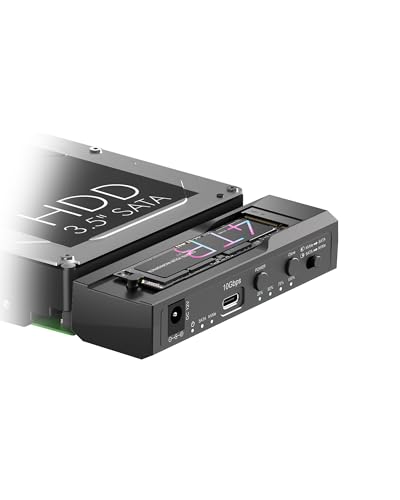
This ICY BOX docking station gives you a tool-free solution to connect an M.2 NVMe SSD and a 2.5-inch or 3.5-inch SATA drive simultaneously. Operating over a 10Gbps USB 3.2 Gen 2 Type-C interface, it enables fast data transfers between modern flash and legacy storage. You can run one-key offline cloning with percentage LED indicators powered by an included 12V/3A adapter, making it ideal if you frequently migrate mixed drive formats.
Pros
- Supports simultaneous read and write access to an M.2 NVMe drive and a SATA drive
- Standalone one-key offline cloning with 25% to 100% LED progress tracking
- USB 3.2 Gen 2 Type-C interface delivers transfer rates up to 10Gbps
- Includes a 12V/3A power adapter supporting high-capacity 18TB+ mechanical drives
Cons
- Supports only one M.2 drive and one SATA drive at a time
- Does not support M.2 drives longer than the 2280 form factor
Good fit if
- You need to clone or transfer files between an M.2 NVMe SSD and a 2.5-inch or 3.5-inch SATA drive.
- You want standalone offline drive cloning without connecting to a computer host.
Skip if
- You need to dock or duplicate two M.2 NVMe SSDs together at the same time.
- You use extra-long 22110 M.2 solid-state drives.
Verdict: ICY BOX M.2 NVMe and SATA Cloner Dock delivers 10Gbps transfers and standalone offline cloning between M.2 NVMe and standard SATA drives. Its dual simultaneous access and dedicated 12V/3A power adapter make it a versatile tool for cross-interface storage workflows.
Specifications side by side
| Spec | SABRENT 4-Bay 10Gbps USB-C Dock | SABRENT Dual-Bay NVMe Cloner Dock | SABRENT Lay-Flat NVMe and SATA Dock | MAIWO Dual-Bay 10Gbps NVMe Cloner Dock | SABRENT Single-Bay SATA SSD & HDD Dock | StarTech.com M.2 NVMe to SATA Duplicator Dock | ORICO NVMe and SATA Dual-Bay Dock | ICY BOX Triple-Bay NVMe & SATA Cloner Dock | ICY BOX M.2 NVMe & SATA SSD/HDD Dock | ICY BOX M.2 NVMe & SATA Cloner Dock |
|---|---|---|---|---|---|---|---|---|---|---|
| Transfer Speed | 10Gbps | Up to 10Gbps | 10Gbps | 10Gbps | 10Gbps | 10Gbps | 10Gbps | 10Gbps | 10Gbps | 10Gbps |
| Supported Drive Types | 3.5-inch SATA HDD/SSD | PCIe NVMe M.2 SSD | M.2 PCIe NVMe, 2.5/3.5-inch SATA | M.2 NVMe SSD | 2.5-inch and 3.5-inch SATA SSD/HDD | M.2 NVMe, 2.5/3.5-inch SATA | M.2 NVMe, 2.5"/3.5" SATA | M.2 NVMe, 2.5"/3.5" SATA | M.2 NVMe, M.2 SATA, 2.5"/3.5" SATA | M.2 NVMe, 2.5"/3.5" SATA |
| Bay Count | 4 | 2 | not specified | 2 | 1 | not specified | not specified | 3 | not specified | 2 |
| Offline Cloning | not specified | One-button clone | Direction switch, clone button | One-key clone | not specified | Bidirectional | Bidirectional | One-touch offline cloning | One-touch offline cloning | One-Key Offline Cloning |
| Supported M.2 Sizes | not specified | 2230, 2242, 2260, 2280 | 2242, 2260, 2280 | 2230, 2242, 2260, 2280, 22110 | not specified | 2242, 2260, 2280 | 2230, 2242, 2260, 2280 | not specified | not specified | 2230–2280 |
| Maximum Capacity | Up to 80TB (4 x 20TB) | not specified | not specified | 16TB | 20TB and larger | not specified | 8TB (NVMe), 22TB (SATA) | not specified | not specified | not specified |
| Cooling Type | 92mm fan | Aluminum body, built-in fan | not specified | not specified | not specified | Passive cooling | Independent aluminum heat sink | not specified | Open-frame cooling design | not specified |
| Interface | not specified | NVMe | SATA III | NVMe | SATA III | SATA III | SATA III | SATA III | SATA III | SATA III |
| Form Factor | not specified | M.2 | M.2 | not specified | not specified | M.2 | not specified | 2.5 Inch | M.2 | 2.5 Inch |
| Features | not specified | Offline Clone | not specified | Offline Clone | not specified | Offline Clone | not specified | Tool-Free, Offline Clone | Tool-Free, Offline Clone | Tool-Free, Offline Clone |
| Material | not specified | not specified | not specified | not specified | not specified | not specified | Aluminum | not specified | not specified | not specified |
| Host Interface | USB-C | USB-C | USB-C | not specified | USB-C | not specified | not specified | USB-C | USB-C | not specified |
| Dimensions | 9.1 × 5.8 × 5.9 inches | 4.3 × 2.5 × 1.25 inches | 7.17 × 4.83 × 1.77 inches | 6.42 × 4.92 × 1.61 inches | 6.2 × 2.5 × 2.7 inches | 5.5 × 3.9 × 2.2 inches | not specified | 5.47 × 3.03 × 2.32 inches | 6.45 × 1.57 × 0.71 inches | 4.27 × 1.74 × 0.55 inches |
| Weight | 9 pounds | 4 ounces | 10.8 ounces | 1.46 pounds | 1.14 pounds | 10.9 ounces | not specified | 10.3 ounces | 5.47 ounces | not specified |
| Size | 4 Bay | USB-C DUAL DOCK | M.2/2.5/3.5 inch Docking Station | not specified | Single-Bay SATA Dock – USB-C 10Gbps | not specified | IT28E | not specified | NVMe/SATA to NVMe | not specified |
| Color | Black | SILVER | Multicolor | Black | Black | Black | Silver | Black | not specified | Black |
| Model | DS-SC4B | EC-SSD2 | DS-UFNC | Dual M.2 NVME Cloner Dock with Switch | DS-UC1B | N2-M2-SSD-DUPLICATOR | IT28E | 3 Bay Cloner | not specified | not specified |
If you need video output alongside fast storage, compare the best 60Hz docking stations for monitor bandwidth requirements.
How to Choose the Right SSD Docking Station
-
Check Supported M.2 Card Lengths
Examine physical drive length specifications before you pair an M.2 dock with your SSDs. Most consumer solid-state drives utilize the common 2280 format, but longer cards require extended bay clearance. If your workflow involves longer enterprise or workstation cards, verify maximum length compatibility. The MAIWO Dual-Bay 10Gbps NVMe Cloner Dock accommodates M.2 cards up to 22110 in length. Choosing a dock with insufficient clearance leaves longer cards unsupported, so inspect your drive dimensions prior to purchase.
-
Evaluate Active Fan Cooling Needs
Assess the thermal design if you plan continuous, heavy data transfers. High-speed NVMe transfers generate concentrated heat during long file operations. Passive metal enclosures help dissipate thermal energy, but active fan cooling actively circulates airflow over sustained workloads. For heavy read and write routines, an integrated fan helps prevent thermal slowdowns. The SABRENT Dual-Bay NVMe Cloner Dock features an all-aluminum body combined with an active cooling fan. Select an actively cooled unit if your routine tasks involve moving large data archives across multiple drives.
-
Select Bay Count and Management
Determine how many simultaneous drives you need connected to your system. Single-bay models work well for basic drive diagnostics and occasional file copies. When you manage multi-disk storage pools or several drives simultaneously, look for multi-bay docks that offer dedicated controllers per slot. The SABRENT 4-Bay 10Gbps USB-C Dock provides four SATA slots alongside individual drive controllers to support desktop storage arrays. Matching the bay count to your typical drive inventory prevents constant drive swapping and keeps your primary storage organized on a single connection.
-
Verify Standalone Cloning Capability
Decide whether you need drive duplication without tethering the docking station to an operating system. Models equipped with offline clone functionality execute sector-by-sector disk copies via hardware buttons. This allows direct operating system migrations and drive backups without consuming host computer processing resources. The StarTech.com M.2 NVMe to SATA Duplicator Dock offers standalone offline cloning across M.2 NVMe and SATA formats. If your daily work includes regular system drive deployment or hardware duplication, ensure the dock features dedicated offline cloning buttons and progress indicators.
-
Consider Physical Dock Orientation
Choose between vertical insertion and horizontal lay-flat designs based on your desk setup and handling habits. Vertical docks minimize desk footprint, making them suitable for crowded workspaces. However, horizontal lay-flat configurations provide stable resting surfaces for bare circuit boards and heavier drives, reducing mechanical stress on drive connectors during insertion. The SABRENT Lay-Flat NVMe and SATA Dock uses a tool-free horizontal bay for secure drive positioning. If you swap bare drives frequently on an active workbench, lay-flat designs minimize accidental tipping and protect drive connectors.
-
Inspect Dedicated Power Specifications
Check the power delivery specifications to confirm whether the dock supplies adequate current for your drive collection. Compact single M.2 enclosures can operate on host bus power, but docks supporting 3.5-inch hard drives or dual bays require external wall power to spin disks reliably. The ICY BOX M.2 NVMe & SATA Cloner Dock includes a dedicated 12V/3A power adapter to maintain consistent operation across multiple bays. If you regularly mount mechanical drives or operate dual bays simultaneously, verify that the dock includes a dedicated external power supply.
Frequently asked questions
Do you need a computer connected to clone drives on an SSD dock?
Many 10Gbps docking stations perform offline cloning without a host computer. Models such as the SABRENT Dual-Bay NVMe Cloner Dock, MAIWO Dual-Bay 10Gbps NVMe Cloner Dock, and StarTech.com M.2 NVMe to SATA Duplicator Dock feature standalone duplication hardware. You insert the source and target drives directly into the bays and trigger the clone function via onboard controls, leaving your host system free during the operation.
Can you use both NVMe and SATA drives in the same docking station?
Yes, several multi-format docking stations support both drive types. Units like the SABRENT Lay-Flat NVMe and SATA Dock, ORICO NVMe and SATA Dual-Bay Dock, and ICY BOX Triple-Bay Cloner Dock provide dedicated slots for both M.2 and SATA media. This hardware layout allows you to dock different storage formats simultaneously or duplicate data across mixed drive interfaces over a single 10Gbps connection.
Do 10Gbps SSD docking stations require external power adapters?
Yes, multi-bay docks and stations accepting larger drives require dedicated external power. For example, the ICY BOX M.2 NVMe & SATA Cloner Dock includes a dedicated 12V/3A power adapter to supply sufficient electricity. Standard USB bus power cannot deliver enough continuous wattage to spin mechanical hard drives or maintain stable voltage across multiple high-speed drives operating simultaneously.
How do 10Gbps SSD docking stations manage heat during heavy transfers?
Docks manage thermal load using active fans, metal enclosures, or open-air bay designs. The SABRENT Dual-Bay NVMe Cloner Dock uses an all-aluminum body paired with an active fan to cool drives under load. The SABRENT 4-Bay 10Gbps USB-C Dock also incorporates active fan cooling, while the ORICO NVMe and SATA Dual-Bay Dock provides an aluminum chassis and dedicated M.2 heat enclosure.
How do multi-bay SATA docks present drives to your operating system?
Multi-bay docks present drives as separate individual volumes when equipped with dedicated drive controllers. The SABRENT 4-Bay 10Gbps USB-C Dock uses individual controllers to deliver dedicated JBOD access for each inserted drive over one USB-C cable. Your operating system mounts each drive as an independent storage disk, allowing you to read from and write to separate disks without combining them into a single volume.
Are tools required to insert or swap drives in an SSD docking station?
Most SSD docking stations feature tool-free bays designed for fast drive swaps. Models such as the ICY BOX Triple-Bay NVMe & SATA Cloner Dock and the SABRENT Lay-Flat NVMe and SATA Dock provide open slots that accept bare drives directly. You can slide M.2 SSDs or SATA drives into place without screws, drive caddies, or specialized installation tools, simplifying routine drive maintenance.
What host cables are used to connect a 10Gbps SSD dock to a computer?
Docks connect to your computer using USB cables, with many models featuring native USB-C ports. For instance, the SABRENT Single-Bay SATA SSD & HDD Dock and SABRENT 4-Bay 10Gbps USB-C Dock use USB-C host interfaces to deliver full 10Gbps bandwidth. Some options, such as the SABRENT Lay-Flat NVMe and SATA Dock, include dual USB cables in the box to help you connect to either USB-A or USB-C host ports.