SABRENT 4-Bay 10Gbps USB-C Dock Review: Specs, Pros and Cons
As an Amazon Associate we earn from qualifying purchases. Links on this page are affiliate links.
This sabrent 4 bay USB c 10gbps hard review covers the DS-SC4B dock. It holds four 3.5-inch SATA drives and offers 10Gbps transfer speeds. The unit uses a dedicated ASMedia controller for each bay, ensuring stable connections. It is not a RAID device, so each drive operates independently. The aluminum housing includes a 92mm fan for cooling. You get tool-free insertion and physical switches per bay. This setup supports up to 80TB of total storage. It connects via USB-C and works with Windows, macOS, and Linux systems.
What stands out
- Dedicated ASMedia ASM1351 controller per bay for independent drive access
- 10Gbps transfer speed over a single USB-C host interface
- Supports up to four 3.5-inch SATA HDDs or SSDs
- Tool-free hot-swappable bays with individual on/off switches and LEDs
- Active cooling via a 92mm fan in an aluminum housing
Who it fits
Good fit for
You should consider this dock if you need to manage multiple large 3.5-inch drives without RAID complexity. It suits users who require JBOD-style direct-attached storage for backup or archival purposes. The independent controllers and hot-swap bays make it practical for frequent drive changes. It is also a solid choice for macOS and Linux users who want a hardware-agnostic solution. The sturdy metal build and active cooling support 24/7 operation in a home or office environment.
Who should skip it
Skip this model if you need hardware RAID capabilities, as each drive mounts individually. It is not suitable for 2.5-inch drives only, since it supports 3.5-inch SATA units exclusively. You should look elsewhere if you prefer a silent operation, given the 92mm fan. Users needing more than four bays should check the five or ten-bay variations. Additionally, if you require a compact, fanless design for quiet spaces, this heavy, actively cooled unit may not fit your needs.
Verdict: This dock provides reliable, independent access to four large SATA drives with fast 10Gbps connectivity. It is a practical choice for users who need JBOD storage without RAID complexity.
SABRENT 4-Bay Dock Key Specs
Transfer Speed: 10Gbps
This limit defines the maximum data rate between the dock and your host computer. You benefit from faster file transfers compared to older USB 3.0 docks. This speed suits users moving large video libraries or database backups. It does not exceed the native speed of most 3.5-inch SATA drives. Check your computer's USB-C port to ensure it supports USB 3.1 Gen 2.
Bay Count: 4
The enclosure holds four separate 3.5-inch drives. This count allows you to expand storage significantly without using multiple cables. It is ideal for media servers or archival systems where you need many distinct volumes. Compare this to single-bay docks if you only need one extra drive. Each bay operates independently, giving you flexible storage management options.
Supported Drive Types: 3.5-inch SATA HDD/SSD
This specification confirms compatibility with standard desktop drives. You can use traditional spinning hard disks or desktop-sized SATA solid-state drives. This is distinct from 2.5-inch laptop drives or NVMe modules. Ensure you buy 3.5-inch models that fit the tray-less slots. This flexibility lets you mix storage speeds based on your specific data needs.
Cooling Type: 92mm fan
An active cooling system helps manage heat during long write operations. This is crucial for 3.5-inch drives that generate significant thermal output. The fan supports 24/7 operation in demanding environments. Compare this to passive aluminum-only enclosures which may throttle speeds under load. Adequate cooling maintains consistent performance and extends drive lifespan.
Design and build quality
The listing describes a sturdy aluminum and metal housing in black. This durable finish supports 24/7 operation by housing a 92mm fan for active cooling. You benefit from reliable heat dissipation during long transfers. The unit measures 9.1 inches in length, 5.8 inches in width, and 5.9 inches in height. It weighs 9 pounds, indicating a solid, heavy base that resists tipping on your desk.
Layout features tray-less hot-swap bays for tool-free drive insertion. Each of the four slots includes its own on/off switch and activity LED. You can lock the unit with a key or secure it to a desk using the Kensington slot. The listing notes a dedicated ASMedia controller for each bay, which ensures independent connections rather than a shared bottleneck.
Power comes from an auto-switching 100-240V external adapter, allowing worldwide use. You connect to your computer via a single USB-C port. The listing states this supports 10Gbps speeds and remains backward compatible with older USB 3.0 and 2.0 standards. This design suits users who need direct-attached storage for up to four 3.5-inch SATA drives. It is not a RAID device, so each drive mounts individually. The build prioritizes stability and security for professional or heavy home use.
Setup and everyday use guide
Setting up this dock requires minimal effort because it uses a tool-free, tray-less design. You simply slide your 3.5-inch SATA drives into the bays. Each bay has its own power switch and activity LED, allowing you to monitor status instantly. The unit ships empty, so you must provide your own storage. For the most stable connection, link the dock to your computer using a USB-C to USB-C cable. This setup supports direct-attached storage for up to four drives, totaling 80TB. The dock works with Windows, macOS, and Linux systems. It is not a RAID device, meaning each drive mounts individually. This JBOD-style operation lets you manage each disk separately. Daily use involves hot-swapping drives without powering down the unit. The 92mm fan provides active cooling for safe 24/7 operation. The aluminum housing helps dissipate heat during long transfers. You can secure the dock with a locking key or Kensington slot. The external adapter supports 100-240V input for worldwide use. Backward compatibility with USB 3.0 and 2.0 ensures it works with older ports, though 10Gbps speeds require USB 3.1 Gen 2. The dedicated ASMedia controller in each bay ensures independent connections. This reliability suits users who need stable access to multiple large files. You benefit from consistent performance without the complexity of hardware RAID configurations.
Before You Buy This Dock
You need four 3.5-inch SATA drives to use this dock. It ships empty. You must buy them separately. This is direct-attached storage, not RAID. Each drive connects independently. You benefit from simple JBOD management. Check your computer’s USB-C port supports 10Gbps. Older ports may limit speed. The dock works with Windows, macOS, and Linux. You should verify OS compatibility before purchasing. Active cooling requires a 92mm fan. This needs space around the vents. You must keep airflow clear for 24/7 operation. The external adapter supports 100-240V worldwide. You can use it globally. This dock suits users needing bulk SATA storage. It differs from NVMe docks which are smaller and faster for single drives. You choose this for capacity, not speed. The ASMedia controllers ensure stable links. You get four independent connections. This fits alongside other SATA options if you need volume. You prioritize reliability and individual drive access over compact design.
Check before you buy
- Buy four 3.5-inch SATA drives separately.
- Verify your host supports 10Gbps USB-C.
- Ensure space for 92mm fan airflow.
- Confirm OS compatibility with Windows or Mac.
The product at a glance
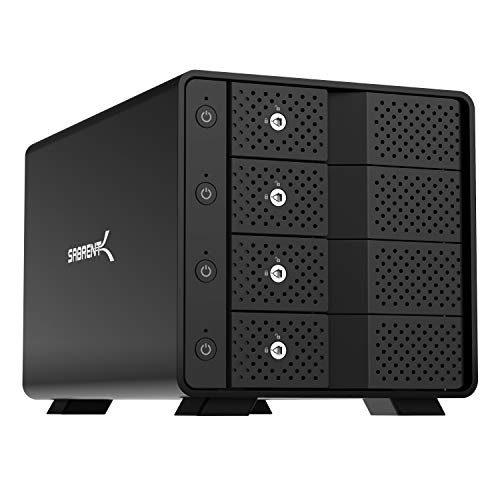
SABRENT 4-Bay 10Gbps USB-C Dock
Best for: independent multi-disk desktop storage setups
- Transfer Speed
- 10Gbps
- Supported Drive Types
- 3.5in SATA HDD/SSD
- Bay Count
- 4
- Maximum Capacity
- 80TB
- Cooling Type
- 92mm fan
- Interface
- SATA III
View on Amazon: SABRENT 4-Bay 10Gbps USB-C Dock Affiliate link
This four-bay storage enclosure connects up to four 3.5-inch SATA hard drives or solid-state drives over a 10Gbps USB-C connection. It gives you up to 80TB of total direct-attached storage without built-in hardware RAID, mounting each drive independently. With active cooling from a 92mm fan and tool-free bays, it suits anyone managing multi-drive backups across separate disks.
Pros
- Dedicated ASMedia ASM1351 controller for each drive bay
- 10Gbps USB 3.1 Gen 2 Type-C connection supporting up to 80TB total capacity
- Tray-less, tool-free design with independent power switches and key locks
- Active cooling via an integrated 92mm fan in a metal housing
Cons
- Mounts drives individually with no integrated hardware RAID support
- Accepts 3.5-inch drives only
- Heavy nine-pound build limits portability
Good fit if
- You want to mount up to four separate 3.5-inch SATA drives using a single USB-C cable.
- You prefer dedicated power controls and physical key locks for each bay.
- You use software management on Windows, macOS, or Linux instead of hardware RAID.
Skip if
- You require built-in hardware RAID configurations.
- You need a lightweight drive dock that travels easily.
Verdict: SABRENT 4-Bay USB-C 10Gbps Enclosure provides reliable, tool-free access to high-capacity 3.5-inch SATA drives over a fast connection. It fits users needing independent disk management across multiple drives without hardware RAID setup.
Specifications side by side
| Spec | SABRENT 4-Bay 10Gbps USB-C Dock |
|---|---|
| Transfer Speed | 10Gbps |
| Supported Drive Types | 3.5in SATA HDD/SSD |
| Bay Count | 4 |
| Maximum Capacity | 80TB |
| Cooling Type | 92mm fan |
| Interface | SATA III |
| Material | Aluminum |
| Host Interface | USB-C |
| Dimensions | 9.1 × 5.8 × 5.9 inches |
| Weight | 9 pounds |
| Size | 4 Bay |
| Color | Black |
| Model | DS-SC4B |
Frequently asked questions
Does the Sabrent 4-Bay dock support RAID configurations?
No, this unit does not support RAID. It operates as a direct-attached storage device with independent drive access. Each of the four bays connects separately to your computer via the ASMedia controller. This setup allows you to manage each drive individually without complex array configurations. You benefit from simple JBOD management rather than redundant storage structures.
What is the maximum transfer speed of this dock?
The maximum transfer speed is 10Gbps. This limit defines the highest data rate between the dock and your host computer. You benefit from faster file transfers compared to older USB 3.0 docks. This speed suits users moving large video libraries or database backups. The USB-C host interface ensures you can utilize this bandwidth effectively.
How do I install drives in the Sabrent dock?
You install drives using a tool-free, tray-less design. Simply slide your 3.5-inch SATA drives directly into the bays. Each bay includes its own power switch and activity LED. This allows you to monitor the status of each drive instantly. The process requires minimal effort and does not need any additional tools or trays.
Is the Sabrent DS-SC4B suitable for 24/7 operation?
Yes, the dock is built for reliable 24/7 operation. It features a sturdy aluminum and metal housing in black. A 92mm fan provides active cooling to ensure proper heat dissipation during long transfers. This durable finish supports continuous use, making it a stable choice for users who need direct-attached storage without complexity.
What type of drives does this dock accept?
This dock accepts four 3.5-inch SATA drives. It ships empty, so you must buy the drives separately. You need to purchase the drives to use this dock. It is designed specifically for these larger desktop drives rather than smaller 2.5-inch units. Check your computer’s USB-C port supports the required speed before buying.
What are the physical dimensions of the Sabrent dock?
The dock measures 9.1 inches in length, 5.8 inches in width, and 5.9 inches in height. It weighs 9 pounds. The model number is DS-SC4B. These dimensions accommodate four drive bays within a compact footprint. The weight suggests a substantial build quality that remains stable on your desk during heavy data transfers.