Best SSD Enclosures for Gaming: 3 Spec-Based Picks
As an Amazon Associate we earn from qualifying purchases. Links on this page are affiliate links.
Finding the best SSD enclosures for gaming requires looking at specific hardware details rather than marketing claims. We compared 3 options ranked by their published specifications. The ASUS TUF Gaming A1 Rugged M.2 SSD Enclosure leads because it supports both NVMe and SATA drives with a 10Gbps transfer speed. This versatility makes it ideal for rugged gaming setups. Our picks rely strictly on these data points to ensure compatibility and performance. You can use this guide to decide which enclosure fits your console or PC needs.
Quick picks
| # | Product | Best for | Price |
|---|---|---|---|
| 1 | ASUS TUF Gaming A1 Rugged M.2 SSD Enclosure Best overall | Rugged gaming setups with NVMe or SATA drives | Check price of ASUS TUF Gaming A1 Rugged M.2 SSD Enclosure on Amazon |
| 2 | VCOM 80Gbps M.2 NVMe Enclosure with Fan Best budget | Active cooling for Thunderbolt gaming setups | Check price of VCOM 80Gbps M.2 NVMe Enclosure with Fan on Amazon |
| 3 | ASUS ROG Strix Arion Miku Edition Best aluminum | Gamers seeking durable aluminum NVMe enclosures | Check price of ASUS ROG Strix Arion Miku Edition on Amazon |
The best fit for you
- You need rugged protection for gaming drives ASUS TUF Gaming A1 Rugged M.2 SSD Enclosure It offers IP68 protection for NVMe and SATA drives.
- You want active cooling for high speeds VCOM 80Gbps M.2 NVMe Enclosure with Fan It includes a cooling fan for Thunderbolt gaming setups.
- You prefer durable aluminum construction for gaming ASUS ROG Strix Arion Miku Edition It provides robust aluminum cooling for NVMe drives.
Our 3 picks
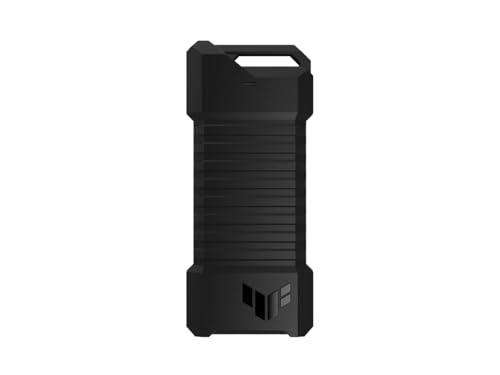
ASUS TUF Gaming A1 Rugged M.2 SSD Enclosure
Best for: Rugged gaming setups with NVMe or SATA drives
- Compatibility
- PS5, Gaming (what this guide is about)
- Max Transfer Speed
- Up to 10 Gbps
- Host Interface
- USB-C 3.2 Gen 2x1
- Drive Interface
- M.2 NVMe PCIe, SATA
- Supported Form Factors
- 2242, 2260, 2280
- Installation Style
- M.2 Q-Latch
View on Amazon: ASUS TUF Gaming A1 Rugged M.2 SSD Enclosure Affiliate link
This enclosure supports both M.2 NVMe PCIe and SATA SSDs in 2242, 2260, and 2280 sizes. It uses a USB-C 3.2 Gen 2x1 interface for up to 10 Gbps transfer speeds. The Q-latch design simplifies installation. It meets MIL-STD-810H drop resistance and IP68 water and dust standards. It works with gaming consoles and PCs.
Pros
- Supports M.2 NVMe PCIe and SATA drives
- USB-C 3.2 Gen 2x1 interface for 10 Gbps speeds
- Q-latch mechanism for easy SSD mounting
- IP68 water and dust resistance rating
- Compatible with PS5 and gaming consoles
Cons
- Max transfer speed of 10 Gbps is lower than 20 Gbps or 40 Gbps alternatives
- Weight of 8.78 ounces is heavier than typical aluminum enclosures
- Does not include a built-in cooling fan
Good fit if
- You need a rugged enclosure with IP68 dust and water resistance
- You want to use either NVMe or SATA M.2 drives
- You prefer a tool-free Q-latch installation method
Skip if
- You require transfer speeds faster than 10 Gbps
- You want a lighter enclosure for portable carry
- You need active cooling for sustained heavy loads
Verdict: ASUS TUF Gaming A1 NVMe Enclosure is a durable option for gamers who need IP68 protection and support for both NVMe and SATA drives. It fits users who prioritize ruggedness and easy installation over maximum transfer speeds.

VCOM 80Gbps M.2 NVMe Enclosure with Fan
Best for: Active cooling for Thunderbolt gaming setups
- Compatibility
- Gaming, Mac (what this guide is about)
- Max Transfer Speed
- 80Gbps
- Host Interface
- Thunderbolt 5/4/3, USB4
- Drive Interface
- NVMe M-Key, B+M Key
- Supported Form Factors
- 2280
- Cooling System
- Turbo cooling fan, aluminum chassis
View on Amazon: VCOM 80Gbps M.2 NVMe Enclosure with Fan Affiliate link
This VCOM enclosure supports Thunderbolt 5, 4, and 3 interfaces with a maximum transfer speed of 80Gbps. It includes a built-in turbo cooling fan and an aluminum alloy chassis to manage heat during sustained high-speed operations. The device secures the drive with screw-tightened installation, ensuring stability against vibrations. It is compatible with NVMe M-Key and B+M Key drives in the 2280 form factor.
Pros
- Supports Thunderbolt 5, 4, and 3 hosts
- Built-in turbo cooling fan for active heat dissipation
- Aluminum alloy chassis with metal heat sink
- Screw-tightened installation for secure drive retention
- Max transfer speed of 80Gbps
Cons
- Not compatible with mobile phones
- May have limited compatibility with certain Thunderbolt 3 devices
- Requires direct Thunderbolt cable connection for tablets
Good fit if
- You need active cooling for sustained high-speed transfers
- You use Thunderbolt 4 or 5 capable devices
- You want a secure screw-tightened mounting system
Skip if
- You plan to connect the enclosure to a mobile phone
- You require a passive cooling solution without fans
- You are using a device that does not support Thunderbolt or USB4
Verdict: VCOM 80Gbps NVMe Enclosure with Fan is a robust option for users who prioritize thermal management and high-speed connectivity on Thunderbolt-enabled systems. It suits those who need reliable, vibration-resistant mounting for heavy workloads.

ASUS ROG Strix Arion Miku Edition
Best for: Gamers seeking durable aluminum NVMe enclosures
- Compatibility
- Gaming (what this guide is about)
- Max Transfer Speed
- 10Gbps
- Host Interface
- USB-C 3.2 Gen 2
- Drive Interface
- PCIe NVMe M-Key
- Supported Form Factors
- 2230, 2242, 2260, 2280
- Drive Bay Count
- 1 bay
View on Amazon: ASUS ROG Strix Arion Miku Edition Affiliate link
This aluminum NVMe enclosure uses a USB-C 3.2 Gen 2 interface to deliver transfer speeds up to 10 Gbps. It supports M.2 PCIe SSDs in 2230, 2242, 2260, and 2280 form factors. The design includes screwdriver-free installation and thermal pads for heat dissipation. It suits gamers who want a durable, aesthetically distinct drive solution with included dual cables.
Pros
- USB-C 3.2 Gen 2 interface supports up to 10 Gbps transfer speeds
- Aluminum alloy case with thermal pads for aggressive heat dissipation
- Screwdriver-free installation mechanism for easy SSD mounting
- Supports 2230, 2242, 2260, and 2280 M.2 NVMe form factors
- Includes dual USB-C to C and USB-C to A cables
Cons
- 10 Gbps speed limit is lower than 20 Gbps options available in this category
- Limited to M.2 NVMe drives and does not support SATA M.2 SSDs
- ARGB lighting effects require compatible motherboard headers for synchronization
Good fit if
- You need a durable aluminum enclosure for gaming setups
- You prefer screwdriver-free installation for quick drive swaps
- You want included USB-C to A and C to C cables
Skip if
- You require transfer speeds exceeding 10 Gbps
- You need support for SATA M.2 NVMe SSDs
- You want a minimalist design without RGB lighting
Verdict: ASUS ROG Strix Arion Miku Edition offers solid 10 Gbps performance and robust aluminum cooling for gamers. It is an ideal fit for users who value easy installation and distinctive aesthetics over maximum raw throughput.
Specifications side by side
| Spec | ASUS TUF Gaming A1 Rugged M.2 SSD Enclosure | VCOM 80Gbps M.2 NVMe Enclosure with Fan | ASUS ROG Strix Arion Miku Edition |
|---|---|---|---|
| Max Transfer Speed | Up to 10 Gbps | 80Gbps | 10Gbps |
| Host Interface | USB-C 3.2 Gen 2x1 | Thunderbolt 5/4/3, USB4 | USB-C 3.2 Gen 2 |
| Drive Interface | M.2 NVMe PCIe, SATA | NVMe M-Key, B+M Key | PCIe NVMe M-Key |
| Supported Form Factors | 2242, 2260, 2280 | 2280 | 2230, 2242, 2260, 2280 |
| Drive Bay Count | not stated | not stated | 1 bay |
| Cooling System | not stated | Turbo cooling fan, aluminum chassis | Passive aluminum casing |
| Installation Style | M.2 Q-Latch | Screw-tightened | Screwdriver-free |
| Interface | SATA III | NVMe | NVMe |
| Form Factor | M.2 | M.2 | M.2 |
| Cooling | not stated | Cooling Fan | not stated |
| Compatibility | PS5, Gaming | Gaming, Mac | Gaming |
| Transfer Speed | 10Gbps | not stated | 10Gbps |
| Material | not stated | not stated | Aluminum |
| Dimensions | 4.93 × 2.14 × 0.52 inches | not stated | 4.9 × 1.9 × 0.4 inches |
| Weight | 8.78 ounces | 5.28 ounces | 3.2 ounces |
| Size | TUF A1|up to 10Gbps | not stated | White|Gaming ARGB|Miku Edition |
| Color | A1|up to 10Gbps | Gray | Moonlight White |
| Model | ESD-T1A/BLK/G/AS// | 80 M.2 NVMe | ESD-S1C/WHT/G/AS//MIKU |
How to Choose the Right SSD Enclosure
-
Check Host Interface Speed
Match the enclosure speed to your computer ports. The ASUS TUF Gaming A1 offers 10Gbps via USB-C, which is standard for most modern gaming PCs and consoles. If you have a Thunderbolt 3 or 4 port, you can access higher speeds. The VCOM 80Gbps model targets these high-bandwidth connections. Always verify your system’s port capabilities before buying to ensure you get the transfer rates you need for large game files.
-
Verify Drive Compatibility
Ensure the enclosure supports your specific SSD type. The ASUS TUF Gaming A1 is versatile, supporting both NVMe and SATA M.2 drives. This makes it a safe choice if you plan to reuse older SATA SSDs. In contrast, the VCOM 80Gbps and ASUS ROG Strix Arion are designed specifically for NVMe drives. Check the product specifications to confirm your drive type matches the enclosure interface to avoid compatibility issues during installation.
-
Assess Thermal Management
High-speed NVMe drives generate significant heat. The VCOM 80Gbps enclosure includes an active cooling fan to maintain performance during heavy gaming workloads. This is crucial for sustained transfer speeds. The ASUS ROG Strix Arion uses a robust aluminum body for passive cooling, which helps dissipate heat without moving parts. Choose active cooling if you run intensive tasks, or passive aluminum construction for quieter operation in a gaming setup.
-
Consider Physical Durability
Gaming setups can be rough on hardware. The ASUS TUF Gaming A1 features IP68 protection, making it resistant to dust and water immersion. This rugged design is ideal for portable gaming rigs or outdoor setups. The ASUS ROG Strix Arion offers a durable aluminum build that protects against physical impacts. If you travel with your gaming drive or have a messy desk, prioritize enclosures with explicit ruggedness ratings or solid metal casings.
-
Match Form Factor
All listed options use the M.2 form factor, which is standard for modern SSDs. Ensure your SSD fits the M.2 slot size, typically 2280. The dimensions vary slightly by enclosure. The ASUS TUF Gaming A1 is slightly wider at 2.14 inches, while the ROG Strix Arion is narrower at 1.9 inches. Check your case or console space to ensure the enclosure fits comfortably without obstructing other components or ports in your gaming station.
Frequently asked questions
Can I use an SSD enclosure for my PS5?
Yes, several options support PS5 compatibility. The ASUS TUF Gaming A1 explicitly lists PS5 support alongside its rugged IP68 design. This makes it a viable choice for expanding storage on your console while maintaining durability against physical impacts and environmental factors.
Do gaming SSD enclosures need active cooling?
Active cooling helps manage heat during sustained high-speed transfers. The VCOM 80Gbps model includes a built-in cooling fan to handle thermal loads. This is particularly useful for Thunderbolt setups where high throughput can generate significant heat in a compact form factor.
Which enclosure supports both NVMe and SATA drives?
The ASUS TUF Gaming A1 supports both NVMe and SATA interfaces. This versatility allows you to use older SATA SSDs or newer NVMe drives in the same rugged, IP68-rated casing. It is ideal if you want a single durable solution for different drive types.
Is aluminum construction better for gaming enclosures?
Aluminum provides robust passive cooling and durability. The ASUS ROG Strix Arion Miku Edition features a solid aluminum body that aids in heat dissipation. This design suits gamers who prioritize sturdy construction and effective thermal management without relying on moving parts like fans.
What is the maximum transfer speed for these enclosures?
Most listed models offer up to 10Gbps transfer speeds. The ASUS TUF Gaming A1 and the ASUS ROG Strix Arion both support this standard USB-C speed. The VCOM model is rated for 80Gbps, catering to users with Thunderbolt-enabled systems requiring higher bandwidth.
Are these enclosures compatible with Mac systems?
Yes, some models support Mac compatibility. The VCOM 80Gbps enclosure is explicitly listed as compatible with Mac systems. This makes it a suitable choice for users running gaming or creative workflows on macOS who need high-speed external storage with active thermal management.