The Best UGREEN SSD Docking Stations in 2026: 2 Picks
As an Amazon Associate we earn from qualifying purchases. Links on this page are affiliate links.
Finding the best UGREEN SSD docking stations requires looking at the specific capabilities each model offers. We compared 2 options based strictly on the specifications published on their listings. UGREEN currently offers dual-bay NVMe cloners designed for offline drive duplication. These devices feature sturdy aluminum enclosures and support high-speed interfaces up to 40Gbps. The UGREEN Dual-Bay 20Gbps NVMe Cloner Dock leads this list because it excels at offline NVMe drive duplication. It provides a reliable solution for users who need to copy two large drives quickly without connecting to a computer.
Quick picks
| # | Product | Best for | Price |
|---|---|---|---|
| 1 | UGREEN Dual-Bay 20Gbps NVMe Cloner Dock Best overall | offline NVMe drive duplication | Check price of UGREEN Dual-Bay 20Gbps NVMe Cloner Dock on Amazon |
| 2 | UGREEN 40Gbps Dual-Bay NVMe Cloner Best budget | Fast offline cloning and software RAID setups | Check price of UGREEN 40Gbps Dual-Bay NVMe Cloner on Amazon |
Our 2 picks

UGREEN Dual-Bay 20Gbps NVMe Cloner Dock
Best for: offline NVMe drive duplication
- Transfer Speed
- 20Gbps
- Supported Drive Types
- M.2 NVMe
- Bay Count
- 2
- Offline Cloning
- One-click offline cloning
- Maximum Capacity
- 16TB
- Features
- Tool-Free, Offline Clone
View on Amazon: UGREEN Dual-Bay 20Gbps NVMe Cloner Dock Affiliate link
This UGREEN dual-bay enclosure supports one-click offline cloning of NVMe SSDs without a computer. It uses the JMS586U chip for 20Gbps transfer speeds and includes TRIM support. The aluminum body and open design provide 360-degree heat dissipation. It accommodates two 8TB drives and accepts M-Key and B+M-Key NVMe SSDs. You get LED status indicators and anti-slip pads for stability.
Pros
- 20Gbps transfer speed with JMS586U chip
- One-click offline cloning without a PC
- Dual-bay design holds two 8TB NVMe drives
- Aluminum construction with open heat dissipation
Cons
- SATA interfaces are not supported for cloning
- Cloning requires the target drive to be equal or larger than the source
- No software RAID features included
Good fit if
- You need to clone NVMe drives without a computer
- You want fast 20Gbps transfer speeds
- You need to manage two NVMe SSDs simultaneously
Skip if
- You require SATA drive support
- You need software RAID capabilities
- You want to clone drives of unequal sizes
Verdict: UGREEN 20Gbps Dual-Bay NVMe Cloner delivers fast, offline duplication for NVMe drives in a sturdy aluminum enclosure. It fits users who need to copy two large drives quickly without connecting to a computer.
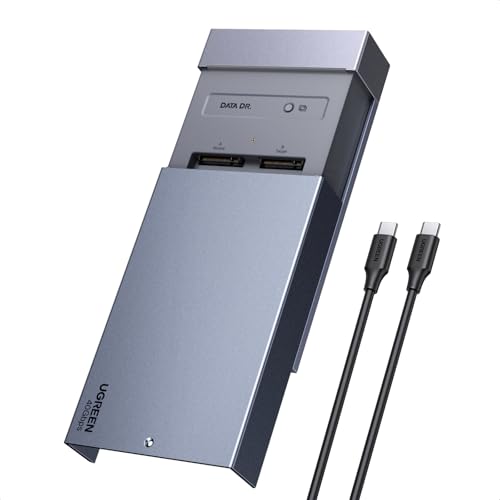
UGREEN 40Gbps Dual-Bay NVMe Cloner
Best for: Fast offline cloning and software RAID setups
- Transfer Speed
- 40Gbps
- Offline Cloning
- One-click offline cloning
- Supported M.2 Sizes
- 2230/2242/2260/2280
- Maximum Capacity
- 16TB
- Cooling Type
- Aluminum alloy top shell, 40mm fan
- Interface
- NVMe
View on Amazon: UGREEN 40Gbps Dual-Bay NVMe Cloner Affiliate link
This UGREEN docking station offers 40Gbps transfer speeds for dual M.2 NVMe SSDs. It supports offline cloning with a single button press, requiring no PC connection. The aluminum shell and 40mm fan manage heat for drives up to 16TB total capacity. It works with Windows, macOS, Linux, and ChromeOS. You get software RAID options and broad OS compatibility for fast, standalone drive management.
Pros
- 40Gbps transfer speed
- One-click offline cloning
- Supports up to 16TB total capacity
- Aluminum alloy shell with 40mm cooling fan
- Compatible with Windows, macOS, Linux, and ChromeOS
Cons
- Requires target disk to be larger than source data
- Only supports NVMe drives, not SATA
- No mention of hardware RAID support
Good fit if
- You need fast offline cloning without a computer
- You want to combine two NVMe drives into one volume
- You use macOS or Linux and need broad OS support
Skip if
- You only have SATA M.2 SSDs
- You need hardware RAID instead of software RAID
- You require support for drives larger than 16TB
Verdict: UGREEN 40Gbps Dual-Bay NVMe Cloner delivers high-speed offline cloning and flexible RAID options for users managing large NVMe drives on various operating systems.
Specifications side by side
| Spec | UGREEN Dual-Bay 20Gbps NVMe Cloner Dock | UGREEN 40Gbps Dual-Bay NVMe Cloner |
|---|---|---|
| Transfer Speed | 20Gbps | 40Gbps |
| Supported Drive Types | M.2 NVMe | not stated |
| Bay Count | 2 | not stated |
| Offline Cloning | One-click offline cloning | One-click offline cloning |
| Supported M.2 Sizes | not stated | 2230/2242/2260/2280 |
| Maximum Capacity | 16TB | 16TB |
| Cooling Type | not stated | Aluminum alloy top shell, 40mm fan |
| Interface | NVMe | NVMe |
| Form Factor | M.2 | M.2 |
| Features | Tool-Free, Offline Clone | Offline Clone |
| Dimensions | 5.04 × 3.15 × 0.59 inches | 5.04 × 3.15 × 0.59 inches |
| Weight | 10.6 ounces | not stated |
| Color | silver | silver |
| Model | CM392 | 65733US |
UGREEN SSD Docking Stations Overview
UGREEN offers two primary dual-bay NVMe cloners, distinguished mainly by their interface speeds. The top choice is the Dual-Bay 20Gbps NVMe Cloner, which provides reliable offline duplication for users who need a straightforward solution. It operates at 20Gbps and fits in a sturdy aluminum enclosure, making it ideal for copying large drives without a computer connection.
For those requiring higher throughput, the 40Gbps Dual-Bay NVMe Cloner supports faster offline cloning and software RAID setups. This model is suited for users managing large NVMe drives across various operating systems. Both devices share the same M.2 form factor and offline cloning features, allowing you to choose based on your speed requirements and budget.
Where UGREEN Fits Your Needs
UGREEN’s current lineup focuses on dual-bay NVMe cloning. You have two main choices based on speed. The 20Gbps model suits users who need reliable offline duplication without complex setup. The 40Gbps version offers higher throughput for large drives and software RAID configurations. Both units use aluminum enclosures and support offline cloning. Neither device includes single-bay options or SATA support in this specific range. If you require single-drive expansion or SATA connectivity, these dual-bay cloners may not fit your workflow. You should verify your operating system compatibility before purchasing the 40Gbps model.
How to choose the right UGREEN SSD dock
-
Check interface speed
You should match the dock’s interface speed to your needs. The UGREEN Dual-Bay 20Gbps NVMe Cloner offers sufficient bandwidth for standard duplication tasks. It provides a reliable connection without requiring excessive power. If you manage large files, consider the UGREEN 40Gbps Dual-Bay NVMe Cloner. Its higher transfer rate reduces wait times during cloning. Faster interfaces allow you to duplicate data more efficiently. Choose the speed that aligns with your typical workload and drive capacity.
-
Verify form factor
Ensure the dock supports your specific M.2 NVMe drives. Both UGREEN options listed here are designed for M.2 form factors. This compatibility is essential for physical installation. You must confirm that your drive fits the slot before purchasing. The dual-bay design allows you to install two drives simultaneously. This feature is useful for cloning operations. Check the specifications to ensure your drive’s length and width are supported. Proper fit ensures stable connectivity and heat dissipation.
-
Consider offline cloning
Look for docks that support offline cloning features. This function allows you to duplicate drives without connecting to a computer. The UGREEN Dual-Bay 20Gbps NVMe Cloner includes this capability. It operates independently, which saves USB ports on your system. You can start a clone job and let it run. This is ideal for users who need to copy data quickly. Offline cloning reduces dependency on host computer performance. Verify that the model you choose supports this standalone operation.
-
Assess build quality
Examine the enclosure material for durability and heat management. Both UGREEN models feature sturdy aluminum enclosures. Aluminum helps dissipate heat generated during high-speed transfers. This passive cooling method keeps the drives cool. You should prefer metal over plastic for better thermal performance. A robust enclosure also protects the internal components. Check the finish and construction quality. A solid build ensures the dock lasts longer. Good thermal design prevents throttling during extended cloning sessions.
-
Review physical dimensions
Check the dock’s size to ensure it fits your space. The UGREEN 40Gbps Dual-Bay NVMe Cloner measures 5.04 inches in length. It is 3.15 inches wide and 0.59 inches high. These dimensions affect how it sits on your desk. You need enough room for ventilation and cable management. Smaller docks may be easier to store. Larger docks might offer better airflow. Measure your available space before buying. Ensure the dock does not obstruct other devices. Proper sizing ensures a tidy and functional workspace.
Frequently asked questions
Can I clone NVMe drives without a computer?
Yes, both UGREEN models support offline cloning. This feature allows you to duplicate one NVMe drive to another without connecting the dock to a PC or laptop. You simply insert the source and target drives, then initiate the process directly on the device. This is ideal for quick backups or migrations.
What is the difference between the 20Gbps and 40Gbps models?
The main difference is the transfer speed. The 20Gbps model offers reliable duplication for standard tasks, while the 40Gbps version provides higher throughput for large files. Both are dual-bay NVMe cloners. The 40Gbps model also supports software RAID setups, giving you more flexibility for managing multiple drives.
Do these docks support software RAID?
Only the UGREEN 40Gbps Dual-Bay NVMe Cloner supports software RAID. This allows you to configure the two drives in modes like RAID 0 or 1 for performance or redundancy. The 20Gbps model is designed strictly for offline cloning and does not offer RAID configuration options.
Are these docking stations compatible with Windows and Mac?
Yes, both models are compatible with various operating systems. The 40Gbps cloner explicitly supports software RAID setups on different OS platforms. Since both devices function via offline cloning, they do not require specific drivers or software installation on your host computer to perform basic duplication tasks.
What form factor do these docks accept?
Both UGREEN docks accept M.2 NVMe drives. They are designed as dual-bay units, meaning you can install two M.2 NVMe SSDs simultaneously. This setup is necessary for the offline cloning feature, allowing you to copy data from one M.2 drive to another directly.
Is the build quality durable?
Yes, both models feature sturdy aluminum enclosures. This construction helps with heat dissipation during intensive cloning tasks. The 40Gbps model has specific dimensions of 3.15 x 5.04 x 0.59 inches, while the 20Gbps model shares a similar silver aluminum design. The metal casing ensures long-term reliability.