UGREEN 40Gbps Dual-Bay NVMe Cloner Review (2026): A Spec-Based Look
As an Amazon Associate we earn from qualifying purchases. Links on this page are affiliate links.
This ugreen 40gbps dual bay m 2 nvme SSD review covers a dedicated cloning dock that operates without a host computer. It features a 40Gbps transfer interface and supports dual M.2 NVMe drives in various form factors. The unit includes a one-click offline cloning button for direct disk duplication. You also get software RAID options, including RAID 0, 1, PM, and Union modes. An aluminum top shell and a 40mm fan provide cooling for sustained performance. This device is designed for users who need to manage storage capacity and data redundancy independently of a PC.
What stands out
- 40Gbps transfer speed for fast data movement
- One-click offline cloning without a host computer
- Supports Software RAID 0, 1, PM, and Union modes
- Aluminum alloy shell with a 40mm direct-flow cooling fan
- Compatible with Windows, macOS, Linux, and ChromeOS
Who it fits
Good fit for
This cloner suits creators and IT professionals who frequently upgrade drives or need to duplicate data quickly. The offline cloning feature allows you to copy files without booting an operating system. The software RAID options are useful for users who want to combine drive capacity or add redundancy. It works well with MacBooks and other devices that have USB-C ports. If you manage multiple M.2 NVMe SSDs and need a standalone solution for cloning and RAID configuration, this dock fits your workflow.
Who should skip it
You should look elsewhere if you need hardware RAID controllers for enterprise-level redundancy. This device relies on software RAID, which requires the host computer to process the RAID logic during access. It does not support SATA M.2 drives, only NVMe interfaces. The cloning process is limited to offline duplication and does not include advanced forensic imaging features. If you require a display for status monitoring or a remote management app, this unit does not provide those hardware or software extras.
Verdict: This is a practical, spec-driven cloning dock for users who need offline duplication and software RAID flexibility. It delivers fast transfers and stable cooling for dual NVMe drives.
UGREEN Cloner Key Specs Explained
Transfer Speed: 40Gbps
This interface rate sets the maximum data throughput between the drives. You get faster cloning and file transfers compared to older 10Gbps or 20Gbps docks. It ensures the enclosure does not become a bottleneck when moving large video files or database backups. Check that your source and target SSDs can actually sustain this speed, as the drive controllers often limit the final result.
Offline Cloning: One-click
This feature allows you to duplicate data without connecting the device to a computer. You simply insert the drives and press a button. This is ideal for IT maintenance or quick drive swaps where a PC is not available. It simplifies the process for users who want to upgrade a laptop or desktop without complex software configuration or host system interference.
Maximum Capacity: 16TB
The unit supports up to 16TB total across both bays, with 8TB per drive. This capacity handles large media libraries, extensive game installations, or heavy professional workstations. It ensures you have room for future SSD upgrades without needing a new enclosure. Verify that your specific SSD models support these high capacities, as older drives may have lower maximum limits.
Supported M.2 Sizes: 2230/2242/2260/2280
This range covers most standard NVMe drives, including the shorter modules used in laptops and handheld gaming devices. You can mix different lengths in the dual bays, offering flexibility for various builds. It eliminates the need for separate docks for different drive sizes. Ensure your specific drives fit the mounting holes, as some compact M.2230 drives may require specific spacing or adapters.
Design and Build Overview
The enclosure features a silver aluminum alloy top shell. According to the listing, this material choice aids in heat dissipation. The unit measures 5.04 inches in length, 3.15 inches in width, and 0.59 inches in height. This compact footprint allows it to sit neatly on a desk without taking up excessive space. The low profile ensures it does not obstruct other devices nearby.
A 40mm direct-flow cooling fan is integrated into the design. This component works with the aluminum shell to maintain stable performance during intensive cloning tasks. The listing notes that the fan operates with low noise. An LED light strip is included to display drive activity and cloning status. This visual feedback helps you monitor progress without needing to check a computer screen.
The front panel includes a single button for one-click offline cloning. You do not need a host PC to duplicate data between the two M.2 bays. The dual-bay layout supports M.2 NVMe SSDs in 2230, 2242, 2260, and 2280 form factors. This flexibility accommodates various drive sizes, from small M.2 cards to standard 2280 modules. The design prioritizes straightforward operation and reliable thermal management for daily use.
Setup and Everyday Use
Setting up this cloner requires no host computer or software installation. You simply insert your source and target M.2 NVMe SSDs into the dual bays. The unit supports 2230, 2242, 2260, and 2280 form factors, so you can mix sizes if needed. Once the drives are seated, you press the single clone button to begin. The process is entirely offline, meaning you do not need to connect the dock to a PC or laptop to initiate a copy. The listing notes that the target disk must be larger than the source data to complete the operation.
For daily use, the device connects via a USB-C port. It works with Windows, macOS, Linux, and ChromeOS. You can use it with devices like MacBook M4 models, Mac mini, or XPS laptops. The 40Gbps interface ensures rapid data movement between the two drives. An LED light strip on the aluminum shell shows drive activity and cloning status, so you can monitor progress without looking at a screen.
Beyond cloning, you can use the software RAID features. The dock supports RAID 0, RAID 1, PM, and Union modes. This allows you to combine the storage capacity of two drives, up to 16TB total. The 40mm direct-flow fan and aluminum top shell help manage heat during these intensive tasks. This setup is practical for IT maintenance or creators who need to duplicate drives or expand storage quickly.
Before You Buy This Cloner
You need to verify your source and target drive capacities before cloning. The listing states the target disk must hold more data than the source. If you plan to use the software RAID modes, ensure your operating system supports the specific configuration. Windows, macOS, Linux, and ChromeOS are listed as compatible. You should also check that your host devices, such as MacBook M4 or XPS laptops, have the required USB-C ports for any connected operations. Regularly clean the 40mm fan and aluminum shell to maintain cooling efficiency. This dock sits alongside standard SATA and NVMe SSDs as a management tool rather than a storage drive itself. It helps you manage large files across dual bays. Keep an eye on the LED indicators for status updates during long transfers. This unit suits users who frequently duplicate drives or need RAID flexibility without a PC.
Check before you buy
- Ensure the target SSD holds more data than the source drive.
- Verify your host devices have USB-C ports for connectivity.
- Confirm your OS supports the desired software RAID mode.
- Check that your NVMe drives fit the 2230 to 2280 sizes.
The product at a glance
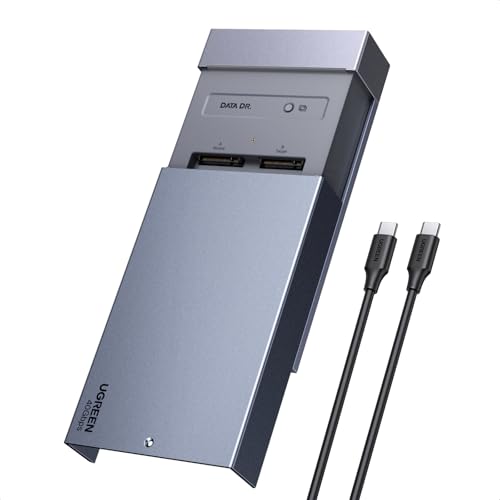
UGREEN 40Gbps Dual-Bay NVMe Cloner
Best for: standalone NVMe drive cloning and software RAID
- Transfer Speed
- 40Gbps
- Offline Cloning
- One-click offline cloning
- Supported M.2 Sizes
- 2230/2242/2260/2280
- Maximum Capacity
- 16TB
- Cooling Type
- Aluminum alloy top shell, 40mm fan
- Interface
- NVMe
View on Amazon: UGREEN 40Gbps Dual-Bay NVMe Cloner Affiliate link
This UGREEN dual-bay enclosure supports two M.2 NVMe drives up to 8TB each. It offers 40Gbps transfer speeds and one-click offline cloning without a PC. You get software RAID modes and a 40mm cooling fan with an aluminum shell. It works with Windows, macOS, Linux, and ChromeOS via USB-C. It fits users needing fast, standalone drive duplication.
Pros
- 40Gbps transfer speed
- One-click offline cloning
- Software RAID 0, 1, PM, and Union modes
- Supports M.2 sizes 2230 through 2280
- 40mm direct-flow cooling fan
Cons
- Target disk must be larger than source data
- Requires USB-C connection for cloning
- No mention of hardware RAID support
Good fit if
- You need to clone drives without a computer
- You want to use software RAID modes
- You use macOS or Linux systems
Skip if
- You need hardware RAID support
- You only have USB-A ports
- You want to clone smaller data to a larger disk without extra space
Verdict: UGREEN 40Gbps Dual-Bay NVMe Cloner is a practical tool for users who need fast, standalone drive duplication and software RAID flexibility. It suits creators and IT maintenance staff who work with multiple M.2 NVMe drives.
Specifications side by side
| Spec | UGREEN 40Gbps Dual-Bay NVMe Cloner |
|---|---|
| Transfer Speed | 40Gbps |
| Offline Cloning | One-click offline cloning |
| Supported M.2 Sizes | 2230/2242/2260/2280 |
| Maximum Capacity | 16TB |
| Cooling Type | Aluminum alloy top shell, 40mm fan |
| Interface | NVMe |
| Form Factor | M.2 |
| Features | Offline Clone |
| Bay Count | Dual-Bay |
| Dimensions | 5.04 × 3.15 × 0.59 inches |
| Color | silver |
| Model | 65733US |
Frequently asked questions
Can I clone drives without a computer?
Yes, this device supports offline cloning. You do not need to connect it to a host PC or install any software. Simply insert the source and target M.2 NVMe SSDs into the dual bays. Press the one-click button to start the duplication process immediately. This standalone operation makes it convenient for quick drive transfers.
What M.2 sizes does the UGREEN cloner support?
The dual bays accommodate multiple M.2 form factors. You can use 2230, 2242, 2260, and 2280 drives. This flexibility allows you to mix different lengths in the two slots. It is useful if you have legacy drives or specific compact SSDs alongside standard 2280 models in your collection.
Is this cloner compatible with SATA SSDs?
No, this model is designed strictly for NVMe drives. The interface and bays are specified for NVMe protocol M.2 SSDs. It does not support SATA-based M.2 drives or 2.5-inch SATA SSDs. You must ensure your source and target drives use the NVMe protocol for the cloning function to work correctly.
How fast is the data transfer rate?
The unit features a 40Gbps transfer interface. This rate sets the maximum data throughput between the connected drives. You will get faster cloning and file transfers compared to older docks with 10Gbps or 20Gbps limits. This speed helps ensure the enclosure does not become a bottleneck when moving large files.
What are the physical dimensions of the device?
The enclosure measures 5.04 inches in length, 3.15 inches in width, and 0.59 inches in height. This compact footprint allows it to sit neatly on a desk without taking up much space. The silver aluminum alloy top shell adds to its slim profile while aiding in heat dissipation during operation.
Can I use this for software RAID?
Yes, the device supports software RAID configurations. You can create RAID arrays using the dual M.2 NVMe slots. This offers flexibility for creators and IT staff who need combined storage or redundancy. Ensure your operating system, such as Windows, macOS, or Linux, supports the specific RAID mode you intend to use.
Does the target drive need to be larger?
Yes, the target disk must hold more data than the source. You need to verify your drive capacities before starting the clone. The cloning process copies existing data, so the destination must have enough free space to accommodate all files from the source drive for a successful operation.