15 Best Aluminum Nvme SSDs, Compared
As an Amazon Associate we earn from qualifying purchases. Links on this page are affiliate links.
An aluminum NVMe SSD pairs fast solid-state storage with passive heat dissipation and physical durability. To find the best options, we evaluated 15 models using only the specifications published on their official listings. The TEAMGROUP PD1000 1TB Rugged SSD takes the top position because its IP68 water- and crush-resistant aluminum enclosure protects against shock while maintaining 1,000 MB/s transfer speeds.
This guide helps you compare internal M.2 cards and portable external drives. You can decide which interface, cooling design, and capacity match your exact requirements.
Quick picks
The best fit for you
- You need durable external storage for harsh outdoor environments. TEAMGROUP PD1000 1TB Rugged SSD Its IP68 water- and crush-resistant aluminum housing protects data while delivering 1,000 MB/s transfer speeds over USB-C.
- You want fast internal storage with dedicated cache memory. TEAMGROUP CARDEA A440 1TB PCIe 4.0 SSD This PCIe 4.0 M.2 SSD includes dedicated DRAM caching and an aluminum heatsink for high-bandwidth desktop setups.
- You require maximum capacity for high-speed portable workflows. SABRENT Rocket XTRM 5 4TB Portable SSD It provides a massive 4TB capacity inside an aluminum chassis with Thunderbolt 5 support reaching up to 64Gbps.
- You want multiple NVMe drives without motherboard bifurcation. 10Gtek 4-Slot M.2 PCIe 3.0 Expansion Card Its onboard Broadcom switch supports four M.2 slots using an aluminum heatsink and active cooling fan.
Our 15 picks

TEAMGROUP PD1000 1TB Rugged SSD
Best for: rugged, all-weather portable external storage
- Material
- Aluminum (what this guide is about)
- Storage Capacity
- 1TB
- Interface
- USB 3.2 Gen 2
- Form Factor
- Portable External
- Max Read Speed
- 1,000 MB/s
- Protection
- Shockproof
The TEAMGROUP PD1000 is an external solid state drive built with an anodized aluminum alloy enclosure. For durability, it carries an IP68 rating for water and dust resistance alongside MIL-STD-810G shock compliance. It operates over a USB 3.2 Gen 2 interface to deliver transfer speeds up to 1,000 MB/s. If you need portable, crush-resistant storage that connects via USB-A or USB-C, this drive fits outdoor and travel workloads well.
Pros
- IP68 waterproof and dustproof rating plus 1,600kg pressure resistance
- Aluminum alloy housing with an anodized matte finish weighing 75g
- USB 3.2 Gen 2 interface with transfer speeds up to 1,000 MB/s
- Includes both USB-C to USB-C and USB-A to USB-C cables
Cons
- Sequential write speed is not specified in the product data
- Transfer speed caps at 1,000 MB/s, below USB4 and Thunderbolt interfaces
- Three-year limited warranty rather than longer five-year coverage
Good fit if
- You need an aluminum drive with certified IP68 water and dust sealing.
- You want out-of-the-box support for both Type-A and Type-C host ports.
- You require a lightweight drive engineered to withstand heavy external pressure.
Skip if
- You require speeds exceeding 1,000 MB/s over Thunderbolt or USB4.
- You need documented sequential write ratings before buying.
Verdict: TEAMGROUP PD1000 1TB Rugged Aluminum SSD pairs 1,000 MB/s transfer capabilities with an IP68 water- and crush-resistant metal shell. It provides durable everyday external performance for mobile systems across standard USB connections.
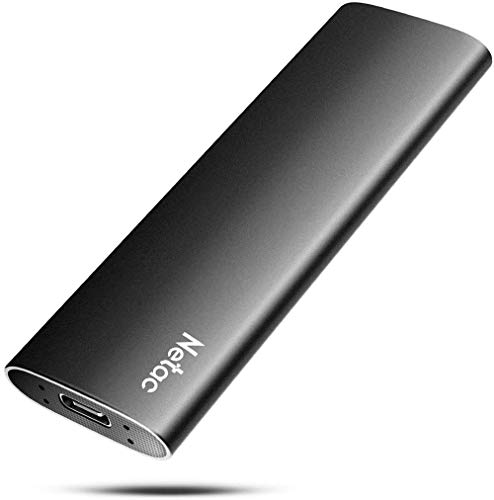
Netac Z Slim 250GB Portable SSD
Best for: lightweight everyday file transfers on a budget
- Material
- Aluminum (what this guide is about)
- Storage Capacity
- 250GB
- Interface
- USB 3.2 Gen 2
- Form Factor
- Portable
- Max Read Speed
- 550MB/s
- Max Write Speed
- 450MB/s
The Netac Z Slim 250GB Portable SSD gives you an external aluminum-alloy drive built for pocket-friendly file transfers. It delivers read speeds up to 550MB/s and write speeds up to 450MB/s over a USB 3.2 Gen 2 connection. Weighing 30 grams and measuring 9mm thick, it includes both a USB Type-C-to-A cable and an adapter. It suits you if you need compact, basic everyday storage for documents and photos.
Pros
- Aluminum-alloy enclosure for daily handling
- Up to 550MB/s read and 450MB/s write speeds
- Weighs approximately 30g with 9mm slim profile
- Includes USB Type-C-to-A cable and USB-A-to-C adapter
- 3-year limited warranty
Cons
- Entry 250GB capacity fills up quickly with large media
- Transfer rates max out below high-speed NVMe PCIe external drives
Good fit if
- You need a lightweight pocket-sized aluminum drive for documents and everyday files.
- You want flexible connectivity across USB-A and USB-C computers, phones, or tablets.
Skip if
- You require multi-gigabyte transfer speeds for massive 4K video workflows.
- You need terabytes of local backup space.
Verdict: Netac Z Slim 250GB Portable SSD offers an ultra-light aluminum enclosure and dependable transfer rates for basic external storage needs.

10Gtek 4-Slot M.2 PCIe 3.0 Expansion Card
Best for: multi-NVMe storage without motherboard bifurcation
- Material
- Aluminum (what this guide is about)
- Interface
- PCIe 3.0 x8
- Cooling
- Aluminum Heatsink & Fan
- Form Factor
- M.2 2280
This 10Gtek expansion card lets you install up to four M.2 NVMe SSDs into a single PCIe 3.0 x8 or x16 slot. Its onboard Broadcom switch handles PCIe lane distribution, so your motherboard does not require PCIe bifurcation support. An integrated aluminum heatsink and cooling fan manage drive temperatures. It fits SSD lengths from 2230 up to 22110, making it a solid choice if you need multi-drive workstation or server storage.
Pros
- Supports up to four M.2 NVMe SSDs in one PCIe x8 or x16 slot
- Onboard Broadcom PEX-8724 switch works without motherboard bifurcation
- Compatible with 2230, 2242, 2260, 2280, and 22110 M.2 form factors
- Equipped with an aluminum heatsink and cooling fan
Cons
- Does not include a low-profile bracket
- Does not support drive hot-swapping
- Limited to PCIe 3.0 speeds
Good fit if
- You need to add multiple NVMe SSDs to a motherboard that lacks PCIe bifurcation.
- You plan to install enterprise-length 22110 M.2 drives alongside standard sizes.
- You have a full-height PCIe 3.0 x8 or x16 slot available in your desktop or server.
Skip if
- You need a low-profile expansion bracket for a slim PC case.
- You require hot-swappable drive bays for regular disk swapping.
Verdict: 10Gtek 4-Port M.2 PCIe Expansion Card provides four M.2 slots with an active Broadcom switch for systems lacking PCIe bifurcation. It cools your drives effectively using an aluminum heatsink and fan.

TEAMGROUP CARDEA A440 1TB PCIe 4.0 SSD
Best for: high-speed desktop and console internal storage
- Material
- Aluminum (what this guide is about)
- Storage Capacity
- 1TB
- Interface
- PCIe Gen4 x4, NVMe
- Form Factor
- M.2 2280
- Max Read Speed
- 7,000 MB/s
- Max Write Speed
- 5,500 MB/s
The TEAMGROUP T-Force CARDEA A440 is an internal M.2 2280 PCIe 4.0 SSD with 1TB of 3D TLC storage. It pairs a Phison E18 controller with dedicated DRAM and SLC caching, reaching read speeds up to 7,000 MB/s and write speeds up to 5,500 MB/s. It includes both a 12.9mm aluminum heatsink and a 3.7mm graphene heatsink. This setup suits you if you need high sustained Gen4 transfer rates for a PC or PlayStation 5.
Pros
- Sequential read speeds up to 7,000 MB/s and write speeds up to 5,500 MB/s
- Equipped with both DRAM cache and SLC cache
- Includes interchangeable 12.9mm aluminum and 3.7mm graphene heatsinks
- Phison E18 controller paired with 3D TLC NAND
Cons
- Thicker 12.9mm aluminum heatsink prevents closing the PlayStation 5 slot lid
- Internal M.2 form factor requires host hardware installation rather than direct USB plug-in
Good fit if
- You want PCIe 4.0 transfer speeds backed by dedicated DRAM caching.
- You need dual heatsink options to fit desktop motherboards or tighter clearances.
- You intend to upgrade PlayStation 5 storage using the low-profile graphene heatsink.
Skip if
- You need an external portable drive that connects directly via USB.
- You insist on closing the PlayStation 5 expansion slot lid with the 12.9mm aluminum heatsink attached.
Verdict: TEAMGROUP T-Force CARDEA A440 1TB Heatsink SSD delivers high PCIe 4.0 bandwidth with dedicated DRAM caching and flexible thermal modules. It provides strong internal speed and dual cooling solutions for demanding desktop and console configurations.

SABRENT 1TB Rocket Nano External SSD
Best for: compact aluminum travel storage and file backups
- Material
- Aluminum (what this guide is about)
- Storage Capacity
- 1TB
- Form Factor
- External
- Max Read Speed
- Up to 1000MB/s
- Dimensions
- 2.71 × 1.1 × 0.47 inches
- Weight
- 2 ounces
The SABRENT 1TB Rocket Nano External SSD is a pocket-sized external drive housed in a sandblasted aluminum alloy shell. It delivers transfer rates up to 1000MB/s across a 10Gbps connection and weighs 0.125 pounds. At 2.71 inches long and 0.47 inches thick, it works with both Windows and Mac OS systems without external power or drivers. It suits you if you need compact, bus-powered portable storage for backups and file transfers.
Pros
- Up to 1000MB/s transfer speeds over a 10Gbps connection
- Lightweight 0.125-pound aluminum alloy sandblasted shell
- Bus-powered design requires no external power source or drivers
- Supports TRIM, UASP, and upgradable firmware
Cons
- Top transfer rate is capped at 1000MB/s
- Maximum available capacity in this series is 1TB
Good fit if
- You need a lightweight, 0.125-pound drive for portable backups.
- You use Windows or Mac OS and require bus-powered plug-and-play operation.
- You want an aluminum enclosure measuring under 3 inches long.
Skip if
- You need storage capacities larger than 1TB.
- You require transfer speeds exceeding 1000MB/s.
Verdict: SABRENT 1TB Rocket Nano External SSD delivers 1000MB/s throughput in a compact 0.125-pound aluminum enclosure. It provides straightforward, bus-powered storage for Windows and Mac OS users on the go.

Inland 500GB Aluminum External SSD
Best for: portable data backups requiring durable aluminum housing
- Material
- Aluminum (what this guide is about)
- Storage Capacity
- 500GB
- Interface
- USB 3.2 Gen 2 Type-C
- Form Factor
- External Portable
- Max Read Speed
- Up to 1100MB/s
- Max Write Speed
- 700MB/s
This portable drive pairs a 500GB capacity with an aluminum alloy sandblasted shell for shock resistance. It runs on the USB 3.2 Gen 2 Type-C interface, delivering speeds up to 1,100 MB/s read and 700 MB/s write. You get bundled Type-C and Type-A cables for support across Windows, Mac, and consoles. A four-year warranty covers parts and labor.
Pros
- Up to 1100 MB/s read and 700 MB/s write speeds
- Aluminum alloy sandblasted shell for shock resistance
- Includes both USB Type-C to C and Type-C to A cables
- 4-year limited parts and labor warranty
Cons
- 500GB capacity ceiling on this model
- 700 MB/s write speed trails 1100 MB/s read speed
Good fit if
- You need a shock-resistant aluminum exterior for portable transport.
- You require out-of-the-box connectivity for both USB-C and USB-A ports.
- You want four years of manufacturer warranty protection.
Skip if
- You need more than 500GB of storage space.
- You require write speeds faster than 700 MB/s.
Verdict: Inland 500GB Aluminum External SSD delivers 1100 MB/s transfer speeds inside a protective metal shell. Dual included cables and four-year coverage make it a practical choice for everyday file transfers.

Netac 1TB PCIe 3.0 Aluminum M.2 SSD
Best for: PCIe 3.0 gaming desktop builds
- Material
- Aluminum (what this guide is about)
- Storage Capacity
- 1TB
- Interface
- PCIe Gen3x4
- Form Factor
- M.2
- Max Read Speed
- 3,100 MB/s
- Max Write Speed
- 1,400 MB/s
This Netac internal M.2 drive provides 1TB of storage using a PCIe Gen3x4 interface. It features an integrated aluminum and graphene heat sink designed to lower operating temperatures by 10°C. With read speeds up to 3,000 MB/s, write speeds up to 1,400 MB/s, and a 300TBW endurance rating, it suits your gaming setup if you need responsive internal storage that manages heat inside standard M.2 slots.
Pros
- Up to 3,000 MB/s read and 1,400 MB/s write speeds
- Aluminum and graphene heat sink designed to cool temperatures by 10°C
- Endurance rating of 300TBW
- Slim 0.65mm heat spreader profile
Cons
- Write speed tops out at 1,400 MB/s
- Limited to PCIe Gen3x4 bandwidth rather than newer standards
Good fit if
- You need a PCIe 3.0 M.2 SSD with an integrated aluminum cooling spreader.
- You want up to 3,000 MB/s read speeds for loading games.
- You want a drive rated for 300TBW write endurance.
Skip if
- You need faster write speeds than 1,400 MB/s for heavy file transfers.
- You have a PCIe 4.0 or PCIe 5.0 system and want to maximize bus speed.
Verdict: Netac 1TB PCIe 3.0 Aluminum M.2 SSD delivers reliable Gen3 speeds and integrated thermal management for gaming systems. Its combination of aluminum cooling and 300TBW endurance makes it a dependable internal drive for day-to-day play.

Netac 1TB Aluminum M.2 SSD
Best for: laptop upgrades needing low-profile aluminum cooling
- Material
- Aluminum (what this guide is about)
- Storage Capacity
- 1TB
- Interface
- PCIe Gen4x4
- Max Read Speed
- 7300 MB/s
- Max Write Speed
- 6600MB/s
- Cooling
- Aluminum Heatspreader
This is an internal M.2 PCIe 4.0 SSD built with an aluminum heat spreader. You get sequential read speeds up to 7,300 MB/s and write speeds up to 6,600 MB/s, backed by a 640 TBW endurance rating. The low-profile 0.65mm cooling layer fits compact spaces. It suits you if you want fast internal storage for a compatible laptop, mini-PC, desktop, or PS5 console.
Pros
- Up to 7,300 MB/s read and 6,600 MB/s write speeds
- Low-profile 0.65mm aluminum and graphene heat spreader
- 640 TBW endurance rating with a 5-year warranty
- Direct compatibility with laptops, mini-PCs, desktops, and PS5
Cons
- Capacity listed is limited to 1TB
- Internal M.2 design is not usable as a portable USB drive
Good fit if
- You need PCIe 4.0 transfer speeds up to 7,300 MB/s.
- You require a slim 0.65mm heat spreader designed for laptops or mini-PCs.
- You want an internal drive rated for PS5 consoles and desktop systems.
Skip if
- You need a plug-and-play external USB drive.
- You require more than 1TB of storage on a single drive.
Verdict: Netac 1TB Aluminum M.2 SSD delivers PCIe 4.0 speeds up to 7,300 MB/s in a compact internal form factor. Its slim 0.65mm aluminum heat spreader provides heat dissipation without clearance issues in laptops or consoles.

SABRENT Rocket XTRM Plus 2TB Portable SSD
Best for: high-speed 2TB Thunderbolt 3 data transfers
- Material
- Aluminum (what this guide is about)
- Storage Capacity
- 2TB
- Interface
- Thunderbolt 3, USB 3.2 Gen 2x1
- Form Factor
- Portable SSD
- Max Read Speed
- up to 2,700 MB/s
- Host Interface
- USB-C
The SABRENT Rocket XTRM Plus 2TB is an external solid-state drive built inside an aluminum enclosure designed for heat dissipation. It connects via a 40Gbps Thunderbolt 3 interface to deliver speeds up to 2,700 MB/s, while offering a 900 MB/s fallback mode on standard USB 3.2 Gen 2 ports. This suits you if you need fast external NVMe transfer rates for large file workflows across Windows, macOS, or Linux systems.
Pros
- Reaches up to 2,700 MB/s over 40Gbps Thunderbolt 3
- Aluminum enclosure with removable silicone protective sleeve
- Dual interface support with USB 3.2 Gen 2 fallback up to 900 MB/s
- Includes both Thunderbolt 3 and USB-A to USB-C cables
Cons
- Transfer speed drops to 900 MB/s on non-Thunderbolt USB ports
- Profile height reaches 0.55 inches with sleeve
Good fit if
- You need up to 2,700 MB/s transfer speeds over a Thunderbolt 3 connection.
- You switch between Thunderbolt 3 and legacy USB-A or USB-C hosts.
- You want an aluminum housing with an extra silicone sleeve for ruggedness.
Skip if
- You only have standard USB ports and require speeds over 900 MB/s.
- You need an internal M.2 NVMe SSD for direct motherboard installation.
Verdict: SABRENT Rocket XTRM Plus 2TB Portable SSD delivers high-speed 2,700 MB/s performance across Thunderbolt 3 connections in a durable, heat-dissipating aluminum body. Its automatic 900 MB/s USB fallback mode ensures broad cross-platform utility when Thunderbolt is unavailable.

ORICO 1TB Magnetic Portable SSD
Best for: mobile ProRes video recording on the go
- Material
- Aluminum (what this guide is about)
- Storage Capacity
- 1TB
- Form Factor
- External Portable
- Max Read Speed
- 2000MB/s
- Dimensions
- 3.27 × 2.36 × 0.43 inches
- Weight
- 1.98 ounces
The ORICO 1TB Magnetic Portable SSD provides high-speed external storage encased in an aluminum alloy body for heat dissipation. You get transfer speeds up to 2000MB/s and direct magnetic attachment for mobile devices, including support for 4K 120 fps ProRes HDR recording. Weighing 0.12 pounds, this drive suits you if you need pocketable external storage for on-the-go video capture.
Pros
- Transfer speeds up to 2000MB/s
- Aluminum alloy housing assists heat dissipation
- Supports 4K 120 fps ProRes HDR direct recording
- Integrated magnetic attachment with included ring
Cons
- Requires proprietary ORICO LC10 adapter for Lightning devices
- Maximum capacity tops out at 1TB
Good fit if
- You record 4K 120 fps ProRes HDR video directly to an external drive.
- You want magnetic mounting directly to the back of your smartphone.
Skip if
- You need external storage capacities greater than 1TB.
- You rely on third-party Lightning adapters with pre-iPhone 15 hardware.
Verdict: ORICO 1TB Magnetic Portable SSD delivers 2000MB/s speeds inside an aluminum enclosure engineered for magnetic phone attachment. It provides steady heat dissipation and direct 4K ProRes capture for mobile creators.

MAIWO 2TB Portable NVMe SSD
Best for: Pocketable multi-platform 2TB storage
- Material
- Aluminum (what this guide is about)
- Storage Capacity
- 2TB
- Interface
- USB 3.2 Gen 2
- Max Read Speed
- 1050MB/s
- Max Write Speed
- 1050MB/s
- Compatibility
- Mac
The MAIWO 2TB Portable Aluminum NVMe SSD gives you 2TB of external storage inside a CNC-machined aluminum alloy shell. Operating over a USB 3.2 Gen 2 Type-C connection, it delivers transfer speeds up to 1050MB/s for PCs, Macs, gaming consoles, and Android devices. Weighing 0.12 pounds, it fits into your pocket or clips to a bag, making it a practical pick if you need compact, bus-powered storage for everyday file transfers and backups.
Pros
- Transfer rates reaching up to 1050MB/s over USB 3.2 Gen 2 Type-C
- CNC-processed aluminum alloy shell helps dissipate heat and absorb shocks
- Pocket-sized form factor weighing 0.12 pounds with integrated hanging buckle
- Cross-platform support for Windows, macOS, Linux, Android, PS5, and Xbox
Cons
- Internal NVMe drive cannot be replaced or upgraded
- Outer aluminum casing cannot be disassembled
Good fit if
- You need a lightweight, pocket-sized 2TB drive for travel or on-the-go storage.
- You want plug-and-play USB-C connectivity across computers, consoles, and mobile devices.
- You prefer an aluminum casing designed to resist drops and manage heat.
Skip if
- You want an enclosure that allows you to swap or service the internal M.2 drive.
- You require Thunderbolt or USB4 throughput exceeding 1050MB/s.
Verdict: MAIWO 2TB Portable Aluminum NVMe SSD combines a durable CNC aluminum body with reliable 1050MB/s speeds for daily multi-platform transfers. It delivers ample pocketable capacity, provided you do not need upgradeable internal storage.

ORICO 512GB Magnetic External SSD
Best for: Direct ProRes mobile video recording
- Material
- Aluminum (what this guide is about)
- Storage Capacity
- 512GB
- Form Factor
- External Portable
- Max Read Speed
- 2000MB/s
- Cooling
- Aluminum-alloy body
The ORICO 512GB Magnetic External SSD provides fast storage in an aluminum alloy enclosure designed for mobile workflows. It delivers transfer rates up to 2000MB/s and includes magnetic mounting hardware to attach directly to your phone. It supports direct 4K 120 fps ProRes HDR capture for compatible devices like the iPhone 16 Pro. You will find it well suited for capturing high-bitrate video footage on the go without filling your internal device memory.
Pros
- Transfer speeds reach up to 2000MB/s
- Supports direct 4K 120 fps ProRes HDR recording
- Lightweight aluminum enclosure weighs 0.09 lbs
- Includes magnetic ring for mounting to devices
Cons
- 512GB capacity limits total archival space
- Requires proprietary ORICO LC10 adapter for Lightning iPhones
Good fit if
- You record 4K 120 fps ProRes video directly from an iPhone 16 Pro.
- You want a lightweight 0.09-pound aluminum drive that snaps magnetically to your phone.
- You need transfer speeds reaching up to 2000MB/s for mobile file offloading.
Skip if
- You require multiple terabytes of storage capacity instead of 512GB.
- You use a Lightning-based iPhone without the brand-specific adapter.
Verdict: ORICO 512GB Magnetic External SSD delivers 2000MB/s speeds inside a compact aluminum body tailored for direct smartphone video capture. It is a capable, portable solution if you need high-speed external recording without bulky hardware.
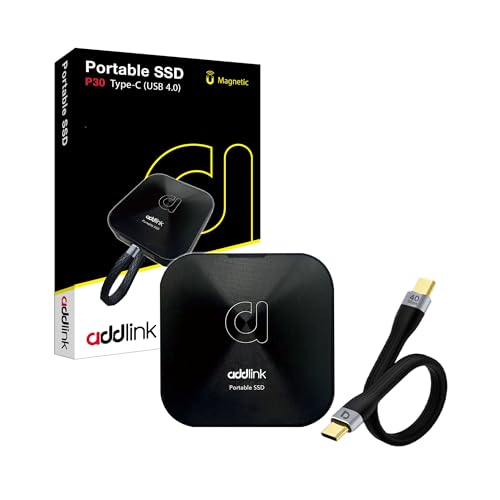
Addlink 1TB Aluminum USB4 Portable SSD
Best for: high-speed mobile editing and iPhone ProRes capture
- Material
- Aluminum (what this guide is about)
- Storage Capacity
- 1TB
- Interface
- USB4
- Form Factor
- External Portable
- Max Read Speed
- 4000 MB/s
- Max Write Speed
- 3600 MB/s
The Addlink 1TB Aluminum USB4 Portable SSD is a pocket-sized external drive housed in an aluminum shell. It relies on a USB4 Type-C interface to deliver read speeds up to 4,000 MB/s and write speeds up to 3,600 MB/s. This compact unit weighs 45 grams and measures 64 mm by 12 mm. It suits you if you need rapid data transfers for 4K video or direct iPhone ProRes capture on location.
Pros
- USB4 interface provides read speeds up to 4,000 MB/s and writes up to 3,600 MB/s
- Compact aluminum enclosure measures 64 mm by 12 mm and weighs 45 grams
- Direct iPhone ProRes video recording support via MagSafe attachment
- Broad compatibility with Mac, PS5, iPad, Steam, and USB-C devices
Cons
- No ingress protection rating listed for dust or water resistance
- Top speeds require a compatible USB4 or Thunderbolt port on the host system
Good fit if
- You record high-bitrate ProRes video directly from an iPhone
- You need fast external transfer rates reaching up to 4,000 MB/s over USB4
- You want a lightweight aluminum drive that weighs only 45 grams
Skip if
- You need rugged, certified water and dust resistance for harsh outdoor environments
- You connect mainly to legacy USB-A ports without USB4 bandwidth support
Verdict: Addlink 1TB Aluminum USB4 Portable SSD combines top-tier USB4 transfer rates with an ultra-compact aluminum frame tailored for mobile creators. It delivers high-throughput storage for users with compatible modern hardware.

SABRENT Rocket XTRM 5 4TB Portable SSD
Best for: Thunderbolt 5 workflows requiring 4TB portable storage
- Material
- Aluminum (what this guide is about)
- Storage Capacity
- 4TB
- Interface
- Thunderbolt 5
- Form Factor
- Portable SSD
- Cooling
- Aluminum body
- Transfer Speed
- 10Gbps
This external drive gives you 4TB of high-speed storage housed in an aluminum body with an included silicone sleeve. It features an 80Gbps Thunderbolt 5 connection capable of transfers up to 64Gbps, while maintaining backward compatibility with USB4, Thunderbolt 3, and 10Gbps USB interfaces. At 0.21 pounds and 0.57 inches thick, it suits mobile creators, gamers, and professionals who need high-capacity portable storage that works across modern and legacy ports.
Pros
- Thunderbolt 5 interface supporting up to 64Gbps transfer speeds
- Aluminum enclosure with included protective silicone sleeve
- Backward compatible with USB4, Thunderbolt 3, and legacy USB connections
- Bus-powered design requires no external power supply
Cons
- Reaching maximum 64Gbps speeds requires a compatible Thunderbolt 5 host port
- Available only in 2TB and 4TB capacity configurations
Good fit if
- You need high-bandwidth external storage up to 64Gbps on Thunderbolt 5 hardware.
- You require 4TB of portable capacity protected by an aluminum chassis and silicone sleeve.
- You connect across mixed ports including Thunderbolt 3, Thunderbolt 4, and legacy USB.
Skip if
- You only have standard USB ports and cannot utilize Thunderbolt speeds.
- You prefer smaller, lower-capacity options below 2TB.
Verdict: SABRENT Rocket XTRM 5 4TB Portable SSD combines 4TB of storage with Thunderbolt 5 transfer capabilities up to 64Gbps in an aluminum chassis. It suits users who need versatile connectivity across Thunderbolt and USB standards without an external power source.

ACASIS 40Gbps Aluminum M.2 NVMe Enclosure
Best for: high-speed DIY external Thunderbolt storage
- Material
- Aluminum (what this guide is about)
- Cooling
- dual-sided aluminum fins
- Interface
- NVMe
- Form Factor
- M.2
- Transfer Speed
- 40Gbps
- Dimensions
- 12 × 8 × 2.5 inches
You get an external drive housing built from aluminum with dual-sided passive cooling fins. This enclosure runs via an Intel JHL7440 controller over a 40Gbps USB4 and Thunderbolt connection, delivering transfer rates up to 2700MB/s. It accommodates M.2 NVMe drives in 2230, 2242, 2260, and 2280 lengths with capacities up to 8TB. It suits you if you want high-speed external storage using your own internal M.2 SSD.
Pros
- Intel JHL7440 controller supports 40Gbps over USB4 and Thunderbolt
- Dual-sided aluminum heat fins provide silent passive cooling
- Accommodates four M.2 form factors from 2230 to 2280
- Supports NVMe drive capacities up to 8TB
Cons
- Does not include an internal SSD
- Lacks active fan cooling for heavy thermal loads
Good fit if
- You already own a compatible M.2 NVMe SSD to install
- You need 40Gbps transfer rates across Thunderbolt or USB4 ports
- You want silent passive heat dissipation without fan noise
Skip if
- You want a complete external drive with preinstalled storage
- You prefer active fan cooling for continuous heavy writes
Verdict: ACASIS 40Gbps Aluminum M.2 NVMe Enclosure turns your internal M.2 SSD into a silent, portable 40Gbps drive. Its aluminum fin body provides passive cooling while supporting up to 8TB storage capacities across USB4 and Thunderbolt.
Specifications side by side
| Spec | TEAMGROUP PD1000 1TB Rugged SSD | Netac Z Slim 250GB Portable SSD | 10Gtek 4-Slot M.2 PCIe 3.0 Expansion Card | TEAMGROUP CARDEA A440 1TB PCIe 4.0 SSD | SABRENT 1TB Rocket Nano External SSD | Inland 500GB Aluminum External SSD | Netac 1TB PCIe 3.0 Aluminum M.2 SSD | Netac 1TB Aluminum M.2 SSD | SABRENT Rocket XTRM Plus 2TB Portable SSD | ORICO 1TB Magnetic Portable SSD | MAIWO 2TB Portable NVMe SSD | ORICO 512GB Magnetic External SSD | Addlink 1TB Aluminum USB4 Portable SSD | SABRENT Rocket XTRM 5 4TB Portable SSD | ACASIS 40Gbps Aluminum M.2 NVMe Enclosure |
|---|---|---|---|---|---|---|---|---|---|---|---|---|---|---|---|
| Storage Capacity | 1TB | 250GB | not specified | 1TB | 1TB | 500GB | 1TB | 1TB | 2TB | 1TB | 2TB | 512GB | 1TB | 4TB | not specified |
| Interface | USB 3.2 Gen 2 | USB 3.2 Gen 2 | PCIe 3.0 x8 | PCIe Gen4 x4, NVMe | not specified | USB 3.2 Gen 2 Type-C | PCIe Gen3x4 | PCIe Gen4x4 | Thunderbolt 3, USB 3.2 Gen 2x1 | not specified | USB 3.2 Gen 2 | not specified | USB4 | Thunderbolt 5 | not specified |
| Form Factor | Portable External | Portable | not specified | M.2 2280 | External | External Portable | M.2 | not specified | Portable SSD | External Portable | not specified | External Portable | External Portable | Portable SSD | not specified |
| Max Read Speed | 1,000 MB/s | 550MB/s | not specified | 7,000 MB/s | Up to 1000MB/s | Up to 1100MB/s | 3,100 MB/s | 7300 MB/s | up to 2,700 MB/s | 2000MB/s | 1050MB/s | 2000MB/s | 4000 MB/s | not specified | not specified |
| Max Write Speed | not specified | 450MB/s | not specified | 5,500 MB/s | not specified | 700MB/s | 1,400 MB/s | 6600MB/s | not specified | not specified | 1050MB/s | not specified | 3600 MB/s | not specified | not specified |
| Cache Type | not specified | not specified | not specified | DRAM, SLC Cache | not specified | not specified | not specified | not specified | not specified | not specified | not specified | not specified | not specified | not specified | not specified |
| Cooling | not specified | not specified | Aluminum Heatsink & Fan | Graphene & Aluminum Heatsink | not specified | not specified | Aluminum Heatspreader | Aluminum Heatspreader | not specified | not specified | not specified | Aluminum-alloy body | not specified | Aluminum body | dual-sided aluminum fins |
| Compatibility | not specified | Mac | not specified | not specified | not specified | not specified | Gaming | Laptop, Desktop, PS5 | not specified | not specified | Mac | not specified | PS5, Mac | not specified | not specified |
| NAND Type | not specified | not specified | not specified | 3D NAND, TLC | not specified | not specified | not specified | not specified | not specified | not specified | not specified | not specified | not specified | not specified | not specified |
| Transfer Speed | not specified | not specified | not specified | not specified | not specified | not specified | not specified | not specified | not specified | not specified | not specified | not specified | not specified | 10Gbps | 40Gbps |
| Size | 1TB | 250 GB | 4x M.2 (M Key), PEX-8724 | 1TB | 1TB | not specified | 1TB | 1TB | 2TB | 1TB | not specified | 512GB | 1TB | 4TB | 2280/2260/2242/2230 |
| Protection | Shockproof | not specified | not specified | not specified | not specified | not specified | not specified | not specified | not specified | not specified | not specified | not specified | not specified | not specified | not specified |
| Material | Aluminum | Aluminum | Aluminum | Aluminum | Aluminum | Aluminum | Aluminum | Aluminum | Aluminum | Aluminum | Aluminum | Aluminum | Aluminum | Aluminum | Aluminum |
| Host Interface | USB-C | USB-C | not specified | not specified | not specified | not specified | not specified | not specified | USB-C | not specified | not specified | not specified | not specified | not specified | not specified |
| Dimensions | 4.21 × 1.57 × 0.43 inches | 3.9 × 1.1 × 0.35 inches | not specified | 19.7 × 19.7 × 11 inches | 2.71 × 1.1 × 0.47 inches | not specified | 3.94 × 0.79 × 3.15 inches | not specified | 4.13 × 1.77 × 0.55 inches | 3.27 × 2.36 × 0.43 inches | not specified | not specified | not specified | 4.13 × 1.77 × 0.57 inches | 12 × 8 × 2.5 inches |
| Weight | 2.65 ounces | 1.06 ounces | not specified | 1.62 ounces | 2 ounces | not specified | 3.53 ounces | not specified | 4.23 ounces | 1.98 ounces | 1.92 ounces | not specified | 2.89 ounces | 3.35 ounces | 11.3 ounces |
| Color | Black | Zslim | 4x M.2 (M Key), PEX-8724 | A440 | Pink | 500GB | Nvme Pcie 3.0 | NV7000-t | black | Gray | Grey | Silver | not specified | not specified | Sliver |
| Model | T8FED6001T0C108 | Z Slim | 10Gtek-LRNV9524-4I | TM8FPZ001T0C327 | SB-1TB-NANO-PNK | not specified | NV3000 | NV7000-t | SB-XTMP-2TB | K20-up to 2000MB/s | Portable ssd-2TB | K20Mini | P30 | SB-XTM5-4TB | TBU405Pro-M1-NEW |
Is an aluminum SSD worth it?
Aluminum directly influences thermal management and chassis rigidity. On internal drives, aluminum heat spreaders as thin as 0.65mm pull warmth away from flash components to maintain transfer stability within compact laptop and console bays. Finned heatsinks expand surface area for high-throughput desktop workloads. For portable drives, CNC-machined aluminum casings provide rigid shells that resist crushing forces while maintaining light carry weights between 0.066 and 0.26 pounds. This metal structure provides silent, passive heat conduction during sustained data transfers.
Worth it if
- You need an internal drive with a low-profile metal heat spreader designed to clear tight laptop or console slots.
- You want a lightweight portable drive that relies on a rigid metal chassis for passive heat dissipation.
- You carry data on the go and require crush-resistant protection for portable storage.
Skip it if
- You install internal storage on a motherboard that already features integrated full-coverage drive heatsinks.
- You run basic storage tasks in open desktop cases where standard passive airflow prevents thermal buildup.
If your drive lacks thermal hardware, you can evaluate the best aluminum heatsinks to maintain lower controller temperatures during sustained sequential transfers.
How We Selected Aluminum SSDs
To build this guide of 15 aluminum models, we selected storage drives and enclosures whose listings identify aluminum material in their title or feature list. Every specification comes directly from the published data on the Amazon listings. We do not physically handle the hardware. In addition, you will find only one size or variant representing each product family across the list.
We evaluated key specifications such as host interface, form factor, and transfer speeds to help you compare your options. The list displays products in stock first. Live availability updates automatically at least daily on the page, ensuring you always review current details for 2026.
How to Choose an Aluminum NVMe SSD
-
Match Capacity to Your Workload
Storage capacity determines how much data your drive holds before you must offload files. Drives on this list range from 250GB up to 4TB. A 250GB drive like the Netac Z Slim suits simple document transfers and small system backups. Mid-tier 1TB and 2TB options handle mixed video capture, game libraries, and daily operating drive duties. If you manage large multi-stream media libraries or bulk drive images, look at 4TB models. Check your current storage consumption and select a drive with room for future directory expansion.
-
Verify Interface and Bus Speeds
Aluminum external drives use varying connection standards that govern real-world throughput. Entry-level portable drives operate around 1,000 MB/s to 1,050 MB/s across standard USB-C links. High-bandwidth options like the SABRENT Rocket XTRM Plus achieve up to 2,700 MB/s over Thunderbolt 3 connections while retaining a 900 MB/s USB fallback mode. Check your computer ports before purchasing. Matching a Thunderbolt 3 or USB4 drive to an older USB 3.0 port drops data rates down to the slower bus standard, leaving high transfer capabilities unused.
-
Check Memory Cache Specifications
Flash memory performance depends heavily on the underlying cache architecture. For internal NVMe models, check whether the listing includes dedicated DRAM caching alongside pseudo-SLC cache buffers. The TEAMGROUP CARDEA A440 specifies both DRAM cache and SLC cache paired with 3D TLC NAND. Drives with dedicated DRAM handle sustained, high-volume file transfers and randomized workloads more consistently than DRAM-less drives. If you only move occasional light files, a standard cache configuration remains adequate, but demanding workloads benefit from onboard DRAM memory.
-
Review Written Endurance Ratings
Terabytes Written, or TBW, measures how much data you can write to solid-state memory before flash cells begin to degrade. Internal drives specify this lifespan metric clearly in their manufacturer tables. For instance, the Netac NV3000 PCIe 3.0 SSD specifies a 300TBW endurance rating for its 1TB capacity. Compare the TBW number against your typical usage patterns. Standard desktop browsing and light gaming consume minimal writes over years, while frequent video editing, continuous logging, and large scratch-disk operations demand higher endurance numbers.
-
Differentiate Active and Passive Dissipation
Aluminum hardware relies on either passive contact cooling or active airflow to maintain steady operating temperatures. Most individual internal drives and pocket enclosures use passive aluminum bodies or grooved finned spreaders to pull heat into the surrounding air. Multi-drive hardware, such as the 10Gtek 4-Slot PCIe Expansion Card, pairs an aluminum heatsink with an active cooling fan. Choose passive designs if you need completely silent operation. Choose active fan-cooled hardware when running multiple high-speed NVMe drives simultaneously inside an enclosed desktop system.
-
Choose Sealed or Modular Enclosures
External aluminum options divide into sealed integrated units and modular DIY enclosures. Pre-assembled external drives arrive formatted and ready for instant cable connection to host devices. Modular housings, such as the ACASIS 40Gbps M.2 NVMe Enclosure, require you to supply and install an internal M.2 card yourself. Modular enclosures accommodate multiple card lengths, such as 2230, 2242, 2260, and 2280 form factors up to 8TB. Select a sealed portable drive for plug-and-play simplicity, or choose an enclosure if you plan to upgrade storage later.
Frequently asked questions
Can you attach an aluminum NVMe SSD directly to a smartphone for video recording?
Yes, certain aluminum portable SSDs are built specifically for direct smartphone attachment. The ORICO 1TB and 512GB magnetic external SSDs feature aluminum enclosures engineered to mount magnetically to phones for direct ProRes capture. These models provide transfer speeds up to 2000MB/s, giving you fast mobile recording capabilities while the metal body dissipates heat during high-resolution footage capture.
How can you run multiple M.2 NVMe drives if your motherboard lacks PCIe bifurcation?
You can use a dedicated expansion card equipped with an onboard PCIe packet switch. The 10Gtek 4-Slot M.2 PCIe 3.0 Expansion Card includes an active Broadcom PEX-8724 switch to manage four M.2 2280 drives simultaneously. It integrates an aluminum heatsink and active cooling fan, allowing you to install multiple high-speed drives without requiring motherboard bifurcation support in your system BIOS.
Can you turn a spare internal M.2 drive into an external aluminum SSD?
Yes, you can install an internal drive into a standalone aluminum enclosure. The ACASIS 40Gbps enclosure accepts M.2 form factors including 2280, 2260, 2242, and 2230 sizes, supporting capacities up to 8TB. Its aluminum finned body delivers passive heat dissipation across USB4 and Thunderbolt connections, allowing you to repurpose internal NVMe solid-state drives as high-speed external storage devices.
What connection protocols do high-speed external aluminum SSDs support?
External aluminum SSDs support several connection protocols depending on the model, ranging from standard USB-C up to Thunderbolt. For instance, the SABRENT Rocket XTRM Plus operates across Thunderbolt 3 at 2,700 MB/s while including a 900 MB/s USB fallback mode. Newer models like the SABRENT Rocket XTRM 5 support Thunderbolt 5 connections up to 64Gbps alongside standard 10Gbps transfer rates.
How much weight does an aluminum casing add to a portable SSD?
Aluminum enclosures add minimal weight while preserving rigid protection. In this guide, portable models remain extremely lightweight for travel. The Netac Z Slim weighs just 0.066 pounds, while the MAIWO 2TB drive weighs 0.12 pounds and the SABRENT Rocket Nano weighs 0.125 pounds. Even ruggedized drives like the TEAMGROUP PD1000 weigh only 0.165 pounds, keeping them highly pocketable.
Are aluminum NVMe SSDs compatible with Apple Mac computers?
Yes, many aluminum external and internal drives list explicit Mac compatibility out of the box. External models like the Netac Z Slim, MAIWO 2TB NVMe SSD, Addlink 1TB USB4 SSD, and SABRENT Rocket Nano officially support Mac operating systems over their respective host cables. You can connect them to Mac hardware using USB-C, USB4, or Thunderbolt ports without needing supplemental driver installations.
Will an aluminum heatsink M.2 SSD fit inside a PlayStation 5?
Yes, provided the heatsink dimensions fit within the console's internal expansion slot. For example, the Netac 1TB Aluminum M.2 SSD (NV7000-t) specifies compatibility with the PS5 alongside desktop and laptop systems. It pairs a slim 0.65mm aluminum heat spreader with PCIe 4.0 transfer speeds up to 7,300 MB/s, allowing you to expand console storage without physical clearance conflicts.