The Best ASUS SSD Enclosures in 2026: 2 Picks
As an Amazon Associate we earn from qualifying purchases. Links on this page are affiliate links.
ASUS offers rugged and aesthetic options in the market for best ASUS SSD enclosures. This guide covers 2 models, including the top pick, the ASUS ROG Strix Arion 10Gbps NVMe Enclosure, which leads due to its superior thermal management and multi-size compatibility. We evaluated each unit strictly by the specifications published on the listings. The selection includes aluminum and ruggedized designs with USB-C interfaces. You can find enclosures supporting both NVMe and SATA III drives. Our analysis focuses on transfer speeds, dimensions, and build materials to help you choose the right hardware for your storage needs.
Quick picks
| # | Product | Best for | Price |
|---|---|---|---|
| 1 | ASUS ROG Strix Arion 10Gbps NVMe Enclosure Best overall | users needing thermal management and multi-size compatibility | Check price of ASUS ROG Strix Arion 10Gbps NVMe Enclosure on Amazon |
| 2 | ASUS TUF Gaming A1 Rugged M.2 SSD Enclosure Best budget | Durable external storage for gaming consoles | Check price of ASUS TUF Gaming A1 Rugged M.2 SSD Enclosure on Amazon |
Our 2 picks

ASUS ROG Strix Arion 10Gbps NVMe Enclosure
Best for: users needing thermal management and multi-size compatibility
- Max Transfer Speed
- Up to 10 Gbps
- Host Interface
- USB Type-C 3.2 Gen 2
- Drive Interface
- PCIe NVMe (M Key, B+M Key)
- Supported Form Factors
- 2230, 2242, 2260, 2280
- Cooling System
- Aluminum alloy case with thermal pads
- Dimensions
- 7.1 × 3.8 × 1.6 inches
View on Amazon: ASUS ROG Strix Arion 10Gbps NVMe Enclosure Affiliate link
The ASUS ROG Strix Arion connects M.2 NVMe drives via USB-C 3.2 Gen 2 for speeds up to 10 Gbps. Its aluminum alloy case with thermal pads helps manage drive heat. It supports 2230, 2242, 2260, and 2280 form factors. You get both USB-C and USB-A cables in the box. Aura Sync RGB lighting adds visual flair for compatible systems.
Pros
- USB-C 3.2 Gen 2 interface supports up to 10 Gbps transfer speeds
- Aluminum alloy construction with thermal pads for effective heat dissipation
- Includes both USB Type-C and USB Type-A cables for versatile connectivity
- Compatible with multiple M.2 form factors including 2230, 2242, 2260, and 2280
- ASUS Aura Sync RGB lighting allows for synchronized color effects
Cons
- Maximum transfer speed is limited to 10 Gbps, which is slower than 20 Gbps alternatives
- Requires separate M.2 NVMe SSD purchase as the drive is not included
- RGB lighting adds aesthetic features but does not impact data performance
Good fit if
- You need reliable cooling for high-performance NVMe drives in portable setups
- You want a single enclosure that supports various M.2 drive sizes
- You prefer USB-C connectivity with included USB-A adapter cable
Skip if
- You require transfer speeds exceeding 10 Gbps for professional workflows
- You prefer a minimalist design without RGB lighting elements
- You are looking for an enclosure that includes a built-in SSD
Verdict: ASUS ROG Strix Arion NVMe Enclosure is ideal for users who prioritize thermal management and multi-size compatibility. It suits those who value USB-C convenience and aesthetic customization over raw speed limits.
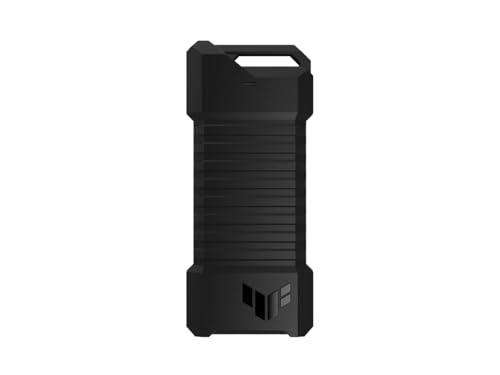
ASUS TUF Gaming A1 Rugged M.2 SSD Enclosure
Best for: Durable external storage for gaming consoles
- Max Transfer Speed
- Up to 10 Gbps
- Host Interface
- USB-C 3.2 Gen 2x1
- Drive Interface
- M.2 NVMe PCIe, SATA
- Supported Form Factors
- 2242, 2260, 2280
- Installation Style
- M.2 Q-Latch
- Compatibility
- PS5, Gaming
View on Amazon: ASUS TUF Gaming A1 Rugged M.2 SSD Enclosure Affiliate link
The ASUS TUF A1 is an external enclosure supporting both M.2 NVMe PCIe and SATA drives in 2242, 2260, and 2280 sizes. It uses a USB-C 3.2 Gen 2x1 interface for up to 10 Gbps transfer speeds. The design includes a Q-Latch for easy installation and meets MIL-STD-810H drop resistance standards. This unit suits users needing durable storage for gaming consoles or laptops.
Pros
- Supports both M.2 NVMe PCIe and SATA SSDs
- USB-C 3.2 Gen 2x1 interface with up to 10 Gbps speed
- M.2 Q-Latch mechanism simplifies drive installation
- Meets MIL-STD-810H drop resistance and IP68 water/dust standards
Cons
- Limited to 10 Gbps transfer speeds
- Heavier at 8.78 ounces compared to lighter alternatives
- Does not include an internal SSD
Good fit if
- You need to connect SATA or NVMe drives to a PC or console
- You require a durable enclosure with water and dust resistance
- You prefer tool-free installation via the Q-Latch mechanism
Skip if
- You need transfer speeds faster than 10 Gbps
- You want a compact, lightweight portable drive solution
- You prefer a simpler, non-ruggedized design
Verdict: ASUS TUF A1 M.2 NVMe/SATA Enclosure offers robust durability and flexible drive support for users prioritizing toughness and ease of use over maximum speed.
Specifications side by side
| Spec | ASUS ROG Strix Arion 10Gbps NVMe Enclosure | ASUS TUF Gaming A1 Rugged M.2 SSD Enclosure |
|---|---|---|
| Max Transfer Speed | Up to 10 Gbps | Up to 10 Gbps |
| Host Interface | USB Type-C 3.2 Gen 2 | USB-C 3.2 Gen 2x1 |
| Drive Interface | PCIe NVMe (M Key, B+M Key) | M.2 NVMe PCIe, SATA |
| Supported Form Factors | 2230, 2242, 2260, 2280 | 2242, 2260, 2280 |
| Cooling System | Aluminum alloy case with thermal pads | not stated |
| Installation Style | not stated | M.2 Q-Latch |
| Interface | NVMe | SATA III |
| Form Factor | M.2 2280 | M.2 |
| Compatibility | not stated | PS5, Gaming |
| Transfer Speed | 10Gbps | 10Gbps |
| Material | Aluminum | not stated |
| Dimensions | 7.1 × 3.8 × 1.6 inches | 4.93 × 2.14 × 0.52 inches |
| Weight | 3.46 ounces | 8.78 ounces |
| Size | Black|up to 10Gbps | TUF A1|up to 10Gbps |
| Color | Black | A1|up to 10Gbps |
| Model | ROG Strix Arion ESD-S1C | ESD-T1A/BLK/G/AS// |
ASUS SSD Enclosures Compared
The ASUS lineup splits into two distinct categories based on interface and form factor. The ASUS ROG Strix Arion 10Gbps NVMe Enclosure supports NVMe drives in a 2280 form factor. It uses aluminum for cooling and targets users who need thermal management alongside aesthetic customization. This model suits those prioritizing speed and heat dissipation over raw durability.
The ASUS TUF Gaming A1 Rugged M.2 SSD Enclosure supports both NVMe and SATA III interfaces. It is built for durability and explicitly lists compatibility with PS5 and gaming consoles. This rugged option suits shoppers who value toughness and flexible drive support. You choose the Arion for performance and the TUF A1 for robust, console-ready storage.
Who ASUS Enclosures Suit
ASUS targets two distinct needs with its current lineup. The ROG Strix Arion focuses on NVMe performance with aluminum thermal management. It fits users who prioritize heat dissipation and aesthetic customization. The TUF Gaming A1 shifts toward durability and SATA III support. It suits those needing rugged protection for gaming consoles or general use. You will not find USB 3.2 Gen 2x2 speeds or eMMC support in this range. The selection covers standard 2280 NVMe and compact SATA drives. If you require Thunderbolt connectivity or M.2 2242 form factors, these specific models do not apply to your setup.
How to choose the right one
-
Match the interface type
You must verify whether your drive uses NVMe or SATA III protocols before purchasing an enclosure. The ASUS ROG Strix Arion supports NVMe interfaces, delivering higher potential throughput for compatible drives. In contrast, the ASUS TUF Gaming A1 is designed for SATA III connections. Using the wrong interface type will prevent the drive from functioning entirely. Check your SSD’s specifications to ensure the enclosure’s host interface aligns with your drive’s internal protocol. This compatibility check is the most critical first step in selecting the correct hardware for your setup.
-
Check form factor size
M.2 drives come in various physical dimensions, commonly known as form factors. The ASUS ROG Strix Arion is built specifically for the 2280 size, which is the standard length for most consumer NVMe drives. If you possess a shorter or longer M.2 stick, this enclosure may not secure it properly. Ensure your drive’s physical dimensions match the enclosure’s requirements. Mismatched sizes can lead to poor contact or physical damage. Always measure your drive’s length and width before buying to guarantee a snug fit within the chosen enclosure’s mounting mechanism.
-
Evaluate thermal management
SSDs generate significant heat during sustained data transfers, which can throttle performance. The ASUS ROG Strix Arion utilizes an aluminum construction to act as a heatsink, drawing heat away from the drive. This passive cooling method helps maintain consistent speeds under heavy loads. The TUF Gaming A1 also uses durable materials but prioritizes ruggedness over explicit thermal optimization. If you plan to transfer large files frequently, prioritize enclosures with metal casings that aid in heat dissipation to prevent overheating and speed reduction.
-
Assess transfer speed limits
The maximum transfer speed of an enclosure is determined by its connection interface, not just the drive inside. Both the ASUS ROG Strix Arion and the TUF Gaming A1 support speeds up to 10Gbps. This limit is imposed by the USB-C host interface. Even if you install a faster NVMe drive, you cannot exceed the enclosure’s 10Gbps ceiling. Consider whether this speed meets your workflow needs. For most external storage tasks, 10Gbps provides ample bandwidth, but professional video editors might seek higher limits for massive file transfers.
-
Consider durability needs
If you frequently transport your external drive, durability becomes a key factor. The ASUS TUF Gaming A1 is marketed as a rugged enclosure, suitable for gaming consoles and mobile use. Its design emphasizes toughness and ease of use in demanding environments. The ROG Strix Arion focuses more on thermal performance and aesthetics for stationary setups. Evaluate where you will use the drive most often. If it will travel in a bag or connect to consoles, the rugged TUF model offers better protection against physical stress and accidental drops.
Frequently asked questions
Does the ASUS ROG Strix Arion support SATA drives?
No, this enclosure is designed strictly for NVMe interfaces. It accommodates M.2 2280 form factor drives only. You must verify your drive type before installation, as SATA III models will not fit or function within this specific housing.
What is the maximum transfer speed for ASUS enclosures?
Both listed models support up to 10Gbps transfer speeds. This limit applies regardless of whether you use the NVMe or SATA III version. Actual performance depends on your host device and the connected SSD, but the enclosure hardware caps at this rate.
Is the ASUS TUF A1 compatible with PS5?
Yes, the TUF Gaming A1 is explicitly compatible with the PS5. It supports SATA III drives, making it suitable for expanding console storage. The rugged design ensures durability for gaming environments while maintaining reliable connection stability through its USB-C host interface.
How do I cool the SSD inside the ASUS enclosure?
The ROG Strix Arion uses an aluminum body to dissipate heat effectively. This material helps manage thermal output during sustained data transfers. The TUF A1 focuses on rugged durability rather than active cooling, relying on its robust construction for protection.
What connection type do these ASUS enclosures use?
Both the ROG Strix Arion and TUF Gaming A1 use a USB-C host interface. This connection type provides the necessary bandwidth for 10Gbps speeds. You will need a USB-C port on your computer or device to utilize these enclosures fully.
Which ASUS enclosure is best for thermal management?
The ROG Strix Arion is the top choice for thermal management. Its aluminum construction aids in heat dissipation for NVMe drives. This makes it ideal for users who prioritize temperature control and aesthetic customization over the rugged durability offered by the TUF series.