Best 40Gbps SSD Docking Stations: 4 Spec-Based Picks
As an Amazon Associate we earn from qualifying purchases. Links on this page are affiliate links.
You need the best 40Gbps SSD docking stations to move large files quickly. This guide compares 4 options using only published specifications. The ORICO 40Gbps Dual-Bay NVMe Cloner Dock leads because it offers fast offline NVMe duplication for M-Key drives. Each pick is based strictly on the specs listed on the product pages. You will find details on transfer speeds, bay counts, and cooling methods. This helps you decide which dock fits your workflow. Whether you need bulk duplication or simple access, the data shows the right choice.
Quick picks
| # | Product | Best for | Price |
|---|---|---|---|
| 1 | ORICO 40Gbps Dual-Bay NVMe Cloner Dock Best overall | fast offline NVMe duplication | Check price of ORICO 40Gbps Dual-Bay NVMe Cloner Dock on Amazon |
| 2 | AMZPILOT 40Gbps USB4 M.2 NVMe Dock Best budget | fast NVMe access without cloning | Check price of AMZPILOT 40Gbps USB4 M.2 NVMe Dock on Amazon |
| 3 | MAIWO 4-Bay 40Gbps NVMe Cloner Best cooling fan | Bulk NVMe duplication and active cooling | Check price of MAIWO 4-Bay 40Gbps NVMe Cloner on Amazon |
| 4 | UGREEN 40Gbps Dual-Bay NVMe Cloner Best premium | dual-drive cloning and software RAID setups | Check price of UGREEN 40Gbps Dual-Bay NVMe Cloner on Amazon |
The best fit for you
- You want fast offline NVMe duplication ORICO 40Gbps Dual-Bay NVMe Cloner Dock It features dual-bay offline cloning for fast standalone duplication.
- You need fast access without cloning AMZPILOT 40Gbps USB4 M.2 NVMe Dock This compact USB4 dock offers high-speed access without cloning features.
- You need bulk duplication with cooling MAIWO 4-Bay 40Gbps NVMe Cloner Its four-bay design and active cooling fan handle heavy workloads.
- You want dual-drive cloning and RAID UGREEN 40Gbps Dual-Bay NVMe Cloner It supports offline cloning and flexible data management for dual drives.
Our 4 picks

ORICO 40Gbps Dual-Bay NVMe Cloner Dock
Best for: fast offline NVMe duplication
- Transfer Speed
- 40Gbps (what this guide is about)
- Supported Drive Types
- M-Key NVMe
- Bay Count
- 2
- Offline Cloning
- One-button offline cloning
- Supported M.2 Sizes
- 2230, 2242, 2260, 2280, 22110
- Maximum Capacity
- 16TB
View on Amazon: ORICO 40Gbps Dual-Bay NVMe Cloner Dock Affiliate link
The ORICO IT28N-C is a dual-bay NVMe cloner with 40Gbps transfer speeds. It supports one-button offline cloning, meaning you can duplicate drives without a PC. The aluminum chassis includes a cooling fan and separate heatsinks for thermal management. It accepts M-Key NVMe drives up to 16TB in 2230 to 2280 sizes. This dock suits users who need fast, standalone duplication workflows.
Pros
- 40Gbps USB4 interface for rapid data transfer
- One-button offline cloning without PC connection
- Dual independent cooling with fan and heatsinks
- Supports M-Key NVMe drives up to 16TB
Cons
- Bandwidth is shared when using both bays
- Only supports M-Key NVMe, not SATA
- Heatsinks are integrated, not standalone enclosures
Good fit if
- You need to clone drives without a computer
- You require high-speed 40Gbps transfer rates
- You use M-Key NVMe SSDs in standard sizes
Skip if
- You need to clone SATA-based M.2 drives
- You require dedicated standalone drive enclosures
- You need independent bandwidth for each bay
Verdict: ORICO 40Gbps Dual-Bay NVMe Cloner delivers fast offline duplication for M-Key drives. It is ideal for users who prioritize speed and standalone cloning over per-bay bandwidth independence.

AMZPILOT 40Gbps USB4 M.2 NVMe Dock
Best for: fast NVMe access without cloning
- Transfer Speed
- 40Gbps (what this guide is about)
- Supported Drive Types
- M.2 NVMe
- Supported M.2 Sizes
- 2230, 2242, 2260, 2280, 22110
- Maximum Capacity
- 8TB
- Form Factor
- M.2 2230
- Compatibility
- Laptop
View on Amazon: AMZPILOT 40Gbps USB4 M.2 NVMe Dock Affiliate link
The AMZPILOT USB4 dock delivers 40Gbps transfer speeds for M.2 NVMe PCIe 4.0 SSDs. It supports capacities up to 8TB and fits sizes from 2230 to 22110. The aluminum alloy case with cooling strips helps manage heat during heavy use. This tool-free reader works with Windows, Mac, and Linux systems. It is a compact solution for users needing fast external storage access.
Pros
- 40Gbps USB4 transfer speed
- Supports up to 8TB capacity
- Aluminum alloy case with cooling strips
- Tool-free installation design
- Compatible with Windows, Mac, and Linux
Cons
- Operates at high temperatures exceeding 60 °C
- Does not support M.2 SATA SSDs
- Lacks RAID or cloning functionality
Good fit if
- You need fast 40Gbps data transfers
- You use M.2 NVMe drives up to 8TB
- You want a compact, tool-free reader
Skip if
- You require M.2 SATA SSD support
- You need hardware RAID or cloning features
- You prefer a cooler operating temperature
Verdict: AMZPILOT 40Gbps USB4 NVMe Dock is a practical choice for users who need high-speed access to NVMe drives without complex setup. It fits those who prioritize transfer speed and compact design over advanced features like cloning.

MAIWO 4-Bay 40Gbps NVMe Cloner
Best for: Bulk NVMe duplication and active cooling
- Transfer Speed
- 40Gbps (what this guide is about)
- Supported Drive Types
- NVMe SSD
- Bay Count
- 4
- Offline Cloning
- 1-to-1 & 1-to-Multiple
- Cooling Type
- Cooling fan & heatsink
- Features
- Offline Clone
View on Amazon: MAIWO 4-Bay 40Gbps NVMe Cloner Affiliate link
This MAIWO docking station offers four bays for simultaneous M.2 NVMe drive access. It supports 40Gbps transfer speeds via USB 4.0. The unit includes a built-in cooling fan and heatsink to manage thermal output during intensive tasks. You can perform 1-to-1 or 1-to-Multiple offline cloning without a computer. It accommodates various drive lengths from 2230 to 22110. This setup suits data centers or video teams needing bulk duplication.
Pros
- Four bays for simultaneous read/write operations
- 40Gbps transfer speed via USB 4.0
- Built-in cooling fan and heatsink
- Offline cloning without a computer
Cons
- 1-pound weight adds bulk to your setup
- No mention of software RAID support
- No mention of individual bay status displays
Good fit if
- You need to clone multiple NVMe drives at once
- You work with large video files or data backups
- You want active cooling for sustained performance
Skip if
- You only have one or two NVMe drives to manage
- You need a compact, portable solution under 1 pound
- You require software RAID configuration options
Verdict: MAIWO 4-Bay 40Gbps NVMe Cloner fits professionals who duplicate large volumes of data daily. Its four-bay design and active cooling handle heavy workloads better than single-bay docks.
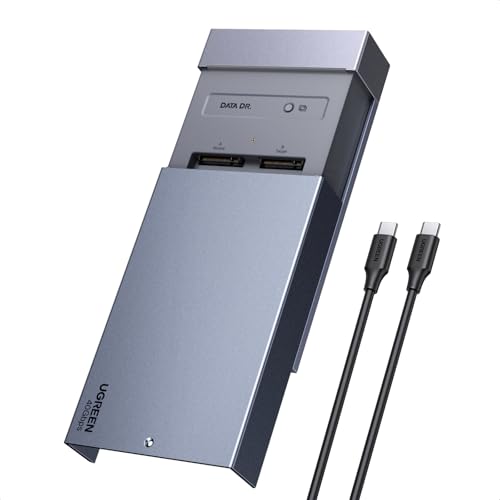
UGREEN 40Gbps Dual-Bay NVMe Cloner
Best for: dual-drive cloning and software RAID setups
- Transfer Speed
- 40Gbps (what this guide is about)
- Offline Cloning
- One-click offline cloning
- Supported M.2 Sizes
- 2230/2242/2260/2280
- Maximum Capacity
- 16TB
- Cooling Type
- Aluminum alloy top shell, 40mm fan
- Interface
- NVMe
View on Amazon: UGREEN 40Gbps Dual-Bay NVMe Cloner Affiliate link
This UGREEN docking station supports two M.2 NVMe drives with 40Gbps transfer speeds. It features one-click offline cloning and software RAID modes including 0, 1, PM, and Union. The aluminum alloy shell and 40mm cooling fan manage heat for sustained performance. You can install drives up to 8TB each, totaling 16TB. It works with Windows, macOS, Linux, and ChromeOS.
Pros
- 40Gbps transfer speed for fast data movement
- One-click offline cloning without a PC
- Supports software RAID 0, 1, PM, and Union
- Dual-bay design handles up to 16TB total capacity
- Active cooling with a 40mm fan and aluminum shell
Cons
- Requires the target disk to be larger than the source data
- Only supports software RAID, not hardware RAID
- Lacks hardware RAID options found in some competitors
Good fit if
- You need to clone drives without a computer
- You want software RAID flexibility for different use cases
- You require active cooling for dual drives
Skip if
- You prefer hardware RAID over software solutions
- You need to clone drives where the target is smaller than the source data
- You only have a single M.2 drive to use
Verdict: UGREEN 40Gbps Dual-Bay NVMe Cloner offers robust cloning and RAID features for users managing large dual-drive setups. It is ideal for creators and IT professionals who need offline duplication and flexible data management on Windows or Mac systems.
Specifications side by side
| Spec | ORICO 40Gbps Dual-Bay NVMe Cloner Dock | AMZPILOT 40Gbps USB4 M.2 NVMe Dock | MAIWO 4-Bay 40Gbps NVMe Cloner | UGREEN 40Gbps Dual-Bay NVMe Cloner |
|---|---|---|---|---|
| Transfer Speed | 40Gbps | 40Gbps | 40Gbps | 40Gbps |
| Supported Drive Types | M-Key NVMe | M.2 NVMe | NVMe SSD | not stated |
| Bay Count | 2 | not stated | 4 | not stated |
| Offline Cloning | One-button offline cloning | not stated | 1-to-1 & 1-to-Multiple | One-click offline cloning |
| Supported M.2 Sizes | 2230, 2242, 2260, 2280, 22110 | 2230, 2242, 2260, 2280, 22110 | not stated | 2230/2242/2260/2280 |
| Maximum Capacity | 16TB | 8TB | not stated | 16TB |
| Cooling Type | Aluminum heatsinks, cooling fan | not stated | Cooling fan & heatsink | Aluminum alloy top shell, 40mm fan |
| Interface | NVMe | NVMe | NVMe | NVMe |
| Form Factor | M.2 2280 | M.2 2230 | not stated | M.2 |
| Cooling | not stated | not stated | Cooling Fan | not stated |
| Compatibility | not stated | Laptop | not stated | not stated |
| Features | Offline Clone | not stated | Offline Clone | Offline Clone |
| Material | not stated | Aluminum | not stated | not stated |
| Host Interface | USB-C | USB-C | not stated | not stated |
| Dimensions | 5.71 × 2.91 × 1.38 inches | 2.74 × 2.74 × 0.61 inches | 8.07 × 7.59 × 2.75 inches | 5.04 × 3.15 × 0.59 inches |
| Weight | not stated | 3.5 ounces | 1 pounds | not stated |
| Size | IT28N | 2.74 x 2.74 x 0.61 inches | not stated | not stated |
| Color | Silver | Space Grey | Black | silver |
| Model | IT28N-C | Pilot C50D-R | 4 Bay USB4.0 NVMe Cloner Dock | 65733US |
How to choose the right 40Gbps dock
-
Check bay count needs
Determine if you need to clone multiple drives simultaneously. The ORICO and UGREEN docks feature dual-bay designs, allowing you to duplicate data between two NVMe drives at once. This is ideal for users who prioritize speed and standalone cloning over per-bay bandwidth independence. If you only need to access a single drive, a single-bay unit like the AMZPILOT may suffice. Consider your workflow to avoid paying for unused bays or needing multiple devices.
-
Verify offline cloning support
Ensure the dock supports offline duplication if you need to clone without a computer. The ORICO, MAIWO, and UGREEN models include this feature, letting you press a button to copy data directly between drives. This is useful for quick backups or duplicating drives in the field. The AMZPILOT lacks this feature, so it is better for users who need fast access to a single drive via a host computer. Choose based on your need for standalone operation.
-
Assess cooling requirements
High-speed transfers generate heat, so consider thermal management for heavy workloads. The MAIWO 4-Bay NVMe Cloner includes an active cooling fan, which helps maintain performance during bulk duplication tasks. This is beneficial for professionals who duplicate large volumes of data daily. Single-bay docks like the AMZPILOT rely on passive cooling through their aluminum chassis. If you plan to run the dock continuously, active cooling may prevent throttling and extend drive life.
-
Confirm host interface compatibility
Your computer must have the correct port to utilize 40Gbps speeds. All listed docks use a USB-C host interface, but your system needs a USB4 or Thunderbolt 3/4 port to achieve the full transfer rate. The AMZPILOT is explicitly described as a USB4 dock, ensuring compatibility with high-speed standards. Other docks also support 40Gbps but require a compatible host controller. Check your computer’s specifications to ensure it can handle the bandwidth without bottlenecks.
-
Evaluate physical size constraints
Measure your workspace to ensure the dock fits comfortably. The AMZPILOT is notably compact, measuring 2.74 x 2.74 x 0.61 inches, making it easy to store or carry. The MAIWO 4-Bay unit is significantly larger at 8.07 inches in length due to its four-bay design and fan. The ORICO and UGREEN dual-bay models fall in between. Choose a size that matches your desk space or portability needs, as larger docks may require more room for ventilation.
Frequently asked questions
Does a 40Gbps dock support all M.2 SSDs?
Most docks in this list support NVMe drives, typically in the M.2 2280 form factor. The ORICO and UGREEN models specifically note M-Key compatibility. You should verify your drive’s interface and physical size before purchasing to ensure it fits the bay correctly.
Can I clone drives without connecting to a computer?
Yes, several options offer offline cloning capabilities. The ORICO, MAIWO, and UGREEN docks support offline duplication. This allows you to copy data between drives independently. The AMZPILOT dock does not list this feature, so it requires a host connection for operations.
Do dual-bay docks share bandwidth between slots?
The specifications for the ORICO and UGREEN dual-bay models do not explicitly state per-bay bandwidth independence. They both operate at a 40Gbps transfer speed. You should assume the total bandwidth may be shared when using both bays simultaneously for cloning tasks.
Which dock is best for large volume duplication?
The MAIWO 4-Bay NVMe Cloner is designed for bulk workloads. It features four bays and an active cooling fan to manage heat during heavy use. This makes it more suitable for professionals duplicating large volumes of data compared to single or dual-bay alternatives.
Is aluminum construction standard for these docks?
The AMZPILOT dock explicitly uses an aluminum material for its casing. Other models like the ORICO and UGREEN are described by color but do not specify their material in the provided data. You should check the product details if heat dissipation via metal is a priority.
Can I use these docks with Mac and Windows?
The UGREEN dock is noted as suitable for Windows or Mac systems. While other docks use USB-C interfaces which are generally compatible, only the UGREEN explicitly mentions this cross-platform support in the provided specifications. You should verify OS compatibility for other models if needed.
How large are these docking stations physically?
Sizes vary significantly by model. The AMZPILOT is compact at 2.74 x 2.74 x 0.61 inches. The MAIWO 4-Bay model is much larger at 8.07 x 7.59 x 2.75 inches. The ORICO and UGREEN dual-bay docks fall in between these dimensions.