Best Pcie 5.0 Nvme SSDs: 15 Spec-Based Picks
As an Amazon Associate we earn from qualifying purchases. Links on this page are affiliate links.
Finding the right pcie 50 nvme SSD helps you maximize bandwidth for demanding gaming and desktop workloads. The KIOXIA Exceria 1TB PCIe 5.0 SSD leads our list because its M.2 2280 form factor and PCIe 5.0 interface deliver fast random IOPS throughput for modern setups.
We compared 15 products using the specifications published on their listings to highlight practical hardware differences. This guide helps you decide which drive matches your system cooling, motherboard form factor, and storage capacity requirements.
Quick picks
The best fit for you
- You build a PCIe 5.0 gaming desktop requiring high IOPS KIOXIA Exceria 1TB PCIe 5.0 SSD This M.2 2280 drive utilizes PCIe 5.0 architecture and 3D QLC NAND to deliver fast random IOPS.
- You need maximum storage capacity with top sequential read speeds Corsair MP700 PRO SE 4TB PCIe 5.0 SSD This drive combines a 4TB TLC layout with PCIe 5.0 sequential read speeds reaching up to 14,000 MB/s.
- You need PCIe 5.0 storage with an integrated cooling heatsink Crucial P510 2TB PCIe 5.0 SSD with Heatsink It features an integrated heatsink and verified laptop and desktop compatibility across a 2TB TLC design.
- You manage enterprise servers equipped with dedicated U.2 backplanes Solidigm D7-PS1030 6.4TB U.2 Enterprise SSD This 6.4TB drive connects directly via an enterprise 2.5-inch 15mm U.2 form factor over PCIe 5.0.
Our 15 picks

KIOXIA Exceria 1TB PCIe 5.0 SSD
Best for: PCIe 5.0 gaming rigs needing high IOPS
- Interface
- PCIe 5.0
- Storage Capacity
- 1TB
- Form Factor
- M.2 2280
- Compatibility
- Gaming
- Dimensions
- 3.19 × 0.09 × 0.87 inches
The KIOXIA Exceria G3 1TB is an internal PCIe 5.0 x4 solid state drive built for your gaming PC setup. It uses an M.2 2280 form factor packed with BiCS Flash 3D QLC NAND memory. You get rated throughput reaching up to 1,600,000 IOPS random read and 1,450,000 IOPS random write speeds. This drive suits you if you need compact Gen5 storage for faster gaming load times and responsive system workflows.
Pros
- PCIe 5.0 Gen5 x4 interface
- Up to 1,600,000 IOPS random read and 1,450,000 IOPS random write
- Compact M.2 2280 form factor
- High-density BiCS Flash 3D QLC NAND
Cons
- No heatsink included in the specifications
- Uses QLC NAND rather than TLC NAND
- Sequential read and write speeds are not listed
Good fit if
- You have a motherboard with an available PCIe 5.0 M.2 slot.
- You want high random read and write IOPS for gaming system responsiveness.
- You need 1TB of storage in a standard 2280 size.
Skip if
- You require an SSD with a pre-installed heatsink.
- You prefer TLC flash memory over QLC NAND.
Verdict: KIOXIA Exceria G3 1TB PCIe 5.0 SSD provides fast random IOPS throughput using an M.2 2280 design and 3D QLC NAND. It offers a straightforward Gen5 storage choice for modern gaming builds.

Crucial T700 1TB PCIe 5.0 SSD
Best for: Ryzen 7000 and Intel Gen5 gaming builds
- Interface
- PCIe 5.0
- Storage Capacity
- 1TB
- Max Read Speed
- Up to 11,700MB/s
- Max Write Speed
- 9,500MB/s
- Cooling
- Heatsink
- Compatibility
- Gaming
The Crucial T700 1TB PCIe 5.0 SSD delivers sequential read speeds up to 11,700 MB/s and write speeds up to 9,500 MB/s. It utilizes Micron TLC NAND flash on a standard M.2 form factor. You need an active PCIe 5.0 slot alongside a compatible motherboard heatsink to manage thermal output. It suits your AMD Ryzen 7000 or Intel 13th/14th Gen gaming rig.
Pros
- Up to 11,700 MB/s read and 9,500 MB/s write speeds
- Micron TLC NAND flash memory
- Five-year manufacturer warranty
- Includes Acronis True Image software and one-month Adobe Creative Cloud subscription
Cons
- Requires installation with a separate compatible heatsink
- Write speed tops out lower than read speed at 9,500 MB/s
Good fit if
- You have an Intel 13th/14th Gen or AMD Ryzen 7000 motherboard with an M.2 Gen5 slot.
- You own a motherboard heatsink capable of cooling high-speed PCIe 5.0 drives.
- You need sequential transfer rates reaching up to 11,700 MB/s for heavy workloads.
Skip if
- You lack an integrated motherboard M.2 heatsink or dedicated cooling solution.
- You require more than 1TB of storage capacity on a single drive.
Verdict: Crucial T700 1TB PCIe 5.0 SSD provides up to 11,700 MB/s read rates for modern desktop builds. You must pair it with dedicated heatsink cooling to handle its PCIe 5.0 throughput.

ELUTENG PCIe 5.0 NVMe M.2 Adapter Card
Best for: Adding M.2 NVMe drives via PCIe slots
- Interface
- PCIe 5.0
- Cooling
- Aluminum heatsink
- Form Factor
- M.2
- Dimensions
- 5.51 × 1.38 × 1.38 inches
The ELUTENG PCIe 5.0 NVMe M.2 Adapter Card is an expansion add-in board rather than a standalone solid-state drive. It converts an open PCIe 4x, 8x, or 16x slot into an M.2 NVMe connection. It supports 2230, 2242, 2260, and 2280 drive sizes and includes an aluminum heatsink. This card suits you if you need to install a PCIe 5.0 M.2 SSD into an existing desktop motherboard expansion slot.
Pros
- Fits PCIe 4x, 8x, and 16x motherboard expansion slots
- Accepts 2230, 2242, 2260, and 2280 M.2 NVMe form factors
- Includes an aluminum heatsink for drive cooling
- Uses solid-state capacitors for onboard voltage regulation
Cons
- Does not include onboard flash storage
- Incompatible with SATA NGFF, MSATA, and B-key M.2 drives
- Does not fit standard PCIe 1x or legacy PCI slots
Good fit if
- You need to mount an M.2 NVMe drive into an open PCIe expansion slot.
- You use a 2230, 2242, 2260, or 2280 form factor drive.
- You run Windows 8, 10, or 11 and want driverless operation.
Skip if
- You need a complete storage drive rather than a host adapter.
- You plan to connect an M.2 SATA or MSATA drive.
- You only have an open PCIe 1x slot on your motherboard.
Verdict: ELUTENG PCIe 5.0 NVMe M.2 Adapter Card provides an expansion slot solution to mount various M.2 NVMe SSD sizes onto your motherboard. It handles PCIe 5.0 drives using an aluminum heatsink and integrated voltage regulation.
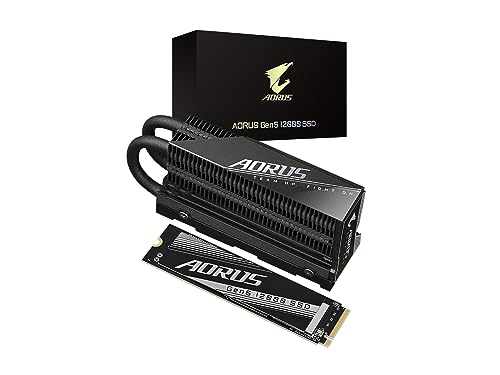
GIGABYTE AORUS Gen5 12000 1TB SSD
Best for: desktop PCIe 5.0 setups needing bundled cooling
- Interface
- PCIe 5.0
- Storage Capacity
- 1000GB (1TB)
- Form Factor
- M.2 2280
- Max Read Speed
- up to 11700 MB/s
- Max Write Speed
- up to 9500 MB/s
- Cache Type
- DDR4 DRAM cache
This M.2 2280 drive operates on the PCIe 5.0 x4 interface with NVMe 2.0. You get sequential read speeds up to 11,700 MB/s and sequential write speeds up to 9,500 MB/s. It includes an onboard DDR4 DRAM cache and 232-layer NAND flash. The unit comes bundled with a dedicated heatsink. This hardware suits you if you need high Gen5 transfer rates for heavy storage workloads.
Pros
- Sequential read speeds reach up to 11,700 MB/s
- Sequential write speeds reach up to 9,500 MB/s
- Equipped with DDR4 DRAM cache and 232-layer NAND
- Dedicated heatsink included in the box
Cons
- Total storage capacity is limited to 1TB
- Included heatsink height of 1.77 inches requires ample physical clearance
Good fit if
- You need read speeds reaching up to 11,700 MB/s on PCIe 5.0.
- You want an included heatsink directly from the manufacturer.
- You prefer an NVMe drive with a dedicated DDR4 DRAM cache.
Skip if
- You need more than 1TB of local storage space.
- You have tight clearance that cannot fit a 1.77-inch tall heatsink.
Verdict: GIGABYTE AORUS Gen5 12000 1TB SSD pairs PCIe 5.0 read speeds up to 11,700 MB/s with an included heatsink and dedicated DDR4 DRAM cache. It provides fast sequential throughput for desktop motherboards with sufficient vertical clearance.

Corsair MP700 PRO 1TB PCIe 5.0 SSD
Best for: PCIe 5.0 systems with existing heatsinks
- Interface
- PCIe 5.0
- Storage Capacity
- 1TB
- Form Factor
- M.2 2280
- Max Read Speed
- 11,700MB/sec
- NAND Type
- TLC
- Dimensions
- 0.87 × 3.15 × 0.12 inches
The Corsair MP700 PRO 1TB is a high-speed internal M.2 2280 drive built for systems supporting the PCIe Gen5 x4 interface and NVMe 2.0 standard. It uses 3D TLC NAND flash to reach sequential read speeds up to 11,700 MB/s and includes Microsoft DirectStorage support. This drive suits your setup if you own an Intel Z790 or AMD X670 motherboard with dedicated M.2 cooling.
Pros
- PCIe Gen5 x4 and NVMe 2.0 interface
- Up to 11,700 MB/s sequential read speed
- High-density 3D TLC NAND
- Microsoft DirectStorage support
Cons
- Separate SSD cooling hardware required
- DirectStorage requires a DirectX12 GPU with Shader Model 6.0
Good fit if
- You have an Intel Z790, AMD X670, or newer PCIe 5.0 motherboard.
- You already have a motherboard heatsink or dedicated M.2 cooler.
- You want PCIe 5.0 transfer speeds up to 11,700 MB/s.
Skip if
- You do not have dedicated M.2 cooling hardware ready.
- You need more than 1TB of storage space.
Verdict: Corsair MP700 PRO 1TB PCIe 5.0 SSD delivers PCIe Gen5 read speeds up to 11,700 MB/s via NVMe 2.0 and 3D TLC NAND. It is built for compatible modern motherboards that provide dedicated drive cooling.

Corsair MP700 PRO SE 4TB PCIe 5.0 SSD
Best for: Max-capacity high-speed PCIe 5.0 systems
- Interface
- PCIe 5.0
- Storage Capacity
- 4TB
- Form Factor
- M.2 2280
- Max Read Speed
- Up to 14,000MB/sec
- Max Write Speed
- 12,000MB/sec
- NAND Type
- TLC
The Corsair MP700 PRO SE is a high-capacity PCIe 5.0 x4 drive built for demanding workloads. You get 4TB of 3D TLC storage inside a standard M.2 2280 form factor. It delivers sequential speeds up to 14,000 MB/s read and 12,000 MB/s write via the NVMe 2.0 protocol. If you need maximum Gen5 bandwidth alongside DirectStorage support on modern Intel or AMD motherboards, this drive suits your setup.
Pros
- Sequential read speeds reach up to 14,000 MB/s and writes reach 12,000 MB/s
- Generous 4TB storage capacity using 3D TLC NAND flash
- Utilizes the high-bandwidth PCIe 5.0 x4 and NVMe 2.0 interface
- Supports Microsoft DirectStorage for direct GPU asset streaming
Cons
- Requires separate M.2 cooling or a motherboard heatsink to operate
- Base model includes no heatsink or cooling hardware
Good fit if
- You need top-tier sequential transfer speeds up to 14,000 MB/s.
- You want 4TB of high-speed 3D TLC storage for massive files.
- You already have a motherboard equipped with a dedicated M.2 heatsink.
Skip if
- You lack an integrated motherboard heatsink or active M.2 cooling setup.
- You run a motherboard without PCIe 5.0 M.2 slot support.
Verdict: Corsair MP700 PRO SE 4TB PCIe 5.0 SSD delivers top-bracket transfer rates up to 14,000 MB/s read alongside a spacious 4TB capacity. It is an ideal high-tier drive as long as your system supplies the required cooling.

TEAMGROUP T-Force GA PRO 2TB PCIe 5.0 SSD
Best for: PCIe 5.0 setups needing multi-tier SLC caching
- Interface
- PCIe 5.0
- Storage Capacity
- 2TB
- Form Factor
- M.2 2280
- Max Read Speed
- 10,000 MB/s
- Max Write Speed
- 8,500 MB/s
- Cache Type
- DRAM SLC Cache
The TEAMGROUP T-Force GA PRO is a 2TB internal SSD built on the PCIe 5.0 interface and M.2 2280 form factor. It combines 3D TLC NAND flash with both dedicated DRAM cache and an SLC cache to handle data transfers. A slim graphene heatsink manages heat dissipation without adding bulk. If you need Gen5 storage with dual-cache architecture for high-demand computing tasks, this drive fits your setup.
Pros
- Features both DRAM cache and SLC cache
- PCIe 5.0 interface in standard M.2 2280 form factor
- Built with 3D TLC NAND flash
- Includes a low-profile graphene heatsink
Cons
- Maximum capacity tops out at 2TB
- No manufacturer read or write speeds listed in specifications
- Lacks active fan cooling for Gen5 thermal output
Good fit if
- You need a PCIe 5.0 M.2 SSD equipped with both SLC and DRAM cache.
- You want a low-profile graphene heatsink that fits tight motherboard clearances.
Skip if
- You need high-capacity storage larger than 2TB.
- You prefer an SSD with a large active fan or tall finned heatsink.
Verdict: TEAMGROUP T-Force GA PRO 2TB PCIe 5.0 SSD delivers Gen5 connectivity alongside dedicated DRAM and SLC caching inside a slim graphene-cooled design. It offers multi-tier caching for heavy workloads without requiring bulky thermal hardware.

Corsair MP700 Elite 1TB PCIe 5.0 SSD
Best for: mainstream PCIe 5.0 gaming and system drives
- Interface
- PCIe 5.0
- Storage Capacity
- 1TB
- Max Read Speed
- Up to 10,000MB/s
- Max Write Speed
- Up to 8,500MB/s
- Form Factor
- M.2 2280
- NAND Type
- TLC
The Corsair MP700 Elite 1TB is an internal PCIe 5.0 x4 M.2 2280 solid-state drive built with 3D TLC NAND. It delivers sequential read speeds up to 10,000 MB/s and sequential write speeds up to 8,500 MB/s, alongside an endurance rating of 1,200 TBW. This drive suits you if you need Gen5 bandwidth for DirectStorage gaming and fast file transfers in a standard setup.
Pros
- Sequential read speeds up to 10,000 MB/s
- Sequential write speeds up to 8,500 MB/s
- High endurance rating of 1,200 TBW
- Supports Microsoft DirectStorage
- High-density 3D TLC NAND
Cons
- Comes without a pre-installed heatspreader on this model
- Peak read rate caps below faster Gen5 options
Good fit if
- You have a PCIe 5.0 motherboard slot with an existing heatsink.
- You want high-speed DirectStorage gaming capabilities.
Skip if
- You require speeds exceeding 10,000 MB/s.
- You need more than 1TB of storage space.
Verdict: Corsair MP700 Elite 1TB PCIe 5.0 SSD balances 10,000 MB/s sequential speeds with a 1,200 TBW endurance rating. It serves as a dependable Gen5 option if your motherboard includes its own M.2 cooling cover.

Solidigm D7-PS1030 6.4TB U.2 Enterprise SSD
Best for: enterprise servers with U.2 backplanes
- Interface
- PCIe 5.0
- Storage Capacity
- 6.4 TB
- Form Factor
- 2.5", U.2 15mm
The Solidigm D7-PS1030 is a 6.4TB internal enterprise solid-state drive. It features a PCIe 5.0 x4 NVMe interface paired with a 2.5-inch 15mm U.2 form factor instead of common M.2 designs. You get 6.4TB of enterprise storage capacity built for high-throughput infrastructure. This drive suits you if you manage enterprise servers or dedicated storage backplanes wired for Gen5 U.2 drives.
Pros
- PCIe 5.0 x4 NVMe interface
- 6.4TB storage capacity
- Enterprise 2.5-inch U.2 15mm form factor
Cons
- Uses a 15mm U.2 connection instead of standard M.2 slots
- Incompatible with standard consumer desktop motherboards without specialized cabling
Good fit if
- You run server hardware with 2.5-inch 15mm U.2 backplanes.
- You need 6.4TB of enterprise-grade PCIe 5.0 storage.
Skip if
- You need an M.2 2280 form factor for a desktop motherboard.
- You lack a compatible U.2 interface in your system.
Verdict: Solidigm D7-PS1030 6.4TB U.2 Enterprise SSD delivers PCIe 5.0 x4 speeds in an enterprise form factor. It is intended for systems with 2.5-inch 15mm U.2 connectivity.

Samsung 9100 PRO 1TB PCIe 5.0 SSD
Best for: high-speed Gen5 gaming and content creation
- Interface
- PCIe 5.0
- Storage Capacity
- 1TB
- Max Read Speed
- 14,800 MB/s
- Max Write Speed
- 13,400 MB/s
- Dimensions
- 3.16 × 0.87 × 0.11 inches
The Samsung 9100 PRO 1TB PCIe 5.0 SSD delivers sequential speeds up to 14,800 MB/s read and 13,400 MB/s write across a PCIe 5.0 x4 interface using the NVMe 2.0 protocol. Measuring 80.2 x 22.15 x 2.4 mm, it fits desktops, laptops, and PlayStation 5 systems. This drive suits you if you handle heavy data transfers, 4K video editing, or 3D rendering and need high Gen5 throughput backed by Samsung Magician management software.
Pros
- Sequential read speeds reach up to 14,800 MB/s
- Sequential write speeds reach up to 13,400 MB/s
- Compatible with PC, laptop, and PlayStation 5 systems
- Includes Samsung Magician software support for drive monitoring
Cons
- Does not include an integrated heatsink
- 1TB capacity may limit users needing large media archives
Good fit if
- You need Gen5 transfer rates up to 14,800 MB/s read and 13,400 MB/s write.
- You want PCIe 5.0 storage compatible with PC, laptop, or PlayStation 5.
- You plan to monitor and manage drive health using Samsung Magician software.
Skip if
- You require more than 1TB of onboard storage capacity.
- You want an SSD that comes pre-installed with a dedicated heatsink.
Verdict: Samsung 9100 PRO 1TB PCIe 5.0 SSD pairs top-tier Gen5 transfer rates up to 14,800 MB/s with broad hardware compatibility. It provides reliable high-bandwidth storage for intensive workloads across PC and console platforms.

Samsung 9100 PRO 2TB PCIe 5.0 SSD
Best for: high-throughput PCIe 5.0 gaming and workstation setups
- Interface
- PCIe 5.0
- Storage Capacity
- 2TB
- Form Factor
- M.2 2280
- Max Read Speed
- 14,700 MB/s
- Max Write Speed
- 13,400 MB/s
- Dimensions
- 3.2 × 0.9 × 0.09 inches
The Samsung 9100 PRO 2TB PCIe 5.0 SSD is a high-speed M.2 2280 drive designed for bandwidth-heavy workloads. It connects via a PCIe 5.0 x4 interface, delivering sequential read speeds up to 14,700 MB/s and write speeds up to 13,400 MB/s. Built with a 5nm controller and in-house DRAM, this drive suits you if you need top-tier transfer rates for fast gaming loads, AI applications, or massive creative file transfers.
Pros
- Sequential read speeds up to 14,700 MB/s and write speeds up to 13,400 MB/s
- Random read up to 1,850K IOPS and write up to 2,600K IOPS
- Power-efficient 5nm controller paired with in-house DRAM and NAND
- Integrated support via Samsung Magician Software for health and firmware updates
Cons
- Standard bare configuration does not include a pre-installed heatsink
- Requires a PCIe 5.0-compatible M.2 slot to reach advertised transfer rates
Good fit if
- You have a motherboard featuring an available PCIe 5.0 x4 M.2 slot with cooling.
- You run AI workflows, video editing, or games that utilize transfer rates up to 14,700 MB/s.
Skip if
- You do not have an existing motherboard heatsink to cover this bare 0.09-inch drive.
- You are using a PCIe 4.0 or older system that cannot utilize Gen5 throughput.
Verdict: Samsung 9100 PRO 2TB PCIe 5.0 SSD delivers sequential reads up to 14,700 MB/s and high random IOPS for demanding desktop workflows. Its slim 0.09-inch profile fits standard M.2 slots but requires your system to provide thermal cooling.

Crucial P510 2TB PCIe 5.0 SSD with Heatsink
Best for: Gen5 laptop and desktop thermal management
- Interface
- PCIe 5.0
- Storage Capacity
- 2TB
- Max Read Speed
- 11,000 MB/s
- Max Write Speed
- 9,500 MB/s
- Cooling
- Integrated Heatsink
- Compatibility
- Laptop, Desktop
The Crucial P510 is a 2TB PCIe 5.0 internal SSD fitted with an integrated heatsink and TLC NAND. It delivers up to 11,000 MB/s read speeds and 9,500 MB/s write speeds for compatible systems. The drive fits both desktops and laptops, making it suitable if you need Gen5 performance and bundled Acronis cloning software in a high-capacity drive.
Pros
- Up to 11,000 MB/s read and 9,500 MB/s write speeds
- Built-in heatsink for thermal control
- Micron TLC NAND flash architecture
- Bundled Acronis True Image software and one-month Adobe Creative Cloud access
Cons
- Integrated heatsink adds 0.38 inches of vertical height
- Maximum available capacity is limited to 2TB
Good fit if
- You want PCIe 5.0 read speeds up to 11,000 MB/s.
- You need an integrated factory heatsink for thermal stability.
- You plan to clone an existing drive using included Acronis software.
Skip if
- You need more than 2TB of internal storage space.
- You have an ultra-thin laptop slot that cannot clear a 0.38-inch profile.
Verdict: Crucial P510 2TB PCIe 5.0 SSD with Heatsink provides high-speed Gen5 throughput and TLC reliability with built-in cooling. It serves desktops and compatible laptops needing fast data transfers without adding a separate thermal solution.

Lexar NM1090 PRO 2TB PCIe 5.0 SSD
Best for: high-throughput PCIe 5.0 computing and DirectStorage gaming
- Interface
- PCIe 5.0
- Storage Capacity
- 2TB
- Form Factor
- M.2 2280
- Max Read Speed
- 14,000 MB/s
- Max Write Speed
- 13,000 MB/s
- Cache Type
- DRAM Cache, SLC Dynamic Cache
The Lexar NM1090 PRO 2TB is an internal M.2 2280 solid-state drive built on the PCIe 5.0 interface. It delivers sequential read speeds up to 14,000 MB/s and write speeds up to 13,000 MB/s. Powered by a 6nm controller, the drive includes both dedicated DRAM cache and dynamic SLC cache. It suits your build if you run heavy data workloads or modern games that utilize Microsoft DirectStorage.
Pros
- Sequential read speeds up to 14,000 MB/s and write speeds up to 13,000 MB/s
- Uses a 6nm controller for power efficiency and thermal control
- Equipped with both onboard DRAM cache and dynamic SLC cache
- Supports Microsoft DirectStorage for faster game loading
Cons
- The standard PRO configuration does not include a built-in heatsink
- Reaching maximum throughput requires a motherboard with PCIe 5.0 M.2 slots
Good fit if
- You need transfer speeds up to 14,000 MB/s for large data tasks.
- You want an M.2 2280 drive configured with dedicated DRAM caching.
Skip if
- You need a factory-installed heatsink included on your drive out of the box.
- You are installing into an older motherboard limited to PCIe 4.0 bandwidth.
Verdict: Lexar NM1090 PRO 2TB PCIe 5.0 SSD pairs top-tier 14,000 MB/s speeds with a modern 6nm controller and DRAM caching. It provides high-speed throughput for demanding PC workloads and DirectStorage gaming.

XPG Mars 980 Blade 1TB PCIe 5.0 SSD
Best for: high-speed Gen5 setups requiring onboard DRAM caching
- Interface
- PCIe 5.0
- Storage Capacity
- 1TB
- Form Factor
- M.2 2280
- Max Read Speed
- Up to 14,000 MB/s
- Max Write Speed
- 12,000 MB/s
- Cache Type
- DRAM Cache
The XPG Mars 980 Blade 1TB gives you access to PCIe 5.0 bandwidth with peak sequential read speeds up to 14,000 MB/s and write speeds reaching 12,000 MB/s. It utilizes the NVMe 2.0 protocol on a standard M.2 2280 form factor. Onboard DRAM caching helps sustain system responsiveness under heavy file transfers. This drive suits you if you need top-tier Gen5 throughput and dedicated cache for heavy storage workloads.
Pros
- Up to 14,000 MB/s read and 12,000 MB/s write speeds
- Onboard DRAM cache for sustained responsiveness
- Uses NVMe 2.0 protocol over PCIe Gen5 x4
- Built-in thermal throttling protection and S.M.A.R.T. monitoring
Cons
- No heatsink is listed in the specifications
- Read speed drops to 6,500 MB/s on PS5
Good fit if
- You need read throughput up to 14,000 MB/s for Gen5 systems.
- You want onboard DRAM caching for sustained data transfers.
Skip if
- You need an included heatsink out of the box.
- You require more than 1TB of base storage capacity.
Verdict: XPG Mars 980 Blade 1TB PCIe 5.0 SSD provides top-tier Gen5 throughput up to 14,000 MB/s alongside an onboard DRAM cache. It serves high-demand workloads well if your setup already includes dedicated M.2 cooling.

Sandisk WD_Black 4TB PCIe 5.0 SSD
Best for: high-throughput gaming systems and massive file workflows
- Interface
- PCIe 5.0
- Storage Capacity
- 4TB
- Form Factor
- M.2 2280
- Max Read Speed
- Up to 14,900 MB/s
- Max Write Speed
- Up to 14,000 MB/s
- Compatibility
- Gaming
This Sandisk WD_Black 4TB PCIe 5.0 SSD gives you high-capacity storage for demanding gaming rigs and heavy workstation tasks. The M.2 2280 drive runs across a PCIe Gen 5.0x4 interface, delivering sequential read speeds up to 14,900MB/s and random performance exceeding 2,300,000 IOPS. It maintains an average operating power of 7.5W or less. This setup suits you if you need fast NVMe storage for large gaming libraries and creative workloads.
Pros
- Sequential read speeds reach up to 14,900MB/s
- Random performance exceeds 2,300,000 IOPS
- Average operating power stays at or under 7.5W
- Includes Acronis True Image for Sandisk data migration
Cons
- Replaced by newer manufacturer product line
- Sandisk Dashboard health software supports Windows only
- Standard drive model does not include an integrated heatsink
Good fit if
- You need 4TB of capacity with sequential reads up to 14,900MB/s.
- You want Gen 5 random performance reaching over 2,300,000 IOPS.
- You operate on Windows and can use the bundled migration software.
Skip if
- You want the manufacturer's latest generation drive line.
- You run a non-Windows OS and require vendor dashboard monitoring.
- You need an included heatsink straight out of the box.
Verdict: Sandisk WD_Black 4TB PCIe 5.0 SSD delivers extreme sequential reads up to 14,900MB/s and immense capacity for data-heavy systems. It remains a viable high-speed option despite being superseded by a newer model.
Specifications side by side
| Spec | KIOXIA Exceria 1TB PCIe 5.0 SSD | Crucial T700 1TB PCIe 5.0 SSD | ELUTENG PCIe 5.0 NVMe M.2 Adapter Card | GIGABYTE AORUS Gen5 12000 1TB SSD | Corsair MP700 PRO 1TB PCIe 5.0 SSD | Corsair MP700 PRO SE 4TB PCIe 5.0 SSD | TEAMGROUP T-Force GA PRO 2TB PCIe 5.0 SSD | Corsair MP700 Elite 1TB PCIe 5.0 SSD | Solidigm D7-PS1030 6.4TB U.2 Enterprise SSD | Samsung 9100 PRO 1TB PCIe 5.0 SSD | Samsung 9100 PRO 2TB PCIe 5.0 SSD | Crucial P510 2TB PCIe 5.0 SSD with Heatsink | Lexar NM1090 PRO 2TB PCIe 5.0 SSD | XPG Mars 980 Blade 1TB PCIe 5.0 SSD | Sandisk WD_Black 4TB PCIe 5.0 SSD |
|---|---|---|---|---|---|---|---|---|---|---|---|---|---|---|---|
| Storage Capacity | 1TB | 1TB | not specified | 1000GB (1TB) | 1TB | 4TB | 2TB | 1TB | 6.4 TB | 1TB | 2TB | 2TB | 2TB | 1TB | 4TB |
| Interface | PCIe 5.0 Gen5 x4 | PCIe 5.0 | not specified | PCI Express Gen5 x4, NVMe 2.0 | PCIe Gen5 x4 | PCIe 5.0 x4, NVMe 2.0 | PCIe Gen5x4 | PCIe 5.0 x4 | PCIe 5.0 x4 | PCIe 5.0 x4, NVMe 2.0 | PCIe 5.0 x4 | PCIe 5.0 | PCIe Gen 5 | PCIe Gen5 x4, NVMe 2.0 | PCIe 5.0 x4 |
| Form Factor | M.2 2280 | not specified | not specified | M.2 2280 | M.2 2280 | M.2 2280 | M.2 2280 | not specified | 2.5", U.2 15mm | not specified | M.2 2280 | not specified | M.2 2280 | M.2 2280 | M.2 2280 |
| Max Read Speed | not specified | Up to 11,700MB/s | not specified | up to 11700 MB/s | 11,700MB/sec | Up to 14,000MB/sec | 10,000 MB/s | Up to 10,000MB/s | not specified | 14,800 MB/s | 14,700 MB/s | 11,000 MB/s | 14,000 MB/s | Up to 14,000 MB/s | Up to 14,900 MB/s |
| Max Write Speed | not specified | 9,500MB/s | not specified | up to 9500 MB/s | not specified | 12,000MB/sec | 8,500 MB/s | Up to 8,500MB/s | not specified | 13,400 MB/s | 13,400 MB/s | 9,500 MB/s | 13,000 MB/s | 12,000 MB/s | Up to 14,000 MB/s |
| Cache Type | not specified | not specified | not specified | DDR4 DRAM cache | not specified | not specified | DRAM SLC Cache | not specified | not specified | not specified | not specified | not specified | DRAM Cache, SLC Dynamic Cache | DRAM Cache | not specified |
| Cooling | not specified | not specified | Aluminum heatsink | Heatsink Included | not specified | not specified | Graphene Heatsink | not specified | not specified | not specified | not specified | Integrated Heatsink | not specified | not specified | not specified |
| Compatibility | Gaming | Gaming | not specified | not specified | not specified | not specified | not specified | not specified | not specified | not specified | not specified | Laptop, Desktop | not specified | not specified | Gaming |
| NAND Type | not specified | not specified | not specified | not specified | TLC | TLC | TLC | TLC | not specified | not specified | not specified | TLC | not specified | not specified | not specified |
| Size | 1 To | 1TB | not specified | not specified | 1TB | 4TB | 2TB | 1TB | not specified | 1 TB | 2TB | 2TB With Heatsink | 2TB | 1TB | 4TB |
| Dimensions | 3.19 × 0.09 × 0.87 inches | 3.15 × 0.87 × 0.15 inches | 5.51 × 1.38 × 1.38 inches | 5.2 × 3.16 × 1.77 inches | 0.87 × 3.15 × 0.12 inches | 3.17 × 0.87 × 0.09 inches | not specified | 3.15 × 0.87 × 0.09 inches | not specified | 3.16 × 0.87 × 0.11 inches | 3.2 × 0.9 × 0.09 inches | 3.1 × 0.9 × 0.38 inches | 6.49 × 4.13 × 0.59 inches | 31.5 × 1.77 × 8.66 inches | 3.15 × 0.87 × 0.09 inches |
| Weight | not specified | 0.35 ounces | not specified | not specified | not specified | not specified | 0.8 ounces | not specified | not specified | not specified | 0.32 ounces | 1.06 ounces | 1.6 ounces | 0.39 ounces | not specified |
| Model | EXCERIA G3 | CT1000T700SSD3 | ELT_ADAPTER CARD_NVME_PCIE4.0_GY | AG512K1TB | CSSD-F1000GBMP700PNH | CSSD-F4000GBMP700PNHS | TM8FFJ002T0C129 | CSSD-F1000GBMP700ENH | SB5PH27E064T001 | MZ-VAP1T0BW | MZ-VAP2T0B/AM | CT2000P510SSD5-01 | LNM109P002T-RNNNU | SMAR-980B-1TCS | WDS400T1X0M |
| Color | not specified | Black | NVMe PCIe 4.0 | Black | Black | Black | not specified | Black | silver | Black | Black | Black | Not Available | not specified | Black |
Is a PCIe 5.0 SSD Worth It?
A PCIe 5.0 interface increases drive bandwidth over prior standards, with listed models reaching sequential read speeds between 10,000 MB/s and 14,900 MB/s. In practical use, this throughput accelerates massive file transfers and supports DirectStorage gaming. Drives using this interface also pair high bus bandwidth with hardware features like dedicated DDR4 DRAM caches, multi-tier SLC caching, or enterprise U.2 form factors. For standard daily computing tasks that do not saturate high-bandwidth storage, these extreme transfer rates provide no functional difference.
Worth it if
- You need sequential read throughput reaching up to 14,900 MB/s for massive file workflows or DirectStorage gaming.
- You run enterprise servers equipped with 2.5-inch 15mm U.2 backplane connections.
- You operate workstations requiring dedicated onboard DRAM caches and multi-tier SLC caching.
Skip it if
- You use hardware that lacks PCIe 5.0 M.2 slot support or compatible PCIe slot adapters.
- You perform everyday desktop tasks that do not push sequential transfer rates past previous generation speeds.
To reach these maximum rated sequential read speeds, verify your system includes a compatible motherboard with pcie 50.
How We Picked These SSDs
We identified PCIe 5.0 SSDs by checking the interface specifications and titles on Amazon listings. Every model on this list explicitly specifies a PCIe 5.0 interface. You see only one capacity or variant for each product family to keep the selection clear. All details come directly from published manufacturer specifications, as products are not physically handled.
The 15 picks are ordered with products in stock first, then by Amazon sales rank. You can compare models using key published specifications, including form factor, NAND flash type, cache type, and cooling hardware. Live availability updates at least daily on the page.
Choosing the Right PCIe 5.0 NVMe SSD
-
Verify Form Factor Compatibility
Check your motherboard physical interface before selecting a drive. Standard consumer desktop and laptop boards utilize M.2 slots designed for M.2 2280 sticks. In contrast, enterprise server systems require different physical connections. For example, the Solidigm D7-PS1030 uses a 2.5-inch 15mm U.2 connector engineered for server backplanes rather than standard desktop M.2 slots. Installing a U.2 drive into a consumer PC requires specific backplane cabling that standard motherboards do not provide. Always match the drive form factor to your system storage connectors.
-
Compare NAND Flash Memory
Review the NAND flash type listed in the drive specifications. Consumer PCIe 5.0 SSDs typically use TLC or QLC flash memory cells. TLC flash stores three bits per cell and generally offers better sustained write capability for intensive workloads. QLC flash stores four bits per cell, providing dense storage for gaming systems focused heavily on data read tasks. The KIOXIA Exceria 1TB uses 3D QLC NAND to provide fast random IOPS throughput. If your workload involves regular large file writes, verify whether the drive uses TLC or QLC flash before deciding.
-
Check Dedicated Cache Configuration
Look at the memory cache architecture specified for each SSD. PCIe 5.0 drives experience significant data bursts, making internal cache design crucial for steady performance. Some drives incorporate dedicated DRAM cache alongside multi-tier SLC caching schemes to accelerate file management and maintain data flow under continuous load. The TEAMGROUP T-Force GA PRO features both SLC cache and dedicated DRAM cache to manage heavy storage demands. If you run sustained workstation workloads, pick an SSD that specifies dedicated DRAM caching rather than relying entirely on host memory buffer systems.
-
Evaluate Sequential Read Speeds
Examine the maximum sequential read throughput to match your specific productivity or gaming needs. Gen5 drives on the market offer distinct speed tiers, typically ranging from 10,000 MB/s up to near theoretical interface maximums. Top-tier drives like the Sandisk WD_Black 4TB achieve sequential read speeds up to 14,900 MB/s, targeting massive media transfers and data-heavy production tasks. Mainstream PCIe 5.0 setups running typical gaming libraries often function well on lower tiers. Compare the sequential megabytes per second to ensure the transfer speed supports your daily workload intensity.
-
Assess Drive Endurance Ratings
Check the Terabytes Written specification to understand drive lifespan under heavy write operations. Every write cycle wears NAND cells down over time. If you install large games once and read them often, baseline endurance is sufficient. For users compiling code, editing raw video footage, or frequently rewriting project files, high TBW ratings are essential to prevent premature wear. The Corsair MP700 Elite 1TB specifies a 1,200 TBW endurance rating for its capacity. Review published TBW specifications against your estimated weekly write volume before selecting a primary drive.
-
Consider PCIe Slot Adapters
Check your available motherboard expansion slots if your dedicated M.2 slots are already occupied. Motherboards often have secondary PCIe slots connected to the chipset or CPU that remain unused. Rather than replacing an existing drive, you can mount an M.2 SSD onto an add-in card. The ELUTENG PCIe 5.0 NVMe M.2 Adapter Card installs directly into a PCIe expansion slot and includes integrated voltage regulation and an aluminum heatsink. This lets you add high-speed storage without needing extra native M.2 connectors on your motherboard.
Frequently asked questions
What read speeds can you expect from a PCIe 5.0 SSD?
You can expect sequential read speeds ranging from 10,000 MB/s to 14,900 MB/s across top-tier drives. For example, the Corsair MP700 Elite reaches 10,000 MB/s, while the Crucial T700 delivers up to 11,700 MB/s. Flagship models achieve even higher figures, such as the Corsair MP700 PRO SE at 14,000 MB/s, Samsung 9100 PRO up to 14,800 MB/s, and Sandisk WD_Black reaching 14,900 MB/s.
What types of NAND flash do PCIe 5.0 SSDs use?
PCIe 5.0 drives primarily utilize either 3D TLC or 3D QLC NAND flash memory. Drives such as the Corsair MP700 PRO, Crucial P510, and TEAMGROUP T-Force GA PRO use TLC NAND, which balances write endurance and sustained performance. Other options, like the KIOXIA Exceria G3, feature 3D QLC NAND to provide fast random IOPS storage for everyday gaming desktop configurations.
Do PCIe 5.0 NVMe SSDs feature dedicated DRAM caching?
Yes, several PCIe 5.0 SSDs include dedicated onboard DRAM to manage data mapping tables efficiently. The GIGABYTE AORUS Gen5 12000 features a dedicated DDR4 DRAM cache alongside its Gen5 controller. Similarly, the Lexar NM1090 PRO, XPG Mars 980 Blade, and TEAMGROUP T-Force GA PRO integrate onboard DRAM caching to maintain rapid transfer speeds during heavy data workloads.
How can you use an M.2 PCIe 5.0 SSD without an open motherboard M.2 slot?
You can install an add-in card to place an M.2 drive into a standard PCIe slot. The ELUTENG PCIe 5.0 NVMe M.2 Adapter Card fits directly into a PCIe expansion slot on your motherboard. It accommodates various M.2 NVMe SSD sizes and incorporates an aluminum heatsink along with integrated voltage regulation to manage power and thermals.
What endurance ratings can you find on PCIe 5.0 SSDs?
Endurance ratings vary by drive design and capacity, with high-tier Gen5 models providing strong terabytes written metrics. For example, the Corsair MP700 Elite 1TB specifies an endurance rating of 1,200 TBW alongside its 10,000 MB/s sequential speed. This metric indicates how much total data you can write to the drive over its operational lifespan under typical desktop conditions.
What capacities are available on consumer PCIe 5.0 SSDs?
Consumer PCIe 5.0 NVMe drives are widely available in 1TB, 2TB, and 4TB capacities. Options like the Samsung 9100 PRO come in 1TB and 2TB versions, while the Crucial P510 and Lexar NM1090 PRO provide 2TB options. If you need maximum capacity, the Corsair MP700 PRO SE and Sandisk WD_Black provide up to 4TB of high-speed storage.
Can PCIe 5.0 SSDs be used in laptops?
Yes, certain PCIe 5.0 SSDs support laptop installations if the chassis has sufficient space for thermal cooling. The Crucial P510 2TB SSD explicitly lists compatibility for both laptop and desktop systems and includes a dedicated heatsink. You must verify that your laptop motherboard has a compatible PCIe 5.0 interface and clearance for the drive's 0.38-inch height.