Best SABRENT 10Gbps SSD Docking Stations: 4 Spec-Based Picks
As an Amazon Associate we earn from qualifying purchases. Links on this page are affiliate links.
Finding the best SABRENT 10Gbps SSD docking stations requires looking at the specs, not just the badges. We compared 4 models to help you choose. Our top pick is the SABRENT 4-Bay 10Gbps USB-C Dock because it supports four 3.5-inch SATA drives with dedicated controllers for each bay. These selections are based strictly on published specifications. This guide helps you decide which docking station fits your drive capacity and interface needs.
Quick picks
| # | Product | Best for | Price |
|---|---|---|---|
| 1 | SABRENT 4-Bay 10Gbps USB-C Dock Best overall | Four 3.5-inch SATA drives | Check price of SABRENT 4-Bay 10Gbps USB-C Dock on Amazon |
| 2 | SABRENT Dual-Bay NVMe Cloner Dock Best premium | NVMe drive cloning and fast dual-bay access | Check price of SABRENT Dual-Bay NVMe Cloner Dock on Amazon |
| 3 | SABRENT Lay-Flat NVMe and SATA Dock Also great | Mixed NVMe and SATA drive management | Check price of SABRENT Lay-Flat NVMe and SATA Dock on Amazon |
| 4 | SABRENT Single-Bay SATA SSD & HDD Dock Best budget | 2.5 and 3.5-inch SATA drive access | Check price of SABRENT Single-Bay SATA SSD & HDD Dock on Amazon |
The best fit for you
- You need to manage four 3.5-inch drives independently SABRENT 4-Bay 10Gbps USB-C Dock It supports four bays with dedicated controllers for each drive.
- You want to clone NVMe drives without a computer SABRENT Dual-Bay NVMe Cloner Dock It features offline cloning capability for M.2 NVMe drives.
- You need to handle both NVMe and SATA drives SABRENT Lay-Flat NVMe and SATA Dock It accepts mixed M.2 and 2.5-inch SATA drive formats.
- You want a compact dock for single SATA drives SABRENT Single-Bay SATA SSD & HDD Dock It offers a single bay for 2.5 or 3.5-inch drives.
Our 4 picks
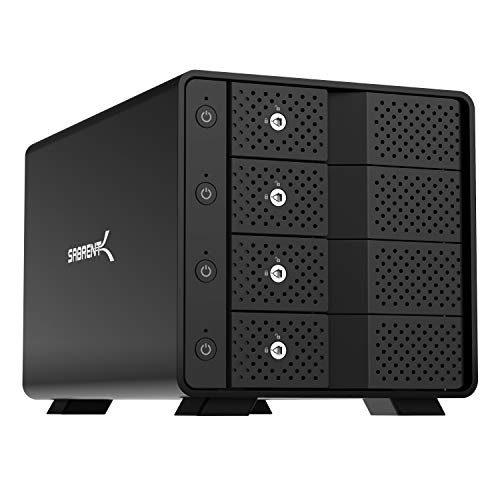
SABRENT 4-Bay 10Gbps USB-C Dock
Best for: Four 3.5-inch SATA drives
- Transfer Speed
- 10Gbps (what this guide is about)
- Supported Drive Types
- 3.5in SATA HDD/SSD
- Bay Count
- 4
- Maximum Capacity
- 80TB
- Cooling Type
- 92mm fan
- Interface
- SATA III
View on Amazon: SABRENT 4-Bay 10Gbps USB-C Dock Affiliate link
The SABRENT DS-SC4B is a 4-bay docking station for 3.5-inch SATA drives. It delivers 10Gbps transfer speeds via USB-C. Each bay uses a dedicated ASMedia ASM1351 controller for stable, independent connections. The aluminum housing includes a 92mm fan for cooling. It supports up to 80TB of total storage. This dock suits users needing direct-attached JBOD storage for multiple large drives.
Pros
- Four bays for 3.5-inch SATA HDDs or SSDs
- 10Gbps USB-C transfer speed
- Dedicated ASMedia ASM1351 controller per bay
- Tool-free hot-swap with locking key
Cons
- Supports only 3.5-inch SATA drives
- Does not support hardware RAID
- Heavy at 9 pounds
Good fit if
- You need to connect four 3.5-inch SATA drives simultaneously
- You require independent JBOD access to each drive
- You want a metal build with active cooling
Skip if
- You need to dock 2.5-inch SATA or NVMe drives
- You require hardware RAID functionality
- You prefer a lightweight, portable design
Verdict: SABRENT 4-Bay 10Gbps SATA Dock is a robust solution for managing four large 3.5-inch drives. It fits users who need reliable, independent JBOD storage with dedicated controllers for each bay.

SABRENT Dual-Bay NVMe Cloner Dock
Best for: NVMe drive cloning and fast dual-bay access
- Transfer Speed
- 10Gbps (what this guide is about)
- Supported Drive Types
- PCIe NVMe M.2 SSD
- Bay Count
- 2
- Offline Cloning
- One-button offline clone
- Supported M.2 Sizes
- 2230, 2242, 2260, 2280
- Cooling Type
- Aluminum body, built-in fan
View on Amazon: SABRENT Dual-Bay NVMe Cloner Dock Affiliate link
This SABRENT dock supports two PCIe NVMe M.2 SSDs in 2230, 2242, 2260, and 2280 sizes. It offers one-button offline cloning without a computer. The USB-C interface reaches 10Gbps. An aluminum body and built-in fan manage heat. You get steady transfers for backup or duplication tasks.
Pros
- One-button offline cloning capability
- 10Gbps USB-C transfer speed
- Supports four M.2 NVMe sizes
- Aluminum chassis with active cooling fan
Cons
- Does not support M.2 SATA drives
- Fan runs continuously when powered
- No support for 2.5 or 3.5 inch SATA drives
Good fit if
- You need to clone NVMe drives without a PC
- You require fast 10Gbps data transfers
- You use 2230, 2242, 2260, or 2280 NVMe SSDs
Skip if
- You need to clone SATA drives
- You require silent operation
- You need a single-bay solution
Verdict: SABRENT Dual-Bay NVMe Cloner Dock is a practical tool for duplicating NVMe drives. It fits users who need offline cloning and fast transfers for specific M.2 sizes.

SABRENT Lay-Flat NVMe and SATA Dock
Best for: Mixed NVMe and SATA drive management
- Transfer Speed
- 10Gbps (what this guide is about)
- Supported Drive Types
- M.2 NVMe, 2.5in/3.5in SATA HDD/SSD
- Offline Cloning
- Offline clone
- Supported M.2 Sizes
- 2242, 2260, 2280
- Interface
- SATA III
- Form Factor
- 2.5 Inch
View on Amazon: SABRENT Lay-Flat NVMe and SATA Dock Affiliate link
This dock handles M.2 NVMe and 2.5 or 3.5-inch SATA drives. It offers 10Gbps transfer speeds via USB-C. You get offline cloning without a PC. The layout lies flat for easy swaps. It includes both USB-C and USB-A cables. This setup suits users who mix drive types and want a stable, tool-free connection.
Pros
- Supports M.2 NVMe and 2.5/3.5-inch SATA drives
- 10Gbps USB 3.2 Gen 2 interface
- Offline cloning with direction switch and clone button
- Includes USB-C to USB-C and USB-A to USB-C cables
Cons
- Requires 12V power adapter for 3.5-inch drives
- Cloning target must be equal to or larger than source
- No mention of hardware RAID or encryption features
Good fit if
- You need to access both NVMe and SATA drives
- You want offline cloning without connecting to a computer
- You prefer a flat layout for easy drive swaps
Skip if
- You only use 2.5-inch SATA drives
- You need high-speed cloning for 3.5-inch drives
- You require a compact enclosure for portability
Verdict: SABRENT Lay Flat NVMe SATA Dock is ideal for users who need to manage mixed drive types. It offers reliable offline cloning and flexible connectivity for desktop setups.

SABRENT Single-Bay SATA SSD & HDD Dock
Best for: 2.5 and 3.5-inch SATA drive access
- Transfer Speed
- 10Gbps (what this guide is about)
- Supported Drive Types
- 2.5"/3.5" SATA SSD & HDD
- Bay Count
- 1
- Maximum Capacity
- 20TB
- Interface
- SATA III
- Form Factor
- 2.5 Inch
View on Amazon: SABRENT Single-Bay SATA SSD & HDD Dock Affiliate link
The SABRENT DS-UC1B is a single-bay docking station for 2.5-inch and 3.5-inch SATA SSDs and HDDs. It supports transfer speeds up to 10Gbps via USB-C. The unit handles drives up to 20TB and larger. It includes a power adapter for 3.5-inch drives and both USB-A and USB-C cables. This tool-less design allows for easy drive insertion and removal without additional hardware.
Pros
- Supports 2.5-inch and 3.5-inch SATA drives
- 10Gbps USB-C transfer speed
- Handles drives 20TB and larger
- Includes power adapter for 3.5-inch drives
- Tool-less design with retractable dust cover
Cons
- Single-bay capacity limits simultaneous operations
- Does not support NVMe drives
- Heavier at 1.14 pounds than compact alternatives
Good fit if
- You need to dock both 2.5-inch and 3.5-inch SATA drives
- You require 10Gbps transfer speeds for large files
- You want a tool-less solution for frequent drive swaps
Skip if
- You need to clone or dock NVMe drives
- You require multiple bays for simultaneous access
- You prefer a lighter, more portable form factor
Verdict: SABRENT Single-Bay SATA Dock is a practical choice for users who need to access both 2.5-inch and 3.5-inch SATA drives with high-speed data transfer. It fits those who prioritize capacity support and tool-less ease over multi-drive versatility.
Specifications side by side
| Spec | SABRENT 4-Bay 10Gbps USB-C Dock | SABRENT Dual-Bay NVMe Cloner Dock | SABRENT Lay-Flat NVMe and SATA Dock | SABRENT Single-Bay SATA SSD & HDD Dock |
|---|---|---|---|---|
| Transfer Speed | 10Gbps | 10Gbps | 10Gbps | 10Gbps |
| Supported Drive Types | 3.5in SATA HDD/SSD | PCIe NVMe M.2 SSD | M.2 NVMe, 2.5in/3.5in SATA HDD/SSD | 2.5"/3.5" SATA SSD & HDD |
| Bay Count | 4 | 2 | not stated | 1 |
| Offline Cloning | not stated | One-button offline clone | Offline clone | not stated |
| Supported M.2 Sizes | not stated | 2230, 2242, 2260, 2280 | 2242, 2260, 2280 | not stated |
| Maximum Capacity | 80TB | not stated | not stated | 20TB |
| Cooling Type | 92mm fan | Aluminum body, built-in fan | not stated | not stated |
| Interface | SATA III | SATA III | SATA III | SATA III |
| Form Factor | not stated | M.2 2280 | 2.5 Inch | 2.5 Inch |
| Cooling | not stated | Cooling Fan | not stated | not stated |
| Compatibility | not stated | not stated | Mac | Mac |
| Features | not stated | Offline Clone | Tool-Free, Offline Clone | Tool-Free |
| Material | Aluminum | not stated | not stated | not stated |
| Host Interface | USB-C | USB-C | USB-C | USB-C |
| Dimensions | 9.1 × 5.8 × 5.9 inches | 4.3 × 2.5 × 1.25 inches | 7.17 × 4.83 × 1.77 inches | 6.2 × 2.5 × 2.7 inches |
| Weight | 9 pounds | 4 ounces | 10.8 ounces | 1.14 pounds |
| Size | 4 Bay | USB-C DUAL DOCK | M.2/2.5/3.5 inch Docking Station | Single-Bay SATA Dock – USB-C 10Gbps |
| Color | Black | SILVER | Multicolor | Black |
| Model | DS-SC4B | EC-SSD2 | DS-UFNC | DS-UC1B |
How to Choose the Right 10Gbps Dock
-
Check Host Interface Type
Ensure your computer has the right port. All listed SABRENT docks use USB-C for connection. You must verify that your host device supports USB-C output to utilize the 10Gbps transfer speed. If your system only has older USB-A ports, you will need an adapter, which may impact performance. Matching the host interface is the first step to ensuring compatibility and achieving the advertised bandwidth without bottlenecks from mismatched ports.
-
Match Drive Form Factor
Identify the physical size of your drives before buying. The SABRENT 4-Bay dock is built specifically for four 3.5-inch SATA drives. In contrast, the Dual-Bay NVMe Cloner Dock handles M.2 NVMe modules. The Lay-Flat dock supports mixed M.2, 2.5-inch, and 3.5-inch formats. Choosing a dock that matches your drive’s physical dimensions is critical. A mismatch means the drive simply will not fit inside the enclosure, rendering the purchase useless for your specific hardware.
-
Verify Interface Protocol
Confirm whether your drives are SATA or NVMe. The Single-Bay and Lay-Flat docks support SATA III interfaces. The Dual-Bay dock is designed for NVMe protocols. Using an NVMe drive in a SATA-only dock will not work, and vice versa. Check the protocol specification on your drive label. This distinction determines the electrical connection and data pathway. Selecting the correct protocol ensures the dock can communicate with the drive efficiently at the intended 10Gbps speed.
-
Consider Offline Cloning
Determine if you need to duplicate drives without a PC. The Dual-Bay NVMe Cloner Dock offers offline cloning for M.2 drives. This feature allows you to copy data directly from one drive to another using the dock’s internal controller. If you frequently duplicate drives for backups or deployments, this is a vital spec. Other docks in this list focus on access rather than duplication. Check the feature list to see if offline cloning is included in the model you are considering.
-
Evaluate Physical Footprint
Measure your available desk or rack space. The 4-Bay dock is large, measuring 9.1 inches long and weighing 9 pounds. The Single-Bay dock is much smaller at 6.2 inches long and 1.14 pounds. The Dual-Bay dock is compact at 4.3 inches long. Consider where you will place the device. A heavy, multi-bay dock requires a sturdy surface. A lightweight single-bay unit is easier to store. Check the dimensions in the specs to ensure it fits your workspace comfortably.
Frequently asked questions
Which SABRENT dock is best for four 3.5-inch drives?
The SABRENT 4-Bay 10Gbps USB-C Dock is the top choice. It supports four 3.5-inch SATA drives with dedicated controllers for each bay. This setup ensures reliable, independent JBOD storage. It measures 9.1 inches in length and weighs 9 pounds, making it a robust solution for managing large drives.
Can I clone NVMe drives without a computer?
Yes, the SABRENT Dual-Bay NVMe Cloner Dock supports offline cloning. You can duplicate M.2 NVMe drives without connecting to a host computer. This dock features a dual-bay design with 10Gbps transfer speeds. It is a practical tool for users who need fast, independent drive duplication for specific M.2 sizes.
Does SABRENT offer a dock for mixed drive types?
The SABRENT Lay-Flat NVMe and SATA Dock handles mixed drive types. It supports M.2 NVMe and 2.5-inch or 3.5-inch SATA drives. This model offers flexible connectivity for desktop setups. It provides reliable offline cloning and allows you to manage both NVMe and SATA drives in a single unit.
What is the smallest SABRENT 10Gbps dock?
The SABRENT Dual-Bay NVMe Cloner Dock is the most compact option. It measures 4.3 inches in length and weighs only 4 ounces. This silver dock is designed for M.2 NVMe drives. Its small footprint makes it easy to store or transport while offering dual-bay access and offline cloning capabilities.
Which dock supports both 2.5 and 3.5-inch SATA drives?
The SABRENT Single-Bay SATA SSD & HDD Dock supports both sizes. It accepts 2.5-inch and 3.5-inch SATA drives via a USB-C interface. This black dock prioritizes capacity support and tool-less ease. It is ideal for users who need high-speed data transfer for individual large drives without needing multiple bays.
Do all these docks use USB-C?
Yes, all listed SABRENT docks use a USB-C host interface. This ensures compatibility with modern computers that support USB-C output. Each dock delivers 10Gbps transfer speeds when connected to a compatible host. You must verify that your device has a USB-C port to utilize the full performance of these stations.
Is there a dock for just one SATA drive?
The SABRENT Single-Bay SATA SSD & HDD Dock is designed for a single drive. It supports both 2.5-inch and 3.5-inch SATA interfaces. This model offers 10Gbps speeds via USB-C. It is a practical choice for users who prioritize capacity support and tool-less installation over multi-drive versatility in a compact form factor.