Choosing SSD Docking Stations in 2026: The Specs That Matter and 8 Picks
As an Amazon Associate we earn from qualifying purchases. Links on this page are affiliate links.
Finding the right external drive dock begins with matching your storage interface and workflow needs. This SSD docking station buying guide helps you select the correct hardware for bare-drive access, multi-bay capacity expansion, and standalone drive duplication. After reading, you will be able to decide with confidence which interface protocol, drive form factor, and host connection best fit your daily desktop setup.
The guide walks you through essential hardware decisions, including choosing between SATA and NVMe interfaces, accommodating 2.5-inch, 3.5-inch, or M.2 form factors, and selecting transfer rates ranging from 5Gbps up to 40Gbps. You will also determine whether your specific tasks demand active cooling fans, multiple independent drive bays, or computer-free offline cloning features. The 8 recommended products featured below were chosen strictly from their published specifications to ensure clear, objective comparisons.
Our top pick: SABRENT 2.5 and 3.5-Inch SATA USB 3.0 Dock.
Key Specs to Consider Before Buying
Drive Interface Compatibility
Docks support SATA III, NVMe, or both. SATA III tops out at standard SATA speeds. NVMe operates via PCIe protocols. If you plug an NVMe SSD into a SATA-only slot, it will not communicate. Likewise, pure NVMe docks ignore SATA M.2 cards. Some dual models accept both protocols, but may not mix them simultaneously across bays. Pick SATA III docks for standard legacy solid-state disks or mechanical platters. Pick NVMe models for modern high-speed gumstick drives. The trade-off is protocol flexibility against complexity. Pure SATA docks limit you to older disk types. Pure NVMe units lock you out of standard 2.5-inch SATA SSDs. For instance, the SABRENT 2.5 and 3.5-Inch SATA USB 3.0 Dock focuses strictly on SATA storage and cannot read M.2 modules. Check your drive labels before selecting a dock to guarantee the controller handles your drive's electrical interface.
- SATA III or NVMe protocol support matched to your inventory
- Dual-protocol support if you routinely manage mixed SSD types
Supported Drive Form Factors
Physical drive dimensions dictate dock fit. Common form factors include 2.5-inch SATA cases, 3.5-inch desktop drives, and M.2 modules in lengths like 2280 or 22110. A dock designed for 2.5-inch drives cannot house 3.5-inch platters due to physical dimensions and lack of 12-volt power. Similarly, M.2 slots feature varied physical retention tabs. Some docks accommodate multiple card lengths, spanning from compact 2230 drives up to longer 22110 enterprise sticks, while others handle only standard 2280 cards. If you work with server pulls, 22110 clearance is essential. The trade-off centers on physical footprint versus versatility. Multi-size bays take up more desk space and require mechanical guides or open bays. Dedicated compact docks save room but restrict hardware swaps. The ICY DOCK M.2 and 2.5-Inch SATA Dock accommodates both 2.5-inch drives and M.2 cards in one unit. Verify physical drive dimensions and card length specifications prior to purchasing.
- M.2 card length support spanning 2230 up to 22110
- Dedicated slots for 2.5-inch or 3.5-inch SATA chassis
Host Connection Transfer Speed
Docks link to your system over USB interfaces running at 5Gbps, 10Gbps, 20Gbps, or 40Gbps USB4. A 5Gbps USB 3.0 interface fully saturates a SATA III SSD, which tops out around 550MB/s. However, 5Gbps bottlenecks high-performance NVMe drives significantly. A 10Gbps USB-C connection allows NVMe drives to transfer at roughly 1,000MB/s, making it suitable for routine file ingest. For maximum throughput, 20Gbps USB 3.2 Gen 2x2 and 40Gbps USB4 interfaces unleash multi-gigabyte sequential speeds. The trade-off rests on host computer port compatibility. A 40Gbps or 20Gbps dock requires a matching host port; otherwise, it steps down to slower baseline USB speeds. The ORICO 40Gbps Dual-Bay NVMe Cloner Dock provides high-speed USB4 performance for fast sustained transfers. If your PC carries only basic 5Gbps ports, purchasing an ultra-high-speed dock delivers no operational speed gain. Match dock bandwidth to your system's fastest port specification.
- Host interface bandwidth rating from 5Gbps up to 40Gbps
- USB-C or USB4 connection matching your computer port capabilities
Standalone Offline Cloning
Standalone cloning lets you duplicate one disk to another without a computer connection. You insert a source disk and a target disk, press a button, and the dock clones sector by sector. This function benefits system administrators, disk upgraders, and bench technicians imaging identical drives. Hardware cloning requires the target disk capacity to match or exceed the source drive capacity. If the target is smaller, the cloning process fails immediately. The trade-off involves disk flexibility and management overhead. Offline cloning copies partition layouts exactly, requiring manual partition expansion later on larger target disks. Furthermore, docks with clone engines generally lack software-level file selection. The MAIWO Dual-Bay 10Gbps NVMe Cloner Dock provides PC-free duplication for NVMe drives. If you only plan to access bare storage volumes for ad-hoc file transfers, dedicated cloning hardware adds unnecessary operational switches to the dock housing.
- One-button PC-free offline cloning functionality
- Target disk capacity requirements matching or exceeding source drive size
Active Cooling and Thermal Design
Fast NVMe drives and multi-disk enclosures produce significant heat during extended writes. Without sufficient dissipation, SSD controllers throttle performance or trigger read-only protection modes. Bare-dock designs utilize passive aluminum bodies or integrated cooling fans. Passive aluminum bodies draw heat away silently, working well for intermittent file checks or shorter read tasks. However, sustained multi-gigabyte clones and heavy sequential writes benefit from active fans pushing airflow over bare drive surfaces. The trade-off involves fan noise and dust accumulation. Small dock fans generate audible hums and occasionally run continuously whenever power connects, even without drive activity. The SABRENT Dual-Bay NVMe Cloner Dock uses active fan cooling to safeguard thermal stability during lengthy transfers. If you prioritize absolute desktop silence, passive enclosures fit better, but you must monitor thermal limits during sustained high-throughput workloads.
- Integrated cooling fan for sustained writes and multi-drive tasks
- Aluminum enclosure construction for passive heat dissipation
Bay Count and Multi-Drive Access
SSD docks range from single-bay adapters to multi-bay desktop towers. Single-bay units handle simple drive diagnostics and periodic quick backups. Dual-bay docks introduce direct disk-to-disk transfers and cloning capabilities. Four-bay enclosures provide high-density bulk storage for desktop environments, aggregating multiple terabytes of SATA media. In multi-bay docks, independent controllers let the operating system mount each drive as an individual volume without requiring hardware RAID arrays. The trade-off involves physical bulk, power needs, and cable logistics. Multi-bay docks require dedicated AC power adapters, weigh considerably more, and occupy permanent desk real estate. The SABRENT 4-Bay 10Gbps USB-C Dock provides independent drive management across four bays for desktop JBOD storage. If you only service drives individually on the go, a multi-bay chassis adds unwanted bulk, making a lightweight single-slot dock the more practical choice for mobility.
- Independent drive controllers for concurrent multi-bay OS mounting
- Dedicated AC power supply for reliable multi-disk operation
Types of SSD Docking Stations
Dedicated SATA Drive Docks
Dedicated SATA drive docks accept standard 2.5-inch and 3.5-inch bare drives using top-loading slots. Models like the SABRENT 4-Bay 2.5-Inch SATA SSD Dock and SABRENT 2.5 and 3.5-Inch SATA USB 3.0 Dock offer multi-drive density or legacy disk support over standard USB host connections. These units suit technicians and desktop users who manage bulk drive archives, run routine local backups, or frequently swap internal storage drives without opening a PC chassis. Independent drive bays allow straightforward hot-swapping. The main trade-off centers on data throughput and protocol compatibility. SATA interfaces cannot exceed SATA III bus limits, and these slots do not accommodate M.2 PCIe NVMe solid-state cards.
High-Speed NVMe Duplicator Docks
Dedicated NVMe cloner docks feature dual M.2 slots engineered specifically for PCIe-based solid-state modules. Units such as the SABRENT Dual-Bay NVMe Cloner Dock and the ORICO 40Gbps Dual-Bay NVMe Cloner Dock provide high-bandwidth USB-C connectivity alongside standalone offline drive duplication. You benefit from push-button disk imaging without connecting to a host computer, making them ideal for system builders, IT deployment specialists, and creators moving multi-gigabyte media directories. Thermal pads and integrated cooling fans help regulate operational temperatures across continuous writes. The core compromise is narrow drive support: these docks exclude traditional 2.5-inch and 3.5-inch drive form factors and typically will not read SATA-based M.2 storage cards.
Hybrid Dual-Protocol M.2 Docks
Hybrid dual-protocol docks support both NVMe PCIe and SATA storage standards within flexible drive slots. Hardware like the FIDECO Dual-Bay 20Gbps M.2 NVMe & SATA Cloner Dock and the ICY DOCK M.2 and 2.5-Inch SATA Dock accommodates mixed drive formats across varied lengths from 2230 up to 22110. This flexibility suits IT diagnostics, hardware recovery benches, and technicians who service diverse generations of salvage storage. You can access legacy SATA drives and modern NVMe modules using one desktop footprint. The primary trade-off involves operational restrictions. Offline cloning frequently requires matched protocols across source and target slots, and maximum transfer speeds do not reach dedicated 40Gbps USB4 NVMe throughput tiers.
SSD Docking Station Mistakes to Avoid
Overlooking thermal dissipation for bare NVMe drives
High-speed NVMe SSDs generate substantial heat during sustained writes. Open vertical dock slots without heatsinks or integrated cooling fans cause controllers to exceed thermal limits quickly. Once thermal throttling kicks in, your transfer speeds drop drastically to protect the silicon. Always install clip-on aluminum heatsinks or select a docking station with built-in active fan cooling for long transfer sessions.
Cloning to a target drive with smaller capacity
Standalone offline cloning requires bit-level sector copies. Hardware cloners fail or refuse to start if the target SSD possesses even a few fewer total bytes than the source SSD, regardless of actual data volume. Do not rely on nominal capacity labels. Verify the exact sector count of both drives before starting, or handle resizing using software cloning tools on your PC.
Relying on host bus power for multiple drives
Running multiple high-throughput SSDs solely on USB port power leads to instability. When several drives reach peak write draw simultaneously, voltage drops cause unexpected disconnections and write failures. Bus power rarely delivers sufficient current for sustained dual-drive operations. Always connect the dedicated external DC power adapter to your docking station to ensure clean, consistent voltage delivery across all drive slots.
Pulling bare drives without operating system ejection
Operating systems use write caching to optimize storage performance, delaying data writes to bare SSDs. Pulling a drive from an active dock slot before unmounting interrupts open file handles. This results in missing files, corrupted partitions, or damaged file systems. Always use your operating system safe-ejection utility to dismount the drive volume before switching off power or removing the media.
Connecting the dock with generic charging cables
Not all USB-C cables support high data transfer rates. Many standard charging cables only carry USB 2.0 data at 480 Mbps. Using these cables restricts your high-speed NVMe or SATA SSD dock to a tiny fraction of its theoretical performance. Check cable bandwidth ratings carefully. Always use cables certified for at least USB 3.2 Gen 2 speeds to ensure maximum dock throughput.
Quick picks
Our 8 picks

SABRENT 2.5 and 3.5-Inch SATA USB 3.0 Dock
Best for: swapping 2.5-inch and 3.5-inch SATA drives
- Transfer Speed
- USB 3.0
- Supported Drive Types
- 2.5-inch and 3.5-inch SATA HDD/SSD
- Interface
- SATA III
- Dimensions
- 7.09 × 4.8 × 1.6 inches
- Weight
- 7.5 ounces
This lay-flat dock connects bare 2.5-inch and 3.5-inch SATA hard drives and SSDs to your computer through a USB 3.0 Type-A interface. It supports SATA I, II, and III with UASP protocol for data transfers and includes a dedicated 12V/2A power supply for 3.5-inch disks. You get tool-free drive insertion and hot-swap capability, making it suitable if you regularly swap or retrieve data from standard SATA storage devices.
Pros
- Supports both 2.5-inch and 3.5-inch SATA I/II/III drives
- Includes dedicated 12V/2A AC power adapter for 3.5-inch drives
- Tool-free lay-flat slot with hot-swap capability
- USB 3.0 interface supports UASP protocol
Cons
- Does not support M.2 NVMe, M.2 SATA, SAS, or IDE drives
- USB bridge does not pass through S.M.A.R.T. diagnostic data
- Supplied host cable is USB Type-A only
Good fit if
- You need quick, tool-free access to bare 2.5-inch or 3.5-inch SATA drives.
- You connect to a host computer with available USB Type-A ports.
- You use 3.5-inch mechanical drives that require external 12V wall power.
Skip if
- You need support for M.2 NVMe or M.2 SATA SSDs.
- You require S.M.A.R.T. monitoring for drive health assessment.
- You only have USB-C ports and do not want to use an external adapter.
Verdict: SABRENT 2.5/3.5-Inch SATA USB 3.0 Dock provides a direct, tool-free interface for standard SATA drives with dedicated AC power for 3.5-inch disks. It handles routine SATA drive access reliably, provided you do not require M.2 compatibility or S.M.A.R.T. passthrough.
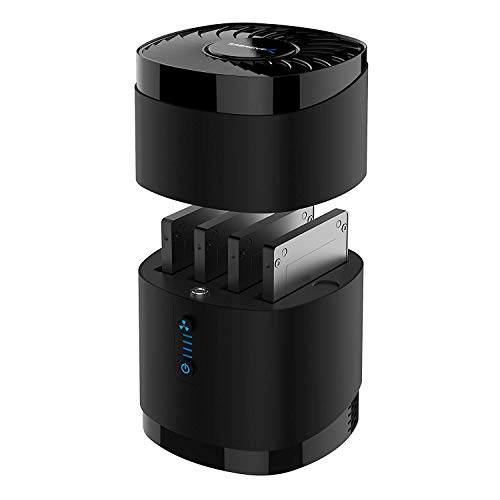
SABRENT 4-Bay 2.5-Inch SATA SSD Dock with Fan
Best for: multi-drive 2.5-inch SATA SSD management
- Transfer Speed
- Up to 5Gbps
- Supported Drive Types
- 2.5-inch SATA SSD/HDD
- Bay Count
- 4
- Maximum Capacity
- Up to 4x 16TB
- Cooling Type
- Built-in fan
- Interface
- SATA III
View on Amazon: SABRENT 4-Bay 2.5-Inch SATA SSD Dock with Fan
This SABRENT docking station gives you four tool-free bays for 2.5-inch SATA SSDs or hard drives. It connects via a USB 3.0 interface delivering transfer speeds up to 5Gbps, backed by a built-in cooling fan with a dedicated power switch. Each bay accepts drives up to 16TB and 12.5mm in thickness. It suits you if you manage multiple individual 2.5-inch drives simultaneously.
Pros
- Holds up to four 2.5-inch SATA drives simultaneously
- Supports up to 16TB capacity per bay
- Built-in cooling fan with independent on and off switch
- Tool-free magnetic cover design
Cons
- Does not support hardware RAID configurations
- Incompatible with 15mm thick drives
- Interface capped at 5Gbps USB 3.0 transfer speed
Good fit if
- You need to connect up to four 2.5-inch SATA drives at once.
- You require active fan cooling for continuous 24/7 operation.
- You swap 2.5-inch drives frequently without using screws or tools.
Skip if
- You need hardware RAID support for drive redundancy or pooling.
- You use M.2 NVMe drives or 3.5-inch form factor drives.
- You require speeds exceeding 5Gbps USB 3.0 bandwidth.
Verdict: SABRENT 4-Bay 2.5-Inch SATA SSD Dock provides high-density multi-drive SATA access with active cooling and tool-free swapping. It serves as a dependable desktop station if you do not require hardware RAID or NVMe speeds.

SABRENT 4-Bay 10Gbps USB-C Dock
Best for: high-capacity independent multi-drive SATA desktop storage
- Transfer Speed
- 10Gbps
- Supported Drive Types
- 3.5-inch SATA HDD/SSD
- Bay Count
- 4
- Maximum Capacity
- Up to 80TB (4 x 20TB)
- Cooling Type
- 92mm fan
- Host Interface
- USB-C
This four-bay docking station connects up to four 3.5-inch SATA drives through a single 10Gbps USB-C port. Each bay features an independent ASMedia controller, a dedicated power switch, and tray-less insertion. It runs drives in JBOD mode without hardware RAID, making it suitable if you need multi-drive desktop storage, bulk backups, or individual disk management with active 92mm fan cooling across Windows, macOS, and Linux.
Pros
- Dedicated ASMedia ASM1351 controller for each drive bay
- 10Gbps USB 3.1 Gen 2 Type-C host interface
- Active cooling with a built-in 92mm fan in an aluminum frame
- Independent per-bay power switches, status LEDs, and drive bay locks
Cons
- No built-in hardware RAID; drives mount as individual volumes
- Supports 3.5-inch SATA drives without native M.2 NVMe slots
- Substantial 9-pound weight limits desk portability
Good fit if
- You need to access up to four 3.5-inch SATA drives over a single USB-C cable.
- You want individual power control and physical key locks for each drive.
- You need continuous cooling via an active 92mm fan for multi-drive storage.
Skip if
- You require hardware-level RAID arrays instead of individual JBOD disks.
- You need direct docking support for M.2 NVMe SSDs.
- You want a compact or lightweight portable enclosure.
Verdict: SABRENT 4-Bay USB-C 10Gbps SATA Dock delivers high-bandwidth multi-drive SATA connectivity with independent controllers and active cooling. It serves high-capacity JBOD workflows effectively when hardware RAID is not needed.

SABRENT Dual-Bay NVMe Cloner Dock
Best for: offline NVMe cloning and dual-drive transfers
- Transfer Speed
- Up to 10Gbps
- Supported Drive Types
- PCIe NVMe M.2 SSD
- Bay Count
- 2
- Offline Cloning
- One-button clone
- Supported M.2 Sizes
- 2230, 2242, 2260, 2280
- Cooling Type
- Aluminum body, built-in fan
This dual-bay docking station connects M.2 NVMe SSDs to your computer over a 10Gbps USB-C interface. It supports 2230, 2242, 2260, and 2280 drive sizes with a tool-free lid design. You can access both drives simultaneously or use the standalone button for offline cloning without a host computer. An active cooling fan and aluminum body manage heat during sustained transfers, making it a practical pick if you clone or swap NVMe storage frequently.
Pros
- Standalone offline cloning without a host computer or extra software
- Dual bays operate simultaneously over a 10Gbps USB-C connection
- Tool-free design accepts 2230, 2242, 2260, and 2280 M.2 form factors
- Built-in cooling fan and aluminum casing prevent thermal throttling
Cons
- Cooling fan runs continuously while powered with no idle or sleep state
- Does not support M.2 SATA, AHCI, or SATA form factors
Good fit if
- You need to duplicate M.2 NVMe drives without using a PC.
- You want simultaneous read and write access to two NVMe drives over USB-C.
Skip if
- You need to read SATA-based M.2 or 2.5-inch drives.
- You require silent idle operation without unplugging the power adapter.
Verdict: SABRENT Dual-Bay NVMe Cloner Dock delivers 10Gbps transfer speeds and standalone drive duplication across multiple M.2 NVMe sizes. Its active cooling protects sustained transfers, though the continuous fan requires disconnecting power when not in use.

ICY DOCK M.2 and 2.5-Inch SATA Dock
Best for: swapping individual 2.5-inch and M.2 SATA drives
- Transfer Speed
- Up to 5Gbps
- Supported Drive Types
- 2.5-inch SATA HDD/SSD, SATA M.2 SSD
- Bay Count
- 1
- Interface
- SATA III
- Dimensions
- 6.25 × 3.75 × 1.12 inches
- Weight
- 3.56 ounces
This ICY DOCK unit functions as an external dock for either one 2.5-inch SATA drive or one M.2 SATA SSD. It connects over a USB 3.2 Gen 1 interface delivering transfer rates up to 5Gbps, and it includes a physical power switch alongside an activity LED. If you work with legacy SATA form factors, this single-bay dock lets you swap and read either format individually.
Pros
- Supports 2.5-inch SATA drives and M.2 SATA SSDs
- 5Gbps transfer speeds over USB 3.2 Gen 1
- Integrated on/off drive power switch
- Drive activity LED indicator light
Cons
- Cannot mount 2.5-inch and M.2 drives simultaneously
- Does not support NVMe SSDs
Good fit if
- You need an external dock for both 2.5-inch and M.2 SATA drives.
- You want a physical power switch to turn drives off without disconnecting the cable.
Skip if
- You need to access fast PCIe NVMe M.2 drives.
- You require simultaneous dual-drive operation.
Verdict: ICY DOCK 2.5-Inch and M.2 SATA SSD Dock is a practical, single-drive dock for servicing both form factors of SATA storage at 5Gbps. Choose it if you manage mixed SATA inventory and do not need NVMe compatibility.

MAIWO Dual-Bay 10Gbps NVMe Cloner Dock
Best for: standalone offline M.2 NVMe drive cloning
- Transfer Speed
- 10Gbps
- Supported Drive Types
- M.2 NVMe SSD
- Bay Count
- 2
- Offline Cloning
- One-key clone
- Supported M.2 Sizes
- 2230, 2242, 2260, 2280, 22110
- Maximum Capacity
- 16TB
The MAIWO Dual-Bay NVMe Cloner Dock provides dual M-Key slots for accessing two drives simultaneously over a 10Gbps USB 3.1 Gen 2 connection. It accommodates M.2 NVMe form factors ranging from 2230 to 22110 and supports standalone offline cloning without a host computer. A dedicated power switch and progress LEDs help you manage data transfers up to 16TB. This dock suits you if you frequently duplicate or read high-capacity NVMe drives.
Pros
- Supports five M.2 NVMe lengths: 2230, 2242, 2260, 2280, and 22110
- Computer-free offline cloning between dual M.2 NVMe bays
- 10Gbps USB 3.1 Gen 2 interface for simultaneous dual-drive access
- Integrated physical power switch and clone progress LED indicators
Cons
- Supports NVMe M Key drives only, with no SATA M.2 compatibility
- Offline cloning requires the target drive to have larger capacity than the source
- Limited to 10Gbps transfer speed rather than 20Gbps or 40Gbps standards
Good fit if
- You need to clone NVMe drives offline without using a host computer.
- You work with extended 22110 form factor M.2 drives alongside standard sizes.
- You want concurrent access to two M.2 NVMe drives through a 10Gbps connection.
Skip if
- You need to dock or clone SATA-based M.2 or 2.5-inch drives.
- You require connection bandwidth faster than 10Gbps for high-speed transfers.
- You plan to clone to a target drive of equal or smaller capacity.
Verdict: MAIWO Dual-Bay NVMe Cloner Dock handles dual NVMe drives up to 22110 in length with standalone offline cloning and 10Gbps USB connectivity. It delivers practical, PC-free duplication for NVMe users who do not require SATA drive support.

FIDECO Dual-Bay 20Gbps M.2 NVMe & SATA Cloner Dock
Best for: Standalone offline cloning across various M.2 sizes
- Transfer Speed
- 20Gbps
- Supported Drive Types
- M.2 PCIe NVMe, M.2 SATA
- Bay Count
- 2
- Offline Cloning
- Clone button
- Supported M.2 Sizes
- 2230, 2242, 2260, 2280, 22110
- Interface
- SATA III
View on Amazon: FIDECO Dual-Bay 20Gbps M.2 NVMe & SATA Cloner Dock
The FIDECO Dual M.2 NVMe & SATA 20Gbps Cloner Dock is a dual-slot aluminum drive station built for external storage and computer-free duplication. It runs on a USB 3.2 Gen 2x2 interface delivering transfer rates up to 20Gbps with UASP support. You can insert M.2 NVMe or M.2 SATA drives ranging from 2230 to 22110 lengths. It suits you if you need standalone offline disk cloning across multiple M.2 card sizes.
Pros
- Supports USB 3.2 Gen 2x2 transfer speeds up to 20Gbps with UASP
- Performs standalone offline cloning without connecting to a host computer
- Accommodates M.2 sizes from 2230 up to 22110 for NVMe and SATA drives
- Includes a dual-connector USB-C to USB-C/A cable in the box
Cons
- Cannot operate an NVMe SSD and a SATA SSD simultaneously in both bays
- Requires target drive capacity to match or exceed source drive for offline cloning
Good fit if
- You need standalone offline cloning without booting up a host PC
- You work with extended M.2 card lengths up to 22110
- You have a USB 3.2 Gen 2x2 port capable of handling 20Gbps bandwidth
Skip if
- You need to clone or transfer between an NVMe drive and a SATA drive simultaneously
- You need a dock that accepts standard 2.5-inch or 3.5-inch SATA disks
Verdict: FIDECO Dual M.2 NVMe & SATA 20Gbps Cloner Dock provides 20Gbps USB 3.2 Gen 2x2 connectivity alongside computer-free offline cloning for M.2 drives up to 22110. It is a capable dual-bay solution if you handle multiple M.2 formats and do not need to mix NVMe and SATA cards at the same time.

ORICO 40Gbps Dual-Bay NVMe Cloner Dock
Best for: high-speed USB4 duplication of NVMe drives
- Transfer Speed
- 40Gbps
- Supported Drive Types
- M-Key NVMe
- Bay Count
- 2
- Offline Cloning
- One-button offline cloning
- Supported M.2 Sizes
- 2230, 2242, 2260, 2280, 22110
- Maximum Capacity
- 16TB
This dual-bay NVMe docking station delivers 40Gbps transfer speeds over a USB4 interface with Thunderbolt 4 compatibility. You get standalone one-button offline cloning between M-key drives without a computer, plus active fan cooling and dual aluminum heatsinks. It supports M.2 lengths from 2230 to 2280 up to 16TB total capacity. It suits you if you need rapid drive duplication or high-bandwidth access to two NVMe drives.
Pros
- Up to 40Gbps transfer speed via USB4 with Thunderbolt 4 compatibility
- Standalone one-button offline cloning without host computer
- Built-in cooling fan with dual vents and aluminum heatsinks
- Supports M.2 NVMe sizes 2230, 2242, 2260, and 2280 up to 16TB
Cons
- Bandwidth shared across bays during dual-drive operations
- Only compatible with M-Key NVMe drives, not SATA SSDs
- Target drive capacity must exceed source drive capacity for offline cloning
Good fit if
- You need 40Gbps transfer rates on USB4 or Thunderbolt 4 systems.
- You duplicate M.2 NVMe drives without connecting to a computer.
- You use M-Key NVMe SSDs in sizes ranging from 2230 to 2280.
Skip if
- You need compatibility with SATA M.2 or 2.5-inch drives.
- You plan to clone to an equal-capacity or smaller target SSD.
Verdict: ORICO 40Gbps Dual-Bay NVMe Dock delivers high-speed USB4 performance and PC-free offline duplication for M.2 drives. Built-in active cooling handles thermal loads during sustained drive operations.
Specifications side by side
| Spec | SABRENT 2.5 and 3.5-Inch SATA USB 3.0 Dock | SABRENT 4-Bay 2.5-Inch SATA SSD Dock with Fan | SABRENT 4-Bay 10Gbps USB-C Dock | SABRENT Dual-Bay NVMe Cloner Dock | ICY DOCK M.2 and 2.5-Inch SATA Dock | MAIWO Dual-Bay 10Gbps NVMe Cloner Dock | FIDECO Dual-Bay 20Gbps M.2 NVMe & SATA Cloner Dock | ORICO 40Gbps Dual-Bay NVMe Cloner Dock |
|---|---|---|---|---|---|---|---|---|
| Transfer Speed | USB 3.0 | Up to 5Gbps | 10Gbps | Up to 10Gbps | Up to 5Gbps | 10Gbps | 20Gbps | 40Gbps |
| Supported Drive Types | 2.5-inch and 3.5-inch SATA HDD/SSD | 2.5-inch SATA SSD/HDD | 3.5-inch SATA HDD/SSD | PCIe NVMe M.2 SSD | 2.5-inch SATA HDD/SSD, SATA M.2 SSD | M.2 NVMe SSD | M.2 PCIe NVMe, M.2 SATA | M-Key NVMe |
| Bay Count | not specified | 4 | 4 | 2 | 1 | 2 | 2 | 2 |
| Offline Cloning | not specified | not specified | not specified | One-button clone | not specified | One-key clone | Clone button | One-button offline cloning |
| Supported M.2 Sizes | not specified | not specified | not specified | 2230, 2242, 2260, 2280 | not specified | 2230, 2242, 2260, 2280, 22110 | 2230, 2242, 2260, 2280, 22110 | 2230, 2242, 2260, 2280, 22110 |
| Maximum Capacity | not specified | Up to 4x 16TB | Up to 80TB (4 x 20TB) | not specified | not specified | 16TB | not specified | 16TB |
| Cooling Type | not specified | Built-in fan | 92mm fan | Aluminum body, built-in fan | not specified | not specified | not specified | Aluminum heatsinks, cooling fan |
| Interface | SATA III | SATA III | not specified | NVMe | SATA III | NVMe | SATA III | NVMe |
| Form Factor | not specified | 2.5 Inch | not specified | M.2 | M.2 | not specified | M.2 | M.2 2280 |
| Cooling | not specified | Cooling Fan | not specified | not specified | not specified | not specified | not specified | not specified |
| Features | not specified | not specified | not specified | Offline Clone | not specified | Offline Clone | Offline Clone | Offline Clone |
| Material | not specified | not specified | not specified | not specified | not specified | not specified | Aluminum | not specified |
| Host Interface | not specified | not specified | USB-C | USB-C | not specified | not specified | not specified | USB-C |
| Dimensions | 7.09 × 4.8 × 1.6 inches | 6.3 × 4.4 × 4.4 inches | 9.1 × 5.8 × 5.9 inches | 4.3 × 2.5 × 1.25 inches | 6.25 × 3.75 × 1.12 inches | 6.42 × 4.92 × 1.61 inches | 2.68 × 2.68 × 0.69 inches | 5.71 × 2.91 × 1.38 inches |
| Weight | 7.5 ounces | 1.01 pounds | 9 pounds | 4 ounces | 3.56 ounces | 1.46 pounds | 12 ounces | not specified |
| Size | 2.5/3.5 inch Docking Station | 4-Bay SATA Dock – USB 3.0 5Gbps | 4 Bay | USB-C DUAL DOCK | not specified | not specified | 6.8*1.75cm | IT28N |
| Color | Black | Black | Black | SILVER | Black | Black | Black | Silver |
| Model | EC-DFLT | DS-4SSD | DS-SC4B | EC-SSD2 | MB031U-1SMB | Dual M.2 NVME Cloner Dock with Switch | M2288 | IT28N-C |
If you need display outputs and charging ports instead of drive bays, the docking station buying guide covers those specifications.
Frequently asked questions
Can you clone an NVMe SSD without connecting to a computer?
Yes, offline cloner docks clone drives independently without a computer connection. Standalone models like the SABRENT Dual-Bay NVMe Cloner Dock and MAIWO Dual-Bay 10Gbps NVMe Cloner Dock duplicate drives using onboard hardware buttons. You insert your source and target drives into designated slots, connect external power, and trigger the cloning sequence directly.
What host connection speed is required for 40Gbps NVMe docks?
You need a host system equipped with a USB4 or Thunderbolt port to achieve full 40Gbps bandwidth. Docks like the ORICO 40Gbps Dual-Bay NVMe Cloner Dock connect via USB-C to deliver these speeds. Connecting a 40Gbps dock to a standard USB 3.0 port drops the transfer rates down to the slower port limits of your host system.
Can you insert M.2 SATA and M.2 NVMe drives into the same dock?
Some docks accept both protocols, but you must check individual slot specifications before inserting drives. The FIDECO Dual-Bay 20Gbps Cloner Dock supports both M.2 NVMe and SATA cards, though it cannot mix both formats simultaneously. Docks like the MAIWO Dual-Bay dock only work with NVMe cards and cannot recognize M.2 SATA drives.
Do multi-bay SSD docks configure drives into hardware RAID automatically?
Most multi-bay docks present drives as independent volumes rather than configuring them into hardware RAID arrays. Units like the SABRENT 4-Bay 10Gbps USB-C Dock and the SABRENT 4-Bay 2.5-Inch SATA SSD Dock use independent controllers for JBOD setups. If you need RAID functionality with these units, you must configure software RAID within your computer operating system.
Can you read drive health and S.M.A.R.T. data through every SSD dock?
Not every drive dock passes S.M.A.R.T. telemetry through its internal bridge controller to your operating system. For example, the SABRENT 2.5 and 3.5-Inch SATA USB 3.0 Dock provides direct file access but does not support S.M.A.R.T. passthrough. If you require diagnostic monitoring to check drive life and temperature, verify bridge controller passthrough before purchasing.
What drive lengths do M.2 SSD docking stations accommodate?
M.2 SSD docks vary in physical length clearance, accommodating drives from common 2280 cards up to extended 22110 enterprise formats. For example, the ORICO 40Gbps Dual-Bay NVMe Cloner Dock specifies M.2 2280 fitment. In contrast, the MAIWO Dual-Bay and FIDECO Dual-Bay docks provide slots long enough to hold M.2 drives up to 22110 size.