12 Best SATA III SSD Docking Stations, Compared
As an Amazon Associate we earn from qualifying purchases. Links on this page are affiliate links.
A dedicated SATA III SSD docking station provides fast external drive access without opening your computer. We evaluated 12 models using only the specifications published on their official listings.
The SABRENT 2.5 and 3.5-Inch SATA USB 3.0 Dock takes first place because its included 12V power adapter supports both 2.5-inch and 3.5-inch SATA drives over USB 3.0. This comparison helps you choose the right format for your needs, whether you require single-slot drive swapping, multi-bay active cooling, or standalone offline cloning.
Quick picks
The best fit for you
- You need to dock standard desktop and laptop bare drives SABRENT 2.5 and 3.5-Inch SATA USB 3.0 Dock The included 12V adapter powers both 2.5-inch and 3.5-inch SATA drives over USB 3.0.
- You manage multiple 2.5-inch SSDs needing active cooling SABRENT 4-Bay 2.5-Inch SATA SSD Dock with Fan Its four 2.5-inch SATA bays feature a dedicated cooling fan for active thermal management.
- You require massive drive density for high-capacity desktop backups SABRENT 10-Bay USB-C SATA Docking Station The 10-bay layout provides independent bay control and 10Gbps USB-C host speeds.
- You prioritize the fastest data transfers and offline cloning FIDECO Dual-Bay 20Gbps M.2 NVMe & SATA Cloner Dock This dock delivers 20Gbps transfer speeds alongside standalone offline cloning support.
Our 12 picks

SABRENT 2.5 and 3.5-Inch SATA USB 3.0 Dock
Best for: basic bare SATA drive docking and swapping
- Interface
- SATA III (what this guide is about)
- Transfer Speed
- USB 3.0
- Supported Drive Types
- 2.5-inch and 3.5-inch SATA HDD/SSD
- Dimensions
- 7.09 × 4.8 × 1.6 inches
- Weight
- 7.5 ounces
This docking station connects one bare 2.5-inch or 3.5-inch SATA I, II, or III drive directly to your computer. It pairs a USB 3.0 host connection with UASP support and uses a lay-flat, tool-free slot for drive swaps. Power comes from an included 12V adapter, which is required when you run larger 3.5-inch drives. It suits you if you need straightforward access to bare SATA SSDs or hard drives without opening your computer.
Pros
- Supports 2.5-inch and 3.5-inch SATA I, II, and III drives
- Tool-free, hot-swappable lay-flat bay
- USB 3.0 interface with UASP protocol support
- Includes dedicated 12V/2A power supply for 3.5-inch drive stability
Cons
- Does not support M.2 NVMe, M.2 SATA, IDE, or SAS drives
- Uses USB Type-A host cable with no USB-C adapter included
- USB bridge does not pass through S.M.A.R.T. diagnostics
Good fit if
- You need quick, tool-free access to bare 2.5-inch or 3.5-inch SATA drives.
- You have an available USB Type-A port on your system.
- You want UASP transfer support on compatible USB 3.0 host ports.
Skip if
- You require support for M.2 NVMe or M.2 SATA solid-state drives.
- You work strictly with USB-C ports and do not own a Type-A adapter.
- You need S.M.A.R.T. health diagnostics read directly over USB.
Verdict: SABRENT 2.5 and 3.5-Inch SATA USB 3.0 Dock provides straightforward, tool-free connectivity for bare SATA SSDs and hard drives via USB 3.0. Its included 12V adapter ensures full compatibility with power-hungry 3.5-inch drives on desktop systems.
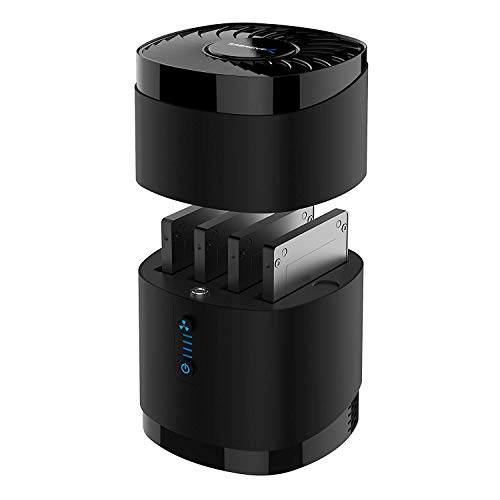
SABRENT 4-Bay 2.5-Inch SATA SSD Dock with Fan
Best for: cooled multi-drive 2.5-inch SATA SSD setups
- Interface
- SATA III (what this guide is about)
- Transfer Speed
- Up to 5Gbps
- Supported Drive Types
- 2.5-inch SATA SSD/HDD
- Bay Count
- 4
- Maximum Capacity
- Up to 4x 16TB
- Cooling Type
- Built-in fan
View on Amazon: SABRENT 4-Bay 2.5-Inch SATA SSD Dock with Fan
This SABRENT docking station holds up to four 2.5-inch SATA SSDs or hard drives with a maximum thickness of 12.5mm. It connects over a 5Gbps USB 3.0 interface and includes a dedicated cooling fan with an independent power switch to manage drive temperatures during continuous operation. If you need multi-drive SATA storage with active airflow across four individual bays, this dock provides tool-free swapping without requiring external software drivers.
Pros
- Built-in cooling fan with dedicated on/off switch
- Four bays supporting up to 16TB per 2.5-inch drive
- Tool-free magnetic cover design for fast drive swaps
- Driver-free compatibility across Windows, macOS, and Linux
Cons
- Does not support hardware or software RAID arrays
- Incompatible with 3.5-inch drives and 15mm-thick 2.5-inch drives
- Interface speed tops out at 5Gbps USB 3.0
Good fit if
- You need active fan cooling to run up to four 2.5-inch SATA drives continuously.
- You swap standard 2.5-inch drives frequently without using screws or mounting brackets.
Skip if
- You require built-in hardware RAID for data redundancy or drive pooling.
- You intend to dock 3.5-inch desktop hard drives or 15mm enterprise drives.
Verdict: SABRENT 4-Bay 2.5-Inch SATA SSD Dock with Fan delivers multi-slot 2.5-inch drive handling with dedicated active thermal management. It offers reliable continuous operation for users who prioritize drive temperatures over RAID configurations.

ICY DOCK M.2 and 2.5-Inch SATA Dock
Best for: switching between single 2.5-inch and M.2 SATA drives
- Interface
- SATA III (what this guide is about)
- Transfer Speed
- Up to 5Gbps
- Supported Drive Types
- 2.5-inch SATA HDD/SSD, SATA M.2 SSD
- Bay Count
- 1
- Dimensions
- 6.25 × 3.75 × 1.12 inches
- Weight
- 3.56 ounces
This ICY DOCK docking station connects either a 2.5-inch SATA drive or a SATA M.2 SSD to your computer. It operates across a USB 3.2 Gen 1 interface delivering transfer speeds up to 5Gbps, with backward compatibility for USB 2.0 ports. You get a physical power switch and an LED activity indicator. It suits you if you need a compact, straightforward reader for swapping individual SATA drives without opening your PC.
Pros
- Supports both 2.5-inch SATA drives and SATA M.2 SSDs
- Provides transfer speeds up to 5Gbps via USB 3.2 Gen 1
- Backward compatible with legacy USB 2.0 ports
- Features an integrated hardware power switch and activity LED
Cons
- Cannot read 2.5-inch and M.2 drives simultaneously
- Supports only SATA M.2 SSDs without NVMe capability
Good fit if
- You need to access both 2.5-inch SATA drives and SATA M.2 SSDs using one dock.
- You want a physical on/off power switch to control drive power safely.
- You connect to hosts using USB 3.2 Gen 1 or USB 2.0 ports.
Skip if
- You need to access two drives at the same time.
- You work with M.2 NVMe SSDs rather than SATA drives.
Verdict: ICY DOCK 2.5-Inch and M.2 SATA SSD Dock delivers dependable 5Gbps data access for one drive at a time. It gives you flexible support for both SATA form factors with simple push-button power control.

SABRENT 10-Bay USB-C SATA Docking Station
Best for: massive multi-drive desktop storage and non-RAID backups
- Interface
- SATA III (what this guide is about)
- Transfer Speed
- Up to 10Gbps
- Supported Drive Types
- 3.5-inch SATA HDD
- Bay Count
- 10
- Maximum Capacity
- Up to 200TB (10 x 20TB)
- Cooling Type
- Dual 120mm fans
The SABRENT 10-Bay USB-C SATA Docking Station is a high-capacity desktop enclosure built for heavy data workflows. You get ten independent 3.5-inch SATA drive bays connected across a single 10Gbps USB 3.2 Gen 2 Type-C link. It features aluminum construction, dual 120mm cooling fans, and dedicated power switches for every drive. It suits you if you need massive, non-RAID storage pools for local backups and large media libraries.
Pros
- Ten tray-less 3.5-inch SATA bays supporting up to 200TB total capacity
- USB 3.2 Gen 2 Type-C host connection with speeds up to 10Gbps
- Individual power switch and LED status indicator for each bay
- Aluminum enclosure equipped with dual 120mm cooling fans
Cons
- Requires separate adapters to mount 2.5-inch SATA drives
- Does not include built-in hardware RAID functionality
- Large desktop footprint weighing over 11 pounds empty
Good fit if
- You manage up to ten 3.5-inch SATA drives without needing hardware RAID.
- You want independent power control over individual bays to minimize drive wear.
- You have a 10Gbps USB-C port to maximize external drive throughput.
Skip if
- You plan to mount 2.5-inch SATA drives without buying additional brackets.
- You require built-in hardware RAID mirroring or striping across bays.
Verdict: SABRENT 10-Bay USB-C SATA Docking Station gives you maximum drive density and independent bay control over a single fast USB-C connection. It delivers substantial capacity and active cooling for users managing massive non-RAID SATA arrays.

FIDECO Dual-Bay 20Gbps M.2 NVMe & SATA Cloner Dock
Best for: 20Gbps speeds and offline M.2 cloning
- Interface
- SATA III (what this guide is about)
- Transfer Speed
- 20Gbps
- Supported Drive Types
- M.2 PCIe NVMe, M.2 SATA
- Bay Count
- 2
- Offline Cloning
- Clone button
- Supported M.2 Sizes
- 2230, 2242, 2260, 2280, 22110
View on Amazon: FIDECO Dual-Bay 20Gbps M.2 NVMe & SATA Cloner Dock
The FIDECO 20Gbps Dual M.2 SSD Dock gives you an external aluminum dock built for M.2 drives. It pairs a fast 20Gbps USB 3.2 Gen 2x2 connection with an offline cloning function. You can mount M.2 SATA or NVMe drives in lengths from 2230 up to 22110. It suits you if you need rapid data transfers and computer-free duplication across various M.2 form factors.
Pros
- Supports transfer speeds up to 20Gbps over USB 3.2 Gen 2x2
- Provides offline cloning without requiring a computer
- Accommodates M.2 drive sizes from 2230 up to 22110
- Includes a dual-connector USB-C to USB-C/A cable
Cons
- Cannot recognize an M.2 NVMe SSD and M.2 SATA SSD simultaneously
- Does not accommodate 2.5-inch or 3.5-inch SATA drives
Good fit if
- You need 20Gbps connection speeds for supported high-speed M.2 drives.
- You want to duplicate M.2 drives offline without host software.
- You use extended 22110 format M.2 drives alongside standard sizes.
Skip if
- You need to read an M.2 NVMe drive and an M.2 SATA drive at the same time.
- You require bays for traditional 2.5-inch or 3.5-inch SATA hard drives or SSDs.
Verdict: FIDECO 20Gbps Dual M.2 SSD Dock provides high-speed 20Gbps connectivity and standalone cloning for multiple M.2 sizes. Keep in mind that it only handles M.2 formats and cannot read NVMe and SATA drives concurrently.

StarTech.com M.2 NVMe to SATA Duplicator Dock
Best for: bidirectional M.2 NVMe and SATA drive cloning
- Interface
- SATA III (what this guide is about)
- Transfer Speed
- 10Gbps
- Supported Drive Types
- M.2 NVMe, 2.5/3.5-inch SATA
- Offline Cloning
- Bidirectional
- Supported M.2 Sizes
- 2242, 2260, 2280
- Cooling Type
- Passive cooling
View on Amazon: StarTech.com M.2 NVMe to SATA Duplicator Dock
This StarTech.com docking station handles both 2.5-inch or 3.5-inch SATA drives and M.2 NVMe SSDs. It features standalone bidirectional cloning at speeds up to 27GB/min without needing a computer. When connected to a host PC, it operates across a USB 10Gbps interface, supporting SATA III up to 6Gbps and PCIe Gen3x2 up to 7.8Gbps. It suits you if you frequently migrate systems between legacy SATA drives and modern NVMe storage formats.
Pros
- Standalone bidirectional cloning between NVMe and SATA drives
- Duplication speeds up to 27GB/min without a host computer
- USB 10Gbps host connection with included USB-C cable
- Supports 2.5-inch and 3.5-inch SATA alongside 2242, 2260, and 2280 M.2 sizes
Cons
- Target drive must be equal to or larger than the source drive
- Relies on passive cooling with no active fan
- M.2 connection limited to PCIe Gen3x2 transfer speeds
Good fit if
- You need to clone directly between an M.2 NVMe SSD and a SATA drive without a computer.
- You want a 10Gbps USB-C dock that accepts both 2.5-inch and 3.5-inch SATA drives.
Skip if
- You need to clone data onto a target drive that is smaller than the source.
- You require an active cooling fan for sustained, high-temperature drive workloads.
Verdict: StarTech.com NVMe and SATA Duplicator Dock offers versatile standalone cloning between SATA and NVMe form factors along with 10Gbps USB transfer speeds. It is an efficient, reliable solution for cross-interface drive imaging and data migration.

GRAUGEAR Lay-Flat NVMe and SATA SSD Cloner Dock
Best for: cross-interface offline cloning and drive migration
- Interface
- SATA III (what this guide is about)
- Transfer Speed
- 10Gbps (NVMe), 6Gbps (SATA)
- Supported Drive Types
- M.2 NVMe, M.2 SATA, 2.5"/3.5" SATA
- Offline Cloning
- SATA <-> NVMe offline cloning
- Cooling Type
- Built-in 3-speed cooling fan
- Features
- Offline Clone
View on Amazon: GRAUGEAR Lay-Flat NVMe and SATA SSD Cloner Dock
This lay-flat docking station supports one M.2 NVMe drive and one SATA drive simultaneously, accommodating 2.5-inch or 3.5-inch SATA disks along with M.2 SATA. You get transfer speeds up to 10Gbps on NVMe and 6Gbps on SATA III. The unit features computer-free offline cloning between SATA and NVMe, paired with an integrated three-speed cooling fan. It suits you if you frequently duplicate or migrate data across mixed M.2 and SATA formats.
Pros
- Bidirectional offline cloning between SATA and NVMe drives
- Built-in three-speed cooling fan with Off, Low, and High settings
- Simultaneous read and write support for M.2 NVMe and SATA drives
- Supports 2.5-inch, 3.5-inch, and M.2 SATA form factors
- Up to 10Gbps NVMe and 6Gbps SATA transfer bandwidth
Cons
- Accommodates only one SATA drive and one NVMe drive at a time
- Lay-flat footprint takes up more desk surface area than vertical docks
Good fit if
- You need to clone data between SATA and NVMe drives without a computer.
- You want an integrated multi-speed fan to control drive temperatures.
- You work with a mix of 2.5-inch, 3.5-inch, and M.2 SATA drives.
Skip if
- You need to dock or clone more than two drives at once.
- You prefer an upright vertical dock to minimize desk space.
Verdict: GRAUGEAR Lay-Flat NVMe & SATA Cloner Dock delivers flexible cross-interface drive access and computer-free cloning with dedicated active cooling. It provides a straightforward hardware bridge between older SATA drives and faster NVMe storage.

ORICO NVMe and SATA Dual-Bay Dock
Best for: bidirectional cloning between NVMe and SATA drives
- Interface
- SATA III (what this guide is about)
- Transfer Speed
- 10Gbps
- Supported Drive Types
- M.2 NVMe, 2.5"/3.5" SATA
- Offline Cloning
- Bidirectional
- Supported M.2 Sizes
- 2230, 2242, 2260, 2280
- Maximum Capacity
- 8TB (NVMe), 22TB (SATA)
This ORICO docking station connects one 2.5-inch or 3.5-inch SATA drive up to 22TB alongside an M.2 NVMe SSD up to 8TB. It handles SATA drives at transfer speeds up to 5Gbps over a 10Gbps USB-C connection and supports bidirectional cloning. You also get simultaneous read and write capabilities, making it practical if you regularly migrate data between SATA drives and NVMe storage formats.
Pros
- Supports bidirectional cloning between NVMe and SATA drives
- Accepts 2.5-inch and 3.5-inch SATA drives up to 22TB
- Simultaneous read and write support for both bays
- Includes an aluminum alloy cooling enclosure for M.2 drives
- Packaged with a 2-in-1 USB Type-C to USB-A/C cable
Cons
- Does not support M.2 SATA SSDs
- SATA drive speeds cap at 5Gbps
- Waking from 10-minute sleep requires clicking the dial
Good fit if
- You need to clone data directly between an M.2 NVMe SSD and a SATA drive.
- You use large 3.5-inch or 2.5-inch SATA drives up to 22TB.
- You want simultaneous read and write access across two different drive formats.
Skip if
- You need to dock or clone M.2 SATA SSDs.
- You require more than one SATA drive bay at the same time.
Verdict: ORICO NVMe and SATA Dual-Bay Dock provides versatile cross-format cloning between M.2 NVMe and 2.5-inch or 3.5-inch SATA drives. Its aluminum heat case and dual-format read and write access make it a solid choice for mixed-drive backups.

ICY BOX Triple-Bay NVMe & SATA Cloner Dock
Best for: mixed SATA and NVMe offline drive cloning
- Interface
- SATA III (what this guide is about)
- Transfer Speed
- 10Gbps
- Supported Drive Types
- M.2 NVMe, 2.5"/3.5" SATA
- Bay Count
- 3
- Offline Cloning
- One-touch offline cloning
- Form Factor
- 2.5 Inch
This ICY BOX docking station gives you three bays to access 2.5-inch or 3.5-inch SATA III drives alongside M.2 PCIe NVMe SSDs at the same time. It connects via a 10Gbps USB 3.2 Gen 2 Type-C interface and includes a 2-in-1 USB cable. You also get one-touch offline cloning between SATA and NVMe formats without a host computer. It suits anyone managing mixed SATA and NVMe drives across multiple systems.
Pros
- Three independent bays with simultaneous multi-drive access
- Standalone one-touch offline cloning between SATA and NVMe
- 10Gbps USB 3.2 Gen 2 host interface
- Includes 2-in-1 USB-C and USB-A cable plus power adapter
Cons
- No built-in cooling fan listed
- Requires the external power adapter to run
Good fit if
- You need to duplicate data between SATA and M.2 NVMe drives offline.
- You want simultaneous access to three drives over a single 10Gbps USB connection.
- You frequently switch between USB-C and USB-A host devices.
Skip if
- You only use 2.5-inch SATA SSDs and do not need M.2 NVMe slots.
- You require an active cooling fan for heavy multi-drive workloads.
Verdict: ICY BOX Triple-Bay SATA and NVMe Cloner Dock handles multi-drive SATA III and NVMe workloads while enabling PC-free data migration across different drive formats.

ICY BOX M.2 NVMe & SATA SSD/HDD Dock
Best for: cloning SATA drives directly to M.2 NVMe
- Interface
- SATA III (what this guide is about)
- Transfer Speed
- 10Gbps
- Supported Drive Types
- M.2 NVMe, M.2 SATA, 2.5"/3.5" SATA
- Offline Cloning
- One-touch offline cloning
- Cooling Type
- Open-frame cooling design
- Features
- Tool-Free, Offline Clone
This ICY BOX docking station connects both 2.5-inch or 3.5-inch SATA drives and M.2 SSDs over a 10Gbps USB 3.2 Gen 2 connection. It features standalone offline cloning that copies from SATA or NVMe drives onto an M.2 NVMe target without requiring a host computer. If you regularly transfer large files across mixed drive formats or need computer-free backups to NVMe storage, this tool-free dock fits your desk workflow.
Pros
- Up to 10Gbps transfer speed via USB 3.2 Gen 2
- One-touch offline cloning without a host computer
- Tool-free slots for 2.5-inch and 3.5-inch SATA drives plus M.2 SSDs
- Open-frame structure for passive air cooling
- Supplied with power adapter and 2-in-1 USB-C to USB-C/A cable
Cons
- Offline cloning destination is limited to M.2 NVMe drives
- Target drive capacity must be strictly larger than the source drive for cloning
Good fit if
- You need to clone SATA drives or M.2 SATA SSDs onto an M.2 NVMe drive without a PC.
- You frequently swap between 2.5-inch, 3.5-inch SATA, and M.2 form factors.
- You want 10Gbps USB-C transfers with both Type-C and Type-A host support.
Skip if
- You need to clone data onto a 2.5-inch or 3.5-inch SATA drive as the destination.
- You require an active cooling fan for extended continuous operation.
Verdict: ICY BOX M.2 and SATA Cloner Dock delivers practical 10Gbps multi-drive connectivity with standalone cloning from SATA or NVMe directly onto an M.2 NVMe SSD. It is a solid pick for quick drive swaps and direct NVMe upgrade paths.

ORICO 3-Bay Cross-Protocol SSD Cloner Dock
Best for: migrating SATA drives to M.2 NVMe storage
- Interface
- SATA III (what this guide is about)
- Transfer Speed
- 10Gbps
- Supported Drive Types
- M.2 NVMe, M.2 SATA, 2.5"/3.5" SATA
- Bay Count
- 3
- Offline Cloning
- Cross-protocol offline cloning
- Features
- Offline Clone
The ORICO 3-Bay M.2 and SATA Docking Station connects through a 10Gbps USB-C interface and accommodates M.2 NVMe, M.2 SATA, and 2.5- or 3.5-inch SATA drives. It features an integrated rear cooling fan, an aluminum body, an extra USB-A 10Gbps port, and an SD/TF 3.0 card reader. You will find it useful if you need standalone cross-protocol cloning from SATA drives to M.2 NVMe without connecting to a computer.
Pros
- Tool-free bays for M.2 NVMe, M.2 SATA, and 2.5/3.5-inch SATA drives
- Standalone offline cloning from SATA to M.2 NVMe
- Active rear cooling fan with aluminum chassis
- Built-in 10Gbps USB-A port and SD/TF 3.0 card reader
- 10Gbps USB-C host interface with dedicated 12V 3A power adapter
Cons
- Does not support same-protocol offline cloning like NVMe to NVMe or SATA to SATA
- Cannot read an M.2 SATA and a 2.5/3.5-inch SATA drive simultaneously in PC mode
Good fit if
- You need to clone data offline from a SATA SSD or HDD directly to an M.2 NVMe drive.
- You want a multi-drive desktop dock that also provides an SD/TF card reader and a USB-A hub port.
- You require active fan cooling during heavy drive workloads.
Skip if
- You need to clone between identical drive types such as NVMe to NVMe or SATA to SATA.
- You plan to access an M.2 SATA SSD and a 2.5/3.5-inch SATA drive at the same time on your PC.
Verdict: ORICO 3-Bay M.2 and SATA Docking Station delivers versatile multi-drive connectivity and standalone SATA-to-NVMe cloning with active cooling and extra hub ports. It is limited by shared SATA lanes in PC mode and a lack of same-protocol offline duplication.
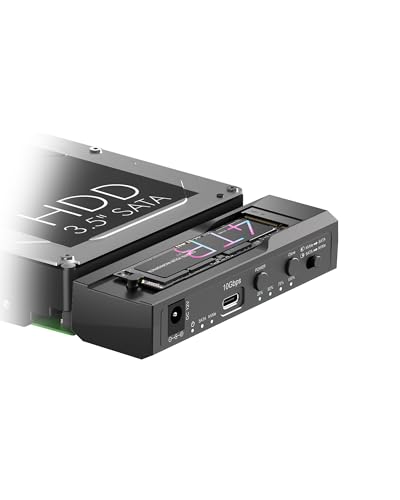
ICY BOX M.2 NVMe & SATA Cloner Dock
Best for: cross-format SATA and NVMe offline drive cloning
- Interface
- SATA III (what this guide is about)
- Transfer Speed
- 10Gbps
- Supported Drive Types
- M.2 NVMe, 2.5"/3.5" SATA
- Bay Count
- 2
- Offline Cloning
- One-Key Offline Cloning
- Supported M.2 Sizes
- 2230–2280
This dual-drive dock from ICY BOX connects both an M.2 NVMe SSD (sizes 2230 to 2280) and a 2.5-inch or 3.5-inch SATA drive simultaneously. Operating over a 10Gbps USB 3.2 Gen 2 Type-C interface, it delivers standalone one-key offline cloning between formats with four LED progress indicators. Powered by an included 12V/3A adapter, it suits you if you need to migrate data between SATA drives and NVMe sticks without boot-up software.
Pros
- Simultaneous read and write support for M.2 NVMe and 2.5/3.5-inch SATA drives
- One-key offline cloning between NVMe and SATA with 25% to 100% LED tracking
- USB 3.2 Gen 2 Type-C interface with rated speeds up to 10Gbps
- Dedicated 12V/3A power supply supports high-capacity drives up to 18TB and beyond
Cons
- Accommodates only one SATA drive at a time
- Requires an external wall adapter for daily operation
Good fit if
- You need to duplicate data directly between NVMe and SATA drives without a PC.
- You want simultaneous desktop access to both an M.2 stick and a 2.5-inch or 3.5-inch drive over USB-C.
Skip if
- You require a multi-bay docking station that holds multiple SATA drives at once.
- You prefer a strictly bus-powered portable adapter that needs no AC power plug.
Verdict: ICY BOX M.2 NVMe and SATA Cloner Dock bridges modern M.2 drives and traditional SATA formats with 10Gbps transfer speeds. It is an efficient standalone solution if you regularly duplicate or manage drives across both interfaces.
Specifications side by side
| Spec | SABRENT 2.5 and 3.5-Inch SATA USB 3.0 Dock | SABRENT 4-Bay 2.5-Inch SATA SSD Dock with Fan | ICY DOCK M.2 and 2.5-Inch SATA Dock | SABRENT 10-Bay USB-C SATA Docking Station | FIDECO Dual-Bay 20Gbps M.2 NVMe & SATA Cloner Dock | StarTech.com M.2 NVMe to SATA Duplicator Dock | GRAUGEAR Lay-Flat NVMe and SATA SSD Cloner Dock | ORICO NVMe and SATA Dual-Bay Dock | ICY BOX Triple-Bay NVMe & SATA Cloner Dock | ICY BOX M.2 NVMe & SATA SSD/HDD Dock | ORICO 3-Bay Cross-Protocol SSD Cloner Dock | ICY BOX M.2 NVMe & SATA Cloner Dock |
|---|---|---|---|---|---|---|---|---|---|---|---|---|
| Transfer Speed | USB 3.0 | Up to 5Gbps | Up to 5Gbps | Up to 10Gbps | 20Gbps | 10Gbps | 10Gbps (NVMe), 6Gbps (SATA) | 10Gbps | 10Gbps | 10Gbps | 10Gbps | 10Gbps |
| Supported Drive Types | 2.5-inch and 3.5-inch SATA HDD/SSD | 2.5-inch SATA SSD/HDD | 2.5-inch SATA HDD/SSD, SATA M.2 SSD | 3.5-inch SATA HDD | M.2 PCIe NVMe, M.2 SATA | M.2 NVMe, 2.5/3.5-inch SATA | M.2 NVMe, M.2 SATA, 2.5"/3.5" SATA | M.2 NVMe, 2.5"/3.5" SATA | M.2 NVMe, 2.5"/3.5" SATA | M.2 NVMe, M.2 SATA, 2.5"/3.5" SATA | M.2 NVMe, M.2 SATA, 2.5"/3.5" SATA | M.2 NVMe, 2.5"/3.5" SATA |
| Bay Count | not specified | 4 | 1 | 10 | 2 | not specified | not specified | not specified | 3 | not specified | 3 | 2 |
| Offline Cloning | not specified | not specified | not specified | not specified | Clone button | Bidirectional | SATA <-> NVMe offline cloning | Bidirectional | One-touch offline cloning | One-touch offline cloning | Cross-protocol offline cloning | One-Key Offline Cloning |
| Supported M.2 Sizes | not specified | not specified | not specified | not specified | 2230, 2242, 2260, 2280, 22110 | 2242, 2260, 2280 | not specified | 2230, 2242, 2260, 2280 | not specified | not specified | not specified | 2230–2280 |
| Maximum Capacity | not specified | Up to 4x 16TB | not specified | Up to 200TB (10 x 20TB) | not specified | not specified | not specified | 8TB (NVMe), 22TB (SATA) | not specified | not specified | not specified | not specified |
| Cooling Type | not specified | Built-in fan | not specified | Dual 120mm fans | not specified | Passive cooling | Built-in 3-speed cooling fan | Independent aluminum heat sink | not specified | Open-frame cooling design | not specified | not specified |
| Interface | SATA III | SATA III | SATA III | SATA III | SATA III | SATA III | SATA III | SATA III | SATA III | SATA III | SATA III | SATA III |
| Form Factor | not specified | 2.5 Inch | M.2 | not specified | M.2 | M.2 | M.2 | not specified | 2.5 Inch | M.2 | M.2 | 2.5 Inch |
| Cooling | not specified | Cooling Fan | not specified | not specified | not specified | not specified | not specified | not specified | not specified | not specified | not specified | not specified |
| Features | not specified | not specified | not specified | not specified | Offline Clone | Offline Clone | Offline Clone | not specified | Tool-Free, Offline Clone | Tool-Free, Offline Clone | Offline Clone | Tool-Free, Offline Clone |
| Material | not specified | not specified | not specified | not specified | Aluminum | not specified | not specified | Aluminum | not specified | not specified | not specified | not specified |
| Host Interface | not specified | not specified | not specified | USB-C | not specified | not specified | not specified | not specified | USB-C | USB-C | not specified | not specified |
| Dimensions | 7.09 × 4.8 × 1.6 inches | 6.3 × 4.4 × 4.4 inches | 6.25 × 3.75 × 1.12 inches | 5.7 × 10.5 × 13.4 inches | 2.68 × 2.68 × 0.69 inches | 5.5 × 3.9 × 2.2 inches | 6.5 × 5.51 × 1.02 inches | not specified | 5.47 × 3.03 × 2.32 inches | 6.45 × 1.57 × 0.71 inches | not specified | 4.27 × 1.74 × 0.55 inches |
| Weight | 7.5 ounces | 1.01 pounds | 3.56 ounces | 11 pounds | 12 ounces | 10.9 ounces | 5.47 ounces | not specified | 10.3 ounces | 5.47 ounces | not specified | not specified |
| Size | 2.5/3.5 inch Docking Station | 4-Bay SATA Dock – USB 3.0 5Gbps | not specified | 10 Bay | 6.8*1.75cm | not specified | Lay-Flat | IT28E | not specified | NVMe/SATA to NVMe | not specified | not specified |
| Color | Black | Black | Black | Black | Black | Black | Dark Gray | Silver | Black | not specified | not specified | Black |
| Model | EC-DFLT | DS-4SSD | MB031U-1SMB | DS-UCTB | M2288 | N2-M2-SSD-DUPLICATOR | 18140 | IT28E | 3 Bay Cloner | not specified | N3-C | not specified |
If you need video output, consider the best docking stations with DisplayPort for your setup.
How to Choose a SATA SSD Dock
-
Select Adequate Host Transfer Speeds
You should verify the host interface bandwidth before making a selection. SATA III operates at 6Gbps, so standard 5Gbps USB connections slightly limit your maximum throughput. Docks with 10Gbps or 20Gbps ratings provide ample headroom, especially for models that handle both NVMe and SATA drives simultaneously. The FIDECO Dual-Bay 20Gbps M.2 NVMe & SATA Cloner Dock delivers 20Gbps host bandwidth, preventing connection bottlenecks during intensive data jobs. Choose higher bandwidth models if you transfer large sequential archives or migrate data regularly between modern drive types.
-
Check Offline Cloning Capabilities
You need to confirm whether a dock supports standalone operation if you intend to duplicate drives without a computer. Docks specifying offline clone features allow direct drive-to-drive copying at the push of a button. Cross-interface models enable duplication between differing technologies, such as imaging a SATA source drive straight to an NVMe target. The StarTech.com M.2 NVMe to SATA Duplicator Dock offers bidirectional cloning across both interfaces without host software. Choose dedicated cloning hardware if you manage routine disk deployments, drive upgrades, or emergency system backups.
-
Examine Enclosure Cooling and Materials
Thermal control is essential for maintaining consistent transfer rates across long workloads. Solid-state drives generate substantial heat during sustained writes, which can lead to thermal throttling. Look closely at the construction materials and cooling specifications of each dock. Aluminum bodies dissipate heat naturally through conduction, providing quiet passive cooling. The ORICO NVMe and SATA Dual-Bay Dock utilizes an aluminum heat case to help manage drive temperatures during data access. If you perform sustained multi-hour backups, prioritize units made with metal enclosures or active fans over all-plastic shells.
-
Assess Multi-Drive Bay Capacity
Determine how many bare drives you need to mount at the same time. Single-bay and dual-bay docks work well for fast maintenance swaps, but expanding storage demands multi-bay hardware. Dedicated multi-bay docks consolidate multiple individual disks into a single desktop footprint over one cable. The SABRENT 10-Bay USB-C SATA Docking Station supports up to ten drives simultaneously with independent bay control for large-scale non-RAID storage arrays. Choose a high-bay dock if you manage bulk media collections, multi-disk archiving, or extensive drive rotation routines at your primary workstation.
-
Look for Tool-Free Designs
Drive swapping speed depends heavily on physical mounting mechanics. If your workflow requires frequent rotation between client drives or backup archives, avoid enclosures that require screws, caddies, or specialized tools. Docking stations labeled with tool-free features let you insert and extract bare drives in seconds with zero hardware adjustments. The ICY BOX Triple-Bay NVMe & SATA Cloner Dock includes tool-free bays that streamline rapid drive exchanges across both SATA and NVMe form factors. Choose tool-free mechanisms to save time whenever you service, wipe, or test storage media regularly.
Frequently asked questions
Can you clone drives without connecting the dock to a computer?
Yes, docks with offline cloning operate without a host computer. Models such as the StarTech.com M.2 NVMe to SATA Duplicator and ICY BOX Triple-Bay Cloner include standalone duplication hardware. You insert your source and target drives directly into the dock slots and start the clone process using physical buttons, eliminating the need for operating system software.
Do SATA SSD docking stations require external power adapters?
Most docking stations require dedicated external power to ensure stable drive performance. Desktop docks supporting 3.5-inch drives, like the SABRENT EC-DFLT, include 12V power adapters to supply adequate operational voltage. Multi-bay enclosures and docks with high bay counts, such as the ten-bay SABRENT DS-UCTB, rely on external power supplies to keep every installed drive and internal cooling fan running smoothly under load.
Can you read NVMe and SATA drives at the same time in dual-bay docks?
It depends on the specific dock design and its internal bridge controller. While models like the ORICO Dual-Bay Dock provide simultaneous read and write access across mixed drive formats, others have hardware limits. For example, the FIDECO 20Gbps Dual M.2 Dock supports both drive protocols and standalone cloning, but its controller cannot mount an NVMe drive and a SATA drive concurrently to your computer.
What is the advantage of active fan cooling on a SATA SSD dock?
Active cooling fans prevent drives from thermal throttling during sustained data transfers. Solid-state drives generate heat during heavy write operations, which can degrade transfer performance over time. Docks such as the SABRENT 4-Bay DS-4SSD and GRAUGEAR Lay-Flat Cloner include built-in fans to continuously circulate air around the drive enclosures, keeping operating temperatures lower during long cloning tasks or multi-drive backups.
Do docking stations require tools to install bare SATA drives?
Most docking stations use tool-free designs for rapid drive insertion and removal. You do not need drive caddies, screwdrivers, or mounting brackets to dock bare storage. Models like the ICY BOX Triple-Bay Dock and SABRENT EC-DFLT feature open slots that allow you to plug bare 2.5-inch or 3.5-inch drives straight into the SATA data and power pins, making disk swapping immediate.
Can you clone an older SATA drive directly to an M.2 NVMe SSD?
Yes, cross-protocol duplicators allow direct hardware cloning from SATA onto M.2 NVMe SSDs. Devices such as the ICY BOX M.2 NVMe & SATA SSD/HDD Dock and ORICO 3-Bay Cross-Protocol Dock are engineered specifically for this upgrade path. They manage sector-by-sector copying across differing physical interfaces without software intervention, which simplifies moving your operating system from legacy SATA storage to high-speed NVMe media.
Can a multi-bay docking station configure drives in hardware RAID?
Most standalone docking stations function strictly as non-RAID multi-drive enclosures. Multi-slot units like the SABRENT 4-Bay SSD Dock and the SABRENT 10-Bay USB-C Dock present each inserted disk as an independent drive letter to your operating system. If you want a RAID array across your docked SATA drives, you must configure software RAID through your computer rather than relying on dock hardware.