15 Best Dual-Bay SSD Enclosures, Compared
As an Amazon Associate we earn from qualifying purchases. Links on this page are affiliate links.
A dual bay SSD enclosure lets you connect two drives at once, handle high-speed backups, or run offline clones from a single unit. The ORICO Dual-Bay NVMe and SATA M.2 Enclosure earns the top position because it supports both M.2 NVMe and SATA protocols in a tool-free aluminum enclosure without requiring an external power brick.
We compared 15 options strictly by the specifications published on their listings. This guide helps you identify the right model for your drive interfaces, required transfer speeds, and cloning workflow.
Quick picks
The best fit for you
- You work with mixed NVMe and SATA M.2 drives ORICO Dual-Bay NVMe and SATA M.2 Enclosure Its dual bays accommodate both SATA III and NVMe M.2 2280 form factors in a tool-free aluminum design.
- You require maximum bandwidth with active drive cooling FREEGENE Dual-Bay 40Gbps NVMe SSD Enclosure It delivers 40Gbps transfer speeds and includes a built-in cooling fan for NVMe M.2 drives.
- You want rugged high-speed external storage for gaming ASUS TUF Gaming A2 Rugged 20Gbps SSD Enclosure It provides 20Gbps transfer speeds across dual M.2 bays inside an aluminum chassis built for gaming.
- You want internal mounting for two 2.5-inch drives Kingwin Dual-Bay 2.5-Inch Trayless Mobile Rack It features an aluminum dual-bay design tailored for 2.5-inch SATA III drives with tool-free installation.
Our 15 picks

ORICO Dual-Bay NVMe and SATA M.2 Enclosure
Best for: managing mixed NVMe and SATA M.2 drives
- Bay Count
- Dual-Bay (what this guide is about)
- Max Transfer Speed
- 10Gbps (NVMe), 6Gbps (SATA)
- Host Interface
- USB 3.2 Gen 2 Type-C
- Drive Interface
- PCIe NVMe M-Key, SATA B-Key, B+M Key
- Supported Form Factors
- 2230, 2242, 2260, 2280
- Drive Bay Count
- 2 bays
This ORICO dual-bay enclosure holds one M.2 NVMe SSD and one M.2 SATA SSD in separate bays. You get a 10Gbps interface on the NVMe slot and 6Gbps on the SATA slot over USB 3.2 Gen 2 Type-C. It accommodates 2230, 2242, 2260, and 2280 drives up to 4TB per slot. Tool-free rubber fasteners simplify setup. It suits you if you frequently access or repurpose mixed-protocol M.2 storage.
Pros
- Dedicated slots for both NVMe (up to 10Gbps) and SATA (up to 6Gbps) M.2 drives
- Tool-free drive installation using rubber retention plugs
- Aluminum finned housing includes two metal heatsinks and two thermal pads
- Supports 2230, 2242, 2260, and 2280 drive sizes up to 4TB per bay
Cons
- Cannot mount two NVMe drives or two SATA drives at the same time
- Requires two separate data cables connected to read both drives simultaneously
- No hardware RAID arrays or offline clone functions supported
Good fit if
- You have both M.2 NVMe and M.2 SATA drives to mount in a single unit.
- You swap drives frequently and need tool-free installation across standard M.2 lengths.
- You want bus-powered operation without an external power adapter.
Skip if
- You need to read or write to two NVMe drives concurrently.
- You require built-in hardware RAID or standalone drive cloning.
- You want to access both installed drives through a single USB cable.
Verdict: ORICO Dual-Bay NVMe and SATA M.2 Enclosure delivers hybrid drive compatibility across separate NVMe and SATA bays in an aluminum housing. It is a solid dual-slot choice when you regularly handle both M.2 protocol types without requiring an external power brick.

ORICO Dual-Bay NVMe and SATA M.2 SSD Enclosure
Best for: reading mixed NVMe and SATA M.2 drives
- Bay Count
- Dual-Bay (what this guide is about)
- Max Transfer Speed
- 10Gbps (NVMe), 6Gbps (SATA)
- Host Interface
- USB 3.2 Gen 2 Type-C
- Drive Interface
- PCIe NVMe M-Key, SATA B-Key, B+M Key
- Supported Form Factors
- 2230, 2242, 2260, 2280
- Drive Bay Count
- 2 bays
View on Amazon: ORICO Dual-Bay NVMe and SATA M.2 SSD Enclosure
This dual-bay aluminum enclosure gives you dedicated slots for one M.2 NVMe drive at up to 10Gbps and one M.2 SATA drive at up to 6Gbps. It uses a tool-free rubber plug system and supports 2230 through 2280 form factors up to 4TB per bay. Because both bays operate independently, you connect two cables to read both drives simultaneously. It fits technicians managing mixed drive formats.
Pros
- Dedicated bays for one 10Gbps NVMe drive and one 6Gbps SATA drive
- Tool-free drive retention with rubber plugs
- Aluminum ribbed housing includes two heatsinks and two thermal pads
- Bus-powered design operates without an external power brick
- Supports M.2 card lengths 2230, 2242, 2260, and 2280 up to 4TB per slot
Cons
- Requires two separate data cables connected at once to mount both drives
- Slots are protocol-restricted and do not support two NVMe drives
- Lacks built-in RAID or offline cloning hardware
Good fit if
- You work with a mix of both M.2 NVMe and legacy M.2 SATA drives.
- You need quick, tool-free drive swaps while working on the go.
- You want bus-powered dual drive access without an external AC supply.
Skip if
- You need to mount two NVMe SSDs at the same time.
- You want both drives to appear over a single USB-C cable.
- You require standalone hardware cloning without a computer.
Verdict: ORICO Dual-Bay NVMe and SATA M.2 Enclosure handles mixed-protocol storage setups by pairing a 10Gbps NVMe bay with a 6Gbps SATA bay in one aluminum body. It serves technicians handling multiple drive generations who do not mind running two USB cables for concurrent use.

MAIWO Dual-Bay 20Gbps NVMe RAID Enclosure
Best for: high-speed dual-NVMe hardware RAID configurations
- Bay Count
- Dual-Bay (what this guide is about)
- Max Transfer Speed
- 20Gbps
- Host Interface
- USB 3.2 Gen 2x2 Type-C
- Drive Interface
- PCIe NVMe M-Key
- Supported Form Factors
- 2230, 2242, 2260, 2280
- Drive Bay Count
- 2 bays
The MAIWO Dual-Bay NVMe 20Gbps RAID Enclosure holds two M.2 PCIe NVMe drives up to 8TB each for 16TB total capacity. It uses a USB 3.2 Gen 2x2 interface reaching transfer rates up to 20Gbps. Hardware switches let you toggle between RAID 0, RAID 1, PM, and JBOD modes. You will find this dual-bay enclosure useful if you need high-bandwidth external storage, data mirroring redundancy, or striped performance across two M.2 drives.
Pros
- USB 3.2 Gen 2x2 interface supports up to 20Gbps transfer speeds
- Hardware switch provides RAID 0, RAID 1, JBOD, and PM modes
- Tool-free aluminum alloy design handles drives up to 8TB per bay
- Comes with an independent 5V 3A power adapter
Cons
- Does not support M.2 SATA SSDs
- Included USB-C to USB-A cable is capped at 10Gbps
Good fit if
- You need hardware RAID 0, RAID 1, PM, or JBOD configurations for two NVMe drives.
- You have a host system with USB 3.2 Gen 2x2 support to utilize 20Gbps speeds.
- You use M-Key PCIe NVMe drives in 2230, 2242, 2260, or 2280 sizes.
Skip if
- You plan to install M.2 SATA or B+M Key solid-state drives.
- You want an enclosure that operates entirely without a dedicated power adapter.
Verdict: MAIWO Dual-Bay NVMe 20Gbps RAID Enclosure delivers 20Gbps bandwidth and versatile hardware array modes for dual M.2 NVMe drives. It is an ideal pick if your host device supports USB 3.2 Gen 2x2.

GODO Dual-Bay NVMe and SATA Clone Dock
Best for: offline M.2 NVMe and SATA duplication
- Bay Count
- Dual-Bay (what this guide is about)
- Max Transfer Speed
- 10Gbps
- Host Interface
- USB 3.1 Gen 2 Type-C
- Drive Interface
- M.2 NVMe, SATA (M Key, B+M Key)
- Supported Form Factors
- M.2 2230, 2242, 2260, 2280, 22110
- Drive Bay Count
- 2 bays
This GODO docking station is a dual-bay tool-free dock designed for both M.2 NVMe and SATA drives. You can clone drives offline without connecting a computer by pressing the dedicated button, with LED lights tracking your progress. It accommodates five different drive lengths from 2230 up to 22110, supporting up to 4TB capacity. If you need standalone disk duplication and broad drive length compatibility across phones, PCs, or consoles, this dock fits your workflow.
Pros
- Supports one-key offline cloning without host computer connection
- Compatible with both M.2 NVMe and M.2 SATA SSD protocols
- Accommodates five drive sizes from 2230 up to 22110
- Includes both USB-C to USB-C and USB-C to USB-A cables
Cons
- Maximum supported drive capacity capped at 4TB
- Target drive capacity must be strictly larger than the source drive for cloning
- No hardware RAID configurations listed in specifications
Good fit if
- You need to duplicate M.2 drives without booting or connecting a computer.
- You work with extended 22110 form factor M.2 SSDs.
- You manage both SATA and NVMe M.2 drives in the same workstation.
Skip if
- You require storage capacities beyond 4TB.
- You need hardware RAID support for speed striping or drive mirroring.
- You plan to clone to a target drive of equal or smaller capacity than the source.
Verdict: GODO Dual-Bay M.2 NVMe and SATA SSD Duplicator provides standalone computer-free cloning across NVMe and SATA protocols. It is a practical choice if you handle mixed drive formats up to 22110 and need quick offline duplication.
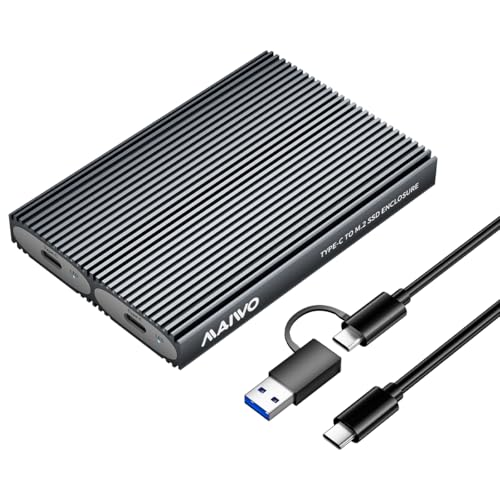
MAIWO Dual-Bay 10Gbps NVMe SSD Enclosure
Best for: tool-free dual NVMe storage on a budget
- Bay Count
- Dual-Bay (what this guide is about)
- Max Transfer Speed
- 10Gbps
- Host Interface
- USB 3.1 Gen 2 Type-C
- Drive Interface
- PCIe NVMe (M Key, B+M Key)
- Supported Form Factors
- M.2 2230, 2242, 2260, 2280
- Drive Bay Count
- 2 bays
This MAIWO enclosure gives you two M.2 NVMe bays inside an aluminum shell with tool-free access. It operates over a USB 3.1 Gen 2 interface at up to 10Gbps, supporting M-key and B+M key drives up to 8TB per slot for 16TB total. It suits you if you need compact, bus-powered dual NVMe access across different form factors without requiring screwdrivers or dedicated power bricks.
Pros
- 10Gbps USB 3.1 Gen 2 interface with UASP and TRIM support
- Tool-free drive installation for 2230, 2242, 2260, and 2280 NVMe SSDs
- Supports up to 16TB total capacity with 8TB per slot
- Aluminum alloy housing with silicone and aluminum thermal pads
Cons
- Requires two separate cables to access both drives simultaneously, but includes only one
- Does not support offline drive cloning
- Incompatible with SATA-based M.2 SSDs
Good fit if
- You need a tool-free dual-slot enclosure for 2230, 2242, 2260, or 2280 NVMe drives.
- You want bus-powered operation without carrying a dedicated power adapter.
- You plan to read and write to individual NVMe drives independently up to 8TB each.
Skip if
- You need standalone offline drive duplication.
- You want to mount and access two SSDs at once using a single USB port and cable.
- You use SATA M.2 solid-state drives.
Verdict: MAIWO Dual-Bay Tool-Free NVMe SSD Enclosure delivers compact, bus-powered dual NVMe drive access with 10Gbps speeds. It provides solid tool-free versatility as long as you supply a second cable to access both bays at once.

WAVLINK Dual-Bay 20Gbps NVMe Cloner
Best for: standalone NVMe duplication and high-speed data backup
- Bay Count
- Dual-Bay (what this guide is about)
- Max Transfer Speed
- 20Gbps
- Host Interface
- USB-C
- Drive Interface
- PCIe NVMe (M and B+M keys)
- Supported Form Factors
- 2280/2260/2242/2230
- Drive Bay Count
- 2 bays
The WAVLINK Dual-Bay 20Gbps NVMe Cloner is an offline duplicator and external dock built for dual PCIe NVMe drives. You get USB-C transfer speeds up to 20Gbps, with ratings reaching 1631MB/s read and 1267MB/s write. It supports capacities up to 16TB across 2230, 2242, 2260, and 2280 form factors. This dock suits you if you need standalone drive copying without a host computer alongside high-speed multi-terabyte data transfers.
Pros
- 20Gbps USB-C interface with rated 1631MB/s read and 1267MB/s write speeds
- One-button standalone offline cloning with 4-stage LED progress indicators
- Supports up to 16TB total capacity across two 8TB NVMe SSDs
- Compatible with 2230, 2242, 2260, and 2280 form factors
Cons
- Incompatible with M.2 SATA SSDs
- Requires external DC 5V/4A power adapter connection
Good fit if
- You need to duplicate NVMe drives without connecting to a PC.
- You use M-Key or B+M Key PCIe NVMe SSDs up to 8TB each.
- You want 20Gbps transfer rates using USB-C or USB-A connections.
Skip if
- You need to read or clone M.2 SATA drives.
- You want a bus-powered enclosure that runs without a DC power brick.
Verdict: WAVLINK Dual-Bay 20Gbps NVMe Cloner delivers standalone offline disk duplicating and fast 20Gbps transfers for dual PCIe NVMe drives. It handles large multi-terabyte backups efficiently without tying up your computer.

FREEGENE Dual-Bay 40Gbps NVMe SSD Enclosure
Best for: Thunderbolt users wanting active SSD cooling
- Bay Count
- Dual-Bay (what this guide is about)
- Max Transfer Speed
- 40Gbps
- Host Interface
- USB-C, Thunderbolt 4/3, USB 4.0
- Drive Interface
- M.2 NVMe (B+M, M-Key)
- Supported Form Factors
- 2230, 2242, 2260, 2280
- Drive Bay Count
- 2 bays
This dual-bay NVMe dock connects to Thunderbolt 3, Thunderbolt 4, or USB4 hosts at up to 40Gbps. It houses two M.2 drives across sizes 2230 to 2280, with an integrated cooling fan and aluminum body managing heat. Beyond storage, it includes HDMI 2.0, USB-A 3.1, and 100W Power Delivery. It suits you if you need active drive cooling and extra desktop ports alongside software RAID configurations.
Pros
- Active built-in cooling fan with an aluminum alloy body
- 40Gbps transfer speed compatible with Thunderbolt 3, Thunderbolt 4, and USB4
- Multi-port dock expansion featuring HDMI 2.0 and 100W Power Delivery
- Accommodates M.2 form factors 2230, 2242, 2260, and 2280
- Supports software RAID 0, RAID 1, and JBOD configurations
Cons
- Incompatible with non-Thunderbolt 3 or 4 host computers
- Cannot fit M.2 SSDs with pre-attached heatsinks
- JBOD storage mode is restricted to macOS hosts
Good fit if
- You have a computer with Thunderbolt 3, Thunderbolt 4, or USB4 connectivity.
- You require an active internal cooling fan to keep fast NVMe drives from throttling.
- You want hub utility like display output and 100W charging in the same unit.
Skip if
- You use a host system that lacks Thunderbolt 3 or Thunderbolt 4 ports.
- You already have M.2 SSDs equipped with thick, permanently attached heatsinks.
- You need hardware-managed RAID rather than software configuration.
Verdict: ACASIS Dual-Bay 40Gbps NVMe Dock pairs active fan cooling with 40Gbps Thunderbolt speeds and extra desktop connectivity. It is a capable choice if you run compatible hardware and want multi-drive software RAID without overheating.

NEWQ Dual-Bay 20Gbps RAID NVMe Enclosure
Best for: hardware RAID and standalone NVMe cloning
- Bay Count
- Dual-Bay (what this guide is about)
- Max Transfer Speed
- 20Gbps
- Host Interface
- USB-C
- Drive Interface
- PCIe NVMe
- Supported Form Factors
- 2280
- Drive Bay Count
- 2 bays
The NEWQ Dual-Bay 20Gbps RAID NVMe Enclosure houses two M.2 2280 NVMe solid-state drives inside an aluminum body. You get transfer speeds up to 20Gbps alongside hardware RAID 0, RAID 1, JBOD, and standalone clone modes. It also includes an auxiliary USB-C power input to run dual drives up to 16TB without power drops. This setup suits you if you need mirrored data security or fast drive duplication.
Pros
- Hardware support for RAID 0, RAID 1, JBOD, and clone modes
- Up to 20Gbps data transfer interface
- Auxiliary USB-C power input for high-capacity SSD configurations
- Tool-free drive installation
Cons
- Accommodates only the M.2 2280 form factor
- Lacks support for M.2 SATA drives
Good fit if
- You need hardware RAID 1 redundancy or RAID 0 performance across two NVMe drives.
- You want direct offline cloning without connecting to a computer.
- You run dual high-capacity drives that benefit from dedicated auxiliary power.
Skip if
- You need to fit shorter M.2 drive sizes like 2230, 2242, or 2260.
- You need an enclosure that supports legacy SATA M.2 solid-state drives.
Verdict: NEWQ Dual-Bay 20Gbps RAID NVMe Enclosure delivers fast 20Gbps transfers alongside flexible hardware RAID and offline cloning for 2280 drives. Dedicated auxiliary power ensures stable performance when operating two high-capacity NVMe SSDs simultaneously.

Kingwin Dual-Bay 2.5-Inch Trayless Mobile Rack
Best for: hot-swapping 2.5-inch SATA drives internally
- Bay Count
- Dual-Bay (what this guide is about)
- Max Transfer Speed
- 12Gbps
- Drive Interface
- 2.5" SATA/SAS
- Supported Form Factors
- 2.5-inch
- Drive Bay Count
- 2 bays
- Cooling System
- Aluminum frame
View on Amazon: Kingwin Dual-Bay 2.5-Inch Trayless Mobile Rack
The Kingwin Dual-Bay 2.5-Inch Trayless Mobile Rack mounts inside desktop or server bays to house two 2.5-inch SATA or SAS drives. It features an aluminum chassis, SATA III connectivity with speeds up to 12Gbps, and an integrated physical keylock. The trayless setup lets you slide drives directly into the slots without mounting screws, making it a practical internal storage option if you routinely swap drives.
Pros
- Tool-free, trayless design allows direct drive insertion without trays or screws
- Supports both 2.5-inch SATA and SAS SSDs and HDDs
- Integrated keylock system for physical drive security
- Aluminum construction assists with drive heat dissipation
Cons
- Does not support M.2 NVMe SSD form factors
- Requires an internal chassis bay installation rather than functioning as a standalone external enclosure
Good fit if
- You need an internal dual-bay solution for 2.5-inch SATA or SAS drives.
- You swap drives frequently and want a screwless, trayless mechanism.
- You require a physical lock to secure drives inside your system.
Skip if
- You need a portable external USB enclosure for M.2 NVMe drives.
- You lack a compatible internal bay in your desktop or server setup.
Verdict: Kingwin Dual-Bay 2.5-Inch Trayless Mobile Rack provides dedicated internal housing for two 2.5-inch SATA or SAS drives. Its aluminum frame and physical keylock offer hardware protection and straightforward drive changes without extra tools.

MAIWO Dual-Bay NVMe & SATA SSD Cloner
Best for: offline cloning across NVMe and SATA drives
- Bay Count
- Dual-Bay (what this guide is about)
- Max Transfer Speed
- 10Gbps
- Host Interface
- USB 3.2 Gen 2
- Drive Interface
- M.2 NVMe & SATA (M Key, B+M Key)
- Drive Bay Count
- Dual-Bay
- Features
- Offline Clone
This dual-bay M.2 enclosure gives you two slots that accommodate both NVMe and SATA M.2 SSDs using M Key and B+M Key interfaces. It delivers transfer speeds up to 10Gbps over a USB 3.2 Gen 2 connection and features built-in offline cloning functionality. You do not need software or drivers to run the device. It suits you if you need a compact, portable tool for migrating data across mixed drive formats.
Pros
- Supports both NVMe and SATA M.2 protocols (M Key and B+M Key)
- Up to 10Gbps transfer speeds via USB 3.2 Gen 2
- Built-in offline clone capability
- Driverless plug-and-play setup
Cons
- Peak transfer speeds capped at 10Gbps rather than 20Gbps or 40Gbps
- No integrated hardware RAID modes listed
Good fit if
- You need to clone data between M.2 NVMe and SATA drives without a computer.
- You want a dual-bay enclosure that handles both M Key and B+M Key form factors.
Skip if
- You need transfer speeds exceeding the 10Gbps USB 3.2 Gen 2 limit.
- You require hardware RAID functionality for dual-drive volume management.
Verdict: MAIWO Dual-Bay M.2 NVMe and SATA Cloner handles drive duplicates and mixed-protocol transfers cleanly up to 10Gbps. It is a practical pick if you need standalone offline duplication in a compact enclosure.

ASUS TUF Gaming A2 Rugged 20Gbps SSD Enclosure
Best for: rugged high-speed portable gaming storage
- Bay Count
- Dual-Bay (what this guide is about)
- Max Transfer Speed
- 20 Gbps
- Host Interface
- USB-C 3.2 Gen 2x2
- Drive Interface
- M.2 NVMe PCIe and SATA
- Supported Form Factors
- 2242, 2260, 2280
- Cooling System
- Aluminum chassis, thermal pad
View on Amazon: ASUS TUF Gaming A2 Rugged 20Gbps SSD Enclosure
The ASUS TUF Gaming A2 is a dual-bay enclosure designed for external M.2 storage. It connects through a USB-C 3.2 Gen 2x2 port at up to 20 Gbps and accommodates both M.2 NVMe PCIe and SATA drives. The aluminum chassis includes a silicone-rubber exterior rated for IP68 and MIL-STD-810H drop resistance. If you need portable gaming storage with tool-free drive swaps, this rugged enclosure delivers durable multi-drive access.
Pros
- USB-C 3.2 Gen 2x2 connection delivers transfer rates up to 20 Gbps
- Supports both M.2 NVMe PCIe and SATA SSDs in 2242, 2260, and 2280 sizes
- Tested to MIL-STD-810H drop resistance and IP68 water and dust ingress standards
- Q-Latch mechanism enables screw-free SSD installation
Cons
- Does not support 2230 or 22110 M.2 form factors
- Lacks hardware RAID switches and standalone offline cloning features
Good fit if
- You have a host system supporting 20 Gbps USB-C 3.2 Gen 2x2 speeds.
- You need a rugged aluminum housing with drop and water resistance.
- You want tool-free drive swaps using standard 2242, 2260, or 2280 SSDs.
Skip if
- You need standalone hardware RAID or push-button offline disk cloning.
- You use M.2 SSDs in non-standard sizes like 2230 or 22110.
Verdict: ASUS TUF Gaming A2 20Gbps Dual M.2 Enclosure combines 20 Gbps USB-C transfer rates with military-tested IP68 drop resistance. It provides durable dual-bay NVMe and SATA support for users needing rugged, tool-free external storage.
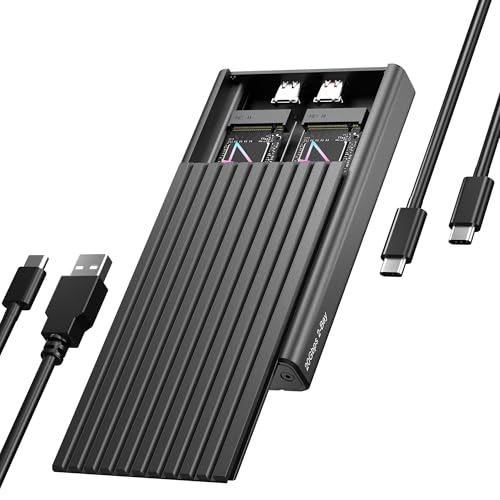
ICY BOX Dual-Bay 20Gbps NVMe Enclosure
Best for: dual NVMe drive access at 20Gbps speeds
- Bay Count
- Dual-Bay (what this guide is about)
- Max Transfer Speed
- 20Gbps
- Host Interface
- USB-C, USB 3.2 Gen 2x2
- Drive Interface
- PCIe NVMe M-Key
- Supported Form Factors
- 2230, 2242, 2260, 2280
- Drive Bay Count
- 2 bays
This aluminum enclosure houses two M.2 NVMe drives and connects through a single USB-C port. Its USB 3.2 Gen 2x2 interface delivers transfer speeds up to 20Gbps when paired with compatible host hardware. You get simultaneous access to both drives across 2230, 2242, 2260, and 2280 sizes using a tool-free rubber mounting system. It suits you if you need fast dual-drive data access on Windows or macOS.
Pros
- Up to 20Gbps bandwidth via USB 3.2 Gen 2x2
- Simultaneous read access for two M.2 NVMe SSDs over one cable
- Tool-free installation supporting 2230, 2242, 2260, and 2280 form factors
- Aluminum body includes thermal pad and dedicated power cable
Cons
- Does not support M.2 SATA SSDs
- No offline cloning or hardware RAID functions listed
- Requires a USB 3.2 Gen 2x2 host port to achieve maximum speeds
Good fit if
- You have a host computer equipped with USB 3.2 Gen 2x2 ports.
- You need concurrent access to two NVMe drives across various M.2 lengths.
- You prefer tool-free drive swaps without using screws.
Skip if
- You need standalone offline drive duplication without a PC.
- You plan to mount M.2 SATA solid-state drives.
Verdict: ICY BOX Dual-Bay 20Gbps NVMe SSD Enclosure delivers high-bandwidth access to two NVMe drives simultaneously over a single tool-free USB-C connection.

Pefishop Dual-Bay NVMe Cloner
Best for: offline NVMe drive cloning without a PC
- Bay Count
- Dual-Bay (what this guide is about)
- Max Transfer Speed
- 10Gbps
- Host Interface
- USB 3.2 Gen 2x2
- Drive Interface
- PCIe NVMe M Key, B+M Key
- Supported Form Factors
- 2230 to 22110
- Drive Bay Count
- 2 bays
The Pefishop Dual-Bay NVMe Cloner provides a standalone dock for reading and cloning M.2 PCIe drives. You get transfer rates up to 10Gbps over USB, offline cloning without a computer, and support for drives sized from 2230 up to 22110. It accommodates capacities up to 2x8TB using its dedicated 5V/3A power supply. If you regularly duplicate NVMe drives without needing host software, this tool-free dock handles your daily cloning tasks.
Pros
- Supports offline cloning without a host computer
- Accommodates M.2 sizes from 2230 up to 22110
- Handles capacities up to 16TB total across two bays
- Includes dedicated 5V/3A power adapter
Cons
- Incompatible with M.2 SATA drives
- Requires separate adapter for source slot AHCI SSDs
- Transfer speed capped at 10Gbps
Good fit if
- You need standalone drive duplication without connecting to a computer.
- You use longer 22110 M.2 form-factor solid-state drives.
Skip if
- You need to clone or read M.2 SATA drives.
- You require transfer speeds faster than 10Gbps.
Verdict: Pefishop Dual-Bay NVMe Cloner delivers standalone offline drive duplication and wide form-factor support up to 22110 at 10Gbps speeds.

Rosewill Dual-Bay NVMe Cloner Dock
Best for: offline NVMe cloning and high-speed backups
- Bay Count
- Dual-Bay (what this guide is about)
- Max Transfer Speed
- 20Gbps
- Host Interface
- USB 3.2 Gen 2x2
- Drive Interface
- PCIe NVMe (M-Key, B+M Key)
- Drive Bay Count
- 2 bays
- Installation Style
- Tool-free
This Rosewill dual-bay docking enclosure connects two M.2 NVMe drives through a 20Gbps USB 3.2 Gen 2x2 interface. It features tool-free installation and supports standalone one-click cloning without needing a host computer. An external 12V/2A power adapter and two USB cables are included to maintain stable throughput. You will find it practical if you frequently duplicate NVMe drives or transfer large files across multiple drives.
Pros
- USB 3.2 Gen 2x2 interface provides up to 20Gbps bandwidth
- One-click standalone offline drive cloning
- Tool-free drive installation for M Key and B+M Key NVMe SSDs
- Includes 12V/2A power adapter, 20Gbps USB-C cable, and 10Gbps USB-A cable
Cons
- Lacks support for SATA-based M.2 SSDs
- Requires external 12V/2A wall power adapter to operate
Good fit if
- You need to clone NVMe drives offline with a single button press.
- You have a USB 3.2 Gen 2x2 port to leverage 20Gbps speeds.
- You work with M Key or B+M Key NVMe SSDs.
Skip if
- You need compatibility with legacy M.2 SATA SSDs.
- You prefer a bus-powered enclosure that does not need a wall adapter.
Verdict: Rosewill Dual-Bay 20Gbps M.2 NVMe Cloner delivers fast 20Gbps USB 3.2 Gen 2x2 connectivity and standalone offline drive duplication in a tool-free format. It is a solid, dedicated option if you manage multiple NVMe drives and need quick, host-free drive cloning.

Elecacc Dual-Bay 20Gbps RAID NVMe Enclosure
Best for: offline NVMe cloning and dual-drive hardware RAID
- Bay Count
- Dual-Bay (what this guide is about)
- Max Transfer Speed
- 20Gbps
- Drive Interface
- PCIe NVMe M-Key, SATA
- Supported Form Factors
- 2230, 2242, 2260, 2280mm
- Drive Bay Count
- Dual Bay
- Cooling System
- Aluminum and ABS casing
This dual-bay enclosure houses two M.2 NVMe solid-state drives using a 20Gbps interface. You get support for RAID 0, RAID 1, JBOD, and standalone offline disk cloning without a computer. It accepts M-key drives in 2230, 2242, 2260, and 2280 form factors with capacities up to 8TB per bay. The tool-free aluminum and plastic chassis suits you if you need fast external arrays, drive duplication, or high-capacity portable storage.
Pros
- Supports 20Gbps transfer speeds
- Hardware support for RAID 0, RAID 1, JBOD, and offline clone modes
- Tool-free drive installation design
- Accommodates up to 16TB total storage (8TB per slot)
- Compatible with 2230, 2242, 2260, and 2280 M.2 form factors
Cons
- Does not support M.2 SATA B+M key drives
- Switching to RAID 0 or RAID 1 formats both drives
- Chassis includes plastic ABS parts rather than an all-aluminum shell
Good fit if
- You need standalone offline drive duplication between two M.2 NVMe drives.
- You want 20Gbps throughput with hardware RAID 0, RAID 1, or JBOD modes.
- You frequently swap different size M.2 SSDs without using tools.
Skip if
- You use M.2 SATA B+M key solid-state drives.
- You need a fully metal chassis without plastic components.
Verdict: Elecacc Dual-Bay 20Gbps RAID M.2 Enclosure delivers flexible RAID modes, offline drive cloning, and 20Gbps throughput in a tool-free chassis. It provides a practical hardware solution if you manage large NVMe backups and drive duplications.
Specifications side by side
| Spec | ORICO Dual-Bay NVMe and SATA M.2 Enclosure | ORICO Dual-Bay NVMe and SATA M.2 SSD Enclosure | MAIWO Dual-Bay 20Gbps NVMe RAID Enclosure | GODO Dual-Bay NVMe and SATA Clone Dock | MAIWO Dual-Bay 10Gbps NVMe SSD Enclosure | WAVLINK Dual-Bay 20Gbps NVMe Cloner | FREEGENE Dual-Bay 40Gbps NVMe SSD Enclosure | NEWQ Dual-Bay 20Gbps RAID NVMe Enclosure | Kingwin Dual-Bay 2.5-Inch Trayless Mobile Rack | MAIWO Dual-Bay NVMe & SATA SSD Cloner | ASUS TUF Gaming A2 Rugged 20Gbps SSD Enclosure | ICY BOX Dual-Bay 20Gbps NVMe Enclosure | Pefishop Dual-Bay NVMe Cloner | Rosewill Dual-Bay NVMe Cloner Dock | Elecacc Dual-Bay 20Gbps RAID NVMe Enclosure |
|---|---|---|---|---|---|---|---|---|---|---|---|---|---|---|---|
| Max Transfer Speed | 10Gbps (NVMe), 6Gbps (SATA) | 10Gbps (NVMe), 6Gbps (SATA) | 20Gbps | 10Gbps | 10Gbps | 20Gbps | 40Gbps | 20Gbps | 12Gbps | 10Gbps | 20 Gbps | 20Gbps | 10Gbps | 20Gbps | 20Gbps |
| Host Interface | USB 3.2 Gen 2 Type-C | USB 3.2 Gen 2 Type-C | USB 3.2 Gen 2x2 Type-C | USB 3.1 Gen 2 Type-C | USB 3.1 Gen 2 Type-C | USB-C | USB-C, Thunderbolt 4/3, USB 4.0 | USB-C | not specified | USB 3.2 Gen 2 | USB-C 3.2 Gen 2x2 | USB-C, USB 3.2 Gen 2x2 | USB 3.2 Gen 2x2 | USB 3.2 Gen 2x2 | not specified |
| Drive Interface | PCIe NVMe M-Key, SATA B-Key, B+M Key | PCIe NVMe M-Key, SATA B-Key, B+M Key | PCIe NVMe M-Key | M.2 NVMe, SATA (M Key, B+M Key) | PCIe NVMe (M Key, B+M Key) | PCIe NVMe (M and B+M keys) | M.2 NVMe (B+M, M-Key) | PCIe NVMe | 2.5" SATA/SAS | M.2 NVMe & SATA (M Key, B+M Key) | M.2 NVMe PCIe and SATA | PCIe NVMe M-Key | PCIe NVMe M Key, B+M Key | PCIe NVMe (M-Key, B+M Key) | PCIe NVMe M-Key, SATA |
| Supported Form Factors | 2230, 2242, 2260, 2280 | 2230, 2242, 2260, 2280 | 2230, 2242, 2260, 2280 | M.2 2230, 2242, 2260, 2280, 22110 | M.2 2230, 2242, 2260, 2280 | 2280/2260/2242/2230 | 2230, 2242, 2260, 2280 | 2280 | 2.5-inch | not specified | 2242, 2260, 2280 | 2230, 2242, 2260, 2280 | 2230 to 22110 | not specified | 2230, 2242, 2260, 2280mm |
| Drive Bay Count | 2 bays | 2 bays | 2 bays | 2 bays | 2 bays | 2 bays | 2 bays | 2 bays | 2 bays | Dual-Bay | not specified | 2 bays | 2 bays | 2 bays | Dual Bay |
| Cooling System | Aluminum fin, heat sinks, thermal pads | Aluminum rib, heat sinks, thermal pads | Aluminum alloy case | Aluminum | Aluminum alloy shell, thermal pad | Silicone thermal pads | Built-in fans, aluminum alloy | Aluminum casing | Aluminum frame | not specified | Aluminum chassis, thermal pad | Aluminum, thermal pad | not specified | not specified | Aluminum and ABS casing |
| Maximum Capacity | 2 x 4TB | 2 x 4TB | 16TB | 4TB | 16TB | 16TB (8TB per drive) | 8TB | 16TB | not specified | not specified | not specified | not specified | 2x8TB | not specified | 16TB |
| Installation Style | Tool-free | Tool Free | Tool-free | Tool Free | Tool Free | Tool-Free | not specified | Tool-free | Trayless, tool-free | not specified | Screw-free | Tool-Free | Tool-Free | Tool-free | Tool-Free |
| Interface | SATA III | SATA III | NVMe | SATA III | NVMe | NVMe | NVMe | NVMe | SATA III | SATA III | SATA III | NVMe | NVMe | not specified | NVMe |
| Form Factor | M.2 2280 | M.2 2280 | M.2 | M.2 | M.2 2242 | M.2 2280 | M.2 | M.2 2280 | not specified | M.2 | M.2 | M.2 2280 | M.2 | M.2 | M.2 |
| Cooling | not specified | not specified | not specified | not specified | not specified | not specified | Cooling Fan | not specified | not specified | not specified | not specified | not specified | not specified | not specified | not specified |
| Compatibility | not specified | not specified | not specified | not specified | not specified | not specified | not specified | not specified | not specified | not specified | Gaming | not specified | not specified | not specified | not specified |
| Transfer Speed | not specified | not specified | 20Gbps | not specified | 10Gbps | 20Gbps | 40Gbps | 20Gbps | not specified | not specified | 20Gbps | 20Gbps | 10Gbps | 20Gbps | 20Gbps |
| Features | Tool-Free | Tool-Free | not specified | Tool-Free, Offline Clone | Tool-Free | Tool-Free, Offline Clone | not specified | Offline Clone | Tool-Free | Offline Clone | not specified | Tool-Free | Offline Clone | Tool-Free, Offline Clone | not specified |
| Bay Count | Dual-Bay | Dual-Bay | Dual-Bay | Dual-Bay | Dual-Bay | Dual-Bay | Dual-Bay | Dual-Bay | Dual-Bay | Dual-Bay | Dual-Bay | Dual-Bay | Dual-Bay | Dual-Bay | Dual-Bay |
| Material | Aluminum | Aluminum | not specified | not specified | not specified | not specified | not specified | not specified | Aluminum | not specified | Aluminum | Aluminum | not specified | not specified | not specified |
| Weight | 6.35 ounces | 8.47 ounces | 13.8 ounces | not specified | 3.53 ounces | 1.01 pounds | 1.57 pounds | 1.01 pounds | 10.4 ounces | not specified | 9.84 ounces | 8.29 ounces | not specified | 13.6 ounces | not specified |
| Dimensions | not specified | not specified | 4.72 × 2.68 × 0.66 inches | 3.14 × 0.69 × 0.69 inches | 4.65 × 1.97 × 0.51 inches | 5.91 × 3.94 × 2.36 inches | not specified | not specified | not specified | 4 × 2.5 × 0.5 inches | 4.6 × 2.2 × 0.6 inches | 4.72 × 2.76 × 0.67 inches | not specified | 6 × 5 × 2.75 inches | not specified |
| Size | Dual M.2 SATA+NVMe | not specified | not specified | not specified | not specified | not specified | not specified | not specified | SATA Dual Bay | not specified | TUF A2|up to 20Gbps | 20GB 2 Bay enclosure | not specified | 20 Gbps Dual Bay Cloner | not specified |
| Color | Grey | Silver | not specified | Black | Grey | Silver | blue | Space Blue | Black | Gray | A2|up to 20Gbps | Black | Grey | black | gray |
| Model | M.2 SATA+NVMe-Dual | Dual M.2 SATA+NVMe | NVMe RAID Enclosure | DK01-NVMe/SATA | 2 Bay - M.2 NVMe | NVMe + NVMe | TBU405 PRO MAX | NQ-RD-01 | K-22SS | K2023CL | TUF GAMING A2/BLK/G/AS | 20GB 2 Bay | not specified | RS-N2-CL | Dual Bay Raid SSD Enclosure |
If you are building a mobile workstation alongside your storage array, you can compare the best dual monitor portable monitors by their display specifications.
How to Choose a Dual-Bay Enclosure
-
Check for Offline Cloning
Offline cloning lets you duplicate one drive to another without connecting to a computer host. Look for enclosures with dedicated clone buttons and status indicators if you frequently image operating systems or back up drives. The Rosewill Dual-Bay NVMe Cloner Dock operates independently of an operating system to duplicate identical or smaller drives directly onto larger ones. If you only plan to access two separate volumes over USB for routine storage, you do not need this offline feature and can focus on standard enclosures instead.
-
Evaluate Hardware RAID Support
Determine whether you need unified storage performance or redundant data protection across both drives. Hardware RAID enclosures manage array modes on the device itself through physical switches rather than relying on software setup in your operating system. The MAIWO Dual-Bay 20Gbps NVMe RAID Enclosure provides built-in RAID modes for striping or mirroring your drives. If you prefer to view both drives as two separate disks with independent drive letters, verify that the enclosure supports normal or JBOD modes before configuring your storage.
-
Verify Supported M.2 Lengths
M.2 solid-state drives arrive in multiple physical lengths, including 2230, 2242, 2280, and extended 22110 enterprise formats. Check the enclosure specifications to confirm its internal mounting points match your drive hardware. Most dual-bay enclosures handle standard 2280 cards, but longer enterprise drives require dedicated chassis spacing. The Pefishop Dual-Bay NVMe Cloner accommodates drives up to 22110 in size. Selecting an enclosure that matches your specific module lengths prevents physical interference and ensures the drive stays firmly anchored in its slot during data transfers.
-
Select Form Factor Mounting
Decide between external USB enclosures and internal hot-swap bays based on your physical workstation setup. External dual-slot enclosures offer portable USB connectivity for compact M.2 sticks, whereas internal mobile racks slide into desktop bays for standard SATA drives. The Kingwin Dual-Bay 2.5-Inch Trayless Mobile Rack mounts inside a desktop tower to let you hot-swap 2.5-inch SATA or SAS SSDs directly. Choose an internal trayless rack for stationary desktop rigs, or select an external USB-C model if you need to carry your storage between workstations.
-
Look for Tool-Free Access
Examine how the enclosure secures your drives if you plan to swap SSDs regularly. Screw-secured enclosures require a mini screwdriver each time you swap storage, which slows down drive diagnosis or bulk file indexing. Tool-free designs feature push-latch covers and rubber retention pins that let you change modules in seconds. The ICY BOX Dual-Bay 20Gbps NVMe Enclosure uses a tool-free chassis that lets you install or replace drives without extra equipment. Opt for tool-free assembly if you frequently rotate multiple testing drives.
-
Assess Environmental Durability Ratings
Consider where you plan to use your dual-bay setup before settling on a build design. Standard desktop docks feature open slots or lightweight aluminum covers best suited for quiet desks. If you travel or work outdoors, look for reinforced housings with certified protection against drops and moisture. The ASUS TUF Gaming A2 Rugged 20Gbps SSD Enclosure features an aluminum body with IP68 resistance to block dust and water intrusion. Verifying build durability protects your paired drives from mechanical shock and debris when working in challenging environments.
Frequently asked questions
Can a dual-bay SSD enclosure access two drives at the same time?
Yes, dual-bay enclosures can access two drives simultaneously, but the connection setup varies by model. Enclosures like the ICY BOX Dual-Bay 20Gbps model mount both drives over a single tool-free USB-C connection. In contrast, the MAIWO Dual-Bay 10Gbps NVMe enclosure requires you to supply a second cable to access both drive bays at the same time.
Do dual-bay enclosures support both M.2 NVMe and SATA SSDs together?
Only certain dual-bay enclosures support both protocols. Models like the ORICO Dual-Bay M.2 enclosure and the GODO Clone Dock feature hybrid designs that accept both NVMe and SATA M.2 drives. Pure NVMe models, such as the MAIWO Dual-Bay 20Gbps RAID Enclosure, only work with PCIe NVMe SSDs. You must verify whether each slot supports SATA, NVMe, or both.
What is the benefit of hardware RAID in a dual-bay enclosure?
Hardware RAID manages drive arrays directly on the enclosure rather than relying on your computer operating system. Units like the MAIWO Dual-Bay 20Gbps RAID Enclosure and Elecacc Dual-Bay RAID enclosure process array modes internally. This frees up host system resources and provides consistent performance for data striping or redundancy across your installed M.2 NVMe drives.
Can you install 2.5-inch SATA SSDs in a dual-bay M.2 enclosure?
No, dual-bay M.2 enclosures cannot accept 2.5-inch SATA SSDs because physical interfaces and dimensions differ completely. For 2.5-inch SATA or SAS drives, you need a dedicated chassis like the Kingwin Dual-Bay Trayless Mobile Rack. That unit installs into computer drive bays with an aluminum frame, whereas portable dual-bay M.2 enclosures only fit bare circuit-board M.2 form factors.
What M.2 SSD sizes do dual-bay enclosures accept?
Most dual-bay enclosures hold standard M.2 2280 drives, but specific models accommodate smaller or longer sizes. The MAIWO Dual-Bay 10Gbps enclosure lists compatibility with M.2 2242 drives. If you handle extended enterprise cards, options like the GODO Clone Dock and Pefishop NVMe Cloner support drives up to 22110. Always verify card length compatibility before mounting your SSDs.
Why do some dual-bay NVMe enclosures include auxiliary power ports?
Auxiliary power ports supply additional electrical current needed when running two high-speed NVMe drives at once. High-capacity M.2 drives consume substantial power during heavy read and write operations. The NEWQ Dual-Bay 20Gbps RAID Enclosure uses dedicated auxiliary power to ensure stable performance, preventing connection drops or drive resets that can occur if host ports fail to deliver enough electricity.
Are dual-bay SSD enclosures durable enough for travel?
Durability depends on enclosure housing materials and protective engineering. Aluminum models naturally offer solid physical protection and heat dissipation for dual drives. For demanding mobile environments, specialized options like the ASUS TUF Gaming A2 feature aluminum construction combined with military-tested IP68 resistance. This rugged design safeguards your dual SATA or NVMe SSDs against accidental drops, moisture, and dust outdoors.