What Is Bay Count? A Guide for SSD Enclosures Buyers (2026)
As an Amazon Associate we earn from qualifying purchases. Links on this page are affiliate links.
Understanding Bay Count in SSD Enclosures
Bay count refers to the number of drive slots available inside an external enclosure. This specification determines how many internal solid-state drives you can install simultaneously. Most consumer models feature single-bay designs, holding one drive. However, dual-bay enclosures are common for users needing extra storage capacity or redundancy. When you see bay count explained in product listings, it indicates the physical space allocated for NVMe or SATA drives.
The mechanism is straightforward. Each bay houses a connection interface, typically M.2 for NVMe or 2.5-inch SATA for traditional SSDs. In a dual-bay setup, the enclosure contains two distinct controllers or a single controller with multiple ports. This allows you to install two separate drives. You can use this configuration for simple mass storage, creating a larger single volume. Alternatively, you can set up a RAID array. RAID 0 combines the drives for faster speeds. RAID 1 mirrors the data for protection against drive failure.
Buyers should check the supported drive types carefully. Some dual-bay units accept only NVMe drives. Others support a mix of NVMe and SATA. This flexibility matters if you plan to reuse older drives. The labeling on packaging usually states "dual-bay" or "2-bay." You will also see dimensions listed, as dual-bay enclosures are larger and heavier than single-bay versions.
Why does this matter to you? If you have two drives, a single-bay enclosure forces you to choose which one to use. A dual-bay enclosure lets you use both. This is essential for content creators who need large video files. It is also useful for users who want to separate their operating system from their personal data. Always verify the maximum capacity per bay. Some enclosures do not support high-capacity drives in both slots simultaneously due to power or thermal limits. Understanding this spec helps you match the enclosure to your existing hardware.
Dual-Bay Enclosure Features
Dual-Bay
A dual-bay enclosure provides two slots for M.2 SSDs. This setup lets you install two drives in one chassis. You gain extra storage capacity without buying multiple cables or docks. Some models support mixed drive types, like one NVMe and one SATA drive. Others support only NVMe protocols. This flexibility helps you match drives to your specific needs. You can also use the second slot for RAID configurations. This offers data redundancy or faster speeds. However, dual-bay units are larger and heavier than single-drive options. They often require external power adapters for stability. The ORICO Dual-Bay NVMe and SATA M.2 Enclosure is one example. It supports mixed protocols and uses a tool-free design. This makes it practical for users who need flexible connectivity.
Mixed Protocol Support
Some dual-bay enclosures allow you to mix drive interfaces. You can install one NVMe drive and one SATA drive in the same unit. This is useful if you have older SATA SSDs and newer NVMe drives. You do not need separate enclosures for each type. The ORICO Dual-Bay NVMe and SATA M.2 Enclosure supports this feature. It connects via USB-C and handles both protocols simultaneously. This saves space on your desk. It also simplifies cable management. You only need one power source and one data cable. This option is ideal for users who want to repurpose older drives. It provides a practical way to expand storage without upgrading every drive. You get the benefits of both technologies in a single device.
Is a Dual-Bay Worth It
Who needs it
You should prioritize a dual-bay enclosure if you manage large media libraries or require significant local storage capacity. This specification allows you to install two M.2 solid-state drives within a single chassis. You gain extra storage without needing multiple cables or separate docks. This setup is ideal for video editors who need fast access to raw footage files. It also benefits users who want to create a simple RAID 0 array for increased read speeds. If you frequently transfer large datasets between computers, having two drives ready to go saves time. You avoid the clutter of multiple adapters. The dual-bay design consolidates your storage solution. You get more space in a portable form factor. This is practical for professionals who move between locations but cannot compromise on data availability. The extra slot provides flexibility for future upgrades without buying a new enclosure.
Who can skip it
You can ignore the dual-bay specification if you primarily store documents, photos, or small application files. Most casual users do not need two internal drives in one device. A single-bay enclosure is sufficient for your daily tasks. It is lighter and often more compact. You save space in your bag. Prioritize transfer speeds and build quality instead. Look for enclosures with USB 3.2 Gen 2 or Thunderbolt 3 support. These features ensure your single drive performs at its maximum potential. A high-speed single drive is faster than a slow dual-bay setup. Also, consider thermal management. Single drives generate less heat than two. Better cooling means sustained performance. If you value portability above all, a slim single-bay model is better. Do not pay for unused capacity. Your current storage needs likely fit in one slot. Focus on reliability and speed rather than extra slots.
Key SSD Terms
NVMe
Non-Volatile Memory Express is a protocol for accessing flash memory. It uses the PCIe interface for faster data transfer compared to older SATA standards in modern enclosures.
SATA
Serial Advanced Technology Attachment is an older interface standard for SSDs. It offers lower speeds than NVMe but remains compatible with many older enclosures and legacy systems.
M.2
A small form factor for internal expansion cards and their associated connectors. Most modern NVMe and SATA SSDs use this shape, fitting directly into the enclosure slots.
PCIe
Peripheral Component Interconnect Express is the bus interface connecting the SSD to your computer. Higher generations like PCIe 4.0 or 5.0 allow for significantly faster data throughput.
USB-C
A reversible connector standard used for external enclosures. It supports high-speed data transfer and power delivery, often enabling Thunderbolt or USB4 connections for maximum performance.
TBW
Terabytes Written measures the total data you can write to an SSD over its lifespan. Higher TBW ratings indicate greater durability and longevity for frequent heavy usage.
DRAM Cache
A dedicated memory chip on the SSD that stores mapping tables. It improves random read and write speeds, making the drive feel more responsive during heavy multitasking.
SLC
Single-Level Cell stores one bit per memory cell. It offers the highest endurance and speed but is expensive. Most consumer drives use TLC or QLC instead.
Quick picks
| # | Product | Best for | Price |
|---|---|---|---|
| 1 | ORICO Dual-Bay NVMe and SATA M.2 Enclosure | Users needing mixed NVMe and SATA connectivity | Check price of ORICO Dual-Bay NVMe and SATA M.2 Enclosure on Amazon |
| 2 | ORICO Dual-Bay NVMe and SATA M.2 SSD Enclosure | Mixed NVMe and SATA drive setups | Check price of ORICO Dual-Bay NVMe and SATA M.2 SSD Enclosure on Amazon |
| 3 | MAIWO Dual-Bay 20Gbps NVMe RAID Enclosure | Users needing RAID 1 redundancy and 20Gbps speeds | Check price of MAIWO Dual-Bay 20Gbps NVMe RAID Enclosure on Amazon |
| 4 | GODO Dual-Bay NVMe and SATA Clone Dock | Offline drive duplication without a computer | Check price of GODO Dual-Bay NVMe and SATA Clone Dock on Amazon |
| 5 | MAIWO Dual-Bay 10Gbps NVMe SSD Enclosure | Tool-free dual NVMe drive expansion | Check price of MAIWO Dual-Bay 10Gbps NVMe SSD Enclosure on Amazon |
Our 5 picks

ORICO Dual-Bay NVMe and SATA M.2 Enclosure
Best for: Users needing mixed NVMe and SATA connectivity
- Bay Count
- Dual-Bay (what this guide is about)
- Max Transfer Speed
- 10Gbps (NVMe), 6Gbps (SATA)
- Host Interface
- USB 3.2 Gen 2 Type-C
- Drive Interface
- PCIe NVMe M-Key, SATA B-Key, B+M Key
- Supported Form Factors
- 2230, 2242, 2260, 2280
- Drive Bay Count
- 2 bays
View on Amazon: ORICO Dual-Bay NVMe and SATA M.2 Enclosure Affiliate link
This enclosure lets you use one NVMe and one SATA drive at the same time. You get 10Gbps speeds for the NVMe slot and 6Gbps for the SATA slot. It supports small 2230 and 2242 drives as well as standard 2280 sizes. The aluminum body with heat sinks helps manage heat. You do not need tools or a power adapter to install your drives.
Pros
- Supports both NVMe M-Key and SATA B+M Key drives simultaneously
- Tool-free installation with rubber caps for quick setup
- Aluminum fin design with heat sinks and thermal pads
- USB 3.2 Gen 2 Type-C interface for high speed
Cons
- Maximum capacity is limited to 2 x 4TB
- SATA slot is restricted to 6Gbps transfer speeds
- Requires initial partitioning and formatting for new drives
Good fit if
- You need to connect both an NVMe and a SATA SSD
- You use small form factor drives like 2230 or 2242
- You want a tool-free setup without external power
Skip if
- You need to connect two NVMe drives simultaneously
- You require transfer speeds faster than 10Gbps
- You need support for drives larger than 4TB each
Verdict: ORICO Dual M.2 NVMe SATA Enclosure is a practical solution for users who need to mix drive types. It fits those who value flexible form factor support and simple tool-free installation over raw maximum capacity.

ORICO Dual-Bay NVMe and SATA M.2 SSD Enclosure
Best for: Mixed NVMe and SATA drive setups
- Bay Count
- Dual-Bay (what this guide is about)
- Max Transfer Speed
- 10Gbps (NVMe), 6Gbps (SATA)
- Host Interface
- USB 3.2 Gen 2 Type-C
- Drive Interface
- PCIe NVMe M-Key, SATA B-Key, B+M Key
- Supported Form Factors
- 2230, 2242, 2260, 2280
- Drive Bay Count
- 2 bays
View on Amazon: ORICO Dual-Bay NVMe and SATA M.2 SSD Enclosure Affiliate link
This ORICO enclosure houses two independent M.2 drives in a single aluminum case. One bay supports NVMe at 10Gbps, while the other handles SATA at 6Gbps. You can install drives up to 2280 size without tools. It uses a USB 3.2 Gen 2 Type-C connection. The design includes heat sinks and thermal pads for cooling. It suits users needing mixed protocol storage.
Pros
- USB 3.2 Gen 2 Type-C host interface
- Dual-bay design for NVMe and SATA SSDs
- Tool-free installation with rubber plugs
- Aluminum alloy body with heat sinks and thermal pads
- Supports 2230, 2242, 2260, and 2280 form factors
Cons
- SATA bay limited to 6Gbps speeds
- Requires separate data cables for each drive
- Strict protocol matching required to prevent damage
Good fit if
- You need to connect both an NVMe and a SATA SSD simultaneously
- You want tool-free installation for quick drive swaps
- You require aluminum cooling for sustained high-speed operations
Skip if
- You plan to use two NVMe drives in both bays
- You prefer a single cable connection for both drives
- You need SATA speeds exceeding 6Gbps
Verdict: ORICO Dual M.2 NVMe SATA Enclosure offers a practical way to mix drive protocols in one chassis. It fits users who need specific SATA and NVMe connectivity in a single portable unit.

MAIWO Dual-Bay 20Gbps NVMe RAID Enclosure
Best for: Users needing RAID 1 redundancy and 20Gbps speeds
- Bay Count
- Dual-Bay (what this guide is about)
- Max Transfer Speed
- 20Gbps
- Host Interface
- USB 3.2 Gen 2x2 Type-C
- Drive Interface
- PCIe NVMe M-Key
- Supported Form Factors
- 2230, 2242, 2260, 2280
- Drive Bay Count
- 2 bays
View on Amazon: MAIWO Dual-Bay 20Gbps NVMe RAID Enclosure Affiliate link
This dual-bay NVMe enclosure uses a JMS586R chipset to support USB 3.2 Gen 2x2 connections at 20Gbps. It handles up to two 8TB drives for a total of 16TB. The aluminum alloy case aids heat dissipation. You get four RAID modes including 0, 1, PM, and JBOD. It requires a separate 5V 3A power adapter and supports tool-free installation for M-Key M.2 SSDs.
Pros
- 20Gbps transfer speed via USB 3.2 Gen 2x2
- Supports four RAID modes: 0, 1, PM, JBOD
- Aluminum alloy case for cooling
- Tool-free installation design
- Handles up to 16TB total capacity
Cons
- Requires a separate 5V 3A power adapter
- Does not support M.2 SATA B+M Key SSDs
- Heavier build at 13.8 ounces
Good fit if
- You need RAID 1 for data redundancy
- You require 20Gbps transfer speeds
- You use PCIe NVMe M-Key drives
Skip if
- You only have SATA M.2 SSDs
- You want a plug-and-play solution without external power
- You need support for B+M Key drives
Verdict: MAIWO Dual-Bay NVMe RAID Enclosure suits users who need high-speed data mirroring or striping with a dedicated power source. It is a solid option for NVMe-only workflows requiring RAID flexibility.

GODO Dual-Bay NVMe and SATA Clone Dock
Best for: Offline drive duplication without a computer
- Bay Count
- Dual-Bay (what this guide is about)
- Max Transfer Speed
- 10Gbps
- Host Interface
- USB 3.1 Gen 2 Type-C
- Drive Interface
- M.2 NVMe, SATA (M Key, B+M Key)
- Supported Form Factors
- M.2 2230, 2242, 2260, 2280, 22110
- Drive Bay Count
- 2 bays
View on Amazon: GODO Dual-Bay NVMe and SATA Clone Dock Affiliate link
This GODO docking station supports dual M.2 bays for NVMe and SATA drives. It features offline cloning, letting you copy data without a computer. The USB-C host interface supports speeds up to 10Gbps. It handles form factors from 2230 to 22110. You get tool-free installation and a 4TB maximum capacity per drive. The aluminum casing provides passive cooling.
Pros
- Offline clone function with one-key operation
- Supports NVMe and SATA M.2 drives
- USB-C host interface with 10Gbps speed
- Tool-free installation for easy drive swaps
Cons
- No RAID or JBOD controller options
- Limited to dual-bay configuration only
- No software management included
Good fit if
- You need to duplicate drives without a PC
- You want to support both NVMe and SATA
- You prefer tool-free drive installation
Skip if
- You require RAID array configurations
- You need more than two drive bays
- You want software-based drive management
Verdict: GODO Dual-Bay NVMe/SATA Duplicator is a specialized tool for users who need to clone drives offline. It fits those who value simplicity and direct drive-to-drive copying over complex array setups.
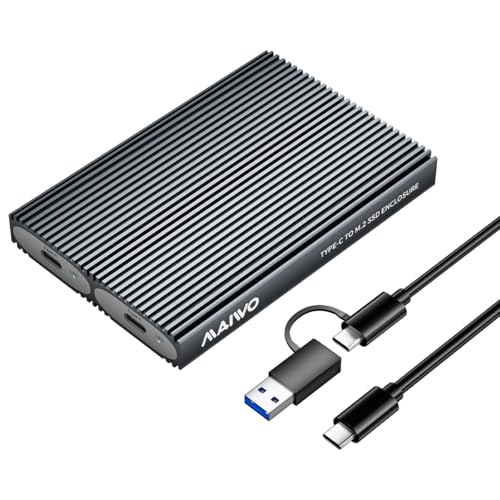
MAIWO Dual-Bay 10Gbps NVMe SSD Enclosure
Best for: Tool-free dual NVMe drive expansion
- Bay Count
- Dual-Bay (what this guide is about)
- Max Transfer Speed
- 10Gbps
- Host Interface
- USB 3.1 Gen 2 Type-C
- Drive Interface
- PCIe NVMe (M Key, B+M Key)
- Supported Form Factors
- M.2 2230, 2242, 2260, 2280
- Drive Bay Count
- 2 bays
View on Amazon: MAIWO Dual-Bay 10Gbps NVMe SSD Enclosure Affiliate link
This dual-bay enclosure holds two M.2 NVMe drives up to 8TB each for 16TB total storage. It connects via USB 3.1 Gen 2 Type-C at up to 10Gbps and features tool-free drive installation with an aluminum shell. It suits you if you need high-capacity external NVMe storage without hardware RAID or offline cloning.
Pros
- Tool-free installation for 2230, 2242, 2260, and 2280 NVMe SSDs
- Supports up to 16TB total capacity across two independent bays
- USB 3.1 Gen 2 Type-C interface with up to 10Gbps transfer speed
- Aluminum alloy housing with thermal pads for heat dissipation
Cons
- Requires two separate cables to run both drives simultaneously while including only one
- Does not support offline drive cloning or SATA M.2 SSDs
Good fit if
- You need tool-free installation for two independent PCIe NVMe SSDs.
- You handle large data pools across drives up to 8TB per slot.
Skip if
- You need offline drive cloning or hardware RAID modes.
- You want concurrent dual-drive access through a single USB cable.
- You use M.2 SATA drives rather than NVMe.
Verdict: MAIWO Dual-Bay Tool-Free NVMe Enclosure fits desktop users who want quick, tool-free access to independent NVMe drives and already have an extra USB-C cable for simultaneous dual-drive transfers.
Specifications side by side
| Spec | ORICO Dual-Bay NVMe and SATA M.2 Enclosure | ORICO Dual-Bay NVMe and SATA M.2 SSD Enclosure | MAIWO Dual-Bay 20Gbps NVMe RAID Enclosure | GODO Dual-Bay NVMe and SATA Clone Dock | MAIWO Dual-Bay 10Gbps NVMe SSD Enclosure |
|---|---|---|---|---|---|
| Max Transfer Speed | 10Gbps (NVMe), 6Gbps (SATA) | 10Gbps (NVMe), 6Gbps (SATA) | 20Gbps | 10Gbps | 10Gbps |
| Host Interface | USB 3.2 Gen 2 Type-C | USB 3.2 Gen 2 Type-C | USB 3.2 Gen 2x2 Type-C | USB 3.1 Gen 2 Type-C | USB 3.1 Gen 2 Type-C |
| Drive Interface | PCIe NVMe M-Key, SATA B-Key, B+M Key | PCIe NVMe M-Key, SATA B-Key, B+M Key | PCIe NVMe M-Key | M.2 NVMe, SATA (M Key, B+M Key) | PCIe NVMe (M Key, B+M Key) |
| Supported Form Factors | 2230, 2242, 2260, 2280 | 2230, 2242, 2260, 2280 | 2230, 2242, 2260, 2280 | M.2 2230, 2242, 2260, 2280, 22110 | M.2 2230, 2242, 2260, 2280 |
| Drive Bay Count | 2 bays | 2 bays | 2 bays | 2 bays | 2 bays |
| Cooling System | Aluminum fin, heat sinks, thermal pads | Aluminum rib, heat sinks, thermal pads | Aluminum alloy case | Aluminum | Aluminum alloy shell, thermal pad |
| Maximum Capacity | 2 x 4TB | 2 x 4TB | 16TB | 4TB | 16TB |
| Installation Style | Tool-free | Tool Free | Tool-free | Tool Free | Tool Free |
| Interface | SATA III | SATA III | NVMe | SATA III | NVMe |
| Form Factor | M.2 2280 | M.2 2280 | M.2 | M.2 | M.2 2242 |
| Transfer Speed | not stated | not stated | 20Gbps | not stated | 10Gbps |
| Features | Tool-Free, UASP, TRIM | Tool-Free, UASP, TRIM | not stated | Tool-Free, Offline Clone | Tool-Free, UASP, TRIM |
| Bay Count | Dual-Bay | Dual-Bay | Dual-Bay | Dual-Bay | Dual-Bay |
| Material | Aluminum | Aluminum | not stated | not stated | not stated |
| Weight | 6.35 ounces | 8.47 ounces | 13.8 ounces | not stated | 3.53 ounces |
| Dimensions | not stated | not stated | 4.72 × 2.68 × 0.66 inches | 3.14 × 0.69 × 0.69 inches | 4.65 × 1.97 × 0.51 inches |
| Size | Dual M.2 SATA+NVMe | not stated | not stated | not stated | not stated |
| Color | Grey | Silver | not stated | Black | Grey |
| Model | M.2 SATA+NVMe-Dual | Dual M.2 SATA+NVMe | NVMe RAID Enclosure | DK01-NVMe/SATA | 2 Bay - M.2 NVMe |
Frequently asked questions
Can I mix NVMe and SATA drives in a dual-bay enclosure?
Yes, many models support mixed drive types. The ORICO Dual-Bay NVMe and SATA M.2 Enclosure fits one of each protocol. This allows you to use older SATA SSDs alongside faster NVMe drives in a single chassis. You gain flexibility without needing separate docks for each drive type.
Do dual-bay enclosures support RAID configurations?
Some high-end models offer RAID support for data redundancy or speed. The MAIWO Dual-Bay 20Gbps NVMe RAID Enclosure allows for RAID 1 mirroring. This setup protects your data by keeping identical copies on both drives. It requires a dedicated power source for stable operation during heavy workloads.
Can I clone drives without connecting to a computer?
Yes, specific docks enable offline drive duplication. The GODO Dual-Bay NVMe and SATA Clone Dock performs direct drive-to-drive copying. You do not need a host computer or software to initiate the process. This feature is useful for creating exact backups or migrating data between two M.2 SSDs quickly.
What is the maximum transfer speed for dual NVMe setups?
Speed depends on the host interface and controller. The MAIWO Dual-Bay 20Gbps NVMe RAID Enclosure supports up to 20Gbps. Another model, the MAIWO Dual-Bay 10Gbps NVMe SSD Enclosure, offers 10Gbps connectivity. These speeds exceed standard USB 3.0 limits, allowing faster data movement between two NVMe drives.
Is installation difficult for dual-bay enclosures?
Most modern designs prioritize tool-free installation for ease of use. Both ORICO models feature tool-free mechanisms for inserting M.2 2280 drives. You typically slide the drive into the slot and secure it with a latch or clip. This design simplifies upgrades and drive swaps without requiring a screwdriver.
How much space does a dual-bay enclosure take up?
Size varies by brand and internal component layout. The MAIWO Dual-Bay 10Gbps model measures 4.65 inches in length and weighs 3.53 ounces. The heavier MAIWO 20Gbps version is larger at 4.72 inches long and weighs 13.8 ounces due to its power requirements. Portability depends on your specific power needs.
What materials are used for heat dissipation?
Aluminum is the common material for heat management. Both ORICO Dual-Bay models use aluminum casings to help dissipate heat from the drives. Metal enclosures conduct heat away from the SSDs more effectively than plastic. This helps maintain consistent performance during sustained data transfers, especially with high-speed NVMe drives.