Best M.2 2230 SSD Enclosures: 8 Spec-Based Picks
As an Amazon Associate we earn from qualifying purchases. Links on this page are affiliate links.
Finding the right m2 2230 SSD enclosure lets you repurpose or expand compact solid-state drives into fast external storage. This guide evaluates 8 models strictly using the specifications published on their product listings.
The DOCKCASE Pocket M.2 2230 NVMe Enclosure leads the list because it provides 10Gbps transfer speeds, hardware power loss protection, and an integrated diagnostic display screen. Use this breakdown to help you choose the right model for your interface needs, host connection types, and portable carrying requirements.
Quick picks
The best fit for you
- You need real-time drive diagnostics and power loss protection DOCKCASE Pocket M.2 2230 NVMe Enclosure It includes an integrated diagnostic screen and hardware power loss protection for 10Gbps NVMe storage.
- You need maximum storage capacity up to four terabytes BIBABLYKE Aluminum M.2 2230 NVMe Enclosure It supports NVMe 2230 drive capacities up to 4TB inside a compact CNC aluminum frame.
- You need rugged IP55 protection for console file storage ASUS Cobble Tool-Free M.2 Enclosure It provides IP55 environmental resistance, tool-free drive installation, and documented compatibility with PS5 consoles.
- You want to duplicate drives without using a computer SEINIKAY Dual-Bay M.2 NVMe Cloner This dual-bay enclosure features built-in offline cloning functionality for M.2 2230 NVMe drives.
Our 8 picks

DOCKCASE Pocket M.2 2230 NVMe Enclosure
Best for: monitored high-protection M.2 2230 storage
- Form Factor
- M.2 2230 (what this guide is about)
- Max Transfer Speed
- 10Gbps
- Host Interface
- USB 3.2 Gen 2 Type-C
- Drive Interface
- PCIe NVMe (M-Key, B+M Key)
- Supported Form Factors
- 2230
- Maximum Capacity
- 2TB
This enclosure houses an M.2 2230 NVMe drive and connects via USB 3.2 Gen 2 Type-C at 10Gbps. It includes an integrated screen showing real-time transfer readouts, drive health, and power-on counts. Built-in power loss protection provides roughly three seconds of backup write time during disconnects. A hardware read-only mode protects stored data from unintended writes. It suits you if you need compact, monitored external NVMe storage supporting capacities up to 2TB.
Pros
- Built-in display shows SSD health, disk life, and live transfer speeds
- Provides about 3 seconds of power loss protection
- Hardware read-only mode prevents accidental data overwrites
- 10Gbps USB 3.2 Gen 2 Type-C interface with UASP support
Cons
- Supports only M.2 2230 form factor drives
- Maximum supported drive capacity is 2TB
Good fit if
- You need real-time on-device drive health and transfer monitoring.
- You want power loss protection to prevent data corruption during disconnects.
- You require a hardware read-only mode to safeguard sensitive files.
Skip if
- You use longer SSD form factors such as M.2 2242 or 2280.
- You need an enclosure that supports capacities beyond 2TB.
Verdict: DOCKCASE Pocket M.2 2230 Display Enclosure delivers 10Gbps transfer speeds alongside hardware features like power loss protection and an integrated diagnostic screen. It provides maximum telemetry and write safety for compact 2230 NVMe drives up to 2TB.

BIBABLYKE Aluminum M.2 2230 NVMe Enclosure
Best for: pocketable M.2 2230 NVMe storage
- Form Factor
- M.2 2230 (what this guide is about)
- Max Transfer Speed
- 10Gbps
- Host Interface
- USB3.2Gen2 C-type
- Drive Interface
- PCIe NVMe
- Supported Form Factors
- 2230
- Cooling System
- Aluminum CNC housing
This is a compact aluminum enclosure designed specifically for M.2 2230 PCIe 3.0 and PCIe 4.0 NVMe drives. It features a 10Gbps USB 3.2 Gen 2 Type-C interface powered by a 9210 chip with UASP and TRIM support. Its square 4-by-4-centimeter profile connects directly to PCs and Android phones, handling capacities up to 4TB. You should choose this if you want simple, pocket-sized external storage.
Pros
- Supports up to 4TB PCIe 3.0 and PCIe 4.0 M.2 2230 NVMe drives
- 10Gbps USB 3.2 Gen 2 interface with UASP and TRIM protocols
- CNC aluminum housing measuring roughly 4 by 4 centimeters
- Uses a 9210 controller chip with driver-free installation
Cons
- Accommodates only 2230 drives without support for longer cards
- Lacks support for SATA-based M.2 solid-state drives
Good fit if
- You need a dedicated external case for an M.2 2230 NVMe drive up to 4TB.
- You plan to connect your drive directly to USB-C computers or Android devices.
Skip if
- You use longer SSD form factors such as M.2 2242 or 2280.
- You require an enclosure that reads M.2 SATA SSDs.
Verdict: BIBABLYKE Aluminum M.2 2230 NVMe Enclosure delivers 10Gbps speeds and up to 4TB drive support in an ultra-compact CNC frame. It gives you a focused, portable housing for standard 2230 NVMe cards.

ORICO M.2 2230 NVMe USB-C Enclosure
Best for: pocket-sized 10Gbps NVMe storage and ProRes recording
- Form Factor
- M.2 2230 (what this guide is about)
- Max Transfer Speed
- 10Gbps
- Host Interface
- USB 3.2 Gen 2 Type-C
- Drive Interface
- NVMe M-Key(B+M Key)
- Supported Form Factors
- 2230
- Installation Style
- Screwdriver
This ORICO enclosure houses an M.2 2230 NVMe drive inside a transparent polycarbonate shell. It pairs a USB 3.2 Gen 2 Type-C interface with UASP protocol support to deliver data transfer rates up to 10Gbps and speeds over 900MB/s. Measuring roughly 1.81 by 1.81 inches, it is tailored for you if you need compact external storage or direct 4K ProRes recording to an iPhone 15 Pro or Pro Max.
Pros
- Supports up to 10Gbps transfer speeds via USB 3.2 Gen 2 Type-C
- Compact 1.81 by 1.81-inch footprint weighing 0.11 pounds
- Enables direct 4K ProRes video recording on compatible iPhones
- Includes a 10Gbps USB 3.2 Gen 2 Type-C cable
Cons
- Requires a screwdriver for drive installation
- Fits only M.2 2230 form factor drives
- Does not support M.2 SATA drives
Good fit if
- You need a compact 10Gbps enclosure dedicated to an M.2 2230 NVMe drive.
- You plan to record 4K ProRes video directly to external storage from an iPhone.
Skip if
- You want a tool-free installation without using a screwdriver.
- You use longer SSD form factors like 2242, 2260, or 2280.
- You need to use a SATA-based M.2 SSD.
Verdict: ORICO 2230 NVMe USB-C Enclosure delivers reliable 10Gbps NVMe performance in an ultra-compact footprint. It serves as a practical portable drive or direct ProRes recording solution if you only use 2230 SSDs.

Sabrent M.2 2230 USB-C NVMe Enclosure
Best for: portable M.2 2230 NVMe drive management
- Form Factor
- M.2 2230 (what this guide is about)
- Max Transfer Speed
- 10Gbps
- Host Interface
- USB-C (USB 3.2 Gen 2x1)
- Drive Interface
- PCIe NVMe
- Supported Form Factors
- M.2 2230
- Cooling System
- Aluminum and ABS plastic
This pocket-sized Sabrent enclosure houses an M.2 2230 PCIe NVMe drive and connects using a built-in USB-C cable. It delivers data transfer rates up to 10Gbps over USB 3.2 Gen 2x1 with UASP and TRIM support. Built from aluminum and ABS plastic, it features tool-free drive installation via an internal retention clasp. It suits you if you need a durable, compact external drive for travel across Windows, macOS, or Linux systems.
Pros
- Up to 10Gbps speeds over USB 3.2 Gen 2x1
- Tool-free drive installation with a secure latch mechanism
- Supports both UASP and TRIM protocols
- Aluminum construction for heat dissipation
Cons
- Integrated USB-C cable cannot be detached or replaced
- Accommodates only 2230-length M.2 SSDs
- Incompatible with SATA-based M.2 drives
Good fit if
- You need a 10Gbps enclosure dedicated exclusively to M.2 2230 NVMe drives.
- You prefer an integrated USB-C cable so you do not carry a separate cord.
- You want tool-free SSD swapping without needing extra tools.
Skip if
- You use longer SSD form factors like 2242 or 2280.
- You need support for M.2 SATA solid-state drives.
- You want a detachable USB cable that can be replaced independently.
Verdict: Sabrent M.2 2230 USB-C NVMe Enclosure delivers 10Gbps transfer speeds and tool-free drive installation inside a durable aluminum chassis. Its integrated cable design ensures you always have a ready connection for high-speed portable storage.

ASUS Cobble Tool-Free M.2 Enclosure
Best for: PS5 storage and durable external file transfers
- Form Factor
- M.2 2230 (what this guide is about)
- Max Transfer Speed
- 10Gbps
- Host Interface
- USB-C 3.2 Gen 2x1
- Drive Interface
- NVMe, SATA
- Supported Form Factors
- M.2 2230–2280
- Cooling System
- Aluminum Cooling
The ASUS Cobble is an aluminum external drive enclosure designed for M.2 2230 drives. It features a tool-free Q-Latch design, dual-protocol support for both NVMe and SATA M.2 SSDs, and a 10Gbps USB-C interface. Certified IP55 water and dust resistance protects the hardware from environmental exposure. This enclosure suits you if you need rugged external storage for console gaming or rapid cross-platform transfers.
Pros
- 10Gbps USB-C 3.2 Gen 2x1 transfer rate
- Dual-protocol NVMe and SATA M.2 compatibility
- IP55-rated water and dust resistance
- Tool-free Q-Latch drive installation
Cons
- Measures 5.1 inches long, larger than minimal 2230 enclosures
- Weighs 0.41 pounds, heavier than plastic alternatives
Good fit if
- You need external storage compatible with a PS5 console via USB-C.
- You want tool-free drive installation using a latch mechanism.
- You need IP55 water and dust protection for everyday carry.
Skip if
- You want the most compact enclosure possible for a 2230 drive.
- You require transfer speeds higher than 10Gbps.
Verdict: ASUS Cobble Tool-Free M.2 Enclosure delivers sustained 10Gbps throughput, IP55 environmental protection, and dual NVMe/SATA support. Its aluminum shell and tool-free latch make it a durable choice for console expansion.
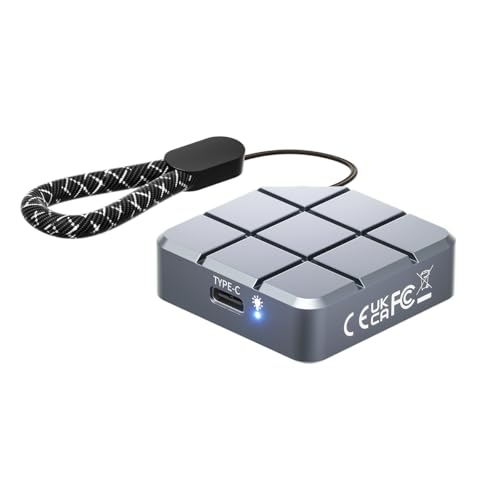
MAIWO 2230 M.2 NVMe SATA SSD Enclosure
Best for: dual-protocol 2230 drives and mobile ProRes capture
- Form Factor
- M.2 2230 (what this guide is about)
- Max Transfer Speed
- 10Gbps
- Host Interface
- USB-C 3.2 Gen2
- Drive Interface
- NVMe SATA (M-KEY, B+M KEY)
- Supported Form Factors
- M.2 2230
- Cooling System
- Aluminum
This enclosure houses a single M.2 2230 solid-state drive with support for both NVMe and SATA protocols via M-Key or B+M Key connections. It connects over USB 3.2 Gen 2 Type-C at up to 10Gbps and supports drive capacities up to 2TB. Measuring 1.77 by 1.77 inches in an aluminum chassis, it suits you if you need compact external storage for direct ProRes recording on compatible phones or quick laptop file transfers.
Pros
- Supports both NVMe and SATA protocols (M-Key and B+M Key)
- USB 3.2 Gen 2 interface supports data rates up to 10Gbps
- Aluminum casing provides passive heat dissipation
- Tool-free installation design
Cons
- Limited strictly to the 2230 form factor
- Maximum drive capacity is capped at 2TB
Good fit if
- You need an enclosure that accepts both NVMe and SATA 2230 drives.
- You want external storage for ProRes video capture on a compatible phone.
- You prefer a pocket-sized square enclosure measuring under two inches.
Skip if
- You need to install longer M.2 drives such as 2242 or 2280 sizes.
- You plan to use an SSD with a capacity greater than 2TB.
Verdict: MAIWO 2230 NVMe and SATA USB-C Enclosure delivers 10Gbps transfer speeds and dual-protocol drive compatibility inside a compact aluminum housing. It is a capable choice if you need portable 2230 storage for camera offloads or external mobile recording.

JEYI Multi-Length NVMe Enclosure
Best for: multi-size drive flexibility and drop protection
- Form Factor
- M.2 2230 (what this guide is about)
- Max Transfer Speed
- 10Gbps
- Host Interface
- USB-C, USB 3.2 Gen 2
- Drive Interface
- M.2 M and M+B Key NVMe
- Supported Form Factors
- 2230/2242/2260/2280
- Cooling System
- Full aluminum, thermal pad
This purple aluminum enclosure adapts your M.2 2230 NVMe drive via a 10Gbps USB 3.2 Gen 2 Type-C interface, supporting transfer speeds up to 1100MB/s. Unlike single-size options, it also accommodates 2242, 2260, and 2280 drives up to 4TB. It includes a silicone protective sleeve, wrist lanyard, and multi-color status LEDs indicating connection speeds. It suits you if you want flexible drive-length compatibility and physical exterior protection for portable data transfers.
Pros
- Supports M.2 2230, 2242, 2260, and 2280 drives up to 4TB
- 10Gbps USB 3.2 Gen 2 transfer speeds reaching 1100MB/s
- Color-coded status LEDs indicate drive presence and USB protocol
- Includes a fitted silicone case and wrist lanyard
Cons
- Requires mounting screws instead of tool-free installation
- Larger 4-inch footprint than dedicated 2230-only enclosures
- Supports NVMe protocols only without SATA compatibility
Good fit if
- You want an enclosure that fits 2230 drives as well as longer 2280 SSDs.
- You need clear LED indicators to monitor connection speed and status.
- You prefer additional drop protection from an included silicone sleeve.
Skip if
- You want the smallest possible footprint exclusive to M.2 2230 drives.
- You prefer a tool-free sliding enclosure without loose screws.
Verdict: JEYI Multi-Length NVMe Enclosure delivers 10Gbps transfer rates alongside multi-size SSD support up to 2280. It is a solid choice if you need drive flexibility and included sleeve protection.

SEINIKAY Dual-Bay M.2 NVMe Cloner
Best for: standalone offline NVMe SSD drive cloning
- Form Factor
- M.2 2230 (what this guide is about)
- Max Transfer Speed
- Up to 16Gbps
- Host Interface
- USB-C 3.2 Gen 2
- Drive Interface
- M-Key M.2 NVMe PCIe
- Supported Form Factors
- 2230, 2242, 2260, 2280, 22110
- Drive Bay Count
- Dual bay
The SEINIKAY Dual-Bay M.2 NVMe Cloner is an open-air docking station designed for standalone drive duplication and external data access. It accepts M-key NVMe drives in sizes ranging from 2230 up to 22110. You can clone directly between two NVMe drives without connecting to a computer using its included 15W power adapter. It suits you if you frequently duplicate 2230 SSDs or need tool-free dual-bay external storage over USB-C.
Pros
- Standalone offline cloning without a host computer
- Supports M.2 form factors from 2230 through 22110
- Tool-free design with included 15W power adapter
- Includes both USB-C to USB-C and USB-C to USB-A cables
Cons
- Incompatible with M.2 SATA SSDs
- Open-air dock leaves installed drives physically exposed
Good fit if
- You want to duplicate M.2 NVMe drives without a host computer.
- You swap drives frequently and need tool-free access across various M.2 lengths.
- You need both USB-C and USB-A host connection options out of the box.
Skip if
- You need compatibility with M.2 SATA drives.
- You want a fully enclosed portable case to protect the drive during transport.
Verdict: SEINIKAY Dual-Bay M.2 NVMe Cloner delivers computer-free drive copying and versatile dock functionality for M-key NVMe drives down to size 2230. It is a solid choice if you need rapid duplication and tool-free drive swapping.
Specifications side by side
| Spec | DOCKCASE Pocket M.2 2230 NVMe Enclosure | BIBABLYKE Aluminum M.2 2230 NVMe Enclosure | ORICO M.2 2230 NVMe USB-C Enclosure | Sabrent M.2 2230 USB-C NVMe Enclosure | ASUS Cobble Tool-Free M.2 Enclosure | MAIWO 2230 M.2 NVMe SATA SSD Enclosure | JEYI Multi-Length NVMe Enclosure | SEINIKAY Dual-Bay M.2 NVMe Cloner |
|---|---|---|---|---|---|---|---|---|
| Max Transfer Speed | 10Gbps | 10Gbps | 10Gbps | 10Gbps | 10Gbps | 10Gbps | 10Gbps | Up to 16Gbps |
| Host Interface | USB 3.2 Gen 2 Type-C | USB3.2Gen2 C-type | USB 3.2 Gen 2 Type-C | USB-C (USB 3.2 Gen 2x1) | USB-C 3.2 Gen 2x1 | USB-C 3.2 Gen2 | USB-C, USB 3.2 Gen 2 | USB-C 3.2 Gen 2 |
| Drive Interface | PCIe NVMe (M-Key, B+M Key) | PCIe NVMe | NVMe M-Key(B+M Key) | PCIe NVMe | NVMe, SATA | NVMe SATA (M-KEY, B+M KEY) | M.2 M and M+B Key NVMe | M-Key M.2 NVMe PCIe |
| Supported Form Factors | 2230 | 2230 | 2230 | M.2 2230 | M.2 2230–2280 | M.2 2230 | 2230/2242/2260/2280 | 2230, 2242, 2260, 2280, 22110 |
| Drive Bay Count | not specified | not specified | not specified | not specified | not specified | not specified | not specified | Dual bay |
| Cooling System | not specified | Aluminum CNC housing | not specified | Aluminum and ABS plastic | Aluminum Cooling | Aluminum | Full aluminum, thermal pad | Open-air chassis |
| Maximum Capacity | 2TB | 4TB | not specified | not specified | not specified | 2TB | 4TB | not specified |
| Installation Style | not specified | not specified | Screwdriver | Tool-free | Tool-Free | Tool-Free | Mounting screws | Tool-free |
| Interface | NVMe | NVMe | NVMe | NVMe | SATA III | SATA III | NVMe | NVMe |
| Form Factor | M.2 2230 | M.2 2230 | M.2 2230 | M.2 2230 | M.2 2230 | M.2 2230 | M.2 2230 | M.2 2230 |
| Compatibility | not specified | not specified | not specified | Mac | PS5, Mac | Mac | not specified | not specified |
| Transfer Speed | 10Gbps | 10Gbps | 10Gbps | 10Gbps | 10Gbps | 10Gbps | 10Gbps | not specified |
| Features | not specified | not specified | not specified | Tool-Free | Tool-Free | Tool-Free | not specified | Tool-Free, Offline Clone |
| Bay Count | not specified | not specified | not specified | not specified | not specified | not specified | not specified | Dual-Bay |
| Material | not specified | not specified | not specified | not specified | Aluminum | Aluminum | Aluminum | not specified |
| Dimensions | 1.57 × 0.47 × 1.57 inches | not specified | 1.81 × 1.81 × 0.47 inches | 1.92 × 1.6 × 0.52 inches | 5.1 × 1.7 × 0.7 inches | 1.77 × 1.77 × 0.53 inches | 1.15 × 4 × 0.4 inches | 2.72 × 2.72 × 0.51 inches |
| Weight | 3.88 ounces | not specified | 1.76 ounces | 2.29 ounces | 6.53 ounces | not specified | 2.82 ounces | 3.7 ounces |
| Color | Black | As Picture Shows | black | Gray | Black | Grey | Purple | Black |
| Model | DSWC1M-Black | 4NB1106015_BIBABLYKE | M.2 2230 NVMe | EC-NE30 | ASUS COBBLE/BLK/G/AS//ESD-A1A | NVMe SATA 2230 Enclosure only | JY0E10CN | S3027AN |
| Size | not specified | approx 4x4x0.8cm/1.57x1.57x0.31in | not specified | 10Gbps 2230 NVMe | Black|Urban Design | M.2 SSD Enclosure | not specified | not specified |
You can also review the best heatsinks for m 2 SSD to ensure your drive stays cool under load.
How to Choose an M.2 2230 Enclosure
-
Evaluate Tool-Free Installation Designs
When you swap drives frequently, mounting hardware matters. Standard enclosures require small screws and screwdrivers to secure an M.2 card and fasten the outer casing. Tool-free enclosures use push latches or sliding mechanisms to hold the circuit board and drive in place without extra equipment. This simplifies drive swaps when you handle multiple storage cards. The Sabrent M.2 2230 USB-C NVMe Enclosure provides a tool-free aluminum chassis alongside an integrated USB-C cable, reducing the parts you must carry. Choose a tool-free design if you need fast, field-ready drive replacement.
-
Assess Standalone Drive Cloning
If you need to copy drives without a computer, verify whether an enclosure includes offline cloning hardware. Most portable enclosures feature a single M.2 slot dedicated to reading or writing from a host operating system. Dual-bay units can copy data directly between two inserted SSDs without software or host connection. The SEINIKAY Dual-Bay M.2 NVMe Cloner features dual M.2 bays and an offline clone function for direct hardware duplication. Select a dual-bay cloner if you routinely back up or replicate compact M.2 cards away from a workstation.
-
Check Supported Form Factor Lengths
Consider whether you need a dedicated miniature shell or flexible drive size support. Enclosures built strictly for M.2 2230 cards measure less than two inches square, maximizing pocket portability. However, they cannot fit longer solid-state drives such as 2242, 2260, or standard 2280 cards. The JEYI Multi-Length NVMe Enclosure measures four inches long to accommodate multiple SSD lengths while still securing short 2230 cards. If you own spare drives in several physical lengths, select a multi-length enclosure. Choose a dedicated 2230 enclosure when minimum carrying size is your priority.
-
Review Ingress Protection Ratings
External storage carried outdoors requires defense against dust and moisture. Standard aluminum enclosures feature open seams or unsealed ports that leave internal circuit boards vulnerable to debris and water contact. Ingress protection ratings define exact environmental resistance thresholds. For instance, the ASUS Cobble Tool-Free M.2 Enclosure carries an IP55 rating, certifying dust resistance and protection against low-pressure water jets. If you plan to transport your M.2 2230 SSD in outdoor, travel, or industrial environments, inspect the specifications for an official IP rating rather than relying on standard aluminum housings.
-
Match Direct Video Capture Requirements
Connecting an external drive directly to cameras or mobile hardware requires sustained 10Gbps USB-C data rates. Certain high-bitrate video formats, such as ProRes, demand continuous data throughput without write stalling or connection dropouts. The ORICO M.2 2230 NVMe USB-C Enclosure lists direct ProRes recording support alongside its 10Gbps interface. If you intend to attach your enclosure to mobile devices or cameras for external video capture, verify sustained throughput specifications and host interface support to prevent interrupted writes during recording sessions.
Frequently asked questions
Can you use a longer M.2 SSD inside an M.2 2230 enclosure?
Most dedicated 2230 enclosures only fit 30-millimeter drives because their compact shells cannot house physically larger cards. If you want the option to use longer drives, you must choose a multi-length model. For example, the JEYI Multi-Length enclosure accommodates compact 2230 cards while also providing mounting space for standard M.2 sizes up to 2280.
What transfer speeds can you expect from an M.2 2230 USB-C enclosure?
You can expect transfer speeds of up to 10Gbps with these enclosures over a USB-C connection. Models such as the Sabrent EC-NE30, ORICO, and BIBABLYKE operate at this 10Gbps ceiling. Real-world transfer throughput is bounded by this interface limit alongside the read and write capabilities of the specific M.2 NVMe or SATA SSD that you install.
Can you clone an M.2 2230 SSD without connecting to a computer?
Yes, you can clone drives without a computer if you use an enclosure equipped with standalone duplication hardware. The SEINIKAY Dual-Bay M.2 NVMe Cloner provides computer-free offline cloning across two bays. It accepts M-key NVMe drives down to size 2230, letting you replicate data directly from one drive to another using a tool-free docking interface.
Are M.2 2230 enclosures suitable for recording ProRes video directly from a phone?
Yes, select compact enclosures support external mobile video capture directly over USB-C. The ORICO M.2 2230 NVMe enclosure and the MAIWO dual-protocol enclosure are specifically designed to handle high-bandwidth tasks like ProRes recording. Their small square dimensions and 10Gbps transfer throughput give you portable external storage that attaches easily to camera rigs or mobile setups.
Can you connect an M.2 2230 enclosure to a gaming console like the PS5?
Yes, you can connect compatible external enclosures to your PS5 using a USB-C port to store and play supported console games. The ASUS Cobble Tool-Free enclosure specifically lists PS5 compatibility alongside its 10Gbps transfer speeds. Its aluminum chassis and IP55 environmental protection provide a durable external housing if you frequently transfer console titles or move your game library between systems.
How do you monitor drive health and data safety in an M.2 2230 enclosure?
You can monitor internal metrics directly if your enclosure includes built-in telemetry hardware. The DOCKCASE Pocket M.2 2230 NVMe Enclosure features an integrated diagnostic screen that displays real-time drive information. It also incorporates hardware power loss protection, which helps prevent data corruption by supplying reserve power during sudden cable disconnects for drives up to 2TB.
What drive capacities do M.2 2230 SSD enclosures support?
Supported drive capacities depend on the enclosure's controller specifications. While compact drives frequently come in sizes between 256GB and 1TB, certain enclosures support much larger volumes. For example, the DOCKCASE Pocket supports 2230 NVMe drives up to 2TB, whereas the BIBABLYKE Aluminum enclosure supports capacities up to 4TB, allowing you to maximize portable storage space.