Best 20Gbps SSD Enclosures: 15 Spec-Based Picks
As an Amazon Associate we earn from qualifying purchases. Links on this page are affiliate links.
A dedicated 20Gbps SSD enclosure provides the bandwidth you need to move large files quickly over high-speed USB ports. The ORICO 20Gbps M.2 NVMe SSD Enclosure takes our top pick because it delivers 20Gbps transfer speeds inside an aluminum shell for M.2 2280 NVMe drives. We compared 15 products strictly through the technical specifications published on their listings.
This guide helps you decide which enclosure fits your specific storage drive, form factor requirements, and single or dual-bay setup.
Quick picks
The best fit for you
- You need balanced performance for a single NVMe drive ORICO 20Gbps M.2 NVMe SSD Enclosure It supports M.2 2280 NVMe drives at full 20Gbps transfer speeds inside an aluminum enclosure.
- You need hardware RAID across two NVMe drives MAIWO Dual-Bay 20Gbps NVMe RAID Enclosure Its dual-bay design supports multi-mode hardware RAID and up to 16TB total capacity over a 20Gbps interface.
- You need rugged protection for portable gaming storage ASUS TUF Gaming A2 Rugged 20Gbps SSD Enclosure It offers IP68 rugged protection with support for both NVMe and SATA M.2 drives at 20Gbps.
- You want PC-free drive duplication across dual NVMe drives WAVLINK Dual-Bay 20Gbps NVMe Cloner It features standalone offline cloning and dual-bay M.2 2280 NVMe slots operating at 20Gbps transfer speeds.
Our 15 picks

ORICO 20Gbps M.2 NVMe SSD Enclosure
Best for: single NVMe drive workflows at 20Gbps
- Transfer Speed
- 20Gbps (what this guide is about)
- Max Transfer Speed
- 20Gbps
- Host Interface
- USB 3.2 Gen 2x2 Type-C
- Drive Interface
- NVMe PCIe (M-Key & B+M Key)
- Supported Form Factors
- 2230, 2242, 2260, 2280
- Cooling System
- Aluminum shell heat sink
This external enclosure adapts M.2 NVMe PCIe solid-state drives to a USB 3.2 Gen 2x2 Type-C interface, delivering up to 20Gbps transfer speeds. It accommodates four drive lengths from 2230 to 2280 up to 8TB in capacity. Built from aluminum for passive heat dissipation, it secures your drive with a single screw. It suits you if you need fast single-drive file transfers on compatible USB 3.2 Gen 2x2 or USB4 host ports.
Pros
- Rated for up to 20Gbps transfer speeds via USB 3.2 Gen 2x2
- Supports M.2 NVMe drives in 2230, 2242, 2260, and 2280 sizes up to 8TB
- Full aluminum shell functions as a heat sink
- Compatible with USB Type-C and USB4 ports
Cons
- Not compatible with M.2 SATA or mSATA drives
- Does not support ports that only offer Thunderbolt 3
- Requires a screw to install the SSD rather than a tool-free latch
Good fit if
- You have an M-Key or B+M Key NVMe drive up to 8TB.
- You connect to host devices equipped with USB 3.2 Gen 2x2 or USB4 ports.
- You want an all-aluminum body to dissipate drive heat.
Skip if
- You need to use an M.2 SATA or mSATA drive.
- You plan to connect primarily to ports that only support Thunderbolt 3.
- You want a completely tool-free enclosure design.
Verdict: ORICO Aluminum 20Gbps M.2 NVMe SSD Enclosure offers fast 20Gbps transfer rates and broad NVMe size support inside a sturdy aluminum shell. It is a solid match for single-drive setups on USB 3.2 Gen 2x2 systems.

MAIWO 20Gbps M.2 NVMe SSD Enclosure
Best for: standard 2280 NVMe drives on 20Gbps ports
- Transfer Speed
- 20Gbps (what this guide is about)
- Max Transfer Speed
- 20Gbps
- Host Interface
- USB 3.2 Gen 2x2 Type-C
- Drive Interface
- PCIe NVMe M-Key
- Supported Form Factors
- 2280
- Cooling System
- Aluminum alloy shell, thermal pads
This MAIWO enclosure offers 20Gbps bandwidth via a USB 3.2 Gen 2x2 Type-C interface, driven by the ASM2364 chipset. Built from aluminum with finned heat dissipation surfaces, it includes two thermal pads to manage drive temperatures. It accepts standard M-Key 2280 NVMe SSDs up to 8TB capacity. If you have a native USB 3.2 Gen 2x2 port and want fast single-drive data transfers, this unit suits your desktop setup.
Pros
- Delivers up to 20Gbps throughput via USB 3.2 Gen 2x2
- Finned aluminum alloy housing with two thermal pads included
- Supports high drive capacities up to 8TB
- ASMedia ASM2364 controller with UASP and TRIM support
Cons
- Supports only 2280 size drives and cannot accommodate 2230, 2242, or 2260 cards
- Speed drops to 10Gbps when connected to USB4 or Thunderbolt 3 and 4 ports
- Requires using the included screwdriver instead of a tool-free latch
Good fit if
- You have a computer with a dedicated USB 3.2 Gen 2x2 Type-C port.
- You are using a standard 2280 form-factor M-Key PCIe NVMe drive.
- You need passive thermal dissipation with aluminum fins and dual thermal pads.
Skip if
- You connect primarily to USB4 or Thunderbolt ports where speeds are capped at 10Gbps.
- You plan to install shorter M.2 drive sizes or SATA-based M.2 SSDs.
- You swap drives frequently and need tool-free installation.
Verdict: MAIWO Aluminum 20Gbps NVMe Enclosure delivers full 20Gbps transfer speeds for standard 2280 NVMe SSDs when paired with a compatible USB 3.2 Gen 2x2 host. Its finned aluminum chassis manages heat effectively, though speeds drop to 10Gbps on USB4 and Thunderbolt ports.

MAIWO Dual-Bay 20Gbps NVMe RAID Enclosure
Best for: dual-drive hardware RAID configurations
- Transfer Speed
- 20Gbps (what this guide is about)
- Max Transfer Speed
- 20Gbps
- Host Interface
- USB 3.2 Gen 2x2 Type-C
- Drive Interface
- PCIe NVMe M-Key
- Supported Form Factors
- 2230, 2242, 2260, 2280
- Drive Bay Count
- 2 bays
This dual-bay enclosure pairs USB 3.2 Gen 2x2 connectivity with hardware RAID support for two M.2 NVMe drives. You get transfer speeds up to 20Gbps across four configurations: RAID 0, RAID 1, JBOD, and PM. It accommodates drives up to 8TB per slot and includes a dedicated 5V 3A power adapter to maintain stable operation. It suits you if you need high-throughput external storage or hardware-mirrored backups.
Pros
- Supports RAID 0, RAID 1, JBOD, and PM via manual switch
- 20Gbps USB 3.2 Gen 2x2 interface using the JMS586R chipset
- Accommodates two M.2 NVMe drives up to 16TB total capacity
- Dedicated 5V 3A external power adapter included
- Tool-free aluminum alloy construction
Cons
- Incompatible with M.2 SATA SSDs
- Included USB-C to USB-A cable caps at 10Gbps
Good fit if
- You need hardware RAID 0 speed or RAID 1 data redundancy.
- You manage two high-capacity M.2 NVMe SSDs in a single unit.
- You have a host system equipped with a USB 3.2 Gen 2x2 port.
Skip if
- You intend to use M.2 SATA B+M key drives.
- You want a compact, single-drive enclosure that runs solely on bus power.
Verdict: MAIWO Dual-Bay 20Gbps NVMe RAID Enclosure delivers dual-drive flexibility and multi-mode RAID over a 20Gbps interface. Its external power supply and 16TB total capacity make it a capable choice for demanding multi-drive setups.

SABRENT Rocket 20Gbps RGB M.2 NVMe and SATA Enclosure
Best for: dual-protocol M.2 swapping with activity LEDs
- Transfer Speed
- 20Gbps (what this guide is about)
- Max Transfer Speed
- 20Gbps
- Host Interface
- USB 3.2 Gen 2x2, USB-C
- Drive Interface
- M.2 NVMe (M-key), M.2 SATA
- Supported Form Factors
- M.2 2230, 2242, 2260, 2280
- Cooling System
- Aluminum housing, thermal padding
View on Amazon: SABRENT Rocket 20Gbps RGB M.2 NVMe and SATA Enclosure
This SABRENT external drive enclosure offers up to 20Gbps transfer rates when you connect it to a USB 3.2 Gen 2x2 port. It accepts both M.2 NVMe and SATA drives in sizes from 2230 to 2280 using a tool-free locking retainer. The aluminum shell includes thermal padding and integrated status-responsive RGB lighting. It suits you if you swap M.2 drives frequently and want visual activity tracking across desktop or handheld systems.
Pros
- Supports both M.2 NVMe and M.2 SATA SSDs across four lengths (2230, 2242, 2260, 2280)
- Tool-free aluminum chassis with included thermal padding
- Dynamic RGB lighting displays real-time drive activity and power status
- Works without drivers on Windows, macOS, Linux, Steam Deck, and ROG Ally
Cons
- Reaches full 20Gbps speed only on USB 3.2 Gen 2x2 ports
- Does not support 2.5-inch drives, mSATA, or M.2 A/E-key cards
Good fit if
- You need a tool-free enclosure that accommodates both NVMe and SATA M.2 drives
- You have a host PC or laptop featuring a USB 3.2 Gen 2x2 port
- You want visual drive status and activity feedback through integrated RGB LEDs
Skip if
- You need an enclosure for 2.5-inch drives or mSATA modules
- Your host system is limited to standard 5Gbps or 10Gbps USB ports
Verdict: SABRENT Rocket RGB 20Gbps NVMe and SATA Enclosure delivers 20Gbps transfers and wide M.2 SSD support inside a tool-free aluminum frame. It is an effective solution if you have USB 3.2 Gen 2x2 connectivity and value visible LED drive monitoring.

SABRENT Rocket 20Gbps RGB M.2 SSD Enclosure
Best for: dual SATA and NVMe M.2 drive versatility
- Transfer Speed
- 20Gbps (what this guide is about)
- Max Transfer Speed
- 20Gbps
- Host Interface
- USB 3.2 Gen 2x2, USB-C
- Drive Interface
- M.2 NVMe, M.2 SATA
- Supported Form Factors
- M.2 2230, 2242, 2260, 2280
- Cooling System
- Aluminum, thermal padding
This SABRENT external enclosure connects via USB 3.2 Gen 2x2 for speeds up to 20Gbps. It accepts both M.2 NVMe and SATA solid-state drives across four sizes: 2230, 2242, 2260, and 2280. The aluminum chassis includes built-in thermal padding and status RGB lighting. If you swap between older SATA drives and faster NVMe drives while requiring 20Gbps throughput, this multi-format enclosure gives you broad compatibility across Windows, macOS, and Linux.
Pros
- Supports both M.2 NVMe and M.2 SATA SSDs
- Up to 20Gbps transfer speed via USB 3.2 Gen 2x2
- Fits 2230, 2242, 2260, and 2280 drive sizes
- Aluminum construction with built-in thermal padding
Cons
- Single-drive capacity with no dual-bay support
- Does not specify tool-free drive installation
Good fit if
- You want an enclosure that reads both M.2 SATA and NVMe drives
- You have a host device that supports 20Gbps USB 3.2 Gen 2x2
- You use M.2 SSDs in sizes from 2230 up to 2280
Skip if
- You need dual drive bays for hardware RAID or standalone cloning
- You want an enclosure without RGB lighting effects
Verdict: SABRENT Rocket 20Gbps M.2 SATA and NVMe Enclosure delivers dual-protocol drive support and 20Gbps USB speeds inside a durable aluminum chassis. It serves as a dependable choice if you need to access both SATA and NVMe M.2 formats from a single external shell.

UGREEN NVMe and SATA 20Gbps SSD Enclosure
Best for: swapping both NVMe and SATA M.2 drives
- Transfer Speed
- 20Gbps (what this guide is about)
- Max Transfer Speed
- 20Gbps
- Host Interface
- USB 3.2 Gen 2x2
- Drive Interface
- PCIe NVMe, SATA NGFF (M/B+M Key)
- Supported Form Factors
- 2230/2242/2260/2280
- Cooling System
- Aluminium case with thermal pad
This enclosure houses M.2 PCIe NVMe or SATA NGFF drives up to 8TB in 2230, 2242, 2260, or 2280 form factors. It connects via USB 3.2 Gen 2x2 to deliver 20Gbps transfer speeds, while dropping to 10Gbps on Thunderbolt 4 ports. Built with an aluminum shell, silicone cover, and RTL9210B controller, it serves you well if you swap between NVMe and SATA drives across multiple operating systems without extra power cables.
Pros
- Dual support for PCIe NVMe and SATA NGFF M.2 drives up to 8TB
- Reaches 20Gbps over USB 3.2 Gen 2x2 connections
- Compatible with 2230, 2242, 2260, and 2280 drive sizes
- Includes aluminum housing with silicone protective sleeve and thermal pad
- Supports UASP, TRIM, and operates via bus power
Cons
- Caps at 10Gbps on Thunderbolt 4 connections
- Requires a screw to install the drive rather than a tool-free latch
- Does not support m-SATA SSDs
Good fit if
- You need to read both M.2 NVMe and SATA drives with one enclosure.
- You have a host device featuring a USB 3.2 Gen 2x2 port for 20Gbps bandwidth.
- You want drop protection provided by the included silicone cover.
Skip if
- You connect mainly to Thunderbolt 4 ports and need more than 10Gbps throughput.
- You prefer a completely tool-free enclosure that requires no screws.
- You plan to use an m-SATA form factor drive.
Verdict: UGREEN NVMe and SATA 20Gbps SSD Enclosure combines dual NVMe and SATA protocol support with 20Gbps USB 3.2 Gen 2x2 speeds. It provides solid aluminum and silicone protection for drives up to 8TB, provided your host system has the matching USB standard.

WAVLINK Dual-Bay 20Gbps NVMe Cloner
Best for: standalone NVMe duplication and high-capacity dual-drive storage
- Transfer Speed
- 20Gbps (what this guide is about)
- Max Transfer Speed
- 20Gbps
- Host Interface
- USB-C
- Drive Interface
- PCIe NVMe (M and B+M keys)
- Supported Form Factors
- 2280/2260/2242/2230
- Drive Bay Count
- 2 bays
This dual-bay dock pairs 20Gbps USB-C connectivity with standalone offline drive duplication. You can install two M.2 NVMe SSDs sized from 2230 to 2280, supporting capacities up to 16TB total. The device hits read speeds up to 1631MB/s and write speeds up to 1267MB/s over USB. It suits your setup if you frequently clone NVMe drives or need high-speed dual-drive access without keeping a host computer connected during cloning.
Pros
- Supports offline one-button cloning without a host computer connection
- Up to 20Gbps transfer speed with rated 1631MB/s read and 1267MB/s write
- Accommodates dual M.2 NVMe drives up to 16TB total capacity
- Compatible with 2230, 2242, 2260, and 2280 NVMe SSD sizes
Cons
- Incompatible with M.2 SATA SSDs
- Requires external DC 5V/4A power adapter to operate
Good fit if
- You want to duplicate M.2 NVMe drives without using a PC
- You need dual-drive capacity up to 16TB over a 20Gbps USB-C connection
- You work with various M.2 NVMe lengths including 2230, 2242, 2260, or 2280
Skip if
- You need to read or clone M.2 SATA drives
- You prefer a bus-powered portable enclosure that does not need a DC wall adapter
Verdict: WAVLINK Dual-Bay 20Gbps NVMe Cloner combines standalone drive duplication with 20Gbps transfer speeds for dual NVMe drives. It delivers fast backups and PC-free cloning as long as you do not need SATA support.

UGREEN Mac mini M.2 NVMe and SATA SSD Enclosure
Best for: desktop setups with USB 3.2 Gen 2x2
- Transfer Speed
- 20Gbps (what this guide is about)
- Max Transfer Speed
- 20Gbps
- Host Interface
- USB-C (USB 3.2 Gen 2x2)
- Drive Interface
- PCIe NVMe, SATA NGFF
- Supported Form Factors
- 2230, 2242, 2260, 2280
- Cooling System
- Aluminum case, thermal pad
View on Amazon: UGREEN Mac mini M.2 NVMe and SATA SSD Enclosure
This desktop enclosure pairs a square aluminum chassis sized for desktop setups with a 20Gbps USB 3.2 Gen 2x2 interface. It accepts both NVMe and SATA M.2 drives in sizes from 2230 to 2280, holding capacities up to 8TB. Because Thunderbolt 3 and 4 ports step down to 10Gbps, you will want this primarily if your host machine supports dedicated USB 3.2 Gen 2x2 speeds.
Pros
- USB 3.2 Gen 2x2 interface delivering up to 20Gbps transfer rates
- Compatible with both PCIe NVMe and SATA NGFF M.2 drives up to 8TB
- Supports 2230, 2242, 2260, and 2280 form factor SSDs
- Aluminum chassis with thermal pad, RTL9220 controller, UASP, and TRIM
Cons
- Limited to 10Gbps on MacBooks and Thunderbolt 3 or 4 ports
- Square 5.1-inch footprint is significantly larger than typical pocket enclosures
- Requires screw fastening rather than fully tool-free installation
Good fit if
- You have a PC with a native USB 3.2 Gen 2x2 port for full 20Gbps throughput.
- You want a stable desktop enclosure that supports both NVMe and SATA drives up to 8TB.
- You need an aluminum enclosure sized to sit under or beside a compact desktop setup.
Skip if
- You connect primarily to MacBooks or Thunderbolt 3/4 ports that cap the connection at 10Gbps.
- You need a pocket-sized portable enclosure for travel.
Verdict: UGREEN Mac mini M.2 NVMe and SATA SSD Enclosure provides dual-protocol drive support and 20Gbps bandwidth in a broad desktop-friendly aluminum casing. It serves as an effective storage expansion if your computer offers native USB 3.2 Gen 2x2 connectivity.

NEWQ Dual-Bay 20Gbps RAID NVMe Enclosure
Best for: dual-drive NVMe cloning and hardware RAID arrays
- Transfer Speed
- 20Gbps (what this guide is about)
- Max Transfer Speed
- 20Gbps
- Host Interface
- USB-C
- Drive Interface
- PCIe NVMe
- Supported Form Factors
- 2280
- Drive Bay Count
- 2 bays
The NEWQ Dual-Bay 20Gbps RAID NVMe Enclosure houses two M.2 2280 NVMe SSDs inside an aluminum chassis. It operates at up to 20Gbps transfer speeds and supports hardware RAID 0, RAID 1, JBOD, and standalone clone modes. A dedicated auxiliary USB-C power input stabilizes dual-drive workloads up to 16TB total. This unit suits you if you need hardware redundancy, high-speed striping, or direct drive duplication without using host computer software.
Pros
- Supports RAID 0, RAID 1, JBOD, and offline clone modes
- Auxiliary USB-C power input for high-capacity dual-drive stability
- Tool-free SSD installation mechanism
- Aluminum casing for heat dissipation
Cons
- Only compatible with M.2 2280 form factor drives
- No SATA M.2 drive support
- Weighs over one pound
Good fit if
- You need hardware RAID 0, RAID 1, or direct drive duplication
- You work with standard M.2 2280 NVMe drives
- You run high-capacity dual drives requiring dedicated auxiliary power
Skip if
- You need compatibility with shorter M.2 drive lengths
- You plan to connect SATA M.2 SSDs
- You require an enclosure weighing well under one pound
Verdict: NEWQ Dual-Bay 20Gbps RAID NVMe Enclosure delivers flexible RAID and offline cloning features backed by dedicated auxiliary power. It is a capable dual-drive storage tool if you strictly run 2280 NVMe SSDs.

ASUS TUF Gaming A2 Rugged 20Gbps SSD Enclosure
Best for: rugged portable gaming and field storage
- Transfer Speed
- 20Gbps (what this guide is about)
- Max Transfer Speed
- 20 Gbps
- Host Interface
- USB-C 3.2 Gen 2x2
- Drive Interface
- M.2 NVMe PCIe and SATA
- Supported Form Factors
- 2242, 2260, 2280
- Cooling System
- Aluminum chassis, thermal pad
View on Amazon: ASUS TUF Gaming A2 Rugged 20Gbps SSD Enclosure
The ASUS TUF Gaming A2 is an external M.2 drive enclosure built for 20Gbps data transfers across a USB-C 3.2 Gen 2x2 interface. It accommodates both NVMe PCIe and SATA SSDs in 2242, 2260, and 2280 form factors. Featuring an aluminum frame with IP68 and MIL-STD-810H ratings, it suits you if you need a durable, tool-free storage setup for fast portable gaming libraries or field backups.
Pros
- USB 3.2 Gen 2x2 interface delivers transfer speeds up to 20Gbps
- Certified MIL-STD-810H drop resistance and IP68 water and dust ingress protection
- Supports both M.2 NVMe PCIe and SATA drives in 2242, 2260, and 2280 sizes
- Screw-free Q-Latch mechanism for quick drive installation
- Aluminum chassis with included thermal pad for heat dissipation
Cons
- Weighs 0.62 pounds, making it heavier than non-rugged alternatives
- Does not support compact 2230 form factor SSDs
Good fit if
- You need IP68 and MIL-STD-810H environmental and drop resistance for portable use.
- You want tool-free SSD installation with support for both NVMe and SATA M.2 drives.
- You have a USB 3.2 Gen 2x2 port capable of 20Gbps speeds.
Skip if
- You need compatibility with compact 2230 form factor SSDs.
- You want a lighter, minimalist pocket enclosure that weighs under half a pound.
Verdict: ASUS TUF Gaming A2 Rugged 20Gbps SSD Enclosure delivers rugged IP68 protection, broad NVMe and SATA support, and 20Gbps bandwidth in a heavy-duty frame. It is a solid choice if you need a durable, tool-free enclosure for high-speed gaming on the go.
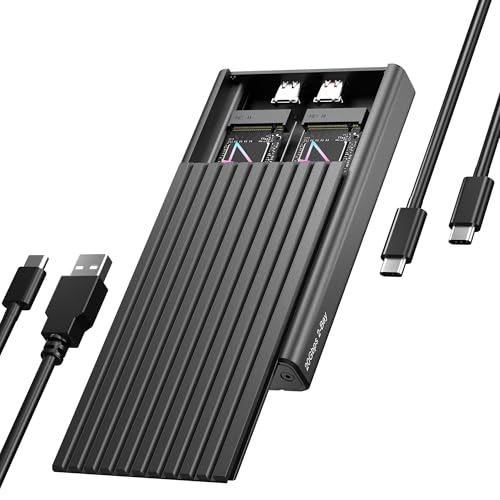
ICY BOX Dual-Bay 20Gbps NVMe Enclosure
Best for: two-drive NVMe storage over one cable
- Transfer Speed
- 20Gbps (what this guide is about)
- Max Transfer Speed
- 20Gbps
- Host Interface
- USB-C, USB 3.2 Gen 2x2
- Drive Interface
- PCIe NVMe M-Key
- Supported Form Factors
- 2230, 2242, 2260, 2280
- Drive Bay Count
- 2 bays
The ICY BOX Dual-Bay 20Gbps NVMe Enclosure gives you simultaneous access to two M.2 PCIe drives across a single USB-C cable. It operates on USB 3.2 Gen 2x2, reaching transfer rates up to 20Gbps when connected to compatible host hardware. Its tool-free aluminum chassis accepts 2230, 2242, 2260, and 2280 form factors. This enclosure fits your setup if you need high-speed dual-drive storage for backups or running secondary operating systems without separate card readers.
Pros
- Dual M.2 NVMe slots accessed via one USB-C connection
- USB 3.2 Gen 2x2 interface offering up to 20Gbps bandwidth
- Tool-free installation with rubber fixation pins
- Accepts four NVMe lengths: 2230, 2242, 2260, and 2280
Cons
- Does not support M.2 SATA SSDs
- Lacks built-in hardware RAID or offline cloning switches
- Full 20Gbps throughput requires a USB 3.2 Gen 2x2 host port
Good fit if
- You need concurrent access to two M.2 NVMe drives through one cable.
- You swap between 2230, 2242, 2260, or 2280 M-Key PCIe drives without tools.
- You own a host system with a 20Gbps USB 3.2 Gen 2x2 port.
Skip if
- You require hardware RAID modes or standalone offline drive duplication.
- You want to use M.2 SATA-based drives.
Verdict: ICY BOX Dual-Bay 20Gbps NVMe Enclosure delivers fast USB 3.2 Gen 2x2 transfer speeds and tool-free mounting for two PCIe drives over a single cable. It is a solid choice for dual-drive storage management without requiring multiple ports.

ICY BOX 20Gbps Tool-Free M.2 NVMe Enclosure
Best for: write-protected single-drive portable NVMe storage
- Transfer Speed
- 20Gbps (what this guide is about)
- Max Transfer Speed
- 20Gbps
- Host Interface
- USB-C 3.2 Gen 2x2
- Drive Interface
- M.2 NVMe
- Supported Form Factors
- 2230, 2242, 2260, 2280
- Drive Bay Count
- 1 bay
The ICY BOX 20Gbps Tool-Free M.2 NVMe Enclosure houses a single M.2 NVMe drive across four lengths: 2230, 2242, 2260, or 2280. Its USB 3.2 Gen 2x2 connection delivers up to 20Gbps throughput when paired with a compatible host port. A physical write-protection switch guards against data modifications or accidental deletion, while the finned aluminum body aids passive cooling. It suits you if you need rapid drive swaps and secure read-only file handling.
Pros
- Hardware write-protection switch to prevent file changes and accidental deletion
- USB 3.2 Gen 2x2 interface supporting transfer rates up to 20Gbps
- Toolless installation compatible with 2230, 2242, 2260, and 2280 M.2 NVMe SSDs
- Finned aluminum casing with included thermal pad for passive heat dissipation
Cons
- Supports NVMe M.2 drives only, with no listed SATA SSD compatibility
- Requires a host device with USB 3.2 Gen 2x2 support to reach full 20Gbps speeds
Good fit if
- You need a hardware write-block switch to protect critical files from modification
- You frequently swap M.2 NVMe drives across varying lengths without needing tools
- You have a host system equipped with a USB 3.2 Gen 2x2 port
Skip if
- You need compatibility with M.2 SATA SSDs
- You require a multi-bay enclosure for RAID configurations or offline cloning
Verdict: ICY BOX 20Gbps Tool-Free M.2 NVMe Enclosure delivers full 20Gbps bus bandwidth and toolless drive swaps, set apart by its dedicated hardware write-protection switch. It provides reliable passive cooling and broad form-factor compatibility for any standard NVMe stick.

Rosewill Dual-Bay NVMe Cloner Dock
Best for: standalone offline drive cloning at 20Gbps
- Transfer Speed
- 20Gbps (what this guide is about)
- Max Transfer Speed
- 20Gbps
- Host Interface
- USB 3.2 Gen 2x2
- Drive Interface
- PCIe NVMe (M-Key, B+M Key)
- Drive Bay Count
- 2 bays
- Installation Style
- Tool-free
The Rosewill Dual-Bay NVMe Cloner Dock gives you a desktop docking station with a USB 3.2 Gen 2x2 interface reaching transfer speeds up to 20Gbps. It accepts two M.2 NVMe drives in M Key or B+M Key configurations without tools. It features one-click standalone drive duplication without needing a host computer, plus TRIM and S.M.A.R.T. support. This enclosure suits you if you frequently duplicate NVMe drives or manage dual high-speed drives.
Pros
- Up to 20Gbps transfer speeds over USB 3.2 Gen 2x2
- Standalone one-click drive cloning without a host computer
- Tool-free dual-bay setup supporting M Key and B+M Key NVMe drives
- Includes 12V/2A power adapter, 20Gbps USB-C cable, and 10Gbps USB-A cable
Cons
- Requires a dedicated 12V/2A external power adapter
- Does not support SATA-based M.2 drives
- Desk-dock footprint measuring 6 by 5 inches
Good fit if
- You need standalone, one-button offline drive cloning between two NVMe SSDs.
- You want 20Gbps USB 3.2 Gen 2x2 transfer speeds across tool-free dual bays.
- You work at a desk where an external 12V power adapter is practical.
Skip if
- You need a compact, bus-powered enclosure for portable use.
- You want compatibility with M.2 SATA drives.
Verdict: Rosewill Dual-Bay NVMe Cloner Dock delivers 20Gbps USB 3.2 Gen 2x2 performance alongside standalone offline drive duplicating for dual NVMe drives. Its tool-free desktop design makes it a practical workstation choice if you regularly swap or replicate drives.

Elecacc Dual-Bay 20Gbps RAID NVMe Enclosure
Best for: dual-drive RAID setups and offline disk cloning
- Transfer Speed
- 20Gbps (what this guide is about)
- Max Transfer Speed
- 20Gbps
- Drive Interface
- PCIe NVMe M-Key, SATA
- Supported Form Factors
- 2230, 2242, 2260, 2280mm
- Drive Bay Count
- Dual Bay
- Cooling System
- Aluminum and ABS casing
The Elecacc Dual-Bay 20Gbps RAID NVMe Enclosure houses two M.2 drives and supports speeds up to 20Gbps. It offers hardware RAID 0, RAID 1, JBOD, and standalone offline cloning without a host computer. Each slot accommodates M.2 NVMe drives in 2230, 2242, 2260, or 2280 form factors up to 8TB, totaling 16TB capacity. You get tool-free drive access inside an aluminum and ABS shell.
Pros
- Supports RAID 0, RAID 1, JBOD, and offline cloning
- 20Gbps transfer speed across dual M.2 bays
- Accommodates up to 16TB total capacity (8TB per slot)
- Tool-free drive installation for quick swaps
Cons
- Enclosure body uses ABS plastic alongside aluminum
- Does not support M.2 SATA B+M key drives
- Switching between RAID 0 and RAID 1 formats both drives
Good fit if
- You need hardware RAID 0, RAID 1, or JBOD over a 20Gbps connection.
- You perform offline disk duplication without connecting to a computer.
- You use M-Key PCIe NVMe SSDs in sizes up to 2280.
Skip if
- You require an all-metal, full-aluminum enclosure design.
- You need compatibility with M.2 SATA B+M key solid-state drives.
Verdict: Elecacc Dual-Bay 20Gbps RAID NVMe Enclosure provides flexible RAID configurations and computer-free cloning across two NVMe slots. It gives you high-capacity external storage with fast 20Gbps transfer speeds and tool-free drive installation.

ULXUUUN Dual-Bay 20Gbps NVMe Cloner Dock
Best for: offline NVMe cloning and dual-drive transfers
- Transfer Speed
- 20Gbps (what this guide is about)
- Max Transfer Speed
- 20Gbps
- Host Interface
- USB 3.2 Gen 2x2
- Drive Interface
- PCIe NVMe (M-Key, B+M Key)
- Supported Form Factors
- 2230, 2242, 2260, 2280, 22110
- Drive Bay Count
- Dual Bay
The ULXUUUN Dual-Bay NVMe Cloner Dock gives you a 20Gbps USB 3.2 Gen 2x2 interface alongside standalone offline cloning. Powered by the JMS586U controller, it reads two M.2 2280 NVMe drives simultaneously or duplicates data without a computer connected. An open-frame layout aids airflow, while the included 12V/2A power adapter delivers dedicated power. It suits you if you regularly copy or access dual NVMe drives.
Pros
- 20Gbps USB 3.2 Gen 2x2 transfer speeds
- One-button offline cloning without a host computer
- Dual-bay operation with simultaneous access to both drives
- Includes 12V/2A power adapter plus C-to-C and C-to-A cables
Cons
- Does not support M.2 SATA SSDs
- Limited to M.2 2280 form factor drives
- Open-frame design leaves installed drives physically exposed
Good fit if
- You need to duplicate NVMe drives without using a PC.
- You want simultaneous access to two M.2 2280 NVMe drives over a 20Gbps interface.
- You require dedicated AC power for multi-drive stability.
Skip if
- You need support for SATA-based M.2 storage.
- You work with shorter drive sizes such as 2230 or 2242.
- You want an enclosed housing for portable outdoor travel.
Verdict: ULXUUUN Dual-Bay 20Gbps NVMe Cloner Dock pairs 20Gbps host bandwidth with push-button offline duplication for dual M.2 2280 NVMe drives.
Specifications side by side
| Spec | ORICO 20Gbps M.2 NVMe SSD Enclosure | MAIWO 20Gbps M.2 NVMe SSD Enclosure | MAIWO Dual-Bay 20Gbps NVMe RAID Enclosure | SABRENT Rocket 20Gbps RGB M.2 NVMe and SATA Enclosure | SABRENT Rocket 20Gbps RGB M.2 SSD Enclosure | UGREEN NVMe and SATA 20Gbps SSD Enclosure | WAVLINK Dual-Bay 20Gbps NVMe Cloner | UGREEN Mac mini M.2 NVMe and SATA SSD Enclosure | NEWQ Dual-Bay 20Gbps RAID NVMe Enclosure | ASUS TUF Gaming A2 Rugged 20Gbps SSD Enclosure | ICY BOX Dual-Bay 20Gbps NVMe Enclosure | ICY BOX 20Gbps Tool-Free M.2 NVMe Enclosure | Rosewill Dual-Bay NVMe Cloner Dock | Elecacc Dual-Bay 20Gbps RAID NVMe Enclosure | ULXUUUN Dual-Bay 20Gbps NVMe Cloner Dock |
|---|---|---|---|---|---|---|---|---|---|---|---|---|---|---|---|
| Max Transfer Speed | 20Gbps | 20Gbps | 20Gbps | 20Gbps | 20Gbps | 20Gbps | 20Gbps | 20Gbps | 20Gbps | 20 Gbps | 20Gbps | 20Gbps | 20Gbps | 20Gbps | 20Gbps |
| Host Interface | USB 3.2 Gen 2x2 Type-C | USB 3.2 Gen 2x2 Type-C | USB 3.2 Gen 2x2 Type-C | USB 3.2 Gen 2x2, USB-C | USB 3.2 Gen 2x2, USB-C | USB 3.2 Gen 2x2 | USB-C | USB-C (USB 3.2 Gen 2x2) | USB-C | USB-C 3.2 Gen 2x2 | USB-C, USB 3.2 Gen 2x2 | USB-C 3.2 Gen 2x2 | USB 3.2 Gen 2x2 | not specified | USB 3.2 Gen 2x2 |
| Drive Interface | NVMe PCIe (M-Key & B+M Key) | PCIe NVMe M-Key | PCIe NVMe M-Key | M.2 NVMe (M-key), M.2 SATA | M.2 NVMe, M.2 SATA | PCIe NVMe, SATA NGFF (M/B+M Key) | PCIe NVMe (M and B+M keys) | PCIe NVMe, SATA NGFF | PCIe NVMe | M.2 NVMe PCIe and SATA | PCIe NVMe M-Key | M.2 NVMe | PCIe NVMe (M-Key, B+M Key) | PCIe NVMe M-Key, SATA | PCIe NVMe (M-Key, B+M Key) |
| Supported Form Factors | 2230, 2242, 2260, 2280 | 2280 | 2230, 2242, 2260, 2280 | M.2 2230, 2242, 2260, 2280 | M.2 2230, 2242, 2260, 2280 | 2230/2242/2260/2280 | 2280/2260/2242/2230 | 2230, 2242, 2260, 2280 | 2280 | 2242, 2260, 2280 | 2230, 2242, 2260, 2280 | 2230, 2242, 2260, 2280 | not specified | 2230, 2242, 2260, 2280mm | 2230, 2242, 2260, 2280, 22110 |
| Drive Bay Count | not specified | not specified | 2 bays | not specified | not specified | not specified | 2 bays | not specified | 2 bays | not specified | 2 bays | 1 bay | 2 bays | Dual Bay | Dual Bay |
| Cooling System | Aluminum shell heat sink | Aluminum alloy shell, thermal pads | Aluminum alloy case | Aluminum housing, thermal padding | Aluminum, thermal padding | Aluminium case with thermal pad | Silicone thermal pads | Aluminum case, thermal pad | Aluminum casing | Aluminum chassis, thermal pad | Aluminum, thermal pad | Passive finned aluminum, thermal pad | not specified | Aluminum and ABS casing | Open-frame, vented baseplate |
| Maximum Capacity | 8TB | 8TB | 16TB | not specified | not specified | 8TB | 16TB (8TB per drive) | 8TB | 16TB | not specified | not specified | not specified | not specified | 16TB | not specified |
| Installation Style | not specified | not specified | Tool-free | Tool-free | not specified | not specified | Tool-Free | not specified | Tool-free | Screw-free | Tool-Free | Tool-Free | Tool-free | Tool-Free | Tool-Free |
| Interface | NVMe | NVMe | NVMe | SATA III | SATA III | SATA III | NVMe | NVMe | NVMe | SATA III | NVMe | NVMe | not specified | NVMe | NVMe |
| Form Factor | M.2 2280 | M.2 | M.2 | M.2 | M.2 | M.2 | M.2 2280 | M.2 | M.2 2280 | M.2 | M.2 2280 | M.2 2280 | M.2 | M.2 | M.2 2280 |
| Compatibility | not specified | not specified | not specified | not specified | not specified | not specified | not specified | not specified | not specified | Gaming | not specified | not specified | not specified | not specified | not specified |
| Transfer Speed | 20Gbps | 20Gbps | 20Gbps | 20Gbps | 20Gbps | 20Gbps | 20Gbps | 20Gbps | 20Gbps | 20Gbps | 20Gbps | 20Gbps | 20Gbps | 20Gbps | 20Gbps |
| Features | not specified | not specified | not specified | RGB Lighting | RGB Lighting | not specified | Tool-Free, Offline Clone | not specified | Offline Clone | not specified | Tool-Free | Tool-Free | Tool-Free, Offline Clone | not specified | Tool-Free, Offline Clone |
| Bay Count | not specified | not specified | Dual-Bay | not specified | not specified | not specified | Dual-Bay | not specified | Dual-Bay | Dual-Bay | Dual-Bay | not specified | Dual-Bay | Dual-Bay | Dual-Bay |
| Material | Aluminum | Aluminum | not specified | not specified | not specified | not specified | not specified | not specified | not specified | Aluminum | Aluminum | Aluminum | not specified | not specified | not specified |
| Dimensions | 4.25 × 1.16 × 0.53 inches | 4.33 × 1.81 × 0.79 inches | 4.72 × 2.68 × 0.66 inches | 4.3 × 1.8 × 0.58 inches | 4.3 × 1.8 × 0.58 inches | 4.84 × 1.49 × 0.49 inches | 5.91 × 3.94 × 2.36 inches | 5.12 × 5.12 × 0.69 inches | not specified | 4.6 × 2.2 × 0.6 inches | 4.72 × 2.76 × 0.67 inches | 4.33 × 1.57 × 0.55 inches | 6 × 5 × 2.75 inches | not specified | not specified |
| Weight | not specified | 8.96 ounces | 13.8 ounces | 3.4 ounces | 3.4 ounces | 5.29 ounces | 1.01 pounds | not specified | 1.01 pounds | 9.84 ounces | 8.29 ounces | 5.11 ounces | 13.6 ounces | not specified | not specified |
| Size | M.2 NVMe-20Gbps | not specified | not specified | 20Gbps RGB Enclosure | not specified | not specified | not specified | not specified | not specified | TUF A2|up to 20Gbps | 20GB 2 Bay enclosure | 20GB M.2 NVMe Enclosure | 20 Gbps Dual Bay Cloner | not specified | not specified |
| Color | gray or silver | not specified | not specified | Multicolor | not specified | Gray | Silver | blue | Space Blue | A2|up to 20Gbps | Black | Black | black | gray | Black |
| Model | ORICO M2PV-C3-BK-EP | 20Gbps - M.2 NVMe Enclosure | NVMe RAID Enclosure | EC-RGBG | EC-RGBC | 35576 | NVMe + NVMe | 55150 | NQ-RD-01 | TUF GAMING A2/BLK/G/AS | 20GB 2 Bay | 20GB 1 Bay | RS-N2-CL | Dual Bay Raid SSD Enclosure | not specified |
If you need an entire system instead of an external drive, you can examine hardware specifications for the best mini PCs with 128GB SSD.
How to Choose a 20Gbps SSD Enclosure
-
Check Drive Protocol Support
Check whether your drive uses NVMe or SATA protocols before choosing an enclosure. Some models accept only NVMe M.2 drives, which prevents SATA SSDs from working. If you need to access older SATA storage or want versatility across drive types, look for dual-protocol support. The UGREEN NVMe and SATA 20Gbps SSD Enclosure handles both formats and accepts capacities up to 8TB. Verify your internal SSD interface standard to avoid hardware mismatches.
-
Select Single or Dual Bays
Decide how many drives you need to connect at the same time. Single-bay models keep your setup lightweight and compact for travel. Dual-bay enclosures let you manage two drives simultaneously through one cable. This saves available USB ports on your computer while keeping multiple volumes online. The ICY BOX Dual-Bay 20Gbps NVMe Enclosure connects two PCIe SSDs using one USB-C connection. If you frequently transfer data between separate drives, a dual-bay layout simplifies your hardware workflow.
-
Evaluate Offline Cloning Functions
Look for standalone offline cloning if you regularly duplicate drives or create direct system backups. Standard enclosures require a host operating system and disk cloning software to mirror drives. Offline duplicators copy an entire source SSD to a target SSD at the press of a button without connecting to a computer. The WAVLINK Dual-Bay 20Gbps NVMe Cloner features standalone offline cloning for M.2 2280 NVMe SSDs. Check this specification if you want rapid drive imaging without tying up host machine resources.
-
Assess Rugged Build Quality
Consider external casing materials if you carry your storage into harsh environments. Standard aluminum casings offer everyday rigidity and passive heat dissipation for office use. Field use demands extra ingress protection against dust and moisture. The ASUS TUF Gaming A2 Rugged 20Gbps SSD Enclosure features an aluminum frame with IP68 resistance to handle rugged transport. Review the ingress protection rating and materials if you expose your hardware to water, fine dust, or demanding outdoor conditions during portable operation.
-
Verify Hardware Write Protection
Check for a dedicated write-protection switch if you need to safeguard stored files. Connecting an external drive to unfamiliar systems can risk virus infection or accidental file deletion. A physical write-blocker ensures connected computers can only read stored data without altering partition tables or writing new files. The ICY BOX 20Gbps Tool-Free M.2 NVMe Enclosure includes a hardware write-protection switch on its chassis. Choose this feature if you manage forensic images, diagnostics, or critical backup archives that must remain untouched.
-
Confirm Tool-Free Installation
Look closely at the enclosure mounting mechanism if you plan to swap drives frequently. Enclosures that require screwdrivers slow down drive swaps and increase the chance of losing tiny screws. Tool-free designs use latches, sliding lids, or rubber pins to secure the drive without tools. The SABRENT Rocket 20Gbps RGB M.2 NVMe and SATA Enclosure features a tool-free aluminum frame for quick drive changes. Prioritize tool-free assembly if you use multiple SSDs for different projects or need rapid disk swapping on the go.
Frequently asked questions
Do 20Gbps SSD enclosures require tools for drive installation?
Many 20Gbps SSD enclosures feature tool-free designs that let you install or swap drives without screwdrivers. Models like the ICY BOX 20Gbps Tool-Free M.2 NVMe Enclosure, Rosewill Dual-Bay NVMe Cloner Dock, and WAVLINK Dual-Bay Cloner include toolless mechanisms. Other enclosures use traditional screws to secure the internal drive and casing. You should verify whether a unit lists tool-free assembly if you plan to swap drives frequently.
Can you clone an NVMe drive without connecting the enclosure to a computer?
Yes, specific dual-bay enclosures support standalone offline cloning without a host computer. Enclosures such as the WAVLINK Dual-Bay 20Gbps NVMe Cloner, Rosewill Dual-Bay NVMe Cloner Dock, NEWQ Dual-Bay RAID Enclosure, and ULXUUUN Dual-Bay Dock include dedicated offline duplication features. You place the source and target drives into the respective bays and start the duplication process directly on the device.
Are there 20Gbps enclosures that support hardware RAID?
Yes, several dual-bay 20Gbps models feature integrated hardware RAID support. The MAIWO Dual-Bay 20Gbps NVMe RAID Enclosure, NEWQ Dual-Bay 20Gbps RAID Enclosure, and Elecacc Dual-Bay 20Gbps RAID Enclosure provide multi-drive configurations. These units allow you to configure multiple NVMe SSDs into combined storage arrays directly through the enclosure hardware. This setup manages drive redundancy or pooled storage capacity across a single 20Gbps connection to your host system.
Can you use both SATA and NVMe M.2 SSDs in a 20Gbps enclosure?
Some 20Gbps enclosures support dual protocols, accommodating both SATA and NVMe M.2 solid-state drives. Models like the UGREEN NVMe and SATA SSD Enclosure, SABRENT Rocket 20Gbps RGB M.2 Enclosure, and ASUS TUF Gaming A2 accept either drive type. Other models, such as the ORICO 20Gbps enclosure, support only NVMe drives. You should always verify the interface specifications of the enclosure to ensure it matches your M.2 drive format.
Do 20Gbps SSD enclosures include write-protection features?
Certain 20Gbps enclosures include physical write-protection switches to safeguard stored data against accidental deletion or virus infection. For instance, the ICY BOX 20Gbps Tool-Free M.2 NVMe Enclosure features a dedicated hardware write-protection switch. Enabling this switch prevents the connected computer from modifying or writing new files to the inserted NVMe drive. This function is practical when you need to access sensitive data safely across shared or public computers.
What enclosure materials are used to manage SSD heat at 20Gbps?
Most high-speed 20Gbps enclosures utilize aluminum casing to dissipate heat generated during sustained high-bandwidth transfers. Models such as the ORICO 20Gbps M.2 NVMe SSD Enclosure, MAIWO 20Gbps M.2 NVMe SSD Enclosure, and ASUS TUF Gaming A2 rely on aluminum shells for thermal management. Some options also incorporate silicone components for additional protection. Aluminum draws heat away from the internal drive to help maintain stable operating temperatures during intensive data operations.
Can a dual-bay 20Gbps SSD enclosure connect using a single cable?
Yes, dual-bay enclosures can route two separate drives through a single USB connection to your computer. For example, the ICY BOX Dual-Bay 20Gbps NVMe Enclosure manages two M.2 NVMe drives across one USB-C cable over a 20Gbps interface. This configuration allows you to access multiple storage volumes simultaneously without occupying several USB ports on your host machine, making it convenient for compact workstation setups.