10 Best Dual-Bay SSD Docking Stations, Compared
As an Amazon Associate we earn from qualifying purchases. Links on this page are affiliate links.
A dual bay SSD docking station lets you mount two drives at once and duplicate data without a host computer. We compared 10 models based on the specifications published on the listings, evaluating interface support, transfer speeds, and cloning features.
The SABRENT Dual-Bay NVMe Cloner Dock leads the ranking because its 10Gbps USB-C interface and built-in fan handle standalone PCIe NVMe drive cloning. This guide helps you decide which dock matches your drive form factors and bandwidth requirements.
Quick picks
The best fit for you
- You need standalone cloning for two PCIe NVMe drives SABRENT Dual-Bay NVMe Cloner Dock This dock delivers 10Gbps transfer speeds and standalone offline drive duplication specifically for dual PCIe NVMe M.2 SSDs.
- You manage bare 2.5-inch or 3.5-inch SATA drives SABRENT Dual-Bay SATA USB-C Cloner Dock Its dual bays specifically accommodate SATA III media with standalone offline cloning over a 5Gbps USB-C connection.
- You need maximum transfer bandwidth for M.2 NVMe drives ORICO 40Gbps Dual-Bay NVMe Cloner Dock It provides 40Gbps transfer speeds, active cooling, and offline duplication for M.2 2280 NVMe SSDs.
- You clone data across SATA and M.2 NVMe formats ICY BOX Dual-Bay NVMe and SATA Dock The dock provides bidirectional offline cloning between 2.5-inch SATA drives and M.2 NVMe SSDs at 10Gbps.
Our 10 picks

SABRENT Dual-Bay NVMe Cloner Dock
Best for: standalone NVMe cloning and dual-drive access
- Bay Count
- Dual-Bay (what this guide is about)
- Transfer Speed
- Up to 10Gbps
- Supported Drive Types
- PCIe NVMe M.2 SSD
- Offline Cloning
- One-button clone
- Supported M.2 Sizes
- 2230, 2242, 2260, 2280
- Cooling Type
- Aluminum body, built-in fan
This SABRENT dual-bay dock holds two M.2 NVMe SSDs for simultaneous access over a 10Gbps USB-C connection. It handles standalone offline cloning with a single button press, removing the need for a host computer. An aluminum shell and integrated cooling fan manage drive temperatures during sustained workloads. It suits you if you frequently duplicate NVMe drives or need dual external high-speed storage without tools.
Pros
- Standalone offline cloning requires no computer or software
- Reads and writes to both NVMe bays simultaneously over 10Gbps USB-C
- Tool-free design accepts 2230, 2242, 2260, and 2280 M.2 sizes
- Built-in cooling fan and aluminum body manage drive heat
- Includes USB-C to USB-C and USB-C to USB-A cables with 5V/4A power supply
Cons
- Does not support M.2 SATA, AHCI, or standard SATA drives
- Cooling fan runs continuously while powered with no auto-shutoff or idle mode
Good fit if
- You need to clone NVMe drives directly without using a computer
- You want simultaneous read and write access to two M.2 NVMe SSDs over USB-C
- You work with varying M.2 lengths from 2230 up to 2280
Skip if
- You need compatibility with M.2 SATA or 2.5-inch and 3.5-inch SATA drives
- You require an enclosure that enters a silent sleep mode without being unplugged
Verdict: SABRENT Dual-Bay NVMe SSD Cloner Dock offers reliable 10Gbps transfer rates and computer-free drive cloning for PCIe NVMe drives. Its built-in fan and tool-free design make it a dependable bench tool, provided you only use NVMe storage.

SABRENT Dual-Bay SATA USB-C Cloner Dock
Best for: standalone cloning and dual-bay SATA drive management
- Bay Count
- Dual-Bay (what this guide is about)
- Transfer Speed
- Up to 5Gbps
- Supported Drive Types
- 2.5-inch and 3.5-inch SATA HDD/SSD
- Offline Cloning
- One-button clone
- Interface
- SATA III
- Features
- Offline Clone
This docking station accepts two 2.5-inch or 3.5-inch SATA SSDs or hard drives. It connects to your host computer via a 5Gbps USB-C connection, mounting both bays as independent drives. It also functions as a standalone offline cloner without a PC, copying data at up to 60MBps. You will find it suits routine SATA drive backups, file transfers, and direct drive-to-drive duplication when you do not need NVMe support.
Pros
- Supports bare 2.5-inch and 3.5-inch SATA SSDs and HDDs
- Standalone offline cloning operates without a host computer
- Reads and writes two drives simultaneously over 5Gbps USB-C
- Tool-free, hot-swappable bays with dedicated drive access LEDs
Cons
- Does not support M.2 or NVMe drives
- Offline cloning speed is limited to 60MBps
- Requires a separate adapter cable if your computer lacks a USB-C port
Good fit if
- You work with bare 2.5-inch or 3.5-inch SATA hard drives and SATA SSDs.
- You need computer-free, push-button drive duplication.
- You want simultaneous access to two SATA drives over one USB-C cable.
Skip if
- You need a dock for M.2 or NVMe format drives.
- You require host transfer bandwidth exceeding 5Gbps.
Verdict: SABRENT Dual-Bay 2.5/3.5-Inch SATA Dock delivers straightforward dual-drive access and computer-free cloning for bare SATA media. It provides an efficient solution when your storage tasks rely strictly on SATA drives rather than faster NVMe formats.

MAIWO Dual-Bay 10Gbps NVMe Cloner Dock
Best for: standalone NVMe duplication and 22110 SSDs
- Bay Count
- Dual-Bay (what this guide is about)
- Transfer Speed
- 10Gbps
- Supported Drive Types
- M.2 NVMe SSD
- Offline Cloning
- One-key clone
- Supported M.2 Sizes
- 2230, 2242, 2260, 2280, 22110
- Maximum Capacity
- 16TB
This dual-bay docking station connects two M.2 NVMe SSDs simultaneously through a 10Gbps USB 3.1 Gen 2 interface. It supports drive sizes from 2230 up to 22110 and handles capacities up to 16TB. You can access both drives together on your computer or clone from source to target without a host PC using its one-key offline clone function and dedicated power switch.
Pros
- Supports M.2 NVMe drive lengths from 2230 up to 22110
- Standalone one-key offline cloning without a host computer
- 10Gbps USB 3.1 Gen 2 interface with simultaneous dual-drive access
- Dedicated physical power switch and clone progress LED indicators
Cons
- Accepts NVMe drives only, with no SATA M.2 compatibility
- Requires target drive capacity to be larger than source drive for cloning
Good fit if
- You need to duplicate NVMe drives without connecting to a computer.
- You use longer 22110 form factor M.2 SSDs.
- You want simultaneous access to two NVMe drives over a 10Gbps connection.
Skip if
- You need to read or duplicate SATA-based M.2 drives.
- You require connection speeds above 10Gbps.
Verdict: MAIWO Dual-Bay 10Gbps NVMe Cloner Dock provides standalone drive duplication and concurrent two-drive access for M.2 NVMe form factors up to 22110. Its 10Gbps interface and hardware switch offer straightforward drive management without requiring a host PC.

ORICO 40Gbps Dual-Bay NVMe Cloner Dock
Best for: high-speed NVMe cloning and Thunderbolt workflows
- Bay Count
- Dual-Bay (what this guide is about)
- Transfer Speed
- 40Gbps
- Supported Drive Types
- M-Key NVMe
- Offline Cloning
- One-button offline cloning
- Supported M.2 Sizes
- 2230, 2242, 2260, 2280, 22110
- Maximum Capacity
- 16TB
This ORICO dual-bay docking station gives you a 40Gbps USB4 interface compatible with Thunderbolt 4 alongside standalone offline cloning. You can insert two M-Key NVMe drives in 2230, 2242, 2260, or 2280 form factors with capacities up to 16TB. Built-in fans and dual aluminum heatsinks manage drive heat. It fits your workflow if you need high-speed transfers and PC-free duplication for NVMe media.
Pros
- 40Gbps USB4 host interface with Thunderbolt 4 compatibility
- One-button standalone offline cloning without a PC
- Active cooling with built-in fan and dual aluminum heatsinks
- Supports M-Key NVMe drives in sizes 2230, 2242, 2260, and 2280 up to 16TB
Cons
- Incompatible with SATA-based M.2 SSDs
- Bandwidth is shared during concurrent dual-drive operations
- Target drive capacity must exceed source drive capacity for offline cloning
Good fit if
- You need 40Gbps or Thunderbolt 4 transfer speeds for NVMe drives.
- You want one-touch offline drive duplication without connecting to a computer.
- You use M-Key NVMe drives up to 16TB across standard M.2 lengths.
Skip if
- You need support for SATA M.2 SSDs or 2.5-inch drives.
- You plan to clone to a target drive with equal or smaller capacity than the source.
Verdict: ORICO Dual-Bay 40Gbps M.2 NVMe Dock delivers fast 40Gbps bandwidth and standalone offline duplication for NVMe drives. Active cooling and wide M.2 size support handle demanding high-capacity workflows.

ORICO Dual-Bay M.2 NVMe Cloner Dock
Best for: offline NVMe cloning in aluminum construction
- Bay Count
- Dual-Bay (what this guide is about)
- Transfer Speed
- 10Gbps
- Supported Drive Types
- M-Key NVMe PCIe SSD
- Offline Cloning
- One-key clone
- Supported M.2 Sizes
- 2230, 2242, 2260, 2280, 22110
- Maximum Capacity
- 8TB
This dual-bay aluminum docking station handles M.2 NVMe PCIe drives across five form factors up to 22110. It delivers 10Gbps transfers over USB 3.2 Gen2 with UASP support and features standalone one-key offline cloning without a host computer. With an 8TB total capacity ceiling, tool-free installation, and a 10-minute auto-sleep mode, you get a compact desktop setup designed for fast offline duplications and direct drive swapping.
Pros
- Supports standalone offline cloning without a host computer
- 10Gbps USB 3.2 Gen2 transfer speeds with UASP support
- Accepts M.2 NVMe sizes from 2230 up to 22110
- Tool-free flat-bed aluminum design with thermal silicone pads
Cons
- Does not support SATA or mSATA M.2 SSDs
- Requires the target drive to be larger than the source drive for cloning
- Caps total storage capacity at 8TB (two 4TB SSDs)
Good fit if
- You need to clone NVMe drives offline without using a PC
- You work with extra-long 22110 M.2 NVMe PCIe drives
- You want a tool-free aluminum dock with 10Gbps transfer speeds
Skip if
- You need compatibility with M.2 SATA or mSATA drives
- You require drive capacities larger than 4TB per bay
- You need faster 20Gbps or 40Gbps transfer speeds
Verdict: ORICO Dual-Bay Aluminum M.2 NVMe Dock provides reliable 10Gbps transfers and standalone offline cloning in a compact aluminum enclosure. It accommodates NVMe drives up to 22110 length without requiring tools or host software.

ICY BOX Dual-Bay NVMe and SATA Dock
Best for: Cross-format SATA and NVMe drive cloning
- Bay Count
- Dual-Bay (what this guide is about)
- Transfer Speed
- 10Gbps
- Supported Drive Types
- M.2 NVMe, 2.5"/3.5" SATA
- Offline Cloning
- Bidirectional offline cloning
- Supported M.2 Sizes
- 2230, 2242, 2260, 2280
- Interface
- SATA III
This dual-bay docking station pairs one M.2 NVMe slot with one 2.5-inch or 3.5-inch SATA bay. It operates over a 10Gbps USB 3.2 Gen 2 Type-C interface and provides standalone bidirectional offline cloning without a host computer. You can read and write to both bays simultaneously. It suits you if you frequently migrate data between legacy SATA drives and modern M.2 NVMe solid-state storage.
Pros
- Bidirectional offline cloning between SATA and M.2 NVMe drives
- Simultaneous read and write support on both drive bays
- 10Gbps USB 3.2 Gen 2 host connection via USB-C
- Tool-free installation supporting 2.5-inch, 3.5-inch, and M.2 drives
- Includes 2-in-1 USB-C to USB-C/USB-A cable and power adapter
Cons
- Does not accommodate two M.2 NVMe drives simultaneously
- Transfer speed tops out at 10Gbps rather than 20Gbps or 40Gbps
Good fit if
- You need to clone data bidirectionally between SATA drives and an M.2 NVMe SSD.
- You work with both 2.5-inch or 3.5-inch SATA disks and M.2 form factors.
- You want standalone offline drive duplication without using a computer.
Skip if
- You need a dock that accepts two M.2 NVMe drives at the same time.
- You require host transfer speeds higher than 10Gbps.
Verdict: ICY BOX Dual-Bay NVMe and SATA Dock delivers versatile bidirectional cloning between SATA drives and M.2 NVMe SSDs over a 10Gbps interface. It is a practical tool-free solution for cross-format drive backups and migrations without a PC.

ICY BOX Dual-Bay M.2 NVMe and SATA Dock
Best for: cross-format SATA and NVMe drive cloning
- Bay Count
- Dual-Bay (what this guide is about)
- Transfer Speed
- 10Gbps
- Supported Drive Types
- M.2 NVMe, M.2 SATA, 2.5"/3.5" SATA
- Offline Cloning
- Bidirectional standalone cloning
- Interface
- SATA III
- Features
- Tool-Free
This ICY BOX dual-bay docking station connects both M.2 NVMe drives and 2.5-inch or 3.5-inch SATA drives to your setup. It runs on a USB 3.2 Gen 2 host interface delivering up to 10Gbps transfer rates. You get standalone, bidirectional offline cloning between SATA and NVMe drives without needing host software. It suits you if you need simultaneous dual-drive access to transfer files across mixed drive formats and sizes.
Pros
- Bidirectional offline cloning between SATA and M.2 NVMe drives
- Supports 2.5-inch, 3.5-inch SATA drives, and M.2 NVMe or SATA SSDs
- Simultaneous access to both drives via USB 3.2 Gen 2 at up to 10Gbps
- Tool-free drive installation for all supported drive sizes
Cons
- Maximum transfer rate is 10Gbps rather than 20Gbps or 40Gbps
- Accommodates one M.2 drive and one SATA drive rather than dual M.2 drives
Good fit if
- You need to clone data bidirectionally between SATA and M.2 NVMe drives without a computer.
- You work with mixed drive formats including 3.5-inch HDDs, 2.5-inch SSDs, and M.2 sticks.
- You want simultaneous access to two drives over a single USB-C connection.
Skip if
- You need to clone directly between two M.2 NVMe SSDs.
- You require connection speeds faster than 10Gbps.
Verdict: ICY BOX Dual-Bay M.2 NVMe and SATA Dock delivers standalone bidirectional cloning and simultaneous access across mixed SATA and NVMe form factors. Its 10Gbps USB-C connection provides steady transfer capability for multi-drive management.

UGREEN Dual-Bay 20Gbps NVMe Cloner Dock
Best for: standalone NVMe cloning and 20Gbps transfers
- Bay Count
- Dual-Bay (what this guide is about)
- Transfer Speed
- 20Gbps
- Offline Cloning
- One-click offline cloning
- Cooling Type
- Aluminum construction, open design
- Interface
- NVMe
- Form Factor
- M.2
This dual-bay NVMe docking station gives you 20Gbps transfer speeds and standalone drive duplication without a host computer. Powered by the JMS586U controller, it accepts two M.2 NVMe SSDs up to 8TB each across M-Key and B+M-Key form factors. The tool-free, open-air aluminum chassis relies on passive 360-degree cooling. It suits you if you frequently back up high-capacity NVMe drives or clone systems quickly without installing internal drives.
Pros
- 20Gbps transfer speed with UASP and TRIM support via JMS586U chip
- Computer-free offline cloning with progress LED indicators
- Accommodates two M.2 NVMe SSDs up to 8TB each
- Tool-free setup supporting M-Key and B+M-Key drives
- All-aluminum construction with 360-degree open heat dissipation
Cons
- Does not support M.2 SATA SSDs
- Full 20Gbps transfer rate requires a 20Gbps-compatible host and cable
- Target drive must equal or exceed source drive capacity for offline cloning
Good fit if
- You need to clone NVMe M.2 drives without turning on a computer.
- You have a 20Gbps-compatible port and want high-speed external transfers.
- You swap M-Key or B+M-Key NVMe drives regularly without tools.
Skip if
- You need to dock or clone M.2 SATA SSDs.
- You need fully enclosed slots to shield exposed SSDs from physical contact.
Verdict: UGREEN Dual-Bay 20Gbps NVMe Cloner delivers fast 20Gbps bandwidth and reliable one-click offline drive replication in a sturdy aluminum dock. It handles high-capacity NVMe duplication tasks efficiently without tying up your computer.
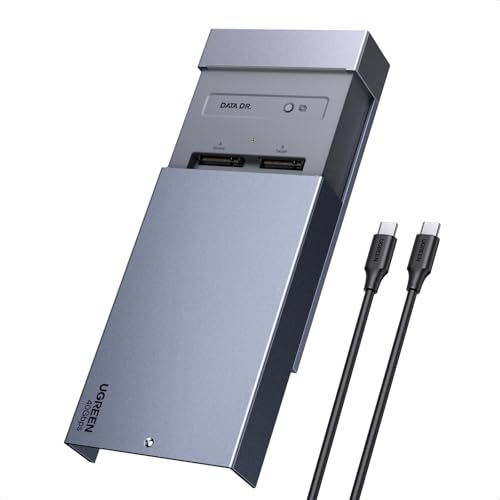
UGREEN 40Gbps Dual-Bay NVMe Cloner
Best for: high-speed NVMe cloning and software RAID storage
- Bay Count
- Dual-Bay (what this guide is about)
- Transfer Speed
- 40Gbps
- Offline Cloning
- One-click offline cloning
- Supported M.2 Sizes
- 2230/2242/2260/2280
- Maximum Capacity
- 16TB
- Cooling Type
- Aluminum alloy top shell, 40mm fan
The UGREEN 40Gbps Dual-Bay M.2 NVMe Cloner is an external drive station built for high-speed transfers and standalone disk duplication. It connects via USB-C at up to 40Gbps and accommodates two M.2 NVMe drives up to 8TB each, delivering a total capacity of 16TB. You get one-button offline cloning and software RAID options alongside an active 40mm fan, making it a practical fit if you handle large file backups across multiple operating systems.
Pros
- Up to 40Gbps transfer speed over USB-C
- One-click offline cloning without requiring a computer
- Supports software RAID 0, 1, PM, and Union modes
- Active 40mm cooling fan paired with an aluminum alloy top shell
- Supports M.2 NVMe sizes 2230, 2242, 2260, and 2280 up to 16TB total
Cons
- Supports NVMe drives only, with no SATA drive compatibility
- Offline cloning requires the target disk to be larger than the source drive
- No support for longer 22110 M.2 form factors
Good fit if
- You need 40Gbps transfer rates for fast dual M.2 NVMe workflows.
- You want to duplicate NVMe SSDs offline with a single button press.
- You intend to use software RAID configurations across your storage.
Skip if
- You need to read or clone M.2 SATA SSDs or legacy SATA drives.
- You plan to duplicate onto a target drive smaller than the source disk.
Verdict: UGREEN 40Gbps Dual-Bay M.2 NVMe Cloner delivers high-bandwidth transfers and PC-free duplication for dual NVMe drives. Its built-in cooling fan and software RAID support make it a capable choice for heavy multi-OS data management.

ORICO Dual-Bay 20Gbps M.2 NVMe & SATA Dock
Best for: silent 20Gbps M.2 transfers and offline cloning
- Bay Count
- Dual-Bay (what this guide is about)
- Transfer Speed
- 20Gbps
- Supported Drive Types
- M.2 NVMe, M.2 SATA
- Offline Cloning
- One-key same-protocol offline clone
- Supported M.2 Sizes
- 2230/2242/2260/2280
- Cooling Type
- Passive aluminum chassis
The ORICO Dual-Bay 20Gbps M.2 NVMe SSD Dock is an open-top cloner that connects via a USB 3.2 Gen 2x2 interface. It supports both M.2 NVMe and SATA drives in sizes 2230, 2242, 2260, and 2280. You can duplicate drives offline without a host computer using same-protocol cloning. This dock fits you if you need faster 20Gbps file transfers, screw-free drive swapping, and silent passive cooling.
Pros
- USB 3.2 Gen 2x2 interface delivering up to 20Gbps speeds
- Standalone PC-free offline cloning with 4-stage LED progress tracking
- Broad compatibility with M.2 NVMe and SATA drives in sizes 2230 to 2280
- Tool-free open-top design for rapid drive swaps
- Fanless aluminum enclosure providing 0dB silent passive cooling
Cons
- Offline cloning is limited to matching protocols (NVMe to NVMe or SATA to SATA only)
- Passive aluminum cooling lacks an active fan for forced airflow
- Cannot dock 2.5-inch or 3.5-inch SATA drives
Good fit if
- You have a USB 3.2 Gen 2x2 port and need 20Gbps bandwidth.
- You want to duplicate matching M.2 drives without connecting to a computer.
- You prefer a completely silent, fanless aluminum docking station.
Skip if
- You need to clone data across different drive protocols like SATA to NVMe.
- You require an active cooling fan for continuous high-temperature tasks.
- You work with standard 2.5-inch or 3.5-inch hard drives.
Verdict: ORICO Dual-Bay 20Gbps M.2 NVMe SSD Dock delivers 20Gbps transfer bandwidth and standalone same-protocol cloning in a silent, fanless chassis. It is a solid choice if you need rapid, tool-free M.2 drive management without workspace noise.
Specifications side by side
| Spec | SABRENT Dual-Bay NVMe Cloner Dock | SABRENT Dual-Bay SATA USB-C Cloner Dock | MAIWO Dual-Bay 10Gbps NVMe Cloner Dock | ORICO 40Gbps Dual-Bay NVMe Cloner Dock | ORICO Dual-Bay M.2 NVMe Cloner Dock | ICY BOX Dual-Bay NVMe and SATA Dock | ICY BOX Dual-Bay M.2 NVMe and SATA Dock | UGREEN Dual-Bay 20Gbps NVMe Cloner Dock | UGREEN 40Gbps Dual-Bay NVMe Cloner | ORICO Dual-Bay 20Gbps M.2 NVMe & SATA Dock |
|---|---|---|---|---|---|---|---|---|---|---|
| Transfer Speed | Up to 10Gbps | Up to 5Gbps | 10Gbps | 40Gbps | 10Gbps | 10Gbps | 10Gbps | 20Gbps | 40Gbps | 20Gbps |
| Supported Drive Types | PCIe NVMe M.2 SSD | 2.5-inch and 3.5-inch SATA HDD/SSD | M.2 NVMe SSD | M-Key NVMe | M-Key NVMe PCIe SSD | M.2 NVMe, 2.5"/3.5" SATA | M.2 NVMe, M.2 SATA, 2.5"/3.5" SATA | not specified | not specified | M.2 NVMe, M.2 SATA |
| Bay Count | 2 | 2 | 2 | 2 | 2 | 2 | 2 | not specified | not specified | 2 |
| Offline Cloning | One-button clone | One-button clone | One-key clone | One-button offline cloning | One-key clone | Bidirectional offline cloning | Bidirectional standalone cloning | One-click offline cloning | One-click offline cloning | One-key same-protocol offline clone |
| Supported M.2 Sizes | 2230, 2242, 2260, 2280 | not specified | 2230, 2242, 2260, 2280, 22110 | 2230, 2242, 2260, 2280, 22110 | 2230, 2242, 2260, 2280, 22110 | 2230, 2242, 2260, 2280 | not specified | not specified | 2230/2242/2260/2280 | 2230/2242/2260/2280 |
| Maximum Capacity | not specified | not specified | 16TB | 16TB | 8TB | not specified | not specified | not specified | 16TB | not specified |
| Cooling Type | Aluminum body, built-in fan | not specified | not specified | Aluminum heatsinks, cooling fan | not specified | not specified | not specified | Aluminum construction, open design | Aluminum alloy top shell, 40mm fan | Passive aluminum chassis |
| Interface | NVMe | SATA III | NVMe | NVMe | NVMe | SATA III | SATA III | NVMe | NVMe | NVMe |
| Form Factor | M.2 | not specified | not specified | M.2 2280 | M.2 | 2.5 Inch | M.2 | M.2 | M.2 | M.2 |
| Features | Offline Clone | Offline Clone | Offline Clone | Offline Clone | Tool-Free, Offline Clone | Offline Clone | Tool-Free | Offline Clone | Offline Clone | Tool-Free |
| Material | not specified | not specified | not specified | not specified | Aluminum | not specified | not specified | not specified | not specified | not specified |
| Host Interface | USB-C | USB-C | not specified | USB-C | not specified | USB-C | USB-C | not specified | not specified | not specified |
| Dimensions | 4.3 × 2.5 × 1.25 inches | 6.2 × 4 × 2.7 inches | 6.42 × 4.92 × 1.61 inches | 5.71 × 2.91 × 1.38 inches | not specified | 5.47 × 3.03 × 2.32 inches | 6.45 × 1.57 × 0.71 inches | not specified | 5.04 × 3.15 × 0.59 inches | not specified |
| Weight | 4 ounces | 10 ounces | 1.46 pounds | not specified | not specified | 10.3 ounces | not specified | not specified | not specified | not specified |
| Size | USB-C DUAL DOCK | 2-Bay SATA Dock – USB-C 5Gbps | not specified | IT28N | not specified | not specified | SATA <-> NVMe | not specified | not specified | not specified |
| Color | SILVER | Black | Black | Silver | Cool Gray | Black | not specified | silver | silver | not specified |
| Model | EC-SSD2 | EC-CH2B | Dual M.2 NVME Cloner Dock with Switch | IT28N-C | M2P2-C3 | 2 Bay Cloner | NVMe to SATA / SATA to NVMe | CM392 | 65733US | N2-C |
If you need external display connections instead of drive bays, the best dual monitor docking stations provide dedicated video bandwidth.
How to Choose a Dual-Bay Dock
-
Check USB Transfer Speed
You should verify the transfer speed rating to match your workload demands. Docks in this category offer bandwidth ratings ranging from 10Gbps up to 40Gbps. If you routinely move very large files across your host system, high-bandwidth options like the ORICO 40Gbps Dual-Bay NVMe Cloner Dock provide 40Gbps throughput over a USB-C connection. For basic duplication or standard file backups, docks rated for 10Gbps or 20Gbps deliver sufficient speed for day-to-day operations without requiring top-tier host ports.
-
Verify M.2 Card Length
You need to check the supported physical lengths of your M.2 drives before selecting a dock. While standard M.2 2280 cards fit most slots, enterprise or specialized SSDs require extended physical clearance. A unit such as the MAIWO Dual-Bay 10Gbps NVMe Cloner Dock accommodates M.2 form factors up to 22110 length. Ensuring the dock supports your specific card dimensions prevents installation issues and allows you to seat longer hardware firmly in the bay.
-
Evaluate Built-In Cooling Fans
You should examine the cooling method used by the docking station. High-performance NVMe drives generate heat during continuous read and write tasks, especially during high-speed transfers. Models like the UGREEN 40Gbps Dual-Bay NVMe Cloner include a built-in cooling fan to actively dissipate heat from both drives. If you work in a quiet environment and do not run sustained transfers, a fanless design keeps your desk completely silent while operating.
-
Consider Tool-Free Drive Installation
You should consider how often you plan to swap drives in your station. If you regularly handle multiple bare storage drives for recovery or imaging, look for a tool-free design. An enclosure like the ORICO Dual-Bay M.2 NVMe Cloner Dock lets you insert and remove SSDs without screwdrivers or mounting brackets. This setup reduces setup friction and speeds up physical drive exchanges when you manage several separate disks during your daily workflow.
-
Check Enclosure Build Material
You should inspect the chassis construction material when comparing docking units. Metal housings offer physical protection and aid passive heat dissipation from internal components during intensive data copying. For instance, the UGREEN Dual-Bay 20Gbps NVMe Cloner Dock features an aluminum enclosure that provides a solid, durable shell on your desk. Choosing a metal body helps protect bare storage boards from physical contact and maintains durability if you frequently transport the dock between work benches.
Frequently asked questions
Can you clone a larger SSD to a smaller SSD using a dual-bay docking station?
Generally, offline cloning requires the target drive to have equal or greater capacity than the source drive. Hardware cloner docks duplicate block by block without a computer. If your target drive is smaller, standalone cloning fails. For smaller targets, you must connect the dock to a computer and use software duplication instead.
Do dual-bay SSD docking stations require a computer to clone drives?
No, dual-bay docking stations with standalone offline cloning operate without being connected to a computer. Models like the SABRENT Dual-Bay NVMe Cloner Dock and ORICO 40Gbps Dual-Bay NVMe Cloner Dock clone data directly between bays via internal hardware logic. You only need to insert the drives, power the unit, and press the clone button.
Can a dual-bay dock read both drives simultaneously when connected to a PC?
Yes, when connected to your computer via USB-C, dual-bay docking stations mount both SSDs as separate drive letters. For instance, the MAIWO Dual-Bay 10Gbps NVMe Cloner Dock and ICY BOX Dual-Bay M.2 NVMe and SATA Dock provide concurrent access to both slots. This allows you to transfer files between them or manage backups freely.
How do dual-bay SSD docking stations handle drive heat during long transfers?
Dual-bay docks manage heat through passive aluminum enclosures or active built-in cooling fans. High-bandwidth options like the ORICO 40Gbps Dual-Bay NVMe Cloner Dock and UGREEN 40Gbps Dual-Bay NVMe Cloner incorporate internal fans to circulate air around hot NVMe drives. Other designs rely on open-air vertical slots or aluminum bodies to dissipate thermal loads silently without active mechanics.
What physical M.2 drive sizes fit into dual-bay NVMe docking stations?
Most dual-bay M.2 docks support standard lengths like 2280, while several accommodate extended 22110 enterprise SSDs. The MAIWO Dual-Bay 10Gbps NVMe Cloner Dock and ORICO Dual-Bay M.2 NVMe Cloner Dock handle form factors up to 22110. Tool-free designs generally allow you to insert bare M.2 drives directly without mounting screws, brackets, or specialized screwdrivers.
Can you set up software RAID using a dual-bay SSD docking station?
Yes, you can configure software RAID when the dock connects to your operating system and supports concurrent multi-drive recognition. The UGREEN 40Gbps Dual-Bay NVMe Cloner explicitly supports software RAID setups across its bays. Your host operating system pools the two mounted NVMe drives together for striping, mirroring, or combined volume management over the high-speed interface.