Looking Beyond the AMZPILOT 40Gbps USB4 M.2 NVMe? 6 Alternatives Worth a Look
As an Amazon Associate we earn from qualifying purchases. Links on this page are affiliate links.
The AMZPILOT 40Gbps USB4 M.2 NVMe Dock offers high-speed data transfer for single NVMe drives. It supports PCIe 4.0 SSDs up to 8TB and features an aluminum enclosure for heat dissipation. You get up to 40Gbps throughput through its USB-C host interface. This makes it a strong choice if you prioritize raw transfer rates and compact portability for a single drive.
However, you might want something else if you need dual-drive support, offline cloning, or compatibility with SATA SSDs. The alternatives listed here were chosen because their specs overlap with the original AMZPILOT model. We selected 6 options that match key requirements like M.2 NVMe support and USB-C connectivity. These alternatives provide different form factors, cooling solutions, and feature sets. Some include dual bays for simultaneous access, while others focus on offline duplication without host software. You can compare these options to find the best fit for your specific workflow, whether you need maximum speed, multi-drive management, or broader drive compatibility.
How the Alternatives Compare
SABRENT Dual-Bay NVMe Cloner Dock
The Sabrent Dual-Bay NVMe Cloner Dock shifts focus from raw transfer speed to utility. While the AMZPILOT offers 40Gbps connectivity, this Sabrent model caps out at 10Gbps. You lose some throughput, but you gain a second drive bay and offline cloning capabilities. This allows you to duplicate NVMe drives without connecting to a computer. It is a practical choice if you need to manage two drives simultaneously or perform backups independently. The dual-bay design makes it better suited for cloning workflows than the single-bay AMZPILOT dock.
ORICO 40Gbps Dual-Bay NVMe Cloner Dock
The ORICO 40Gbps Dual-Bay NVMe Cloner Dock matches the AMZPILOT’s 40Gbps transfer speed but adds a second drive bay and offline cloning. This means you can duplicate NVMe drives without a host computer, a feature the AMZPILOT lacks. The ORICO unit is larger, measuring 5.71 inches in length, compared to the compact AMZPILOT. It is ideal for professionals who need high-speed duplication and active thermal management. If you prioritize offline cloning and dual-drive access over portability, this ORICO model is the stronger option.
ORICO Dual-Bay M.2 NVMe Cloner Dock
The ORICO Dual-Bay NVMe Cloner Dock prioritizes portability and offline cloning over high-speed data transfer. It supports 10Gbps connections, which is slower than the AMZPILOT’s 40Gbps. However, it offers dual-bay access and tool-free installation for easier drive management. This model is best for users who value ease of use and the ability to clone drives without a computer. It sacrifices maximum throughput for a more flexible, portable design that handles multiple drives efficiently.
UGREEN 40Gbps Dual-Bay NVMe Cloner
The UGREEN 40Gbps Dual-Bay NVMe Cloner provides 40Gbps speeds similar to the AMZPILOT but includes a second drive bay and offline cloning. It supports software RAID setups, adding flexibility for storage configurations. The UGREEN dock is larger and heavier than the compact AMZPILOT. It is designed for creators and IT professionals who need reliable offline duplication and flexible storage options. If you require dual-drive access and RAID capabilities alongside high-speed transfer, this UGREEN model is a superior choice.
SABRENT 2-Bay NVMe and SATA Cloner Dock
The Sabrent 2-Bay NVMe and SATA Cloner Dock supports both NVMe and SATA drives, unlike the AMZPILOT which only handles NVMe. It offers offline cloning and dual-bay access. The transfer speed is not specified for USB connectivity in the same way, but it focuses on mixed-drive management. This dock is ideal for users who need to manage both NVMe and SATA drives without host software. It sacrifices the high-speed USB4 connectivity of the AMZPILOT for broader drive compatibility and cloning utility.
SABRENT Lay-Flat NVMe and SATA Dock
The Sabrent Lay-Flat NVMe and SATA Dock supports both NVMe and SATA drives, offering offline cloning and a stable, flat design. It features a 10Gbps transfer speed, which is slower than the AMZPILOT’s 40Gbps. The dock is larger and heavier, measuring 7.17 inches in length. It is best for users who need to manage mixed drive types and value a stable footprint. It gives up high-speed USB4 connectivity for broader compatibility and a design that prioritizes stability over compactness.
Quick picks
Our 7 picks

AMZPILOT 40Gbps USB4 M.2 NVMe Dock
Best for: Single NVMe drive speed
- Transfer Speed
- 40Gbps
- Supported Drive Types
- M.2 NVMe
- Supported M.2 Sizes
- 2230, 2242, 2260, 2280, 22110
- Maximum Capacity
- 8TB
- Form Factor
- M.2 2230
- Compatibility
- Laptop
View on Amazon: AMZPILOT 40Gbps USB4 M.2 NVMe Dock Affiliate link
The AMZPILOT dock connects M.2 NVMe SSDs to USB-C ports at up to 40Gbps. It supports PCIe 4.0 drives in sizes 2230 through 22110. The aluminum case aids heat dissipation. It works with Windows, Mac, and Linux. You can transfer large files quickly. This tool suits users who need fast external storage access.
Pros
- 40Gbps transfer speed via USB4
- Supports M.2 NVMe sizes 2230 to 22110
- Aluminum alloy case for cooling
- Compatible with Windows, Mac, and Linux
Cons
- Does not support M.2 SATA SSDs
- SSD surface may exceed 60°C during use
- Single-bay design without RAID options
Good fit if
- You need fast 40Gbps data transfer
- You use M.2 NVMe drives up to 8TB
- You want a compact desktop dock
Skip if
- You require M.2 SATA drive support
- You need dual-bay cloning capabilities
- You prefer passive cooling without heat
Verdict: AMZPILOT 40Gbps USB4 M.2 NVMe Dock delivers high speed for single NVMe drives. It fits users who prioritize transfer rates over multi-drive features.

SABRENT Dual-Bay NVMe Cloner Dock
Best for: Offline NVMe cloning and dual-drive docking
- Transfer Speed
- 10Gbps
- Supported Drive Types
- PCIe NVMe M.2 SSD
- Bay Count
- 2
- Offline Cloning
- One-button offline clone
- Supported M.2 Sizes
- 2230, 2242, 2260, 2280
- Cooling Type
- Aluminum body, built-in fan
View on Amazon: SABRENT Dual-Bay NVMe Cloner Dock Affiliate link
The Sabrent EC-SSD2 is a dual-bay docking station for PCIe NVMe M.2 SSDs. It supports offline cloning without a computer, copying data with one button press. It also works as a dual-drive dock via USB-C at 10Gbps. The aluminum body and built-in fan help manage heat. It accepts 2230, 2242, 2260, and 2280 drives. This tool is for users who need to duplicate drives or use two NVMe SSDs simultaneously.
Pros
- Offline cloning without a PC or software
- Dual-bay design allows simultaneous read/write
- Aluminum body with built-in cooling fan
- Tool-free quick-release lid for drive installation
Cons
- Does not support M.2 SATA or AHCI SSDs
- Built-in fan runs continuously when powered
- Limited to 10Gbps transfer speeds
Good fit if
- You need to clone NVMe drives without a computer
- You want to use two NVMe SSDs at once
- You prefer passive cooling with active fan backup
Skip if
- You use M.2 SATA or AHCI SSDs
- You require 20Gbps or faster transfer speeds
- You need silent operation without fan noise
Verdict: Sabrent Dual-Bay NVMe Cloner Dock is a practical tool for duplicating NVMe drives or using two SSDs at once. It fits users who value offline cloning and dual-drive access over high-speed USB4 transfers.

ORICO 40Gbps Dual-Bay NVMe Cloner Dock
Best for: fast offline NVMe duplication
- Transfer Speed
- 40Gbps
- Supported Drive Types
- M-Key NVMe
- Bay Count
- 2
- Offline Cloning
- One-button offline cloning
- Supported M.2 Sizes
- 2230, 2242, 2260, 2280, 22110
- Maximum Capacity
- 16TB
View on Amazon: ORICO 40Gbps Dual-Bay NVMe Cloner Dock Affiliate link
The ORICO IT28N-C is a dual-bay docking station built for NVMe SSDs. It features a 40Gbps USB4 interface with Thunderbolt 4 compatibility, delivering up to 3300 MB/s transfer speeds. You get one-button offline cloning without needing a PC. The chassis includes aluminum heatsinks and a cooling fan to manage thermal output. It supports M-Key drives in sizes from 2230 to 2280, with a maximum capacity of 16TB per drive.
Pros
- 40Gbps transfer speeds up to 3300 MB/s
- One-button offline cloning without PC connection
- Dual-bay design for simultaneous operations
- Active cooling with fan and aluminum heatsinks
Cons
- Bandwidth is shared when using both bays simultaneously
- Target disk capacity must exceed the source disk
- Heatsinks are not standalone enclosures for single drives
Good fit if
- You need fast duplication of NVMe drives
- You want offline cloning without a computer
- You require active cooling for sustained transfers
Skip if
- You need to clone SATA SSDs
- You require independent bandwidth per bay
- You want to use the heatsinks as standalone enclosures
Verdict: The ORICO 40Gbps Dual-Bay NVMe Cloner delivers high-speed duplication for users who need offline cloning capabilities. It fits professionals who duplicate large NVMe volumes and require active thermal management during the process.

ORICO Dual-Bay M.2 NVMe Cloner Dock
Best for: Offline cloning and portable dual-bay storage
- Transfer Speed
- 10Gbps
- Supported Drive Types
- M-Key NVMe PCIe SSD
- Bay Count
- 2
- Offline Cloning
- One-key clone
- Supported M.2 Sizes
- 2230, 2242, 2260, 2280, 22110
- Maximum Capacity
- 8TB
View on Amazon: ORICO Dual-Bay M.2 NVMe Cloner Dock Affiliate link
The ORICO M2P2-C3 is a dual-bay docking station for M.2 NVMe PCIe SSDs. It supports up to 8TB total capacity across two drives. The unit offers 10Gbps transfer speeds via USB 3.2 Gen2. You can clone data offline with a single key press. Its aluminum build includes a lying-flat design for easy access. This dock suits users needing portable, tool-free storage expansion without a PC.
Pros
- Dual-bay design supports two M.2 NVMe drives simultaneously
- One-key offline cloning requires no computer connection
- 10Gbps transfer speed with UASP protocol support
- Tool-free installation with included thermal pads and buckles
Cons
- 10Gbps speed is slower than the 40Gbps options on this list
- Only supports M-Key NVMe PCIe drives, not SATA
- No software RAID features compared to other dual-bay docks
Good fit if
- You need a compact, portable drive duplicator
- You want to clone NVMe SSDs without a PC
- You prefer a tool-free, lying-flat design
Skip if
- You require 40Gbps transfer speeds for maximum performance
- You need to clone SATA or mSATA SSDs
- You want software RAID configuration options
Verdict: ORICO Dual-Bay NVMe Dock 10Gbps offers a practical, portable solution for offline cloning and storage expansion. It fits users who prioritize ease of use and portability over the highest possible transfer speeds.
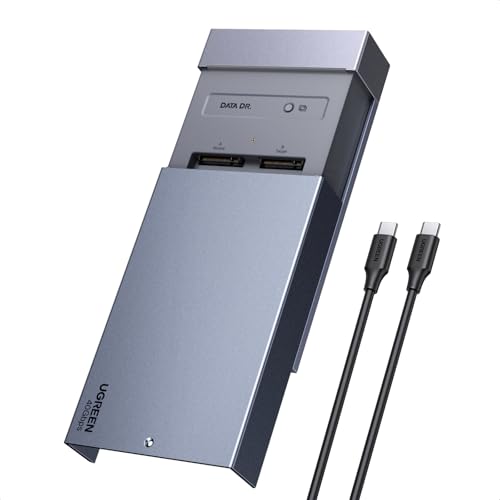
UGREEN 40Gbps Dual-Bay NVMe Cloner
Best for: offline cloning and software RAID setups
- Transfer Speed
- 40Gbps
- Offline Cloning
- One-click offline cloning
- Supported M.2 Sizes
- 2230/2242/2260/2280
- Maximum Capacity
- 16TB
- Cooling Type
- Aluminum alloy top shell, 40mm fan
- Interface
- NVMe
View on Amazon: UGREEN 40Gbps Dual-Bay NVMe Cloner Affiliate link
This UGREEN dock connects two M.2 NVMe SSDs via USB-C for 40Gbps transfers. It supports offline cloning and Software RAID modes. The aluminum shell includes a 40mm fan for cooling. It handles drives up to 8TB each. You get compatibility with Windows, macOS, Linux, and ChromeOS. It fits users needing fast duplication or RAID setups.
Pros
- 40Gbps transfer speed
- One-click offline cloning
- Supports Software RAID 0, 1, PM, and Union
- Dual-bay design for 2230 to 2280 drives
Cons
- Requires a PC-free setup for cloning
- Target disk must be larger than source data
- Includes a 40mm fan for noise
Good fit if
- You need to duplicate drives without a computer
- You want to combine two drives into a single volume
- You use macOS or Linux systems
Skip if
- You only have one M.2 drive
- You need SATA support
- You want silent operation without a fan
Verdict: UGREEN 40Gbps Dual-Bay NVMe Cloner offers robust cloning and RAID options for users managing multiple high-speed drives. It is ideal for creators and IT professionals who need reliable offline duplication and flexible storage configurations.

SABRENT 2-Bay NVMe and SATA Cloner Dock
Best for: Mixed NVMe and SATA drive management
- Transfer Speed
- 10Gbps
- Supported Drive Types
- M.2 PCIe/NVMe, 2.5"/3.5" SATA
- Bay Count
- 2
- Offline Cloning
- Supported
- Supported M.2 Sizes
- 2242, 2260, 2280
- Cooling Type
- Built-in aluminum M.2 heatsink
View on Amazon: SABRENT 2-Bay NVMe and SATA Cloner Dock Affiliate link
This Sabrent dock supports both M.2 NVMe and 2.5-inch/3.5-inch SATA drives in a dual-bay layout. It offers offline cloning and reaches up to 10Gbps via USB-C. The unit includes a built-in aluminum heatsink for NVMe cooling and comes with necessary cables and a power adapter. It suits users needing mixed-drive access without software.
Pros
- Supports M.2 NVMe and 2.5/3.5 SATA drives simultaneously
- Includes offline cloning functionality for drive duplication
- Built-in aluminum heatsink dissipates NVMe heat
- Comes with USB-A to C and C to C cables
- Tool-less installation for easy drive access
Cons
- 10Gbps speed is slower than 40Gbps USB4 alternatives
- Requires external power adapter for 3.5-inch or dual-drive use
- ABS plastic body lacks the metal build of premium docks
Good fit if
- You need to connect both NVMe and SATA drives at once
- You want offline cloning without installing software
- You prefer a compact dual-bay solution for mixed storage
Skip if
- You require 40Gbps transfer speeds for maximum performance
- You only use M.2 NVMe drives and want a single-bay design
- You prefer a metal chassis over plastic construction
Verdict: Sabrent DS-UNHC 2-Bay NVMe SATA Dock delivers reliable mixed-drive support and offline cloning. It is a practical choice for users who need to manage both NVMe and SATA drives without relying on host software.

SABRENT Lay-Flat NVMe and SATA Dock
Best for: Mixed NVMe and SATA drive management
- Transfer Speed
- 10Gbps
- Supported Drive Types
- M.2 NVMe, 2.5in/3.5in SATA HDD/SSD
- Offline Cloning
- Offline clone
- Supported M.2 Sizes
- 2242, 2260, 2280
- Interface
- SATA III
- Form Factor
- 2.5 Inch
View on Amazon: SABRENT Lay-Flat NVMe and SATA Dock Affiliate link
This dock handles M.2 NVMe and 2.5 or 3.5-inch SATA drives via a USB-C 10Gbps interface. It supports offline cloning with a direction switch and clone button, requiring no PC. The hinged lid allows tool-free swaps and the unit lays flat for easy access. It includes both USB-C to USB-C and USB-A to USB-C cables for broad host compatibility.
Pros
- Supports M.2 NVMe and 2.5/3.5-inch SATA drives
- 10Gbps USB 3.2 Gen 2 transfer speed
- Offline cloning without a computer
- Includes USB-C and USB-A cables
Cons
- 10Gbps speed is slower than 40Gbps alternatives
- Requires a separate 12V power adapter for 3.5-inch drives
- Only supports M.2 sizes 2242, 2260, and 2280
Good fit if
- You need to access both NVMe and SATA drives
- You want a stable, flat layout for frequent swaps
- You have older USB-A ports to connect to
Skip if
- You require 40Gbps transfer speeds
- You need to clone drives via software RAID
- You only use M.2 NVMe drives
Verdict: Sabrent Lay Flat NVMe & SATA Dock is a practical choice for users who need to manage both NVMe and SATA drives with offline cloning capabilities. It fits those who value a stable, flat design and broad cable compatibility over maximum transfer speeds.
Specifications side by side
| Spec | AMZPILOT 40Gbps USB4 M.2 NVMe Dock | SABRENT Dual-Bay NVMe Cloner Dock | ORICO 40Gbps Dual-Bay NVMe Cloner Dock | ORICO Dual-Bay M.2 NVMe Cloner Dock | UGREEN 40Gbps Dual-Bay NVMe Cloner | SABRENT 2-Bay NVMe and SATA Cloner Dock | SABRENT Lay-Flat NVMe and SATA Dock |
|---|---|---|---|---|---|---|---|
| Transfer Speed | 40Gbps | 10Gbps | 40Gbps | 10Gbps | 40Gbps | 10Gbps | 10Gbps |
| Supported Drive Types | M.2 NVMe | PCIe NVMe M.2 SSD | M-Key NVMe | M-Key NVMe PCIe SSD | not stated | M.2 PCIe/NVMe, 2.5"/3.5" SATA | M.2 NVMe, 2.5in/3.5in SATA HDD/SSD |
| Bay Count | not stated | 2 | 2 | 2 | not stated | 2 | not stated |
| Offline Cloning | not stated | One-button offline clone | One-button offline cloning | One-key clone | One-click offline cloning | Supported | Offline clone |
| Supported M.2 Sizes | 2230, 2242, 2260, 2280, 22110 | 2230, 2242, 2260, 2280 | 2230, 2242, 2260, 2280, 22110 | 2230, 2242, 2260, 2280, 22110 | 2230/2242/2260/2280 | 2242, 2260, 2280 | 2242, 2260, 2280 |
| Maximum Capacity | 8TB | not stated | 16TB | 8TB | 16TB | not stated | not stated |
| Cooling Type | not stated | Aluminum body, built-in fan | Aluminum heatsinks, cooling fan | not stated | Aluminum alloy top shell, 40mm fan | Built-in aluminum M.2 heatsink | not stated |
| Interface | NVMe | SATA III | NVMe | NVMe | NVMe | SATA III | SATA III |
| Form Factor | M.2 2230 | M.2 2280 | M.2 2280 | M.2 | M.2 | 2.5 Inch | 2.5 Inch |
| Cooling | not stated | Cooling Fan | not stated | not stated | not stated | not stated | not stated |
| Compatibility | Laptop | not stated | not stated | not stated | not stated | not stated | Mac |
| Features | not stated | Offline Clone | Offline Clone | Tool-Free, Offline Clone | Offline Clone | Tool-Free, Offline Clone | Tool-Free, Offline Clone |
| Material | Aluminum | not stated | not stated | Aluminum | not stated | not stated | not stated |
| Host Interface | USB-C | USB-C | USB-C | not stated | not stated | USB-C | USB-C |
| Dimensions | 2.74 × 2.74 × 0.61 inches | 4.3 × 2.5 × 1.25 inches | 5.71 × 2.91 × 1.38 inches | not stated | 5.04 × 3.15 × 0.59 inches | 6.1 × 2.4 × 2.6 inches | 7.17 × 4.83 × 1.77 inches |
| Weight | 3.5 ounces | 4 ounces | not stated | not stated | not stated | 7 ounces | 10.8 ounces |
| Size | 2.74 x 2.74 x 0.61 inches | USB-C DUAL DOCK | IT28N | not stated | not stated | 2-Bay NVMe + SATA Dock – USB-C | M.2/2.5/3.5 inch Docking Station |
| Color | Space Grey | SILVER | Silver | Cool Gray | silver | Black | Multicolor |
| Model | Pilot C50D-R | EC-SSD2 | IT28N-C | M2P2-C3 | 65733US | DS-UNHC | DS-UFNC |
When your build requires dedicated thermal hardware, you can compare the joyjom nvme m 2 heatsink SSD alternatives.
Frequently asked questions
Which alternative supports both NVMe and SATA drives?
The Sabrent 2-Bay NVMe and SATA Cloner Dock handles both drive types. It features a USB-C host interface and offline cloning capabilities. This model allows you to manage mixed storage needs without relying on host software. The Sabrent Lay-Flat Dock also supports SATA III interfaces alongside NVMe drives for versatile connectivity.
Do any alternatives offer dual-bay configurations for simultaneous access?
Several options provide dual-bay designs for managing two drives at once. The Sabrent Dual-Bay NVMe Cloner Dock and the ORICO Dual-Bay M.2 NVMe Cloner Dock both feature two drive slots. The UGREEN 40Gbps Dual-Bay NVMe Cloner also supports dual drives, offering software RAID options for flexible storage configurations.
Which dock allows for offline cloning without a computer?
Multiple docks support offline cloning for duplicating drives without host software. The Sabrent Dual-Bay NVMe Cloner Dock, ORICO 40Gbps Dual-Bay NVMe Cloner Dock, UGREEN 40Gbps Dual-Bay NVMe Cloner, and Sabrent 2-Bay NVMe and SATA Cloner Dock all include this feature. The ORICO Dual-Bay M.2 NVMe Cloner Dock also offers tool-free offline cloning.
Are there alternatives with 40Gbps transfer speeds?
Yes, several alternatives match the high-speed performance of the AMZPILOT dock. The AMZPILOT 40Gbps USB4 M.2 NVMe Dock, ORICO 40Gbps Dual-Bay NVMe Cloner Dock, and UGREEN 40Gbps Dual-Bay NVMe Cloner all support 40Gbps transfer rates. These models are ideal for users prioritizing maximum throughput for large file transfers.
Which option is best for portable dual-bay storage?
The ORICO Dual-Bay M.2 NVMe Cloner Dock is designed for portability. It offers a compact form factor suitable for travel while supporting offline cloning. This model provides a practical solution for users who need dual-drive access and ease of use without requiring the highest possible transfer speeds.
Does any alternative support software RAID setups?
The UGREEN 40Gbps Dual-Bay NVMe Cloner supports software RAID configurations. This feature allows you to combine drives for increased performance or redundancy. It is ideal for creators and IT professionals who need reliable offline duplication and flexible storage management for multiple high-speed drives.