Looking Beyond the Elecacc Dual-Bay 20Gbps RAID NVMe? 6 Alternatives Worth a Look
As an Amazon Associate we earn from qualifying purchases. Links on this page are affiliate links.
The Elecacc Dual-Bay 20Gbps RAID NVMe enclosure offers a practical solution for users needing high-speed data management. It supports RAID 0, RAID 1, JBOD, and offline cloning modes. The tool-free design allows easy access for swapping drives. Its aluminum and ABS casing provides decent heat dissipation for portable setups. You can install NVMe drives up to 8TB per slot, totaling 16TB capacity. This flexibility makes it a strong choice for professionals managing large datasets on the go.
However, you might look for Elecacc Dual-Bay RAID SSD alternatives that better match your specific requirements. Some users prefer dedicated cooling fans for sustained workloads, while others need hardware RAID controllers for enhanced reliability. The size and weight of the enclosure may also influence your decision if you prioritize extreme portability or desktop stability. We selected these 6 options because their specifications overlap significantly with the original. They all support 20Gbps transfer speeds and dual-bay configurations. This guide compares their features to help you find the right balance of speed, redundancy, and physical form factor for your workflow.
How these alternatives compare
MAIWO Dual-Bay 20Gbps NVMe RAID Enclosure
The MAIWO Dual-Bay 20Gbps NVMe RAID Enclosure shares the same 20Gbps transfer speed and dual-bay capacity as the Elecacc unit. It offers flexible RAID options for redundancy or speed. However, it lacks the offline cloning feature found in the Elecacc model. Its dimensions are 2.68 by 4.72 by 0.66 inches, making it slightly wider but thinner than the Elecacc. It weighs 13.8 ounces. You should choose this if you need pure RAID performance without cloning needs. It is a solid budget option for managing large files with data safety.
MAIWO Dual-Bay 20Gbps NVMe RAID Enclosure
This MAIWO enclosure also provides 20Gbps speeds and dual-bay support. It distinguishes itself with an active cooling fan, which the Elecacc lacks. The Elecacc relies on its aluminum and ABS casing for heat dissipation. This unit measures 2.7 by 4.7 by 0.9 inches. It is slightly taller than the Elecacc. The active cooling supports sustained workloads better for video editors. You might prefer this if you run heavy data tasks continuously. It delivers reliable high-throughput storage with better thermal management for professional use cases requiring consistent performance.
JEYI Dual-Bay 20Gbps NVMe RAID Enclosure
The JEYI Dual-Bay 20Gbps NVMe RAID Enclosure includes an active cooling fan, unlike the Elecacc's passive design. It supports hardware RAID for fast transfers. The JEYI unit is larger, measuring 6.3 by 7.5 by 1.6 inches. It weighs only 6.4 ounces. The Elecacc is more compact for portability. You should pick the JEYI if you prioritize sustained performance for large files over portability. Its cooling system handles video editing and data-heavy tasks better. It is a premium choice for users who need reliable RAID performance in a stationary setup.
Rosewill Dual-Bay NVMe Cloner and Eraser
The Rosewill Dual-Bay NVMe Cloner and Eraser focuses on offline duplication and secure wiping rather than RAID configurations. It shares the 20Gbps speed and tool-free design with the Elecacc. However, it lacks RAID modes. It measures 3.01 by 3.1 by 0.71 inches and weighs 5.28 ounces. It is more compact than the Elecacc. You should choose this if you prioritize data security and standalone cloning over high-speed RAID performance. It is a specialized tool for users who need to duplicate drives or erase data securely without complex RAID setups.
MAIWO 20Gbps M.2 NVMe SSD Enclosure
The MAIWO 20Gbps M.2 NVMe SSD Enclosure supports only a single drive, unlike the dual-bay Elecacc. It offers high-speed connectivity for one drive. It measures 4.33 by 1.81 by 0.79 inches and weighs 8.96 ounces. It lacks RAID options and cloning features. You should pick this if you prioritize raw speed for a single drive over dual-bay capacity. It is a solid choice for users who do not need RAID configurations. It provides efficient access to a single high-speed NVMe drive without the bulk of a dual-bay enclosure.
WAVLINK Dual-Bay 20Gbps NVMe Cloner
The WAVLINK Dual-Bay 20Gbps NVMe Cloner supports offline cloning of PCIe NVMe drives. It lacks RAID modes, focusing on independent cloning. It measures 5.91 by 3.94 by 2.36 inches and weighs 1.01 pounds. It is significantly larger and heavier than the Elecacc. You should choose this if you need flexible form factor support for cloning. It is a practical tool for duplicating drives offline. It suits users who prioritize cloning capabilities over RAID performance or portability. Its size accommodates larger drives but reduces mobility compared to the Elecacc.
Quick picks
Our 7 picks

Elecacc Dual-Bay 20Gbps RAID NVMe Enclosure
Best for: portable NVMe RAID setups with cloning needs
- Max Transfer Speed
- 20Gbps
- Drive Interface
- PCIe NVMe M-Key
- Supported Form Factors
- 2230, 2242, 2260, 2280 mm
- Drive Bay Count
- Dual Bay
- Cooling System
- Aluminum and plastic ABS casing
- Maximum Capacity
- 16TB
View on Amazon: Elecacc Dual-Bay 20Gbps RAID NVMe Enclosure Affiliate link
This dual-bay enclosure connects two M.2 NVMe SSDs via a 20Gbps interface for fast data transfer. It supports RAID 0, RAID 1, JBOD, and offline cloning. The aluminum and ABS casing helps dissipate heat while keeping the unit lightweight. You can install drives tool-free, which speeds up swapping SSDs. It handles up to 16TB of total storage across compatible PCIe NVMe drives.
Pros
- 20Gbps transfer speed for large file handling
- Supports RAID 0, RAID 1, JBOD, and clone modes
- Tool-free installation for easy drive swapping
- Aluminum and ABS casing for heat dissipation
- Supports 2230, 2242, 2260, and 2280mm form factors
Cons
- Does not support M.2 SATA B+M Key SSDs
- Requires both drives to use the same protocol
- Formats drives when switching between RAID 0 and RAID 1
Good fit if
- You need offline cloning capabilities for drive duplication
- You want RAID 1 for data redundancy
- You use multiple M.2 NVMe drives in a portable setup
Skip if
- You rely on M.2 SATA drives
- You need hot-swapping without formatting drives
- You require hardware RAID controller integration
Verdict: Elecacc Dual-Bay 20Gbps NVMe RAID Enclosure offers versatile RAID options and offline cloning for users managing large NVMe datasets. It suits professionals who need portable, high-speed storage expansion with tool-free access.

MAIWO Dual-Bay 20Gbps NVMe RAID Enclosure
Best for: Users needing RAID redundancy and 20Gbps speeds
- Max Transfer Speed
- 20Gbps
- Host Interface
- USB 3.2 Gen 2x2 Type-C
- Drive Interface
- PCIe NVMe M-Key
- Supported Form Factors
- 2230, 2242, 2260, 2280
- Drive Bay Count
- 2 bays
- Cooling System
- Aluminum alloy case
View on Amazon: MAIWO Dual-Bay 20Gbps NVMe RAID Enclosure Affiliate link
This MAIWO enclosure holds two PCIe NVMe M-Key SSDs in sizes 2230 to 2280. It uses a JMS586R chipset to deliver 20Gbps speeds via USB 3.2 Gen 2x2. You can choose between RAID 0, RAID 1, PM, or JBOD modes. The aluminum alloy case supports up to 16TB total capacity. It includes a dedicated 5V 3A power adapter and tool-free installation for easy setup.
Pros
- Supports RAID 0, RAID 1, PM, and JBOD modes
- USB 3.2 Gen 2x2 interface with 20Gbps transfer speed
- Aluminum alloy case for passive heat dissipation
- Tool-free installation for quick drive swaps
- Includes both 20Gbps C-to-C and 10Gbps C-to-A cables
Cons
- Requires a separate 5V 3A power adapter
- Does not support M.2 SATA B+M Key SSDs
- Heavier at 13.8 ounces compared to lighter enclosures
Good fit if
- You need RAID 1 for data redundancy across two drives
- You want to combine two drives into a single 16TB volume
- You use a desktop with USB 3.2 Gen 2x2 ports
Skip if
- You only have one M.2 NVMe drive to use
- You rely on older USB 3.0 ports without Gen 2x2 support
- You need to connect SATA-based M.2 SSDs
Verdict: MAIWO Dual-Bay NVMe RAID Enclosure offers flexible RAID options and high-speed connectivity for users needing large, redundant storage. It is ideal for professionals managing large files who require data safety through RAID 1 or speed through RAID 0.

MAIWO Dual-Bay 20Gbps NVMe RAID Enclosure
Best for: High-speed NVMe RAID setups
- Max Transfer Speed
- 20Gbps
- Host Interface
- USB 3.2 Gen 2x2
- Drive Interface
- M.2 PCIe NVMe (M Key)
- Supported Form Factors
- 2230, 2242, 2260, 2280
- Drive Bay Count
- 2 bays
- Cooling System
- Built-in cooling fan, aluminum shell
View on Amazon: MAIWO Dual-Bay 20Gbps NVMe RAID Enclosure Affiliate link
This MAIWO enclosure holds two M.2 PCIe NVMe SSDs in a tool-free aluminum chassis. It uses a JMS586R chipset and USB 3.2 Gen 2x2 to reach 20Gbps speeds. You get RAID 0, 1, JBOD, and PM modes for flexibility. A built-in cooling fan helps manage heat during heavy workloads. It supports drives up to 2280 size and offers a maximum capacity of 16TB.
Pros
- Supports 20Gbps transfer speeds via USB 3.2 Gen 2x2
- Includes a built-in cooling fan for thermal management
- Offers four RAID modes: 0, 1, JBOD, and PM
- Tool-free magnetic cover for easy drive installation
- Compatible with Windows, macOS, and Linux
Cons
- Does not support M.2 SATA SSDs
- Requires a separate 5V 3A power adapter
- Only supports M.2 PCIe NVMe M Key drives
Good fit if
- You need high-speed data transfers for large files
- You want RAID 1 mirroring for data protection
- You use M.2 PCIe NVMe SSDs in standard sizes
Skip if
- You only have M.2 SATA SSDs
- You want a portable solution without external power
- You need support for older USB 3.0 speeds only
Verdict: MAIWO Dual-Bay NVMe Enclosure delivers 20Gbps performance and flexible RAID options for users who prioritize speed and data redundancy. It is ideal for professionals managing large datasets who need reliable, high-throughput storage solutions.

JEYI Dual-Bay 20Gbps NVMe RAID Enclosure
Best for: Users needing hardware RAID and 20Gbps speeds
- Max Transfer Speed
- 20Gbps
- Host Interface
- USB 3.2 Gen2x2
- Drive Interface
- NVMe M.2
- Drive Bay Count
- 2 bays
- Cooling System
- Smart turbo fan, aluminum body
- Maximum Capacity
- 16TB
View on Amazon: JEYI Dual-Bay 20Gbps NVMe RAID Enclosure Affiliate link
The JEYI dual-bay NVMe enclosure uses a JMS586R controller to support USB 3.2 Gen2x2 connections with 20Gbps transfer speeds. It offers hardware RAID 0, 1, JBOD, and LARGE modes for flexible storage management. The aluminum body includes a smart turbo fan and thermal pad for cooling. It holds two M.2 NVMe drives up to 8TB each, totaling 16TB. The purple case measures 7.5 by 6.3 inches.
Pros
- Supports USB 3.2 Gen2x2 for 20Gbps speeds
- Hardware RAID 0, 1, JBOD, and LARGE modes
- Smart turbo fan and aluminum body for cooling
- Expands storage up to 16TB total
Cons
- Purple color may not suit all setups
- Requires screwdriver for installation
- No software RAID management included
Good fit if
- You need hardware RAID for data redundancy
- You edit 4K video or handle large files
- You want fast 20Gbps transfer speeds
Skip if
- You prefer software-based RAID solutions
- You need a neutral color scheme
- You want tool-free installation
Verdict: The JEYI Dual-Bay NVMe Enclosure fits users who need hardware RAID and fast 20Gbps transfers for large files. Its cooling system supports sustained workloads, making it suitable for video editors and data-heavy tasks.
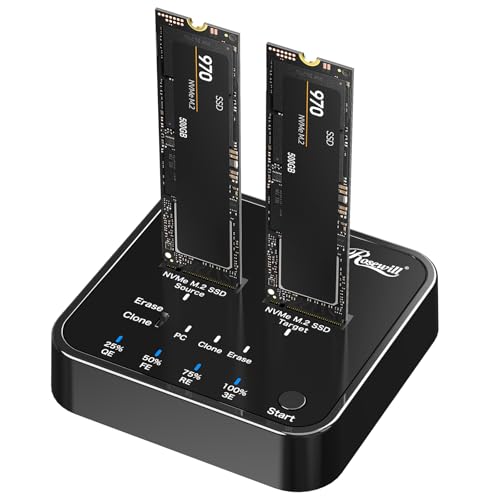
Rosewill Dual-Bay NVMe Cloner and Eraser
Best for: Offline cloning and secure data erasure
- Max Transfer Speed
- 20Gbps
- Host Interface
- USB 3.2 Gen 2x2
- Drive Interface
- PCIe NVMe M Key
- Drive Bay Count
- 2 bays
- Installation Style
- Tool-Free
- Form Factor
- M.2
View on Amazon: Rosewill Dual-Bay NVMe Cloner and Eraser Affiliate link
The Rosewill RS-N2-CLE is a 20Gbps dual-bay NVMe enclosure that doubles as an offline cloner and eraser. It supports tool-free installation for PCIe NVMe M-Key drives and offers four erasure modes for data security. This compact black unit measures 3.1 by 3.01 inches and weighs 5.28 ounces. It suits users who need to duplicate drives or securely wipe data without connecting to a host computer.
Pros
- Offline cloning capability without a host computer
- Four erasure modes for data destruction
- Tool-free M.2 SSD installation
- 20Gbps USB 3.2 Gen 2x2 transfer speed
Cons
- No RAID support for combined drive performance
- Limited to PCIe NVMe M-Key drives only
- No host computer connection for live cloning
Good fit if
- You need to clone NVMe drives offline
- You require secure data erasure for old drives
- You want a compact tool-free enclosure
Skip if
- You need RAID configurations for speed
- You want to connect to a PC for live cloning
- You use SATA or Intel Optane drives
Verdict: Rosewill Dual-Bay NVMe Cloner & Eraser is a specialized tool for offline duplication and secure wiping. It fits users who prioritize data security and standalone cloning over high-speed RAID performance.

MAIWO 20Gbps M.2 NVMe SSD Enclosure
Best for: Single high-speed NVMe drive access
- Max Transfer Speed
- 20Gbps
- Host Interface
- USB 3.2 Gen 2x2 Type-C
- Drive Interface
- PCIe NVMe M-Key
- Supported Form Factors
- 2280
- Cooling System
- Aluminum alloy shell, thermal pads
- Maximum Capacity
- 8TB
View on Amazon: MAIWO 20Gbps M.2 NVMe SSD Enclosure Affiliate link
This MAIWO enclosure connects a single M.2 NVMe drive via USB 3.2 Gen 2x2. It delivers up to 20Gbps throughput, reaching theoretical speeds of 2000MB/s. The aluminum shell includes thermal pads for cooling. It supports drives up to 8TB in the 2280 form factor. You get a USB-C cable and tools for installation. It works with macOS, Windows, Linux, and Android OTG.
Pros
- USB 3.2 Gen 2x2 interface for 20Gbps speeds
- Aluminum alloy shell with thermal pads for heat dissipation
- Supports up to 8TB capacity
- Compatible with macOS, Windows, Linux, and Android OTG
Cons
- Single-bay design, not suitable for RAID setups
- Speed drops to 10Gbps on USB4 and Thunderbolt 3/4 ports
- Limited to 2280 M-Key NVMe drives only
Good fit if
- You need maximum speed for a single NVMe drive
- You want a compact aluminum enclosure for portability
- You use Android devices with OTG support
Skip if
- You require dual-bay RAID functionality
- You plan to use USB4 or Thunderbolt 3/4 hosts
- You need support for smaller M.2 form factors
Verdict: MAIWO 20Gbps NVMe Enclosure offers high-speed connectivity for a single drive but lacks the dual-bay capacity of the other options. It is a solid choice if you prioritize raw speed over RAID configurations.

WAVLINK Dual-Bay 20Gbps NVMe Cloner
Best for: Offline cloning of PCIe NVMe drives
- Max Transfer Speed
- 20Gbps
- Host Interface
- USB-C
- Drive Interface
- PCIe NVMe (M and B+M keys)
- Supported Form Factors
- 2280/2260/2242/2230
- Drive Bay Count
- 2 bays
- Cooling System
- Silicone thermal pads
View on Amazon: WAVLINK Dual-Bay 20Gbps NVMe Cloner Affiliate link
The WAVLINK dual-bay enclosure supports offline cloning and 20Gbps transfer speeds. It accepts PCIe NVMe drives in 2280, 2260, 2242, and 2230 sizes. You get tool-free installation and up to 16TB total capacity. It includes silicone thermal pads for cooling. This unit suits users who need to duplicate drives without a computer.
Pros
- Supports one-click offline cloning
- 20Gbps USB-C interface
- Tool-free installation
- Supports multiple M.2 sizes
Cons
- Requires external DC power adapter
- Does not support SATA M.2 drives
- No active cooling fan
Good fit if
- You need to clone drives without a PC
- You use various M.2 form factors
- You want tool-free drive installation
Skip if
- You only have SATA M.2 SSDs
- You prefer a fan-cooled design
- You need bus-powered operation
Verdict: The WAVLINK Dual-Bay NVMe Cloner 20Gbps is a practical tool for duplicating PCIe NVMe drives offline. It fits users who need flexible form factor support and independent cloning.
Specifications side by side
| Spec | Elecacc Dual-Bay 20Gbps RAID NVMe Enclosure | MAIWO Dual-Bay 20Gbps NVMe RAID Enclosure | MAIWO Dual-Bay 20Gbps NVMe RAID Enclosure | JEYI Dual-Bay 20Gbps NVMe RAID Enclosure | Rosewill Dual-Bay NVMe Cloner and Eraser | MAIWO 20Gbps M.2 NVMe SSD Enclosure | WAVLINK Dual-Bay 20Gbps NVMe Cloner |
|---|---|---|---|---|---|---|---|
| Max Transfer Speed | 20Gbps | 20Gbps | 20Gbps | 20Gbps | 20Gbps | 20Gbps | 20Gbps |
| Host Interface | not stated | USB 3.2 Gen 2x2 Type-C | USB 3.2 Gen 2x2 | USB 3.2 Gen2x2 | USB 3.2 Gen 2x2 | USB 3.2 Gen 2x2 Type-C | USB-C |
| Drive Interface | PCIe NVMe M-Key | PCIe NVMe M-Key | M.2 PCIe NVMe (M Key) | NVMe M.2 | PCIe NVMe M Key | PCIe NVMe M-Key | PCIe NVMe (M and B+M keys) |
| Supported Form Factors | 2230, 2242, 2260, 2280 mm | 2230, 2242, 2260, 2280 | 2230, 2242, 2260, 2280 | not stated | not stated | 2280 | 2280/2260/2242/2230 |
| Drive Bay Count | Dual Bay | 2 bays | 2 bays | 2 bays | 2 bays | not stated | 2 bays |
| Cooling System | Aluminum and plastic ABS casing | Aluminum alloy case | Built-in cooling fan, aluminum shell | Smart turbo fan, aluminum body | not stated | Aluminum alloy shell, thermal pads | Silicone thermal pads |
| Maximum Capacity | 16TB | 16TB | 16TB | 16TB | not stated | 8TB | 16TB (8TB per drive) |
| Installation Style | Tool-Free | Tool-free | Tool Free | not stated | Tool-Free | not stated | Tool-Free |
| Interface | SATA III | NVMe | NVMe | NVMe | NVMe | NVMe | NVMe |
| Form Factor | M.2 | M.2 | M.2 | M.2 | M.2 | M.2 | M.2 2280 |
| Cooling | not stated | not stated | Cooling Fan | Cooling Fan | not stated | not stated | not stated |
| Transfer Speed | 20Gbps | 20Gbps | 20Gbps | 20Gbps | 20Gbps | 20Gbps | 20Gbps |
| Features | Offline Clone | not stated | not stated | not stated | Tool-Free, Offline Clone | not stated | Tool-Free, Offline Clone |
| Bay Count | Dual-Bay | Dual-Bay | Dual-Bay | Dual-Bay | Dual-Bay | not stated | Dual-Bay |
| Use | Travel | not stated | not stated | not stated | not stated | not stated | not stated |
| Material | not stated | not stated | Aluminum | not stated | not stated | Aluminum | not stated |
| Dimensions | not stated | 4.72 × 2.68 × 0.66 inches | 4.7 × 2.7 × 0.9 inches | 7.5 × 6.3 × 1.6 inches | 3.01 × 0.71 × 3.1 inches | 4.33 × 1.81 × 0.79 inches | 5.91 × 3.94 × 2.36 inches |
| Weight | not stated | 13.8 ounces | not stated | 6.4 ounces | 5.28 ounces | 8.96 ounces | 1.01 pounds |
| Color | gray | not stated | Gray | Purple | Black | not stated | Silver |
| Model | Dual Bay Raid SSD Enclosure | NVMe RAID Enclosure | 20Gbps NVMe RAID | not stated | RS-N2-CLE | 20Gbps - M.2 NVMe Enclosure | NVMe + NVMe |
| Size | not stated | not stated | not stated | not stated | 20 Gbps Dual Bay Cloner & Eraser | not stated | not stated |
Frequently asked questions
Can I use RAID 1 with these dual-bay enclosures?
Yes, most dual-bay options support RAID 1 for data redundancy. The Elecacc and MAIWO models explicitly offer this mode to protect your files. The JEYI enclosure also provides hardware RAID capabilities. This setup mirrors data across both drives, ensuring safety if one drive fails.
Do these enclosures support offline cloning without a computer?
Several models allow you to clone drives without connecting to a host PC. The Elecacc and Rosewill units feature offline cloning functions. The WAVLINK cloner also supports this standalone duplication. This is useful for quick backups or duplicating drives directly.
Is a cooling fan included in all dual-bay NVMe enclosures?
No, not all models include an active cooling fan. The MAIWO and JEYI enclosures both feature built-in cooling fans to manage heat. The Elecacc and Rosewill units do not list active cooling in their specifications. Passive heat dissipation relies on the aluminum or ABS casing.
What is the maximum transfer speed for these enclosures?
All listed dual-bay enclosures support a maximum transfer speed of 20Gbps. This applies to the Elecacc, MAIWO, JEYI, Rosewill, and WAVLINK models. This speed ensures fast data movement for large files. It is suitable for video editing and high-throughput tasks.
Which enclosure is best for secure data erasure?
The Rosewill Dual-Bay NVMe Cloner & Eraser is designed for this purpose. It includes secure data erasure capabilities alongside cloning. This makes it ideal for users prioritizing data security. Other models focus on RAID performance or speed rather than wiping functions.
Can I use these enclosures with M.2 2280 drives?
Yes, most models support the standard M.2 2280 form factor. The WAVLINK enclosure explicitly lists support for M.2 2280 drives. The Elecacc, MAIWO, and JEYI models also accommodate standard NVMe SSDs. Check the specific bay dimensions to ensure compatibility with your drive size.
Are these enclosures tool-free for drive installation?
Many models offer tool-free designs for easy drive access. The Elecacc and Rosewill enclosures feature tool-free mechanisms. The WAVLINK cloner also supports tool-free installation. This simplifies swapping drives or upgrading storage without needing additional hardware.