Looking Beyond the SABRENT USB 3.0 to SATA? 6 Alternatives Worth a Look
As an Amazon Associate we earn from qualifying purchases. Links on this page are affiliate links.
The SABRENT 2.5 and 3.5-Inch SATA USB 3.0 Dock offers straightforward, tool-free desktop access for standard 2.5-inch and 3.5-inch SATA drives. If your storage setup requires different connectivity or multi-drive handling, exploring SABRENT USB 3.0 to SATA alternatives makes practical sense. The original dock delivers a reliable baseline with its lay-flat design, hot-swap capability, and included 12V/2A power adapter for mechanical hard drives. It operates standard SATA storage over a 5Gbps USB Type-A connection with UASP support.
You might look beyond this dock if you require features the original does not provide, such as M.2 form factor support, native USB-C ports, or standalone offline cloning. Other tasks demand multi-bay hardware with active cooling fans or higher bandwidth reaching 10Gbps or 20Gbps. The 6 alternatives in this guide were chosen because their core specifications overlap with the original dock while providing targeted options for format versatility, drive density, and faster host interfaces.
How the Alternatives Compare to SABRENT
ICY DOCK M.2 and 2.5-Inch SATA Dock
The ICY DOCK MB031U-1SMB supports both 2.5-inch SATA drives and M.2 SATA solid-state cards. In contrast, the original SABRENT dock accommodates 2.5-inch and 3.5-inch SATA drives, but it cannot connect M.2 hardware. Choosing this ICY DOCK unit gives you a lighter, more compact build at 0.22 pounds compared to SABRENT's 0.47 pounds. However, you give up compatibility with full-size 3.5-inch desktop hard drives and lose the dedicated 12V power adapter required for spinning desktop disks. You should choose this dock if you regularly swap between bare 2.5-inch SATA drives and M.2 SATA modules and do not require 3.5-inch desktop drive access.
ICY BOX M.2 NVMe & SATA Cloner Dock
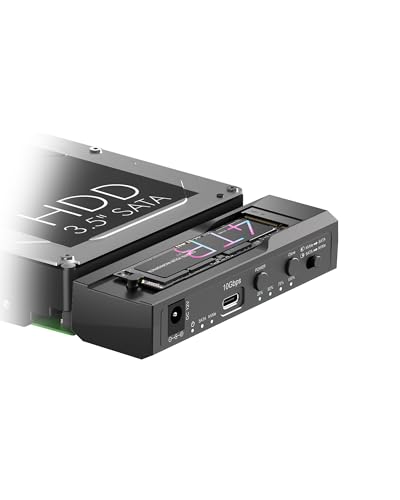
The ICY BOX dock steps up transfer performance to 10Gbps over USB-C, doubling the 5Gbps interface bandwidth of the original SABRENT USB 3.0 dock. It also integrates standalone offline cloning and handles both M.2 NVMe and SATA protocols. The original SABRENT dock strictly connects SATA drives, lacks offline cloning, and requires an external computer to manage drive data. By switching to this ICY BOX model, you surrender standard 3.5-inch mechanical drive support and the included 12V power supply designed for heavy spinning platters. Pick this unit if you need computer-free drive duplication between NVMe and SATA formats with 10Gbps throughput.
SABRENT 4-Bay 2.5-Inch SATA SSD Dock with Fan
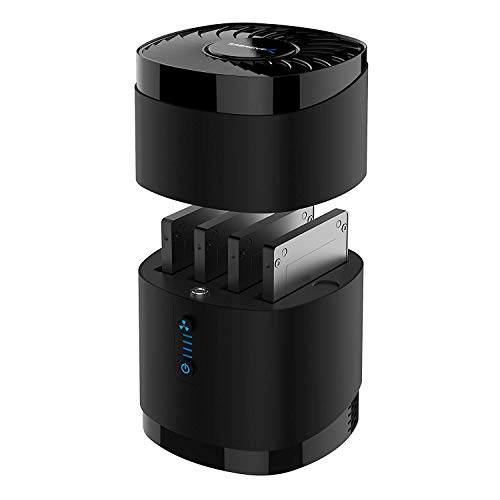
The SABRENT DS-4SSD provides four independent 2.5-inch SATA bays alongside an integrated cooling fan. The original SABRENT dock accommodates only one drive at a time and relies strictly on passive cooling. While both models operate on a 5Gbps USB connection, this four-bay alternative allows you to dock multiple 2.5-inch drives simultaneously without swapping hardware. What you give up is 3.5-inch drive compatibility, as the DS-4SSD accepts only 2.5-inch SSDs or laptop hard drives. It is also bulkier at 1.01 pounds. You should pick this dock if you need to manage multiple 2.5-inch SATA drives concurrently and want active thermal management.
SABRENT 10-Bay USB-C SATA Docking Station
The SABRENT DS-UCTB scales your storage up to ten 3.5-inch SATA bays, connecting over a fast 10Gbps USB-C host interface. The original SABRENT dock handles only a single drive at 5Gbps over a USB Type-A connection. With the ten-bay station, you can pool massive independent storage volumes from one central location. However, you give up portability and a small desktop footprint. The DS-UCTB weighs 11.02 pounds and measures 13.4 inches tall, making it far larger than the compact 0.47-pound original dock. Pick this model if you need high-density, multi-drive SATA storage pools and direct USB-C connectivity.
FIDECO Dual-Bay 20Gbps M.2 NVMe & SATA Cloner Dock
The FIDECO M2288 features a 20Gbps interface, dual M.2 bays, and offline cloning within an aluminum chassis. It handles both M.2 NVMe and M.2 SATA cards. Compared to the original SABRENT dock, FIDECO offers quadruple the transfer bandwidth and allows standalone cloning without host system intervention. What you give up is compatibility with traditional 2.5-inch and 3.5-inch form factor drives, since this dock exclusively houses M.2 sticks. It measures just 2.68 inches square. You should pick this alternative if your workflow centers on high-speed M.2 solid-state media and you need rapid standalone cloning without physical hard drive bays.
StarTech.com M.2 NVMe to SATA Duplicator Dock
The StarTech.com N2-M2-SSD-DUPLICATOR provides bidirectional offline cloning between M.2 NVMe and SATA drives, operating over a 10Gbps USB interface. In comparison, the original SABRENT dock relies on a 5Gbps connection and cannot read NVMe drives or clone without a computer. The StarTech.com dock allows standalone data migration across different solid-state drive protocols. However, it gives up the lay-flat 3.5-inch desktop drive bay and dedicated 12V/2A power profile found on the SABRENT unit. You should select this StarTech.com duplicator if you frequently clone or migrate data across mixed M.2 NVMe and SATA form factors without using an operating system.
Quick picks
Our 7 picks

SABRENT 2.5 and 3.5-Inch SATA USB 3.0 Dock
Best for: basic 2.5-inch and 3.5-inch SATA drive access
- Supported Drive Types
- 2.5-inch & 3.5-inch SATA HDD/SSD
- Interface
- SATA III
- Form Factor
- M.2
- Host Interface
- USB-C
- Dimensions
- 7.09 × 4.8 × 1.6 inches
- Weight
- 7.5 ounces
This tool-free docking station connects one bare 2.5-inch or 3.5-inch SATA hard drive or SSD via a USB 3.0 Type-A interface. It supports SATA I, II, and III drives with UASP capability. A 12V/2A external power supply powers larger 3.5-inch mechanical disks. It suits you if you need a simple, single-bay lay-flat dock to access standard SATA drives without opening a computer chassis or installing screws.
Pros
- Tool-free, lay-flat bay for 2.5-inch and 3.5-inch SATA drives
- USB 3.0 interface with UASP protocol support
- Included 12V/2A external power adapter for 3.5-inch drives
- Driver-free hot-swapping on Windows, macOS, and Linux
Cons
- No support for M.2 NVMe, M.2 SATA, IDE, or SAS drives
- USB bridge does not pass through S.M.A.R.T. diagnostics
- Includes only a USB Type-A cable, requiring an adapter for USB-C ports
Good fit if
- You need quick, tool-free access to bare 2.5-inch or 3.5-inch SATA drives.
- You connect via standard USB Type-A ports on your host computer.
Skip if
- You need to read or clone M.2 NVMe or M.2 SATA solid-state drives.
- You require S.M.A.R.T. health data passthrough over the USB connection.
Verdict: SABRENT 2.5/3.5-Inch SATA USB 3.0 Dock provides straightforward, tool-free desktop access for standard SATA drives using a USB Type-A connection. It remains a reliable baseline if you do not require M.2 format support or integrated drive cloning.

ICY DOCK M.2 and 2.5-Inch SATA Dock
Best for: swapping single 2.5-inch or M.2 SATA drives
- Transfer Speed
- Up to 5Gbps
- Supported Drive Types
- 2.5-inch SATA HDD/SSD, SATA M.2 SSD
- Bay Count
- 1
- Interface
- SATA III
- Dimensions
- 6.25 × 3.75 × 1.12 inches
- Weight
- 3.56 ounces
This external dock accepts either a 2.5-inch SATA hard drive or solid-state drive, or a SATA M.2 solid-state drive. It connects via a USB 3.2 Gen 1 interface rated for speeds up to 5Gbps. It also provides backward compatibility with USB 2.0 ports. You get a dedicated on/off power switch and an activity indicator light. It suits you if you need a compact single-drive adapter for legacy SATA formats.
Pros
- Supports 2.5-inch SATA drives and SATA M.2 SSDs
- USB 3.2 Gen 1 interface provides transfer rates up to 5Gbps
- Backward compatible with USB 2.0 ports
- Dedicated on/off power switch and drive activity LED indicator
Cons
- Cannot read 2.5-inch and M.2 drives simultaneously
- No support for NVMe solid-state drives
- Does not fit 3.5-inch desktop hard drives
Good fit if
- You need to access either a 2.5-inch SATA drive or an M.2 SATA SSD.
- You want an integrated power switch to control drive power.
- You connect to host systems that use USB 3.2 Gen 1 or USB 2.0.
Skip if
- You need to run two drives at the same time.
- You require support for PCIe NVMe M.2 drives.
- You need to mount standard 3.5-inch SATA drives.
Verdict: ICY DOCK 2.5-Inch and M.2 SATA Drive Dock provides a straightforward 5Gbps USB connection for individual 2.5-inch SATA or M.2 SATA drives. It handles one drive at a time without requiring extra bay hardware.
ICY BOX M.2 NVMe & SATA Cloner Dock
Best for: tool-free NVMe and SATA drive cloning
- Transfer Speed
- 10Gbps
- Supported Drive Types
- M.2 NVMe, 2.5"/3.5" SATA
- Bay Count
- 2
- Offline Cloning
- One-Key Offline Cloning
- Supported M.2 Sizes
- 2230–2280
- Interface
- SATA III
This dock pairs an M.2 NVMe slot with a 2.5-inch or 3.5-inch SATA bay. You get USB 3.2 Gen 2 connectivity providing transfer speeds up to 10Gbps. It includes one-key offline cloning between NVMe and SATA drives without a computer, plus simultaneous read and write access to both slots. It suits you if you frequently duplicate drives or manage mixed storage formats with a tool-free setup.
Pros
- USB 3.2 Gen 2 Type-C interface supports transfer speeds up to 10Gbps
- One-key offline cloning works without a host computer
- Reads and writes to M.2 NVMe and SATA drives simultaneously
- Supports M.2 sizes from 2230 to 2280 plus 2.5-inch and 3.5-inch SATA drives
Cons
- Requires the included 12V/3A external power adapter for operation
- Limited to one M.2 slot and one SATA slot at a time
Good fit if
- You need tool-free offline cloning between M.2 NVMe and SATA drives.
- You want 10Gbps USB 3.2 Gen 2 speeds for simultaneous drive access.
Skip if
- You need to clone between two M.2 NVMe drives directly.
- You require a bus-powered setup without an external power adapter.
Verdict: ICY BOX Tool-Free NVMe & SATA Dock delivers dual-slot versatility with standalone cloning and 10Gbps USB-C connectivity. It provides a simple tool-free solution for moving data across mixed drive formats.
SABRENT 4-Bay 2.5-Inch SATA SSD Dock with Fan
Best for: managing multiple 2.5-inch SATA drives simultaneously
- Transfer Speed
- 5Gbps
- Supported Drive Types
- 2.5-inch SATA SSD/HDD
- Bay Count
- 4
- Maximum Capacity
- Up to 4x 16TB
- Cooling Type
- Built-in fan
- Interface
- SATA III
View on Amazon: SABRENT 4-Bay 2.5-Inch SATA SSD Dock with Fan
This dock gives you four tool-free drive bays dedicated to 2.5-inch SATA SSDs and hard drives. It connects via a 5Gbps USB 3.0 interface and handles drives up to 16TB each and 12.5mm thick. A built-in fan with a power switch provides active cooling for continuous operation. You will find this setup practical if you need fast, multi-drive access without complex hardware setups or internal installations.
Pros
- Four bays supporting up to 16TB per 2.5-inch SATA drive
- Built-in cooling fan with dedicated on and off switch
- Tool-free magnetic cover for fast drive swapping
- USB 3.0 connection delivering speeds up to 5Gbps
Cons
- Does not support hardware RAID modes
- Incompatible with 3.5-inch drives and 15mm thick drives
Good fit if
- You need simultaneous access to up to four 2.5-inch SATA drives.
- You run drives continuously and require active fan cooling.
- You want tool-free swapping with a magnetic cover.
Skip if
- You need to connect 3.5-inch desktop hard drives.
- You require integrated hardware RAID functionality.
- You use drives with a thickness exceeding 12.5mm.
Verdict: SABRENT 4-Bay 2.5-Inch SATA Dock delivers multi-drive convenience with active cooling for high-density 2.5-inch storage management. It provides 5Gbps connectivity across four bays without requiring tools or drivers.

SABRENT 10-Bay USB-C SATA Docking Station
Best for: High-capacity independent 3.5-inch drive pools
- Transfer Speed
- 10Gbps
- Supported Drive Types
- 3.5in SATA HDD
- Bay Count
- 10
- Maximum Capacity
- 200TB
- Cooling Type
- Dual 120mm fans
- Interface
- SATA III
The dock connects up to ten 3.5-inch SATA hard drives to your system using a single 10Gbps USB 3.2 Gen 2 Type-C cable. Each tray-less bay runs independently via dedicated ASMedia controllers with its own power switch, supporting up to 200TB total capacity. Dual 120mm fans cool the aluminum enclosure. You get massive multi-drive storage for backups or archives without complex RAID setups.
Pros
- 10Gbps USB 3.2 Gen 2 Type-C interface
- Supports ten 3.5-inch SATA drives up to 200TB total
- Individual power switch and status LED for each bay
- Dual 120mm cooling fans inside an aluminum chassis
- Tray-less design with locking key security
Cons
- No built-in hardware RAID support
- Requires separate adapters to mount 2.5-inch drives
- Heavy 11-pound enclosure with a large desk footprint
Good fit if
- You need to access up to ten 3.5-inch SATA drives over one USB-C connection.
- You want individual power switches to run only specific drives as needed.
- You manage backups or media using separate non-RAID disk volumes.
Skip if
- You need hardware RAID striping or mirroring across your drives.
- You frequently swap 2.5-inch SSDs without purchasing extra drive adapters.
- You require a compact, portable drive dock for travel.
Verdict: SABRENT 10-Bay USB-C SATA Hard Drive Dock delivers high-bandwidth 10Gbps access to ten independent 3.5-inch SATA drives. It offers a practical non-RAID solution for managing up to 200TB of high-density storage from one USB-C port.

FIDECO Dual-Bay 20Gbps M.2 NVMe & SATA Cloner Dock
Best for: high-speed 20Gbps M.2 SSD offline cloning
- Transfer Speed
- 20Gbps
- Supported Drive Types
- M.2 PCIe NVMe, M.2 SATA
- Bay Count
- 2
- Offline Cloning
- Clone button
- Supported M.2 Sizes
- 2230, 2242, 2260, 2280, 22110
- Interface
- SATA III
View on Amazon: FIDECO Dual-Bay 20Gbps M.2 NVMe & SATA Cloner Dock
This aluminum dual-slot docking station connects M.2 NVMe and M.2 SATA drives to your computer through a fast 20Gbps USB 3.2 Gen 2x2 connection with UASP support. It accepts 2230 through 22110 form-factor cards and runs standalone offline cloning without a computer attached. If you work exclusively with bare M.2 solid-state drives rather than legacy 2.5-inch or 3.5-inch SATA disks, this dock gives you high-speed file transfers and quick drive duplication.
Pros
- Up to 20Gbps USB 3.2 Gen 2x2 transfer speeds with UASP support
- Standalone offline cloning without connecting to a host computer
- Accommodates five M.2 drive lengths from 2230 up to 22110
- Includes combo USB-C to USB-C/A cable for broad port compatibility
Cons
- Cannot pair one NVMe drive and one SATA drive simultaneously
- Does not accommodate standard 2.5-inch or 3.5-inch SATA drives
Good fit if
- You transfer data between high-speed M.2 NVMe drives at up to 20Gbps.
- You need computer-free offline drive cloning between matching M.2 SSD types.
- You handle varied M.2 drive sizes from 2230 up to 22110.
Skip if
- You need to dock standard 2.5-inch or 3.5-inch SATA hard drives.
- You want to duplicate directly between an NVMe drive and an M.2 SATA drive.
Verdict: FIDECO Dual M.2 NVMe and SATA Cloner Dock delivers high 20Gbps speeds and computer-free duplication for bare M.2 cards. It is an ideal high-speed alternative if you do not require traditional 2.5-inch or 3.5-inch drive bays.

StarTech.com M.2 NVMe to SATA Duplicator Dock
Best for: Cross-format SATA and NVMe drive cloning
- Transfer Speed
- 10Gbps
- Supported Drive Types
- M.2 NVMe, 2.5/3.5" SATA
- Bay Count
- Dual-bay
- Offline Cloning
- Bidirectional
- Supported M.2 Sizes
- 2242, 2260, 2280
- Cooling Type
- Passive cooling
View on Amazon: StarTech.com M.2 NVMe to SATA Duplicator Dock
This dock houses one M.2 NVMe SSD and one 2.5-inch or 3.5-inch SATA drive on your desk. It features standalone bidirectional cloning at speeds up to 27GB/min without requiring a host computer. When connected to a PC, the USB 10Gbps interface delivers up to SATA III and PCIe Gen3x2 throughput. It suits you if you frequently duplicate data across mixed drive formats or need quick external access to legacy and modern drives.
Pros
- Bidirectional standalone cloning between M.2 NVMe and SATA drives up to 27GB/min
- USB 10Gbps host connection with included USB-C cable
- Supports 2242, 2260, and 2280 M.2 NVMe sizes plus 2.5-inch and 3.5-inch SATA drives
- Top-loading design with LED progress and activity indicators
Cons
- Target disk must be equal to or larger than the source disk for cloning
- PCIe Gen3x2 host link caps NVMe bandwidth at 7.8Gbps
Good fit if
- You need to clone data directly between SATA and M.2 NVMe drives without a computer.
- You want a single 10Gbps desktop dock accommodating both SATA and NVMe form factors.
Skip if
- You need to clone to a target drive smaller than your source drive.
- You require multi-bay SATA enclosures for simultaneous use of more than one SATA drive.
Verdict: StarTech.com NVMe and SATA Duplicator Dock offers bidirectional offline cloning between SATA and NVMe drives alongside a 10Gbps USB host connection. It provides practical cross-format drive management without requiring a computer for duplication tasks.
Specifications side by side
| Spec | SABRENT 2.5 and 3.5-Inch SATA USB 3.0 Dock | ICY DOCK M.2 and 2.5-Inch SATA Dock | ICY BOX M.2 NVMe & SATA Cloner Dock | SABRENT 4-Bay 2.5-Inch SATA SSD Dock with Fan | SABRENT 10-Bay USB-C SATA Docking Station | FIDECO Dual-Bay 20Gbps M.2 NVMe & SATA Cloner Dock | StarTech.com M.2 NVMe to SATA Duplicator Dock |
|---|---|---|---|---|---|---|---|
| Transfer Speed | not specified | Up to 5Gbps | 10Gbps | 5Gbps | 10Gbps | 20Gbps | 10Gbps |
| Supported Drive Types | 2.5-inch & 3.5-inch SATA HDD/SSD | 2.5-inch SATA HDD/SSD, SATA M.2 SSD | M.2 NVMe, 2.5"/3.5" SATA | 2.5-inch SATA SSD/HDD | 3.5in SATA HDD | M.2 PCIe NVMe, M.2 SATA | M.2 NVMe, 2.5/3.5" SATA |
| Bay Count | not specified | 1 | 2 | 4 | 10 | 2 | Dual-bay |
| Offline Cloning | not specified | not specified | One-Key Offline Cloning | not specified | not specified | Clone button | Bidirectional |
| Supported M.2 Sizes | not specified | not specified | 2230–2280 | not specified | not specified | 2230, 2242, 2260, 2280, 22110 | 2242, 2260, 2280 |
| Maximum Capacity | not specified | not specified | not specified | Up to 4x 16TB | 200TB | not specified | not specified |
| Cooling Type | not specified | not specified | not specified | Built-in fan | Dual 120mm fans | not specified | Passive cooling |
| Interface | SATA III | SATA III | SATA III | SATA III | SATA III | SATA III | SATA III |
| Form Factor | M.2 | M.2 | 2.5 Inch | 2.5 Inch | not specified | M.2 | M.2 2280 |
| Cooling | not specified | not specified | not specified | Cooling Fan | not specified | not specified | not specified |
| Features | not specified | not specified | Tool-Free, Offline Clone | Tool-Free | not specified | Offline Clone | Offline Clone |
| Material | not specified | not specified | not specified | not specified | Aluminum | Aluminum | not specified |
| Host Interface | USB-C | not specified | not specified | not specified | USB-C | not specified | USB-C |
| Dimensions | 7.09 × 4.8 × 1.6 inches | 6.25 × 3.75 × 1.12 inches | 4.27 × 1.74 × 0.55 inches | 6.3 × 4.4 × 4.4 inches | 5.7 × 10.5 × 13.4 inches | 2.68 × 2.68 × 0.69 inches | 5.5 × 3.9 × 2.2 inches |
| Weight | 7.5 ounces | 3.56 ounces | not specified | 1.01 pounds | 11 pounds | 12 ounces | 10.9 ounces |
| Size | 2.5/3.5 inch Docking Station | not specified | not specified | 4-Bay SATA Dock – USB 3.0 5Gbps | 10 Bay | 6.8*1.75cm | not specified |
| Color | Black | Black | Black | Black | Black | Black | Black |
| Model | EC-DFLT | MB031U-1SMB | not specified | DS-4SSD | DS-UCTB | M2288 | N2-M2-SSD-DUPLICATOR |
For docking station connectivity beyond drive adapters, you can evaluate plugable USB 3 0 universal laptop alternatives.
Frequently asked questions
Can you clone drives without connecting to a computer?
Yes, you can clone drives without a computer if you choose a dock with offline cloning. The ICY BOX dock, FIDECO dual-bay dock, and StarTech.com duplicator all feature standalone cloning hardware. The StarTech.com dock allows bidirectional copying across NVMe and SATA drives, while the FIDECO model performs high-speed offline cloning for bare M.2 solid-state cards.
Which SATA dock alternatives support speeds faster than 5Gbps?
Several dock alternatives provide bandwidth well beyond standard 5Gbps USB connections. The ICY BOX dock, StarTech.com duplicator, and SABRENT 10-Bay station all feature 10Gbps transfer speeds. If you need maximum throughput for M.2 drives, the FIDECO dual-bay dock reaches up to 20Gbps. These higher interfaces help avoid data bottlenecks during large file transfers.
How do you connect multiple SATA drives to a single port?
You can connect multiple disks using multi-bay docking stations that manage individual drives over one host cable. The SABRENT 4-Bay dock houses four 2.5-inch SATA drives simultaneously and features an integrated cooling fan. For massive deployments, the SABRENT 10-Bay USB-C docking station connects up to ten 3.5-inch SATA drives without requiring a RAID configuration.
Can SATA docking stations also read M.2 NVMe drives?
Traditional SATA-only docks cannot read NVMe drives, but hybrid alternatives support both formats. Docks like the ICY BOX cloner, StarTech.com duplicator, and FIDECO dual-bay station accommodate both M.2 NVMe and SATA drives. These dual-protocol options let you service modern high-speed PCIe drives and legacy SATA storage using the same desktop hardware.
Why do multi-bay SATA docks include an integrated cooling fan?
Integrated fans prevent thermal throttling and protect hardware by exhausting heat during continuous drive activity. When you run multiple drives together, accumulated heat can build up quickly in multi-bay enclosures. The SABRENT 4-Bay dock incorporates an active cooling fan specifically to keep up to four 2.5-inch SATA solid-state drives operating within safe temperature limits.
What benefits does a USB-C SATA dock offer over standard USB Type-A?
A USB-C connection offers modern port compatibility, reversible cable plug-in, and higher potential bandwidth up to 10Gbps. The SABRENT 10-Bay SATA docking station relies on a 10Gbps USB-C interface to feed high-capacity data pools across ten independent 3.5-inch drives. Standard USB Type-A docks typically utilize 5Gbps links, which restrict aggregate bandwidth across multiple disks.