6 Best Alternatives to the SABRENT USB 3.0 4-Bay 2.5in (2026)
As an Amazon Associate we earn from qualifying purchases. Links on this page are affiliate links.
If you are looking for sabrent USB 3 0 4 bay 2 5in alternatives, you likely want reliable multi-drive storage on your desk. The original SABRENT DS-4SSD handles up to four 2.5-inch SATA drives across four bays over a 5Gbps USB 3.0 connection. It features an integrated cooling fan with an on/off switch, tool-free magnetic access, and support for up to 16TB drives. However, you might need specific capabilities that this particular docking station does not provide.
You may require support for 3.5-inch drives, M.2 NVMe cards, or standalone offline cloning without a host computer. Other setups benefit from faster 10Gbps USB-C transfer speeds, a smaller single-drive footprint, or an expanded ten-bay capacity. The 6 options in this 2026 guide were chosen because their specs overlap with the original SABRENT model. Whether you want mixed-interface flexibility or expanded multi-bay SATA volume, these alternatives offer focused hardware configurations for your workflow.
Our top pick: SABRENT 4-Bay 2.5-Inch SATA SSD Dock with Fan.
How Each Alternative Compares
ICY BOX Triple-Bay NVMe & SATA Cloner Dock
The ICY BOX dock doubles interface transfer speeds to 10Gbps over USB-C compared to the 5Gbps USB 3.0 connection on the SABRENT DS-4SSD. It also adds standalone offline cloning and accepts M.2 NVMe and 3.5-inch SATA disks alongside 2.5-inch drives. In return, you drop from four bays down to three and lose the built-in active cooling fan engineered for 24/7 drive operation. The SABRENT unit also provides greater total capacity for dedicated 2.5-inch storage arrays. Choose this ICY BOX model if you service mixed drive formats or clone drives without a host computer.
ICY BOX M.2 NVMe & SATA Cloner Dock
This ICY BOX model brings 10Gbps transfer speeds and cross-format offline cloning between M.2 NVMe and SATA drives. Its footprint measures just 1.74 by 4.27 inches with a 0.55-inch profile, making it significantly more compact than the 4.4-inch cubed SABRENT chassis. However, you give up two drive bays, stepping down from four 2.5-inch bays to a dual-slot arrangement. You also lose the built-in cooling fan that helps regulate heat during sustained 24/7 transfers on the SABRENT. Choose this ICY BOX cloner if you need high-speed cross-format data duplication and portability rather than bulk 2.5-inch SATA drive pooling.
SABRENT 2.5 and 3.5-Inch SATA USB 3.0 Dock
This single-bay SABRENT dock handles full-size 3.5-inch SATA hard drives in addition to 2.5-inch drives, whereas the DS-4SSD dock is strictly limited to 2.5-inch drives up to 12.5mm thick. At 7.5 ounces, it is lighter and sits lower on your desk with a 1.6-inch height. What you sacrifice is multi-drive pooling. You drop from four simultaneous bays down to a single drive slot, and you lose the integrated cooling fan. Both units share 5Gbps USB 3.0 speeds. Pick this dock if you only need to read or swap one standard 2.5-inch or 3.5-inch drive at a time.
ICY DOCK M.2 and 2.5-Inch SATA Dock
The ICY DOCK MB031U-1SMB accommodates both 2.5-inch SATA disks and SATA M.2 cards, giving you direct access to compact blade-style SSDs. Weighing just 3.56 ounces, it is substantially lighter than the 1.01-pound SABRENT four-bay unit and takes up less vertical space on your workspace. To gain M.2 compatibility, you surrender three drive bays and cannot mount multiple disks at once. You also lose the SABRENT dock's active cooling fan designed for continuous drive operation. Pick this ICY DOCK unit if you frequently inspect individual SATA M.2 blades alongside standard 2.5-inch drives and do not require multi-disk capacity.
SABRENT 10-Bay USB-C SATA Docking Station
The SABRENT 10-Bay dock dramatically expands storage scaling, offering ten bays designed for 3.5-inch SATA hard drives alongside a 10Gbps USB-C host interface. That doubles the 5Gbps throughput of the four-bay DS-4SSD and provides individual power toggles for managing each slot independently. However, it requires significant desk space, measuring 13.4 inches tall and weighing 11 pounds compared to the compact 1.01-pound four-bay enclosure. It also trades dedicated 2.5-inch slots for high-capacity 3.5-inch bays. Choose this 10-bay station if your workflow demands massive multi-terabyte volume across numerous high-capacity 3.5-inch drives rather than four compact 2.5-inch SSDs.
MAIWO Dual-Bay 10Gbps NVMe Cloner Dock
The MAIWO dock provides high-speed M.2 NVMe protocol support up to the 22110 size format, reaching 10Gbps data speeds over USB. It also includes standalone offline cloning, allowing computer-free duplication between two NVMe solid-state cards. In contrast, the SABRENT DS-4SSD operates over SATA III at 5Gbps and lacks standalone cloning functionality. However, the MAIWO dock gives up all 2.5-inch drive compatibility and drops your concurrent drive count from four down to two. It also omits active fan cooling. Pick the MAIWO cloner if you work strictly with fast M.2 NVMe solid-state cards instead of traditional 2.5-inch SATA SSDs or hard drives.
Quick picks
Our 7 picks
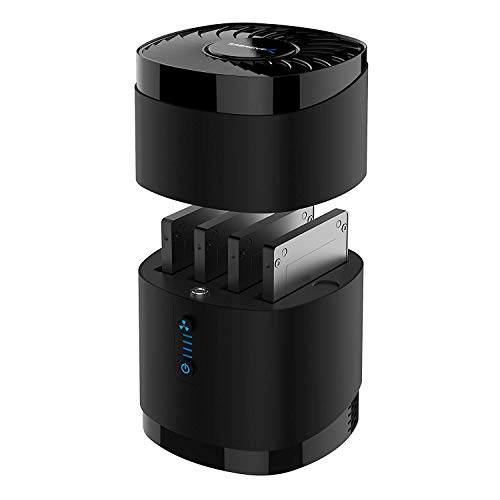
SABRENT 4-Bay 2.5-Inch SATA SSD Dock with Fan
Best for: multi-drive 2.5-inch SATA storage management
- Transfer Speed
- 5Gbps
- Supported Drive Types
- 2.5-inch SATA SSD/HDD
- Bay Count
- 4
- Maximum Capacity
- Up to 4x 16TB
- Cooling Type
- Built-in fan
- Interface
- SATA III
View on Amazon: SABRENT 4-Bay 2.5-Inch SATA SSD Dock with Fan
This SABRENT 4-bay docking station houses up to four 2.5-inch SATA hard drives or solid-state drives using a single USB 3.0 connection. It delivers transfer speeds up to 5Gbps and supports drive capacities up to 16TB per bay. A built-in cooling fan with a dedicated power switch maintains airflow during continuous operation. This dock suits you if you need compact, multi-drive desktop storage without opening your computer case.
Pros
- Holds up to four 2.5-inch SATA SSDs or HDDs up to 16TB each
- Built-in cooling fan with an independent power switch
- Tool-free magnetic cover for quick drive swapping
- Up to 5Gbps transfer speeds via USB 3.0
Cons
- Does not support hardware RAID
- Incompatible with 15mm thick 2.5-inch drives
- Does not accept 3.5-inch or M.2 NVMe drives
Good fit if
- You need to access up to four 2.5-inch SATA drives simultaneously.
- You want active fan cooling for drives running continuously.
- You prefer tool-free drive swapping with a magnetic cover.
Skip if
- You require built-in hardware RAID arrays.
- You use 15mm thick 2.5-inch drives or 3.5-inch drives.
- You need support for M.2 NVMe solid-state drives.
Verdict: SABRENT 4-Bay 2.5-Inch SATA Dock with Fan delivers high-density 2.5-inch SATA storage with active cooling and simple tool-free installation. It provides dependable multi-drive management over a standard 5Gbps USB connection.

ICY BOX Triple-Bay NVMe & SATA Cloner Dock
Best for: cloning and accessing mixed NVMe and SATA drives
- Transfer Speed
- 10Gbps
- Supported Drive Types
- M.2 NVMe, 2.5"/3.5" SATA
- Bay Count
- 3
- Offline Cloning
- One-touch offline cloning
- Interface
- SATA III
- Form Factor
- 2.5 Inch
The ICY BOX Triple-Bay Dock gives you three drive slots supporting M.2 NVMe PCIe SSDs alongside 2.5-inch and 3.5-inch SATA drives. Operating across a 10Gbps USB 3.2 Gen 2 interface, it supports one-touch offline cloning between NVMe and SATA drives without an attached host computer. It suits you if you handle mixed drive types and need standalone duplication alongside fast external multi-drive file transfers over USB-C.
Pros
- 10Gbps USB 3.2 Gen 2 transfer speeds
- Supports M.2 NVMe, 2.5-inch SATA, and 3.5-inch SATA drives
- One-touch offline cloning between SATA and NVMe
- Includes 2-in-1 USB-C and USB-A combo cable
Cons
- Offers three drive bays instead of four
- No integrated cooling fan listed
Good fit if
- You need to clone or transfer data between M.2 NVMe and SATA drives.
- You want standalone offline cloning without using software or a host PC.
- You require 10Gbps USB-C connectivity with both Type-C and Type-A host support.
Skip if
- You need four or more simultaneous drive bays.
- You exclusively use 2.5-inch SATA drives and do not need NVMe or 3.5-inch compatibility.
Verdict: ICY BOX Triple-Bay NVMe and SATA Dock delivers 10Gbps transfer speeds and versatile standalone cloning across M.2 NVMe, 2.5-inch SATA, and 3.5-inch SATA drives. It is a capable choice if you manage varied drive form factors and want offline cloning without a computer.
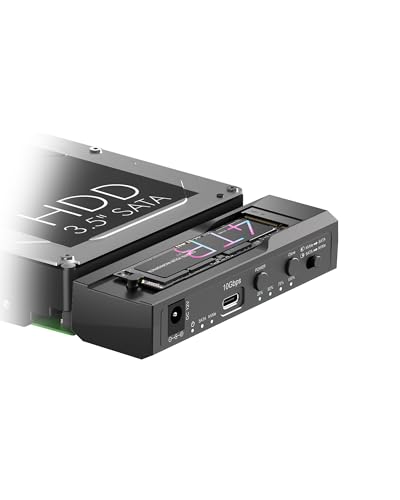
ICY BOX M.2 NVMe & SATA Cloner Dock
Best for: cross-format M.2 NVMe and SATA drive cloning
- Transfer Speed
- 10Gbps
- Supported Drive Types
- M.2 NVMe, 2.5"/3.5" SATA
- Bay Count
- 2
- Offline Cloning
- One-Key Offline Cloning
- Supported M.2 Sizes
- 2230–2280
- Interface
- SATA III
This ICY BOX docking station holds one M.2 NVMe SSD and one 2.5-inch or 3.5-inch SATA drive simultaneously. Operating over a 10Gbps USB 3.2 Gen 2 Type-C interface, it enables fast data transfers alongside one-button offline cloning between formats. An included 12V/3A power adapter drives high-capacity disks without extra host power. If you need a flexible two-bay setup to duplicate or access mixed-format storage without filling four dedicated 2.5-inch bays, this dock fits your desk.
Pros
- Supports simultaneous access to one M.2 NVMe SSD and one 2.5-inch or 3.5-inch SATA drive
- Up to 10Gbps transfer speed via USB 3.2 Gen 2 Type-C
- Standalone one-key offline cloning with 25% to 100% LED progress tracking
- Includes dedicated 12V/3A external power adapter
Cons
- Offers only two drive bays instead of four
- Limited to one M.2 slot and one SATA slot rather than uniform drive bays
Good fit if
- You need to clone data directly between an M.2 NVMe stick and a SATA drive without a PC.
- You want 10Gbps USB-C transfer speeds across mixed M.2 and 2.5-inch or 3.5-inch drive form factors.
Skip if
- You require four dedicated 2.5-inch drive bays connected at the same time.
- You need to dock multiple M.2 NVMe SSDs simultaneously.
Verdict: ICY BOX Dual-Bay M.2 NVMe and SATA Dock provides versatile cross-format cloning and simultaneous dual-drive access over a fast 10Gbps connection. It gives you flexible mixed-drive handling if you do not require a massive four-bay SATA enclosure.

SABRENT 2.5 and 3.5-Inch SATA USB 3.0 Dock
Best for: swapping single 2.5-inch and 3.5-inch SATA drives
- Supported Drive Types
- 2.5-inch & 3.5-inch SATA HDD/SSD
- Interface
- SATA III
- Form Factor
- M.2
- Host Interface
- USB-C
- Dimensions
- 7.09 × 4.8 × 1.6 inches
- Weight
- 7.5 ounces
This SABRENT docking station accommodates a single bare 2.5-inch or 3.5-inch SATA hard drive or solid-state drive in a horizontal lay-flat slot. It connects to your host system via a USB 3.0 Type-A interface with UASP support and includes a dedicated 12V/2A power adapter for 3.5-inch drives. It suits you if you need a simple tool-free dock for swapping individual SATA drives.
Pros
- Supports both 2.5-inch and 3.5-inch SATA I/II/III drives
- USB 3.0 interface with UASP support
- Tool-free, hot-swappable lay-flat bay design
- Includes a 12V/2A AC power adapter for 3.5-inch hard drives
Cons
- Does not support M.2 NVMe, M.2 SATA, IDE, or SAS drives
- Includes a USB Type-A cable rather than a native USB-C connection
- Does not pass S.M.A.R.T. diagnostic data through the USB bridge
Good fit if
- You need to access bare 2.5-inch or 3.5-inch SATA drives one at a time
- You have a computer with an available USB Type-A port
- You want a tool-free lay-flat bay with an included external power adapter
Skip if
- You need to connect M.2 NVMe or M.2 SATA solid-state drives
- You want a multi-bay docking station to run several drives simultaneously
- You require S.M.A.R.T. diagnostic monitoring across the USB connection
Verdict: SABRENT 2.5/3.5-Inch SATA USB 3.0 Dock provides a reliable single-bay solution for reading bare 2.5-inch and 3.5-inch SATA drives via USB 3.0. It gives you straightforward, tool-free access without extra drive bays or complex setup.

ICY DOCK M.2 and 2.5-Inch SATA Dock
Best for: swapping individual 2.5-inch and SATA M.2 drives
- Transfer Speed
- Up to 5Gbps
- Supported Drive Types
- 2.5-inch SATA HDD/SSD, SATA M.2 SSD
- Bay Count
- 1
- Interface
- SATA III
- Dimensions
- 6.25 × 3.75 × 1.12 inches
- Weight
- 3.56 ounces
This ICY DOCK unit is a single-bay docking station that connects one 2.5-inch SATA drive or one M.2 SATA SSD via a 5Gbps USB 3.2 Gen 1 interface. It gives you flexible support for SATA storage formats without opening your computer. It suits you if you need a compact single-drive reader that handles both 2.5-inch drives and SATA M.2 cards individually for quick data transfers.
Pros
- Supports both 2.5-inch SATA and SATA M.2 SSDs
- USB 3.2 Gen 1 interface supports up to 5Gbps transfer speeds
- Backward compatible with USB 2.0 ports
- Equipped with an on/off power switch and drive activity LED
Cons
- Cannot run 2.5-inch and M.2 drives simultaneously
- Limited to a single drive bay
- Does not support NVMe M.2 drives
Good fit if
- You work with both 2.5-inch SATA drives and SATA M.2 SSDs.
- You only need to dock one drive at a time.
- You prefer having a dedicated power switch on the dock.
Skip if
- You need to access multiple drives at the same time.
- You require support for faster NVMe M.2 solid-state drives.
Verdict: ICY DOCK 2.5-Inch and M.2 SATA Drive Dock gives you a straightforward single-bay solution for reading either a 2.5-inch SATA drive or a SATA M.2 card over a 5Gbps USB connection. It works well if you need occasional SATA drive swaps without requiring multi-bay capacity.

SABRENT 10-Bay USB-C SATA Docking Station
Best for: High-capacity multi-drive 3.5-inch SATA storage
- Transfer Speed
- 10Gbps
- Supported Drive Types
- 3.5in SATA HDD
- Bay Count
- 10
- Maximum Capacity
- 200TB
- Cooling Type
- Dual 120mm fans
- Interface
- SATA III
This SABRENT dock expands your setup with ten 3.5-inch SATA hard drive bays over a single 10Gbps USB-C connection. It functions as direct-attached storage without RAID, giving you up to 200TB across independent drives. Each tray-less slot features a dedicated power switch and dual 120mm cooling fans regulate airflow. It suits you if you manage massive multi-drive archives or media libraries and need individual drive management instead of pooled storage.
Pros
- Ten tray-less 3.5-inch SATA bays supporting up to 200TB
- USB 3.2 Gen 2 interface with up to 10Gbps transfer speeds
- Independent power button and status LED for each bay
- Dual 120mm cooling fans inside an aluminum enclosure
Cons
- Requires separate adapters to install 2.5-inch drives
- No hardware RAID support built into the enclosure
- Heavy 11-pound desktop footprint
Good fit if
- You need high-density capacity across up to ten 3.5-inch SATA drives.
- You want independent bay power control and tool-free hot-swapping.
- You connect via a 10Gbps USB-C or USB-A port.
Skip if
- You primarily use 2.5-inch SATA SSDs without buying extra adapters.
- You need hardware-managed RAID arrays out of the box.
Verdict: SABRENT 10-Bay 3.5-Inch SATA USB-C Dock delivers massive direct-attached capacity with per-drive power toggles and high-speed USB-C connectivity. It is a capable pick when you prioritize raw volume and single-drive access over onboard RAID.

MAIWO Dual-Bay 10Gbps NVMe Cloner Dock
Best for: standalone dual M.2 NVMe drive cloning
- Transfer Speed
- 10Gbps
- Supported Drive Types
- M.2 NVMe SSD
- Bay Count
- 2
- Offline Cloning
- One-key clone
- Supported M.2 Sizes
- 2230, 2242, 2260, 2280, 22110
- Maximum Capacity
- 16TB
The MAIWO Dual-Bay M.2 NVMe Cloner Dock is a two-slot external station built specifically for M.2 NVMe solid-state drives. It delivers up to 10Gbps transfer speeds across a USB 3.1 Gen 2 connection and accommodates drives up to 16TB. You get one-button offline cloning without needing a computer, plus hardware support for 2230 through 22110 form factors. It suits you if you prioritize fast NVMe data duplication over standard SATA bays.
Pros
- Supports standalone offline cloning with a dedicated one-key button
- Delivers up to 10Gbps bandwidth via USB 3.1 Gen 2
- Accepts five M.2 NVMe sizes from 2230 up to 22110
- Accommodates up to 16TB total storage capacity across two bays
Cons
- Does not support 2.5-inch, 3.5-inch, or SATA-based drives
- Provides two bays instead of four
Good fit if
- You need to duplicate high-speed M.2 NVMe SSDs without connecting to a computer.
- You work with extended 22110 M.2 modules alongside standard drive sizes.
Skip if
- You need compatibility with 2.5-inch or 3.5-inch SATA storage drives.
- You require four simultaneous drive bays.
Verdict: MAIWO Dual-Bay M.2 NVMe Cloner Dock provides fast 10Gbps transfers and computer-free duplication for NVMe cards up to 22110 in size. It replaces high-capacity SATA drive bays with focused, high-speed M.2 hardware.
Specifications side by side
| Spec | SABRENT 4-Bay 2.5-Inch SATA SSD Dock with Fan | ICY BOX Triple-Bay NVMe & SATA Cloner Dock | ICY BOX M.2 NVMe & SATA Cloner Dock | SABRENT 2.5 and 3.5-Inch SATA USB 3.0 Dock | ICY DOCK M.2 and 2.5-Inch SATA Dock | SABRENT 10-Bay USB-C SATA Docking Station | MAIWO Dual-Bay 10Gbps NVMe Cloner Dock |
|---|---|---|---|---|---|---|---|
| Transfer Speed | 5Gbps | 10Gbps | 10Gbps | not specified | Up to 5Gbps | 10Gbps | 10Gbps |
| Supported Drive Types | 2.5-inch SATA SSD/HDD | M.2 NVMe, 2.5"/3.5" SATA | M.2 NVMe, 2.5"/3.5" SATA | 2.5-inch & 3.5-inch SATA HDD/SSD | 2.5-inch SATA HDD/SSD, SATA M.2 SSD | 3.5in SATA HDD | M.2 NVMe SSD |
| Bay Count | 4 | 3 | 2 | not specified | 1 | 10 | 2 |
| Offline Cloning | not specified | One-touch offline cloning | One-Key Offline Cloning | not specified | not specified | not specified | One-key clone |
| Supported M.2 Sizes | not specified | not specified | 2230–2280 | not specified | not specified | not specified | 2230, 2242, 2260, 2280, 22110 |
| Maximum Capacity | Up to 4x 16TB | not specified | not specified | not specified | not specified | 200TB | 16TB |
| Cooling Type | Built-in fan | not specified | not specified | not specified | not specified | Dual 120mm fans | not specified |
| Interface | SATA III | SATA III | SATA III | SATA III | SATA III | SATA III | NVMe |
| Form Factor | 2.5 Inch | 2.5 Inch | 2.5 Inch | M.2 | M.2 | not specified | not specified |
| Cooling | Cooling Fan | not specified | not specified | not specified | not specified | not specified | not specified |
| Features | Tool-Free | Tool-Free, Offline Clone | Tool-Free, Offline Clone | not specified | not specified | not specified | Offline Clone |
| Material | not specified | not specified | not specified | not specified | not specified | Aluminum | not specified |
| Host Interface | not specified | USB-C | not specified | USB-C | not specified | USB-C | not specified |
| Dimensions | 6.3 × 4.4 × 4.4 inches | 5.47 × 3.03 × 2.32 inches | 4.27 × 1.74 × 0.55 inches | 7.09 × 4.8 × 1.6 inches | 6.25 × 3.75 × 1.12 inches | 5.7 × 10.5 × 13.4 inches | 6.42 × 4.92 × 1.61 inches |
| Weight | 1.01 pounds | 10.3 ounces | not specified | 7.5 ounces | 3.56 ounces | 11 pounds | 1.46 pounds |
| Size | 4-Bay SATA Dock – USB 3.0 5Gbps | not specified | not specified | 2.5/3.5 inch Docking Station | not specified | 10 Bay | not specified |
| Color | Black | Black | Black | Black | Black | Black | Black |
| Model | DS-4SSD | 3 Bay Cloner | not specified | EC-DFLT | MB031U-1SMB | DS-UCTB | Dual M.2 NVME Cloner Dock with Switch |
If you prefer portable storage over four bays, the best USB 3 2 USB flash drives provide alternative options.
Frequently asked questions
Can you use 3.5-inch hard drives in a dock instead of 2.5-inch SSDs?
Yes, several alternative docks support larger 3.5-inch SATA drives. The SABRENT EC-DFLT accommodates both 2.5-inch and 3.5-inch SATA disks in a single-bay desktop format. If you require massive multi-drive storage capacity, the SABRENT DS-UCTB provides ten dedicated bays specifically designed for 3.5-inch SATA drives with individual per-drive power toggles.
Which alternative supports high-speed M.2 NVMe cloning without a computer?
The MAIWO Dual-Bay dock and both ICY BOX models support standalone offline cloning for M.2 NVMe drives. MAIWO specializes strictly in dual M.2 NVMe hardware, accommodating cards up to size 22110 at 10Gbps transfer speeds. If you need mixed media duplication, the ICY BOX models clone between M.2 NVMe cards and SATA disks without host computer intervention.
Are there alternatives that accept both M.2 and standard SATA drives?
Yes, you can choose hybrid docks that accept both form factors. The ICY BOX Triple-Bay dock handles M.2 NVMe, 2.5-inch SATA, and 3.5-inch SATA drives simultaneously. For a more compact setup, the ICY DOCK MB031U-1SMB reads either a single 2.5-inch SATA disk or a SATA M.2 card over a 5Gbps USB connection.
What is the highest bay capacity option among these alternatives?
The SABRENT DS-UCTB offers the highest capacity with ten SATA drive bays. This docking station connects via USB-C at 10Gbps transfer speeds and focuses on 3.5-inch SATA storage. It provides individual power switches for each drive bay, making it suitable if your storage demands exceed the four-bay limit of standard 2.5-inch enclosures.
Which alternative is best if you only need to access one drive at a time?
The SABRENT EC-DFLT or ICY DOCK MB031U-1SMB are compact choices for single-drive swaps. The SABRENT EC-DFLT reads individual 2.5-inch or 3.5-inch SATA drives via USB 3.0. The ICY DOCK MB031U-1SMB weighs just 3.56 ounces and lets you mount either a 2.5-inch SATA drive or an M.2 SATA module when multi-bay enclosures take up too much desk space.
How do data transfer speeds differ between these docking stations?
Transfer speeds depend on the host interface specifications of each model. Standard docks like the SABRENT DS-4SSD and ICY DOCK MB031U-1SMB operate at 5Gbps over USB 3.0. In contrast, docks such as the ICY BOX models, MAIWO dual cloner, and SABRENT DS-UCTB deliver up to 10Gbps bandwidth, which benefits faster solid-state media like NVMe drives.
Do any of these multi-bay docks include active cooling fans?
Yes, the SABRENT DS-4SSD features a built-in cooling fan to regulate operating temperatures across its four drive slots. High-density enclosures generate heat when multiple drives run at the same time, making active cooling useful during prolonged data transfers. Many smaller or single-bay alternatives rely on open-air, tool-free designs instead of integrated fans.