6 Best Alternatives to the SABRENT Rocket 20Gbps RGB M.2 (2026)
As an Amazon Associate we earn from qualifying purchases. Links on this page are affiliate links.
You might be looking for sabrent rocket RGB USB c alternatives because the original enclosure does not fit every workflow. The SABRENT Rocket 20Gbps RGB M.2 SSD Enclosure supports both M.2 SATA and NVMe drives. It offers up to 20Gbps transfer speeds inside a durable aluminum housing with RGB lighting. This makes it a strong choice for users who need dual-protocol support and high bandwidth. However, you may want a different form factor or feature set. Some users prefer a simpler design without lights. Others need a dock with additional ports for peripherals. Some buyers prioritize rugged protection or offline cloning capabilities. These needs often require a different spec profile than what the original provides. We selected these options because their specifications overlap with the original product. Each alternative shares key traits like USB-C connectivity and M.2 drive support. This ensures you can find a suitable replacement based on your specific technical requirements. The list covers various use cases, from budget-friendly SATA-only options to dual-bay cloning solutions. You can compare these products by their published data to find the best match. This guide focuses on practical differences in size, speed, and cooling methods. You will find clear distinctions between single-bay and dual-bay designs. The goal is to help you choose based on facts, not marketing claims.
How alternatives differ from original
ASUS TUF Gaming A2 Rugged 20Gbps SSD Enclosure
The ASUS TUF Gaming A2 matches the 20Gbps speed and dual-protocol support of the original but adds significant physical durability. It features IP68 and MIL-STD-810H ratings, making it resistant to dust and water ingress, which the SABRENT model lacks. The aluminum housing is larger and heavier, weighing 9.84 ounces compared to 3.4 ounces. This extra mass helps with heat dissipation but reduces portability. If you need rugged protection for field work or gaming setups where drops are a risk, this enclosure provides better safeguarding. You sacrifice the compact size and RGB lighting of the SABRENT for industrial-grade resilience and a more substantial build quality.
ASUS ROG Strix Aiolos 20Gbps Tool-Free SSD Enclosure
The ASUS ROG Strix Aiolos also delivers 20Gbps speeds and supports both NVMe and SATA drives, similar to the original. Its primary advantage is a tool-free design, allowing for quick drive swaps without screwdrivers. It includes a silicone coating for grip and dashboard software for monitoring, features absent in the SABRENT enclosure. The weight is slightly higher at 4.8 ounces, and the dimensions are marginally larger. While it lacks the visible RGB lighting of the original, it offers a more professional, matte black finish. This option suits users who prioritize ease of maintenance and software integration over aesthetic lighting effects, providing a streamlined experience for frequent drive changes.
StarTech M.2 SATA USB-C Enclosure
The StarTech M.2 SATA USB-C Enclosure differs significantly by supporting only M.2 SATA drives, excluding NVMe compatibility. It offers 10Gbps speeds, which is half the bandwidth of the original 20Gbps model. The enclosure is larger, measuring 6.3 inches in length, and uses a robust aluminum housing for ventilation. It is designed specifically for SATA drives that require reliable cooling. If you only use M.2 SATA SSDs and do not need NVMe support or maximum speed, this is a focused alternative. You give up dual-protocol flexibility and high-speed transfers for a specialized, cost-effective solution dedicated to SATA performance and thermal management.
The Vantec M.2 NVMe RGB USB-C Enclosure supports only NVMe drives, unlike the original which handles both NVMe and SATA. It provides 10Gbps connectivity, half the speed of the SABRENT model. It includes RGB lighting with a hardware switch for control, similar to the original but limited to NVMe protocols. The aluminum housing is compact, weighing 3.25 ounces, comparable to the original. This enclosure is suitable if you exclusively use NVMe SSDs and want physical control over lighting effects. You sacrifice SATA compatibility and higher transfer speeds for a dedicated NVMe solution with tangible lighting controls, making it a niche choice for specific drive types.
The StarTech M.2 NVMe/SATA USB-C Enclosure supports both drive types like the original but offers 10Gbps speeds, which is slower. It features a compact aluminum design, weighing 1.76 ounces, significantly lighter than the SABRENT model. The enclosure prioritizes heat dissipation and broad host compatibility over maximum bandwidth. It lacks RGB lighting, providing a neutral space gray appearance. This option is ideal for users who need dual-protocol support but do not require 20Gbps speeds or aesthetic features. You trade speed and visual customization for a lightweight, reliable enclosure focused on thermal performance and versatility across different host devices.
The MAIWO M.2 NVMe/SATA USB-C Enclosure supports both NVMe and SATA drives with 10Gbps speeds, half the original's capacity. It features a tool-free design for easy drive installation, a convenience not present in the SABRENT model. The aluminum housing is compact, weighing 1.76 ounces, and is available in blue. It lacks RGB lighting, focusing on functionality over aesthetics. This enclosure suits users who mix NVMe and SATA drives and value quick access and portability. You give up higher transfer speeds and lighting effects for a streamlined, tool-free experience that prioritizes ease of use and compact form factor for mobile storage needs.
Quick picks
Our 7 picks

SABRENT Rocket 20Gbps RGB M.2 SSD Enclosure
Best for: dual-protocol NVMe and SATA high-speed transfers
- Max Transfer Speed
- 20Gbps
- Host Interface
- USB 3.2 Gen 2x2, USB-C
- Drive Interface
- M.2 NVMe, M.2 SATA
- Supported Form Factors
- M.2 2230, 2242, 2260, 2280
- Cooling System
- Aluminum, thermal padding
- Features
- RGB Lighting
View on Amazon: SABRENT Rocket 20Gbps RGB M.2 SSD Enclosure Affiliate link
This SABRENT external aluminum enclosure connects M.2 drives through a 20Gbps USB 3.2 Gen 2x2 Type-C interface. It accommodates both NVMe and SATA M.2 SSDs across four standard sizes: 2230, 2242, 2260, and 2280. Integrated thermal padding aids heat dissipation, while built-in RGB lighting signals device status. It suits you if you frequently swap between different M.2 drive formats and require high-speed external transfers on compatible hardware.
Pros
- Supports both M.2 NVMe and SATA protocols
- Up to 20Gbps bandwidth via USB 3.2 Gen 2x2
- Compatible with 2230, 2242, 2260, and 2280 form factors
- Solid aluminum body with integrated thermal padding
Cons
- Requires a USB 3.2 Gen 2x2 host port to reach 20Gbps speeds
- Does not support 22110 form factor drives
Good fit if
- You have a host device featuring a USB 3.2 Gen 2x2 port.
- You need to alternate between NVMe and SATA M.2 drives.
- You use drives ranging in length from 2230 to 2280.
Skip if
- You only have standard 5Gbps or 10Gbps USB ports on your host devices.
- You need an enclosure for longer 22110 M.2 SSDs.
Verdict: SABRENT Rocket 20Gbps RGB M.2 Enclosure delivers flexible dual-protocol drive support and 20Gbps theoretical bandwidth inside a durable aluminum housing. It is a capable pick if your setup includes native USB 3.2 Gen 2x2 connectivity.

StarTech M.2 SATA USB-C Enclosure
Best for: M.2 SATA drives needing robust cooling
- Max Transfer Speed
- 10Gbps
- Host Interface
- USB-C, USB 3.1 Gen 2
- Drive Interface
- M.2 SATA (SATA I/II/III)
- Supported Form Factors
- 30mm, 42mm, 60mm, 80mm
- Cooling System
- Aluminum with ventilation
- Dimensions
- 6.3 × 5.12 × 1.18 inches
View on Amazon: StarTech M.2 SATA USB-C Enclosure Affiliate link
This StarTech enclosure converts M.2 SATA SSDs into portable external drives. It supports USB 3.1 Gen 2 speeds up to 10Gbps and works with Thunderbolt 3 hosts. The aluminum shell provides ventilation for thermal management. It fits 30mm, 42mm, 60mm, and 80mm drives. You should use it if you need a reliable, OS-independent solution for SATA-only M.2 drives. It does not support NVMe drives.
Pros
- Supports USB 3.1 Gen 2 10Gbps transfer speeds
- Aluminum casing with ventilation for cooling
- Compatible with 30mm, 42mm, 60mm, and 80mm M.2 SATA SSDs
- Works with Thunderbolt 3 and USB-C ports
Cons
- Does not support M.2 NVMe drives
- Limited to SATA III interface speeds
- Larger footprint than single-drive enclosures
Good fit if
- You have M.2 SATA SSDs you want to use externally
- You need a durable aluminum enclosure with active ventilation
- You require compatibility with Thunderbolt 3 hosts
Skip if
- You own M.2 NVMe drives
- You need the highest possible transfer speeds
- You prefer a compact, minimalist design
Verdict: StarTech M.2 SATA USB-C Enclosure is a specialized tool for users with M.2 SATA drives who need a robust, ventilated aluminum housing. It is not suitable for NVMe users or those seeking maximum speed.

ORICO OM28PR 8-in-1 USB-C Dock with SSD Enclosure
Best for: Users needing SSD storage with 10Gbps hub expansion
- Max Transfer Speed
- 10Gbps
- Host Interface
- USB 3.2 Gen2 USB-C
- Drive Interface
- M.2 NVMe/SATA
- Cooling System
- Heatsink and silicone cooling pad
- Maximum Capacity
- 8TB
- Dimensions
- 5.09 × 2.14 × 0.82 inches
View on Amazon: ORICO OM28PR 8-in-1 USB-C Dock with SSD Enclosure Affiliate link
This ORICO docking station combines an M.2 NVMe or SATA SSD enclosure with a multi-port hub. It supports 10Gbps data transfer and includes a Gigabit Ethernet port. The unit outputs 4K video at 60Hz via HDMI. It also features PD100W charging for your host device. This 8-in-1 solution is designed for users who need to expand storage while connecting multiple peripherals through a single USB-C connection.
Pros
- Supports M.2 NVMe and SATA SSDs up to 8TB
- 10Gbps transfer speeds on both USB-A and USB-C ports
- Outputs 4K video at 60Hz via HDMI
- Includes Gigabit Ethernet RJ45 port
- Provides PD100W fast charging for laptops
Cons
- Limited to 10Gbps speeds, which is lower than the 20Gbps option on this list
- Heavier at 4.23 ounces compared to simple enclosures
- Bulkier dimensions of 5.09 by 2.14 inches
Good fit if
- You need to connect an external M.2 SSD to your laptop
- You require a Gigabit Ethernet port for stable wired networking
- You want to output 4K video to an external display
Skip if
- You need transfer speeds exceeding 10Gbps
- You only want a simple SSD enclosure without extra ports
- You require 20Gbps bandwidth for high-speed data moves
Verdict: ORICO OM28PR 8-in-1 USB-C Dock with SSD Enclosure is a practical hub for users who need to add storage and network connectivity simultaneously. It suits those who prioritize a single cable solution for video, data, and charging.

ASUS TUF Gaming A2 Rugged 20Gbps SSD Enclosure
Best for: rugged 20 Gbps dual-protocol drive protection
- Max Transfer Speed
- 20 Gbps
- Host Interface
- USB-C 3.2 Gen 2x2
- Drive Interface
- M.2 NVMe PCIe and SATA
- Supported Form Factors
- 2242, 2260, 2280
- Cooling System
- Aluminum chassis, thermal pad
- Installation Style
- Screw-free
View on Amazon: ASUS TUF Gaming A2 Rugged 20Gbps SSD Enclosure Affiliate link
The ASUS TUF Gaming A2 20Gbps SSD Enclosure is a rugged portable drive carrier designed for mobile setups. You get a USB-C 3.2 Gen 2x2 host connection that delivers transfer rates up to 20 Gbps. It supports 2242, 2260, and 2280 M.2 NVMe PCIe and SATA drives using a screw-free Q-Latch mount. With IP68 water resistance, MIL-STD-810H drop resistance, and an aluminum body, it suits gamers needing protected storage on the go.
Pros
- Delivers speeds up to 20 Gbps via USB-C 3.2 Gen 2x2
- Meets MIL-STD-810H drop resistance and IP68 standards
- Supports both M.2 NVMe PCIe and SATA drives
- Screw-free Q-Latch system simplifies SSD installation
Cons
- Lacks support for 2230 and 22110 M.2 form factors
- Weighs 9.84 ounces, which is heavier than typical basic enclosures
Good fit if
- You need 20 Gbps throughput paired with MIL-STD-810H and IP68 protection.
- You want tool-free drive swaps across 2242, 2260, or 2280 form factors.
Skip if
- You need to house smaller 2230 or longer 22110 M.2 SSDs.
- You prefer an ultra-lightweight enclosure under 9.84 ounces.
Verdict: ASUS TUF Gaming A2 20Gbps SSD Enclosure delivers fast 20 Gbps USB 3.2 Gen 2x2 speeds inside a reinforced IP68 and MIL-STD-810H rated shell. It provides reliable, drop-resistant dual-interface storage if you need physical protection for your drive.

SUITOK STK03 Pro 20Gbps Dual Bay M.2 Cloner
Best for: offline cloning of dual M.2 drives
- Max Transfer Speed
- 20Gbps
- Host Interface
- USB 3.2 Gen 2x2
- Drive Interface
- NVMe/PCIe, SATA/NGFF
- Supported Form Factors
- 2230, 2242, 2260, 2280, 22110
- Drive Bay Count
- 2 bays
- Cooling System
- Aluminum shell, side vents
View on Amazon: SUITOK STK03 Pro 20Gbps Dual Bay M.2 Cloner Affiliate link
This SUITOK enclosure supports both NVMe and SATA M.2 drives in a dual-bay design. It offers 20Gbps transfer speeds via USB-C and features offline cloning without a PC. The aluminum shell includes quadruple cooling for thermal management. It fits 2230 to 22110 form factors. This tool-free dock suits laptop users needing fast, independent drive duplication.
Pros
- 20Gbps transfer speed via USB 3.2 Gen 2x2
- Supports NVMe and SATA protocols in dual-bay
- Offline cloning without PC or software
- Aluminum shell with quadruple cooling architecture
- Tool-free hot-swappable design for multiple form factors
Cons
- Heavier at 3.86 ounces compared to single-bay alternatives
- Cross-protocol cloning from SATA to NVMe is not supported
- Requires dedicated Type-C power cord for stability
Good fit if
- You need to clone drives without a computer
- You use both NVMe and SATA M.2 SSDs
- You want fast 20Gbps transfer speeds for media
Skip if
- You only need a single drive enclosure
- You prefer a lighter, more portable single-bay dock
- You require cross-protocol cloning between SATA and NVMe
Verdict: SUITOK STK03 Pro 20Gbps Dual Bay M.2 Cloner fits laptop users who need to duplicate drives quickly and independently. Its dual-bay design and offline cloning make it ideal for managing multiple SSDs without a host PC.
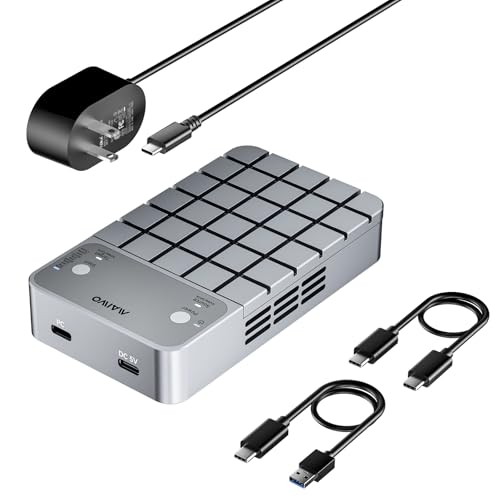
MAIWO 20Gbps Dual Bay NVMe SATA Enclosure
Best for: Dual SSD RAID and cloning workflows
- Max Transfer Speed
- 20Gbps
- Host Interface
- USB-C 3.2 Gen 2x2
- Drive Interface
- NVMe M-Key, SATA B+M Key
- Supported Form Factors
- 2230, 2242, 2260, 2280
- Drive Bay Count
- Dual Bay
- Cooling System
- Cooling fan, aluminum alloy shell
View on Amazon: MAIWO 20Gbps Dual Bay NVMe SATA Enclosure Affiliate link
This MAIWO enclosure holds two M.2 SSDs and connects via USB-C 3.2 Gen 2x2 for 20Gbps speeds. It supports RAID 0, RAID 1, and independent modes. A built-in cooling fan and aluminum shell manage heat. You can clone drives offline or online. It fits 2230 to 2280 drives. This dual-bay unit suits users needing high speed and data redundancy.
Pros
- 20Gbps transfer speed via USB-C 3.2 Gen 2x2
- Built-in cooling fan for heat management
- Supports RAID 0, RAID 1, and PM modes
- Offline and online cloning capabilities
- Tool-free magnetic cover for easy installation
Cons
- Requires a separate 5V 3A power adapter
- Limited to cloning only when both drives share the same protocol
- Larger footprint at 4.7 inches in length
Good fit if
- You need dual SSD support for RAID configurations
- You require 20Gbps data transfer speeds
- You want active cooling for sustained performance
Skip if
- You only need a single M.2 drive bay
- You prefer a compact, bus-powered design
- You need to clone mixed NVMe and SATA drives simultaneously
Verdict: MAIWO 20Gbps Dual Bay NVMe SATA Enclosure delivers high-speed dual-drive performance with active cooling. It is a solid choice for users who need RAID redundancy or cloning capabilities in a single external unit.

ASUS ROG Strix Aiolos 20Gbps Tool-Free SSD Enclosure
Best for: premium dual-protocol 20Gbps drive swapping
- Max Transfer Speed
- 20Gbps
- Host Interface
- USB-C 3.2 Gen 2x2
- Drive Interface
- PCIe NVMe, SATA
- Supported Form Factors
- 2242, 2260, 2280
- Cooling System
- Internal thermal pad
- Installation Style
- Tool-free
View on Amazon: ASUS ROG Strix Aiolos 20Gbps Tool-Free SSD Enclosure Affiliate link
The ASUS ROG Strix Aiolos is an external drive enclosure featuring a USB-C 3.2 Gen 2x2 connection for up to 20Gbps transfer speeds. It accepts both M.2 NVMe PCIe and SATA drives in 2242, 2260, and 2280 sizes using a tool-free push-to-open design. With an internal thermal pad, liquid-silicone-rubber coating, and ROG SSD Dashboard monitoring support, it suits you if you swap high-speed SSDs frequently on the go.
Pros
- USB-C 3.2 Gen 2x2 host interface delivers up to 20Gbps bandwidth
- Dual compatibility covers both M.2 NVMe PCIe and SATA drives
- Tool-free push-to-open mechanism simplifies drive installation
- Liquid-silicone-rubber coating resists heat and dust
Cons
- Lacks integrated RGB lighting
- Does not support 2230 or 22110 form factor M.2 drives
Good fit if
- You want 20Gbps transfer speeds across both NVMe and SATA M.2 drives.
- You need tool-free installation alongside desktop dashboard monitoring.
- You carry external drives frequently and require silicone exterior protection.
Skip if
- You require customizable RGB lighting on your external enclosure.
- You use 2230 or 22110 drive lengths.
Verdict: ASUS ROG Strix Aiolos 20Gbps M.2 Enclosure provides 20Gbps transfers, dual NVMe and SATA support, and a tool-free build for quick drive maintenance. Its silicone coating and dashboard software make it a dependable premium option for mobile storage.
Specifications side by side
| Spec | SABRENT Rocket 20Gbps RGB M.2 SSD Enclosure | StarTech M.2 SATA USB-C Enclosure | ORICO OM28PR 8-in-1 USB-C Dock with SSD Enclosure | ASUS TUF Gaming A2 Rugged 20Gbps SSD Enclosure | SUITOK STK03 Pro 20Gbps Dual Bay M.2 Cloner | MAIWO 20Gbps Dual Bay NVMe SATA Enclosure | ASUS ROG Strix Aiolos 20Gbps Tool-Free SSD Enclosure |
|---|---|---|---|---|---|---|---|
| Max Transfer Speed | 20Gbps | 10Gbps | 10Gbps | 20 Gbps | 20Gbps | 20Gbps | 20Gbps |
| Host Interface | USB 3.2 Gen 2x2, USB-C | USB-C, USB 3.1 Gen 2 | USB 3.2 Gen2 USB-C | USB-C 3.2 Gen 2x2 | USB 3.2 Gen 2x2 | USB-C 3.2 Gen 2x2 | USB-C 3.2 Gen 2x2 |
| Drive Interface | M.2 NVMe, M.2 SATA | M.2 SATA (SATA I/II/III) | M.2 NVMe/SATA | M.2 NVMe PCIe and SATA | NVMe/PCIe, SATA/NGFF | NVMe M-Key, SATA B+M Key | PCIe NVMe, SATA |
| Supported Form Factors | M.2 2230, 2242, 2260, 2280 | 30mm, 42mm, 60mm, 80mm | not stated | 2242, 2260, 2280 | 2230, 2242, 2260, 2280, 22110 | 2230, 2242, 2260, 2280 | 2242, 2260, 2280 |
| Drive Bay Count | not stated | not stated | not stated | not stated | 2 bays | Dual Bay | not stated |
| Cooling System | Aluminum, thermal padding | Aluminum with ventilation | Heatsink and silicone cooling pad | Aluminum chassis, thermal pad | Aluminum shell, side vents | Cooling fan, aluminum alloy shell | Internal thermal pad |
| Maximum Capacity | not stated | not stated | 8TB | not stated | 16TB | 16TB | not stated |
| Installation Style | not stated | not stated | not stated | Screw-free | Tool-free | Tool-Free | Tool-free |
| Interface | SATA III | SATA III | SATA III | SATA III | SATA III | SATA III | SATA III |
| Form Factor | M.2 | M.2 | M.2 | M.2 | M.2 | M.2 | M.2 |
| Cooling | not stated | not stated | not stated | not stated | not stated | Cooling Fan | not stated |
| Compatibility | not stated | not stated | not stated | Gaming | Laptop, PS5 | not stated | not stated |
| Transfer Speed | 20Gbps | 10Gbps | 10Gbps | 20Gbps | 20Gbps | 20Gbps | 20Gbps |
| Features | RGB Lighting | not stated | not stated | not stated | Tool-Free, Offline Clone | Offline Clone | Tool-Free |
| Bay Count | not stated | not stated | not stated | Dual-Bay | Dual-Bay | Dual-Bay | Dual-Bay |
| Material | not stated | Aluminum | not stated | Aluminum | not stated | Aluminum | not stated |
| Dimensions | 4.3 × 1.8 × 0.58 inches | 6.3 × 5.12 × 1.18 inches | 5.09 × 2.14 × 0.82 inches | 4.6 × 2.2 × 0.6 inches | 3.95 × 2.71 × 0.56 inches | 4.7 × 2.7 × 0.9 inches | 4.54 × 1.81 × 0.59 inches |
| Weight | 3.4 ounces | 2.15 ounces | 4.23 ounces | 9.84 ounces | 3.86 ounces | not stated | 4.8 ounces |
| Model | EC-RGBC | SM21BMU31C3 | OM28PR | TUF GAMING A2/BLK/G/AS | STK03 Pro 20Gbps Dual Bay M.2 Cloner | 20Gbps RAID&Clone | ROG STRIX AIOLOS/BLK/G/AS |
| Size | not stated | 10Gbps SATA | 8-in-1 | TUF A2|up to 20Gbps | 3.95 x 2.71 x 0.56 inches | not stated | Black|up to 20Gbps |
| Color | not stated | Black | Black | A2|up to 20Gbps | Space Grey | silver | BLACK |
If you need extra ports for your drive setup, comparing acer USB c hub alternatives details shared bandwidth specifications.
Frequently asked questions
Can I use an M.2 SATA drive in these enclosures?
Yes, most alternatives support M.2 SATA drives. The StarTech M.2 SATA USB-C Enclosure is designed specifically for SATA III interfaces. The ORICO OM28PR and MAIWO dual bay models also accept SATA drives. This allows you to use older or budget-friendly SATA SSDs alongside faster NVMe options.
Which enclosure is best for laptop users who need cloning?
The SUITOK STK03 Pro is ideal for laptop users. It features a dual-bay design with offline cloning capabilities. This lets you duplicate drives without connecting to a host PC. It supports both SATA and NVMe drives, making it versatile for managing multiple SSDs on the go.
Do any alternatives include active cooling fans?
The MAIWO 20Gbps Dual Bay NVMe SATA Enclosure includes an active cooling fan. This helps manage heat during sustained transfers or RAID operations. Most other options rely on passive aluminum heat dissipation. Active cooling is useful if you plan to run drives in RAID configurations.
Are there enclosures with tool-free installation?
Yes, the ASUS ROG Strix Aiolos offers a tool-free design. It allows for quick drive swapping and maintenance without needing screwdrivers. The SUITOK STK03 Pro also features tool-free installation. This convenience is helpful if you frequently change drives or need to access the internal SSD quickly.
Which option is best for rugged outdoor use?
The ASUS TUF Gaming A2 is built for rugged environments. It carries IP68 and MIL-STD-810H ratings for dust and water resistance. It also offers drop resistance for physical protection. This makes it suitable for users who need reliable storage in harsh conditions compared to standard aluminum enclosures.
Can I connect multiple devices with one cable?
The ORICO OM28PR 8-in-1 USB-C Dock adds hub expansion. It allows you to connect multiple peripherals alongside your SSD. This single-cable solution supports video, data, and charging simultaneously. It is best for users who want to simplify their desk setup while adding external storage.
What is the maximum transfer speed for these alternatives?
Many alternatives support up to 20Gbps transfer speeds. The SABRENT Rocket, ASUS TUF Gaming A2, SUITOK STK03 Pro, and MAIWO models all offer this high bandwidth. The StarTech and ORICO models are limited to 10Gbps. Choose 20Gbps models if your host port supports USB 3.2 Gen 2x2.
Do any enclosures support RAID configurations?
The MAIWO 20Gbps Dual Bay NVMe SATA Enclosure supports RAID workflows. It allows you to configure two drives for redundancy or speed. This is useful for users needing data protection or increased throughput. Other dual-bay models focus on cloning rather than RAID functionality.