TEAMGROUP vs SK Hynix Nvme SSDs: Which Brand Fits You?
As an Amazon Associate we earn from qualifying purchases. Links on this page are affiliate links.
In this TEAMGROUP vs SK Hynix nvme SSD comparison, you will see two distinct approaches to storage. Both drives use SATA III interfaces, but they differ significantly in form factor and capacity. You are choosing between a compact M.2 stick and a traditional 2.5-inch drive. The TEAMGROUP MS30 offers smaller dimensions, while the SK Hynix Gold S31 provides more storage space and a longer warranty. Your decision depends on your device's physical slots and your need for data protection.
Key differences
| Aspect | TEAMGROUP MS30 256GB M.2 SATA SSD | SK Hynix Gold S31 500GB SATA SSD |
|---|---|---|
| Form Factor | M.2 2280 | 2.5 inch |
| Storage Capacity | 256GB | 500GB |
| Max Read Speed | 500 MB/s | 560 MB/s |
| Max Write Speed | 400 MB/s | 525 MB/s |
| Cache Type | SLC Cache | HYPERWRITE, DRAM |
| Warranty | 3-year | 5-year |
Which one should you choose?
Choose TEAMGROUP MS30 256GB M.2 SATA SSD if
- You need an M.2 2280 drive for a slim laptop or modern desktop motherboard.
- You are upgrading a system that already uses SATA III and prefer a compact form factor.
Choose SK Hynix Gold S31 500GB SATA SSD if
- You require more storage space and higher sequential read and write speeds.
- You want a drive with DRAM cache and a longer five-year warranty for better reliability.
Verdict: Choose the TEAMGROUP MS30 if your device requires an M.2 2280 form factor and you prioritize a compact design. The SK Hynix Gold S31 is the better choice if you need more capacity, faster speeds, and a longer warranty period.
TEAMGROUP vs SK Hynix SSD Specs
transfer speed
SK Hynix Gold S31 offers higher sequential speeds than TEAMGROUP MS30. The SK Hynix drive reaches up to 560 MB/s read and 525 MB/s write. TEAMGROUP MS30 caps at 500 MB/s read and 400 MB/s write. Both use SATA III 6Gb/s interfaces. The difference is noticeable in large file transfers. You will see faster load times with the SK Hynix model. This matters if you move big files often. TEAMGROUP is sufficient for basic tasks. SK Hynix wins for raw throughput.
storage capacity
You are comparing different base capacities. TEAMGROUP MS30 starts at 256GB. SK Hynix Gold S31 starts at 500GB. The SK Hynix option gives you more than double the space. This is a significant advantage for storing operating systems and applications. TEAMGROUP lists 2TB as a variation, but the base model is smaller. SK Hynix provides more value in the entry tier. You get more room for your data with SK Hynix.
cache type
Cache technology affects sustained performance. SK Hynix Gold S31 uses HYPERWRITE cache and includes DRAM. This helps manage data efficiently during heavy writes. TEAMGROUP MS30 uses SLC Cache without dedicated DRAM. DRAM cache typically provides better stability under load. It allows the drive to map data faster. SK Hynix has a more robust caching solution. This makes it better for multitasking. TEAMGROUP relies on simpler caching methods.
form factor
The physical shape determines installation options. TEAMGROUP MS30 is an M.2 2280 drive. It is small and fits into modern laptops and motherboards. SK Hynix Gold S31 is a 2.5-inch drive. It is larger and requires a specific bay. M.2 is more compact for thin devices. 2.5-inch is standard for older desktops. Your choice depends on your hardware. TEAMGROUP wins for space efficiency. SK Hynix wins for legacy compatibility.
nand type
NAND technology impacts durability and speed. TEAMGROUP MS30 uses 3D NAND TLC. This is a common, cost-effective storage medium. SK Hynix Gold S31 uses in-house 3D NAND. The specific type is not detailed in the provided data. Both use 3D NAND architecture. This generally offers better endurance than planar NAND. The difference lies in the controller and firmware. SK Hynix is a major memory manufacturer. TEAMGROUP focuses on value. Both are reliable for general use.
Which SSD fits your specific needs
Users needing M.2 slot compatibility
The TEAMGROUP MS30 uses an M.2 2280 form factor. This compact size fits directly into motherboard slots, saving space inside your chassis. It weighs only 0.35 ounces. This makes it ideal for laptops or small form factor desktops where a bulky 2.5-inch drive will not physically fit. You get SATA III speeds in a much smaller package.
Buyers wanting higher sequential speeds
The SK Hynix Gold S31 delivers faster data transfer rates. It reaches up to 560 MB/s read and 525 MB/s write speeds. These figures exceed the TEAMGROUP MS30 limits of 500 MB/s and 400 MB/s. If your workflow involves moving large files frequently, these higher numbers mean less waiting time during copy and paste operations.
Shoppers seeking greater storage capacity
The SK Hynix drive offers 500GB of storage. This is double the 256GB capacity found in the TEAMGROUP MS30. More space allows you to store more games, documents, and media files without managing storage usage as strictly. The 2.5-inch form factor also provides ample room for internal components, including dedicated DRAM cache for better performance stability.
The products compared

TEAMGROUP MS30 256GB M.2 SATA SSD
Best for: Budget M.2 SATA upgrades
- Storage Capacity
- 256GB
- Interface
- SATA III 6Gb/s
- Max Read Speed
- 500 MB/s
- Max Write Speed
- 400 MB/s
- Cache Type
- SLC Cache
- Form Factor
- M.2 2280
View on Amazon: TEAMGROUP MS30 256GB M.2 SATA SSD Affiliate link
This TEAMGROUP MS30 is a 256GB M.2 2280 SATA III drive. It uses 3D NAND TLC with an SLC cache. Read speeds reach 500 MB/s and write speeds hit 400 MB/s. It supports Intel Smart Response Technology. The drive is slim and light. It fits laptops and desktops. You get a 3-year limited warranty. This model offers solid performance for everyday tasks.
Pros
- SATA III 6Gb/s interface
- 500 MB/s max read speed
- 400 MB/s max write speed
- SLC Cache technology
- 3-year limited warranty
Cons
- Only 256GB capacity
- SATA III limits speed vs NVMe
- No included mounting hardware
Good fit if
- You need a budget M.2 SATA upgrade
- You want faster speeds than an HDD
- You use Intel Smart Response Technology
Skip if
- You require NVMe PCIe speeds
- You need more than 256GB storage
- You want a 2.5 inch form factor
Verdict: TEAMGROUP MS30 256GB SATA SSD provides reliable SATA III performance for basic storage needs. It suits users upgrading older systems who prioritize cost over raw speed.
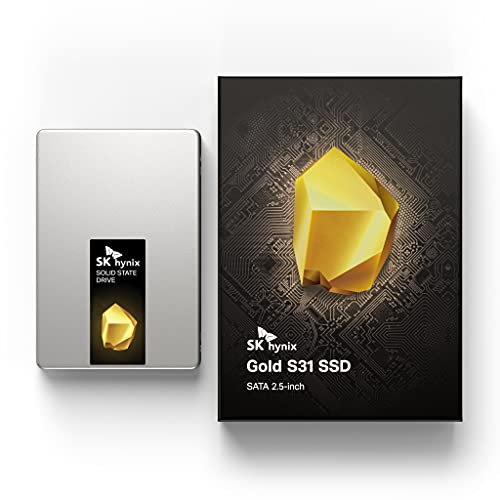
SK Hynix Gold S31 500GB SATA SSD
Best for: Desktop upgrades requiring SATA reliability
- Storage Capacity
- 500GB
- Interface
- SATA Gen3
- Form Factor
- 2.5 inch
- Max Read Speed
- Up to 560MB/s
- Max Write Speed
- Up to 525MB/s
- Cache Type
- HYPERWRITE, DRAM
View on Amazon: SK Hynix Gold S31 500GB SATA SSD Affiliate link
The SK Hynix Gold S31 is a 500GB SATA SSD in a standard 2.5-inch form factor. It offers sequential read speeds up to 560MB/s and write speeds up to 525MB/s. The drive uses in-house 3D NAND and includes DRAM cache with HYPERWRITE technology. It is designed for reliable storage with a 5-year warranty and 600 TBW endurance rating.
Pros
- Sequential read speeds up to 560MB/s
- Includes DRAM cache and HYPERWRITE technology
- 600 TBW endurance rating
- 5-year warranty coverage
- Uses in-house 3D NAND components
Cons
- Limited to 500GB capacity
- Uses older SATA Gen3 interface
- Larger 2.5-inch form factor
Good fit if
- You need reliable SATA storage for a desktop or laptop
- You value high endurance with 600 TBW
- You want a drive with DRAM cache for better performance
Skip if
- You require M.2 2280 NVMe speeds
- You need more than 500GB of storage
- You are building a compact mini-PC with M.2 slots only
Verdict: SK Hynix Gold S31 500GB SATA SSD fits users who prioritize endurance and DRAM caching in a traditional 2.5-inch SATA drive. It is a solid choice for desktop upgrades or laptop replacements where M.2 slots are unavailable.
Specifications side by side
| Spec | TEAMGROUP MS30 256GB M.2 SATA SSD | SK Hynix Gold S31 500GB SATA SSD |
|---|---|---|
| Storage Capacity | 256GB | 500GB |
| Interface | SATA III 6Gb/s | SATA Gen3 |
| Form Factor | not stated | 2.5 inch |
| Max Read Speed | 500 MB/s | Up to 560MB/s |
| Max Write Speed | 400 MB/s | Up to 525MB/s |
| Cache Type | SLC Cache | HYPERWRITE, DRAM |
| Compatibility | Laptop, Desktop | not stated |
| NAND Type | 3D NAND, TLC | not stated |
| Size | 256GB | 500GB |
| Dimensions | 0.87 × 3.15 × 0.14 inches | 3.94 × 2.75 × 0.28 inches |
| Weight | 0.35 ounces | 1.85 ounces |
| Model | TM8PS7256G0C101 | SHGS31-500GS-2 |
| Color | not stated | Gold |
Frequently asked questions
Is the TEAMGROUP MS30 a true NVMe drive?
No, the TEAMGROUP MS30 uses a SATA III interface, not NVMe. It connects via the M.2 2280 form factor but operates on the older SATA protocol. This limits its speed compared to modern NVMe standards. You should choose this only if your system requires SATA compatibility in an M.2 slot.
Does the SK Hynix Gold S31 use DRAM cache?
Yes, the SK Hynix Gold S31 includes DRAM caching for improved performance. This dedicated memory helps manage data more efficiently than drives that rely solely on SLC caching. This feature supports better endurance and consistent speeds, making it suitable for desktop upgrades where reliability is a priority.
Can I install the TEAMGROUP MS30 in a desktop PC?
Yes, the TEAMGROUP MS30 is compatible with desktops. It uses the M.2 2280 form factor, which fits standard M.2 slots on most modern motherboards. This allows you to upgrade storage without using a SATA cable or occupying a drive bay. It is also designed for laptops with available M.2 ports.
What NAND type does the SK Hynix Gold S31 use?
The provided data does not specify the NAND type for the SK Hynix Gold S31. It lists the interface as SATA III and the size as 500GB. For the TEAMGROUP MS30, the data confirms it uses 3D TLC NAND. You should check the manufacturer specifications for the specific NAND technology used in the SK Hynix model.
Which drive is better for a laptop upgrade?
The TEAMGROUP MS30 is better for laptops due to its M.2 2280 form factor. It weighs only 0.35 ounces and fits directly into motherboard slots. The SK Hynix Gold S31 uses a 2.5-inch form factor, which requires a SATA connection and more internal space. Choose the M.2 drive for compact systems.
Does the SK Hynix Gold S31 fit in M.2 slots?
No, the SK Hynix Gold S31 uses a 2.5-inch form factor. It requires a SATA III connection and a mounting bracket or bay. It will not fit into an M.2 slot. You need a system with available 2.5-inch drive bays or a SATA port to install this specific drive.