TEAMGROUP or Netac? Nvme SSDs Compared in 2026
As an Amazon Associate we earn from qualifying purchases. Links on this page are affiliate links.
This TEAMGROUP vs netac nvme SSD comparison looks at two distinct storage solutions. You might assume they are direct competitors, but they serve very different roles. The TEAMGROUP MS30 is an internal M.2 SATA drive designed for installation inside a laptop or desktop computer. In contrast, the Netac Z Slim is an external portable SSD that connects via USB. Both offer reliable performance for their respective categories, but their form factors and interfaces make them suitable for different use cases.
Key differences
| Aspect | TEAMGROUP MS30 256GB M.2 SATA SSD | Netac Z Slim 250GB Portable SSD |
|---|---|---|
| Interface | SATA III 6Gb/s | USB 3.2 Gen 2 |
| Form Factor | M.2 2280 Internal | Portable External |
| Max Read Speed | 500 MB/s | 550 MB/s |
| Max Write Speed | 400 MB/s | 450 MB/s |
| NAND Type | 3D NAND TLC | not listed |
Which one should you choose?
Choose TEAMGROUP MS30 256GB M.2 SATA SSD if
- You need to install a drive inside a laptop or desktop computer to replace or expand internal storage.
- You require a drive that supports Intel Smart Response Technology for system caching.
- You prefer a drive with explicitly listed 3D NAND TLC technology for consistent internal performance.
Choose Netac Z Slim 250GB Portable SSD if
- You need a portable drive that fits in your pocket for transferring files between different devices.
- You want a drive that works with USB-C connections on laptops, phones, or tablets.
- You value a lightweight aluminum alloy enclosure that protects the drive during travel.
Verdict: Choose the TEAMGROUP MS30 if you are building or upgrading an internal storage system in a PC or laptop. Select the Netac Z Slim if you need a portable, external drive for transferring large files on the go. The internal drive offers direct motherboard integration, while the external unit provides flexibility across multiple devices.
TEAMGROUP vs Netac: Key Differences
interface type
You must choose the right connection for your setup. The TEAMGROUP MS30 uses a SATA III 6Gb/s interface, connecting directly to your motherboard via an M.2 slot. This is ideal for internal upgrades in laptops and desktops. Netac offers a USB 3.2 Gen 2 interface on its Z Slim drive. This external connection allows you to plug the drive into any computer with a USB-C or USB-A port. If you need internal storage, the TEAMGROUP interface is the only option. For portable use, the Netac connection provides flexibility across different devices.
form factor
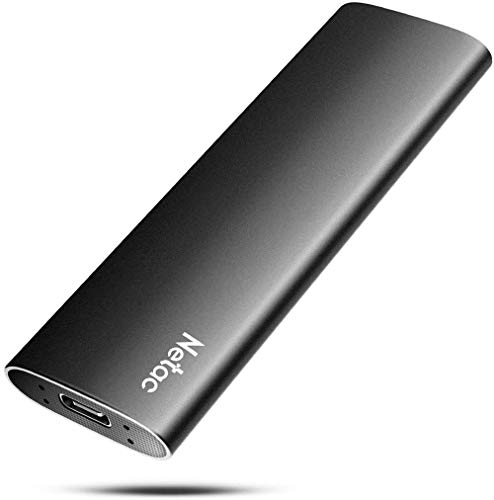
Physical size determines where you can install the drive. The TEAMGROUP MS30 is an M.2 2280 drive, measuring 3.15 by 0.87 inches. It fits into internal slots on modern motherboards and laptops. It weighs just 0.35 ounces. The Netac Z Slim is a portable external drive. It measures 3.9 by 1.1 inches and weighs 1.06 ounces. It includes an aluminum alloy enclosure for durability. You cannot install the Netac drive internally. The TEAMGROUP form factor is better for building or upgrading a PC. The Netac form factor is better for carrying files in a bag.
transfer speed
Speed affects how fast you move data. The TEAMGROUP MS30 reads at up to 500 MB/s and writes at 400 MB/s. These are standard speeds for SATA III drives. The Netac Z Slim reads at up to 550 MB/s and writes at 450 MB/s. The Netac drive offers slightly higher peak speeds for both reading and writing. However, these speeds depend on your USB port and host device. The TEAMGROUP speed is consistent for internal SATA connections. The Netac speed is higher on paper but requires a compatible USB 3.2 Gen 2 port to achieve those numbers.
nand type
The type of flash memory impacts longevity and performance. The TEAMGROUP MS30 uses 3D NAND TLC technology with an SLC cache. This combination helps maintain speed during large file transfers and extends the drive's life. The Netac Z Slim data does not specify the NAND type or cache technology. Without this information, you cannot compare the underlying storage efficiency. The TEAMGROUP provides transparency about its 3D TLC NAND. This detail helps you understand how the drive handles wear leveling and garbage collection. The Netac lacks this specific technical disclosure in the provided data.
compatibility
Both drives support common operating systems, but in different ways. The TEAMGROUP MS30 works with laptops and desktops that have an M.2 SATA slot. It supports Intel Smart Response Technology for caching. The Netac Z Slim works with Windows, macOS, Linux, and Android devices. It includes a USB-C to USB-A cable and adapter. This makes the Netac drive versatile for phones, tablets, and computers. The TEAMGROUP is limited to internal PC use. The Netac compatibility is broader because it connects via standard USB ports found on almost all modern electronics.
Which drive fits your specific needs
Users needing internal desktop or laptop storage
The TEAMGROUP MS30 is an internal M.2 SATA SSD. It connects directly to your motherboard via a SATA III 6Gb/s interface. This design is ideal for upgrading the primary storage in laptops or desktops. You get read speeds up to 500 MB/s and write speeds up to 400 MB/s. It uses 3D NAND TLC with SLC cache for efficient performance.
Users needing portable external storage for travel
The Netac Z Slim is a portable external SSD. It connects via USB 3.2 Gen 2 USB-C. This makes it perfect for transferring files between different devices like phones, tablets, or computers. It features a slim aluminum alloy enclosure. You get read speeds up to 550 MB/s and write speeds up to 450 MB/s for fast data access on the go.
Users prioritizing higher sequential write speeds
If you frequently write large files, the Netac Z Slim offers a 450 MB/s write speed. This is faster than the TEAMGROUP MS30, which tops out at 400 MB/s for writes. While the TEAMGROUP is an internal drive, the Netac provides higher throughput for external transfers. Both drives offer similar read speeds, but the Netac handles sustained writes better for portable use.
The products compared

TEAMGROUP MS30 256GB M.2 SATA SSD
Best for: Budget internal storage upgrades for laptops
- Storage Capacity
- 256GB
- Interface
- SATA III 6Gb/s
- Max Read Speed
- 500 MB/s
- Max Write Speed
- 400 MB/s
- Cache Type
- SLC Cache
- Form Factor
- M.2 2280
View on Amazon: TEAMGROUP MS30 256GB M.2 SATA SSD Affiliate link
The TEAMGROUP MS30 is a 256GB M.2 2280 SATA III SSD designed for laptops and desktops. It delivers sequential read speeds up to 500 MB/s and write speeds up to 400 MB/s. The drive uses 3D TLC NAND with an SLC cache to manage data efficiently. It supports Intel Smart Response Technology and standard maintenance commands like TRIM. This internal drive fits systems requiring a B & M key slot.
Pros
- SATA III 6Gb/s interface for broad compatibility
- Read speeds up to 500 MB/s
- Uses 3D TLC NAND with SLC cache
- Supports Intel Smart Response Technology
Cons
- SATA III limits speeds below NVMe standards
- 256GB capacity is small by modern standards
- No included mounting bracket or software suite
Good fit if
- You need a budget internal SSD for a laptop or desktop
- Your system has an available M.2 SATA slot
- You want a drive with a 3-year warranty
Skip if
- You require NVMe PCIe speeds
- You need more than 256GB of storage
- You are building a high-end gaming PC
Verdict: The TEAMGROUP MS30 256GB SATA M.2 SSD offers reliable SATA performance for basic computing tasks. It fits users who need affordable internal storage for older or budget systems.
Netac Z Slim 250GB Portable SSD
Best for: portable storage for daily files
- Storage Capacity
- 250GB
- Interface
- USB 3.2 Gen 2
- Form Factor
- Portable
- Max Read Speed
- 550MB/s
- Max Write Speed
- 450MB/s
- Compatibility
- Mac
View on Amazon: Netac Z Slim 250GB Portable SSD Affiliate link
The Netac ZSlim is a portable external SSD with 250GB of storage. It uses a USB 3.2 Gen 2 interface to deliver read speeds up to 550MB/s and write speeds up to 450MB/s. The aluminum alloy housing is slim and lightweight, measuring 100 × 29.4 × 9mm. It works with Windows, macOS, Linux, and Android devices. This drive suits users who need reliable, compact storage for daily files and media transfer.
Pros
- Read speeds up to 550MB/s
- Slim aluminum alloy enclosure
- Compatible with multiple operating systems
- Lightweight design at 30g
Cons
- Lower write speed than internal NVMe drives
- Limited 250GB capacity option
- No included USB-C to C cable
Good fit if
- You need portable storage for photos and documents
- You use a mix of Windows and Mac computers
- You want a lightweight drive for travel
Skip if
- You require internal M.2 installation
- You need speeds over 1000MB/s
- You prefer larger 1TB or 2TB capacities
Verdict: Netac ZSlim 250GB Portable SSD offers solid portable performance for users needing a compact, cross-platform drive for everyday file management and media transfer.
Specifications side by side
| Spec | TEAMGROUP MS30 256GB M.2 SATA SSD | Netac Z Slim 250GB Portable SSD |
|---|---|---|
| Storage Capacity | 256GB | 250GB |
| Interface | SATA III 6Gb/s | USB 3.2 Gen 2 |
| Form Factor | not stated | Portable |
| Max Read Speed | 500 MB/s | 550MB/s |
| Max Write Speed | 400 MB/s | 450MB/s |
| Cache Type | SLC Cache | not stated |
| Compatibility | Laptop, Desktop | Mac |
| NAND Type | 3D NAND, TLC | not stated |
| Size | 256GB | 250 GB |
| Material | not stated | Aluminum |
| Host Interface | not stated | USB-C |
| Dimensions | 0.87 × 3.15 × 0.14 inches | 3.9 × 1.1 × 0.35 inches |
| Weight | 0.35 ounces | 1.06 ounces |
| Model | TM8PS7256G0C101 | Z Slim |
| Color | not stated | Zslim |
Frequently asked questions
Is the TEAMGROUP MS30 a true NVMe drive?
No, it is not. The TEAMGROUP MS30 uses a SATA III interface, not the NVMe protocol. It connects via an M.2 2280 slot but operates at SATA speeds. You should choose this if you need affordable internal storage for older systems that do not support NVMe. It is designed for basic computing tasks rather than high-speed data transfer.
What is the difference between the Netac Z Slim and the TEAMGROUP MS30?
They serve completely different purposes. The Netac Z Slim is a portable external drive with a USB-C host interface. It is built for cross-platform use on Mac and other devices. The TEAMGROUP MS30 is an internal M.2 SATA SSD for installation inside a laptop or desktop. You cannot use the Netac drive as an internal system drive.
Does the Netac Z Slim work with Mac computers?
Yes, it is compatible with Mac. The Netac Z Slim is designed for cross-platform use, including macOS. It features a USB-C connection for easy plug-and-play functionality. This makes it suitable for managing daily files and transferring media between different operating systems. It is not an internal drive, so it does not replace your computer's main storage.
What type of NAND does the TEAMGROUP MS30 use?
It uses 3D TLC NAND. This type of flash memory balances cost and performance for everyday tasks. The drive also includes an SLC cache to help manage data writes efficiently. This configuration is ideal for users who need reliable, affordable internal storage for laptops or desktops without requiring the highest performance tiers.
Can I use the Netac Z Slim as my main computer storage?
No, it is an external portable drive. The Netac Z Slim connects via USB-C and is meant for file management and media transfer. It is not designed to be installed inside a computer as a primary drive. For internal storage, you would need a drive like the TEAMGROUP MS30, which connects directly to your motherboard.
Is the Netac Z Slim made of plastic or metal?
The Netac Z Slim features an aluminum material construction. This gives it a durable and compact form factor. The drive is small enough to carry easily for daily file management. Its portable design makes it suitable for users who need to move data between different devices, such as laptops and desktops, without relying on internal storage upgrades.