ICY BOX Dual-Bay 20Gbps NVMe Enclosure Review: Specs, Pros and Cons
As an Amazon Associate we earn from qualifying purchases. Links on this page are affiliate links.
In this icy box dual m 2 nvme SSD review, we look at a dual-bay enclosure designed for high-speed external storage. The unit supports two M.2 NVMe drives, allowing you to expand capacity without cluttering your desk with multiple cables. It connects via USB-C and supports USB 3.2 Gen 2x2, offering transfer rates up to 20Gbps. This setup lets you access both drives simultaneously. The enclosure is built from aluminum and includes a thermal pad for cooling. It accepts four common M.2 sizes, making it versatile for various SSDs you may already own or plan to purchase.
What stands out
- Dual-bay design supports two M.2 NVMe SSDs simultaneously
- USB 3.2 Gen 2x2 interface with 20Gbps max transfer speed
- Tool-free installation with rubber fixation system for 2230, 2242, 2260, and 2280 sizes
- Aluminum chassis with thermal pad for passive cooling
- Compatible with macOS and Windows operating systems
Who it fits
Good fit for
This enclosure suits users who need to manage large datasets or run dual operating systems from external drives. If you frequently swap between different M.2 form factors like 2230 or 2280, the tool-free design makes upgrades simple. Photographers and video editors who benefit from high 20Gbps transfer speeds will find this useful. It is also ideal for those who want a clean setup with a single cable connection for multiple drives.
Who should skip it
You should look elsewhere if your computer does not support USB 3.2 Gen 2x2, as you will not reach the 20Gbps speed limit. The product only accepts PCIe NVMe M-Key drives, so it will not work with SATA-based M.2 SSDs. If you need to store more than two drives, this dual-bay unit is insufficient. Additionally, users requiring active cooling fans or hard drive support will find this aluminum enclosure too limited for their needs.
Verdict: The ICY BOX Dual-Bay 20Gbps NVMe Enclosure offers a practical, tool-free way to manage two M.2 drives with high-speed connectivity. It is a solid choice for users with compatible hosts who need flexible form factor support.
Key specs explained for ICY BOX
Drive Bay Count: 2 bays
This enclosure holds two separate M.2 NVMe drives simultaneously. You can install two different SSDs and access both through a single USB-C connection. This setup is useful if you want to keep your operating system and data on separate physical drives, or if you need extra capacity without buying a second enclosure. It simplifies your desk by reducing cable clutter while doubling your storage options.
Host Interface: USB-C, USB 3.2 Gen 2x2
The device connects to your computer using a USB-C port that supports the USB 3.2 Gen 2x2 standard. This specific interface is required to achieve the maximum transfer speeds listed. You must check that your computer or laptop has a compatible USB-C port. If your host device only supports older USB standards, you will not reach the full 20Gbps speed potential, resulting in slower file transfers.
Max Transfer Speed: 20Gbps
This specification indicates the maximum data transfer rate of the enclosure. It allows you to move large files, such as high-resolution videos or game libraries, much faster than standard USB 3.0 drives. This speed is ideal for users who frequently work with large media files or need to backup significant amounts of data quickly. Note that actual speeds depend on your SSD and host port capabilities.
Supported Form Factors: 2230, 2242, 2260, 2280
The enclosure accepts four different physical sizes of M.2 NVMe SSDs. This includes the common 2280 size used in most laptops, as well as smaller 2230, 2242, and 2260 variants often found in handheld consoles or compact devices. This flexibility means you can use almost any standard M.2 NVMe drive you have on hand. You do not need to buy a specific length to make the enclosure work.
Installation Style: Tool-Free
You can install your SSDs without using any screwdrivers or additional tools. The enclosure uses a rubber fixation system to hold the drives securely in place. This design makes upgrades and drive swaps simple and fast. It is particularly helpful if you need to access your drives frequently or if you are not comfortable working with small screws. The process is designed to be straightforward for all users.
Design and Build Quality
The ICY BOX enclosure uses an aluminum chassis finished in black. According to the listing, the unit measures 4.72 inches in length, 2.76 inches in width, and 0.67 inches in height. It weighs 8.29 ounces. The material choice suggests robust heat dissipation, which is critical for maintaining performance during sustained transfers. The compact footprint allows it to sit neatly on a desk or in a bag without taking up excessive space.
Installation is tool-free. The listing describes a rubber fixation system that securely holds M.2 drives in place. This design supports four form factors: 2230, 2242, 2260, and 2280. You can swap drives quickly without needing screwdrivers or extra hardware. The dual-bay layout lets you access two separate NVMe drives through a single USB-C connection. This simplifies cable management and reduces desktop clutter.
The enclosure includes a thermal pad to assist with cooling. This component helps transfer heat from the SSDs to the aluminum casing. The tool-less design and wide size compatibility make it flexible for various storage needs. You can mix different drive sizes within the same unit. The build prioritizes ease of use and efficient heat management for high-speed data access.
Setup and Everyday Use
Setting up this enclosure is straightforward. The tool-free design means you do not need screwdrivers. You simply place your M.2 NVMe drives into the slots. The rubber fixation system holds the drives securely. This supports 2230, 2242, 2260, and 2280 form factors. You can mix sizes if needed. The thermal pad is included to help manage heat. Aluminum construction aids in passive cooling. You connect the USB-C cable to your host device. The listing notes you need a port that supports USB 3.2 Gen 2x2 to reach the 20Gbps speed. Without that host support, speeds will be lower. The unit is driver-free and plug-and-play. It works with macOS and Windows. You can access both drives as separate volumes. This is useful for running dual operating systems or backing up data. The single cable keeps your desk clean. You get a power cable and the USB-C cable in the box. The enclosure is compact at 4.72 inches long. It fits easily on a desk or in a bag. Daily use involves plugging in the cable and accessing your files. The tool-free design makes swapping drives simple. You can upgrade or replace SSDs without tools. This flexibility suits users who need portable, high-capacity storage. The dual-bay feature allows you to manage data efficiently. You can keep one drive for work and another for personal files. The aluminum body stays cool during transfers. This setup is ideal for professionals who need fast, reliable external storage. The 24-month warranty provides peace of mind. Lifetime expert support is also available. You do not need to install any software. The operating system handles the drives automatically. This simplicity reduces setup time and potential errors. You can start using the enclosure immediately after connecting it. The design prioritizes ease of use and performance.
Before You Buy This Enclosure
Before you purchase this ICY BOX dual-bay enclosure, verify your host device supports USB 3.2 Gen 2x2. This interface is required to achieve the stated 20Gbps transfer speeds. If your computer only offers standard USB 3.2 Gen 2, you will see significantly slower performance. Ensure your M.2 NVMe drives use the M-Key interface, as this unit does not support B-Key drives. You must also purchase your own SSDs, as the enclosure does not include drives. Keep the included thermal pad in mind for heat management during heavy file transfers. This setup is ideal if you need to manage two separate operating systems or large backup archives without multiple cables. It fits well alongside single-bay options if you prioritize capacity expansion over portability. Check your software compatibility with macOS and Windows to ensure smooth operation. This tool-free design simplifies upgrades, allowing you to swap drives easily without tools.
Check before you buy
- Confirm host device supports USB 3.2 Gen 2x2 for max speed.
- Verify M.2 NVMe drives use M-Key interface.
- Check that your drives fit 2230, 2242, 2260, or 2280 sizes.
- Ensure your OS is compatible with macOS or Windows.
- Prepare to purchase two separate M.2 NVMe SSDs.
The product at a glance
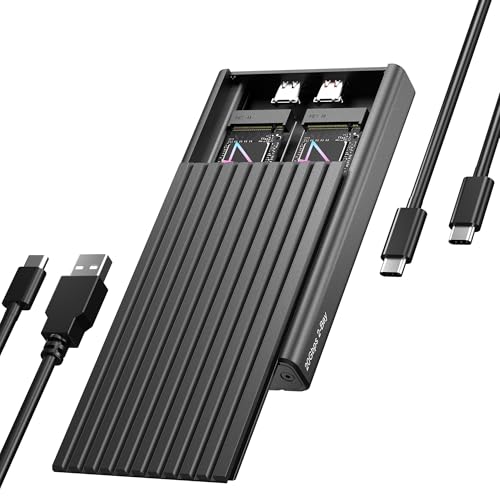
ICY BOX Dual-Bay 20Gbps NVMe Enclosure
Best for: Dual NVMe drive expansion and management
- Max Transfer Speed
- 20Gbps
- Host Interface
- USB-C, USB 3.2 Gen 2x2
- Drive Interface
- PCIe NVMe M-Key
- Supported Form Factors
- 2230, 2242, 2260, 2280
- Drive Bay Count
- 2 bays
- Cooling System
- Aluminum, thermal pad
View on Amazon: ICY BOX Dual-Bay 20Gbps NVMe Enclosure Affiliate link
This ICY BOX enclosure holds two M.2 NVMe SSDs in a single USB-C unit. It supports 2230, 2242, 2260, and 2280 form factors with tool-free installation. The aluminum case uses a thermal pad for cooling and offers up to 20Gbps transfer speeds via USB 3.2 Gen 2x2. It works with Windows and macOS. You get a clean setup for dual operating systems or expanded storage without multiple cables.
Pros
- Dual-bay design for two NVMe drives
- Supports 2230, 2242, 2260, and 2280 sizes
- Tool-free installation with rubber fixation
- 20Gbps USB 3.2 Gen 2x2 interface
- Aluminum casing with thermal pad
Cons
- Requires host device to support USB 3.2 Gen 2x2 for max speed
- Includes a separate power cable
- Limited to 24-month warranty
Good fit if
- You need to connect two NVMe drives at once
- You use various M.2 SSD sizes like 2230 or 2280
- You want a tool-free setup for quick upgrades
Skip if
- Your computer only supports USB 3.2 Gen 2 speeds
- You prefer a single-bay compact solution
- You need a warranty longer than 24 months
Verdict: ICY BOX Dual-Bay 20Gbps NVMe Enclosure fits users who need to manage two NVMe drives simultaneously. It is ideal for those with mixed SSD sizes who want a simple, tool-free connection.
Specifications side by side
| Spec | ICY BOX Dual-Bay 20Gbps NVMe Enclosure |
|---|---|
| Max Transfer Speed | 20Gbps |
| Host Interface | USB-C, USB 3.2 Gen 2x2 |
| Drive Interface | PCIe NVMe M-Key |
| Supported Form Factors | 2230, 2242, 2260, 2280 |
| Drive Bay Count | 2 bays |
| Cooling System | Aluminum, thermal pad |
| Installation Style | Tool-Free |
| Interface | NVMe |
| Form Factor | M.2 2280 |
| Transfer Speed | 20Gbps |
| Features | Tool-Free |
| Bay Count | Dual-Bay |
| Material | Aluminum |
| Dimensions | 4.72 × 2.76 × 0.67 inches |
| Weight | 8.29 ounces |
| Size | 20GB 2 Bay enclosure |
| Color | Black |
| Model | 20GB 2 Bay |
Frequently asked questions
Does this enclosure support different sizes of NVMe drives?
Yes, the ICY BOX enclosure accommodates various M.2 form factors. It supports 2230, 2242, 2260, and 2280 sizes. This flexibility allows you to mix drive lengths in the dual bays, making it useful for expanding storage with leftover or varied SSDs without needing separate enclosures for each size.
What is the maximum transfer speed of this device?
The listed transfer speed is 20Gbps. This rate requires a host device with a USB 3.2 Gen 2x2 interface to achieve. If your computer only supports standard USB 3.2 Gen 2, the actual speed will be lower. Ensure your connection matches the specification for optimal performance.
Is the ICY BOX enclosure tool-free?
Yes, the design is tool-free. You do not need screwdrivers to install your drives. The unit uses a rubber fixation system to hold the M.2 NVMe SSDs securely in place. This feature simplifies setup and allows for easy drive swaps without additional hardware or complex assembly steps.
What material is the ICY BOX enclosure made from?
The chassis is constructed from aluminum. It features a black finish. The aluminum body is chosen for its durability and ability to dissipate heat effectively. This material choice helps manage temperatures during sustained data transfers, which is important for maintaining performance in a dual-bay configuration.
Can I use this enclosure with SATA NVMe drives?
No, this unit is designed for NVMe interfaces only. The specifications list the interface as NVMe. It does not support SATA-based M.2 drives. You must use NVMe SSDs that follow the PCIe protocol to ensure compatibility with this dual-bay enclosure and its controller.
How heavy is the ICY BOX dual-bay enclosure?
The unit weighs 8.29 ounces. It measures 4.72 inches in length, 2.76 inches in width, and 0.67 inches in height. This compact and relatively lightweight design makes it portable. You can easily carry it in a bag while maintaining a sturdy build due to the aluminum construction.