Best ICY BOX SSD Enclosures: 5 Models Compared
As an Amazon Associate we earn from qualifying purchases. Links on this page are affiliate links.
This guide covers the best ICY BOX SSD enclosures for your external storage needs. ICY BOX offers tool-free aluminum and plastic cases in single and dual-bay configurations, supporting M.2 2280 drives. The ICY BOX M.2 NVMe Tool-Free SSD Enclosure leads the list because it supports both NVMe and SATA interfaces. We compared 5 models using only the specifications published on the listings. You can choose based on transfer speeds ranging from 10Gbps to 40Gbps or the need for dual-drive management. Each option is designed for straightforward setup without additional tools.
Quick picks
| # | Product | Best for | Price |
|---|---|---|---|
| 1 | ICY BOX M.2 NVMe Tool-Free SSD Enclosure Best overall | Users needing NVMe and SATA compatibility | Check price of ICY BOX M.2 NVMe Tool-Free SSD Enclosure on Amazon |
| 2 | ICY BOX Dual-Bay 20Gbps NVMe Enclosure Also great | Dual NVMe drive management and high-speed transfers | Check price of ICY BOX Dual-Bay 20Gbps NVMe Enclosure on Amazon |
| 3 | ICY BOX 20Gbps Tool-Free M.2 NVMe Enclosure Also great | High-speed single-drive external storage | Check price of ICY BOX 20Gbps Tool-Free M.2 NVMe Enclosure on Amazon |
| 4 | ICY BOX 40Gbps Tool-Free M.2 NVMe Enclosure Best premium | Thunderbolt 4 hosts needing 40Gbps speeds | Check price of ICY BOX 40Gbps Tool-Free M.2 NVMe Enclosure on Amazon |
| 5 | ICY BOX Tool-Free 10Gbps M.2 NVMe Enclosure Best budget | Users needing simple, tool-free NVMe external storage | Check price of ICY BOX Tool-Free 10Gbps M.2 NVMe Enclosure on Amazon |
Our 5 picks

ICY BOX M.2 NVMe Tool-Free SSD Enclosure
Best for: Users needing NVMe and SATA compatibility
- Max Transfer Speed
- 10Gbps
- Host Interface
- USB-C, USB 3.2 Gen2
- Drive Interface
- NVMe, SATA, M and B&M Keys
- Supported Form Factors
- 2230, 2242, 2260, 2280
- Cooling System
- Aluminium housing, thermal pad
- Installation Style
- Tool-Free
View on Amazon: ICY BOX M.2 NVMe Tool-Free SSD Enclosure Affiliate link
This ICY BOX enclosure supports both NVMe and SATA M.2 drives in a tool-free design. It offers 10Gbps transfer speeds via USB 3.2 Gen2. The aluminum housing includes a thermal pad for heat management. It fits 2230, 2242, 2260, and 2280 form factors. You get a 24-month warranty and lifetime support. It works with Windows, Mac, and Linux without drivers.
Pros
- Tool-free installation with secure buckle design
- Supports NVMe and SATA M.2 drives
- Aluminum housing with thermal pad for cooling
- Compatible with USB-C and USB-A ports
Cons
- Limited to 10Gbps transfer speeds
- Does not support SATA NGFF or mSATA SSDs
- Only includes a 24-month warranty
Good fit if
- You need to use both NVMe and SATA M.2 drives
- You want a tool-free installation process
- You require compatibility with older USB-A ports
Skip if
- You need transfer speeds faster than 10Gbps
- You only use NVMe drives and want higher bandwidth
- You prefer a longer warranty period
Verdict: ICY BOX M.2 NVMe/SATA Enclosure offers broad drive compatibility and easy tool-free setup. It fits users who need to switch between NVMe and SATA drives regularly.
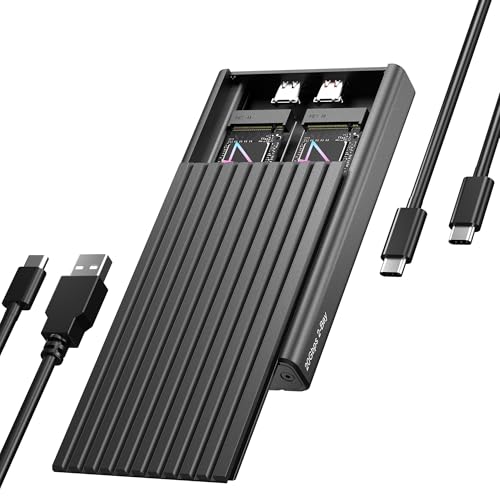
ICY BOX Dual-Bay 20Gbps NVMe Enclosure
Best for: Dual NVMe drive management and high-speed transfers
- Max Transfer Speed
- 20Gbps
- Host Interface
- USB-C, USB 3.2 Gen 2x2
- Drive Interface
- PCIe NVMe M-Key
- Supported Form Factors
- 2230, 2242, 2260, 2280
- Drive Bay Count
- 2 bays
- Cooling System
- Aluminum, thermal pad
View on Amazon: ICY BOX Dual-Bay 20Gbps NVMe Enclosure Affiliate link
This ICY BOX enclosure expands your storage by housing two M.2 NVMe SSDs in a single USB-C connection. It supports 2230, 2242, 2260, and 2280 drives with tool-free installation. You get transfer speeds up to 20Gbps via USB 3.2 Gen 2x2. The aluminum body includes a thermal pad for cooling. It works with Windows and macOS. This model is ideal if you need to manage multiple drives without clutter.
Pros
- Dual-bay design for two M.2 NVMe SSDs
- Supports 2230, 2242, 2260, and 2280 form factors
- USB 3.2 Gen 2x2 interface for 20Gbps speeds
- Tool-free installation with rubber fixation system
- Aluminum casing with thermal pad for cooling
Cons
- Requires a host device with USB 3.2 Gen 2x2 for max speed
- Includes a separate power cable for operation
- Heavier at 8.29 ounces compared to single-bay models
Good fit if
- You need to connect two NVMe drives simultaneously
- You use a host device that supports USB 3.2 Gen 2x2
- You want tool-free installation for frequent drive swaps
Skip if
- You only have one M.2 NVMe SSD to connect
- Your host device only supports USB 3.2 Gen 2 (10Gbps)
- You prefer a lighter, single-bay portable solution
Verdict: ICY BOX Dual M.2 NVMe 20Gbps Enclosure is a practical solution for users who need to manage two NVMe drives at once. It fits those who have compatible USB-C hosts and want a robust, tool-free setup for data management or dual operating systems.

ICY BOX 20Gbps Tool-Free M.2 NVMe Enclosure
Best for: High-speed single-drive external storage
- Max Transfer Speed
- 20Gbps
- Host Interface
- USB-C 3.2 Gen 2x2
- Drive Interface
- M.2 NVMe
- Supported Form Factors
- 2230, 2242, 2260, 2280
- Drive Bay Count
- 1 bay
- Cooling System
- Passive finned aluminum, thermal pad
View on Amazon: ICY BOX 20Gbps Tool-Free M.2 NVMe Enclosure Affiliate link
This ICY BOX enclosure connects M.2 NVMe SSDs via USB-C 3.2 Gen 2x2 for transfer speeds up to 20Gbps. It supports 2230, 2242, 2260, and 2280 form factors with a tool-free design. The finned aluminum case and thermal pad provide passive cooling. You get a hardware write protection switch and a 24-month warranty. It fits users needing fast external storage without complex setup.
Pros
- USB-C 3.2 Gen 2x2 host interface
- 20Gbps maximum transfer speed
- Supports 2230, 2242, 2260, and 2280 SSDs
- Tool-free installation
- Hardware write protection switch
Cons
- Requires a host device with USB 3.2 Gen 2x2 support for max speeds
- Single drive bay limits multi-drive use
- 24-month warranty is shorter than typical 3-year industry standards
Good fit if
- You need high-speed transfers up to 20Gbps
- You use various M.2 SSD sizes like 2230 or 2280
- You want tool-free installation with hardware write protection
Skip if
- Your computer lacks USB-C 3.2 Gen 2x2 ports
- You require more than one drive bay
- You prefer a longer warranty period than 24 months
Verdict: ICY BOX 20Gbps NVMe Enclosure delivers high-speed connectivity for users with compatible USB-C ports. It suits those needing flexible SSD size support and hardware data protection.

ICY BOX 40Gbps Tool-Free M.2 NVMe Enclosure
Best for: Thunderbolt 4 hosts needing 40Gbps speeds
- Max Transfer Speed
- 40Gbps
- Host Interface
- USB4, Thunderbolt 4/3
- Drive Interface
- NVMe M-Key, B+M Key
- Supported Form Factors
- 2230, 2242, 2260, 2280
- Drive Bay Count
- 1 bay
- Cooling System
- Passive aluminum heatsink, thermal pad
View on Amazon: ICY BOX 40Gbps Tool-Free M.2 NVMe Enclosure Affiliate link
This ICY BOX enclosure supports 40Gbps transfer speeds via USB4 or Thunderbolt 4. It uses an aluminum passive heatsink to manage thermal output without a fan. The tool-free design accommodates M.2 NVMe drives in 2230, 2242, 2260, and 2280 sizes. You get a durable metal build that keeps your drive cool during heavy workloads. It suits users needing high bandwidth for large files.
Pros
- 40Gbps max transfer speed via USB4
- Passive aluminum heatsink cooling
- Tool-free installation
- Supports 2230 to 2280 form factors
- Compatible with Thunderbolt 3 and 4
Cons
- Single drive bay only
- No active fan cooling
- Heavier than plastic alternatives
Good fit if
- You need maximum transfer speeds for 8K video editing
- You use Thunderbolt 4 or USB4 ports
- You want a fanless, silent enclosure
Skip if
- You require multiple drive bays
- Your computer only supports USB 3.2 Gen 2
- You prefer active fan cooling for extreme loads
Verdict: ICY BOX 40Gbps NVMe Enclosure delivers top-tier speeds for professionals handling large datasets. It is best for users with Thunderbolt 4 or USB4 hosts who need silent, high-performance storage.

ICY BOX Tool-Free 10Gbps M.2 NVMe Enclosure
Best for: Users needing simple, tool-free NVMe external storage
- Max Transfer Speed
- 10Gbps
- Host Interface
- USB 3.2 Gen 2
- Drive Interface
- NVMe PCIe (M-Key, B+M-Keys)
- Supported Form Factors
- 2230, 2242, 2260, 2280
- Drive Bay Count
- 1 Bay
- Cooling System
- Aluminum, Thermal Pad
View on Amazon: ICY BOX Tool-Free 10Gbps M.2 NVMe Enclosure Affiliate link
This ICY BOX enclosure connects M.2 NVMe SSDs via USB 3.2 Gen 2 for 10Gbps transfers. It features a tool-free design and supports 2230, 2242, 2260, and 2280 form factors. The aluminum shell includes a thermal pad for heat management. It works with Windows, macOS, and Linux. You get a 60cm cable and a two-year warranty. It suits users needing reliable external storage without complex setup.
Pros
- USB 3.2 Gen 2 interface delivers 10Gbps speeds
- Tool-free installation for quick drive swaps
- Aluminum body with thermal pad for cooling
- Supports 2230, 2242, 2260, and 2280 sizes
Cons
- 10Gbps speed is lower than 20Gbps or 40Gbps competitors
- Single drive bay limits capacity expansion
- ABS plastic construction may feel less premium than all-metal designs
Good fit if
- You need a simple, tool-free way to use an NVMe drive externally
- You work with Windows, macOS, or Linux and want plug-and-play compatibility
- You have 2230, 2242, 2260, or 2280 M.2 NVMe SSDs
Skip if
- You require transfer speeds faster than 10Gbps
- You need to connect two NVMe drives simultaneously
- You prefer an enclosure with RGB lighting effects
Verdict: ICY BOX 10Gbps M.2 NVMe Enclosure is a solid choice for users who prioritize ease of use and broad form factor support over raw speed. It fits those who want a straightforward, reliable external drive solution without dealing with screws or drivers.
Specifications side by side
| Spec | ICY BOX M.2 NVMe Tool-Free SSD Enclosure | ICY BOX Dual-Bay 20Gbps NVMe Enclosure | ICY BOX 20Gbps Tool-Free M.2 NVMe Enclosure | ICY BOX 40Gbps Tool-Free M.2 NVMe Enclosure | ICY BOX Tool-Free 10Gbps M.2 NVMe Enclosure |
|---|---|---|---|---|---|
| Max Transfer Speed | 10Gbps | 20Gbps | 20Gbps | 40Gbps | 10Gbps |
| Host Interface | USB-C, USB 3.2 Gen2 | USB-C, USB 3.2 Gen 2x2 | USB-C 3.2 Gen 2x2 | USB4, Thunderbolt 4/3 | USB 3.2 Gen 2 |
| Drive Interface | NVMe, SATA, M and B&M Keys | PCIe NVMe M-Key | M.2 NVMe | NVMe M-Key, B+M Key | NVMe PCIe (M-Key, B+M-Keys) |
| Supported Form Factors | 2230, 2242, 2260, 2280 | 2230, 2242, 2260, 2280 | 2230, 2242, 2260, 2280 | 2230, 2242, 2260, 2280 | 2230, 2242, 2260, 2280 |
| Drive Bay Count | not stated | 2 bays | 1 bay | 1 bay | 1 Bay |
| Cooling System | Aluminium housing, thermal pad | Aluminum, thermal pad | Passive finned aluminum, thermal pad | Passive aluminum heatsink, thermal pad | Aluminum, Thermal Pad |
| Installation Style | Tool-Free | Tool-Free | Tool-Free | Tool-Free | Tool-Free |
| Interface | SATA III | NVMe | NVMe | NVMe | NVMe |
| Form Factor | M.2 2280 | M.2 2280 | M.2 2280 | M.2 2280 | M.2 2280 |
| Transfer Speed | 10Gbps | 20Gbps | 20Gbps | 40Gbps | 10Gbps |
| Features | Tool-Free | Tool-Free | Tool-Free | Tool-Free | not stated |
| Bay Count | not stated | Dual-Bay | not stated | not stated | not stated |
| Material | not stated | Aluminum | Aluminum | Aluminum | Aluminum |
| Dimensions | 4.33 × 1.65 × 0.59 inches | 4.72 × 2.76 × 0.67 inches | 4.33 × 1.57 × 0.55 inches | 4.33 × 1.57 × 0.55 inches | 4.92 × 3.54 × 0.79 inches |
| Weight | not stated | 8.29 ounces | 5.11 ounces | 2.86 ounces | 2.86 ounces |
| Size | M.2 NVMe SATA Enclosure | 20GB 2 Bay enclosure | 20GB M.2 NVMe Enclosure | 40Gbps | Aluminum M.2 NVMe 10GB |
| Color | Black | Black | Black | black | Black |
| Model | not stated | 20GB 2 Bay | 20GB 1 Bay | 40GB 1 Bay | 10GB 1 Bay |
ICY BOX Enclosure Lineup Overview
ICY BOX offers distinct options based on transfer speed and bay count. The ICY BOX Dual-Bay 20Gbps NVMe Enclosure stands out for managing two drives simultaneously. It features an aluminum body and tool-free design for robust data management. The ICY BOX 40Gbps Tool-Free M.2 NVMe Enclosure targets professionals needing Thunderbolt 4 speeds for large datasets. Its lightweight aluminum construction supports high-performance silent operation.
For single-drive users, the ICY BOX M.2 NVMe Tool-Free SSD Enclosure provides broad SATA and NVMe compatibility. It is ideal for switching between drive types regularly. The ICY BOX 20Gbps Tool-Free M.2 NVMe Enclosure offers high-speed single-drive storage with hardware protection. These models ensure you select the right interface and form factor for your specific workflow needs.
Who Should Buy ICY BOX
ICY BOX suits users who need straightforward, tool-free external storage. The range covers single-bay options from 10Gbps to 40Gbps, plus a dual-bay model for managing two drives. You get aluminum bodies for heat dissipation and silent operation. The lineup lacks SATA-only or USB-A specific enclosures. You also will not find RGB lighting or software management tools in these models. This brand fits you if you prioritize physical ease of use and broad NVMe compatibility over advanced software features or legacy connection types.
How to choose the right enclosure
-
Check transfer speed needs
Match the enclosure speed to your host port. The ICY BOX 40Gbps Tool-Free M.2 NVMe Enclosure supports 40Gbps, ideal for Thunderbolt 4 hosts. The ICY BOX Dual-Bay 20Gbps NVMe Enclosure offers 20Gbps for faster data moves than standard USB 3.2. If your computer only has USB 3.0, a 10Gbps model like the ICY BOX M.2 NVMe Tool-Free SSD Enclosure is sufficient. Higher speeds matter for large file transfers, but only if your computer supports them.
-
Verify interface compatibility
Ensure the enclosure supports your drive type. The ICY BOX M.2 NVMe Tool-Free SSD Enclosure handles both NVMe and SATA M.2 drives. Most other models, like the ICY BOX 20Gbps Tool-Free M.2 NVMe Enclosure, support NVMe only. If you have older SATA M.2 SSDs, you must choose the first model. NVMe drives are faster but require a compatible controller. Check your drive’s label to confirm it is NVMe before buying a single-interface enclosure.
-
Decide on bay count
Choose between single or dual drive management. The ICY BOX Dual-Bay 20Gbps NVMe Enclosure holds two M.2 2280 drives. This is useful for RAID setups or carrying multiple operating systems. Single-bay models like the ICY BOX 20Gbps NVMe Enclosure are smaller and lighter. They weigh around 5.11 ounces compared to the dual-bay’s 8.29 ounces. Pick a single bay for portability. Choose dual bays if you need to manage two drives simultaneously without swapping them.
-
Consider cooling and material
Aluminum bodies help dissipate heat from high-speed drives. The ICY BOX 40Gbps Tool-Free M.2 NVMe Enclosure uses aluminum for better thermal performance. The ICY BOX M.2 NVMe Tool-Free SSD Enclosure uses a different material, which may run warmer under load. Heat can throttle speeds, so metal cases are better for sustained transfers. All listed models are tool-free, making assembly easy. Check if your drive gets hot during use. If so, prioritize the aluminum models for consistent performance.
-
Confirm host interface
All models use USB-C for connection. You need a USB-C port on your computer. The ICY BOX 40Gbps model requires a Thunderbolt 4 or USB4 port for full speed. The ICY BOX Dual-Bay 20Gbps NVMe Enclosure also needs a compatible high-speed USB-C port. Standard USB-C ports may limit speeds to 10Gbps or lower. Check your computer’s specifications before purchasing. Without the right host interface, you cannot achieve the advertised transfer rates. Ensure your cables and ports match the enclosure’s requirements.
Frequently asked questions
Which ICY BOX enclosure supports both NVMe and SATA drives?
The ICY BOX M.2 NVMe/SATA Enclosure is the only model in this lineup that supports both protocols. It features a SATA III interface alongside NVMe compatibility. This dual support allows you to switch between drive types easily without buying a new case.
Do I need tools to install an SSD in these enclosures?
No, all listed models feature a tool-free design. You can install your M.2 2280 drive without screws or additional hardware. This setup process is consistent across the entire range, from the budget 10Gbps models to the premium dual-bay option.
What is the maximum transfer speed available in this lineup?
The highest transfer speed offered is 40Gbps. This performance is found in the ICY BOX 40Gbps Tool-Free M.2 NVMe Enclosure. You will need a Thunderbolt 4 or USB4 host port to achieve these top-tier speeds for large dataset transfers.
Can I connect two NVMe drives at once with ICY BOX?
Yes, the ICY BOX Dual-Bay 20Gbps NVMe Enclosure supports two drives simultaneously. It is designed for users who need to manage multiple NVMe drives. This dual-bay configuration allows for efficient data management or running dual operating systems from external storage.
Are these enclosures made of metal for heat dissipation?
Most models use an aluminum body to help with heat dissipation. The Dual-Bay, single 20Gbps, 40Gbps, and 10Gbps NVMe enclosures all feature aluminum construction. Only the best overall NVMe/SATA model uses a different material, though it still provides reliable performance.
What connector type do these enclosures use to connect to a computer?
All enclosures in this list use a USB-C host interface. This connection type is standard for modern external storage solutions. It ensures compatibility with current laptops and desktops that feature USB-C ports for data transfer and power delivery.
Which model is best for users who want high speed on a budget?
The ICY BOX 20Gbps Tool-Free M.2 NVMe Enclosure is the best budget option for high speeds. It delivers 20Gbps connectivity while maintaining an aluminum build. It also includes hardware data protection, making it a practical choice for secure external storage.