ICY BOX Dual-Bay 20Gbps NVMe Enclosure vs ICY BOX 40Gbps Tool-Free M.2 NVMe: Spec Comparison
As an Amazon Associate we earn from qualifying purchases. Links on this page are affiliate links.
When you compare the icy box dual bay 20gbps nvme enclosure vs 40gbps tool free m 2 nvme, you see two distinct approaches to portable storage. Both use aluminum cases and tool-free designs for easy installation. They support standard M.2 sizes like 2280 and 2230. The main difference lies in capacity and speed. One offers dual bays for expanded storage, while the other focuses on single-drive performance with higher bandwidth.
Key differences
| Aspect | ICY BOX Dual-Bay 20Gbps NVMe Enclosure | ICY BOX 40Gbps Tool-Free M.2 NVMe Enclosure |
|---|---|---|
| Drive Bay Count | 2 bays | 1 bay |
| Max Transfer Speed | 20Gbps | 40Gbps |
| Host Interface | USB-C, USB 3.2 Gen 2x2 | USB4, Thunderbolt 4/3 |
| Drive Interface | PCIe NVMe M-Key | NVMe M-Key, B+M Key |
| Weight | 8.29 ounces | 2.86 ounces |
Which one should you choose?
Choose ICY BOX Dual-Bay 20Gbps NVMe Enclosure if
- You need to connect two NVMe drives simultaneously.
- You want a larger total storage capacity from one cable.
- You primarily use USB 3.2 Gen 2x2 hosts.
Choose ICY BOX 40Gbps Tool-Free M.2 NVMe Enclosure if
- You require maximum transfer speeds up to 40Gbps.
- You want a lighter, more compact single-drive solution.
- You use Thunderbolt 4 or USB4 ports for connectivity.
Verdict: Choose the dual-bay model if you need to manage two drives or double your storage capacity. Pick the single-bay 40Gbps version if you prioritize raw speed and portability for a single high-performance drive.
Speed, Bays, and Build Comparison
Transfer speed
Product B offers significantly higher bandwidth with a max transfer speed of 40Gbps, powered by the ASM2464PD chip and USB4 compatibility. This allows for rapid data movement, such as transferring 10GB in under 7 seconds, which benefits 8K video editing and large datasets. Product A caps at 20Gbps via USB 3.2 Gen 2x2. To reach this maximum, your host device must specifically support USB 3.2 Gen 2x2. While Product A is fast enough for most general tasks, Product B provides the headroom needed for demanding professional workflows and future-proofing.
Drive capacity
Product A is a dual-bay enclosure, supporting two M.2 NVMe SSDs simultaneously through a single USB-C cable. This lets you double your storage capacity instantly and access both drives concurrently, which is useful for running dual operating systems or managing backups efficiently. Product B is a single-bay unit, holding only one M.2 NVMe SSD. If you need to store more data or switch between two drives without unplugging, Product A is the practical choice. Product B is better if you only need one high-speed portable drive.
Host interface
Product B supports a wider range of host connections, including USB4, Thunderbolt 3, and Thunderbolt 4, in addition to backward compatibility with USB 3.2, 3.1, 3.0, and 2.0. This versatility ensures it works with modern Macs, Windows PCs, and laptops that feature Thunderbolt ports. Product A uses USB-C with USB 3.2 Gen 2x2 support. While it works with various devices, it lacks the native Thunderbolt or USB4 protocol support found in Product B. If you have a Thunderbolt-equipped computer, Product B unlocks higher potential speeds.
SSD compatibility
Both enclosures support the same standard M.2 form factors: 2230, 2242, 2260, and 2280. They both use a tool-free rubber fixation system to secure these sizes. However, Product B explicitly supports both M-Key and B+M Key NVMe SSDs, offering slightly broader compatibility for different drive types. Product A is specified for PCIe NVMe M-Key drives only. For most standard NVMe drives, both work well, but Product B is more flexible if you use less common B+M Key modules.
Physical size
Product B is more compact and lightweight, measuring 1.57 inches wide, 0.55 inches high, and 4.33 inches long, weighing just 2.86 ounces. This makes it easier to carry in a bag or pocket. Product A is larger and heavier due to its dual-bay design, measuring 2.76 inches wide, 0.67 inches high, and 4.72 inches long, with a weight of 8.29 ounces. The extra bulk accommodates the second drive slot. If portability is your top priority, Product B is the better option.
Choose based on speed or capacity
Users needing 40Gbps bandwidth
Product B supports USB4 and Thunderbolt 4, delivering up to 40Gbps transfer speeds. This high bandwidth handles large files efficiently, such as 8K video editing or large datasets. You get faster data movement compared to the 20Gbps limit of the other option. The passive aluminum heatsink ensures stable performance during intensive tasks without generating noise.
Users needing dual drive access
Product A features two drive bays, allowing you to connect two M.2 NVMe SSDs simultaneously. This doubles your storage capacity and lets you manage data from both drives via a single USB-C cable. It is ideal for running dual operating systems or backing up files efficiently without needing multiple enclosures or ports.
Users with older USB ports
Product A uses USB 3.2 Gen 2x2, which is widely supported by many current devices. While Product B requires USB4 or Thunderbolt 3/4 for its maximum speed, Product A offers a straightforward connection method. If your host device does not support USB4, this enclosure provides a reliable way to access high-speed NVMe storage without compatibility issues.
The products compared
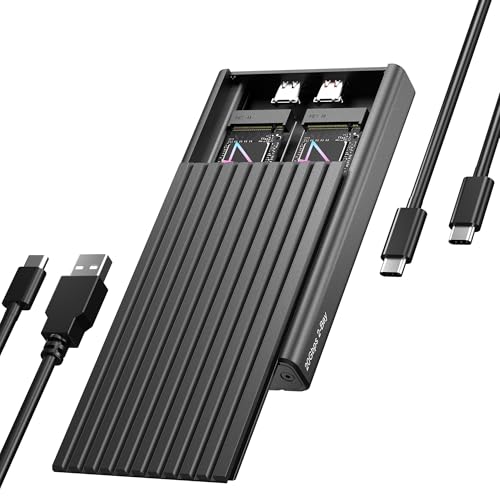
ICY BOX Dual-Bay 20Gbps NVMe Enclosure
Best for: Dual NVMe drive management
- Max Transfer Speed
- 20Gbps
- Host Interface
- USB-C, USB 3.2 Gen 2x2
- Drive Interface
- PCIe NVMe M-Key
- Supported Form Factors
- 2230, 2242, 2260, 2280
- Drive Bay Count
- 2 bays
- Cooling System
- Aluminum, thermal pad
View on Amazon: ICY BOX Dual-Bay 20Gbps NVMe Enclosure Affiliate link
This ICY BOX enclosure holds two M.2 NVMe SSDs in a single tool-free chassis. It connects via USB-C and supports speeds up to 20Gbps using USB 3.2 Gen 2x2. The aluminum body includes a thermal pad for cooling. It fits 2230, 2242, 2260, and 2280 drives. You get plug-and-play operation on Windows and macOS without extra drivers.
Pros
- Dual-bay design for two NVMe drives
- 20Gbps transfer speed via USB 3.2 Gen 2x2
- Tool-free installation with rubber fixation
- Aluminum casing with thermal pad
Cons
- Requires host device to support USB 3.2 Gen 2x2 for max speed
- No mention of Thunderbolt compatibility
- 24-month warranty period
Good fit if
- You need to access two separate NVMe drives simultaneously
- You have a host port supporting USB 3.2 Gen 2x2
- You prefer tool-free drive installation
Skip if
- You require transfer speeds above 20Gbps
- Your host device lacks USB 3.2 Gen 2x2 support
- You need Thunderbolt connectivity
Verdict: ICY BOX Dual-Bay 20Gbps NVMe Enclosure offers a practical dual-drive solution for users with compatible USB-C ports. It suits those who need to manage two NVMe SSDs without tools.

ICY BOX 40Gbps Tool-Free M.2 NVMe Enclosure
Best for: single-drive USB4 workflows with varied M.2 sizes
- Max Transfer Speed
- 40Gbps
- Host Interface
- USB4, Thunderbolt 4/3
- Drive Interface
- NVMe M-Key, B+M Key
- Supported Form Factors
- 2230, 2242, 2260, 2280
- Drive Bay Count
- 1 bay
- Cooling System
- Passive aluminum heatsink, thermal pad
View on Amazon: ICY BOX 40Gbps Tool-Free M.2 NVMe Enclosure Affiliate link
This single-bay enclosure connects M.2 NVMe drives via USB4 or Thunderbolt 3/4 for speeds up to 40Gbps. It supports 2230, 2242, 2260, and 2280 form factors with a tool-free design. The aluminum body includes a thermal pad for passive cooling. You get a USB-C cable and rubber fixation. It suits users needing fast, quiet, and versatile storage for large files.
Pros
- USB4 and Thunderbolt 3/4 support for 40Gbps speeds
- Tool-free installation for easy drive swaps
- Passive aluminum heatsink with thermal pad for cooling
- Supports 2230, 2242, 2260, and 2280 sizes
Cons
- Single drive bay limits multi-drive workflows
- No active fan may throttle under extreme sustained loads
- Does not include an AC power adapter
Good fit if
- You need USB4 or Thunderbolt 3/4 connectivity
- You use various M.2 SSD lengths like 2230 or 2280
- You prefer silent, fanless operation
Skip if
- You require dual-bay storage capacity
- You only have USB 3.2 ports without USB4
- You need active fan cooling for heavy workloads
Verdict: ICY BOX 40Gbps Tool-Free NVMe Enclosure delivers high-speed USB4 connectivity and flexible size support in a quiet, single-bay form factor. It is best for users who need fast, portable storage for various M.2 drive sizes without the noise of a fan.
Specifications side by side
| Spec | ICY BOX Dual-Bay 20Gbps NVMe Enclosure | ICY BOX 40Gbps Tool-Free M.2 NVMe Enclosure |
|---|---|---|
| Max Transfer Speed | 20Gbps | 40Gbps |
| Host Interface | USB-C, USB 3.2 Gen 2x2 | USB4, Thunderbolt 4/3 |
| Drive Interface | PCIe NVMe M-Key | NVMe M-Key, B+M Key |
| Supported Form Factors | 2230, 2242, 2260, 2280 | 2230, 2242, 2260, 2280 |
| Drive Bay Count | 2 bays | 1 bay |
| Cooling System | Aluminum, thermal pad | Passive aluminum heatsink, thermal pad |
| Installation Style | Tool-Free | Tool-Free |
| Interface | NVMe | NVMe |
| Form Factor | M.2 2280 | M.2 2280 |
| Transfer Speed | 20Gbps | 40Gbps |
| Features | Tool-Free | Tool-Free |
| Bay Count | Dual-Bay | not stated |
| Material | Aluminum | Aluminum |
| Dimensions | 4.72 × 2.76 × 0.67 inches | 4.33 × 1.57 × 0.55 inches |
| Weight | 8.29 ounces | 2.86 ounces |
| Size | 20GB 2 Bay enclosure | 40Gbps |
| Color | Black | black |
| Model | 20GB 2 Bay | 40GB 1 Bay |
Frequently asked questions
Can I use both enclosures for M.2 2230 drives?
Yes, both the ICY BOX Dual-Bay 20Gbps and the 40Gbps Tool-Free models support M.2 2230 form factors. The product data confirms that they are designed for standard sizes including 2280 and 2230. You do not need additional adapters for these compact drives.
Do these enclosures include cooling fans?
No, neither enclosure uses a cooling fan. The 40Gbps model is described as quiet and relies on passive cooling. Both units use aluminum cases to help dissipate heat from the NVMe drives during operation.
Which enclosure supports USB4 connectivity?
The ICY BOX 40Gbps Tool-Free M.2 NVMe Enclosure supports USB4. It delivers up to 40Gbps transfer speeds using this interface. The Dual-Bay 20Gbps model uses a standard USB-C host interface with a maximum speed of 20Gbps.
Are both enclosures tool-free for installation?
Yes, both products feature tool-free designs. You can install NVMe SSDs without needing screwdrivers or other hardware. This makes swapping drives quick and easy for both the single-bay 40Gbps unit and the dual-bay 20Gbps unit.
How do the physical sizes compare?
The 40Gbps single-bay enclosure is more compact than the dual-bay version. It measures 4.33 inches in length and weighs 2.86 ounces. The dual-bay 20Gbps model is larger at 4.72 inches long and weighs 8.29 ounces due to the extra drive bay.
Can I connect these to a Thunderbolt 4 port?
The 40Gbps enclosure is compatible with Thunderbolt 4 ports, allowing for high-speed data transfer. The Dual-Bay 20Gbps enclosure connects via USB-C. While both use USB-C connectors, only the 40Gbps model explicitly supports the higher bandwidth of Thunderbolt 4.
What is the maximum transfer speed for each model?
The ICY BOX 40Gbps Tool-Free model offers a maximum transfer speed of 40Gbps. The Dual-Bay 20Gbps NVMe Enclosure provides up to 20Gbps. The difference allows the 40Gbps unit to move large files significantly faster than the dual-bay option.