Looking Beyond the ICY BOX Dual-Bay 20Gbps NVMe Enclosure? 6 Alternatives Worth a Look
As an Amazon Associate we earn from qualifying purchases. Links on this page are affiliate links.
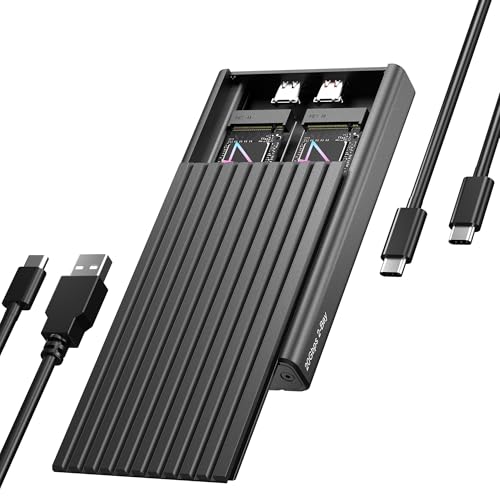
The ICY BOX Dual-Bay 20Gbps NVMe Enclosure handles two PCIe NVMe drives simultaneously through a single USB-C connection at USB 3.2 Gen 2x2 transfer rates. Evaluating icy box dual m 2 nvme SSD alternatives ensures you select external storage tailored to your interface needs and drive formats. The original unit performs well for dual-drive operations, providing tool-free drive installation, aluminum passive cooling, and support for 2230, 2242, 2260, and 2280 M.2 form factors.
You might look elsewhere if your system lacks USB 3.2 Gen 2x2 host support or if you need M.2 SATA drive compatibility alongside NVMe. Other workflows benefit from standalone offline cloning, support for longer 22110 SSDs, a more compact single-bay footprint, or alternative brands like ORICO, WAVLINK, and ULXUUUN. The 6 alternatives on this page were chosen because their specifications overlap with the original, offering high-speed USB-C connections, tool-free installation, and multi-bay or high-bandwidth configurations.
How Each Alternative Compares
ICY BOX 20Gbps Tool-Free M.2 NVMe Enclosure
The ICY BOX 20Gbps Tool-Free M.2 NVMe Enclosure scales down to a single drive slot instead of two. You lose the dual-bay simultaneous reading capability of the original ICY BOX dock, meaning you cannot mount two SSDs across a single cable. In exchange, this model cuts weight to 5.11 ounces and reduces overall dimensions to 4.33 by 1.57 by 0.55 inches, making it significantly more pocketable. It retains the same 20Gbps USB 3.2 Gen 2x2 transfer rate, tool-free M.2 2280 installation, and aluminum shell, while adding dedicated hardware write protection. You should pick this enclosure if you only need fast transfers on one NVMe SSD at a time.
ORICO Dual-Bay NVMe and SATA M.2 Enclosure
The ORICO Dual-Bay NVMe and SATA M.2 Enclosure gives you protocol flexibility that the original ICY BOX lacks. While the ICY BOX accepts only PCIe NVMe drives, this ORICO model accommodates both NVMe and SATA M.2 drives side by side. You give up the high-speed 20Gbps transfer ceiling and single-cable access, stepping down to SATA III interface limitations on supported slots. The enclosure weighs 6.35 ounces, making it lighter than the 8.29-ounce ICY BOX while retaining tool-free installation and an aluminum exterior. You should select this alternative if your workflow requires reading an older SATA M.2 module alongside a modern NVMe stick.
ORICO Dual-Bay NVMe and SATA M.2 SSD Enclosure
This silver ORICO Dual-Bay NVMe and SATA M.2 SSD Enclosure provides cross-protocol compatibility across two separate bays. Unlike the original ICY BOX, which requires two NVMe SSDs, this unit accepts a mix of M.2 NVMe and SATA drives. You trade away the streamlined single-cable 20Gbps connection, as this model uses protocol-split slots with a dual-cable setup and SATA III support. At 8.47 ounces, it carries a slightly heavier aluminum build than the 8.29-ounce ICY BOX. You should choose this model if you need to access both SATA and NVMe drives without packing a separate power brick.
ORICO Tool-Free Aluminum M.2 NVMe Enclosure
The ORICO Tool-Free Aluminum M.2 NVMe Enclosure focuses on portable single-drive storage. It lowers the transfer bandwidth to 10Gbps compared to the 20Gbps speed of the original ICY BOX. You also lose the secondary drive bay, meaning you cannot mount or access two drives at once. However, this unit weighs just 3.53 ounces and measures 1.38 inches wide, making it substantially lighter and narrower than the 8.29-ounce dual-bay dock. It maintains tool-free drive installation, USB-C connectivity, and an aluminum casing. You should pick this model if you want a compact, lightweight 10Gbps enclosure for a single NVMe SSD.
WAVLINK Dual-Bay 20Gbps NVMe Cloner
The WAVLINK Dual-Bay 20Gbps NVMe Cloner adds standalone offline cloning to dual-drive operations. Both devices match at 20Gbps transfer speeds, dual NVMe slots, tool-free installation, and USB-C connectivity. What you gain with the WAVLINK is the ability to clone one NVMe drive to another without connecting to a computer host. The trade-off is physical size: the WAVLINK weighs 1.01 pounds and measures 5.91 by 3.94 by 2.36 inches, making it bulkier and heavier than the 8.29-ounce ICY BOX enclosure. You should choose this device if your primary task involves duplicating M.2 NVMe drives independently of operating systems.
ULXUUUN Dual-Bay 20Gbps NVMe Cloner Dock
The ULXUUUN Dual-Bay 20Gbps NVMe Cloner Dock expands drive compatibility and standalone functionality. Like the ICY BOX, it supports dual NVMe drives at 20Gbps speeds over USB-C with tool-free installation. However, the ULXUUUN adds standalone PC-free offline drive cloning and supports longer M.2 form factors up to 22110, beyond the 2280 limit of the original. You give up the enclosed aluminum shell in favor of an open-frame docking build that requires a dedicated 12V power supply. You should pick this dock if you need offline drive duplication or frequently handle enterprise-length 22110 NVMe drives at your desk.
Quick picks
Our 7 picks
ICY BOX Dual-Bay 20Gbps NVMe Enclosure
Best for: dual NVMe access at 20Gbps bandwidth
- Max Transfer Speed
- 20Gbps
- Host Interface
- USB-C, USB 3.2 Gen 2x2
- Drive Interface
- PCIe NVMe M-Key
- Supported Form Factors
- 2230, 2242, 2260, 2280
- Drive Bay Count
- 2 bays
- Cooling System
- Aluminum, thermal pad
View on Amazon: ICY BOX Dual-Bay 20Gbps NVMe Enclosure Affiliate link
This dual-bay enclosure holds two M.2 NVMe SSDs across sizes 2230, 2242, 2260, and 2280. You connect over a single USB-C cable using USB 3.2 Gen 2x2 protocols for speeds up to 20Gbps. Both drives read simultaneously without tools. It suits you if you need fast dual-drive NVMe storage or regular drive swaps on Windows or macOS systems with Gen 2x2 ports.
Pros
- USB 3.2 Gen 2x2 interface delivers transfer speeds up to 20Gbps
- Dual M.2 bays read two NVMe drives simultaneously over one cable
- Tool-free installation fits 2230, 2242, 2260, and 2280 form factors
- Aluminum housing includes thermal pad for heat dissipation
Cons
- Requires USB 3.2 Gen 2x2 host support to hit 20Gbps
- Supports PCIe NVMe M-Key drives only, not SATA M.2 SSDs
- Requires separate power cable alongside the USB-C connection
Good fit if
- You need concurrent access to two NVMe SSDs over a single port
- You have a host computer supporting USB 3.2 Gen 2x2 for full 20Gbps speeds
- You swap M.2 NVMe drives frequently and require tool-free installation
Skip if
- You want to use M.2 SATA SSDs instead of NVMe drives
- Your computer lacks USB 3.2 Gen 2x2 support and you require top speed
Verdict: ICY BOX Dual-Bay 20Gbps NVMe Enclosure delivers fast multi-drive handling with tool-free access and 20Gbps USB 3.2 Gen 2x2 bandwidth. It gives you dependable dual-bay performance if your host hardware matches its interface specs.

ICY BOX 20Gbps Tool-Free M.2 NVMe Enclosure
Best for: fast single-drive transfers with write protection
- Max Transfer Speed
- 20Gbps
- Host Interface
- USB-C 3.2 Gen 2x2
- Drive Interface
- M.2 NVMe
- Supported Form Factors
- 2230, 2242, 2260, 2280
- Drive Bay Count
- 1 bay
- Cooling System
- Passive finned aluminum, thermal pad
View on Amazon: ICY BOX 20Gbps Tool-Free M.2 NVMe Enclosure Affiliate link
This external enclosure houses a single M.2 NVMe drive using a USB 3.2 Gen 2x2 connection capable of speeds up to 20Gbps. It offers tool-free installation across 2230, 2242, 2260, and 2280 form factors and includes a hardware write-protection switch. It suits you if you want high-speed data transfers on a single drive and do not need the dual-bay capacity or cloning functionality of multi-drive enclosures.
Pros
- Up to 20Gbps transfer speed via USB 3.2 Gen 2x2
- Hardware write-protection slide switch
- Tool-free installation for 2230, 2242, 2260, and 2280 NVMe SSDs
- Finned aluminum housing with included thermal pad
Cons
- Holds only one drive instead of two
- Does not support M.2 SATA SSDs
- Requires a USB 3.2 Gen 2x2 host port to reach maximum speed
Good fit if
- You need 20Gbps transfer rates for a single M.2 NVMe drive.
- You want a physical write-protection switch to prevent file changes.
- You frequently swap M.2 drives and require tool-free access.
Skip if
- You need dual drive slots for cloning or expanded storage.
- You need to use M.2 SATA drives.
Verdict: ICY BOX Single-Bay 20Gbps NVMe Enclosure delivers fast USB 3.2 Gen 2x2 speeds and hardware write protection in a compact aluminum body. It gives you a focused single-slot setup when you do not need dual-bay functionality.

ORICO Dual-Bay NVMe and SATA M.2 Enclosure
Best for: handling mixed NVMe and SATA M.2 drives
- Max Transfer Speed
- 10Gbps (NVMe), 6Gbps (SATA)
- Host Interface
- USB 3.2 Gen 2 Type-C
- Drive Interface
- PCIe NVMe M-Key, SATA B-Key, B+M Key
- Supported Form Factors
- 2230, 2242, 2260, 2280
- Drive Bay Count
- 2 bays
- Cooling System
- Aluminum fin, heat sinks, thermal pads
View on Amazon: ORICO Dual-Bay NVMe and SATA M.2 Enclosure Affiliate link
This ORICO dual-bay enclosure holds one M.2 NVMe drive and one M.2 SATA drive at once. It runs the NVMe slot at USB 3.2 Gen 2 speeds up to 10Gbps and the SATA slot at up to 6Gbps. Both bays operate independently without an external power adapter, though you must connect two data cables to access both drives simultaneously. It suits you if you need a tool-free enclosure for mixed M.2 drive types.
Pros
- Supports both M.2 NVMe (10Gbps) and M.2 SATA (6Gbps) drives
- Tool-free drive installation with rubber retention caps
- Aluminum fin body with included heatsinks and thermal pads
- Supports up to 2 x 4TB drive capacity
Cons
- Requires two separate USB cables to access both drives simultaneously
- Does not support two NVMe drives at the same time
- Top transfer speed capped at 10Gbps rather than 20Gbps
Good fit if
- You need to access an M.2 SATA drive and an M.2 NVMe drive in one unit.
- You prefer tool-free installation without needing screwdrivers.
- You want bus-powered operation without an external power adapter.
Skip if
- You want to mount two M.2 NVMe drives together.
- You need 20Gbps transfer speeds.
- You want to run two drives off a single USB cable.
Verdict: ORICO Dual-Bay NVMe and SATA SSD Enclosure provides a practical mixed-protocol solution for reading one PCIe drive and one SATA drive side by side. It trades 20Gbps bandwidth and single-cable access for versatile dual-format support.

ORICO Dual-Bay NVMe and SATA M.2 SSD Enclosure
Best for: mixed M.2 NVMe and SATA drive setups
- Max Transfer Speed
- 10Gbps (NVMe), 6Gbps (SATA)
- Host Interface
- USB 3.2 Gen 2 Type-C
- Drive Interface
- PCIe NVMe M-Key, SATA B-Key, B+M Key
- Supported Form Factors
- 2230, 2242, 2260, 2280
- Drive Bay Count
- 2 bays
- Cooling System
- Aluminum rib, heat sinks, thermal pads
View on Amazon: ORICO Dual-Bay NVMe and SATA M.2 SSD Enclosure Affiliate link
This ORICO dual-bay aluminum enclosure gives you dedicated slots for one M.2 NVMe drive and one M.2 SATA drive. It runs over a USB 3.2 Gen 2 Type-C interface, supporting up to 10Gbps for NVMe and 6Gbps for SATA across capacities up to 2x4TB. With tool-free installation and included heatsinks, it suits you if you need to access both SSD protocols simultaneously without an external power adapter.
Pros
- Supports both M.2 NVMe (10Gbps) and M.2 SATA (6Gbps) protocols
- Tool-free drive mounting using rubber retention plugs
- Aluminum ribbed body includes two heatsinks and two thermal pads
- Bus-powered operation without an external power adapter
Cons
- Bays are protocol-locked with one bay for NVMe and one for SATA
- Requires connecting two data cables to read both drives at once
- NVMe interface caps at 10Gbps instead of 20Gbps
Good fit if
- You regularly work with both M.2 NVMe and M.2 SATA drives.
- You prefer tool-free drive swaps without needing screws.
- You want dual-drive access powered directly by host USB ports.
Skip if
- You need to mount two NVMe SSDs at the same time.
- You require 20Gbps transfer speeds over USB 3.2 Gen 2x2.
- You want to connect both drives through a single USB cable.
Verdict: ORICO Dual-Bay NVMe and SATA SSD Enclosure is a versatile dual-protocol solution for running mixed M.2 drives without a power brick. Its protocol-split bays and dual-cable design trade single-cable simplicity for cross-protocol flexibility.

ORICO Tool-Free Aluminum M.2 NVMe Enclosure
Best for: single-drive portable 10Gbps NVMe storage
- Max Transfer Speed
- 10Gbps
- Host Interface
- USB 3.2, Thunderbolt 3 Compatible
- Drive Interface
- PCIe M-Key, PCIe B&M key
- Supported Form Factors
- 2230, 2242, 2260, 2280
- Cooling System
- Silicone pad, heatsink, aluminum body
- Maximum Capacity
- 4TB
View on Amazon: ORICO Tool-Free Aluminum M.2 NVMe Enclosure Affiliate link
This is an aluminum external drive enclosure designed for a single M.2 NVMe SSD up to 4TB. It operates over a 10Gbps USB-C connection, providing transfer speeds up to 1000MB/s. If you need a compact, tool-free drive reader rather than a bulky dual-bay enclosure, this gives you broad drive size support from 2230 to 2280 with a dedicated heatsink cooling setup.
Pros
- Tool-free push-cover tray for simple drive installation
- Supports multiple M.2 NVMe sizes including 2230, 2242, 2260, and 2280
- Three-layer cooling with silicone thermal pad, heatsink, and aluminum body
- Automatic 10-minute idle sleep mode to reduce drive wear
Cons
- Single-bay design lacks drive-to-drive cloning capabilities
- Capped at 10Gbps USB 3.2 rather than 20Gbps speeds
- Incompatible with SATA and M.2 PCIe AHCI solid-state drives
Good fit if
- You want a single portable 10Gbps drive reader instead of a dual-bay unit.
- You swap M.2 NVMe drives frequently and need tool-free installation.
- You use PCIe M-Key or B&M Key drives up to 4TB.
Skip if
- You need dual bays for offline cloning or running two drives at once.
- You want 20Gbps transfer speeds or support for SATA-based M.2 drives.
Verdict: ORICO Tool-Free 10Gbps M.2 NVMe Enclosure offers a straightforward, single-drive alternative to multi-bay units with reliable heatsink cooling and easy drive swapping. It trades dual-bay cloning for compact portability and standard 10Gbps transfers.

WAVLINK Dual-Bay 20Gbps NVMe Cloner
Best for: offline NVMe cloning and dual-drive USB-C expansion
- Max Transfer Speed
- 20Gbps
- Host Interface
- USB-C
- Drive Interface
- PCIe NVMe (M and B+M keys)
- Supported Form Factors
- 2280/2260/2242/2230
- Drive Bay Count
- 2 bays
- Cooling System
- Silicone thermal pads
View on Amazon: WAVLINK Dual-Bay 20Gbps NVMe Cloner Affiliate link
This WAVLINK dock holds two M.2 NVMe SSDs and operates at speeds up to 20Gbps over a USB-C connection. It handles drives up to 8TB per bay across 2230, 2242, 2260, and 2280 sizes. You get a dedicated button for standalone offline cloning with four progress indicator LEDs. It suits you if you need to clone NVMe drives without a computer or access two high-speed drives simultaneously.
Pros
- Supports standalone offline cloning with 25%, 50%, 75%, and 100% progress LEDs
- 20Gbps USB-C interface with rated speeds up to 1631MB/s read and 1267MB/s write
- Tool-free installation compatible with 2230, 2242, 2260, and 2280 form factors
- Accommodates up to 16TB total capacity with 8TB supported per bay
Cons
- Does not support M.2 SATA SSDs
- Requires the external DC 5V/4A power adapter for operation
Good fit if
- You need to duplicate NVMe drives directly without using a computer
- You use M-key or B+M key NVMe SSDs sized from 2230 to 2280
- You want 20Gbps USB-C connection speeds for high-capacity file transfers
Skip if
- You need an enclosure that supports M.2 SATA drives
- You prefer a bus-powered drive dock that operates without a DC power brick
Verdict: WAVLINK Dual-Bay 20Gbps NVMe Cloner provides standalone drive cloning and 20Gbps dual-drive expansion over USB-C. It delivers dependable utility if your storage workflow focuses strictly on M.2 NVMe drives.

ULXUUUN Dual-Bay 20Gbps NVMe Cloner Dock
Best for: offline NVMe cloning and dual-drive transfers
- Max Transfer Speed
- 20Gbps
- Host Interface
- USB 3.2 Gen 2x2
- Drive Interface
- PCIe NVMe (M-Key, B+M Key)
- Supported Form Factors
- 2230, 2242, 2260, 2280, 22110
- Drive Bay Count
- Dual Bay
- Cooling System
- Open-frame, vented baseplate
View on Amazon: ULXUUUN Dual-Bay 20Gbps NVMe Cloner Dock Affiliate link
This tool-free dual-bay dock supports PCIe NVMe M.2 SSDs across 2230 to 22110 form factors over a 20Gbps USB 3.2 Gen 2x2 connection. Powered by a JMS586U chip, it runs two drives concurrently and handles one-button offline cloning without a host computer. An open-frame layout with a vented baseplate provides passive airflow, making it suitable if you need standalone drive duplication and high-bandwidth transfers.
Pros
- 20Gbps USB 3.2 Gen 2x2 host interface
- Standalone one-button offline cloning without a computer
- Supports M.2 sizes from 2230 up to 22110
- Includes dedicated 12V/2A power adapter and two USB cables
Cons
- Does not support M.2 SATA SSDs
- Target drive capacity must equal or exceed source drive
- Requires disconnecting the data cable during offline cloning
Good fit if
- You need to duplicate NVMe drives without connecting to a computer.
- You use longer 22110 form factor NVMe SSDs.
- You have a USB 3.2 Gen 2x2 port capable of 20Gbps speeds.
Skip if
- You need compatibility with M.2 SATA SSDs.
- You prefer a fully enclosed case instead of an open-frame dock design.
Verdict: ULXUUUN Dual-Bay 20Gbps NVMe Cloner Dock delivers high-speed dual-drive access and PC-free duplication for NVMe drives up to size 22110. Its open-frame build and dedicated 12V power supply make it a capable tool-free drive utility.
Specifications side by side
| Spec | ICY BOX Dual-Bay 20Gbps NVMe Enclosure | ICY BOX 20Gbps Tool-Free M.2 NVMe Enclosure | ORICO Dual-Bay NVMe and SATA M.2 Enclosure | ORICO Dual-Bay NVMe and SATA M.2 SSD Enclosure | ORICO Tool-Free Aluminum M.2 NVMe Enclosure | WAVLINK Dual-Bay 20Gbps NVMe Cloner | ULXUUUN Dual-Bay 20Gbps NVMe Cloner Dock |
|---|---|---|---|---|---|---|---|
| Max Transfer Speed | 20Gbps | 20Gbps | 10Gbps (NVMe), 6Gbps (SATA) | 10Gbps (NVMe), 6Gbps (SATA) | 10Gbps | 20Gbps | 20Gbps |
| Host Interface | USB-C, USB 3.2 Gen 2x2 | USB-C 3.2 Gen 2x2 | USB 3.2 Gen 2 Type-C | USB 3.2 Gen 2 Type-C | USB 3.2, Thunderbolt 3 Compatible | USB-C | USB 3.2 Gen 2x2 |
| Drive Interface | PCIe NVMe M-Key | M.2 NVMe | PCIe NVMe M-Key, SATA B-Key, B+M Key | PCIe NVMe M-Key, SATA B-Key, B+M Key | PCIe M-Key, PCIe B&M key | PCIe NVMe (M and B+M keys) | PCIe NVMe (M-Key, B+M Key) |
| Supported Form Factors | 2230, 2242, 2260, 2280 | 2230, 2242, 2260, 2280 | 2230, 2242, 2260, 2280 | 2230, 2242, 2260, 2280 | 2230, 2242, 2260, 2280 | 2280/2260/2242/2230 | 2230, 2242, 2260, 2280, 22110 |
| Drive Bay Count | 2 bays | 1 bay | 2 bays | 2 bays | not stated | 2 bays | Dual Bay |
| Cooling System | Aluminum, thermal pad | Passive finned aluminum, thermal pad | Aluminum fin, heat sinks, thermal pads | Aluminum rib, heat sinks, thermal pads | Silicone pad, heatsink, aluminum body | Silicone thermal pads | Open-frame, vented baseplate |
| Maximum Capacity | not stated | not stated | 2 x 4TB | 2 x 4TB | 4TB | 16TB (8TB per drive) | not stated |
| Installation Style | Tool-Free | Tool-Free | Tool-free | Tool Free | Tool-Free | Tool-Free | Tool-Free |
| Interface | NVMe | NVMe | SATA III | SATA III | NVMe | NVMe | NVMe |
| Form Factor | M.2 2280 | M.2 2280 | M.2 2280 | M.2 2280 | M.2 2280 | M.2 2280 | M.2 2280 |
| Transfer Speed | 20Gbps | 20Gbps | not stated | not stated | 10Gbps | 20Gbps | 20Gbps |
| Features | Tool-Free | Tool-Free | Tool-Free, UASP, TRIM | Tool-Free, UASP, TRIM | Tool-Free | Tool-Free, Offline Clone | Tool-Free, Offline Clone |
| Bay Count | Dual-Bay | not stated | Dual-Bay | Dual-Bay | not stated | Dual-Bay | Dual-Bay |
| Material | Aluminum | Aluminum | Aluminum | Aluminum | Aluminum | not stated | not stated |
| Dimensions | 4.72 × 2.76 × 0.67 inches | 4.33 × 1.57 × 0.55 inches | not stated | not stated | 4.88 × 1.38 × 0.55 inches | 5.91 × 3.94 × 2.36 inches | not stated |
| Weight | 8.29 ounces | 5.11 ounces | 6.35 ounces | 8.47 ounces | 3.53 ounces | 1.01 pounds | not stated |
| Size | 20GB 2 Bay enclosure | 20GB M.2 NVMe Enclosure | Dual M.2 SATA+NVMe | not stated | not stated | not stated | not stated |
| Color | Black | Black | Grey | Silver | Blue | Silver | Black |
| Model | 20GB 2 Bay | 20GB 1 Bay | M.2 SATA+NVMe-Dual | Dual M.2 SATA+NVMe | Black | NVMe + NVMe | not stated |
If you prefer a single enclosure, bykski b nvme ct m 2 SSD aluminum alternatives compare similar metal designs.
Frequently asked questions
Can you clone NVMe drives without a computer using an ICY BOX alternative?
Yes, you can use dedicated dual-bay cloning models like the WAVLINK Dual-Bay 20Gbps NVMe Cloner or the ULXUUUN Dual-Bay 20Gbps NVMe Cloner Dock. Both devices feature built-in offline clone functions alongside standard 20Gbps NVMe data access. You insert your M.2 drives directly into the tool-free bays and start duplication without routing data through an operating system.
Which dual-bay alternatives support both SATA and NVMe M.2 SSDs?
The ORICO Dual-Bay NVMe and SATA M.2 Enclosure models support mixed drive types. Unlike enclosures restricted strictly to PCIe NVMe drives, these units provide one bay for an NVMe SSD and one bay for a SATA III M.2 drive. You connect them via USB-C to read two distinct storage protocols simultaneously through separate aluminum drive bays.
What should you choose if you only need a single 20Gbps NVMe drive enclosure?
The ICY BOX 20Gbps Tool-Free M.2 NVMe Enclosure is the primary single-bay alternative on this list. It maintains the 20Gbps USB-C transfer speed of the dual-bay flagship while cutting unit weight down to 5.11 ounces. You also gain integrated hardware write protection, which prevents data modifications when working with sensitive files across portable workstations.
Are there portable 10Gbps alternatives if you do not need 20Gbps speeds?
Yes, the ORICO Tool-Free Aluminum M.2 NVMe Enclosure serves as a compact 10Gbps alternative. It houses a single M.2 2280 NVMe SSD inside an aluminum shell weighing just 3.53 ounces. You connect through standard USB-C, making it a portable option when you prefer lower power draw and lighter hardware over dual-bay drive arrays.
Do all dual-bay NVMe enclosures support drives longer than M.2 2280?
Most dual-bay units on this list focus on standard M.2 2280 drives, but the ULXUUUN Dual-Bay 20Gbps NVMe Cloner Dock accommodates larger sizes up to 22110. Its open-frame design allows you to install longer enterprise or specialized NVMe SSDs without physical enclosure constraints. Other dual-bay alternatives strictly specify standard 2280 form factor dimensions.
How do dock-style cloners differ from enclosed aluminum ICY BOX alternatives?
Dock-style options like the WAVLINK Dual-Bay 20Gbps NVMe Cloner feature open, upright slots optimized for drive swapping and offline cloning. Traditional aluminum enclosures enclose the M.2 SSDs completely for portable protection. The WAVLINK model weighs 1.01 pounds and measures larger on your desk, giving you an anchored workstation utility rather than a travel-oriented enclosure.
Do you need tools to install SSDs in these alternative enclosures?
No, all 6 alternatives on this list feature tool-free designs. You can swap M.2 2280 drives in and out of the aluminum enclosures and cloner docks without using screwdrivers or specialized hardware. This design choice speeds up drive maintenance, especially when you regularly switch between different storage pools or run offline drive duplication jobs.