15 Best SSD Enclosures with Tool-Free, Compared
As an Amazon Associate we earn from qualifying purchases. Links on this page are affiliate links.
A solid SSD enclosure with tool free access allows you to swap M.2 drives quickly without handling small mounting screws. The Plugable Tool-Free M.2 NVMe SSD Enclosure leads our list because it provides 10Gbps data transfer speeds alongside included cables for both USB-C and USB-A host connections.
We compared 15 options strictly using the specifications published on each product listing. This guide helps you choose the right design for your required drive protocol, transfer bandwidth, and cooling needs.
Quick picks
The best fit for you
- You need tool-free NVMe connectivity across different USB ports Plugable Tool-Free M.2 NVMe SSD Enclosure It provides 10Gbps NVMe speeds with included cables for both USB-C and USB-A host systems.
- You want 40Gbps transfer speeds for large SSDs ANYOYO Tool-Free 40Gbps M.2 NVMe Enclosure Its 40Gbps interface supports fast transfers and accommodates M.2 NVMe drives up to 8TB.
- You need to swap both NVMe and SATA drives MAIWO M.2 NVMe and SATA USB-C Enclosure Its controller supports both SATA III and NVMe M.2 drives at up to 10Gbps speeds.
- You want to connect two different drives simultaneously ORICO Dual-Bay NVMe and SATA M.2 Enclosure Its dual-bay aluminum chassis includes dedicated slots for one NVMe drive and one SATA M.2 SSD.
Our 15 picks

Plugable Tool-Free M.2 NVMe SSD Enclosure
Best for: flexible, screw-free NVMe data transfers
- Features
- Tool-Free (what this guide is about)
- Max Transfer Speed
- Up to 10Gbps
- Host Interface
- USB-C, USB4, Thunderbolt 3, TB4
- Drive Interface
- PCIe NVMe (Gen 3, Gen 4)
- Supported Form Factors
- 2230, 2242, 2260, 2280
- Cooling System
- Aluminum case with heatsink fins
This tool-free external aluminum drive enclosure houses M.2 NVMe PCIe SSDs without requiring any screwdrivers. You connect it to modern hosts at up to 10Gbps using the included USB-C or USB-A cables. The internal mount fits 2230, 2242, 2260, and 2280 drive lengths across Windows, macOS, Linux, and ChromeOS. It suits you if you need reliable, high-speed external storage and frequent drive swaps without extra hardware.
Pros
- Tool-free installation requires no screws or specialized tools
- Up to 10Gbps transfer rates over USB-C and Thunderbolt connections
- Supports 2230, 2242, 2260, and 2280 M.2 form factors
- Includes both USB-C and USB-A host connection cables
- Aluminum chassis includes low-profile integrated heatsink fins
Cons
- Incompatible with M.2 SATA and AHCI drives
- Bandwidth capped at 10Gbps rather than higher 40Gbps speeds
Good fit if
- You need to install or swap M.2 NVMe drives quickly without tools.
- You require broad connection options using either USB-C or USB-A ports.
- You use multiple operating systems including Windows, macOS, Linux, or ChromeOS.
Skip if
- You need an enclosure that supports legacy M.2 SATA SSDs.
- You require 40Gbps transfer speeds for high-bandwidth tasks.
Verdict: Plugable Tool-Free M.2 NVMe Enclosure delivers swift, tool-free installation and dependable 10Gbps data transfer speeds for standard PCIe NVMe SSDs. It provides practical connectivity out of the box with cables for both USB-C and USB-A host machines.

SABRENT Tool-Free Thunderbolt 3 M.2 NVMe Enclosure
Best for: Thunderbolt 3 users needing fast drive swaps
- Features
- Tool-Free (what this guide is about)
- Max Transfer Speed
- Up to 1600 MB/s
- Host Interface
- Thunderbolt 3
- Cooling System
- Solid Aluminum
- Installation Style
- Tool-Free
- Form Factor
- M.2
View on Amazon: SABRENT Tool-Free Thunderbolt 3 M.2 NVMe Enclosure
This SABRENT external enclosure houses an M.2 NVMe drive using an entirely tool-free aluminum chassis. You swap drives by opening the rear latch with a knob and securing the drive with a retention pin. It runs over a dedicated Thunderbolt 3 connection for transfer speeds up to 1600 MB/s and includes a detachable cable. You will find it suits high-bandwidth workflows where you need fast, screwless drive swaps on Thunderbolt-equipped host machines.
Pros
- Tool-free installation with locking knob and drive retention pin
- Thunderbolt 3 interface supports speeds up to 1600 MB/s
- Detachable cable allows flexible cable choices
- Solid aluminum construction assists heat dissipation
Cons
- Incompatible with standard non-Thunderbolt USB-C ports
- Supports M.2 NVMe drives only without SATA compatibility
Good fit if
- You have a computer with a dedicated Thunderbolt 3 port.
- You want to swap M.2 NVMe SSDs quickly without screws.
- You require data transfer speeds up to 1600 MB/s.
Skip if
- You need to connect to standard USB-C or legacy USB ports.
- You intend to use an M.2 SATA solid state drive.
Verdict: SABRENT Thunderbolt 3 M.2 NVMe Tool-Free Enclosure pairs rapid screw-free drive swaps with up to 1600 MB/s transfer speeds. It provides reliable aluminum heat management for users with dedicated Thunderbolt 3 hardware.

Sokiwi Tool-Free M.2 NVMe & SATA SSD Enclosure
Best for: Dual-protocol NVMe and SATA drive swapping
- Features
- Tool-Free (what this guide is about)
- Max Transfer Speed
- 10Gbps
- Host Interface
- USB 3.2 Gen 2
- Drive Interface
- NVMe/SATA PCIe M-Key, PCIe B&M Key
- Supported Form Factors
- 2230, 2242, 2260, 2280
- Cooling System
- Aluminum alloy shell
View on Amazon: Sokiwi Tool-Free M.2 NVMe & SATA SSD Enclosure
The Sokiwi Tool-Free M.2 NVMe & SATA SSD Enclosure is an external aluminum case designed for quick drive swaps. It runs on the RTL9210 chipset, delivering speeds up to 10Gbps over NVMe and 6Gbps over SATA via USB 3.2. You can install 2230, 2242, 2260, or 2280 drives up to 2TB. This unit suits you if you frequently switch between different M.2 solid-state drives without using screwdrivers.
Pros
- Supports both M.2 NVMe up to 10Gbps and SATA up to 6Gbps
- Tool-free latch mechanism allows drive installation without screws
- Includes both USB Type-C and USB Type-A cables
- Compatible with 2230, 2242, 2260, and 2280 form factors
Cons
- Maximum drive capacity is limited to 2TB
- Not compatible with M.2 PCIe AHCI or mSATA drives
Good fit if
- You need to access both M.2 NVMe and SATA drives in one enclosure.
- You swap M.2 drives frequently and prefer a tool-free locking cover.
- You connect to host machines via both USB Type-C and USB Type-A ports.
Skip if
- You need storage capacity exceeding 2TB.
- You plan to mount an older M.2 PCIe AHCI or mSATA drive.
Verdict: Sokiwi Tool-Free M.2 NVMe & SATA SSD Enclosure delivers broad dual-protocol support and toolless access in a compact aluminum shell. It offers a practical way to mount drives up to 2TB across USB-A and USB-C hardware.

SABRENT Tool-Free NVMe and SATA M.2 Enclosure
Best for: swapping bare NVMe and SATA M.2 drives
- Features
- Tool-Free (what this guide is about)
- Max Transfer Speed
- 10Gbps
- Host Interface
- USB 3.2 Type-C
- Drive Interface
- PCIe NVMe, SATA
- Supported Form Factors
- 2242, 2260, 2280
- Cooling System
- Aluminum case, thermal pad
View on Amazon: SABRENT Tool-Free NVMe and SATA M.2 Enclosure
This enclosure accepts bare M.2 NVMe and M.2 SATA solid-state drives across 2242, 2260, and 2280 form factors. You get tool-free drive swaps, an aluminum body with an ABS frame, and a 10Gbps USB 3.2 Type-C interface that transfers up to 1000MB/s. It suits you if you need a bus-powered external drive case to swap between modern PCIe drives and older SATA M.2 sticks on the go.
Pros
- Tool-free setup installs and removes SSDs without a screwdriver
- Dual compatibility with both M.2 PCIe NVMe and M.2 SATA drives
- 10Gbps USB 3.2 Type-C interface with up to 1000MB/s transfer rates
- Accommodates 2242, 2260, and 2280 form factor lengths
- Includes thermal pad and an 8-inch Type-C to Type-C cable
Cons
- No clearance inside for drives with pre-installed heatsinks
- Incompatible with 2.5-inch SATA drives and mSATA cards
- Included cable measures only 8 inches long
Good fit if
- You want to swap bare M.2 NVMe and SATA drives without using tools.
- You need a bus-powered 10Gbps enclosure for 2242, 2260, or 2280 SSDs.
Skip if
- You have an SSD fitted with a permanent or pre-installed heatsink.
- You need to connect 2.5-inch SATA drives or mSATA cards.
Verdict: SABRENT Tool-Free NVMe and SATA M.2 Enclosure delivers flexible dual-protocol drive support and 10Gbps speeds in an aluminum shell. It provides fast, driverless swaps for bare 2242, 2260, and 2280 drives.

ANYOYO Tool-Free 40Gbps M.2 NVMe Enclosure
Best for: silent, high-speed NVMe storage up to 8TB
- Features
- Tool-Free (what this guide is about)
- Max Transfer Speed
- 40Gbps
- Host Interface
- Thunderbolt 4/3, USB4
- Drive Interface
- NVMe M-Key, B+M Key
- Supported Form Factors
- 2230, 2242, 2260, 2280
- Cooling System
- Aluminum alloy shell, thermal pad
This external drive enclosure houses an M.2 NVMe drive using a tool-free setup and connects at up to 40Gbps over Thunderbolt or USB4 connections. Built with an aluminum shell and a silicone thermal pad, it delivers passive, silent heat dissipation with dual JHL7440 and RTL9210 chips. It suits you if you need high-bandwidth external storage up to 8TB for modern systems without needing tools or dealing with fan noise.
Pros
- Up to 40Gbps transfer rates with Thunderbolt 4/3 and USB4 compatibility
- Tool-free installation for 2230, 2242, 2260, and 2280 NVMe SSDs
- Supports drive capacities up to 8TB
- Dual JHL7440 and RTL9210 control chips
- Silent passive cooling with aluminum housing and silicone thermal pad
Cons
- Does not support SATA NGFF or mSATA SSDs
- No integrated cooling fan for active airflow
Good fit if
- You have an NVMe SSD up to 8TB and want tool-free assembly.
- You connect to Thunderbolt 3, Thunderbolt 4, or USB4 host ports.
- You want silent, fanless operation using passive aluminum heat dissipation.
Skip if
- You need to use a SATA NGFF or mSATA solid-state drive.
- You prefer an enclosure with an active cooling fan.
Verdict: ANYOYO Tool-Free 40Gbps M.2 NVMe SSD Enclosure delivers high-speed data transfers across Thunderbolt and USB4 systems without requiring tools for drive swaps. Its fanless aluminum build provides silent heat dissipation for drives up to 8TB.

MAIWO M.2 NVMe and SATA USB-C Enclosure
Best for: swapping NVMe and SATA M.2 drives
- Features
- Tool-Free (what this guide is about)
- Max Transfer Speed
- 10Gbps
- Host Interface
- USB 3.1 Gen 2x1 Type-C
- Drive Interface
- PCIe NVMe (M-Key), SATA NGFF (B+M-Key)
- Supported Form Factors
- 2230, 2242, 2260, 2280
- Cooling System
- Aluminum alloy shell, thermal pads
This MAIWO enclosure gives you a tool-free aluminum housing compatible with both M.2 NVMe and SATA drives. It uses a USB 3.1 Gen 2 interface running at up to 10Gbps, powered by the RTL9210B chipset with UASP and TRIM support. It accepts 2230, 2242, 2260, and 2280 drive sizes up to 8TB. It suits you if you need a flexible, portable drive caddy for swapping different M.2 formats without tools.
Pros
- Supports both M.2 NVMe (M-Key) and SATA (B+M-Key) drives
- Accommodates capacities up to 8TB across four M.2 sizes (2230, 2242, 2260, 2280)
- Delivers up to 10Gbps via USB 3.1 Gen 2 with UASP and TRIM support
- Includes aluminum alloy shell, ventilation holes, and two thermal pads
Cons
- Does not support M.2 SATA B-Key drives
- Caps transfer speeds at 10Gbps rather than faster 40Gbps standards
Good fit if
- You need to swap between M.2 NVMe and M.2 SATA drives without using tools.
- You want to house a high-capacity drive up to 8TB in sizes from 2230 to 2280.
- You need UASP and TRIM support over a 10Gbps USB-C connection.
Skip if
- You use an M.2 SATA drive with a B-Key only connector.
- You require transfer speeds above 10Gbps, such as 40Gbps interfaces.
Verdict: MAIWO Tool-Free NVMe and SATA SSD Enclosure pairs broad drive compatibility with a simple tool-free aluminum chassis and 10Gbps speeds. It provides a practical way to read or repurpose NVMe and SATA M.2 drives up to 8TB.

ORICO Dual-Bay NVMe and SATA M.2 Enclosure
Best for: dual-format M.2 NVMe and SATA setups
- Features
- Tool-Free (what this guide is about)
- Max Transfer Speed
- 10Gbps (NVMe), 6Gbps (SATA)
- Host Interface
- USB 3.2 Gen 2 Type-C
- Drive Interface
- PCIe NVMe M-Key, SATA B-Key, B+M Key
- Supported Form Factors
- 2230, 2242, 2260, 2280
- Drive Bay Count
- 2 bays
This dual-bay enclosure holds one M.2 NVMe drive and one M.2 SATA drive at the same time. You install drives without tools using rubber retention caps. The NVMe bay supports USB 3.2 Gen 2 transfer speeds up to 10 Gbps, while the SATA bay runs up to 6 Gbps. Independent cable connections let you mount both drives simultaneously. It suits you if you need to access both SSD formats from a single aluminum dock.
Pros
- Tool-free drive mounting with rubber retention caps
- Independent dual bays for one NVMe drive and one SATA drive
- Supports transfer speeds up to 10 Gbps for NVMe and 6 Gbps for SATA
- Aluminum finned housing includes two heat sinks and two thermal silicone pads
- Accommodates sizes 2230, 2242, 2260, and 2280 up to 4 TB per slot
Cons
- SATA bay cannot run NVMe drives and NVMe bay cannot run SATA drives
- Requires two separate data cables connected simultaneously to read both drives
Good fit if
- You need to access an M.2 NVMe drive and an M.2 SATA drive at the same time.
- You want tool-free installation across standard drive lengths up to 2280.
Skip if
- You plan to run two NVMe drives together in one enclosure.
- You want to connect two drives using only a single USB port.
Verdict: ORICO Dual-Bay NVMe and SATA SSD Enclosure gives you dedicated, tool-free access to both an NVMe and a SATA M.2 SSD side by side. It provides solid aluminum heat dissipation for mixed-protocol drive workflows.

ORICO Dual-Bay NVMe and SATA M.2 SSD Enclosure
Best for: running mixed NVMe and SATA drive setups
- Features
- Tool-Free (what this guide is about)
- Max Transfer Speed
- 10Gbps (NVMe), 6Gbps (SATA)
- Host Interface
- USB 3.2 Gen 2 Type-C
- Drive Interface
- PCIe NVMe M-Key, SATA B-Key, B+M Key
- Supported Form Factors
- 2230, 2242, 2260, 2280
- Drive Bay Count
- 2 bays
View on Amazon: ORICO Dual-Bay NVMe and SATA M.2 SSD Enclosure
This dual-bay aluminum enclosure connects one NVMe drive and one SATA drive over USB-C. You get tool-free installation using rubber retention plugs, with aluminum heatsinks and thermal pads included for heat dissipation. One slot runs NVMe drives at up to 10Gbps, while the other runs SATA drives at up to 6Gbps. It suits you if you need to read both drive types simultaneously without using tools or external power bricks.
Pros
- Dual independent bays support one NVMe and one SATA drive simultaneously
- Tool-free drive installation using rubber retention plugs
- Includes two aluminum heatsinks and two silicone thermal pads
- Bus-powered design requires no external power adapter
Cons
- Bays are protocol-locked and cannot fit two NVMe drives
- Requires connecting two separate data cables to access both drives at once
- SATA bay throughput is limited to 6Gbps
Good fit if
- You need to access an M.2 NVMe drive and an M.2 SATA drive at the same time.
- You swap drives frequently and need tool-free rubber plug installation.
- You want a bus-powered enclosure that runs without an external power brick.
Skip if
- You need to install two NVMe SSDs simultaneously.
- You want both drives to connect through a single cable.
- You require transfer speeds above 10Gbps.
Verdict: ORICO Dual-Bay NVMe and SATA SSD Enclosure gives you tool-free access to an NVMe drive and a SATA drive side by side. It is practical for mixed-drive setups, provided you keep in mind each bay is locked to a specific protocol.

GODO RGB M.2 NVMe and SATA SSD Enclosure
Best for: dual-protocol drive swapping with visual status cues
- Features
- Tool-Free, RGB Lighting (what this guide is about)
- Max Transfer Speed
- 10Gbps (NVMe), 6Gbps (SATA)
- Host Interface
- USB 3.1 Gen 2 Type-C
- Drive Interface
- PCIe NVMe M-Key, B+M Key, SATA
- Supported Form Factors
- 2230, 2242, 2260, 2280
- Maximum Capacity
- 2TB
This tool-free external enclosure from GODO accommodates both NVMe and SATA M.2 drives across 2230, 2242, 2260, and 2280 form factors. Powered by the Realtek RTL9210B chipset, it delivers transfer speeds up to 10Gbps over USB 3.1 Gen 2 Type-C for NVMe drives and 6Gbps for SATA. Integrated RGB lighting communicates standby, read, write, and sleep drive states. It suits you if you need drive swapping with visible connection and status cues.
Pros
- Supports both M.2 NVMe (up to 10Gbps) and SATA (up to 6Gbps) protocols
- Tool-free installation requires no screws or drivers
- Real-time drive status monitoring via multi-mode RGB lighting
- Compatible with 2230, 2242, 2260, and 2280 M.2 form factors
Cons
- Drive capacity limited to a maximum of 2TB
- Lighting cannot be customized or switched off
- Maximum transfer bandwidth caps at 10Gbps rather than 40Gbps
Good fit if
- You want visual color-coded lighting to monitor drive activity and sleep states.
- You need to alternate between NVMe and SATA M.2 drives without using tools.
- You use M.2 SSDs ranging from 2230 to 2280 in sizes up to 2TB.
Skip if
- You plan to use an M.2 solid-state drive larger than 2TB.
- You require 40Gbps transfer speeds over Thunderbolt.
- You prefer an enclosure without dynamic lighting.
Verdict: GODO Tool-Free RGB M.2 NVMe and SATA SSD Enclosure provides dual-protocol drive support and toolless access paired with dynamic visual status lighting. It delivers up to 10Gbps transfer rates for drives up to 2TB.

ORICO Tool-Free Aluminum M.2 NVMe Enclosure
Best for: Tool-free M.2 NVMe SSD installations
- Features
- Tool-Free (what this guide is about)
- Max Transfer Speed
- 10Gbps
- Host Interface
- USB 3.2, Thunderbolt 3 Compatible
- Drive Interface
- PCIe M-Key, PCIe B&M key
- Supported Form Factors
- 2230, 2242, 2260, 2280
- Cooling System
- Silicone pad, heatsink, aluminum body
This ORICO Tool-Free Aluminum M.2 NVMe Enclosure provides an external USB-C connection for M-Key and B+M Key PCIe NVMe drives. You get up to 10Gbps transfer speeds and 1000MB/s data rates without using tools. It accommodates 2230, 2242, 2260, and 2280 drive sizes inside an aluminum chassis. A silicone thermal pad and dedicated cooling vest manage drive heat. This enclosure suits you if you need fast, portable NVMe storage across multiple devices.
Pros
- Tool-free push-cover tray design
- 10Gbps transfer speed with up to 1000MB/s bandwidth
- Three-layer cooling with silicone pad, heatsink vest, and aluminum body
- Supports 2230, 2242, 2260, and 2280 NVMe SSD sizes
Cons
- Does not support M.2 SATA or M.2 PCIe AHCI drives
- Limited to 10Gbps USB 3.2 transfer rates
Good fit if
- You need a tool-free enclosure for an M.2 NVMe drive up to 2280.
- You want multi-layer passive cooling with a dedicated heatsink vest.
Skip if
- You use an M.2 SATA or PCIe AHCI drive.
- You need transfer speeds higher than 10Gbps.
Verdict: ORICO Tool-Free Aluminum M.2 NVMe Enclosure delivers reliable 10Gbps performance with a convenient push-cover mechanism and multi-stage passive thermal management. It offers a solid, hardware-focused option for standard NVMe sizes without requiring assembly tools.

ORICO Dual-Protocol Tool-Free M.2 Enclosure
Best for: swapping between NVMe and SATA M.2 SSDs
- Features
- Tool-Free (what this guide is about)
- Max Transfer Speed
- 10Gbps NVMe, 5Gbps SATA
- Host Interface
- USB-C 3.2 Gen 2
- Drive Interface
- M.2 NVMe M/B+M Key, NGFF SATA B+M Key
- Supported Form Factors
- 2230, 2242, 2260, 2280
- Cooling System
- Heatsink, thermal silicone, aluminum
This ORICO aluminum enclosure offers tool-free installation for both M.2 NVMe and SATA SSDs. It supports 10Gbps transfer rates for NVMe drives and 5Gbps for SATA drives, handling sizes from 2230 to 2280 up to 4TB. Inside, you get a dedicated heatsink vest and thermal pad to manage heat. It suits you if you frequently swap between drive types and need quick access without extra tools.
Pros
- Tool-free one-click open and lock design with rubber fasteners
- Dual-protocol support for NVMe at 10Gbps and SATA at 5Gbps
- Accommodates 2230, 2242, 2260, and 2280 form factors up to 4TB
- Aluminum housing with heatsink vest and thermal silicone pad
Cons
- SATA transfer speed is limited to 5Gbps
- Top transfer speed is capped at 10Gbps rather than 20Gbps or 40Gbps
Good fit if
- You need to read both M.2 NVMe and M.2 SATA SSDs using a single enclosure.
- You want to swap different drive sizes from 2230 to 2280 without screws.
- You connect to multiple operating systems including Windows, Mac OS, Linux, and Android.
Skip if
- You need transfer speeds higher than 10Gbps.
- You plan to install an SSD with a capacity greater than 4TB.
Verdict: ORICO Tool-Free Dual-Protocol M.2 Enclosure delivers flexible drive compatibility across NVMe and SATA formats with a simple latch mechanism. Its 10Gbps USB 3.2 interface and included thermal vest make drive swaps fast and thermally managed.
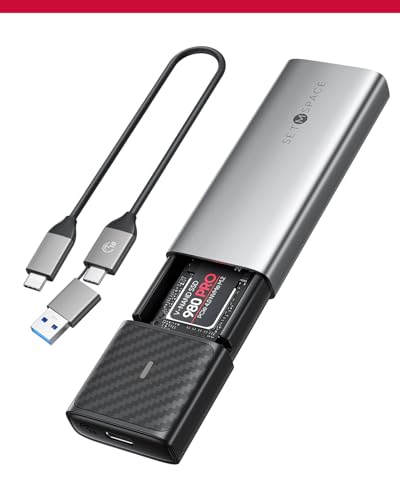
SETMSPACE Tool-Free M.2 Heatsink Enclosure
Best for: tool-free dual-protocol drive swaps with heatsink cooling
- Features
- Tool-Free (what this guide is about)
- Max Transfer Speed
- Exceeding 1000Mb/s
- Drive Interface
- NVMe, SATA (M Key, B+M Key)
- Supported Form Factors
- 2230, 2242, 2260, 2280
- Cooling System
- Heatsink, aluminum alloy case
- Installation Style
- Tool-Free
This SETMSPACE enclosure accommodates M.2 NVMe and SATA SSDs in 2230, 2242, 2260, and 2280 form factors using M-Key or B+M Key slots. You open the gray chassis with a single press for tool-free drive installations. It connects over USB-C with transfer rates exceeding 1000Mb/s and features an included heatsink plus a 10-minute sleep mode. This unit suits you if you need quick drive swaps with passive cooling.
Pros
- Tool-free press-to-open chassis mechanism
- Supports NVMe and SATA M.2 drives in 2230, 2242, 2260, and 2280 sizes
- Includes dedicated heatsink for heat dissipation
- Switches to sleep mode automatically after 10 minutes of inactivity
Cons
- Uses passive heatsink cooling with no active built-in fan
- Single-bay design accommodates only one SSD at a time
Good fit if
- You need tool-free drive installation opened by pressing a button.
- You work with both M.2 NVMe and SATA drives in various lengths.
- You want an included heatsink to help manage SSD temperatures.
Skip if
- You require an active cooling fan for continuous heavy workloads.
- You need an enclosure that houses two SSDs simultaneously.
Verdict: SETMSPACE Tool-Free Heatsink M.2 Enclosure delivers simple push-button access and broad NVMe and SATA compatibility. Its included heatsink and 10-minute sleep mode provide steady, manageable operation for everyday external drive usage.

ORICO Transparent Tool-Free NVMe and SATA Enclosure
Best for: dual-protocol NVMe and SATA drive swapping
- Features
- Tool-Free (what this guide is about)
- Max Transfer Speed
- 10Gbps
- Host Interface
- USB 3.2 Gen 2 Type-C
- Drive Interface
- SATA/NVMe M.2 (M-Key/B+M-Key)
- Supported Form Factors
- 2230/2242/2260/2280
- Maximum Capacity
- 4TB
View on Amazon: ORICO Transparent Tool-Free NVMe and SATA Enclosure
This ORICO enclosure features a transparent shell with tool-free drive installation for M.2 storage. It supports both M-Key NVMe drives at up to 10Gbps and B+M Key SATA drives at up to 6Gbps via a USB 3.2 Gen 2 Type-C connection. You can install 2230, 2242, 2260, or 2280 drives up to 4TB. It includes UASP, TRIM support, an LED indicator, and a 10-minute auto sleep mode.
Pros
- Tool-free drive installation without drivers required
- Dual-protocol support for both NVMe (10Gbps) and SATA (6Gbps) M.2 drives
- Accommodates 2230, 2242, 2260, and 2280 form factors up to 4TB
- Supports UASP, TRIM, and automatic 10-minute sleep mode
Cons
- Maximum transfer speed capped at 10Gbps for NVMe and 6Gbps for SATA
- Storage capacity limited to a maximum of 4TB
Good fit if
- You need a tool-free enclosure that handles both NVMe and SATA M.2 drives.
- You swap between 2230, 2242, 2260, or 2280 size drives up to 4TB.
- You want an enclosure with an idle sleep timer and an LED indicator.
Skip if
- You require transfer speeds faster than 10Gbps.
- You plan to use an SSD larger than 4TB.
Verdict: ORICO Transparent Tool-Free NVMe and SATA Enclosure delivers dual-protocol compatibility for SATA and NVMe drives up to 4TB with tool-less installation. It provides a practical solution if you need flexible drive swapping at USB 3.2 Gen 2 speeds.

ORICO 40Gbps Tool-Free M.2 NVMe SSD Enclosure
Best for: high-speed NVMe drives requiring active cooling
- Features
- Tool-Free (what this guide is about)
- Max Transfer Speed
- 40Gbps
- Host Interface
- USB4, Thunderbolt 4/3
- Drive Interface
- NVMe M-Key
- Supported Form Factors
- 2230/2242/2260/2280
- Cooling System
- Built-in silent fan
View on Amazon: ORICO 40Gbps Tool-Free M.2 NVMe SSD Enclosure
This ORICO external enclosure houses M-Key NVMe SSDs in sizes 2230 through 2280 without tools. It delivers transfer speeds up to 40Gbps and 3,100 MB/s read and write over USB4 or Thunderbolt connections. Active heat management combines a built-in silent fan, striped aluminum, and silicone pads. It suits you if you need sustained high-speed file transfers across Windows, Mac, or Linux systems without thermal throttling.
Pros
- Up to 40Gbps transfer speeds and 3,100 MB/s read/write rates
- Built-in active cooling fan with aluminum heatsink and silicone pad
- Tool-free installation for M.2 sizes 2230, 2242, 2260, and 2280
- Included 2-in-1 cable supports USB-C (40Gbps) and USB-A (10Gbps)
- Supports NVMe drive capacities up to 4TB
Cons
- Supports NVMe M-Key only; incompatible with SATA M.2 SSDs
- Requires USB4 or Thunderbolt 3/4 ports to reach the full 40Gbps rate
Good fit if
- You own a 2230, 2242, 2260, or 2280 NVMe M-Key drive up to 4TB.
- You have a Thunderbolt 3/4 or USB4 port to utilize 40Gbps bandwidth.
- You need active fan cooling to manage drive heat during fast transfers.
Skip if
- You need compatibility with M.2 SATA SSDs.
- You only have standard USB-A ports, which limit speeds to 10Gbps.
Verdict: ORICO 40Gbps Tool-Free NVMe SSD Enclosure delivers high-bandwidth data transfers alongside built-in fan cooling for drives up to 4TB. It offers fast, toolless drive swaps for high-performance NVMe setups on modern host systems.

ANYOYO 40Gbps Fan-Cooled M.2 NVMe Enclosure
Best for: high-speed NVMe transfers requiring active cooling
- Features
- Tool-Free (what this guide is about)
- Max Transfer Speed
- 40Gbps
- Host Interface
- USB4, Thunderbolt 4/3
- Drive Interface
- PCIe NVMe (M Key, B&M Key)
- Supported Form Factors
- M.2 2230, 2242, 2260, 2280
- Cooling System
- Aluminum alloy shell, PWM turbo fan
This ANYOYO enclosure gives you high-speed 40Gbps connectivity and tool-free drive swaps in an aluminum body. It uses a dual JHL7440 and RTL9210 controller design with an active PWM turbo fan to keep temperatures steady. It accepts M.2 NVMe drives in 2230, 2242, 2260, and 2280 sizes up to 8TB. If you need sustained transfer rates up to 2700MB/s across Thunderbolt or USB ports, this unit handles your workflow.
Pros
- Up to 40Gbps transfer speed with rates reaching 2700MB/s
- Integrated PWM turbo fan paired with an aluminum alloy shell
- Tool-free installation supporting 2230, 2242, 2260, and 2280 NVMe SSDs
- Dual JHL7440 and RTL9210 controller chips for broad OS support
Cons
- Does not support M.2 SATA NGFF or mSATA drives
- Internal solid-state drive is not included
Good fit if
- You need 40Gbps or Thunderbolt transfer speeds up to 2700MB/s.
- You want active fan cooling to maintain drive temperatures under load.
- You swap M.2 NVMe drives frequently without using tools.
Skip if
- You plan to use an M.2 SATA NGFF or mSATA drive.
- You prefer a fully silent enclosure without mechanical fan parts.
Verdict: ANYOYO 40Gbps Fan-Cooled NVMe Enclosure pairs high-bandwidth 40Gbps transfers with active PWM fan cooling and tool-free drive installation. It provides reliable thermal management for heavy NVMe workloads across Thunderbolt and USB interfaces.
Specifications side by side
| Spec | Plugable Tool-Free M.2 NVMe SSD Enclosure | SABRENT Tool-Free Thunderbolt 3 M.2 NVMe Enclosure | Sokiwi Tool-Free M.2 NVMe & SATA SSD Enclosure | SABRENT Tool-Free NVMe and SATA M.2 Enclosure | ANYOYO Tool-Free 40Gbps M.2 NVMe Enclosure | MAIWO M.2 NVMe and SATA USB-C Enclosure | ORICO Dual-Bay NVMe and SATA M.2 Enclosure | ORICO Dual-Bay NVMe and SATA M.2 SSD Enclosure | GODO RGB M.2 NVMe and SATA SSD Enclosure | ORICO Tool-Free Aluminum M.2 NVMe Enclosure | ORICO Dual-Protocol Tool-Free M.2 Enclosure | SETMSPACE Tool-Free M.2 Heatsink Enclosure | ORICO Transparent Tool-Free NVMe and SATA Enclosure | ORICO 40Gbps Tool-Free M.2 NVMe SSD Enclosure | ANYOYO 40Gbps Fan-Cooled M.2 NVMe Enclosure |
|---|---|---|---|---|---|---|---|---|---|---|---|---|---|---|---|
| Max Transfer Speed | Up to 10Gbps | Up to 1600 MB/s | 10Gbps | 10Gbps | 40Gbps | 10Gbps | 10Gbps (NVMe), 6Gbps (SATA) | 10Gbps (NVMe), 6Gbps (SATA) | 10Gbps (NVMe), 6Gbps (SATA) | 10Gbps | 10Gbps NVMe, 5Gbps SATA | Exceeding 1000Mb/s | 10Gbps | 40Gbps | 40Gbps |
| Host Interface | USB-C, USB4, Thunderbolt 3, TB4 | Thunderbolt 3 | USB 3.2 Gen 2 | USB 3.2 Type-C | Thunderbolt 4/3, USB4 | USB 3.1 Gen 2x1 Type-C | USB 3.2 Gen 2 Type-C | USB 3.2 Gen 2 Type-C | USB 3.1 Gen 2 Type-C | USB 3.2, Thunderbolt 3 Compatible | USB-C 3.2 Gen 2 | not specified | USB 3.2 Gen 2 Type-C | USB4, Thunderbolt 4/3 | USB4, Thunderbolt 4/3 |
| Drive Interface | PCIe NVMe (Gen 3, Gen 4) | not specified | NVMe/SATA PCIe M-Key, PCIe B&M Key | PCIe NVMe, SATA | NVMe M-Key, B+M Key | PCIe NVMe (M-Key), SATA NGFF (B+M-Key) | PCIe NVMe M-Key, SATA B-Key, B+M Key | PCIe NVMe M-Key, SATA B-Key, B+M Key | PCIe NVMe M-Key, B+M Key, SATA | PCIe M-Key, PCIe B&M key | M.2 NVMe M/B+M Key, NGFF SATA B+M Key | NVMe, SATA (M Key, B+M Key) | SATA/NVMe M.2 (M-Key/B+M-Key) | NVMe M-Key | PCIe NVMe (M Key, B&M Key) |
| Supported Form Factors | 2230, 2242, 2260, 2280 | not specified | 2230, 2242, 2260, 2280 | 2242, 2260, 2280 | 2230, 2242, 2260, 2280 | 2230, 2242, 2260, 2280 | 2230, 2242, 2260, 2280 | 2230, 2242, 2260, 2280 | 2230, 2242, 2260, 2280 | 2230, 2242, 2260, 2280 | 2230, 2242, 2260, 2280 | 2230, 2242, 2260, 2280 | 2230/2242/2260/2280 | 2230/2242/2260/2280 | M.2 2230, 2242, 2260, 2280 |
| Drive Bay Count | not specified | not specified | not specified | not specified | not specified | not specified | 2 bays | 2 bays | not specified | not specified | not specified | not specified | not specified | not specified | not specified |
| Cooling System | Aluminum case with heatsink fins | Solid Aluminum | Aluminum alloy shell | Aluminum case, thermal pad | Aluminum alloy shell, thermal pad | Aluminum alloy shell, thermal pads | Aluminum fin, heat sinks, thermal pads | Aluminum rib, heat sinks, thermal pads | not specified | Silicone pad, heatsink, aluminum body | Heatsink, thermal silicone, aluminum | Heatsink, aluminum alloy case | not specified | Built-in silent fan | Aluminum alloy shell, PWM turbo fan |
| Maximum Capacity | Any capacity | not specified | 2TB | not specified | 8TB | 8TB | 2 x 4TB | 2 x 4TB | 2TB | 4TB | 4TB | not specified | 4TB | 4TB | 8TB |
| Installation Style | Tool-Free | Tool-Free | Tool-Free | Tool-free | Tool-free | Tool Free | Tool-free | Tool Free | Tool-Free | Tool-Free | Tool-Free | Tool-Free | Tool-free | Tool-Free | Tool-Free |
| Interface | NVMe | NVMe | SATA III | SATA III | NVMe | SATA III | SATA III | SATA III | NVMe | NVMe | SATA III | SATA III | SATA III | NVMe | NVMe |
| Form Factor | M.2 | M.2 | M.2 | M.2 | M.2 | M.2 | M.2 2280 | M.2 2280 | M.2 | M.2 2280 | M.2 2280 | M.2 2280 | M.2 2280 | M.2 2280 | M.2 |
| Cooling | not specified | not specified | not specified | not specified | not specified | not specified | not specified | not specified | not specified | not specified | not specified | Heatsink | not specified | Cooling Fan | Cooling Fan |
| Transfer Speed | not specified | not specified | 10Gbps | not specified | 40Gbps | 10Gbps | not specified | not specified | 10Gbps | 10Gbps | 10Gbps | not specified | 10Gbps | 40Gbps | 40Gbps |
| Features | Tool-Free | Tool-Free | Tool-Free | Tool-Free | Tool-Free | Tool-Free | Tool-Free | Tool-Free | Tool-Free, RGB Lighting | Tool-Free | Tool-Free | Tool-Free | Tool-Free | Tool-Free | Tool-Free |
| Bay Count | not specified | not specified | not specified | not specified | not specified | not specified | Dual-Bay | Dual-Bay | not specified | not specified | not specified | not specified | not specified | not specified | not specified |
| Material | not specified | not specified | not specified | not specified | Aluminum | not specified | Aluminum | Aluminum | not specified | Aluminum | Aluminum | not specified | not specified | not specified | not specified |
| Dimensions | 7.87 × 3.54 × 1.18 inches | 4 × 1.5 × 0.58 inches | 3.7 × 1.5 × 0.4 inches | 4.59 × 1.24 × 0.5 inches | 3.94 × 2.24 × 0.55 inches | 4.33 × 1.48 × 0.49 inches | not specified | not specified | 4.35 × 1.56 × 0.53 inches | 4.88 × 1.38 × 0.55 inches | 4.88 × 1.38 × 0.55 inches | 0.55 × 1.97 × 3.94 inches | 4.21 × 1.38 × 0.47 inches | not specified | 4.65 × 2.24 × 0.71 inches |
| Weight | 3.21 ounces | 4.7 ounces | 3.84 ounces | 3.99 ounces | 5.29 ounces | 1.76 ounces | 6.35 ounces | 8.47 ounces | not specified | 3.53 ounces | 3.21 ounces | not specified | 0.35 ounces | 3.17 ounces | 5.86 ounces |
| Color | Black | Grey | Gray | BLACK | Space Gray | Blue | Grey | Silver | Black | Blue | Blue | Gray | Transparent | Black | Space Gray |
| Model | USBC-NVME | EC-T3NS | SKUD0501-US | EC-SNVE | TBU401 | 10Gbps NVMe/SATA Enclosure | M.2 SATA+NVMe-Dual | Dual M.2 SATA+NVMe | MS09-NVMe/SATA | Black | Blue-C to C cable | NVME/SATA SSD Enclosure | NVMe & SATA | TCM2-U4-BK | TBU401 Pro |
| Size | not specified | M.2 NVMe | 2230/2242/2260/2280 | 10Gbps NVMe + SATA | TBU401 | not specified | Dual M.2 SATA+NVMe | not specified | not specified | not specified | not specified | not specified | not specified | not specified | TBU401Pro |
If you are also comparing kitchen hardware specifications, the reference for best juicers with BPA-Free details those material standards.
Choosing the Best Tool-Free SSD Enclosure
-
Verify Supported Physical Drive Lengths
M.2 solid-state drives come in different physical lengths, designated by four-digit numbers such as 2230, 2242, 2260, and 2280. While 2280 is the standard desktop size, compact handheld drives often use 2230 or 2242 cards. Some tool-free enclosures only fit 2280 sticks, which leaves smaller cards unanchored. If you handle multiple drive sizes, pick an enclosure with adjustable mounting positions. The Sokiwi Tool-Free M.2 NVMe & SATA SSD Enclosure accommodates 2230, 2242, 2260, and 2280 formats, making it suitable for mixed drive collections.
-
Select Active or Passive Cooling
M.2 NVMe drives generate heat during continuous read and write tasks, making thermal dissipation a key specification. Many tool-free enclosures rely on passive cooling using an aluminum chassis or an internal heatsink to draw heat away from the SSD silently. However, sustained high-bandwidth operations benefit from active airflow. If you transfer large volumes of data frequently, look for enclosures with integrated cooling fans. The ORICO 40Gbps Tool-Free M.2 NVMe SSD Enclosure incorporates a built-in cooling fan, maintaining operational temperatures during demanding data transfers without thermal throttling.
-
Check Drive Capacity Limitations
Enclosures specify the maximum storage capacity supported by their internal controller chipsets. Some models cap drive capacity at 2TB or 4TB, while others accommodate drives up to 8TB. If you plan to install a high-capacity storage drive, verify that the enclosure controller addresses that density without partition issues. For high-volume archival tasks or large media libraries, choosing an enclosure rated for higher capacities ensures your drive functions at its full potential. The MAIWO M.2 NVMe and SATA USB-C Enclosure supports SSD capacities up to 8TB for expanding external storage.
-
Evaluate Dual Bay Requirements
Single-bay enclosures hold one drive at a time, making them portable and simple. If your workflow requires cloning, direct drive-to-drive transfers, or running both NVMe and SATA drives simultaneously, consider a dual-bay unit. Note how the bays are wired on multi-slot units. Some models do not offer interchangeable bays; instead, each slot is dedicated to a distinct interface. The ORICO Dual-Bay NVMe and SATA M.2 Enclosure mounts both an NVMe and a SATA drive side by side, providing independent tool-free access to each format on a single workstation connection.
-
Confirm Host Port Compatibility
External SSD enclosures depend heavily on the port capabilities of your host computer. Standard USB 3.2 enclosures function reliably across standard USB-A and USB-C ports, while specialized high-speed enclosures require dedicated host hardware to operate. If your enclosure requires a Thunderbolt connection, plugging it into a legacy USB-A or standard USB port will prevent the drive from mounting. The SABRENT Tool-Free Thunderbolt 3 M.2 NVMe Enclosure operates at speeds up to 1600 MB/s, but requires dedicated Thunderbolt 3 host ports rather than conventional USB connections to achieve full data functionality.
Frequently asked questions
How do tool-free SSD enclosures secure the drive without screws?
Tool-free enclosures use specialized retention clips, latches, or sliding mechanisms to hold the SSD in place. For example, the ORICO Tool-Free Aluminum M.2 NVMe Enclosure uses a push-cover mechanism, while the ORICO Dual-Protocol enclosure relies on a latch mechanism. These setups secure your drive firmly inside the chassis and let you swap hardware without using a screwdriver.
Can you install two M.2 drives simultaneously in a tool-free enclosure?
Yes, you can if you choose a multi-slot model designed for dual drives. The ORICO Dual-Bay NVMe and SATA M.2 Enclosure accommodates both an NVMe and a SATA M.2 drive side by side without tools. You must note that each bay is dedicated to a single protocol, meaning you cannot install two NVMe or two SATA drives together.
Do 40Gbps tool-free enclosures require active cooling fans?
Active cooling is not strictly mandatory, but it helps manage high thermal loads during heavy transfers. The ANYOYO 40Gbps Fan-Cooled Enclosure and ORICO 40Gbps Tool-Free Enclosure feature built-in cooling fans to actively exhaust heat. In contrast, the ANYOYO TBU401 enclosure relies on a fanless aluminum build for silent heat dissipation across 40Gbps connections without internal fan noise.
What drive capacity limits exist among tool-free SSD enclosures?
Supported storage limits depend entirely on the enclosure chipset and firmware specifications. Compact models like the Sokiwi Tool-Free and GODO RGB enclosures support drives up to 2TB. If you need larger capacities, the ORICO Transparent model handles drives up to 4TB, while the MAIWO USB-C and ANYOYO TBU401 enclosures support high-capacity M.2 drives up to 8TB.
What transfer speeds can you expect from a tool-free Thunderbolt enclosure?
Transfer speeds depend on the enclosure interface and drive specifications. The SABRENT Tool-Free Thunderbolt 3 M.2 NVMe Enclosure delivers data transfer speeds up to 1600 MB/s over dedicated Thunderbolt 3 host connections. If you connect to 40Gbps ports, options like the ANYOYO Tool-Free 40Gbps enclosure offer maximum bandwidth across compatible Thunderbolt and USB4 systems.
How do heatsinks and thermal pads fit inside tool-free enclosures?
Tool-free enclosures integrate thermal accessories directly around the M.2 SSD before you close the case. The SETMSPACE Tool-Free M.2 Enclosure comes with a dedicated heatsink that rests on the drive, along with a 10-minute sleep mode. Similarly, the ORICO Dual-Protocol enclosure includes an aluminum thermal vest designed to fit inside the chassis to disperse heat.