Best USB-C SSD Enclosures: 15 Spec-Based Picks
As an Amazon Associate we earn from qualifying purchases. Links on this page are affiliate links.
A fast USB-C SSD enclosure turns an internal M.2 drive into dependable external storage for your system. We compared 15 products strictly using the specifications published on their listings. The StarTech Aluminum M.2 NVMe SSD Enclosure leads because its aluminum build delivers 10Gbps transfer speeds for NVMe drives.
Different drives require specific protocol support, card lengths, and connection types. This guide helps you decide which model suits your setup by breaking down interface compatibility, form factors, and transfer performance.
Quick picks
The best fit for you
- You want an aluminum enclosure for everyday NVMe backups StarTech Aluminum M.2 NVMe SSD Enclosure Its aluminum housing supports 10Gbps NVMe transfer speeds up to 1GB/s over USB-C.
- You need rugged physical protection for outdoor field use StarTech Rugged M.2 NVMe USB-C Enclosure This enclosure features IP67 ingress protection alongside MIL-STD-810G drop resistance.
- You use longer 22110 enterprise M.2 solid-state drives ICY DOCK M.2 NVMe USB-C Enclosure with Power Switch The chassis accommodates drive lengths up to 22110 and includes an integrated power switch.
- You need simultaneous access to NVMe and SATA drives ORICO Dual-Bay NVMe and SATA M.2 Enclosure Its dual-bay aluminum design provides independent 10Gbps NVMe and 6Gbps SATA slots simultaneously.
Our 15 picks

StarTech Aluminum M.2 NVMe SSD Enclosure
Best for: everyday USB-C NVMe backups and data recovery
- Host Interface
- USB-C (what this guide is about)
- Max Transfer Speed
- 10Gbps
- Drive Interface
- PCIe NVMe M-Key
- Supported Form Factors
- 2230, 2242, 2260, 2280
- Cooling System
- Aluminum housing with ventilation holes
- Dimensions
- 4.3 × 1.6 × 0.5 inches
The StarTech.com USB-C 10Gbps M.2 NVMe SSD Enclosure turns an internal PCIe M.2 drive into portable storage. It connects through a 10Gbps USB-C interface with UASP support, transferring data at up to 1GB/s over PCIe 3.0. The aluminum housing features ventilation holes for heat dissipation and accepts 2230, 2242, 2260, and 2280 drive lengths. You get plug-and-play setup across Windows, Mac, Chrome, and Linux systems for backups and file transfers.
Pros
- 10Gbps USB 3.1 Gen 2 transfer rate with UASP and up to 1GB/s throughput
- Aluminum body with ventilation holes for heat dissipation
- Supports 2230, 2242, 2260, and 2280 M-Key PCIe NVMe SSDs
- Includes USB-C cable and installation screwdriver in the box
Cons
- Requires screwdriver assembly rather than tool-free installation
- Incompatible with M.2 SATA solid-state drives
Good fit if
- You need 10Gbps transfer speeds for an M-Key PCIe NVMe drive.
- You want a ventilated aluminum chassis for passive heat dissipation.
- You connect to USB-C or Thunderbolt 3 host devices.
Skip if
- You need an enclosure that supports M.2 SATA SSDs.
- You prefer a tool-free design that opens without hardware tools.
Verdict: StarTech.com USB-C 10Gbps M.2 NVMe SSD Enclosure delivers 1GB/s transfer speeds and broad drive size compatibility in a ventilated metal housing. It is a solid pick when you need dependable PCIe storage access on USB-C and Thunderbolt 3 systems.

ASUS ROG Strix Arion 10Gbps NVMe Enclosure
Best for: NVMe drives needing RGB lighting and dual cables
- Host Interface
- USB-C (what this guide is about)
- Max Transfer Speed
- Up to 10 Gbps
- Drive Interface
- PCIe NVMe (M Key, B+M Key)
- Supported Form Factors
- 2230, 2242, 2260, 2280
- Cooling System
- Aluminum alloy case with thermal pads
- Dimensions
- 7.1 × 3.8 × 1.6 inches
The ASUS ROG Strix Arion M.2 NVMe Enclosure adapts PCIe SSDs to a 10Gbps USB-C connection. Built from aluminum alloy with internal thermal pads, it houses 2230, 2242, 2260, and 2280 drive sizes. You get integrated Aura Sync RGB lighting and both USB-C and USB-A cables in the box. It suits you if you want a dedicated NVMe carrier with active illumination and multi-cable connectivity.
Pros
- 10Gbps USB 3.2 Gen 2 Type-C transfer speeds
- Supports 2230, 2242, 2260, and 2280 M.2 PCIe NVMe drives
- Aluminum alloy chassis with included thermal pads
- Includes both USB-C to USB-C and USB-C to USB-A cables
- Integrated ASUS Aura Sync RGB lighting
Cons
- No support for M.2 SATA SSDs
- Large enclosure body measuring 7.1 inches long
Good fit if
- You need an aluminum USB-C enclosure for an M.2 PCIe NVMe drive.
- You want Aura Sync RGB lighting on your external storage.
- You require out-of-the-box cables for both USB-C and USB-A host ports.
Skip if
- You need to install an M.2 SATA drive.
- You prefer an ultra-compact enclosure under seven inches long.
Verdict: ASUS ROG Strix Arion M.2 NVMe Enclosure provides 10Gbps NVMe speeds inside an aluminum shell equipped with thermal pads and Aura Sync RGB. It is a solid pick if you need multi-cable compatibility across modern and legacy ports.

StarTech Rugged M.2 NVMe USB-C Enclosure
Best for: rugged outdoor and field data protection
- Host Interface
- USB-C (what this guide is about)
- Max Transfer Speed
- 10Gbps
- Drive Interface
- PCIe NVMe M-Key
- Supported Form Factors
- 2230, 2242, 2260, 2280
- Cooling System
- Aluminum housing, internal thermal pad
- Dimensions
- 1.8 × 4.1 × 0.6 inches
This external drive housing connects M.2 NVMe PCIe SSDs to your host device via a 10Gbps USB-C connection. It features an IP67 rating for dustproofing and water resistance, along with MIL-STD-810G drop certification. Its aluminum body houses 2230, 2242, 2260, and 2280 form-factor drives. If you need portable, hardware-protected storage that delivers up to 1GB/s transfer speeds in demanding environments, this enclosure fits your setup.
Pros
- IP67 rated dustproof and water resistant build
- MIL-STD-810G drop test certification
- 10Gbps USB 3.2 Gen 2 transfer rates up to 1GB/s
- Supports M.2 NVMe lengths from 2230 to 2280
Cons
- Requires screwdriver installation rather than a tool-free design
- Does not support M.2 SATA SSDs
Good fit if
- You require an IP67 water- and dust-resistant aluminum enclosure for outdoor use.
- You need drop-tested hardware protection for your M.2 NVMe PCIe drive.
Skip if
- You need to install an M.2 SATA drive.
- You prefer a tool-free enclosure that swaps drives without screws.
Verdict: StarTech Rugged M.2 NVMe SSD Enclosure combines IP67 protection and MIL-STD-810G drop resistance with 10Gbps USB-C performance. It is a solid choice when physical drive durability takes priority over tool-free swapping.

SSK Dual-Protocol M.2 SSD Enclosure
Best for: swapping between NVMe and SATA M.2 drives
- Host Interface
- USB-C (what this guide is about)
- Max Transfer Speed
- 10Gbps
- Drive Interface
- NVMe PCIe, SATA (M-Key, B+M Key)
- Supported Form Factors
- 2230, 2242, 2260, 2280
- Cooling System
- Aluminum alloy shell, thermal pads
- Installation Style
- Tool-Free
The SSK Dual-Protocol NVMe and SATA USB-C Enclosure handles both PCIe NVMe and SATA M.2 SSDs. Its USB-C 3.2 Gen 2 host interface supports speeds up to 10Gbps on NVMe and 6Gbps on SATA. Tool-free assembly lets you install 2230, 2242, 2260, or 2280 drives without screws. The aluminum casing includes thermal pads and both USB-C and USB-A cables. It suits you if you need a flexible drive reader.
Pros
- Supports both PCIe NVMe and SATA M.2 SSDs
- Tool-free design installs drives without screws
- Compatible with 2230, 2242, 2260, and 2280 drive sizes
- Includes both USB-C and USB-A cables plus two thermal pads
Cons
- SATA operation capped at 6Gbps maximum transfer rate
- Peak NVMe data transfer speed limited to 10Gbps
Good fit if
- You work with both M.2 NVMe and M.2 SATA solid-state drives.
- You want tool-free SSD swapping across multiple form factors.
- You need out-of-the-box support for both USB-C and USB-A host ports.
Skip if
- You require transfer bandwidth higher than 10Gbps.
- You need an enclosure with a hardware write-protect switch.
Verdict: SSK Dual-Protocol NVMe and SATA USB-C Enclosure provides dual NVMe and SATA support with quick tool-free drive installation. Its aluminum chassis and dual included cables deliver a straightforward 10Gbps external storage solution.

ICY DOCK M.2 NVMe USB-C Enclosure with Power Switch
Best for: users with 22110 enterprise-length NVMe SSDs
- Host Interface
- USB-C (what this guide is about)
- Max Transfer Speed
- 10Gbps
- Drive Interface
- PCIe NVMe
- Supported Form Factors
- 2230, 2242, 2260, 2280, 22110
- Drive Bay Count
- 1 bay
- Dimensions
- 5.91 × 2.48 × 0.47 inches
View on Amazon: ICY DOCK M.2 NVMe USB-C Enclosure with Power Switch
This external drive enclosure connects PCIe NVMe drives to a computer using a USB-C interface. It accommodates M.2 card lengths from 2230 up to 22110, which handles unusually long enterprise SSDs. The unit features transfer speeds up to 10Gbps, a dedicated power switch, and a blue drive activity LED. If you frequently swap bare NVMe drives of various form factors without opening a desktop case, this enclosure handles the job.
Pros
- Supports 2230, 2242, 2260, 2280, and 22110 M.2 lengths
- Up to 10Gbps transfer speed over USB-C
- Dedicated on/off drive power switch
- Compatible with Thunderbolt 3 and Thunderbolt 4 ports
Cons
- Does not list support for M.2 SATA SSDs
- Longer 5.9-inch footprint to accommodate 110mm cards
Good fit if
- You need an enclosure that accepts 110mm (22110) NVMe drives.
- You want a physical hardware switch to power the drive on and off.
- You connect to USB-C or Thunderbolt host ports.
Skip if
- You need compatibility with legacy M.2 SATA drives.
- You prefer the most compact enclosure possible for standard 2280 cards.
Verdict: ICY DOCK M.2 NVMe USB-C SSD Enclosure provides broad form-factor compatibility up to 22110 drives alongside an integrated power switch. It is a practical USB-C option if you manage varying card lengths.

SSK Tool-Free M.2 NVMe USB-C Enclosure
Best for: tool-free M.2 NVMe drive access
- Host Interface
- USB-C (what this guide is about)
- Max Transfer Speed
- 10Gbps
- Drive Interface
- PCIe NVMe M-Key
- Supported Form Factors
- 2230, 2242, 2260, 2280
- Cooling System
- Aluminum shell, 2 thermal pads
- Installation Style
- Tool-free
This enclosure houses an M.2 NVMe PCIe SSD in 2230, 2242, 2260, or 2280 sizes and connects over a 10Gbps USB-C 3.2 Gen 2 interface. Powered by the JMS583 controller, it supports TRIM and UASP for sustained performance. The tool-free aluminum chassis includes thermal pads and both USB-C and USB-A cables. It suits you if you need fast, swappable external storage for an M-Key NVMe drive.
Pros
- Tool-free installation requires no screws or drivers
- 10Gbps USB 3.2 Gen 2 speeds with UASP and TRIM support
- Includes both USB-C and USB-A cables alongside two thermal pads
- Supports 2230, 2242, 2260, and 2280 M.2 form factors
Cons
- Incompatible with SATA-based M.2 SSDs
- Supports only M-Key PCIe NVMe drives, excluding B-Key connectors
Good fit if
- You use an M-Key PCIe NVMe drive in sizes from 2230 to 2280.
- You want quick, tool-free drive swaps without screwdrivers.
- You need both USB-C and USB-A connection options in the box.
Skip if
- You have an M.2 SATA SSD or an AHCI PCIe drive.
- You require support for B-Key or B+M Key edge connectors.
Verdict: SSK Tool-Free M.2 NVMe USB-C Enclosure delivers 10Gbps transfer rates in an accessible, screwless aluminum frame. It is a capable pick for portable NVMe storage that covers four common drive lengths.

MAIWO Dual-Interface M.2 NVMe and SATA Enclosure
Best for: cable-free use across USB-C and USB-A devices
- Host Interface
- USB-C (what this guide is about)
- Max Transfer Speed
- 10Gbps
- Drive Interface
- NVMe & SATA (M-Key, B+M Key)
- Supported Form Factors
- 2230, 2242, 2260, 2280
- Cooling System
- Aluminum alloy
- Maximum Capacity
- 8TB
View on Amazon: MAIWO Dual-Interface M.2 NVMe and SATA Enclosure
This MAIWO aluminum enclosure features integrated USB-C and USB-A male plugs, eliminating the need for loose cables. It accepts M.2 NVMe and SATA SSDs across four lengths: 2230, 2242, 2260, and 2280. You get throughput up to 10Gbps on PCIe drives and 6Gbps on SATA drives. An integrated LED monitors drive status. This model suits you if you switch frequently between modern USB-C ports and legacy USB-A ports without carrying adapters.
Pros
- Integrated USB-C and USB-A plugs require no external cables
- Supports both M.2 NVMe (10Gbps) and SATA (6Gbps) drives
- Accepts 2230, 2242, 2260, and 2280 form factors
- Aluminum alloy shell assists with heat dissipation
Cons
- Longer 5.55-inch body can block adjacent ports when plugged directly into a host
- SATA drives cap at 6Gbps transfer rates due to interface limits
Good fit if
- You need direct USB-C and USB-A connections without carrying loose cords.
- You swap between M.2 NVMe and legacy SATA drives in sizes up to 2280.
Skip if
- You have tightly spaced ports where a 1.22-inch wide direct-plug enclosure causes obstruction.
- You prefer a flexible tether cable for cramped or recessed ports.
Verdict: MAIWO Dual-Connector M.2 NVMe and SATA Enclosure gives you versatile cable-free connectivity for both NVMe and SATA drives across multiple card lengths. Its direct-plug dual-interface design makes switching between USB-C and USB-A hosts straightforward.

UGREEN 10Gbps M.2 NVMe SSD Enclosure
Best for: tool-free portable NVMe drive swapping
- Host Interface
- USB-C (what this guide is about)
- Max Transfer Speed
- 10Gbps
- Drive Interface
- NVMe M-Key, B+M Key
- Supported Form Factors
- 2230, 2242, 2260, 2280
- Cooling System
- Aluminum casing, silicone case
- Maximum Capacity
- 8TB
This external enclosure houses M.2 NVMe drives in 2230, 2242, 2260, and 2280 form factors up to 8TB. You get a USB-C connection powered by the RTL9210 controller, delivering transfer speeds up to 10Gbps via USB 3.2 Gen 2. The aluminum body includes a protective silicone case and tool-free buckle mounting. It suits you if you need portable NVMe storage across Windows, macOS, Linux, Android, or iOS devices without carrying tools.
Pros
- Supports NVMe SSD sizes 2230, 2242, 2260, and 2280 up to 8TB
- Tool-free buckle installation requires no extra drivers
- Includes aluminum casing and protective silicone sleeve
- RTL9210 controller supports UASP and TRIM commands
Cons
- No support for SATA NGFF or mSATA SSDs
- Full 10Gbps speed requires a USB-C 3.2 Gen 2 data cable
Good fit if
- You need tool-free installation for standard M.2 NVMe drives up to 8TB.
- You want an aluminum housing equipped with an extra silicone case for portability.
- You connect external drives across Windows, macOS, Linux, Android, or iOS hosts.
Skip if
- You need compatibility with SATA NGFF or mSATA drives.
- You require transfer speeds faster than 10Gbps.
Verdict: UGREEN Tool-Free 10Gbps M.2 NVMe SSD Enclosure delivers reliable 10Gbps NVMe performance with simple toolless installation and broad operating system support. Its aluminum shell and silicone bumper provide straightforward protection for drives up to 8TB.

MAIWO M.2 NVMe and SATA USB-C Enclosure
Best for: swapping NVMe and SATA M.2 SSDs
- Host Interface
- USB-C (what this guide is about)
- Max Transfer Speed
- 10Gbps
- Drive Interface
- PCIe NVMe (M-Key), SATA NGFF (B+M-Key)
- Supported Form Factors
- 2230, 2242, 2260, 2280
- Cooling System
- Aluminum alloy shell, thermal pads
- Maximum Capacity
- 8TB
This external enclosure adapts M.2 NVMe and SATA drives to a 10Gbps USB-C connection using the RTL9210B controller. It accommodates 2230, 2242, 2260, and 2280 form factors with capacities up to 8TB. The tool-free aluminum housing features passive ventilation holes and includes thermal pads for heat dissipation. It suits you if you switch between different drive types and need a compact, portable caddy.
Pros
- Supports both M.2 NVMe (M-Key) and SATA (B+M-Key) SSDs
- Tool-free installation design
- Accepts drive capacities up to 8TB
- Includes silicone and aluminum thermal pads
Cons
- Does not support M.2 SATA B-Key drives
- Transfer speeds cap at 10Gbps via USB 3.1 Gen 2x1
Good fit if
- You need an enclosure that works with both NVMe and SATA M.2 drives.
- You swap SSDs frequently and prefer a tool-free setup.
- You deploy high-capacity drives up to 8TB.
Skip if
- You use an M.2 SATA SSD with an exclusive B-Key connector.
- You require host transfer interfaces faster than 10Gbps.
Verdict: MAIWO Tool-Free M.2 NVMe and SATA SSD Enclosure delivers broad drive compatibility across NVMe and SATA standards up to 8TB capacities. Its tool-free aluminum chassis provides straightforward drive swaps and 10Gbps USB-C data transfer.

ORICO Dual-Bay NVMe and SATA M.2 Enclosure
Best for: simultaneous NVMe and SATA drive access
- Host Interface
- USB-C (what this guide is about)
- Max Transfer Speed
- 10Gbps (NVMe), 6Gbps (SATA)
- Drive Interface
- PCIe NVMe M-Key, SATA B-Key, B+M Key
- Supported Form Factors
- 2230, 2242, 2260, 2280
- Drive Bay Count
- 2 bays
- Cooling System
- Aluminum fin, heat sinks, thermal pads
This dual-bay aluminum enclosure connects one M.2 NVMe drive and one M.2 SATA drive to your computer through USB-C. You get 10Gbps transfer rates on the NVMe slot and 6Gbps on the SATA slot, with tool-free installation for drives up to 4TB each. It suits you if you handle mixed drive types and want simultaneous access without carrying separate adapters.
Pros
- Dual bays support one NVMe drive at 10Gbps and one SATA drive at 6Gbps
- Tool-free drive installation using rubber retention caps
- Aluminum finned housing with dual heatsinks and thermal silicone pads
- Supports 2230, 2242, 2260, and 2280 form factors up to 4TB per slot
Cons
- Requires two separate cables connected at once to access both drives simultaneously
- Slots are protocol-locked with one bay limited strictly to SATA drives
Good fit if
- You need to access both an M.2 NVMe drive and an M.2 SATA drive from one enclosure.
- You want tool-free drive swapping across 2230, 2242, 2260, or 2280 form factors.
- You want bus-powered dual drive operation without carrying an external AC power adapter.
Skip if
- You want to run two NVMe SSDs at the same time.
- You prefer accessing multiple drives over a single USB cable connection.
Verdict: ORICO Dual-Bay NVMe and SATA USB-C Enclosure pairs a 10Gbps NVMe slot with a 6Gbps SATA slot in an all-aluminum, tool-free design. It provides a practical two-in-one desktop solution if you frequently work with mixed-protocol M.2 drives.

ORICO Dual-Bay NVMe and SATA M.2 SSD Enclosure
Best for: Reading NVMe and SATA drives simultaneously
- Host Interface
- USB-C (what this guide is about)
- Max Transfer Speed
- 10Gbps (NVMe), 6Gbps (SATA)
- Drive Interface
- PCIe NVMe M-Key, SATA B-Key, B+M Key
- Supported Form Factors
- 2230, 2242, 2260, 2280
- Drive Bay Count
- 2 bays
- Cooling System
- Aluminum rib, heat sinks, thermal pads
View on Amazon: ORICO Dual-Bay NVMe and SATA M.2 SSD Enclosure
This aluminum dual-bay enclosure from ORICO houses one M.2 NVMe drive and one M.2 SATA drive side by side. It connects via USB-C, delivering up to 10Gbps for the PCIe bay and up to 6Gbps for the SATA bay. It features tool-free installation and supports drive sizes from 2230 to 2280 up to 4TB per slot. It suits you if you need concurrent access to mixed-protocol M.2 drives.
Pros
- Dual bays hold one M.2 NVMe SSD and one M.2 SATA SSD simultaneously
- Dedicated 10Gbps transfer speed for NVMe bay and 6Gbps for SATA bay
- Tool-free installation with rubber retention plugs
- Aluminum alloy housing with two heatsinks and two silicone thermal pads
- Supports 2230, 2242, 2260, and 2280 form factors up to 4TB each
Cons
- Bays are protocol-locked and cannot accept two NVMe or two SATA drives
- Requires connecting two separate data cables to access both drives simultaneously
Good fit if
- You need to access both an M.2 NVMe drive and an M.2 SATA drive in one unit.
- You prefer tool-free drive swapping without using screws.
- You want passive cooling with included thermal pads and internal heatsinks.
Skip if
- You need to run two NVMe SSDs or two SATA SSDs at the same time.
- You want to read two drives using a single USB cable connection.
Verdict: ORICO Dual-Bay NVMe and SATA USB-C Enclosure delivers independent dual-protocol access with dedicated 10Gbps and 6Gbps transfer lanes. It provides a practical tool-free aluminum housing for managing both NVMe and SATA M.2 drives side by side.

GODO RGB M.2 NVMe and SATA SSD Enclosure
Best for: visual RGB drive status monitoring
- Host Interface
- USB-C (what this guide is about)
- Max Transfer Speed
- 10Gbps (NVMe), 6Gbps (SATA)
- Drive Interface
- PCIe NVMe M-Key, B+M Key, SATA
- Supported Form Factors
- 2230, 2242, 2260, 2280
- Maximum Capacity
- 2TB
- Installation Style
- Tool-Free
This external enclosure features a Realtek RTL9210B chipset supporting both NVMe drives at up to 10Gbps and SATA M.2 drives at up to 6Gbps over a USB-C connection. It accommodates 2230, 2242, 2260, and 2280 form factors with a tool-free installation mechanism. Dynamic RGB LEDs signal sleep, standby, reading, and writing activity directly. It suits you if you need a flexible drive reader with visible, color-coded status lighting for fast drive swaps.
Pros
- Supports both M.2 NVMe up to 10Gbps and SATA up to 6Gbps
- Multi-state RGB lighting displays standby, read/write, and sleep status
- Tool-free installation accepts 2230, 2242, 2260, and 2280 drive sizes
- Equipped with the Realtek RTL9210B controller chip
Cons
- Maximum drive capacity is limited to 2TB
- Bandwidth tops out at 10Gbps rather than faster USB standards
Good fit if
- You want visual drive activity indicators via dedicated RGB lights.
- You use both M.2 NVMe and M.2 SATA drives.
- You swap M.2 drives frequently and need tool-free access.
Skip if
- You need an enclosure that supports drives larger than 2TB.
- You require speeds exceeding standard 10Gbps USB 3.1 Gen 2.
Verdict: GODO RGB Tool-Free M.2 NVMe and SATA SSD Enclosure pairs broad dual-protocol support with functional RGB status diagnostics. It provides an accessible, tool-free USB-C housing for drives up to 2TB.

ORICO Tool-Free Aluminum M.2 NVMe Enclosure
Best for: tool-free NVMe drive swapping on USB-C
- Host Interface
- USB-C (what this guide is about)
- Max Transfer Speed
- 10Gbps
- Drive Interface
- PCIe M-Key, PCIe B&M key
- Supported Form Factors
- 2230, 2242, 2260, 2280
- Cooling System
- Silicone pad, heatsink, aluminum body
- Maximum Capacity
- 4TB
The ORICO Tool-Free Aluminum M.2 NVMe Enclosure connects PCIe M.2 drives to your devices through a 10Gbps USB-C interface. It delivers transfer rates up to 1000MB/s across 2230, 2242, 2260, and 2280 form factors. A push-cover design eliminates screws during drive swaps, while an internal heatsink and silicone pad manage heat. It suits you if you need fast, screwdriver-free access to NVMe storage across modern USB-C laptops, phones, or consoles.
Pros
- Tool-free push-cover tray requires no installation tools
- 10Gbps USB-C interface transfers data at up to 1000MB/s
- Includes thermal silicone pad and dedicated cooling heatsink
- Accepts four NVMe lengths: 2230, 2242, 2260, and 2280
Cons
- Does not support SATA or PCIe AHCI M.2 drives
- Included cable is USB-C to USB-C only
Good fit if
- You swap M.2 NVMe drives frequently and want tool-free installation.
- You need 10Gbps transfer speeds for a 2230, 2242, 2260, or 2280 NVMe SSD.
- You connect external storage directly to USB-C hosts such as modern PCs or phones.
Skip if
- You need compatibility with legacy SATA or AHCI M.2 SSDs.
- You require an included USB-A cable for legacy USB ports without an adapter.
Verdict: ORICO Tool-Free Aluminum M.2 NVMe Enclosure delivers practical 10Gbps speeds and effortless, toolless drive swaps for standard NVMe form factors. Its aluminum chassis and dedicated thermal vest keep high-speed PCIe storage operating steadily without complex hardware setup.

ORICO Dual-Protocol Tool-Free M.2 Enclosure
Best for: tool-free swaps across NVMe and SATA drives
- Host Interface
- USB-C (what this guide is about)
- Max Transfer Speed
- 10Gbps NVMe, 5Gbps SATA
- Drive Interface
- M.2 NVMe M/B+M Key, NGFF SATA B+M Key
- Supported Form Factors
- 2230, 2242, 2260, 2280
- Cooling System
- Heatsink, thermal silicone, aluminum
- Maximum Capacity
- 4TB
The ORICO Tool-Free Dual-Protocol M.2 SSD Enclosure converts an NVMe or SATA M.2 drive into an external USB-C drive. You get up to 10Gbps speeds for NVMe drives and 5Gbps for SATA drives, supporting capacities up to 4TB across 2230, 2242, 2260, and 2280 form factors. It suits you if you swap drives frequently and need tool-free installation paired with an aluminum housing and internal heatsink vest.
Pros
- Supports both NVMe at 10Gbps and SATA at 5Gbps
- Tool-free sliding case with rubber retention fastener
- Accommodates 2230, 2242, 2260, and 2280 lengths up to 4TB
- Includes aluminum shell, thermal silicone pad, and heatsink vest
Cons
- SATA transmission rate is limited to 5Gbps
- Profile measures 0.55 inches thick
Good fit if
- You need to read both PCIe NVMe and SATA M.2 SSDs.
- You want tool-free drive swaps without using screws.
- You use drives up to 4TB across standard M.2 lengths.
Skip if
- You require host transfer rates beyond 10Gbps.
- You need a slimline enclosure thinner than 0.55 inches.
Verdict: ORICO Tool-Free Dual-Protocol M.2 SSD Enclosure gives you versatile dual-protocol compatibility and screw-free installation for drives up to 4TB. Its aluminum exterior and included heatsink vest keep NVMe and SATA transfers operating reliably.
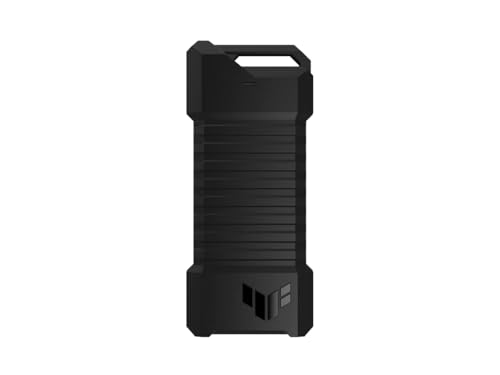
ASUS TUF Gaming A1 Rugged M.2 SSD Enclosure
Best for: rugged PS5 and multi-device external storage
- Host Interface
- USB-C (what this guide is about)
- Max Transfer Speed
- Up to 10 Gbps
- Drive Interface
- M.2 NVMe PCIe, SATA
- Supported Form Factors
- 2242, 2260, 2280
- Installation Style
- M.2 Q-Latch
- Compatibility
- PS5, Gaming
The ASUS TUF Gaming A1 is an external drive enclosure featuring a USB-C 3.2 Gen 2x1 connection delivering up to 10 Gbps for NVMe drives and 6 Gbps for SATA SSDs. It accommodates M.2 form factors 2242, 2260, and 2280 using an internal Q-Latch system. Built with IP68 dust and water resistance alongside MIL-STD-810H drop protection, it suits you if you need a durable portable drive for PCs, mobile devices, or gaming consoles.
Pros
- Supports both M.2 NVMe PCIe and SATA SSDs
- IP68 water and dust resistance plus MIL-STD-810H drop resistance
- Q-Latch mechanism for mounting M.2 drives
- USB-C 3.2 Gen 2x1 connection with speeds up to 10 Gbps
Cons
- Does not accommodate 2230 or 22110 M.2 drive sizes
- Weighs 0.55 pounds, making it heavier than non-rugged enclosures
Good fit if
- You need IP68 water resistance and MIL-STD-810H drop protection for portable storage.
- You use M.2 NVMe or SATA drives in 2242, 2260, or 2280 form factors.
- You connect external storage directly to a PS5, PC, or mobile device using USB-C.
Skip if
- You need transfer speeds higher than 10 Gbps.
- You plan to mount a compact 2230 M.2 SSD.
Verdict: ASUS TUF Gaming A1 USB-C Enclosure pairs 10 Gbps NVMe and 6 Gbps SATA compatibility with IP68 and MIL-STD-810H durability ratings. It provides secure, rugged external storage for gaming consoles and computers.
Specifications side by side
| Spec | StarTech Aluminum M.2 NVMe SSD Enclosure | ASUS ROG Strix Arion 10Gbps NVMe Enclosure | StarTech Rugged M.2 NVMe USB-C Enclosure | SSK Dual-Protocol M.2 SSD Enclosure | ICY DOCK M.2 NVMe USB-C Enclosure with Power Switch | SSK Tool-Free M.2 NVMe USB-C Enclosure | MAIWO Dual-Interface M.2 NVMe and SATA Enclosure | UGREEN 10Gbps M.2 NVMe SSD Enclosure | MAIWO M.2 NVMe and SATA USB-C Enclosure | ORICO Dual-Bay NVMe and SATA M.2 Enclosure | ORICO Dual-Bay NVMe and SATA M.2 SSD Enclosure | GODO RGB M.2 NVMe and SATA SSD Enclosure | ORICO Tool-Free Aluminum M.2 NVMe Enclosure | ORICO Dual-Protocol Tool-Free M.2 Enclosure | ASUS TUF Gaming A1 Rugged M.2 SSD Enclosure |
|---|---|---|---|---|---|---|---|---|---|---|---|---|---|---|---|
| Max Transfer Speed | 10Gbps | Up to 10 Gbps | 10Gbps | 10Gbps | 10Gbps | 10Gbps | 10Gbps | 10Gbps | 10Gbps | 10Gbps (NVMe), 6Gbps (SATA) | 10Gbps (NVMe), 6Gbps (SATA) | 10Gbps (NVMe), 6Gbps (SATA) | 10Gbps | 10Gbps NVMe, 5Gbps SATA | Up to 10 Gbps |
| Host Interface | USB Type-C, Thunderbolt 3 | USB Type-C 3.2 Gen 2 | USB 3.2 Gen 2x1, Thunderbolt 3 | USB-C 3.2 Gen 2 | USB 3.2 Gen 2, Thunderbolt 3/4 | USB-C 3.2 Gen 2 | USB-A, USB-C | USB 3.2 Gen 2 Type-C | USB 3.1 Gen 2x1 Type-C | USB 3.2 Gen 2 Type-C | USB 3.2 Gen 2 Type-C | USB 3.1 Gen 2 Type-C | USB 3.2, Thunderbolt 3 Compatible | USB-C 3.2 Gen 2 | USB-C 3.2 Gen 2x1 |
| Drive Interface | PCIe NVMe M-Key | PCIe NVMe (M Key, B+M Key) | PCIe NVMe M-Key | NVMe PCIe, SATA (M-Key, B+M Key) | PCIe NVMe | PCIe NVMe M-Key | NVMe & SATA (M-Key, B+M Key) | NVMe M-Key, B+M Key | PCIe NVMe (M-Key), SATA NGFF (B+M-Key) | PCIe NVMe M-Key, SATA B-Key, B+M Key | PCIe NVMe M-Key, SATA B-Key, B+M Key | PCIe NVMe M-Key, B+M Key, SATA | PCIe M-Key, PCIe B&M key | M.2 NVMe M/B+M Key, NGFF SATA B+M Key | M.2 NVMe PCIe, SATA |
| Supported Form Factors | 2230, 2242, 2260, 2280 | 2230, 2242, 2260, 2280 | 2230, 2242, 2260, 2280 | 2230, 2242, 2260, 2280 | 2230, 2242, 2260, 2280, 22110 | 2230, 2242, 2260, 2280 | 2230, 2242, 2260, 2280 | 2230, 2242, 2260, 2280 | 2230, 2242, 2260, 2280 | 2230, 2242, 2260, 2280 | 2230, 2242, 2260, 2280 | 2230, 2242, 2260, 2280 | 2230, 2242, 2260, 2280 | 2230, 2242, 2260, 2280 | 2242, 2260, 2280 |
| Drive Bay Count | not specified | not specified | not specified | not specified | 1 bay | not specified | not specified | not specified | not specified | 2 bays | 2 bays | not specified | not specified | not specified | not specified |
| Cooling System | Aluminum housing with ventilation holes | Aluminum alloy case with thermal pads | Aluminum housing, internal thermal pad | Aluminum alloy shell, thermal pads | not specified | Aluminum shell, 2 thermal pads | Aluminum alloy | Aluminum casing, silicone case | Aluminum alloy shell, thermal pads | Aluminum fin, heat sinks, thermal pads | Aluminum rib, heat sinks, thermal pads | not specified | Silicone pad, heatsink, aluminum body | Heatsink, thermal silicone, aluminum | not specified |
| Maximum Capacity | not specified | not specified | not specified | not specified | not specified | not specified | 8TB | 8TB | 8TB | 2 x 4TB | 2 x 4TB | 2TB | 4TB | 4TB | not specified |
| Installation Style | not specified | not specified | not specified | Tool-Free | not specified | Tool-free | not specified | Tool-free | Tool Free | Tool-free | Tool Free | Tool-Free | Tool-Free | Tool-Free | M.2 Q-Latch |
| Interface | NVMe | NVMe | NVMe | SATA III | NVMe | NVMe | SATA III | NVMe | SATA III | SATA III | SATA III | NVMe | NVMe | SATA III | SATA III |
| Form Factor | M.2 | M.2 2280 | M.2 | M.2 | M.2 2280 | M.2 | M.2 2280 | M.2 | M.2 | M.2 2280 | M.2 2280 | M.2 | M.2 2280 | M.2 2280 | M.2 |
| Compatibility | not specified | not specified | not specified | not specified | not specified | not specified | not specified | not specified | not specified | not specified | not specified | not specified | not specified | not specified | PS5, Gaming |
| Transfer Speed | 10Gbps | 10Gbps | 10Gbps | not specified | 10Gbps | not specified | 10Gbps | 10Gbps | 10Gbps | not specified | not specified | 10Gbps | 10Gbps | 10Gbps | 10Gbps |
| Features | not specified | not specified | not specified | not specified | not specified | not specified | not specified | not specified | Tool-Free | Tool-Free | Tool-Free | Tool-Free, RGB Lighting | Tool-Free | Tool-Free | not specified |
| Bay Count | not specified | not specified | not specified | not specified | not specified | not specified | not specified | not specified | not specified | Dual-Bay | Dual-Bay | not specified | not specified | not specified | not specified |
| Material | Aluminum | Aluminum | not specified | not specified | not specified | not specified | Aluminum | not specified | not specified | Aluminum | Aluminum | not specified | Aluminum | Aluminum | not specified |
| Dimensions | 4.3 × 1.6 × 0.5 inches | 7.1 × 3.8 × 1.6 inches | 1.8 × 4.1 × 0.6 inches | 4.49 × 1.5 × 0.47 inches | 5.91 × 2.48 × 0.47 inches | 4.53 × 1.54 × 0.43 inches | 5.55 × 1.22 × 0.35 inches | 4.8 × 1.65 × 0.55 inches | 4.33 × 1.48 × 0.49 inches | not specified | not specified | 4.35 × 1.56 × 0.53 inches | 4.88 × 1.38 × 0.55 inches | 4.88 × 1.38 × 0.55 inches | 4.93 × 2.14 × 0.52 inches |
| Weight | 2.24 ounces | 3.46 ounces | 5.76 ounces | 2.82 ounces | 7.2 ounces | 2.82 ounces | 2.12 ounces | 4.9 ounces | 1.76 ounces | 6.35 ounces | 8.47 ounces | not specified | 3.53 ounces | 3.21 ounces | 8.78 ounces |
| Size | 10Gbps NVMe | Black|up to 10Gbps | M.2 NVMe | 10 Gbps | not specified | M.2 NVMe | not specified | not specified | not specified | Dual M.2 SATA+NVMe | not specified | not specified | not specified | not specified | TUF A1|up to 10Gbps |
| Color | Black | Black | Black | Grey | Black | Silver grey | Grey | Grey | Blue | Grey | Silver | Black | Blue | Blue | A1|up to 10Gbps |
| Model | M2E1BMU31C | ROG Strix Arion ESD-S1C | M2E1BRU31C | HE-C371 | MB861U31-1M2B | HE-C327 | MAIWO K1683P2 | Grey | 10Gbps NVMe/SATA Enclosure | M.2 SATA+NVMe-Dual | Dual M.2 SATA+NVMe | MS09-NVMe/SATA | Black | Blue-C to C cable | ESD-T1A/BLK/G/AS// |
If you need extra port connectivity alongside drive enclosures, you can review the best docking stations with USB-C for controller bandwidth and power delivery specifications.
How to Choose a USB-C Enclosure
-
Check M.2 Card Length
Most external enclosures accommodate standard M.2 2280 drives, which measure 80 millimeters in length. If you repurpose enterprise hardware or non-standard solid-state drives, verify length support before purchase. Extended formats such as 22110 cards exceed the physical clearance of standard shells. The ICY DOCK M.2 NVMe USB-C Enclosure accommodates cards up to 22110 length for high-capacity enterprise cards. Review your drive label for form factor specifications to ensure the enclosure chassis and mounting standoffs align properly with your hardware.
-
Choose Single or Dual Bays
Consider how many storage drives you need to access at one time. Single-bay enclosures work best for portable file storage and daily backups. If you frequently clone drives or migrate data between two units, select a multi-slot model instead. The ORICO Dual-Bay NVMe and SATA M.2 Enclosure mounts two drives simultaneously to deliver independent read and write operations. Check the bay specifications to ensure the unit supplies separate controller channels for both slots so you avoid hardware bottlenecks during heavy transfers.
-
Select Tool-Free Mounting Designs
Drive installation mechanisms dictate how fast you can swap storage hardware. Screw-secured enclosures require screwdrivers and small fasteners, making them suitable for long-term installations. If you regularly test spare solid-state drives or transfer content across different systems, choose a tool-free chassis. The SSK Tool-Free M.2 NVMe USB-C Enclosure utilizes a slide-lock mechanism that lets you secure the drive without tools. Check the internal mounting design to ensure rubber pins or plastic retention clips hold your card firmly against thermal pads.
-
Evaluate Environmental Ingress Ratings
Standard aluminum enclosures safeguard drives against minor bumps on a desk but offer no protection against moisture or fine dust particles. If you operate drives outdoors or transport them in demanding field conditions, check for certified durability ratings. The ASUS TUF Gaming A1 Rugged M.2 SSD Enclosure carries IP68 water resistance along with MIL-STD-810H drop compliance. Review published IP numbers to confirm the enclosure seals out liquid and dust contaminants before taking sensitive storage hardware into rugged environments.
-
Consider Integrated Direct Connectors
Traditional external enclosures require loose USB-C cables to interface with your workstation, laptop, or mobile phone. If you travel frequently and prefer not to pack separate wiring, consider an enclosure that integrates host plugs directly into the body. The MAIWO Dual-Interface M.2 NVMe and SATA Enclosure features built-in USB-C and USB-A plugs that connect straight into host ports. Check your machine port spacing and surrounding clearance before choosing a direct-plug chassis so the casing does not block adjacent ports.
-
Look for Visual Diagnostics
Basic enclosures provide single-color LED lights that merely indicate incoming power. Enclosures with dedicated status tracking deliver real-time visual alerts during active data transfers, system sleep states, or operational faults. The GODO RGB M.2 NVMe and SATA SSD Enclosure incorporates RGB status lighting to help you track current operational modes at a glance. Check the product specifications for drive monitoring features so you can verify safe dismount conditions before disconnecting the enclosure from your computer or game console.
Frequently asked questions
What transfer speeds can you expect from a 10Gbps USB-C SSD enclosure?
You can expect real-world data rates around 1GB/s from a 10Gbps USB-C enclosure. While internal NVMe drives reach higher PCIe speeds inside a motherboard, the USB-C interface caps the transfer rate at 10Gbps. Products like the StarTech Aluminum M.2 NVMe SSD Enclosure hit this ceiling, delivering sufficient bandwidth for heavy file backups, fast media transfers, and operating system recovery.
Can you connect a USB-C SSD enclosure to a gaming console like the PS5?
Yes, you can connect compatible USB-C enclosures directly to gaming consoles like the PlayStation 5. The ASUS TUF Gaming A1, for example, lists dedicated PS5 and gaming compatibility alongside its 10Gbps NVMe and 6Gbps SATA protocol support. An external enclosure lets you store and play backward-compatible games or offload console storage through a fast, rugged interface.
Do USB-C SSD enclosures require external power supplies?
Most single-drive USB-C SSD enclosures draw all operating power straight from the host USB port through bus power. Standard M.2 NVMe and SATA solid-state drives operate within USB-C power delivery specifications. Some models, such as the ICY DOCK M.2 NVMe USB-C Enclosure, provide an integrated physical power switch, allowing you to turn drive power on and off manually without disconnecting the host cable.
What is the maximum storage capacity supported by USB-C enclosures?
Enclosure capacity limits depend on the specific controller hardware. Several modern enclosures, including the UGREEN 10Gbps M.2 NVMe SSD Enclosure and the MAIWO Tool-Free model, explicitly support drive capacities up to 8TB. Others, like the ORICO Dual-Protocol enclosure, list support up to 4TB, while the GODO RGB model specifies a 2TB limit. You should verify your drive size against enclosure controller specifications.
Can you run two M.2 drives simultaneously in one USB-C enclosure?
You can run two drives at once if you choose a dual-bay USB-C enclosure. Options like the ORICO Dual-Bay NVMe and SATA M.2 Enclosure feature independent slots that read both an NVMe SSD and a SATA SSD simultaneously. These enclosures provide dedicated 10Gbps and 6Gbps channels, allowing you to transfer files directly between two separate solid-state drives over a single connection.
How do USB-C enclosures handle heat from high-speed NVMe drives?
USB-C enclosures handle heat primarily through aluminum chassis construction that radiates thermal energy away from the controller and flash memory. High-performance models often include thermal pads or heatsink vests to bridge physical contact between the drive and the casing. For instance, the ASUS ROG Strix Arion includes thermal pads, while the ORICO Tool-Free Aluminum enclosure supplies a dedicated thermal vest to maintain steady operation.