15 Best 40Gbps SSD Enclosures, Compared
As an Amazon Associate we earn from qualifying purchases. Links on this page are affiliate links.
A fast 40Gbps SSD enclosure transforms an internal M.2 drive into high-speed portable storage for data-heavy tasks. The ANYOYO Tool-Free 40Gbps M.2 NVMe Enclosure takes the top spot because its silent aluminum design provides tool-free drive installation and 2700MB/s transfer potential.
To help you find the right fit, we compared 15 products based strictly on the specifications published on their official listings. This guide helps you choose the right model based on critical hardware specs like active fan cooling, supported M.2 form factors, and chassis dimensions.
Quick picks
The best fit for you
- You need tool-free swaps in a silent enclosure ANYOYO Tool-Free 40Gbps M.2 NVMe Enclosure Its tool-free aluminum chassis provides passive thermal dissipation without fan noise.
- You run sustained transfers requiring active fan cooling UGREEN 40Gbps Aluminum M.2 NVMe Fan Enclosure An integrated PWM cooling fan maintains operating temperatures during prolonged 40Gbps workloads.
- You travel often and dislike carrying loose cables ZIKE USB4 40Gbps M.2 NVMe Enclosure An integrated tethered cable provides direct 40Gbps connectivity without separate cords.
- You duplicate multiple NVMe drives without a host MAIWO 4-Bay 40Gbps NVMe Cloner Enclosure Dedicated offline clone functionality enables standalone duplication across four M.2 bays.
Our 15 picks

ANYOYO Tool-Free 40Gbps M.2 NVMe Enclosure
Best for: silent, tool-free 40Gbps NVMe drive setups
- Transfer Speed
- 40Gbps (what this guide is about)
- Max Transfer Speed
- 40Gbps
- Host Interface
- Thunderbolt 4/3, USB4
- Drive Interface
- NVMe M-Key, B+M Key
- Supported Form Factors
- 2230, 2242, 2260, 2280
- Cooling System
- Aluminum alloy shell, thermal pad
The ANYOYO Tool-Free 40Gbps NVMe Enclosure houses an M.2 NVMe solid-state drive inside an aluminum chassis for external storage. It uses dual JHL7440 and RTL9210 control chips to provide transfer rates up to 2700MB/s across USB4, Thunderbolt 3, and Thunderbolt 4 ports. It accommodates four drive lengths up to 8TB without installation tools. This enclosure suits you if you want silent heat dissipation and wide hardware compatibility.
Pros
- Up to 2700MB/s transfer speeds over 40Gbps USB4 and Thunderbolt connections
- Dual JHL7440 and RTL9210 control chips ensure wide host compatibility
- Tool-free drive installation requires no hardware assembly tools
- Accommodates 2230, 2242, 2260, and 2280 M.2 form factors up to 8TB
- Fanless aluminum shell with thermal pad operates without fan noise
Cons
- Does not support SATA NGFF or mSATA solid-state drives
- Lacks an active cooling fan for heavy sustained thermal loads
Good fit if
- You need tool-free installation for standard M.2 NVMe drives up to 8TB.
- You want silent passive cooling without the noise of an internal fan.
- You connect across varied hosts using USB4, Thunderbolt 4/3, or older USB ports.
Skip if
- You need an enclosure that supports legacy SATA NGFF or mSATA drives.
- You prefer active fan cooling over silent passive aluminum heat dissipation.
Verdict: ANYOYO Tool-Free 40Gbps NVMe Enclosure delivers fast 2700MB/s transfers and tool-free drive swaps in a silent aluminum design. It is a dependable choice for high-speed NVMe storage across modern Thunderbolt and USB standards.

ACASIS 40Gbps M.2 NVMe Enclosure
Best for: Fast 2280 NVMe storage across mixed USB ports
- Transfer Speed
- 40Gbps (what this guide is about)
- Max Transfer Speed
- 40Gbps
- Host Interface
- USB4, USB 3.2/3.1/3.0/2.0
- Drive Interface
- M.2 NVMe
- Supported Form Factors
- 2230, 2242, 2260, 2280
- Dimensions
- 3.96 × 1.92 × 0.6 inches
This ACASIS enclosure houses an M.2 2280 NVMe drive and provides up to 40Gbps transfer speeds using a JHL7440 controller chip. It connects across USB4, USB 3.2, 3.1, 3.0, and 2.0 ports on macOS, Windows, and Linux devices. Measuring 3.96 by 1.92 by 0.6 inches and weighing 0.35 pounds, it fits into a pocket. You get reliable high-speed external storage for moving large files between compatible workstations.
Pros
- Reaches transfer speeds up to 40Gbps
- JHL7440 certified chip with dual-chip control
- Broad compatibility with USB4, 3.2, 3.1, 3.0, and 2.0
- Compact casing measuring 3.96 by 1.92 by 0.6 inches
Cons
- Solid-state drive not included
- Supports only M.2 2280 form factor drives
Good fit if
- You have an M.2 2280 NVMe drive ready to install.
- You need 40Gbps bandwidth with backward compatibility to older USB standards.
- You want a lightweight, pocket-sized enclosure weighing around 0.35 pounds.
Skip if
- You need an external drive that comes with built-in storage.
- You use M.2 cards in sizes other than 2280, such as 2230 or 2242.
Verdict: ACASIS 40Gbps M.2 NVMe SSD Enclosure pairs a JHL7440 chip with 40Gbps transfer rates for standalone 2280 drives. It provides dependable multi-platform compatibility across Windows, macOS, and Linux in a pocketable build.

VCOM 40Gbps USB4 M.2 NVMe SSD Enclosure
Best for: budget-conscious users needing 40Gbps USB4 speeds
- Transfer Speed
- 40Gbps (what this guide is about)
- Max Transfer Speed
- Up to 40Gbps
- Host Interface
- USB4, Thunderbolt 3/4, USB 3.2/3.1/3.0
- Drive Interface
- NVMe M&B+M-Key
- Supported Form Factors
- 2280
- Cooling System
- Thermal pad, aluminum alloy shell
This VCOM enclosure houses an M.2 NVMe SSD using an aluminum shell and a 40Gbps USB4 interface. Driven by an Intel JHL7440 controller chip, it supports transfer rates up to 2800MB/s read and 2500MB/s write. It fits size 2280 drives and connects through Thunderbolt 3 or USB 3.0 and newer ports. It suits you if you need compact, passive thermal pad cooling for single-drive backups without moving fan parts.
Pros
- Intel JHL7440 dual-chip master control
- Up to 40Gbps transfer speed via USB4
- Compatible with Thunderbolt 3 and USB 3.2, 3.1, and 3.0
- Passive cooling via aluminum shell and thermal pad
Cons
- Incompatible with USB 2.0 and older ports
- Supports only M.2 size 2280 drives
- Requires screwdriver installation rather than tool-free access
Good fit if
- You use a standard 2280 form factor NVMe drive.
- You connect to USB4, Thunderbolt 3, or USB 3.x ports.
- You prefer silent, fanless heat dissipation.
Skip if
- You need backward compatibility with legacy USB 2.0 ports.
- You use shorter SSD lengths like 2230, 2242, or 2260.
- You require tool-free drive installation.
Verdict: VCOM 40Gbps Aluminum M.2 2280 SSD Enclosure provides fast Intel JHL7440-based USB4 connectivity in a simple, fanless metal housing. It offers dependable specs for modern 2280 drives if you do not require legacy USB 2.0 support.

ZIKE USB4 40Gbps M.2 NVMe Enclosure
Best for: portable use without carrying loose cables
- Transfer Speed
- 40Gbps (what this guide is about)
- Max Transfer Speed
- 40Gbps
- Host Interface
- USB4, Thunderbolt 5
- Drive Interface
- M.2 NVMe M-Key
- Supported Form Factors
- 2280
- Cooling System
- Aluminum alloy
The ZIKE 40Gbps M.2 NVMe Enclosure with Integrated Cable is an aluminum external drive housing built specifically for 2280-size M.2 NVMe solid-state drives. It delivers transfer rates up to 40Gbps, with specs reaching 3.8 GB/s read and 3.1 GB/s write speeds. If you need portable storage without carrying loose wires, its built-in USB4 cable and toolless drive installation make it a practical pick for your laptop, desktop, tablet, or console.
Pros
- Up to 40Gbps transfer speed with 3.8 GB/s read and 3.1 GB/s write
- Toolless installation for quick drive swaps
- Built-in integrated USB4 cable
- Aluminum alloy chassis for heat dissipation and drop protection
Cons
- Supports only 2280 length M.2 drives
- Integrated cable cannot be swapped for longer custom cords
Good fit if
- You use an M.2 2280 NVMe drive and want tool-free installation.
- You prefer an integrated USB4 cable so you do not have to carry extra cords.
- You connect to USB-C, Thunderbolt 4, or USB4 host devices.
Skip if
- You need to install smaller M.2 sizes such as 2230, 2242, or 2260.
- You require a long, detachable USB connection cable.
Verdict: ZIKE 40Gbps M.2 NVMe Enclosure with Integrated Cable provides high-speed 40Gbps performance alongside a tethered cable and tool-free design. It is a dependable choice for quick 2280 NVMe drive access across modern USB-C systems.

UGREEN 40Gbps Aluminum M.2 NVMe Fan Enclosure
Best for: sustained 40Gbps transfers needing active fan cooling
- Transfer Speed
- 40Gbps (what this guide is about)
- Max Transfer Speed
- 40Gbps
- Host Interface
- USB4, Thunderbolt 3/4
- Drive Interface
- NVMe M/B+M key
- Supported Form Factors
- 2230/2242/2260/2280
- Cooling System
- Aluminum casing, cooling fan
View on Amazon: UGREEN 40Gbps Aluminum M.2 NVMe Fan Enclosure
This external drive enclosure delivers transfer rates up to 40Gbps over USB4 and Thunderbolt using an ASMedia ASM2464PD controller. It houses M.2 NVMe drives in 2230, 2242, 2260, and 2280 sizes with capacities up to 4TB. Built-in active cooling pairs an aluminum shell with an internal PWM turbo fan and thermal pad. It suits you if you need sustained high-speed data transfers without thermal throttling.
Pros
- Built-in PWM cooling fan, thermal pad, and aluminum casing
- ASM2464PD controller supporting 40Gbps USB4 and Thunderbolt 3/4
- Supports four M.2 drive sizes: 2230, 2242, 2260, and 2280 up to 4TB
- Supports UASP, TRIM, and S.M.A.R.T. monitoring protocols
Cons
- Incompatible with PCIe 5.0 NVMe SSDs
- Does not accommodate SSDs with pre-installed heatsinks
- Active cooling fan introduces moving parts and operating noise
Good fit if
- You need active fan cooling to maintain speeds during heavy 40Gbps transfers.
- You use an M-key or B+M key PCIe 4.0 or 3.0 NVMe drive up to 4TB.
- You connect across USB4, Thunderbolt 4, or Thunderbolt 3 ports.
Skip if
- You intend to use a PCIe 5.0 M.2 SSD.
- You have an SSD with a fixed, factory-installed heatsink.
Verdict: UGREEN 40Gbps M.2 NVMe Enclosure with Fan delivers high-bandwidth external storage with active PWM cooling for sustained transfer workloads. It provides comprehensive compatibility across USB4 and Thunderbolt host ports for NVMe drives up to 4TB.

ORICO 40Gbps Tool-Free M.2 NVMe SSD Enclosure
Best for: Tool-free drive swaps with active fan cooling
- Transfer Speed
- 40Gbps (what this guide is about)
- Max Transfer Speed
- 40Gbps
- Host Interface
- USB4, Thunderbolt 4/3
- Drive Interface
- NVMe M-Key
- Supported Form Factors
- 2230/2242/2260/2280
- Cooling System
- Built-in silent fan
View on Amazon: ORICO 40Gbps Tool-Free M.2 NVMe SSD Enclosure
This enclosure delivers up to 40Gbps bandwidth with rated read and write speeds reaching 3100MB/s over USB4 or Thunderbolt connections. You get a tool-free transparent chassis that accepts M.2 NVMe drives in 2230, 2242, 2260, or 2280 sizes up to 4TB. Thermal management combines an active silent cooling fan, striped aluminum, and silicone pads. It suits you if you swap drives frequently and need active cooling during heavy transfers.
Pros
- Up to 40Gbps bandwidth and 3100MB/s read/write speeds over USB4 or Thunderbolt
- Built-in active cooling fan paired with striped aluminum and silicone thermal pads
- Tool-free installation supporting 2230, 2242, 2260, and 2280 M-Key NVMe drives up to 4TB
- Includes 30cm 2-in-1 cable supporting USB-C (40Gbps), USB-A (10Gbps), and PD 100W
Cons
- Drive capacity capped at 4TB
- Short 30cm cable limits drive placement options
- USB-A connection mode caps transfers at 10Gbps
Good fit if
- You need active fan cooling to mitigate thermal throttling during sustained transfers.
- You swap bare M.2 NVMe drives of varying sizes regularly without using screwdrivers.
- You require dual USB-C and USB-A host compatibility from a single included cable.
Skip if
- You require an external drive capacity greater than 4TB.
- You prefer an entirely silent, passive heatsink enclosure with no moving parts.
Verdict: ORICO 40Gbps Tool-Free NVMe SSD Enclosure provides fast 3100MB/s transfer potential paired with active fan cooling and quick, hardware-free drive swaps. It is a practical external drive solution for handling multi-size NVMe SSDs up to 4TB.

ANYOYO 40Gbps Fan-Cooled M.2 NVMe Enclosure
Best for: sustained 40Gbps transfers requiring active fan cooling
- Transfer Speed
- 40Gbps (what this guide is about)
- Max Transfer Speed
- 40Gbps
- Host Interface
- USB4, Thunderbolt 4/3
- Drive Interface
- PCIe NVMe (M Key, B&M Key)
- Supported Form Factors
- M.2 2230, 2242, 2260, 2280
- Cooling System
- Aluminum alloy shell, PWM turbo fan
The ANYOYO 40Gbps Fan-Cooled NVMe SSD Enclosure is an aluminum external drive housing built for high-throughput storage. It pairs JHL7440 and RTL9210 controllers to deliver transfer speeds up to 2700MB/s across Thunderbolt 4, Thunderbolt 3, and older USB ports. An active PWM turbo fan controls operating temperatures. This enclosure suits you if you need tool-free installation and broad M.2 size compatibility for drives up to 8TB capacity.
Pros
- Dual JHL7440 and RTL9210 chips support up to 2700MB/s transfer speeds
- Active PWM turbo fan automatically adjusts cooling speeds
- Tool-free drive installation design
- Accommodates 2230, 2242, 2260, and 2280 M.2 form factors
- Supports NVMe drive capacities up to 8TB
Cons
- Incompatible with SATA NGFF and mSATA SSDs
- Integrated fan adds moving parts compared to passive enclosures
Good fit if
- You want active fan cooling to manage drive temperatures during heavy workloads.
- You use non-standard drive lengths like 2230, 2242, or 2260 alongside 2280.
- You prefer swapping drives without using screwdrivers or tools.
Skip if
- You plan to install a SATA-based M.2 or mSATA drive.
- You require a completely silent, passive enclosure without fan noise.
Verdict: ANYOYO 40Gbps Fan-Cooled NVMe SSD Enclosure combines dual-chip connectivity and active PWM cooling for high-bandwidth 40Gbps transfers. Its tool-free aluminum chassis accommodates M.2 NVMe drives from 2230 up to 2280 format at capacities up to 8TB.

ACASIS 40Gbps M.2 NVMe Enclosure with Fan
Best for: active cooling across multiple M.2 drive sizes
- Transfer Speed
- 40Gbps (what this guide is about)
- Max Transfer Speed
- 40Gbps
- Host Interface
- USB4, Thunderbolt 5/4/3
- Drive Interface
- PCIe NVMe
- Supported Form Factors
- M.2 2230, 2242, 2260, 2280
- Cooling System
- Aluminum alloy, silent fan, thermal pad
This ACASIS enclosure converts an M.2 NVMe SSD into a 40Gbps external drive using the Intel JHL7440 controller. It features an aluminum chassis paired with an active cooling fan switched manually, plus a thermal pad. The unit accepts 2230, 2242, 2260, and 2280 drive sizes across Windows, Linux, and Mac platforms. It suits you if you need sustained transfer performance across multiple drive lengths.
Pros
- Intel JHL7440 chip with 40Gbps transfer speed support
- Built-in active cooling fan with physical power switch
- Accommodates four M.2 drive lengths: 2230, 2242, 2260, and 2280
- Compatible with Thunderbolt 3, 4, 5 and USB 3.2, 3.1, 3.0
Cons
- Fan requires manual switch activation
- Chassis measures over 0.7 inches thick
Good fit if
- You use various M.2 card lengths from 2230 to 2280.
- You need active fan cooling to manage drive heat during heavy transfers.
- You connect across Thunderbolt and standard USB-C interfaces.
Skip if
- You want a completely silent, fanless enclosure design.
- You prefer automatic fan controls without a manual switch.
Verdict: ACASIS 40Gbps NVMe Enclosure with Cooling Fan pairs an Intel JHL7440 chip with switchable active cooling. It delivers broad host compatibility alongside support for four M.2 drive sizes.
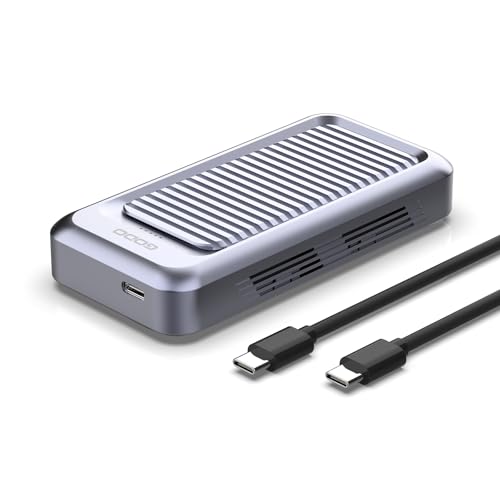
GODO Tool-Free 40Gbps M.2 NVMe Enclosure
Best for: tool-free NVMe swaps with active fan cooling
- Transfer Speed
- 40Gbps (what this guide is about)
- Max Transfer Speed
- 40Gbps
- Host Interface
- USB4.0 Type-C, Thunderbolt 4/3
- Drive Interface
- PCIe NVMe (M Key, B+M Key)
- Supported Form Factors
- M.2 2230, 2242, 2260, 2280
- Cooling System
- Aluminum alloy body with fan
The GODO 40Gbps Tool-Free NVMe Enclosure with Fan gives you a 40Gbps USB4 Type-C external interface backed by an aluminum alloy chassis with an integrated cooling fan. It accommodates M-Key and B+M Key NVMe drives in 2230, 2242, 2260, and 2280 sizes up to 4TB capacity. It suits you if you swap drives frequently without tools and need active cooling during sustained high-bandwidth file transfers.
Pros
- Supports 40Gbps transfer speeds over USB4 Type-C
- Tool-free drive installation requires no screwdrivers
- Built-in active cooling fan inside CNC aluminum alloy housing
- Accepts 2230, 2242, 2260, and 2280 NVMe SSD sizes up to 4TB
Cons
- Supports NVMe drives only, excluding M.2 SATA SSDs
- Drive capacity limited to 4TB maximum
Good fit if
- You swap NVMe drives regularly and prefer tool-free installation.
- You run high-bandwidth 40Gbps transfers and want active fan cooling.
- You utilize shorter NVMe form factors like 2230, 2242, or 2260 alongside 2280.
Skip if
- You need compatibility with legacy M.2 SATA drives.
- You need an enclosure rated for drives exceeding 4TB.
Verdict: GODO 40Gbps Tool-Free NVMe Enclosure with Fan pairs 40Gbps USB4 speeds and active fan cooling with tool-free drive installation. It handles NVMe sizes up to 2280 and capacities up to 4TB without requiring extra tools.

MAIWO 40Gbps NVMe SSD Enclosure with Fan
Best for: active cooling and tool-free drive swaps
- Transfer Speed
- 40Gbps (what this guide is about)
- Max Transfer Speed
- 40Gbps
- Host Interface
- USB4, Thunderbolt 4/3
- Drive Interface
- PCIe NVMe (M Key)
- Supported Form Factors
- 2280
- Cooling System
- Aluminium alloy shell, built-in fan
This MAIWO enclosure gives you 40Gbps transfer speeds over USB4 and Thunderbolt connections using the ASM2464PD controller. It supports M.2 NVMe drives up to 8TB in capacity, reaching read and write rates up to 3,200 MB/s. An internal cooling fan and aluminum body manage heat during sustained operations. Its tool-free installation and attached strap make it a practical choice if you need high-speed external storage on the go.
Pros
- ASM2464PD controller delivers up to 40Gbps speeds and 3,200 MB/s transfers
- Built-in active cooling fan paired with an aluminum alloy chassis
- Tool-free installation requires no mounting hardware
- Supports high-capacity M.2 drives up to 8TB
Cons
- Supports only 2280 form-factor M.2 NVMe drives
- Caps maximum transfer speeds at 20Gbps when connected via Thunderbolt 3
Good fit if
- You want tool-free drive installation with built-in active fan cooling.
- You use an 8TB or smaller 2280 M-Key NVMe drive.
- You connect to USB4 or Thunderbolt 4 ports for speeds up to 3,200 MB/s.
Skip if
- You need compatibility with smaller drive sizes like 2230, 2242, or 2260.
- You require the full 40Gbps bandwidth while using Thunderbolt 3 hosts.
Verdict: MAIWO Tool-Free 40Gbps NVMe Enclosure with Fan combines high-bandwidth ASM2464PD performance with active fan cooling and quick drive swaps. It provides reliable heat dissipation and high read/write speeds for standard 2280 NVMe SSDs.

Qwiizlab Fanless 40Gbps USB4 SSD Enclosure
Best for: silent high-speed external storage setups
- Transfer Speed
- 40Gbps (what this guide is about)
- Max Transfer Speed
- 40Gbps
- Host Interface
- USB4, Thunderbolt 5/4/3
- Drive Interface
- PCIe M.2 NVMe (M Key, B-M Key)
- Supported Form Factors
- 2280/2260/2242/2230 mm
- Cooling System
- Fanless aluminum chassis, thermal pads
The Qwiizlab Fanless 40Gbps Aluminum SSD Enclosure houses M.2 NVMe drives in 2230, 2242, 2260, and 2280 sizes up to 8TB. Powered by the ASM2464PD controller, it delivers transfer rates up to 3,840 MB/s over USB4, Thunderbolt 4, and Thunderbolt 5 ports. Its passive, fan-free aluminum chassis eliminates fan noise. This enclosure suits you if you need silent, high-speed external storage for macOS or Windows.
Pros
- Up to 40Gbps transfer speed reaching 3,840 MB/s sequential read and write
- Fanless aluminum chassis dissipates heat without mechanical noise
- Compatible with 2230, 2242, 2260, and 2280 NVMe SSDs up to 8TB
- Works with USB4 as well as Thunderbolt 3, 4, and 5 ports
Cons
- Requires screwdriver assembly with no tool-free latch mechanism
- Not compatible with legacy Thunderbolt 1 or Thunderbolt 2 ports
Good fit if
- You want zero fan noise while working at USB4 or Thunderbolt speeds.
- You need compatibility with varied M.2 drive sizes from 2230 up to 2280.
- You connect to modern USB4 or Thunderbolt 3, 4, or 5 host systems.
Skip if
- You need tool-free drive installation for frequent drive swaps.
- You use legacy computers limited to Thunderbolt 1 or Thunderbolt 2.
Verdict: Qwiizlab Fanless 40Gbps Aluminum SSD Enclosure delivers 40Gbps speeds and broad drive size compatibility without mechanical fan noise. It is a solid choice when you need fast NVMe transfers in a silent passive design.

UGREEN 40Gbps M.2 NVMe SSD Enclosure
Best for: active cooling and drop protection
- Transfer Speed
- 40Gbps (what this guide is about)
- Max Transfer Speed
- 40Gbps
- Host Interface
- USB4, Thunderbolt 3/4
- Drive Interface
- NVMe (M/B+M key)
- Supported Form Factors
- 2230/2242/2260/2280
- Cooling System
- PWM turbo high-speed fan, aluminium case
This UGREEN enclosure converts an M.2 NVMe drive into an external drive operating at up to 40Gbps using the ASM2464PD controller. It supports drives up to 8TB across four form factors: 2230, 2242, 2260, and 2280. Thermal management combines an aluminum body with an integrated PWM turbo fan, while a silicone sleeve adds drop protection. It suits you if you move large files across USB4, Thunderbolt 3, or Thunderbolt 4 ports.
Pros
- 40Gbps transfer speed powered by an ASM2464PD controller
- Built-in PWM turbo fan automatically regulates cooling speeds
- Accommodates M.2 NVMe drives in 2230, 2242, 2260, and 2280 sizes up to 8TB
- Aluminum body paired with a surrounding protective silicone cover
Cons
- Does not support SATA NGFF or mSATA solid-state drives
- Active PWM cooling fan introduces a mechanical moving part
Good fit if
- You need active fan cooling and silicone drop protection for portable use.
- You work with M-key or B+M key NVMe drives ranging from 2230 to 2280 in size.
- You connect to USB4 or Thunderbolt 3/4 ports and require up to 8TB capacity.
Skip if
- You need an enclosure for an M.2 SATA NGFF or mSATA drive.
- You prefer a fanless design that operates in total silence.
Verdict: UGREEN 40Gbps NVMe Enclosure with Cooling Fan pairs 40Gbps ASM2464PD connectivity with active PWM fan cooling and silicone exterior protection for NVMe drives up to 8TB. It provides dependable thermal management and broad interface compatibility across modern high-speed hosts.

MAIWO 4-Bay 40Gbps NVMe Cloner Enclosure
Best for: standalone multi-drive cloning and high-capacity RAID
- Transfer Speed
- 40Gbps (what this guide is about)
- Max Transfer Speed
- 40Gbps
- Host Interface
- USB4, Thunderbolt 4/3
- Supported Form Factors
- 2230, 2242, 2260, 2280
- Drive Bay Count
- 4 bays
- Cooling System
- Built-in cooling fan, aluminum alloy
This enclosure holds four M.2 NVMe SSDs and connects at up to 40Gbps over USB4. You get standalone one-to-three offline cloning without a host computer, support for RAID modes, and a built-in cooling fan. Each drive bay routes up to 16Gbps across PCIe Gen4x1 lanes. It fits your setup if you duplicate drives or need high-capacity multi-drive storage.
Pros
- Standalone 1-to-3 offline drive cloning without host computer
- Four M.2 NVMe slots supporting up to 32TB total capacity
- Built-in cooling fan with magnetic aluminum enclosure
- Tool-free drive installation with thermal pads included
Cons
- Single-bay transfer rate caps at 16Gbps
- Requires external 12V 5A power adapter
- Desktop footprint measures 5.7 by 5.7 inches
Good fit if
- You duplicate one NVMe drive to multiple drives without a PC.
- You need a multi-bay RAID enclosure for up to four drives.
- You run sustained multi-drive workflows requiring an active cooling fan.
Skip if
- You need a compact single-drive enclosure for portable use.
- You require full 40Gbps bandwidth directed to a single SSD.
- You want a bus-powered drive enclosure that runs without an AC adapter.
Verdict: MAIWO 4-Bay 40Gbps NVMe Cloner Enclosure provides standalone multi-drive duplication and 32TB pooled capacity with active cooling. It suits high-volume drive cloning and multi-bay RAID storage over USB4.

FREEGENE Dual-Bay 40Gbps NVMe SSD Enclosure
Best for: dual-drive desktop storage with docking hub expansion
- Transfer Speed
- 40Gbps (what this guide is about)
- Max Transfer Speed
- 40Gbps
- Host Interface
- USB-C, Thunderbolt 4/3, USB 4.0
- Drive Interface
- M.2 NVMe (B+M, M-Key)
- Supported Form Factors
- 2230, 2242, 2260, 2280
- Drive Bay Count
- 2 bays
This dual-bay 40Gbps NVMe enclosure doubles as a 6-in-1 docking station for Thunderbolt and USB4 systems. It accommodates two M.2 NVMe SSDs in sizes from 2230 to 2280, supporting capacities up to 8TB with software RAID 0, RAID 1, or JBOD setups. An active cooling fan manages heat during heavy transfers. It suits you if you need multi-drive storage alongside 100W Power Delivery, an HDMI 2.0 port, and USB expansion on your desk.
Pros
- Dual M.2 NVMe slots supporting software RAID 0, RAID 1, and JBOD
- Integrated 6-in-1 dock with 100W Power Delivery, HDMI 2.0, and USB-A
- Built-in cooling fan combined with an aluminum alloy enclosure
- Compatible with 2230, 2242, 2260, and 2280 M.2 drive sizes
Cons
- Incompatible with host devices that lack Thunderbolt 3 or Thunderbolt 4
- Cannot fit M.2 SSDs with pre-installed heatsinks
- JBOD configuration is supported on macOS only
Good fit if
- You need dual NVMe drive bays with software RAID capability.
- You want an all-in-one docking station with 100W Power Delivery and display out.
- You use bare M.2 SSDs without attached heatsinks.
Skip if
- You use host devices that lack Thunderbolt 3 or Thunderbolt 4 ports.
- You plan to install drives that have built-in heatsinks.
- You require JBOD functionality on a Windows system.
Verdict: FREEGENE Dual-Bay 40Gbps NVMe SSD Enclosure combines two high-speed M.2 slots with a 6-in-1 dock to streamline multi-drive storage and desktop connectivity. Its software RAID options and active cooling make it a versatile desk hub for compatible Thunderbolt systems.

Cable Matters Foldable 40Gbps NVMe Enclosure
Best for: single-sided NVMe drives needing active fan cooling
- Transfer Speed
- 40Gbps (what this guide is about)
- Max Transfer Speed
- 40Gbps
- Host Interface
- USB4, Thunderbolt 4/5
- Drive Interface
- PCIe NVMe (M-Key, B+M Key)
- Supported Form Factors
- M.2 2230, 2242, 2260, 2280
- Cooling System
- Active fan
View on Amazon: Cable Matters Foldable 40Gbps NVMe Enclosure
This Cable Matters enclosure connects M.2 NVMe drives through a 40Gbps USB4 interface with PCIe Gen 4x4 support. It includes a built-in temperature-controlled cooling fan and a folding design. You can mount 2230, 2242, 2260, and 2280 form-factor drives without tools using a rubber stopper. It suits you if you need active cooling and fast data transfers across Thunderbolt 4, Thunderbolt 5, or USB4 hosts.
Pros
- Supports 40Gbps transfer rates over USB4, Thunderbolt 4, and Thunderbolt 5
- Temperature-controlled active cooling fan helps manage drive heat
- Tool-free drive mounting using a rubber stopper
- Compatible with 2230, 2242, 2260, and 2280 M.2 form factors
- Dual-color LED indicates USB4 40Gbps or USB 3.2 connection modes
Cons
- Does not support double-sided M.2 NVMe drives
- Active fan adds moving parts compared to passive fanless enclosures
Good fit if
- You use a single-sided M.2 NVMe SSD in 2230, 2242, 2260, or 2280 sizes.
- You want active fan cooling to maintain performance during long transfers.
- You connect to USB4, Thunderbolt 4, or Thunderbolt 5 computer ports.
Skip if
- You own a double-sided M.2 SSD such as a high-capacity Crucial T700 or WD_BLACK SN850X.
- You need a silent enclosure with entirely passive heat dissipation.
Verdict: Cable Matters Foldable 40Gbps NVMe Enclosure delivers high-speed USB4 performance with active cooling and tool-free mounting for single-sided M.2 drives. Its folding body and connection mode LED make it a practical portable option.
Specifications side by side
| Spec | ANYOYO Tool-Free 40Gbps M.2 NVMe Enclosure | ACASIS 40Gbps M.2 NVMe Enclosure | VCOM 40Gbps USB4 M.2 NVMe SSD Enclosure | ZIKE USB4 40Gbps M.2 NVMe Enclosure | UGREEN 40Gbps Aluminum M.2 NVMe Fan Enclosure | ORICO 40Gbps Tool-Free M.2 NVMe SSD Enclosure | ANYOYO 40Gbps Fan-Cooled M.2 NVMe Enclosure | ACASIS 40Gbps M.2 NVMe Enclosure with Fan | GODO Tool-Free 40Gbps M.2 NVMe Enclosure | MAIWO 40Gbps NVMe SSD Enclosure with Fan | Qwiizlab Fanless 40Gbps USB4 SSD Enclosure | UGREEN 40Gbps M.2 NVMe SSD Enclosure | MAIWO 4-Bay 40Gbps NVMe Cloner Enclosure | FREEGENE Dual-Bay 40Gbps NVMe SSD Enclosure | Cable Matters Foldable 40Gbps NVMe Enclosure |
|---|---|---|---|---|---|---|---|---|---|---|---|---|---|---|---|
| Max Transfer Speed | 40Gbps | 40Gbps | Up to 40Gbps | 40Gbps | 40Gbps | 40Gbps | 40Gbps | 40Gbps | 40Gbps | 40Gbps | 40Gbps | 40Gbps | 40Gbps | 40Gbps | 40Gbps |
| Host Interface | Thunderbolt 4/3, USB4 | USB4, USB 3.2/3.1/3.0/2.0 | USB4, Thunderbolt 3/4, USB 3.2/3.1/3.0 | USB4, Thunderbolt 5 | USB4, Thunderbolt 3/4 | USB4, Thunderbolt 4/3 | USB4, Thunderbolt 4/3 | USB4, Thunderbolt 5/4/3 | USB4.0 Type-C, Thunderbolt 4/3 | USB4, Thunderbolt 4/3 | USB4, Thunderbolt 5/4/3 | USB4, Thunderbolt 3/4 | USB4, Thunderbolt 4/3 | USB-C, Thunderbolt 4/3, USB 4.0 | USB4, Thunderbolt 4/5 |
| Drive Interface | NVMe M-Key, B+M Key | M.2 NVMe | NVMe M&B+M-Key | M.2 NVMe M-Key | NVMe M/B+M key | NVMe M-Key | PCIe NVMe (M Key, B&M Key) | PCIe NVMe | PCIe NVMe (M Key, B+M Key) | PCIe NVMe (M Key) | PCIe M.2 NVMe (M Key, B-M Key) | NVMe (M/B+M key) | not specified | M.2 NVMe (B+M, M-Key) | PCIe NVMe (M-Key, B+M Key) |
| Supported Form Factors | 2230, 2242, 2260, 2280 | 2230, 2242, 2260, 2280 | 2280 | 2280 | 2230/2242/2260/2280 | 2230/2242/2260/2280 | M.2 2230, 2242, 2260, 2280 | M.2 2230, 2242, 2260, 2280 | M.2 2230, 2242, 2260, 2280 | 2280 | 2280/2260/2242/2230 mm | 2230/2242/2260/2280 | 2230, 2242, 2260, 2280 | 2230, 2242, 2260, 2280 | M.2 2230, 2242, 2260, 2280 |
| Drive Bay Count | not specified | not specified | not specified | not specified | not specified | not specified | not specified | not specified | not specified | not specified | not specified | not specified | 4 bays | 2 bays | not specified |
| Cooling System | Aluminum alloy shell, thermal pad | not specified | Thermal pad, aluminum alloy shell | Aluminum alloy | Aluminum casing, cooling fan | Built-in silent fan | Aluminum alloy shell, PWM turbo fan | Aluminum alloy, silent fan, thermal pad | Aluminum alloy body with fan | Aluminium alloy shell, built-in fan | Fanless aluminum chassis, thermal pads | PWM turbo high-speed fan, aluminium case | Built-in cooling fan, aluminum alloy | Built-in fans, aluminum alloy | Active fan |
| Maximum Capacity | 8TB | not specified | not specified | not specified | 4TB | 4TB | 8TB | not specified | 4TB | 8TB | 8TB | 8TB | 32TB | 8TB | not specified |
| Installation Style | Tool-free | not specified | not specified | Toolless | not specified | Tool-Free | Tool-Free | not specified | Tool-Free | Tool Free | not specified | not specified | Tool-free | not specified | Tool-free |
| Interface | NVMe | NVMe | NVMe | NVMe | NVMe | NVMe | NVMe | NVMe | NVMe | NVMe | NVMe | NVMe | NVMe | NVMe | NVMe |
| Form Factor | M.2 | M.2 2280 | M.2 2280 | M.2 2280 | M.2 | M.2 2280 | M.2 | M.2 | M.2 2280 | M.2 | M.2 | M.2 | M.2 | M.2 | M.2 |
| Cooling | not specified | not specified | not specified | not specified | Cooling Fan | Cooling Fan | Cooling Fan | Cooling Fan | not specified | Cooling Fan | not specified | Cooling Fan | Cooling Fan | Cooling Fan | not specified |
| Transfer Speed | 40Gbps | 40Gbps | 40Gbps | 40Gbps | 40Gbps | 40Gbps | 40Gbps | 40Gbps | 40Gbps | 40Gbps | 40Gbps | 40Gbps | 40Gbps | 40Gbps | 40Gbps |
| Features | Tool-Free | not specified | not specified | not specified | not specified | Tool-Free | Tool-Free | not specified | Tool-Free | Tool-Free | not specified | not specified | Offline Clone | not specified | not specified |
| Bay Count | not specified | not specified | not specified | not specified | not specified | not specified | not specified | not specified | not specified | not specified | not specified | not specified | not specified | Dual-Bay | not specified |
| Material | Aluminum | not specified | Aluminum | not specified | Aluminum | not specified | not specified | not specified | Aluminum | not specified | Aluminum | not specified | not specified | not specified | not specified |
| Dimensions | 3.94 × 2.24 × 0.55 inches | 3.96 × 1.92 × 0.6 inches | 3.94 × 2.08 × 0.53 inches | 4.41 × 2.63 × 0.71 inches | 4.72 × 1.89 × 0.75 inches | not specified | 4.65 × 2.24 × 0.71 inches | 4.65 × 2.24 × 0.71 inches | not specified | 4.72 × 1.97 × 0.59 inches | 4.92 × 2.55 × 0.92 inches | 48.3 × 22.6 × 7.24 inches | 5.71 × 5.71 × 1.26 inches | not specified | not specified |
| Weight | 5.29 ounces | 5.61 ounces | not specified | not specified | 7.05 ounces | 3.17 ounces | 5.86 ounces | 4.83 ounces | not specified | 9.59 ounces | 8.82 ounces | 4.8 ounces | 7.05 ounces | 1.57 pounds | 7.05 ounces |
| Size | TBU401 | TBU405 | not specified | not specified | not specified | not specified | TBU401Pro | 2230/2242/2260/2280 | not specified | not specified | not specified | 2230/2242/2260/2280 | not specified | not specified | not specified |
| Color | Space Gray | not specified | Black | Silver | Grey | Black | Space Gray | black | Black or White or Gray | not specified | Gray | silver | not specified | blue | silver |
| Model | TBU401 | TBU405 | 40Gbps M.2 NVMe | Z666 | 15976-40GB | TCM2-U4-BK | TBU401 Pro | TBU401 Pro | USB401-NVMe | 40Gbps NVMe Enclosure Built-in Fan | ES40UR (Gray) | CM850 | K2024P | TBU405 PRO MAX | 201379 |
If you plan to connect external storage to a compact host system, review storage specifications for the best mini PCs with 128GB SSD.
Buying Guide for 40Gbps NVMe Enclosures
-
Check the Controller Chipset
Pay attention to the internal bridge controller managing the 40Gbps interface. Many models use Intel JHL7440 chips, while newer units use the ASMedia ASM2464PD controller. The ASM2464PD controller, featured in the MAIWO 40Gbps NVMe SSD Enclosure, supports modern USB4 architectures alongside PCIe tunneling. Intel chips provide reliable legacy Thunderbolt connections, though some variants drop USB 2.0 communication. Match the controller specification to your computer ports to confirm whether your system operates at full 40Gbps speeds or falls back to standard USB rates.
-
Verify Maximum Drive Capacity
Check the maximum drive capacity listed by the enclosure manufacturer before buying high-density M.2 storage. While many standard 40Gbps enclosures cap individual drive compatibility at 4TB, others accommodate higher density NAND configurations. For example, the ANYOYO 40Gbps Fan-Cooled M.2 NVMe Enclosure lists support for single drives up to 8TB. Installing a drive that exceeds an enclosure stated capacity rating can cause detection issues or firmware limitations. Verify the maximum capacity limit matches the specific NVMe SSD capacity you plan to install.
-
Assess Multi-Bay Desktop Needs
Decide whether your workflow requires a simple single-drive enclosure or multi-bay desktop expansion. Single-slot enclosures prioritize lightweight portability for field transfers. In contrast, multi-bay hardware like the FREEGENE Dual-Bay 40Gbps NVMe SSD Enclosure combines two internal M.2 slots with integrated 6-in-1 dock expansion. Multi-bay enclosures allow you to configure software RAID setups and run multiple drives from a single host port. If you work from a fixed desk setup and manage multiple drives, multi-bay models save workspace clutter.
-
Evaluate Offline Clone Functions
Determine whether you need to duplicate NVMe drives without connecting to an operating system. Standard enclosures require a host computer to transfer files between drives. Dedicated cloner hardware, such as the MAIWO 4-Bay 40Gbps NVMe Cloner Enclosure, incorporates standalone offline duplication that copies drives at the push of a hardware button. This feature is practical for system deployment, bulk data imaging, and drive duplication tasks. If you only transfer files from a single PC, standard enclosures remain smaller and lighter.
-
Review Cable Management Options
Examine how the 40Gbps cable connects to the enclosure body. Detachable cables allow you to swap lengths or replace damaged lines easily, but they require you to pack extra loose cords. An enclosure with a built-in tethered line, such as the ZIKE USB4 40Gbps M.2 NVMe Enclosure, ensures you never misplace your 40Gbps-rated interconnect during travel. If you prefer keeping your gear bag compact and self-contained, integrated cables eliminate connection clutter and prevent using under-spec charging cables by mistake.
-
Confirm Single-Sided Drive Clearance
Check the physical clearance inside the chassis for drive component thickness. High-capacity M.2 drives often feature NAND flash chips soldered onto both sides of the printed circuit board. Certain compact units, like the Cable Matters Foldable 40Gbps NVMe Enclosure, specify compatibility strictly for single-sided M.2 drives. Installing a double-sided SSD in a single-sided enclosure can bend the board, damage bottom components, or prevent the enclosure lid from closing properly. Verify whether your NVMe drive has components on both sides before purchase.
Frequently asked questions
Can you use SATA M.2 drives in a 40Gbps enclosure?
No, 40Gbps enclosures exclusively support NVMe M.2 solid-state drives. Physical SATA M.2 drives use an older AHCI protocol that 40Gbps bridge controllers do not recognize. Products like the ACASIS TBU405 and ORICO TCM2-U4-BK explicitly require an NVMe interface. Check your drive keying and protocol to ensure it matches the M-key NVMe standard before installing an SSD.
Are 40Gbps NVMe enclosures backwards compatible with older USB ports?
Most 40Gbps NVMe enclosures connect to older USB ports, but speeds drop to the host port limit and some models have compatibility gaps. When plugged into USB 3.2 or USB 3.0 ports, throughput drops to 10Gbps or 5Gbps. Furthermore, certain models omit legacy compatibility; for example, the VCOM 40Gbps enclosure does not support legacy USB 2.0. Always confirm downstream USB backward compatibility.
What SSD storage capacity can a 40Gbps enclosure support?
Single-drive 40Gbps enclosures typically support M.2 NVMe storage capacities up to 4TB or 8TB. For instance, the UGREEN 15976-40GB and GODO models handle up to 4TB, while the ANYOYO TBU401 Pro accommodates up to 8TB. If you require higher storage limits, multi-drive units such as the MAIWO K2024P 4-Bay cloner support pooled capacities reaching up to 32TB.
Can you clone SSDs without a computer using a 40Gbps enclosure?
Standard single-drive 40Gbps enclosures require a host computer to copy data, but specialized multi-bay units can clone offline. Most portable enclosures function purely as external drives for connected systems. In contrast, multi-drive models like the MAIWO 4-Bay enclosure feature dedicated offline clone capabilities, allowing you to duplicate data directly from one M.2 NVMe SSD to another without a computer connection.
Which M.2 SSD physical sizes fit inside 40Gbps enclosures?
Many 40Gbps enclosures fit only standard 2280 drives, but several models support multiple form factors like 2230, 2242, and 2260. Enclosures like the ACASIS TBU405 and ZIKE Z666 focus exclusively on standard 80mm drives. Meanwhile, models such as the ACASIS TBU401 Pro and UGREEN CM850 include mounting provisions for 2230, 2242, 2260, and 2280 sizes. Check your drive dimensions before choosing.
Do you need tools to install an SSD into a 40Gbps enclosure?
You do not always need tools, because many 40Gbps enclosures feature tool-free designs. Models like the ANYOYO TBU401, ORICO TCM2-U4-BK, and GODO USB401-NVMe allow you to install or swap M.2 NVMe drives without screwdrivers or mounting hardware. Other models rely on traditional screws to secure the chassis. If you frequently swap bare drives, tool-free enclosures provide faster access.
Can a single 40Gbps enclosure hold multiple M.2 NVMe drives?
Yes, multi-bay 40Gbps enclosures can house two or more M.2 NVMe drives through a single connection. While most models take one drive, units like the FREEGENE TBU405 PRO MAX offer dual-bay M.2 slots alongside hub connectivity. Larger units like the MAIWO K2024P provide four drive bays. These multi-drive models let you run software RAID or mount distinct drives simultaneously.