M.2 2280 vs M.2 Nvme SSDs in 2026: Key Differences
As an Amazon Associate we earn from qualifying purchases. Links on this page are affiliate links.
You might see the terms m2 2280 vs m2 nvme SSD and wonder how they differ. Both are internal storage drives that fit into modern computers. They share a similar physical footprint, allowing them to occupy the same slot on many motherboards. The main difference lies in how they talk to your system. One uses the older SATA connection, while the other uses the faster NVMe protocol. This change in interface drives the performance gap between the two options.
Key differences
| Aspect | ADATA SU800 256GB M.2 SATA SSD | Samsung 970 EVO Plus 500GB NVMe M.2 SSD |
|---|---|---|
| Interface | SATA III | PCIe Gen 3.0 x4 NVMe 1.3 |
| Max Read Speed | 560 MB/s | 3,500 MB/s |
| Max Write Speed | 520 MB/s | 3,300 MB/s |
| NAND Type | 3D NAND, TLC | V-NAND Technology |
| Cache Type | SLC Caching | not listed |
| Security | not listed | AES 256-bit, TCG/Opal V2.0 |
Which one should you choose?
Choose ADATA SU800 256GB M.2 SATA SSD if
- You need a budget-friendly drive for basic tasks and older systems.
- You want a proven SATA interface with known compatibility.
- You prioritize lower cost over maximum transfer speeds.
Choose Samsung 970 EVO Plus 500GB NVMe M.2 SSD if
- You require high bandwidth for gaming or content creation.
- You want the lowest possible latency for responsive computing.
- You need advanced data security features like full disk encryption.
Verdict: The ADATA SU800 is a solid choice for standard everyday computing where SATA speeds are sufficient. The Samsung 970 EVO Plus is the better option if you need rapid file transfers and high performance. Your choice depends on whether you value cost savings or raw speed.
Speed and Interface Comparison
Interface and Speed
The Samsung 970 EVO Plus uses a PCIe Gen 3.0 x4 NVMe 1.3 interface, while the ADATA SU800 relies on a SATA III connection. This hardware difference drives the performance gap. The Samsung reaches sequential read speeds up to 3,500 MB/s and write speeds up to 3,300 MB/s. The ADATA maxes out at 560 MB/s read and 520 MB/s write. You will notice this when moving large files. The NVMe protocol offers lower latency and higher bandwidth than the older SATA standard. For heavy workloads, the Samsung is significantly faster.
Form Factor Compatibility
Both drives share the M.2 2280 physical dimensions, measuring 3.15 inches in length and roughly 0.87 inches in width. This allows them to fit into the same M.2 slots on most modern motherboards. However, the ADATA SU800 explicitly uses an M and B key, which is standard for SATA M.2 drives. The Samsung 970 EVO Plus uses a B and M key configuration typical for NVMe drives. You must check your motherboard’s slot keys to ensure physical compatibility. The Samsung is the safer choice for high-speed NVMe slots, while the ADATA fits standard SATA M.2 lanes.
NAND Technology
The ADATA SU800 utilizes 3D TLC NAND technology. This type of flash memory stores three bits per cell, balancing capacity and cost. The Samsung 970 EVO Plus employs Samsung’s proprietary V-NAND technology. While the specific cell type is not listed in the provided data, V-NAND is Samsung’s advanced vertical NAND architecture designed for higher endurance and performance. The ADATA also mentions SLC caching to boost temporary write speeds. The Samsung relies on its V-NAND architecture and dynamic thermal guard for sustained performance. Both use different methods to manage data integrity and speed.
Thermal Management
Heat management differs between these two drives. The Samsung 970 EVO Plus features Dynamic Thermal Guard, which automatically monitors and maintains optimal operating temperatures to minimize performance drops under load. The ADATA SU800 data does not list a specific thermal management technology. It relies on standard heat dissipation through its casing. If you plan to use the drive in a compact system with poor airflow, the Samsung’s active thermal monitoring may help maintain consistent speeds. The ADATA may throttle sooner without such a feature, though its lower power interface generates less heat initially.
Capacity and Warranty
The Samsung 970 EVO Plus shown here is a 500GB model, while the ADATA SU800 is a 256GB model. Both brands offer variations in other sizes. The Samsung includes a 5-year limited warranty or 600 TBW (Terabytes Written), whichever comes first. The ADATA SU800 data does not specify its warranty terms or TBW rating. The Samsung also supports AES 256-bit Full Disk Encryption and TCG/Opal V2.0 for data security. The ADATA mentions an ECC engine for data integrity but does not list encryption standards. The Samsung offers more transparent longevity metrics.
Which M.2 SSD Should You Buy
You need fast load times for gaming or video editing
The Samsung 970 EVO Plus uses a PCIe Gen 3.0 x4 NVMe interface. This allows sequential read speeds up to 3,500 MB/s and write speeds up to 3,300 MB/s. These speeds are significantly faster than SATA options. The drive also includes Dynamic Thermal Guard to maintain performance during heavy workloads. You get 500 GB of storage capacity for your operating system and applications.
You want reliable storage for basic daily computing tasks
The ADATA SU800 uses a SATA III interface with read speeds up to 560 MB/s and write speeds up to 520 MB/s. This is sufficient for general office work, web browsing, and media consumption. It features 3D TLC NAND and SLC caching to boost performance. You get 256 GB of storage. The drive is compact and fits standard M.2 slots, making it a practical choice for everyday use.
You prioritize maximum bandwidth for professional content creation
The Samsung 970 EVO Plus offers superior bandwidth through its NVMe connection. Random read speeds reach up to 600,000 IOPS. This helps when moving large files or working with 4K video. The drive includes Samsung Magician software for optimization and data security. It also supports AES 256-bit encryption. The 500 GB capacity provides ample space for your projects and system files.
Quick picks
| # | Product | Best for | Price |
|---|---|---|---|
| 1 | ADATA SU800 256GB M.2 SATA SSD | M.2 SATA upgrades for general use | Check price of ADATA SU800 256GB M.2 SATA SSD on Amazon |
| 2 | Samsung 970 EVO Plus 500GB NVMe M.2 SSD | fast sequential transfers and data security | Check price of Samsung 970 EVO Plus 500GB NVMe M.2 SSD on Amazon |
The products compared

ADATA SU800 256GB M.2 SATA SSD
Best for: M.2 SATA upgrades for general use
- Form Factor
- M.2 2280 (what this guide is about)
- Storage Capacity
- 256GB
- Interface
- SATA
- Max Read Speed
- 560 MB/s
- Max Write Speed
- 520 MB/s
- Cache Type
- SLC Caching
View on Amazon: ADATA SU800 256GB M.2 SATA SSD Affiliate link
The ADATA SU800 is a 256GB M.2 2280 SSD using a SATA III interface and 3D TLC NAND. It delivers sequential read speeds up to 560 MB/s and write speeds up to 520 MB/s. The drive includes SLC caching to boost performance and an LDPC ECC engine for data integrity. It fits systems with M.2 slots supporting SATA protocols. You should choose this if you need reliable storage for general computing tasks without the premium cost of NVMe.
Pros
- M.2 2280 form factor for compact builds
- SATA III interface compatibility
- Read speeds up to 560 MB/s
- 3D TLC NAND for data retention
Cons
- SATA interface limits speed compared to NVMe
- 256GB capacity is lower than modern standards
- No PCIe NVMe bandwidth available
Good fit if
- You need an M.2 SATA SSD for a laptop upgrade
- You want to replace a 2.5-inch drive with an M.2 form factor
- You prioritize compatibility over maximum throughput
Skip if
- You require NVMe PCIe speeds for heavy workloads
- You need more than 256GB of storage
- Your motherboard only supports PCIe NVMe drives
Verdict: The ADATA SU800 256GB M.2 2280 SATA SSD offers solid SATA performance for basic tasks. It is a practical option for users upgrading older systems to M.2 slots without needing NVMe speeds.
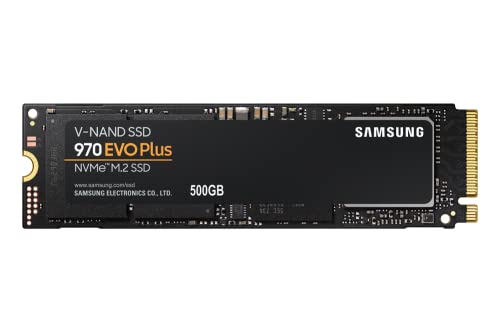
Samsung 970 EVO Plus 500GB NVMe M.2 SSD
Best for: fast sequential transfers and data security
- Form Factor
- M.2 (what this guide is about)
- Storage Capacity
- 500GB
- Interface
- PCIe Gen 3.0 x4 NVMe 1.3
- Max Read Speed
- Up to 3,500MB s
- Max Write Speed
- Up to 3,300MB s
- Dimensions
- 0.87 × 0.09 × 3.15 inches
View on Amazon: Samsung 970 EVO Plus 500GB NVMe M.2 SSD Affiliate link
This 500GB M.2 NVMe drive uses PCIe Gen 3.0 x4 and NVMe 1.3. It delivers up to 3,500MB/s read and 3,300MB/s write speeds. The Samsung V-NAND technology helps with power efficiency. Dynamic Thermal Guard monitors temperatures to prevent throttling. It includes a 5-year warranty or 600 TBW. You get AES 256-bit encryption for data security. It suits users needing fast sequential transfers.
Pros
- Sequential read speeds up to 3,500MB/s
- Sequential write speeds up to 3,300MB/s
- Dynamic Thermal Guard for temperature management
- AES 256-bit Full Disk Encryption
- 5-year limited warranty or 600 TBW
Cons
- 500GB capacity is smaller than 1TB or 2TB options
- No mention of included physical mounting hardware
- Lacks a dedicated DRAM cache in listed specs
Good fit if
- You need fast sequential read and write speeds for large files
- You want a reliable drive with a 5-year warranty
- You require AES 256-bit encryption for data security
Skip if
- You need more than 500GB of storage space
- You are looking for a SATA-based M.2 drive
- You prefer a drive with a larger DRAM cache
Verdict: Samsung 970 EVO Plus 500GB NVMe offers high-speed PCIe Gen 3.0 performance and thermal management. It fits users who prioritize fast data transfer rates and strong encryption standards over maximum storage capacity.
Specifications side by side
| Spec | ADATA SU800 256GB M.2 SATA SSD | Samsung 970 EVO Plus 500GB NVMe M.2 SSD |
|---|---|---|
| Storage Capacity | 256GB | 500GB |
| Interface | SATA | PCIe Gen 3.0 x4 NVMe 1.3 |
| Form Factor | not stated | M.2 |
| Max Read Speed | 560 MB/s | Up to 3,500MB s |
| Max Write Speed | 520 MB/s | Up to 3,300MB s |
| Cache Type | SLC Caching | not stated |
| NAND Type | 3D NAND, TLC | not stated |
| Size | 256 GB | 500GB |
| Dimensions | 0.87 × 0.14 × 3.15 inches | 0.87 × 0.09 × 3.15 inches |
| Weight | 0.32 ounces | 1.76 ounces |
| Color | Black | Black |
| Model | SU800 M.2 256GB | MZ-V7S500B/AM |
Frequently asked questions
Is M.2 2280 the same as NVMe?
No. M.2 2280 describes the physical size and shape of the drive. NVMe refers to the communication protocol used to transfer data. You can find M.2 2280 drives that use the older SATA interface instead of NVMe. Both form factors fit into the same slot, but they operate differently under the hood.
Can I use an M.2 SATA SSD in an NVMe slot?
It depends on your motherboard. Some M.2 slots support both SATA and NVMe protocols. Others support only one. Check your motherboard manual to see which interface is supported. The ADATA SU800 uses a SATA III interface, so it requires a slot that handles SATA signals to function correctly.
What does the 2280 number mean?
It indicates the physical dimensions of the drive. The first two digits, 22, mean the drive is 22 millimeters wide. The last two digits, 80, mean it is 80 millimeters long. This standard size is common for both M.2 SATA and NVMe drives, ensuring they fit in most modern laptops and desktops.
Is NVMe faster than M.2 SATA?
Yes, typically. NVMe drives bypass the SATA bottleneck by using the PCIe bus. The Samsung 970 EVO Plus uses a PCIe Gen 3.0 interface for high-speed sequential transfers. M.2 SATA drives are limited by the SATA III interface speed, making them slower for large file transfers and complex data tasks.
Do I need a heatsink for M.2 NVMe SSDs?
High-performance NVMe drives generate more heat than SATA drives. The Samsung 970 EVO Plus includes thermal management features to handle this. While not always mandatory, a heatsink helps maintain consistent speeds during heavy workloads. Check if your motherboard includes a built-in heatsink or if you need to purchase one separately.
Which is better for general office work?
An M.2 SATA SSD is often sufficient for basic tasks. The ADATA SU800 offers solid SATA performance for general use. It is a practical option for users upgrading older systems. You will notice faster boot times compared to traditional hard drives, even if the speed does not match top-tier NVMe options.
Are M.2 2280 and M.2 2242 compatible?
They share the same width but differ in length. M.2 2280 drives are 80mm long, while 2242 drives are only 42mm long. Most motherboards have slots that support the longer 2280 size. You may need an adapter to install a shorter 2242 drive in a slot designed for the standard 2280 length.