What Is Form Factor? A Guide for Nvme SSDs Buyers (2026)
As an Amazon Associate we earn from qualifying purchases. Links on this page are affiliate links.
Understanding NVMe SSD Form Factors
The form factor of an SSD defines its physical shape and interface type. This specification determines which slots on your motherboard or device can accept the drive. You must match the drive’s dimensions to your system’s available space. The most common options include M.2 2280, 2.5-inch, and M.2 2242.
The M.2 2280 is the standard for modern desktops and laptops. The name describes its size: 22 millimeters wide and 80 millimeters long. This compact stick-like design plugs directly into an M.2 slot on the motherboard. It eliminates cables and saves significant space inside your case. Most NVMe drives use this format because it supports high-speed PCIe connections.
The 2.5-inch form factor is the traditional standard. These drives resemble small hard drives. They connect via SATA or NVMe cables to a motherboard or power supply. This option is common in older systems or desktops with limited M.2 slots. It offers a familiar installation process using standard brackets and screws.
The M.2 2242 is a smaller version of the M.2 stick. It measures 22 millimeters wide but only 42 millimeters long. This compact size fits in ultrabooks, mini PCs, and some gaming consoles where space is tight. Not all motherboards support this shorter length, so you must check your manual.
Understanding form factor explained helps you avoid buying the wrong drive. You cannot force a 2280 drive into a slot meant for 2242. Similarly, a 2.5-inch drive requires a specific bracket and cable. Always verify your device’s specifications before purchasing. Choosing the correct physical size ensures compatibility and proper installation.
This guide covers the three main types you will encounter. Each serves a different use case based on space and interface needs.
M.2 2280 vs 2.5 Inch vs 2242
M.2 2280
This is the standard M.2 size for most modern laptops and desktops. The drive measures 22 millimeters wide and 80 millimeters long. You will find this form factor on nearly every motherboard with an M.2 slot. It fits directly into the motherboard without extra cables. The ADATA SU800 is an example of this size. It uses SATA III speeds, which are reliable for everyday tasks. This option is best if you have a standard system. It offers a balance of capacity and physical footprint. You do not need a mounting bracket for installation. The drive sits flat against the circuit board. This keeps your build clean and compact. It is the most common choice for general upgrades. If your system supports it, this is usually the easiest path. It works for both SATA and NVMe interfaces. Check your manual to confirm slot compatibility.
2.5 Inch
This is the traditional block shape used for decades. It measures 2.75 inches wide and 3.95 inches long. The drive is about 0.27 inches thick. You connect it using SATA data and power cables. The SanDisk SSD Plus is a typical 2.5-inch model. This form factor is ideal for desktops with limited M.2 slots. It is also good for older laptops that lack M.2 support. The drive sits in a dedicated bay or caddy. You need to manage cables inside the case. This option offers high capacity at lower costs. The Intel D3-S4510 shows this size in enterprise settings. It is robust and easy to replace. If you have spare SATA ports, this is a safe choice. It does not fit in slim ultrabooks. The physical bulk is the main trade-off. You get proven reliability and wide compatibility. It works with almost any computer made in the last ten years.
M.2 2242
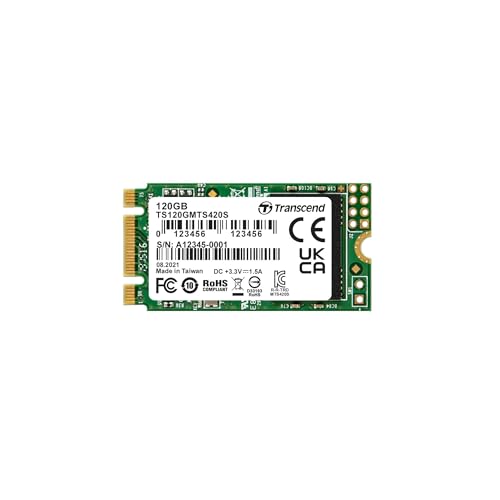
This is a compact M.2 variant for tight spaces. It is 22 millimeters wide but only 42 millimeters long. The drive is half the length of a standard 2280. The Transcend MTS420S fits this small footprint. You need a motherboard with a specific short key slot. This size is common in mini PCs and ultrabooks. It is also used in some gaming consoles. The drive saves space inside small chassis. You may need a mounting bracket to secure it. The shorter length limits the number of NAND chips. This often means lower maximum capacity. The Transcend MTS430S offers DRAM caching for better performance. This is a practical choice for compact builds. You sacrifice some capacity for a smaller physical size. It is not suitable for standard desktops without adapters. Check your device specs before buying. It is perfect for systems where space is at a premium. The trade-off is potential capacity limits for high-end tasks.
Is Form Factor Worth Your Attention
Who needs it
You must prioritize form factor if you are building a custom desktop or upgrading an existing system. The physical dimensions of the drive dictate whether it fits into your available slots. M.2 2280 is the standard size for most modern motherboards. If your board has these slots, this is your primary option. However, if you are working with a compact laptop or a small form factor PC, space is tight. You might need the shorter M.2 2242 drive to fit within the chassis. Conversely, if you are adding storage to a desktop tower that lacks M.2 slots, the 2.5 Inch drive is your only choice. It connects via SATA or PCIe adapters. Ignoring these physical constraints will result in a drive that simply does not fit. You need to measure your available space or check your motherboard manual before purchasing. This spec is critical for compatibility.
Who can skip it
You can largely ignore specific form factor details if you are buying a pre-built laptop or an all-in-one desktop. These devices come with fixed internal storage configurations. You generally cannot upgrade or change the drive type without complex modifications that may void warranties. In these cases, focus on capacity and interface speed instead. The manufacturer has already selected the correct physical size for your model. Your priority should be ensuring the new drive is compatible with your system’s BIOS and connector type. Do not worry about millimeter dimensions. Instead, check if your device supports NVMe protocols or if it is limited to SATA. For external portable drives, the form factor is irrelevant because the enclosure handles the physical shape. You only need to ensure the connection cable matches your computer’s ports. Focus on performance metrics and reliability rather than the physical dimensions of the internal component.
Key SSD Terms Explained
NVMe Interface
A protocol designed for flash storage. It allows the drive to communicate directly with the CPU via PCIe lanes, offering much higher speeds than older SATA interfaces.
PCIe Lane
A dedicated connection path between the SSD and the motherboard. More lanes, such as four in PCIe 4.0, allow for greater data throughput and faster transfer speeds.
SATA Interface
An older connection standard used by both SSDs and hard drives. It limits read and write speeds to approximately 600 MB/s, regardless of the drive's internal technology.
M.2 Form Factor
A small, rectangular card shape that plugs directly into the motherboard. It eliminates the need for cables and saves space inside desktop cases and thin laptop chassis.
2280 Size
The most common M.2 dimensions, measuring 22 millimeters wide and 80 millimeters long. This size fits the majority of modern motherboards and is standard for gaming PCs.
TLC NAND
A type of flash memory storing three bits per cell. It offers a good balance between cost, capacity, and performance, making it the standard for most consumer drives.
DRAM Cache
A small amount of fast memory on the drive. It stores mapping tables to help the SSD locate data quickly, improving sustained write speeds and overall system responsiveness.
End-to-End Protection
A security feature that checks data integrity during transfers. It prevents corruption by verifying that data written to the drive matches the data read back from it.
Quick picks
| # | Product | Best for | Price |
|---|---|---|---|
| 1 | ADATA SU800 256GB M.2 SATA SSD | Standard M.2 2280 SATA upgrades | Check price of ADATA SU800 256GB M.2 SATA SSD on Amazon |
| 2 | SanDisk SSD Plus 2TB SATA III SSD | Desktops and laptops needing 2TB SATA storage | Check price of SanDisk SSD Plus 2TB SATA III SSD on Amazon |
| 3 | Transcend 120GB M.2 2242 SATA SSD | compact mini PC storage upgrades | Check price of Transcend 120GB M.2 2242 SATA SSD on Amazon |
| 4 | Transcend 120GB M.2 SATA SSD | Light storage in M.2 SATA slots | Check price of Transcend 120GB M.2 SATA SSD on Amazon |
| 5 | Intel D3-S4510 1.92TB Enterprise SATA SSD | read-intensive enterprise server storage | Check price of Intel D3-S4510 1.92TB Enterprise SATA SSD on Amazon |
| 6 | Transcend 128GB M.2 2242 SATA SSD | compact laptops and mini-PCs needing DRAM cache | Check price of Transcend 128GB M.2 2242 SATA SSD on Amazon |
Our 6 picks

ADATA SU800 256GB M.2 SATA SSD
Best for: Standard M.2 2280 SATA upgrades
- Form Factor
- M.2 2280 (what this guide is about)
- Storage Capacity
- 256GB
- Interface
- SATA
- Max Read Speed
- 560 MB/s
- Max Write Speed
- 520 MB/s
- Cache Type
- SLC Caching
View on Amazon: ADATA SU800 256GB M.2 SATA SSD Affiliate link
This 256GB drive uses the M.2 2280 form factor with a SATA III interface. It delivers sequential read speeds up to 560 MB/s and write speeds up to 520 MB/s. The controller employs SLC caching to manage performance. It fits standard M.2 slots that support the B+M key layout. This drive suits users needing reliable storage for everyday computing tasks without requiring PCIe bandwidth.
Pros
- M.2 2280 form factor fits most modern motherboards
- SATA III interface offers up to 560 MB/s read speeds
- SLC caching boosts sustained write performance
- Includes LDPC ECC for data integrity
Cons
- 256GB capacity is limited for large media libraries
- SATA interface caps throughput below NVMe standards
- Requires a motherboard slot supporting B+M key
Good fit if
- You need a standard M.2 2280 drive for a laptop or desktop
- You require SATA III speeds for general office work
- You want a reliable upgrade for an older system with M.2 slots
Skip if
- You need high-speed NVMe PCIe performance
- You require more than 256GB of storage
- Your motherboard only supports M.2 2242 or 2.5-inch drives
Verdict: ADATA SU800 256GB M.2 2280 is a solid choice for users needing standard M.2 2280 SATA storage. It fits systems with B+M key slots and provides reliable SATA III speeds for everyday tasks.

SanDisk SSD Plus 2TB SATA III SSD
Best for: Desktops and laptops needing 2TB SATA storage
- Form Factor
- 2.5 Inch (what this guide is about)
- Storage Capacity
- 2TB
- Interface
- SATA III 6 Gb/s
- Max Read Speed
- Up to 545MB/s
- Max Write Speed
- Up to 515MB/s
- Cache Type
- SLC Caching
View on Amazon: SanDisk SSD Plus 2TB SATA III SSD Affiliate link
This SanDisk drive uses a standard 2.5-inch form factor with a SATA III interface. It offers 2TB of storage and reaches read speeds of 545MB/s. The unit includes SLC caching to boost burst writes. It fits most desktops and laptops with SATA ports. You get reliable performance for everyday tasks without the bulk of a mechanical drive.
Pros
- 2TB storage capacity for large files
- 545MB/s sequential read speed
- SLC caching for faster burst writes
- Shock and vibration resistant design
Cons
- SATA III interface limits max speed
- No DRAM cache for heavy workloads
- Standard 3-year limited warranty
Good fit if
- You need high capacity storage
- You are upgrading a desktop PC
- You want a reliable everyday drive
Skip if
- You require PCIe Gen4 speeds
- You need NVMe M.2 form factor
- You prioritize DRAM cache performance
Verdict: SanDisk SSD Plus 2TB 2.5 Inch delivers solid SATA performance for users who need ample space and reliable daily speed. It is a practical upgrade for standard desktops and laptops that rely on SATA connections.
Transcend 120GB M.2 2242 SATA SSD
Best for: compact mini PC storage upgrades
- Form Factor
- M.2 2242 (what this guide is about)
- Storage Capacity
- 120GB
- Interface
- SATA III 6GB/s
- Max Read Speed
- 560MB/sec
- Max Write Speed
- 500MB/sec
- Cache Type
- SLC Cache
View on Amazon: Transcend 120GB M.2 2242 SATA SSD Affiliate link
This is a 120GB M.2 2242 SSD using SATA III 6GB/s. It offers read speeds up to 560MB/sec and write speeds up to 500MB/sec. The drive uses 3D TLC NAND with SLC Cache. It fits compact systems needing a B+M key slot. You get a 3-year warranty. It is ideal for small form factor builds where space is tight.
Pros
- M.2 2242 form factor for compact builds
- Read speeds up to 560MB/sec
- SATA III 6GB/s interface
- 3D TLC NAND with SLC Cache
Cons
- Small 120GB storage capacity
- SATA III interface limits speed
- No DRAM cache listed
Good fit if
- You need a 2242 size for a mini PC
- You require SATA III speeds
- You want a 3-year warranty
Skip if
- You need more than 120GB
- You want PCIe NVMe speeds
- You require a 2280 size
Verdict: Transcend MTS420S 120GB M.2 2242 fits users with tight space constraints who need reliable SATA performance. It is a solid option for compact builds.

Transcend 120GB M.2 SATA SSD
Best for: Light storage in M.2 SATA slots
- Form Factor
- M.2 2280 (what this guide is about)
- Storage Capacity
- 120GB
- Interface
- SATA III 6GB/s
- Max Read Speed
- 560MB/sec
- Max Write Speed
- 510MB/sec
- Cache Type
- SLC Cache
View on Amazon: Transcend 120GB M.2 SATA SSD Affiliate link
This Transcend MTS820S is a 120GB M.2 2280 drive using SATA III. It offers sequential read speeds up to 560MB/sec and write speeds up to 510MB/sec. The drive uses 3D TLC NAND with SLC caching. It measures 80mm in length. This compact form factor fits standard M.2 slots. It suits users needing basic storage expansion for older systems or lightweight tasks.
Pros
- SATA III 6GB/s interface
- 560MB/sec max read speed
- 510MB/sec max write speed
- 120GB storage capacity
- M.2 2280 form factor
Cons
- 120GB capacity is small by modern standards
- Uses SLC cache instead of full DRAM
- SATA III limits speeds compared to NVMe
Good fit if
- You need a cheap M.2 2280 drive for light use
- You have a motherboard with an M.2 SATA slot
- You only need basic storage expansion
Skip if
- You require high sequential write speeds
- You need more than 120GB of space
- You want NVMe PCIe speeds
Verdict: Transcend MTS820S 120GB M.2 2280 SATA SSD is a basic storage option for light users. It fits systems with M.2 SATA slots but lacks the speed and capacity of modern drives.

Intel D3-S4510 1.92TB Enterprise SATA SSD
Best for: read-intensive enterprise server storage
- Form Factor
- 2.5 Inch (what this guide is about)
- Storage Capacity
- 1.92TB
- Interface
- SATA 6Gb/s
- Max Read Speed
- 560 MB/s
- Max Write Speed
- 510 MB/s
- NAND Type
- TLC
View on Amazon: Intel D3-S4510 1.92TB Enterprise SATA SSD Affiliate link
The Intel D3-S4510 is a 1.92TB enterprise drive built for read-heavy tasks like virtualization and databases. It uses 64-layer 3D TLC NAND and delivers 560 MB/s reads and 510 MB/s writes. You get AES 256-bit encryption and power loss protection. The 2.5-inch SATA form factor fits standard server bays. It is rated for 24/7 operation with a 2 million hour MTBF. This drive suits data centers needing reliable, consistent access.
Pros
- 1.92TB capacity for large datasets
- 560 MB/s sequential read speed
- AES 256-bit encryption for data security
- Power loss protection feature
- 2 million hour MTBF reliability rating
Cons
- Read-intensive endurance rating limits write heavy use
- No DRAM cache listed in specifications
- Enterprise form factor is bulky for desktops
Good fit if
- You need high capacity for read-heavy workloads
- You require enterprise-grade data protection features
- You are building a standard 2.5-inch server
Skip if
- You need write-intensive endurance for heavy logging
- You are installing in a small form factor desktop
- You require DRAM cache for latency sensitivity
Verdict: The Intel D3-S4510 1.92TB 2.5-Inch SATA SSD provides robust storage for read-heavy enterprise environments. You should choose this drive if you prioritize data integrity and capacity over random write performance in a standard server chassis.

Transcend 128GB M.2 2242 SATA SSD
Best for: compact laptops and mini-PCs needing DRAM cache
- Form Factor
- M.2 2242 (what this guide is about)
- Storage Capacity
- 128GB
- Interface
- SATA III 6Gb/s
- Max Read Speed
- 560MB/s
- Max Write Speed
- 350MB/s
- Cache Type
- DDR3 DRAM, SLC Cache
View on Amazon: Transcend 128GB M.2 2242 SATA SSD Affiliate link
This Transcend drive uses the compact M.2 2242 form factor, measuring just 42mm in length. It connects via SATA III 6Gb/s and includes a dedicated DDR3 DRAM cache to lower latency. You get sequential read speeds up to 560MB/s and write speeds of 350MB/s. The 128GB capacity fits ultrabooks and mini-PCs where space is tight. It supports SATA Device Sleep for efficiency.
Pros
- Compact M.2 2242 form factor saves space
- Dedicated DDR3 DRAM cache reduces latency
- Sequential read speeds up to 560MB/s
- Supports SATA Device Sleep for battery efficiency
Cons
- Only 128GB storage capacity
- SATA III interface limits speed compared to NVMe
- Not compatible with NVMe or PCIe slots
Good fit if
- You need an SSD for a space-constrained mini-PC
- You require DRAM cache for consistent performance
- Your device supports M.2 SATA 2242 drives
Skip if
- You need high-capacity storage above 128GB
- Your motherboard only supports NVMe PCIe drives
- You require maximum sequential write speeds over 350MB/s
Verdict: Transcend MTS430S 128GB M.2 2242 is a practical option for users upgrading ultrabooks or NUCs with limited internal space. It offers reliable SATA performance with DRAM caching, making it suitable for basic computing tasks in compact chassis.
Specifications side by side
| Spec | ADATA SU800 256GB M.2 SATA SSD | SanDisk SSD Plus 2TB SATA III SSD | Transcend 120GB M.2 2242 SATA SSD | Transcend 120GB M.2 SATA SSD | Intel D3-S4510 1.92TB Enterprise SATA SSD | Transcend 128GB M.2 2242 SATA SSD |
|---|---|---|---|---|---|---|
| Storage Capacity | 256GB | 2TB | 120GB | 120GB | 1.92TB | 128GB |
| Interface | SATA | SATA III 6 Gb/s | SATA III 6GB/s | SATA III 6GB/s | SATA 6Gb/s | SATA III 6Gb/s |
| Form Factor | not stated | 2.5"/7mm | not stated | not stated | 2.5-Inch | not stated |
| Max Read Speed | 560 MB/s | Up to 545MB/s | 560MB/sec | 560MB/sec | 560 MB/s | 560MB/s |
| Max Write Speed | 520 MB/s | Up to 515MB/s | 500MB/sec | 510MB/sec | 510 MB/s | 350MB/s |
| Cache Type | SLC Caching | SLC Caching | SLC Cache | SLC Cache | not stated | DDR3 DRAM, SLC Cache |
| Compatibility | not stated | not stated | Laptop, Desktop | Laptop, Desktop | not stated | Laptop, Desktop |
| NAND Type | 3D NAND, TLC | not stated | not stated | not stated | TLC | not stated |
| Size | 256 GB | 2TB | 120GB | 120GB | not stated | 128GB |
| Dimensions | 0.87 × 0.14 × 3.15 inches | 3.95 × 2.75 × 0.27 inches | 0.87 × 0.15 × 3.15 inches | 0.87 × 0.15 × 3.15 inches | 2.5 × 2.5 × 1.5 inches | 1.65 × 0.87 × 0.14 inches |
| Weight | 0.32 ounces | 1.15 ounces | not stated | not stated | 3.2 ounces | not stated |
| Color | Black | Black | Multicoloured | Black | Silver | Green |
| Model | SU800 M.2 256GB | SDSSDA-2T00 | TS120GMTS420S | TS120GMTS820S | SSDSC2KB019T8 | TS128GMTS430S |
Frequently asked questions
What is the difference between M.2 2280 and M.2 2242?
The primary difference is the length. The M.2 2280 measures 80 millimeters long, making it the standard for most desktops and laptops. The M.2 2242 is shorter, measuring only 42 millimeters long. You should choose the 2242 size for compact mini PCs or ultrabooks where space is limited. Always check your motherboard manual to confirm which lengths your slots support.
Can I use a 2.5 inch SSD in an M.2 slot?
No, you cannot. The 2.5 inch form factor is a rectangular box that connects via a SATA cable. The M.2 form factor is a small stick that plugs directly into the motherboard. They have different physical connectors and mounting holes. You must select the drive type that matches the specific physical slot available on your device.
Does form factor affect SSD speed?
The physical shape itself does not dictate speed. However, the interface used with that form factor does. Many M.2 drives use the faster NVMe interface, while 2.5 inch drives typically use the older SATA III interface. Some M.2 drives, like the ADATA SU800, use SATA III instead. You must check the interface specification, not just the size, to determine performance.
What does the 2280 number mean?
The numbers describe the physical dimensions in millimeters. The first two digits, 22, represent the width of the drive. The last two digits, 80, represent the length. This standard ensures compatibility across many devices. You will see other numbers like 2242 for shorter drives or 2230 for very compact modules. The width usually remains constant at 22 millimeters.
Is M.2 better than 2.5 inch for gaming?
M.2 drives often offer faster load times if they use the NVMe interface. The 2.5 inch SATA drives are slower but still functional for gaming. The Intel D3-S4510 is a 2.5 inch drive designed for enterprise servers, not gaming. For most gamers, an M.2 NVMe drive provides the best balance of speed and modern compatibility. Check your motherboard supports NVMe before buying.
Do I need an M.2 adapter for a 2.5 inch drive?
No, you do not need an adapter. The 2.5 inch drive is a standalone unit that connects via a cable to the motherboard or power supply. M.2 drives plug directly into the board. You cannot simply adapt one to the other because the connectors and protocols differ. You must buy the form factor that physically fits your system.
Can I mix M.2 and 2.5 inch drives in one PC?
Yes, you can mix them if your system has both types of slots. Many desktop motherboards have both M.2 slots and SATA ports. You can install an M.2 drive for the operating system and a 2.5 inch drive for large storage. The Transcend 120GB M.2 2242 is small enough for tight spaces, while the SanDisk SSD Plus fits standard bays.