6 Best Alternatives to the ICY BOX 20Gbps Tool-Free M.2 NVMe (2026)
As an Amazon Associate we earn from qualifying purchases. Links on this page are affiliate links.
If you want fast external storage, exploring icy box 20gbps m 2 nvme SSD alternatives helps you match an enclosure to your system. The original ICY BOX enclosure provides USB-C 3.2 Gen 2x2 connectivity for transfer rates up to 20Gbps, a dedicated hardware write-protection switch, and tool-free installation for 2230, 2242, 2260, and 2280 drive sizes. Its finned aluminum chassis relies on a thermal pad for passive cooling.
However, you might want different specifications depending on your hardware and workflow. Your computer may lack USB 3.2 Gen 2x2 support, making a 10Gbps enclosure from brands like ORICO or ASUS a more practical fit. You might also prefer active fan cooling for sustained transfers, a dual-bay model for two NVMe drives, or a different enclosure size. The 6 alternatives in this 2026 guide were chosen because their specifications overlap with the original, providing NVMe drive support, aluminum construction, and USB-C connectivity.
Our top pick: ICY BOX 20Gbps Tool-Free M.2 NVMe Enclosure.
How Each Alternative Compares
ICY BOX Dual-Bay 20Gbps NVMe Enclosure
This ICY BOX model doubles your drive capacity by providing two M.2 NVMe bays instead of one, running across a 20Gbps USB-C connection. It keeps tool-free installation and an aluminum chassis for passive heat dissipation. You give up the single-bay model's hardware write-protection switch, which prevents accidental file overwrites or malicious data modifications. The dual-bay enclosure is also bulkier and heavier, measuring 4.72 by 2.76 by 0.67 inches and weighing 8.29 ounces compared to 5.11 ounces on the original. Choose this unit if you manage dual NVMe drives simultaneously on your desk and do not need write-lock protection.
ORICO Tool-Free Aluminum M.2 NVMe Enclosure
This ORICO enclosure trades maximum interface bandwidth for everyday 10Gbps performance, making it suitable for standard USB 3.2 Gen 2 ports. It retains a tool-free aluminum design for quick drive swaps and supports M.2 NVMe capacities up to 4TB. By choosing this unit, you give up the 20Gbps transfer speed of the original ICY BOX, cutting peak theoretical interface throughput in half. You also lose the hardware write-protection switch that protects critical data against deletion. Pick this enclosure if your host computer lacks a 20Gbps USB 3.2 Gen 2x2 port and you want a simple, tool-free aluminum case for regular drive swaps.
ORICO Tool-Free Aluminum M.2 NVMe Enclosure
This blue ORICO enclosure gives you a lighter, slimmer portable option, weighing 3.53 ounces compared to the 5.11-ounce ICY BOX and measuring 1.38 inches wide. It features a tool-free aluminum shell and supports drives up to 4TB. However, its host interface maxes out at 10Gbps, which delivers half the 20Gbps bandwidth of the original enclosure. You also forfeit the physical write-protection toggle for safeguarding stored drives. You should pick this alternative if you need a lightweight, compact enclosure for daily travel and your workflow does not require 20Gbps transfer rates or dedicated write blocking.
Plugable Tool-Free Active-Cooling M.2 NVMe Enclosure
This Plugable enclosure incorporates active fan cooling inside its aluminum frame, whereas the original ICY BOX relies solely on passive finned heat dissipation. This active cooling helps push air across the drive during sustained transfers. In return, you step down from 20Gbps USB 3.2 Gen 2x2 to a 10Gbps interface. You also lose the tool-free write-protection switch found on the ICY BOX, leaving data vulnerable to accidental deletion or system writes. Choose this Plugable alternative if you prioritize active airflow to manage temperatures during prolonged file transfers over maximum 20Gbps burst transfer speeds.
ASUS ROG Strix Arion 10Gbps NVMe Enclosure
The ASUS ROG Strix Arion features an aluminum build weighing 3.46 ounces, making it lighter than the 5.11-ounce ICY BOX. It supports multiple M.2 NVMe lengths, similar to the original. However, you give up the 20Gbps transfer speeds of USB 3.2 Gen 2x2, as this enclosure tops out at 10Gbps. You also lose the tool-free installation mechanism and the physical write-protection switch offered by the ICY BOX. Select this enclosure if you want a sturdy aluminum housing for 10Gbps connections and do not need 20Gbps speeds or hardware write protection.
ORICO 20Gbps M.2 NVMe SSD Enclosure
This ORICO enclosure matches the ICY BOX with 20Gbps transfer rates over USB 3.2 Gen 2x2, while supporting high-capacity drives up to 8TB. Its aluminum chassis is slightly more compact, measuring 4.25 by 1.16 inches. What you give up is tool-free convenience, as this model uses single-screw drive mounting that requires a tool during assembly. You also lose the hardware write-protection switch found on the ICY BOX. Choose this alternative if you need 20Gbps performance with high-capacity 8TB drive support in a narrower aluminum body and do not mind using a screw to secure your drive.
Quick picks
Our 7 picks

ICY BOX 20Gbps Tool-Free M.2 NVMe Enclosure
Best for: high-speed transfers with hardware write protection
- Max Transfer Speed
- 20Gbps
- Host Interface
- USB-C 3.2 Gen 2x2
- Drive Interface
- M.2 NVMe
- Supported Form Factors
- 2230, 2242, 2260, 2280
- Drive Bay Count
- 1 bay
- Cooling System
- Passive finned aluminum, thermal pad
View on Amazon: ICY BOX 20Gbps Tool-Free M.2 NVMe Enclosure Affiliate link
This external enclosure houses a single M.2 NVMe drive using a tool-free design. It supports 2230, 2242, 2260, and 2280 form factors and connects via USB-C 3.2 Gen 2x2 for transfer speeds up to 20Gbps. You also get a dedicated physical write-protection switch to safeguard data. It suits you if you need fast single-drive data transfers, regular drive swaps, and reliable hardware-level data locking without carrying screwdrivers.
Pros
- Up to 20Gbps transfer speeds over USB 3.2 Gen 2x2
- Hardware write-protection switch prevents data modification
- Tool-free installation supports 2230, 2242, 2260, and 2280 SSDs
- Finned aluminum housing with thermal pad for passive cooling
Cons
- Requires a USB 3.2 Gen 2x2 host port to reach maximum speeds
- Supports NVMe drives only with no SATA compatibility
- Single-bay design holds only one drive at a time
Good fit if
- You have a USB 3.2 Gen 2x2 port and want 20Gbps transfer rates.
- You want a physical write-protection switch to prevent accidental file deletion.
- You frequently swap M.2 NVMe drives without using tools.
Skip if
- You need an enclosure that accommodates legacy M.2 SATA SSDs.
- You require multiple drive bays in one enclosure.
Verdict: ICY BOX 20Gbps Tool-Free M.2 NVMe Enclosure delivers rapid 20Gbps speeds and tool-free drive swaps alongside a dedicated hardware write-protection switch. It is a solid choice if your system supports USB 3.2 Gen 2x2.
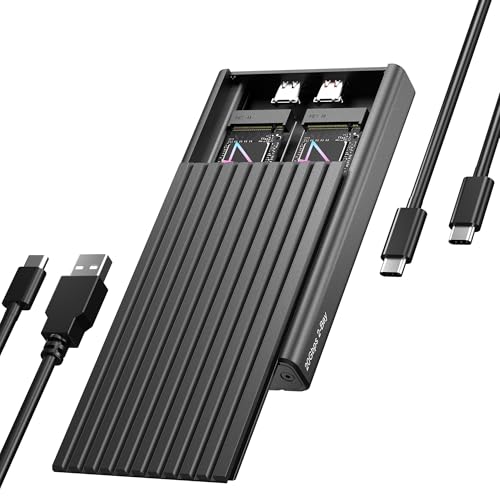
ICY BOX Dual-Bay 20Gbps NVMe Enclosure
Best for: simultaneous dual NVMe drive workflows
- Max Transfer Speed
- 20Gbps
- Host Interface
- USB-C, USB 3.2 Gen 2x2
- Drive Interface
- PCIe NVMe M-Key
- Supported Form Factors
- 2230, 2242, 2260, 2280
- Drive Bay Count
- 2 bays
- Cooling System
- Aluminum, thermal pad
View on Amazon: ICY BOX Dual-Bay 20Gbps NVMe Enclosure Affiliate link
The ICY BOX Dual-Bay 20Gbps NVMe Enclosure gives you simultaneous access to two M.2 NVMe drives through a single USB-C cable. It features a USB 3.2 Gen 2x2 interface capable of 20Gbps transfer rates, aluminum construction, and a tool-free rubber mounting system. It accepts 2230, 2242, 2260, and 2280 form factors. This enclosure suits you if you regularly manage dual-drive backups or expand your storage setup.
Pros
- Holds two M.2 NVMe SSDs accessible simultaneously
- Supports 20Gbps transfers over USB 3.2 Gen 2x2
- Tool-free drive installation using rubber fixations
- Accepts 2230, 2242, 2260, and 2280 form factors
Cons
- Requires an included dedicated power cable
- Needs a USB 3.2 Gen 2x2 host port to achieve 20Gbps
- Weighs 8.29 ounces, making it bulkier than single-slot enclosures
Good fit if
- You need to run or access two M.2 NVMe SSDs at the same time over one connection.
- You have a host computer equipped with a USB 3.2 Gen 2x2 port.
- You frequently swap M.2 drives and prefer tool-free installation.
Skip if
- You only need an enclosure for a single NVMe drive.
- You want an ultra-light, bus-powered enclosure that uses only one cable for data and power.
Verdict: ICY BOX Dual-Bay 20Gbps NVMe Enclosure delivers simultaneous dual-drive access at up to 20Gbps in a tool-free aluminum casing. It serves as an expansive desktop docking solution if your hardware supports USB 3.2 Gen 2x2.

ORICO Tool-Free Aluminum M.2 NVMe Enclosure
Best for: Everyday 10Gbps tool-free NVMe drive swaps
- Max Transfer Speed
- 10Gbps
- Host Interface
- USB 3.2 Gen 2 Type-C
- Drive Interface
- PCIe NVMe M-Key
- Supported Form Factors
- 2230, 2242, 2260, 2280
- Cooling System
- Aluminum shell, heatsink, thermal pad
- Maximum Capacity
- 4TB
View on Amazon: ORICO Tool-Free Aluminum M.2 NVMe Enclosure Affiliate link
This ORICO external enclosure converts an M-Key PCIe NVMe drive into portable storage using a USB 3.2 Gen 2 interface that tops out at 10Gbps. It accepts four common drive lengths from 2230 up to 2280, accommodating storage sizes up to 4TB. An included two-in-one cable connects to Type-C or Type-A ports, while the tool-free chassis simplifies drive swaps. It suits you if you need a versatile, moderate-speed portable drive adapter.
Pros
- Tool-free chassis design for quick drive installation
- Included 2-in-1 cable supports both USB-C and USB-A connections
- Supports 2230, 2242, 2260, and 2280 NVMe SSD form factors up to 4TB
- Includes aluminum shell, cooling vest heatsink, and thermal pad
Cons
- Maximum transfer speed is 10Gbps rather than 20Gbps
- Does not support SATA-based M.2 SSDs
Good fit if
- You want tool-free SSD installation without needing screwdrivers.
- You need to connect to both USB Type-C and Type-A host ports.
- You use an M-Key PCIe NVMe drive between 2230 and 2280 in size.
Skip if
- You require 20Gbps transfer speeds for your workflow.
- You plan to install a SATA-based M.2 SSD.
Verdict: ORICO Tool-Free 10Gbps M.2 NVMe Enclosure offers tool-free installation and broad port flexibility for PCIe drives up to 4TB. It provides reliable 10Gbps transfers if you do not need 20Gbps throughput.

ORICO Tool-Free Aluminum M.2 NVMe Enclosure
Best for: Everyday 10Gbps portable NVMe storage
- Max Transfer Speed
- 10Gbps
- Host Interface
- USB 3.2, Thunderbolt 3 Compatible
- Drive Interface
- PCIe M-Key, PCIe B&M key
- Supported Form Factors
- 2230, 2242, 2260, 2280
- Cooling System
- Silicone pad, heatsink, aluminum body
- Maximum Capacity
- 4TB
View on Amazon: ORICO Tool-Free Aluminum M.2 NVMe Enclosure Affiliate link
The ORICO Tool-Free 10Gbps M.2 NVMe Enclosure is an external USB-C drive caddy built for PCIe NVMe drives. You get transfer rates up to 10Gbps (1000MB/s) and support for M.2 sizes from 2230 to 2280 up to 4TB. It features a tool-free push-cover installation and three-layer aluminum cooling. This enclosure suits you if you want quick drive swaps and solid daily transfer speeds across computers, phones, or consoles.
Pros
- Tool-free push-cover tray allows quick drive installation
- Supports M.2 NVMe sizes 2230, 2242, 2260, and 2280 up to 4TB
- Three-layer cooling includes aluminum body, heatsink, and thermal pad
- Broad host support including USB-C and Thunderbolt 3 interfaces
Cons
- Limits transfer speeds to 10Gbps rather than 20Gbps
- Incompatible with M.2 SATA and PCIe AHCI solid-state drives
Good fit if
- You need a tool-free enclosure for fast M.2 NVMe drive swaps
- You want to connect drives up to 4TB via 10Gbps USB-C or Thunderbolt 3
- You use standard NVMe sizes from 2230 up to 2280
Skip if
- You require 20Gbps transfer speeds for your workflow
- You need compatibility with M.2 SATA or PCIe AHCI drives
Verdict: ORICO Tool-Free 10Gbps M.2 NVMe Enclosure delivers dependable 10Gbps speeds and toolless drive installation in a durable aluminum shell. It offers a practical, portable storage option for drives up to 4TB.

Plugable Tool-Free Active-Cooling M.2 NVMe Enclosure
Best for: sustained 10Gbps transfers needing active fan cooling
- Max Transfer Speed
- 10Gbps
- Host Interface
- USB 3.2 Gen 2, USB-C
- Drive Interface
- PCIe NVMe M-Key, B+M Key
- Supported Form Factors
- 2242, 2260, 2280
- Cooling System
- Active fan, passive aluminum alloy
- Installation Style
- Tool-free
View on Amazon: Plugable Tool-Free Active-Cooling M.2 NVMe Enclosure Affiliate link
This Plugable external enclosure houses an M.2 NVMe SSD using a tool-free aluminum design. It delivers transfer rates up to 10Gbps over a USB 3.2 Gen 2 interface and features an active cooling fan rated below 28dB alongside passive metal dissipation. It suits you if you want steady thermal management for sizes 2242, 2260, or 2280 without needing tools or dealing with SATA drives.
Pros
- Dual cooling with built-in active fan and aluminum body
- Tool-free setup requires no screws or drivers
- Includes both USB-C and USB-A host cables
- Compatible with 2242, 2260, and 2280 NVMe M.2 drives
Cons
- Caps at 10Gbps instead of 20Gbps transfer speeds
- Does not support NGFF SATA SSDs
Good fit if
- You want active fan cooling to mitigate thermal throttling during large file transfers.
- You need tool-free drive installation for swapping M.2 PCIe SSDs.
- You connect to host devices using either USB-C or USB-A ports.
Skip if
- You require 20Gbps transfer bandwidth.
- You use SATA-based M.2 drives.
Verdict: Plugable Tool-Free 10Gbps M.2 NVMe Enclosure provides steady active cooling and toolless drive swaps at USB 3.2 Gen 2 speeds. It is a reliable option if you prioritize thermal control over 20Gbps maximum bandwidth.

ASUS ROG Strix Arion 10Gbps NVMe Enclosure
Best for: RGB-focused setups needing 10 Gbps NVMe speeds
- Max Transfer Speed
- Up to 10 Gbps
- Host Interface
- USB Type-C 3.2 Gen 2
- Drive Interface
- PCIe NVMe (M Key, B+M Key)
- Supported Form Factors
- 2230, 2242, 2260, 2280
- Cooling System
- Aluminum alloy case with thermal pads
- Dimensions
- 7.1 × 3.8 × 1.6 inches
View on Amazon: ASUS ROG Strix Arion 10Gbps NVMe Enclosure Affiliate link
The ASUS ROG Strix Arion is an external aluminum enclosure designed for PCIe NVMe drives. It connects over USB 3.2 Gen 2 Type-C to deliver data transfer speeds up to 10 Gbps. Inside, it fits M.2 cards in 2230, 2242, 2260, and 2280 sizes using thermal pads for heat dissipation. Both USB-C and USB-A cables are included. It suits you if you want wide drive compatibility and built-in RGB lighting.
Pros
- Supports 2230, 2242, 2260, and 2280 NVMe SSD form factors
- Includes both USB-C to USB-C and USB-C to USB-A cables
- Aluminum alloy enclosure with thermal pads for heat management
- ASUS Aura Sync RGB lighting synchronization
Cons
- Caps transfer speeds at 10 Gbps instead of 20 Gbps
- Does not include an internal SSD
Good fit if
- You need support for varying NVMe drive sizes from 2230 to 2280.
- You want both USB-C and USB-A cables included in the box.
- You want Aura Sync RGB lighting on your external storage.
Skip if
- You require 20 Gbps transfer speeds for your workflow.
- You need a package that already includes an M.2 SSD.
Verdict: ASUS ROG Strix Arion 10Gbps M.2 NVMe Enclosure offers solid aluminum cooling and multi-length drive support for 10 Gbps setups. It is a reliable pick if you do not require 20 Gbps bandwidth.

ORICO 20Gbps M.2 NVMe SSD Enclosure
Best for: USB 3.2 Gen 2x2 high-capacity NVMe storage
- Max Transfer Speed
- 20Gbps
- Host Interface
- USB 3.2 Gen 2x2 Type-C
- Drive Interface
- NVMe PCIe (M-Key & B+M Key)
- Supported Form Factors
- 2230, 2242, 2260, 2280
- Cooling System
- Aluminum shell heat sink
- Maximum Capacity
- 8TB
View on Amazon: ORICO 20Gbps M.2 NVMe SSD Enclosure Affiliate link
This ORICO enclosure houses an M.2 NVMe PCIe drive inside an aluminum shell. You get a USB 3.2 Gen 2x2 Type-C connection delivering up to 20Gbps transfer speeds. It accepts 2230, 2242, 2260, and 2280 form factor drives with capacities up to 8TB. It suits you if you need sustained high bandwidth for moving large data files or video projects across USB 3.2 Gen 2x2 and USB4 ports.
Pros
- USB 3.2 Gen 2x2 Type-C interface supports speeds up to 20Gbps
- Supports capacities up to 8TB across four M.2 form factors
- Full aluminum body functions as a passive heat sink
- Compatible with both M-Key and B+M Key NVMe PCIe drives
Cons
- Requires a screw to install rather than a tool-free latch
- Incompatible with host ports that only support Thunderbolt 3
- Does not work with M.2 SATA or mSATA SSDs
Good fit if
- You have a computer with a USB 3.2 Gen 2x2 or USB4 port.
- You need an external enclosure that supports high-capacity NVMe drives up to 8TB.
- You use M.2 NVMe drives in 2230, 2242, 2260, or 2280 sizes.
Skip if
- You need tool-free drive swaps without using a screwdriver.
- You connect mainly to ports limited strictly to Thunderbolt 3.
- You want to house an M.2 SATA or mSATA SSD.
Verdict: ORICO 20Gbps M.2 NVMe Aluminum Enclosure delivers fast 20Gbps transfers and 8TB capacity inside a compact aluminum chassis. It offers reliable single-screw installation for systems with USB 3.2 Gen 2x2 support.
Specifications side by side
| Spec | ICY BOX 20Gbps Tool-Free M.2 NVMe Enclosure | ICY BOX Dual-Bay 20Gbps NVMe Enclosure | ORICO Tool-Free Aluminum M.2 NVMe Enclosure | ORICO Tool-Free Aluminum M.2 NVMe Enclosure | Plugable Tool-Free Active-Cooling M.2 NVMe Enclosure | ASUS ROG Strix Arion 10Gbps NVMe Enclosure | ORICO 20Gbps M.2 NVMe SSD Enclosure |
|---|---|---|---|---|---|---|---|
| Max Transfer Speed | 20Gbps | 20Gbps | 10Gbps | 10Gbps | 10Gbps | Up to 10 Gbps | 20Gbps |
| Host Interface | USB-C 3.2 Gen 2x2 | USB-C, USB 3.2 Gen 2x2 | USB 3.2 Gen 2 Type-C | USB 3.2, Thunderbolt 3 Compatible | USB 3.2 Gen 2, USB-C | USB Type-C 3.2 Gen 2 | USB 3.2 Gen 2x2 Type-C |
| Drive Interface | M.2 NVMe | PCIe NVMe M-Key | PCIe NVMe M-Key | PCIe M-Key, PCIe B&M key | PCIe NVMe M-Key, B+M Key | PCIe NVMe (M Key, B+M Key) | NVMe PCIe (M-Key & B+M Key) |
| Supported Form Factors | 2230, 2242, 2260, 2280 | 2230, 2242, 2260, 2280 | 2230, 2242, 2260, 2280 | 2230, 2242, 2260, 2280 | 2242, 2260, 2280 | 2230, 2242, 2260, 2280 | 2230, 2242, 2260, 2280 |
| Drive Bay Count | 1 bay | 2 bays | not stated | not stated | not stated | not stated | not stated |
| Cooling System | Passive finned aluminum, thermal pad | Aluminum, thermal pad | Aluminum shell, heatsink, thermal pad | Silicone pad, heatsink, aluminum body | Active fan, passive aluminum alloy | Aluminum alloy case with thermal pads | Aluminum shell heat sink |
| Maximum Capacity | not stated | not stated | 4TB | 4TB | not stated | not stated | 8TB |
| Installation Style | Tool-Free | Tool-Free | Tool-Free | Tool-Free | Tool-free | not stated | not stated |
| Interface | NVMe | NVMe | NVMe | NVMe | NVMe | NVMe | NVMe |
| Form Factor | M.2 2280 | M.2 2280 | M.2 2280 | M.2 2280 | M.2 2280 | M.2 2280 | M.2 2280 |
| Transfer Speed | 20Gbps | 20Gbps | 10Gbps | 10Gbps | 10Gbps | 10Gbps | 20Gbps |
| Features | Tool-Free | Tool-Free | Tool-Free, UASP, TRIM | Tool-Free | Tool-Free, UASP, TRIM | not stated | not stated |
| Bay Count | not stated | Dual-Bay | not stated | not stated | not stated | not stated | not stated |
| Material | Aluminum | Aluminum | Aluminum | Aluminum | Aluminum | Aluminum | Aluminum |
| Dimensions | 4.33 × 1.57 × 0.55 inches | 4.72 × 2.76 × 0.67 inches | 4.43 × 39 × 0.67 inches | 4.88 × 1.38 × 0.55 inches | not stated | 7.1 × 3.8 × 1.6 inches | 4.25 × 1.16 × 0.53 inches |
| Weight | 5.11 ounces | 8.29 ounces | 5.29 ounces | 3.53 ounces | not stated | 3.46 ounces | not stated |
| Size | 20GB M.2 NVMe Enclosure | 20GB 2 Bay enclosure | M.2 NVMe-10Gbps | not stated | not stated | Black|up to 10Gbps | M.2 NVMe-20Gbps |
| Color | Black | Black | Grey | Blue | Grey | Black | gray or silver |
| Model | 20GB 1 Bay | 20GB 2 Bay | M.2 NVMe-10Gbps | Black | not stated | ROG Strix Arion ESD-S1C | ORICO M2PV-C3-BK-EP |
You can compare bykski b nvme ct m 2 SSD aluminum alternatives if you need different enclosure material specifications.
Frequently asked questions
Which alternative matches the 20Gbps transfer speed of the ICY BOX tool-free enclosure?
You can choose the ORICO 20Gbps M.2 NVMe SSD Enclosure or the ICY BOX Dual-Bay 20Gbps NVMe Enclosure. Both match the 20Gbps transfer speed over USB-C. The ORICO model supports drives up to 8TB inside an aluminum chassis using single-screw installation. Meanwhile, the dual-bay ICY BOX unit offers tool-free installation across two bays for simultaneous drive access.
Are there tool-free 10Gbps alternatives to the ICY BOX 20Gbps enclosure?
Yes, several options provide tool-free drive installation at 10Gbps transfer rates. The ORICO Tool-Free Aluminum M.2 NVMe Enclosures let you swap M.2 2280 PCIe drives up to 4TB without tools. If thermal management is your priority, the Plugable Tool-Free Active-Cooling M.2 NVMe Enclosure also supports toolless drive installation alongside an integrated active fan.
Which alternative enclosure includes active fan cooling for NVMe drives?
The Plugable Tool-Free Active-Cooling M.2 NVMe Enclosure includes built-in active fan cooling. While most alternatives rely on passive aluminum heat dissipation, this enclosure uses an active fan to control drive temperatures during sustained workloads. It operates over a USB-C connection, supports M.2 2280 NVMe SSDs, delivers up to 10Gbps transfer speeds, and gives you tool-free drive installation.
Can you install multiple M.2 NVMe drives in any of these alternatives?
You can install multiple drives by selecting the ICY BOX Dual-Bay 20Gbps NVMe Enclosure. This model features two bays for M.2 2280 NVMe drives, allowing simultaneous access across a single USB-C connection. It delivers up to 20Gbps transfer rates in an aluminum casing with tool-free drive bays, whereas the other listed alternatives only accommodate a single drive.
Does the ASUS ROG Strix Arion support 20Gbps transfer speeds?
No, the ASUS ROG Strix Arion operates at a maximum transfer speed of 10Gbps. It connects through a USB-C interface and features an aluminum body that supports multi-length M.2 NVMe drives. While it lacks 20Gbps throughput, it provides reliable 10Gbps performance, passive thermal dissipation, and integrated RGB lighting if you do not require 20Gbps bandwidth for your workflow.
What drive capacities do ORICO M.2 NVMe enclosures support?
Maximum supported storage depends on the specific ORICO model you choose. The ORICO Tool-Free 10Gbps enclosures support M.2 NVMe PCIe drives up to 4TB. If you require higher storage limits alongside faster speeds, the ORICO 20Gbps M.2 NVMe SSD Enclosure supports capacities up to 8TB inside a compact aluminum enclosure using single-screw installation.
What drive form factors do these NVMe enclosures support?
Every enclosure on this list supports standard M.2 2280 NVMe solid state drives. The ICY BOX, ORICO, and Plugable models specifically accommodate 2280 form factor cards. In addition, the ASUS ROG Strix Arion provides multi-length drive support, allowing you to secure different physical lengths of M.2 NVMe drives within its aluminum chassis.