GIGABYTE AORUS Gen5 12000 1TB vs GIGABYTE AORUS Gen4 7000E SSD (2026): Key Differences
As an Amazon Associate we earn from qualifying purchases. Links on this page are affiliate links.
When you compare the gigabyte aorus gen5 12000 SSD vs aorus gen4 7000e SSD, you see two 1TB drives from the same brand. Both use the M.2 2280 form factor. The main difference lies in their generation and speed. The Gen5 model offers PCIe 5.0 connectivity with much higher sequential speeds. The Gen4 model uses PCIe 4.0 and relies on Host Memory Buffer instead of a dedicated DRAM cache.
Key differences
| Aspect | GIGABYTE AORUS Gen5 12000 1TB SSD | GIGABYTE AORUS Gen4 7000E 1TB NVMe SSD |
|---|---|---|
| Interface | PCIe Gen5 x4, NVMe 2.0 | PCIe Gen4 x4, NVMe 1.4 |
| Max Read Speed | up to 11700 MB/s | not listed |
| Max Write Speed | up to 9500 MB/s | not listed |
| Cache Type | DDR4 DRAM cache | Host Memory Buffer (HMB) |
| NAND Type | 232-layer NAND | 3D TLC NAND |
| Cooling | Heatsink Included | not listed |
Which one should you choose?
Choose GIGABYTE AORUS Gen5 12000 1TB SSD if
- You need the fastest possible sequential transfer speeds for large file moves.
- You want a drive with a dedicated DRAM cache for consistent performance under heavy loads.
- Your motherboard supports PCIe 5.0 and you have adequate cooling.
Choose GIGABYTE AORUS Gen4 7000E 1TB NVMe SSD if
- You are using a PCIe 4.0 compatible system and want high performance without the cost of Gen5.
- You prefer a drive that utilizes Host Memory Buffer to save space on the drive module.
- You need a drive with 3D TLC NAND for good stability in gaming and creative work.
Verdict: The Gen5 12000 is the better choice if you have a compatible PCIe 5.0 motherboard and need maximum throughput. The Gen4 7000E is a solid option for PCIe 4.0 systems where extreme speeds are not required. Your decision should depend on your motherboard's capabilities and whether you value DRAM caching.
Specs and Performance Comparison
Interface generation
The GIGABYTE AORUS Gen5 12000 1TB SSD uses a PCI Express Gen5 x4 interface with NVMe 2.0 support. This newer standard allows for wider data lanes and higher bandwidth potential compared to previous generations. The GIGABYTE AORUS Gen4 7000E SSD relies on a PCI Express Gen4 x4 interface with NVMe 1.4. While Gen4 is still very fast for most users, it represents an older generation of connectivity. If your motherboard supports PCIe 5.0, the Gen5 drive can utilize that extra bandwidth. Otherwise, it will fall back to Gen4 speeds. The Gen5 interface is technically superior for future-proofing.
Sequential read speed
Speed is where the difference becomes most apparent. The GIGABYTE AORUS Gen5 12000 1TB SSD offers sequential read speeds of up to 11700 MB/s. This is among the fastest speeds available for consumer NVMe drives today. In contrast, the GIGABYTE AORUS Gen4 7000E SSD does not list a specific sequential read speed in the provided data. However, as a Gen4 drive, its theoretical maximum is significantly lower than the Gen5 model. For tasks like loading large game assets or transferring massive video files, the Gen5 drive will complete these operations much faster due to its higher bandwidth capabilities.
Sequential write speed
Write performance matters for saving large files quickly. The GIGABYTE AORUS Gen5 12000 1TB SSD provides sequential write speeds of up to 9500 MB/s. This high throughput helps maintain performance during sustained large file transfers. The GIGABYTE AORUS Gen4 7000E SSD does not specify its write speed in the given specifications. Generally, Gen4 drives cap out well below 9500 MB/s. The Gen5 drive’s ability to write data at nearly 10 GB/s gives it a clear advantage for content creators who need to move heavy data to the drive rapidly without bottlenecks.
Cache type
Both drives use different methods to manage data caching. The GIGABYTE AORUS Gen5 12000 1TB SSD includes a dedicated DDR4 DRAM cache. This separate memory chip helps manage mapping tables and improves consistency under heavy loads. The GIGABYTE AORUS Gen4 7000E SSD does not have a dedicated DRAM cache. Instead, it supports Host Memory Buffer (HMB) technology, which uses a small portion of your system’s main RAM. While HMB is effective for many users, a dedicated DRAM cache is generally preferred for high-end performance and stability in demanding workloads.
NAND technology
The internal flash memory differs between the two models. The GIGABYTE AORUS Gen5 12000 1TB SSD utilizes 232-layer NAND. This high layer count allows for greater density and improved performance characteristics. The GIGABYTE AORUS Gen4 7000E SSD is described as using 3D TLC NAND flash. While TLC is a reliable and common type for high-speed SSDs, the specific layer count is not provided in the data. The Gen5 drive’s 232-layer NAND represents a more advanced manufacturing process, which often correlates with better efficiency and speed potential compared to older NAND technologies.
Which SSD matches your specific needs
Users with PCIe 5.0 motherboards
You need the highest possible bandwidth. This drive delivers up to 11700 MB/s read speeds via PCIe Gen5. The included heatsink manages heat from the 232-layer NAND. You get dedicated DDR4 DRAM cache for consistent performance during heavy workloads.
Owners of PCIe 4.0 systems
Your motherboard likely supports PCIe Gen4. This drive uses that interface for reliable high-speed transfers. It uses Host Memory Buffer technology to save space while maintaining good throughput. It is a stable choice for standard gaming and creative tasks.
Those wanting included cooling
Thermal management matters for sustained writes. This model comes with a heatsink included in the box. It covers the 232-layer NAND chips to prevent throttling. You do not need to buy a separate cooler. This simplifies installation on compatible motherboards.
The products compared
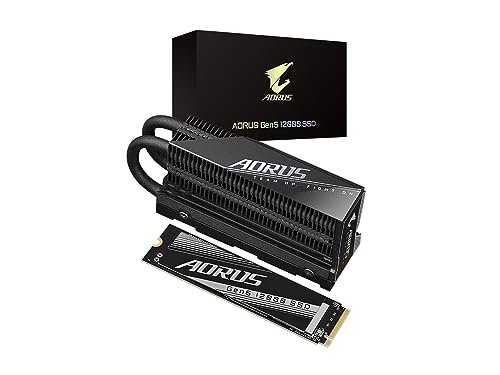
GIGABYTE AORUS Gen5 12000 1TB SSD
Best for: Maximum PCIe Gen5 sequential performance
- Storage Capacity
- 1000GB (1TB)
- Interface
- PCI Express Gen5 x4, NVMe 2.0
- Form Factor
- M.2 2280
- Max Read Speed
- up to 11700 MB/s
- Max Write Speed
- up to 9500 MB/s
- Cache Type
- DDR4 DRAM cache
View on Amazon: GIGABYTE AORUS Gen5 12000 1TB SSD Affiliate link
This 1TB M.2 2280 drive uses PCIe Gen5 x4 and NVMe 2.0. It reaches sequential read speeds up to 11700 MB/s and write speeds up to 9500 MB/s. A DDR4 DRAM cache helps manage data. The unit includes a heatsink to manage thermal output. You should choose this if you need maximum bandwidth for heavy workloads or high-end gaming on compatible motherboards.
Pros
- Sequential read speeds up to 11700 MB/s
- Sequential write speeds up to 9500 MB/s
- Includes a heatsink for thermal management
- Features DDR4 DRAM cache
Cons
- Requires a PCIe Gen5 compatible motherboard to reach top speeds
- 1TB capacity is smaller than higher-tier options
- Physical dimensions with heatsink may not fit all small form factor cases
Good fit if
- You have a PCIe Gen5 compatible motherboard
- You need maximum sequential read and write speeds
- You want a drive with a DRAM cache
Skip if
- You only have a PCIe Gen4 motherboard
- You need more than 1TB of storage
- You are building a compact system with limited clearance
Verdict: GIGABYTE AORUS Gen5 12000 1TB SSD delivers top-tier bandwidth for users with Gen5 support. It suits those prioritizing raw sequential performance and thermal management over capacity.

GIGABYTE AORUS Gen4 7000E 1TB NVMe SSD
Best for: Users prioritizing stability and software control
- Storage Capacity
- 1TB
- Interface
- PCIe 4.0 x4, NVMe 1.4
- Cache Type
- Host Memory Buffer (HMB)
View on Amazon: GIGABYTE AORUS Gen4 7000E 1TB NVMe SSD Affiliate link
This GIGABYTE AORUS Gen4 7000E SSD uses a PCIe 4.0 x4 interface with NVMe 1.4 support. It delivers high-speed data transfer for gaming and creative workloads. The drive relies on Host Memory Buffer technology instead of a dedicated DRAM cache, utilizing system RAM for improved efficiency. It features 3D TLC NAND flash for stable performance under stress. You get integrated software management via the GIGABYTE CONTROL CENTER for easy product oversight.
Pros
- PCIe 4.0 x4 interface for high-speed data transfer
- 3D TLC NAND flash for consistent performance under stress
- Host Memory Buffer technology for space-saving efficiency
- GIGABYTE CONTROL CENTER software for integrated management
Cons
- Lacks a dedicated DRAM cache module
- Limited to PCIe 4.0 speeds compared to newer Gen5 options
- No mention of a physical heatsink in the provided data
Good fit if
- You need reliable 3D TLC NAND stability for creative work
- You prefer software-managed drive settings via GCC
- You are building a system that supports Host Memory Buffer
Skip if
- You require the maximum bandwidth of PCIe 5.0
- You need a drive with a dedicated DRAM cache module
- You want a pre-attached heatsink for passive cooling
Verdict: GIGABYTE AORUS Gen4 7000E 1TB SSD suits users who value consistent performance under stress and software integration over raw peak bandwidth. It fits systems where Host Memory Buffer provides sufficient caching without a dedicated DRAM chip.
Specifications side by side
| Spec | GIGABYTE AORUS Gen5 12000 1TB SSD | GIGABYTE AORUS Gen4 7000E 1TB NVMe SSD |
|---|---|---|
| Storage Capacity | 1000GB (1TB) | 1TB |
| Interface | PCI Express Gen5 x4, NVMe 2.0 | PCIe 4.0 x4, NVMe 1.4 |
| Form Factor | M.2 2280 | not stated |
| Max Read Speed | up to 11700 MB/s | not stated |
| Max Write Speed | up to 9500 MB/s | not stated |
| Cache Type | DDR4 DRAM cache | Host Memory Buffer (HMB) |
| Cooling | Heatsink Included | not stated |
| Size | not stated | 1TB |
| Dimensions | 5.2 × 3.16 × 1.77 inches | not stated |
| Color | Black | not stated |
| Model | AG512K1TB | AG470E1TB |
Frequently asked questions
Does the AORUS Gen5 12000 have DRAM cache?
Yes, it includes dedicated DDR4 DRAM cache. This helps manage data mapping and improves sustained performance during heavy workloads. The AORUS Gen4 7000E instead relies on Host Memory Buffer to provide sufficient caching without a separate DRAM chip.
Is the Gen5 12000 faster than the Gen4 7000E?
Yes, the Gen5 model offers higher sequential read speeds up to 11700 MB/s. This is due to its PCIe 5.0 interface. The Gen4 drive prioritizes stability and software control over raw peak bandwidth, making it slightly slower in sequential transfers.
What is the physical size of these drives?
Both drives use the standard M.2 2280 form factor. The Gen5 model measures 5.2 inches in length, 3.16 inches in width, and 1.77 inches in height. Both are designed to fit into standard M.2 slots on modern motherboards.
Does the Gen4 7000E need a heatsink?
The Gen4 model is designed for systems where consistent performance under stress is key. It utilizes Host Memory Buffer for caching. The Gen5 drive includes a heatsink to manage heat generated by its 232-layer NAND, which runs hotter due to higher speeds.
Can I use the Gen5 SSD on a Gen4 motherboard?
You can install it, but it will not run at Gen5 speeds. The drive will fall back to the maximum speed supported by your motherboard. The Gen4 7000E is optimized for stability and software integration on Gen4 systems.
Which drive is better for gaming?
The Gen5 12000 provides top-tier bandwidth for users with Gen5 support. It suits those prioritizing raw sequential performance. The Gen4 7000E suits users who value consistent performance under stress and software integration over raw peak bandwidth.