GIGABYTE AORUS 1TB PCIe 4.0 NVMe SSD vs GIGABYTE AORUS Gen5 12000 1TB: Spec Comparison
As an Amazon Associate we earn from qualifying purchases. Links on this page are affiliate links.
When comparing the gigabyte aorus nvme gen4 m 2 vs aorus gen5 12000 SSD, you see two distinct generations of storage. Both offer 1 TB of capacity and use M.2 form factors. The main difference lies in their interface technology. One uses PCIe 4.0, while the other jumps to PCIe 5.0. This shift brings significant changes to speed and controller architecture. You need to check if your system supports the newer standard before deciding.
Key differences
| Aspect | GIGABYTE AORUS 1TB PCIe 4.0 NVMe SSD | GIGABYTE AORUS Gen5 12000 1TB SSD |
|---|---|---|
| Interface | PCIe 4.0 x4, NVMe 1.3 | PCIe 5.0 x4, NVMe 2.0 |
| Max Read Speed | Up to 5000 MB/s | Up to 11700 MB/s |
| Max Write Speed | Up to 4400 MB/s | Up to 9500 MB/s |
| NAND Flash | 3D-TLC | 232-layer NAND |
| Controller | Phison E16 | Not listed |
| Heatsink | Not listed | Included |
Which one should you choose?
Choose GIGABYTE AORUS 1TB PCIe 4.0 NVMe SSD if
- You have a motherboard with only PCIe 4.0 slots.
- You want a proven controller like the Phison E16.
- You need lower power consumption for general gaming.
Choose GIGABYTE AORUS Gen5 12000 1TB SSD if
- Your system supports PCIe 5.0 and NVMe 2.0.
- You need maximum sequential read and write speeds.
- You prefer a drive that includes a heatsink for cooling.
Verdict: The Gen4 model suits users with compatible PCIe 4.0 hardware who need reliable performance. The Gen5 12000 is for those with PCIe 5.0 support who want the highest possible transfer rates. Choose based on your motherboard's capabilities and speed needs.
Specs: Gen4 vs Gen5 Performance
Interface Generation
The GIGABYTE AORUS 1TB PCIe 4.0 NVMe SSD uses a PCI-Express 4.0 x4 interface with NVMe 1.3 support. This is a mature standard that balances performance and power efficiency. The GIGABYTE AORUS Gen5 12000 1TB SSD steps up to PCI Express Gen5 x4 and NVMe 2.0. This newer interface doubles the bandwidth potential of the previous generation. You need a motherboard that supports PCIe 5.0 to utilize the full capabilities of the Gen5 drive. If your system only supports PCIe 4.0, the Gen5 drive will likely fall back to lower speeds. The interface choice dictates which platforms can run these drives at their peak.
Sequential Read Speed
Speed is often the primary reason for choosing an NVMe drive. The GIGABYTE AORUS 1TB PCIe 4.0 NVMe SSD offers sequential read speeds of up to 5000 MB/s. This is sufficient for most gaming and general computing tasks. In contrast, the GIGABYTE AORUS Gen5 12000 1TB SSD delivers sequential read speeds up to 11700 MB/s. This is more than double the throughput of the PCIe 4.0 model. The Gen5 drive can move large files significantly faster. For users who frequently transfer massive datasets or work with high-resolution video, this speed difference is substantial. The Gen5 drive wins on raw transfer capability.
Sequential Write Speed
Write speeds determine how quickly you can save data to the drive. The GIGABYTE AORUS 1TB PCIe 4.0 NVMe SSD has a maximum sequential write speed of up to 4400 MB/s. This ensures smooth performance when installing games or saving documents. The GIGABYTE AORUS Gen5 12000 1TB SSD reaches up to 9500 MB/s for sequential writes. This higher write speed helps maintain performance during sustained large file transfers. It reduces bottlenecks when copying data from faster external drives. The Gen5 model provides a clear advantage in write performance, making it better for heavy data ingestion tasks.
NAND Flash Type
The type of NAND flash affects endurance and density. The GIGABYTE AORUS 1TB PCIe 4.0 NVMe SSD uses 3D-TLC NAND Flash. This is a common and reliable type of storage used in many high-performance drives. The GIGABYTE AORUS Gen5 12000 1TB SSD utilizes 232-layer NAND. The specific layer count indicates a more advanced manufacturing process, allowing for higher density and potentially better performance per dollar. While both use TLC technology, the Gen5 drive benefits from the newer 232-layer architecture. This advanced NAND structure supports the higher speeds and capacities of the Gen5 platform.
Cache and Buffer
Both drives include dedicated DRAM cache to manage data mapping and improve performance. The GIGABYTE AORUS 1TB PCIe 4.0 NVMe SSD features an external DDR4 1 GB cache buffer. This helps maintain consistent speeds during random read and write operations. The GIGABYTE AORUS Gen5 12000 1TB SSD also includes a DDR4 DRAM cache. While the exact size is not specified in the provided data, the presence of DRAM is crucial for high-performance NVMe drives. Both drives avoid the performance drops associated with DRAM-less models. The cache ensures that both drives can handle heavy workloads without significant slowdowns.
Which AORUS SSD Should You Buy
Budget gamers on PCIe 4.0 motherboards
This drive uses a mature PCIe 4.0 x4 interface with NVMe 1.3 support. It offers sequential read speeds up to 5000 MB/s and write speeds up to 4400 MB/s. The Phison E16 controller and 1 GB DDR4 cache ensure stable performance for gaming without the premium cost of newer generations.
Users needing maximum Gen5 throughput
If your motherboard supports PCIe 5.0, this drive delivers up to 11700 MB/s reads and 9500 MB/s writes. It features NVMe 2.0 support and 232-layer NAND. The included heatsink helps manage thermal output from the higher bandwidth interface, making it ideal for high-end content creation workflows.
Those wanting included cooling solutions
The Gen5 12000 model comes with a heatsink included, which simplifies installation on boards with limited M.2 slot spacing. This contrasts with the Gen4 option, which requires you to source your own cooling. The robust thermal management supports sustained high-speed transfers using the newer PCIe 5.0 standard.
The products compared

GIGABYTE AORUS 1TB PCIe 4.0 NVMe SSD
Best for: Gamers seeking PCIe 4.0 performance
- Storage Capacity
- 1 TB
- Interface
- NVMe 1.3, PCI-Express 4.0 x4
- Max Read Speed
- Up to 5000 MB/s
- Max Write Speed
- Up to 4400 MB/s
- Cache Type
- DDR4 1 GB
- Form Factor
- M.2
View on Amazon: GIGABYTE AORUS 1TB PCIe 4.0 NVMe SSD Affiliate link
This 1 TB drive uses a Phison E16 controller and 3D TLC NAND. It offers sequential read speeds up to 5000 MB/s and write speeds up to 4400 MB/s. You get a dedicated 1 GB DDR4 cache buffer to help manage data efficiently. It connects via NVMe 1.3 over PCIe 4.0 x4. This setup suits gamers who want consistent performance without the premium cost of newer generations.
Pros
- 1 TB storage capacity
- 1 GB DDR4 external cache buffer
- Sequential read speeds up to 5000 MB/s
- Phison E16 controller
Cons
- Slower speeds compared to PCIe 5.0 options
- NVMe 1.3 interface is older
- Heavier than standard M.2 drives
Good fit if
- You want reliable PCIe 4.0 performance
- You need a dedicated DRAM cache
- You are building a gaming PC
Skip if
- You need the fastest PCIe 5.0 speeds
- You prefer the latest NVMe standards
- You want a lighter drive
Verdict: GIGABYTE AORUS 1TB PCIe 4.0 SSD delivers solid speeds for gamers who value a dedicated cache buffer. It fits users who want proven PCIe 4.0 performance rather than the latest generation.
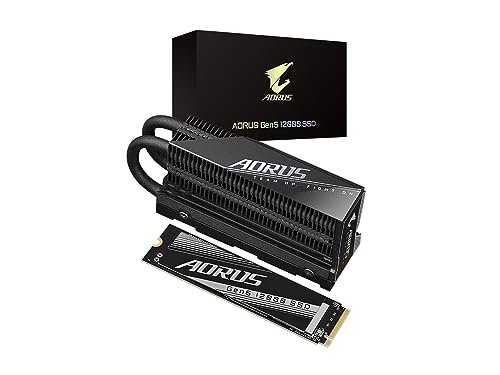
GIGABYTE AORUS Gen5 12000 1TB SSD
Best for: PCIe 5.0 systems needing max speed
- Storage Capacity
- 1000GB (1TB)
- Interface
- PCI Express Gen5 x4, NVMe 2.0
- Form Factor
- M.2 2280
- Max Read Speed
- up to 11700 MB/s
- Max Write Speed
- up to 9500 MB/s
- Cache Type
- DDR4 DRAM cache
View on Amazon: GIGABYTE AORUS Gen5 12000 1TB SSD Affiliate link
This GIGABYTE drive uses the PCIe 5.0 interface to reach sequential read speeds of up to 11700 MB/s. It includes a heatsink and DDR4 DRAM cache for sustained performance. The 1TB capacity fits standard M.2 2280 slots. You need a compatible motherboard to use these speeds. This model suits users who want the latest high-bandwidth storage technology.
Pros
- PCIe Gen5 x4 interface
- Sequential read speed up to 11700 MB/s
- Includes heatsink
- DDR4 DRAM cache
Cons
- Requires PCIe 5.0 compatible motherboard
- Higher physical profile due to heatsink
- 1TB capacity limits large game libraries
Good fit if
- You have a PCIe 5.0 compatible motherboard
- You need maximum sequential transfer speeds
- You want a drive with a heatsink included
Skip if
- You only have a PCIe 4.0 motherboard
- You need more than 1TB of space
- You are on a tight budget
Verdict: GIGABYTE AORUS Gen5 12000 1TB SSD delivers top-tier speeds for PCIe 5.0 systems. It fits users who prioritize raw bandwidth and have the necessary hardware support.
Specifications side by side
| Spec | GIGABYTE AORUS 1TB PCIe 4.0 NVMe SSD | GIGABYTE AORUS Gen5 12000 1TB SSD |
|---|---|---|
| Storage Capacity | 1 TB | 1000GB (1TB) |
| Interface | NVMe 1.3, PCI-Express 4.0 x4 | PCI Express Gen5 x4, NVMe 2.0 |
| Form Factor | not stated | M.2 2280 |
| Max Read Speed | Up to 5000 MB/s | up to 11700 MB/s |
| Max Write Speed | Up to 4400 MB/s | up to 9500 MB/s |
| Cache Type | DDR4 1 GB | DDR4 DRAM cache |
| Cooling | not stated | Heatsink Included |
| Compatibility | Gaming | not stated |
| NAND Type | TLC | not stated |
| Dimensions | 5.12 × 3.15 × 1.18 inches | 5.2 × 3.16 × 1.77 inches |
| Weight | 3.64 pounds | not stated |
| Color | Black | Black |
| Model | GP-AG41TB | AG512K1TB |
Frequently asked questions
Is the GIGABYTE AORUS Gen5 12000 faster than the Gen4 model?
Yes, the Gen5 drive offers higher sequential speeds. It is designed for PCIe 5.0 systems to maximize bandwidth. The Gen4 SSD provides solid performance for mature platforms. You should choose the Gen5 version if your motherboard supports the newer standard and you need top-tier throughput for large file transfers.
Do both drives use the same M.2 form factor?
Yes, both the GIGABYTE AORUS 1TB PCIe 4.0 NVMe SSD and the Gen5 12000 1TB SSD use the M.2 form factor. This ensures they fit into standard M.2 slots on most modern motherboards. You can verify physical compatibility by checking your motherboard manual for available M.2 connectors before purchasing either drive.
What NAND type does the GIGABYTE AORUS 1TB PCIe 4.0 SSD use?
The GIGABYTE AORUS 1TB PCIe 4.0 NVMe SSD uses TLC NAND. This type of flash memory balances capacity and endurance for gaming and general use. The Gen5 model data does not specify its NAND type, so you should check the detailed product page for that specific information if it matters to your workflow.
Which SSD is better for gaming on a PCIe 4.0 motherboard?
The GIGABYTE AORUS 1TB PCIe 4.0 NVMe SSD is the better choice for PCIe 4.0 systems. It delivers proven performance that matches the interface capabilities of your motherboard. The Gen5 drive would be bottlenecked on older hardware. You get optimal value and speed without paying for unsupported next-generation bandwidth.
Can I use the Gen5 SSD in a PCIe 4.0 slot?
You can physically install the GIGABYTE AORUS Gen5 12000 1TB SSD in a PCIe 4.0 slot, but it will run at PCIe 4.0 speeds. The drive is backward compatible with older interfaces. You will not achieve the maximum potential speeds of the Gen5 interface unless your motherboard and CPU support PCIe 5.0.
What is the model number for the GIGABYTE AORUS Gen5 12000 SSD?
The model number for the GIGABYTE AORUS Gen5 12000 1TB SSD is AG512K1TB. You can use this identifier to verify compatibility with your system or to find driver updates. The Gen4 model uses the model number GP-AG41TB. Keeping these numbers handy helps ensure you purchase the correct hardware for your build.
Does the Gen4 SSD include a dedicated cache buffer?
The GIGABYTE AORUS 1TB PCIe 4.0 SSD includes a dedicated cache buffer. This feature helps maintain consistent speeds during heavy data transfers. The Gen5 model specifications do not mention a cache buffer in the provided data. You should prioritize the Gen4 drive if sustained write performance and buffer management are critical for your tasks.