GIGABYTE AORUS Gen5 12000 1TB Review: Who It Fits and Who Should Skip It
As an Amazon Associate we earn from qualifying purchases. Links on this page are affiliate links.
This gigabyte aorus gen5 12000 SSD review covers the 1TB model designed for high-end systems. It uses PCIe 5.0 x4 and NVMe 2.0 standards. The drive offers sequential read speeds up to 11,700 MB/s and write speeds up to 9,500 MB/s. It includes a built-in heatsink to manage thermal output. The M.2 2280 form factor fits standard slots. You get 232-layer NAND with a DDR4 DRAM cache. This configuration targets users who need maximum bandwidth for heavy workloads.
What stands out
- Sequential read speeds up to 11,700 MB/s
- PCIe Gen5 x4 interface with NVMe 2.0
- Includes a dedicated heatsink for thermal management
- 1TB capacity using 232-layer NAND
- DDR4 DRAM cache for consistent performance
Who it fits
Good fit for
You should consider this drive if you have a motherboard with a PCIe 5.0 slot and need extreme throughput. It suits video editors handling large 4K or 8K files, and developers compiling massive codebases. The included heatsink helps maintain performance during sustained writes. If your setup supports the latest interface, this SSD delivers top-tier sequential speeds for demanding tasks.
Who should skip it
You should look elsewhere if your motherboard only supports PCIe 4.0. This drive will not reach its maximum potential on older platforms. It is also unnecessary for general office work, web browsing, or light gaming. The cost and power requirements of PCIe 5.0 do not benefit typical users. Stick to a PCIe 4.0 SSD if you do not need the extreme bandwidth this model provides.
Verdict: The GIGABYTE AORUS Gen5 12000 1TB SSD delivers extreme sequential speeds for compatible PCIe 5.0 systems. It is a specialized choice for users requiring maximum bandwidth, not a general-purpose upgrade.
GIGABYTE AORUS Gen5 12000 Key Specs
Max Read Speed: up to 11700 MB/s
This speed indicates how fast the drive retrieves large files. You will notice faster load times in games and quicker transfers of heavy video projects. This is significantly faster than PCIe 4.0 drives, which top out near 7000 MB/s. It suits users who move massive data sets daily. For basic web browsing, this speed is unnecessary overhead.
Max Write Speed: up to 9500 MB/s
Write speed determines how quickly you save data to the drive. High rates here reduce the wait time when exporting large video files or copying entire game libraries. This performance level is ideal for content creators and high-end gaming rigs. Standard SATA SSDs write at roughly 500 MB/s, making this drive over ten times faster for bulk writes.
Interface: PCI Express Gen5 x4, NVMe 2.0
This interface defines the communication pathway between your SSD and motherboard. PCIe 5.0 offers double the bandwidth of PCIe 4.0, enabling those high speeds. NVMe 2.0 improves efficiency and command processing. You must have a compatible motherboard to utilize these standards. Older systems will not recognize the drive or will run it at reduced speeds.
Cache Type: DDR4 DRAM cache
The DRAM cache stores the mapping table that tells the SSD where data lives. This allows for consistent performance during heavy workloads and improves random read/write speeds. It prevents slowdowns when the drive is nearly full. Many budget drives use HMB instead, which is slower under load. This feature ensures stability for professional applications and intensive multitasking.
Form Factor: M.2 2280
This physical size measures 22mm wide by 80mm long. It is the standard shape for most desktop and laptop NVMe slots. You can easily find compatible slots on modern motherboards. The 2280 size balances storage capacity with compactness. Larger forms like 22110 offer more capacity but fit fewer systems. This size ensures broad compatibility with current PC builds.
Physical Design And Build Quality
According to the listing, the GIGABYTE AORUS Gen5 12000 1TB SSD follows the standard M.2 2280 form factor. This means it measures 80mm in length and 22mm in width. You will need an available M.2 slot on your motherboard that supports this specific size. The drive itself is black, which helps it blend into most modern PC builds without drawing unnecessary attention. The compact footprint ensures it fits in standard desktop towers and many slim laptops that support M.2 drives.
The listing notes that a heatsink is included with this model. This component is essential for managing the thermal output of a PCIe Gen5 x4 drive. Without adequate cooling, the controller may throttle performance to protect itself. The included heatsink helps dissipate heat during sustained workloads, allowing the drive to maintain its high sequential read speeds of up to 11,700 MB/s and write speeds of up to 9,500 MB/s. You should install the heatsink according to the manufacturer's instructions to ensure proper contact with the NAND and controller.
This drive uses NVMe 2.0 standards over a PCIe 5.0 x4 interface. It also features a DDR4 DRAM cache, which helps manage data flow efficiently. The physical design prioritizes thermal management and compatibility with high-end motherboards. You should verify that your system supports PCIe Gen5 before purchasing, as older systems will not utilize the full speed potential of this device.
Setup and Everyday Use Guide
Installation is straightforward if your motherboard supports PCIe 5.0. The drive uses the standard M.2 2280 form factor, so it fits into most modern desktop slots. You must ensure your system includes a compatible M.2 slot that supports the Gen5 x4 interface. The listing notes that a heatsink is included. This is a practical inclusion because the high-speed controller generates significant heat. You should attach the provided heatsink to maintain stable performance during long sessions. Without adequate cooling, the drive may throttle its speeds to protect its components.
The GIGABYTE AORUS Gen5 12000 1TB SSD supports NVMe 2.0. This newer protocol can offer better efficiency than older versions. It also features a DDR4 DRAM cache. This component helps manage data mapping, which keeps the drive responsive when you are running multiple applications or transferring many small files. The 1000GB capacity provides ample space for your operating system, games, and large media libraries.
In everyday use, the sequential read speed of up to 11,700 MB/s and write speed of up to 9,500 MB/s mean fast load times. You will notice quicker startup times for demanding software and faster exports of high-resolution video. This performance level is ideal for content creators and gamers who need rapid data access. However, you need a compatible motherboard and CPU to realize these speeds. Without PCIe 5.0 support, the drive will fall back to lower speeds.
Before You Buy This SSD
This drive targets enthusiasts who need extreme throughput for professional workflows. You must verify your motherboard supports PCIe Gen5. Many current boards only offer Gen4 slots. Using this SSD in a Gen4 slot limits speeds significantly. The included heatsink helps manage thermal output during sustained writes. You should ensure your case has adequate airflow around the M.2 slot. This model sits at the top tier of NVMe drives. It is not necessary for general office work or basic gaming. SATA SSDs remain sufficient for everyday tasks. If you edit 4K video or compile large codebases, the speed advantage is real. Otherwise, a PCIe 4.0 drive offers better value. Check your BIOS for the latest firmware to ensure stability. This SSD is a specialized tool for high-end builds.
Check before you buy
- Verify your motherboard has a PCIe Gen5 M.2 slot.
- Check if your case allows proper airflow for the heatsink.
- Ensure your CPU supports the required PCIe lane configuration.
- Confirm the drive fits your specific M.2 2280 slot space.
The product at a glance
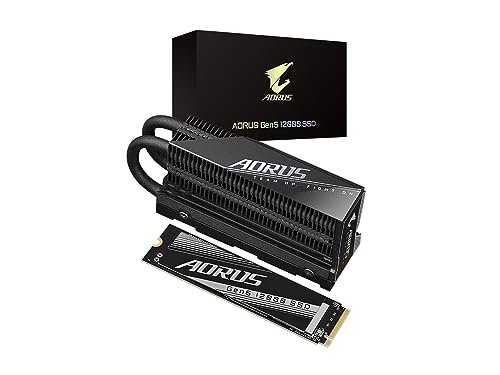
GIGABYTE AORUS Gen5 12000 1TB SSD
Best for: PCIe 5.0 systems needing high sequential throughput
- Storage Capacity
- 1000GB (1TB)
- Interface
- PCI Express Gen5 x4, NVMe 2.0
- Form Factor
- M.2 2280
- Max Read Speed
- up to 11700 MB/s
- Max Write Speed
- up to 9500 MB/s
- Cache Type
- DDR4 DRAM cache
View on Amazon: GIGABYTE AORUS Gen5 12000 1TB SSD Affiliate link
This GIGABYTE drive uses PCIe Gen5 x4 and NVMe 2.0 to reach sequential read speeds of up to 11,700 MB/s and write speeds of 9,500 MB/s. It includes a heatsink for thermal management and uses 232-layer NAND with a DDR4 DRAM cache. The M.2 2280 form factor fits standard slots. You get high performance for demanding workloads, though the 1TB capacity may limit large media libraries.
Pros
- Sequential read speeds up to 11,700 MB/s
- Includes a heatsink for cooling
- Features DDR4 DRAM cache
- Uses 232-layer NAND technology
Cons
- Limited to 1TB storage capacity
- Requires PCIe Gen5 compatible motherboard
- Larger physical profile with heatsink attached
Good fit if
- You need maximum sequential transfer speeds for large files
- You are building a new PC with PCIe 5.0 support
- You want a drive with dedicated DRAM cache
Skip if
- You only have a PCIe Gen4 motherboard
- You need more than 1TB of storage
- You are building a compact mini-ITX case with limited space
Verdict: GIGABYTE AORUS Gen5 12000 1TB SSD delivers top-tier sequential speeds for users with PCIe 5.0 systems. It is best for creators who move large files and have compatible hardware to support the interface.
Specifications side by side
| Spec | GIGABYTE AORUS Gen5 12000 1TB SSD |
|---|---|
| Storage Capacity | 1000GB (1TB) |
| Interface | PCI Express Gen5 x4, NVMe 2.0 |
| Form Factor | M.2 2280 |
| Max Read Speed | up to 11700 MB/s |
| Max Write Speed | up to 9500 MB/s |
| Cache Type | DDR4 DRAM cache |
| Cooling | Heatsink Included |
| Dimensions | 5.2 × 3.16 × 1.77 inches |
| Color | Black |
| Model | AG512K1TB |
Frequently asked questions
Does the GIGABYTE AORUS Gen5 12000 require a specific motherboard?
Yes, this drive requires a motherboard with a PCIe 5.0 M.2 slot. The product data confirms its interface is PCIe 5.0. If you install it in a PCIe 4.0 slot, you will not achieve its maximum speeds. Check your motherboard specifications before purchasing to ensure compatibility with the Gen5 standard.
What is the physical size of the GIGABYTE AORUS Gen5 12000?
The drive follows the standard M.2 2280 form factor. It measures 80mm in length and 22mm in width. These dimensions match the listing details for the AG512K1TB model. You should verify that your case and motherboard have an available slot that accommodates this standard size and any included heatsink.
Is this SSD suitable for gaming?
This SSD is suitable for gaming if you have a PCIe 5.0 compatible system. The high sequential read speeds allow for faster loading of large game files. However, gaming benefits more from random read speeds, which are not listed here. It is best suited for users who prioritize maximum throughput for professional workflows.
Can I use the GIGABYTE AORUS Gen5 12000 in a laptop?
Most laptops do not support PCIe 5.0 M.2 slots. The product data specifies this drive uses the PCIe 5.0 interface. You must verify your laptop motherboard supports this specific generation. Even if the M.2 2280 form factor fits, the lack of Gen5 support will limit performance significantly compared to desktop systems.
What capacity options are available for this model?
The reviewed model is the 1TB version, identified by the model number AG512K1TB. The provided data does not list other capacity options for this specific product line. You should check the retailer listing for other sizes if you need more or less storage. The focus of this review is strictly on the 1TB configuration.
Does the drive come with a heatsink?
The provided product data does not explicitly mention a heatsink in the attributes or specs. It only lists the interface, form factor, and physical dimensions. You should check the retailer listing or packaging details to confirm if a thermal solution is included. Proper thermal management is critical for PCIe 5.0 drives due to their power usage.
Is this SSD compatible with PlayStation 5?
The PlayStation 5 requires SSDs that meet specific performance and thermal standards. The GIGABYTE AORUS Gen5 12000 uses PCIe 5.0, which exceeds the console's PCIe 4.0 interface. While it may fit physically, the console might not recognize it or could throttle its performance. It is designed for desktop systems with Gen5 support.