DOCKCASE Magnetic Visual M.2 2242 NVMe SSD Review (2026): A Spec-Based Look
As an Amazon Associate we earn from qualifying purchases. Links on this page are affiliate links.
In this dockcase magnetic visual m 2 2242 nvme SSD review, we look at an enclosure that bridges mobile photography and desktop storage. It supports M.2 2242 and 2230 NVMe drives, offering up to 2TB of capacity. The device connects via USB 3.2 Type-C, delivering 10Gbps transfer speeds. It also features a 100W PD power interface for simultaneous charging. A built-in screen monitors drive health in real time. This design targets users who need reliable, high-speed external storage that attaches securely to phones or laptops without bulky cables.
What stands out
- 10Gbps USB 3.2 Gen2 interface for transfers up to 1000MB/s
- Magnetic mounting with included ring for MagSafe-compatible and non-MagSafe devices
- 3-second power loss protection via supercapacitor and RTL9210 controller
- Integrated HD screen showing lifespan, usage, and remaining capacity
- Dual USB-C ports for data transfer and 100W PD charging
Who it fits
Good fit for
This enclosure suits iPhone 16/15 Pro users who shoot 4K ProRes video at 60 or 120fps. The magnetic design keeps the drive attached to your phone case, freeing internal storage instantly. It also works well for Steam Deck, ROG Ally, or Android users who need portable backup. The 100W PD pass-through allows you to charge your device while transferring large files. If you handle high-resolution media on the go, this setup reduces wait times and manages space efficiently.
Who should skip it
You should look elsewhere if you require SATA SSD compatibility, as this unit only supports NVMe drives in 2242 and 2230 form factors. The magnetic attachment may not suit users who prefer a permanent, non-detachable desktop solution. Additionally, if you need transfers faster than 10Gbps, this interface will bottleneck your speeds. The visual display is useful for monitoring but adds bulk. Users needing standard 2280 drive support will find this enclosure incompatible with their existing hardware.
Verdict: The DOCKCASE enclosure offers a practical magnetic solution for mobile NVMe storage with robust power management. Its real-time health monitoring and fast transfer speeds make it a solid choice for content creators on the move.
Key specs explained
Host Interface: USB 3.2 Type-C
This specifies the physical connector and communication protocol used to link the enclosure to your computer or phone. You will need a USB-C port on your host device to establish the connection. This standard is now common on modern laptops and smartphones, ensuring broad compatibility without requiring legacy adapters or older USB-A ports for your daily workflow.
Max Transfer Speed: 10Gbps
This rating indicates the maximum bandwidth available for data movement between the SSD and your host device. In practical terms, this allows for sequential read and write speeds up to 1000MB/s. This speed is suitable for large file transfers, such as backing up video projects or moving game libraries, and is twice as fast as standard USB 3.0 connections.
Maximum Capacity: 2TB
This defines the upper limit of storage volume the enclosure can support when you install an NVMe drive. You can use this space to store extensive photo libraries, 4K video files, or large software collections. When shopping for drives, you can pair this enclosure with any M.2 NVMe SSD up to this size to maximize your portable storage potential efficiently.
Drive Interface: M.2 NVMe PCIe
This confirms the enclosure is designed for modern NVMe SSDs that use the PCIe bus, rather than older SATA-based M.2 drives. NVMe drives offer significantly lower latency and higher throughput. This interface choice ensures you are utilizing the full performance capabilities of contemporary SSDs, making it ideal for tasks requiring rapid data access and high-speed sequential transfers.
Supported Form Factors: 2242, 2230
These dimensions indicate the physical sizes of M.2 SSDs that fit inside the enclosure. The 2242 size is common in gaming handhelds and some laptops, while 2230 is often found in compact devices like the Steam Deck. This flexibility allows you to repurpose drives from various hardware sources, making the enclosure a versatile solution for different portable computing setups.
Design and build details
The listing describes the enclosure as black, measuring 2.33 by 2.33 by 0.57 inches and weighing 1.9 ounces. These dimensions make it compact enough to fit in a pocket or bag without adding significant bulk. The low profile helps it sit flat against surfaces or devices. You can attach it to MagSafe-compatible phone cases using the built-in magnetic structure. A included magnetic ring expands this to non-MagSafe devices, allowing secure attachment to various smartphones.
The front features an integrated HD screen. According to the listing, this display shows real-time data on SSD lifespan, usage cycles, remaining capacity, and health status. This visual feedback lets you monitor drive condition without opening software tools. The enclosure includes two USB-C ports. One port handles data transfer, while the other supports 100W Power Delivery. This layout lets you charge connected devices, such as phones or handheld consoles, while simultaneously backing up files.
The design prioritizes mobile utility and rapid data access. The magnetic attachment system offers a stable hold for on-the-go use. The dual-port configuration simplifies workflows by combining storage and charging into a single unit. The compact form factor ensures it does not interfere with phone cases or laptop ports. You get a portable solution that adapts to different devices through its magnetic flexibility and power delivery capabilities.
Setup and everyday use
Setting up the DOCKCASE Magnetic Visual M.2 2242 NVMe Enclosure requires an M.2 NVMe PCIe drive in either the 2242 or 2230 form factor. You insert the SSD into the enclosure and connect it to your host device using the included USB-C cable. The listing notes that the unit features a magnetic design with an included magnetic ring. This allows the enclosure to attach securely to MagSafe-compatible phone cases. The ring expands compatibility to non-MagSafe devices, ensuring a stable hold without accidental detachment. This setup is particularly useful for iPhone 16, 15 Pro, and 15 Pro Max users who need portable storage.
In daily use, the enclosure supports 10Gbps transfer speeds, which enables data transfers of up to 1000MB/s. This speed is sufficient for direct 4K ProRes video storage at 120Hz or 60Hz. You can save high-resolution videos directly to the drive, freeing up internal phone memory instantly. The device also includes a smart screen that monitors real-time SSD health. This display shows lifespan, usage cycles, remaining capacity, and overall status. This feature helps you track drive health without needing additional software.
The enclosure includes a 100W PD port for simultaneous charging. You can charge devices like a MacBook, Steam Deck, or ROG Ally while using the enclosure for storage. Additionally, the unit features 3-second power loss protection. This uses a supercapacitor to ensure data integrity during unexpected shutdowns. The RTL9210 controller manages this process. These specifications suggest the device is built for professionals handling high-volume data backups and transfers on the go.
Before You Buy This Enclosure
You need an M.2 NVMe drive in the 2242 or 2230 size to use this device. The listing confirms support for these specific form factors, so verify your SSD matches before purchasing. The enclosure features two USB-C ports. One handles data transfer at 10Gbps, while the other supports 100W Power Delivery. You can charge your phone or laptop while backing up files. This dual function is useful for mobile creators. The magnetic design requires a compatible case or the included ring for secure attachment. Check your phone model to ensure stability. Regularly monitor the SSD health via the built-in screen. The 3-second power loss protection helps prevent data corruption during unexpected shutdowns. Keep your drive firmware updated. This enclosure suits users who need portable, high-speed storage for video work. It complements standard internal SSDs by adding external mobility.
Check before you buy
- Verify your NVMe SSD is 2242 or 2230 size.
- Check if your phone case supports MagSafe or use the ring.
- Ensure your host device has USB-C ports for data and power.
- Confirm the SSD supports the required NVMe PCIe protocol.
The product at a glance
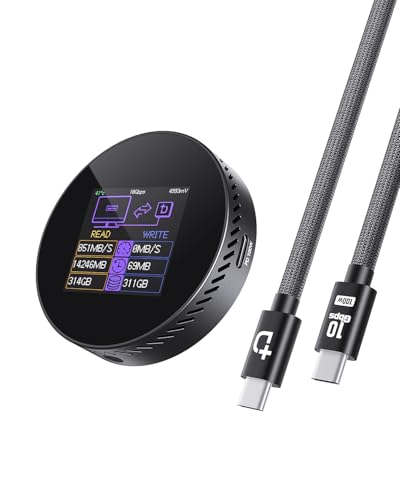
DOCKCASE Magnetic 2242 NVMe Enclosure
Best for: MagSafe users shooting 4K ProRes video
- Max Transfer Speed
- 10Gbps
- Host Interface
- USB 3.2 Type-C
- Drive Interface
- M.2 NVMe PCIe
- Supported Form Factors
- 2242, 2230
- Maximum Capacity
- 2TB
- Dimensions
- 2.33 × 0.57 × 2.33 inches
View on Amazon: DOCKCASE Magnetic 2242 NVMe Enclosure Affiliate link
This enclosure supports M.2 NVMe 2242 and 2230 drives with USB 3.2 Gen2 connectivity. It delivers 10Gbps transfer speeds and includes 100W Power Delivery pass-through. A built-in screen monitors drive health in real time. Magnetic mounting works with MagSafe cases or non-MagSafe devices via an included ring. It also offers 3-second power loss protection for data safety.
Pros
- 10Gbps USB 3.2 Gen2 interface for fast data transfer
- Magnetic design with MagSafe compatibility and included ring
- 100W PD pass-through charging for connected devices
- Integrated screen displays drive health and usage stats
- 3-second power loss protection via supercapacitor
Cons
- Supports only 2242 and 2230 form factors, not standard 2280
- No dedicated app mentioned for advanced drive management
- Requires separate M.2 NVMe SSD purchase
Good fit if
- You use MagSafe-compatible phones and need portable storage
- You shoot 4K ProRes video and need fast offloading
- You want real-time drive health monitoring without extra software
Skip if
- You need to use standard 2280 M.2 SSDs
- You require wireless connectivity like Bluetooth or Wi-Fi
- You want a complete drive and enclosure bundle
Verdict: DOCKCASE Magnetic Visual M.2 2242 NVMe Enclosure fits creators who shoot high-resolution video and need reliable, magnetic portable storage with health monitoring. It is ideal for MagSafe users but not for those needing standard 2280 drive support.
Specifications side by side
| Spec | DOCKCASE Magnetic 2242 NVMe Enclosure |
|---|---|
| Max Transfer Speed | 10Gbps |
| Host Interface | USB 3.2 Type-C |
| Drive Interface | M.2 NVMe PCIe |
| Supported Form Factors | 2242, 2230 |
| Maximum Capacity | 2TB |
| Interface | NVMe |
| Form Factor | M.2 2242 |
| Transfer Speed | 10Gbps |
| Dimensions | 2.33 × 0.57 × 2.33 inches |
| Weight | 1.9 ounces |
| Color | black |
| Model | Black-100W PD |
Frequently asked questions
Is the DOCKCASE Magnetic Visual enclosure compatible with MagSafe devices?
Yes, this enclosure is designed for MagSafe users. The product data highlights it as ideal for creators who shoot high-resolution video and need reliable, magnetic portable storage. This magnetic feature allows you to attach the drive directly to compatible Apple devices for easy access while working on the go.
What transfer speed does this M.2 2242 NVMe enclosure support?
The DOCKCASE Magnetic Visual enclosure supports a transfer speed of 10Gbps. This specification ensures fast data movement between your NVMe drive and your host device. It is suitable for handling large files, such as 4K ProRes video, without significant bottlenecks during read or write operations.
Does this enclosure support standard 2280 NVMe SSDs?
No, this device does not support standard 2280 drives. The product data specifies that it is intended for M.2 2242 form factor drives. You must verify that your NVMe SSD matches the 2242 size requirement before purchasing, as larger 2280 drives will not fit inside the enclosure.
How heavy is the DOCKCASE Magnetic Visual enclosure?
The enclosure weighs 1.9 ounces. This lightweight design makes it easy to carry in a pocket or bag. The low profile and compact dimensions ensure it does not add significant bulk to your setup, which is helpful for mobile creators who need portable storage solutions.
What color options are available for this magnetic enclosure?
The listed model is available in black. The product data identifies the specific model as Black-100W PD. This color choice provides a neutral appearance that blends well with most electronic setups while maintaining a professional look for your portable storage device.
Is this enclosure suitable for shooting 4K ProRes video?
Yes, the DOCKCASE Magnetic Visual enclosure is well-suited for shooting 4K ProRes video. It is recommended for creators who need reliable, magnetic portable storage. The 10Gbps transfer speed helps manage the high data rates associated with high-resolution video recording, ensuring smooth performance during your workflow.
What are the physical dimensions of this NVMe enclosure?
The enclosure measures 2.33 inches in length, 2.33 inches in width, and 0.57 inches in height. These compact dimensions allow it to fit easily into small bags or pockets. The slim profile ensures it sits flush against your device when attached via the magnetic connection.