The Best DOCKCASE SSD Enclosures in 2026: 3 Picks
As an Amazon Associate we earn from qualifying purchases. Links on this page are affiliate links.
This guide covers the best DOCKCASE SSD enclosures available in 2026. DOCKCASE offers specialized NVMe enclosures for various M.2 form factors, including standard 2280, compact 2230, and mid-size 2242 drives. These units feature health monitoring displays and robust protection for your data. We compared 3 models based strictly on published specifications. The DOCKCASE Explorer NVMe Enclosure with Display leads as the top pick because it provides essential drive health visibility for users who value data safety. Each enclosure supports 10Gbps transfer speeds and is designed for specific use cases.
Quick picks
| # | Product | Best for | Price |
|---|---|---|---|
| 1 | DOCKCASE Explorer NVMe Enclosure with Display Best overall | users needing drive health visibility | Check price of DOCKCASE Explorer NVMe Enclosure with Display on Amazon |
| 2 | DOCKCASE Pocket M.2 2230 NVMe Enclosure Best budget | M.2 2230 NVMe drives with health display | Check price of DOCKCASE Pocket M.2 2230 NVMe Enclosure on Amazon |
| 3 | DOCKCASE Magnetic 2242 NVMe Enclosure Also great | Magnetic mounting and visual health monitoring | Check price of DOCKCASE Magnetic 2242 NVMe Enclosure on Amazon |
Our 3 picks

DOCKCASE Explorer NVMe Enclosure with Display
Best for: users needing drive health visibility
- Max Transfer Speed
- 10Gbps
- Host Interface
- USB 3.2 Gen 2 Type-C
- Drive Interface
- M.2 NVMe (M-Key, B+M Key)
- Supported Form Factors
- M.2 2230, 2242, 2260, 2280
- Cooling System
- Graphite thermal pad
- Features
- UASP
View on Amazon: DOCKCASE Explorer NVMe Enclosure with Display Affiliate link
This DOCKCASE enclosure features an HD display to show SSD health and capacity. It uses a Realtek RTL9210 chip for 10Gbps speeds. The design includes graphite thermal pads and a 10-second power loss protection buffer. It supports 2230, 2242, 2260, and 2280 M.2 drives. You get a clear view of your drive status and reliable data safety.
Pros
- HD display shows health and capacity
- 10s power loss protection
- Graphite thermal pad cooling
- 10Gbps transfer speed
Cons
- Heavier at 5.29 ounces
- No mention of Bluetooth control
- No mention of companion app
Good fit if
- You want to monitor SSD health
- You need power loss protection
- You use multiple M.2 sizes
Skip if
- You prefer a lighter drive
- You need wireless control
- You want a smaller form factor
Verdict: DOCKCASE Explorer Edition M.2 NVMe Enclosure fits users who value drive visibility and data safety. Its display and protection features make it ideal for critical work.

DOCKCASE Pocket M.2 2230 NVMe Enclosure
Best for: M.2 2230 NVMe drives with health display
- Max Transfer Speed
- 10Gbps
- Host Interface
- USB 3.2 Gen 2 Type-C
- Drive Interface
- PCIe NVMe (M-Key, B+M Key)
- Supported Form Factors
- 2230
- Maximum Capacity
- 2TB
- Features
- UASP
View on Amazon: DOCKCASE Pocket M.2 2230 NVMe Enclosure Affiliate link
This DOCKCASE enclosure is built for M.2 2230 NVMe drives. It uses a USB 3.2 Gen 2 Type-C interface for 10Gbps speeds. The black case includes an HD display showing health and capacity. It supports 3s PLP to prevent data loss during power failures. You get read-only mode and live transfer readouts for better control.
Pros
- Supports M.2 2230 form factor with M-Key and B+M Key
- Features an HD display for SSD health and capacity monitoring
- Includes 3s PLP to prevent write data loss
- Offers read-only mode for data security
Cons
- Limited to 2230 size, not compatible with standard 2280 drives
- Maximum capacity is 2TB
- Weight is 3.88 ounces
Good fit if
- You use M.2 2230 NVMe SSDs like those in Steam Deck or Surface devices
- You want real-time health monitoring via a built-in display
- You need data protection with power loss protection
Skip if
- You have standard M.2 2280 NVMe drives
- You require capacities larger than 2TB
- You prefer a drive without a display screen
Verdict: DOCKCASE Pocket M.2 2230 NVMe Enclosure is a specialized solution for small-form-factor drives. It fits users who need health monitoring and data protection for compact SSDs.
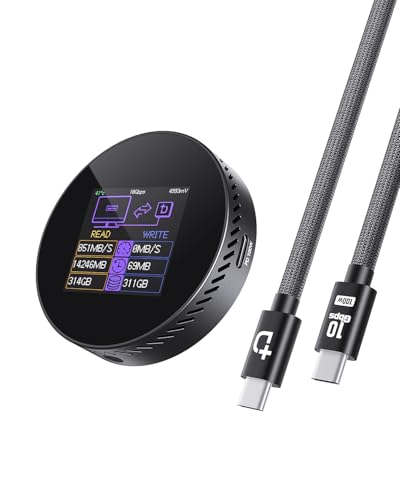
DOCKCASE Magnetic 2242 NVMe Enclosure
Best for: Magnetic mounting and visual health monitoring
- Max Transfer Speed
- 10Gbps
- Host Interface
- USB 3.2 Type-C
- Drive Interface
- M.2 NVMe PCIe
- Supported Form Factors
- 2242, 2230
- Maximum Capacity
- 2TB
- Dimensions
- 2.33 × 0.57 × 2.33 inches
View on Amazon: DOCKCASE Magnetic 2242 NVMe Enclosure Affiliate link
This DOCKCASE enclosure supports M.2 2242 and 2230 NVMe drives with 10Gbps USB 3.2 transfer speeds. It features a magnetic design for phone attachment and an HD screen for real-time health monitoring. The unit includes 3-second power loss protection and dual USB-C ports for simultaneous charging and data transfer. It is ideal for users needing portable, high-speed storage with visual feedback for their SSD.
Pros
- Supports M.2 2242 and 2230 form factors
- 10Gbps USB 3.2 transfer speeds
- Built-in HD screen for SSD health monitoring
- 3-second power loss protection
- Magnetic attachment for smartphones
Cons
- Limited to 2TB maximum capacity
- Supports only NVMe drives, not SATA
- Black color option only
Good fit if
- You need to store 4K ProRes video on your phone
- You want real-time visibility into your SSD health
- You prefer magnetic mounting for portable storage
Skip if
- You require more than 2TB of storage
- You need SATA drive compatibility
- You prefer a non-magnetic, rigid enclosure
Verdict: DOCKCASE Magnetic Visual M.2 2242 NVMe Enclosure offers a unique blend of magnetic mounting, health monitoring, and fast transfer speeds. It fits users who prioritize visual drive status and convenient phone attachment for high-resolution media workflows.
Specifications side by side
| Spec | DOCKCASE Explorer NVMe Enclosure with Display | DOCKCASE Pocket M.2 2230 NVMe Enclosure | DOCKCASE Magnetic 2242 NVMe Enclosure |
|---|---|---|---|
| Max Transfer Speed | 10Gbps | 10Gbps | 10Gbps |
| Host Interface | USB 3.2 Gen 2 Type-C | USB 3.2 Gen 2 Type-C | USB 3.2 Type-C |
| Drive Interface | M.2 NVMe (M-Key, B+M Key) | PCIe NVMe (M-Key, B+M Key) | M.2 NVMe PCIe |
| Supported Form Factors | M.2 2230, 2242, 2260, 2280 | 2230 | 2242, 2230 |
| Cooling System | Graphite thermal pad | not stated | not stated |
| Maximum Capacity | not stated | 2TB | 2TB |
| Interface | NVMe | NVMe | NVMe |
| Form Factor | M.2 2280 | M.2 2230 | M.2 2242 |
| Transfer Speed | 10Gbps | 10Gbps | 10Gbps |
| Features | UASP | UASP | not stated |
| Weight | 5.29 ounces | 3.88 ounces | 1.9 ounces |
| Dimensions | not stated | 1.57 × 0.47 × 1.57 inches | 2.33 × 0.57 × 2.33 inches |
| Color | Black | Black | black |
| Model | 10SPLP-Black | DSWC1M-Black | Black-100W PD |
DOCKCASE Enclosure Lineup Overview
All three DOCKCASE models support NVMe interfaces and deliver 10Gbps transfer speeds. The Explorer Edition is built for standard M.2 2280 drives, offering a black finish and weighing 5.29 ounces. It is designed for users who require drive health visibility and robust protection for critical work. This unit features a display to monitor status. The Pocket model targets compact M.2 2230 NVMe drives. It is smaller, measuring 1.57 inches in length and height, and weighs 3.88 ounces. This enclosure suits those needing health monitoring for small-form-factor SSDs. The Magnetic Visual model fits M.2 2242 drives. It weighs just 1.9 ounces and includes magnetic mounting options. This design is ideal for users who prioritize visual drive status and convenient phone attachment for high-resolution media workflows.
Who DOCKCASE Enclosures Suit You
DOCKCASE targets users who prioritize drive health visibility and physical protection. Their range covers standard M.2 2280, compact 2230, and mid-size 2242 NVMe drives. All models include displays for real-time status monitoring and support 10Gbps transfer speeds. The magnetic option allows for convenient attachment to phones or surfaces. You should note that SATA support is not listed. Also, USB-C PD charging is only mentioned for the 2242 model. If you need those specific features, check the detailed specs. The brand focuses on compact, monitored NVMe storage solutions.
How to Choose the Right DOCKCASE NVMe Enclosure
-
Match the M.2 Form Factor
You must verify the physical dimensions of your SSD before purchasing. DOCKCASE offers specific models for 2280, 2230, and 2242 drives. The Explorer Edition fits standard 2280 modules, while the Pocket model is designed for compact 2230 units. The Magnetic enclosure supports the mid-size 2242 format. Using the wrong size will prevent proper installation. Check your drive’s length and width carefully. This ensures the enclosure’s internal contacts align correctly with your SSD’s pins. Proper fitment is critical for reliable data transfer and physical stability.
-
Confirm NVMe Interface Support
All listed DOCKCASE enclosures support the NVMe interface. You should check your drive’s protocol compatibility before buying. These units do not support older SATA-based M.2 drives. NVMe drives use the PCIe bus for faster communication. If your SSD uses the SATA protocol, these enclosures will not work. Verify your drive specifications to ensure it is an NVMe model. This step prevents purchasing an incompatible accessory. Correct interface matching ensures you can utilize the full potential of your storage device.
-
Evaluate Transfer Speed Needs
Each DOCKCASE model listed here supports 10Gbps transfer speeds. This limit applies to the Explorer, Pocket, and Magnetic enclosures. You should consider whether your host device supports USB 3.2 Gen 2 or higher. If your computer only supports USB 3.0, speeds will be capped at 5Gbps. The 10Gbps rating ensures future-proofing for faster hosts. Compare this speed against your workflow requirements. High-resolution video editing benefits from faster transfers. Ensure your entire chain supports these speeds for optimal performance.
-
Consider Health Monitoring Features
Drive health visibility is a key feature across this lineup. The Explorer Edition includes a display for real-time status monitoring. The Pocket model also features health monitoring for compact drives. The Magnetic enclosure offers visual status checks as well. You should decide if this visibility is important for your workflow. Monitoring helps you track temperature and drive status proactively. This feature aids in data safety and preventative maintenance. If you need to know drive health without software, these displays provide immediate feedback on your SSD’s condition.
-
Assess Mounting and Portability
Consider how you plan to use the enclosure physically. The Magnetic model allows for convenient attachment to metal surfaces. This is useful for attaching the drive to a phone or laptop. The Explorer and Pocket models are standalone units. You should choose based on your mobility needs. Magnetic mounting offers unique flexibility for content creators. Standalone units are better for desk use. Think about where you will store the drive. The right form factor and mounting style improve your daily workflow efficiency and convenience.
Frequently asked questions
Which DOCKCASE enclosure is best for standard M.2 2280 drives?
The Explorer NVMe Enclosure is the top choice for standard 2280 modules. It features a built-in display for drive health visibility and robust physical protection. The unit weighs 5.29 ounces and supports 10Gbps transfer speeds, making it ideal for users who value data safety and clear status monitoring.
Does DOCKCASE make an enclosure for M.2 2230 SSDs?
Yes, the Pocket M.2 2230 NVMe Enclosure is designed specifically for compact drives. It fits 2230 form factors and includes a health display for real-time monitoring. This model weighs 3.88 ounces and delivers 10Gbps speeds, providing a specialized solution for small-form-factor NVMe modules that require data protection.
Can I use a DOCKCASE enclosure with an M.2 2242 drive?
The Magnetic 2242 NVMe Enclosure supports M.2 2242 form factors. It offers magnetic mounting for convenient attachment to surfaces like phones or laptops. This model includes visual health monitoring and supports 10Gbps transfer speeds, catering to users who prioritize drive status visibility and flexible mounting options for high-resolution workflows.
Do all DOCKCASE NVMe enclosures support fast data transfer?
All listed DOCKCASE models support 10Gbps transfer speeds. This ensures efficient data movement for NVMe drives regardless of the specific form factor. The consistent speed rating applies to the Explorer, Pocket, and Magnetic variants, allowing you to maintain high performance across standard, compact, and mid-size M.2 SSDs.
Which DOCKCASE model includes a display for drive health?
All three models feature displays for drive health visibility. The Explorer Edition, Pocket, and Magnetic enclosures all provide real-time status monitoring. This feature helps you track drive conditions, ensuring data safety and allowing you to address potential issues early. Each unit prioritizes visibility alongside its specific form factor support.
How much does the DOCKCASE Explorer NVMe Enclosure weigh?
The Explorer NVMe Enclosure weighs 5.29 ounces. This weight applies to the black version with the 10SPLP model number. It is designed for M.2 2280 drives and includes a display for health monitoring. The compact yet sturdy build supports 10Gbps speeds while offering robust protection for your data.
What color options are available for DOCKCASE NVMe enclosures?
The listed DOCKCASE models are available in black. The Explorer Edition, Pocket, and Magnetic enclosures all feature a black finish. This uniform color scheme provides a consistent aesthetic across the lineup. Each model maintains this dark appearance while offering specific form factor support and health monitoring capabilities.
Is the DOCKCASE Magnetic enclosure suitable for mobile workflows?
Yes, the Magnetic 2242 NVMe Enclosure is designed for mobile use. It features magnetic mounting for easy attachment to phones or laptops. This allows for convenient handling during high-resolution media workflows. The unit supports 10Gbps speeds and includes visual health monitoring, combining portability with essential drive status visibility.