6 Best Alternatives to the DOCKCASE Explorer NVMe Enclosure Display (2026)
As an Amazon Associate we earn from qualifying purchases. Links on this page are affiliate links.
The dockcase explorer edition m 2 nvme SSD alternatives list helps you find enclosures that match the original’s key specifications. The DOCKCASE Explorer Edition stands out by combining 10Gbps transfer speeds with an HD display for real-time health monitoring and hardware power loss protection. These features provide direct visibility into drive telemetry and safeguard against data loss during unexpected power failures. However, you might prefer a different design if you do not need a screen or require support for longer drive lengths.
The alternatives in this guide were selected because their core specs overlap with the original, ensuring comparable performance. You will find options ranging from tool-free dual-bay systems to enclosures supporting extended 22110 form factors. Each product maintains the 10Gbps bandwidth standard, but they differ in physical dimensions, cooling materials, and additional hardware features like power switches. This selection allows you to choose an enclosure that better fits your specific portability needs or drive compatibility requirements without sacrificing essential transfer speeds.
Our top pick: DOCKCASE Explorer NVMe Enclosure with Display.
How each alternative compares
The ASUS ROG Strix Arion trades the DOCKCASE display for a rugged aluminum chassis and Aura Sync lighting. It retains the 10Gbps transfer speed but lacks the 10-second power loss protection that safeguards your writes during unexpected outages. You lose real-time health monitoring, but gain a more durable portable design. This enclosure suits users who prioritize physical resilience and aesthetic customization over drive telemetry. It supports standard M.2 sizes and includes flexible cable options. If you need a sturdy external drive that looks good on your desk, this model offers a compelling alternative to the DOCKCASE Explorer's smart features.
ICY DOCK M.2 NVMe USB-C Enclosure with Power Switch
The ICY DOCK enclosure expands drive compatibility to include 22110 length NVMe modules, which the DOCKCASE cannot accommodate. It maintains the 10Gbps speed and USB-C interface but removes the diagnostic screen and power loss protection. Instead, it adds a physical power switch for manual control. This model is ideal for users with longer enterprise-grade drives who do not need health monitoring. The lack of a display means you must check drive status via your host system. If your primary concern is fitting larger form factors without sacrificing transfer bandwidth, this enclosure provides necessary compatibility that the DOCKCASE lacks.
ORICO Dual-Bay M.2 NVMe SSD Enclosure
The ORICO Dual-Bay enclosure doubles your storage capacity by supporting two independent NVMe drives in a single chassis. It offers 10Gbps speeds per slot and tool-free installation, but omits the built-in display and power loss protection found in the DOCKCASE. You gain the ability to run two drives simultaneously, which is useful for backups or RAID setups. The aluminum heatsink aids cooling for both units. This option is best for users who need expanded storage volume rather than individual drive monitoring. If your workflow requires managing multiple high-speed external drives from one compact unit, this dual-bay design is a practical choice.
ORICO Transparent 10Gbps M.2 NVMe Enclosure
The ORICO Transparent enclosure provides a simple, tool-free design for standard M.2 NVMe drives at a lower complexity level. It delivers 10Gbps transfer speeds but lacks the DOCKCASE's display screen and power loss protection. You get essential high-speed connectivity without the added hardware of a diagnostic interface. This model is suitable for users who want straightforward external storage without monitoring features. The transparent design allows you to see the drive inside, offering visual feedback without digital readouts. If you prefer a minimalist approach and do not need health telemetry, this enclosure offers a clean, functional alternative to the more feature-rich DOCKCASE Explorer.
The ORICO 10Gbps enclosure focuses on reliable performance for high-capacity NVMe drives up to 8TB. It uses the Realtek RTL9210 interface for stable 10Gbps transfers but does not include a display or power loss protection. This model is designed for users who need consistent large file transfer capabilities without the need for drive health monitoring. It supports multi-cable compatibility for versatile host connections. If your priority is handling large datasets with a straightforward, no-frills enclosure, this option provides dependable performance. It sacrifices the smart features of the DOCKCASE for a focus on core data transport reliability and capacity support.
The ORICO Transparent NVMe enclosure offers tool-free installation and 10Gbps speeds for standard M-Key NVMe drives. It lacks the built-in telemetry screen and power loss protection of the DOCKCASE Explorer. This model provides essential high-speed connectivity in a simple, accessible package. You gain easy drive swapping without tools but lose real-time health monitoring and write safety features. This enclosure is ideal for users who want a basic, reliable external drive without the complexity of a display interface. If you prioritize simplicity and ease of use over advanced monitoring capabilities, this transparent model serves as a practical, straightforward alternative to the DOCKCASE.
Quick picks
Our 7 picks

DOCKCASE Explorer NVMe Enclosure with Display
Best for: monitoring SSD health and preventing write data loss
- Max Transfer Speed
- 10Gbps
- Host Interface
- USB 3.2 Gen 2 Type-C
- Drive Interface
- M.2 NVMe (M-Key, B+M Key)
- Supported Form Factors
- M.2 2230, 2242, 2260, 2280
- Cooling System
- Graphite thermal pad
- Features
- UASP
View on Amazon: DOCKCASE Explorer NVMe Enclosure with Display Affiliate link
The DOCKCASE Explorer Edition M.2 NVMe Enclosure is an external USB 3.2 Gen 2 Type-C drive case featuring an integrated display screen. It delivers transfer speeds up to 10Gbps via a Realtek RTL9210 controller and provides roughly 10 seconds of hardware power loss protection during sudden disconnects. This enclosure suits you if you need real-time monitoring of disk health, power draw, and drive life alongside safeguards against data corruption during live writes.
Pros
- Onboard display shows drive health, power-on count, remaining capacity, and power status
- Hardware power loss protection provides up to 10 seconds of backup write time
- USB 3.2 Gen 2 Type-C interface delivers transfer rates up to 10Gbps
- Supports M.2 NVMe form factors 2230, 2242, 2260, and 2280
Cons
- Limited to PCIe NVMe drives with no SATA M.2 protocol support listed
- Weighs 5.29 ounces, heavier than standard unmonitored enclosures
- Requires auxiliary power if the host supply drops below 15W
Good fit if
- You want an integrated screen to track SSD health, life expectancy, and wattage
- You require 10 seconds of power loss protection to prevent data corruption during unexpected disconnects
- You use M.2 NVMe SSDs in standard sizes from 2230 up to 2280
Skip if
- You need an enclosure that supports M.2 SATA or dual-drive setups
- You need speeds exceeding the 10Gbps USB 3.2 Gen 2 ceiling
Verdict: DOCKCASE Explorer Edition M.2 NVMe Enclosure combines 10Gbps transfer bandwidth with an informative diagnostic screen and hardware power loss protection. It gives you direct visibility into drive telemetry and reliable write safety for critical external storage tasks.

ICY DOCK M.2 NVMe USB-C Enclosure with Power Switch
Best for: Long 22110 M.2 NVMe drive compatibility
- Max Transfer Speed
- 10Gbps
- Host Interface
- USB 3.2 Gen 2, Thunderbolt 3/4
- Drive Interface
- PCIe NVMe
- Supported Form Factors
- 2230, 2242, 2260, 2280, 22110
- Drive Bay Count
- 1 bay
- Dimensions
- 5.91 × 2.48 × 0.47 inches
View on Amazon: ICY DOCK M.2 NVMe USB-C Enclosure with Power Switch Affiliate link
This external enclosure houses one M.2 PCIe NVMe SSD and connects over USB 3.2 Gen 2 at up to 10Gbps. It works across Thunderbolt 3 and 4 ports, supports five drive lengths from 2230 up to 22110, and features a dedicated power switch. You get broad hardware flexibility if you need an external drive adapter that fits longer 110mm cards.
Pros
- Supports M.2 drive lengths 2230, 2242, 2260, 2280, and 22110
- USB 3.2 Gen 2 host interface with speeds up to 10Gbps
- Thunderbolt 3 and Thunderbolt 4 port compatibility
- Dedicated on/off drive power switch
Cons
- Accommodates only a single M.2 drive
- No integrated status display screen listed
- PCIe NVMe support only without SATA drive compatibility listed
Good fit if
- You need an enclosure that accommodates longer 110mm (22110) M.2 NVMe drives.
- You want a physical on/off power switch to control drive power manually.
- You connect to USB 3.2 Gen 2, Thunderbolt 3, or Thunderbolt 4 ports.
Skip if
- You require an integrated display screen for real-time drive diagnostics.
- You need a multi-bay enclosure to mount multiple M.2 drives simultaneously.
Verdict: ICY DOCK 10Gbps M.2 NVMe SSD Enclosure delivers 10Gbps transfer rates and broad drive length compatibility from 2230 to 22110. It is a solid choice when you need a physical power switch and extended drive length support without screen readouts.

ORICO Dual-Bay M.2 NVMe SSD Enclosure
Best for: dual-drive tool-free NVMe storage expansion
- Max Transfer Speed
- 10Gbps
- Host Interface
- USB 3.2 Gen 2 Type-C
- Drive Interface
- PCIe NVMe M-Key, B&M Key
- Supported Form Factors
- 2230, 2242, 2260, 2280
- Drive Bay Count
- 2 bays
- Cooling System
- Aluminum fin, heat sinks, thermal pads
View on Amazon: ORICO Dual-Bay M.2 NVMe SSD Enclosure Affiliate link
The ORICO Dual-Bay M.2 NVMe SSD Enclosure provides two independent M.2 NVMe slots in an aluminum enclosure. It accommodates PCIe M-Key and B&M Key drives in 2230, 2242, 2260, and 2280 sizes. The enclosure supports USB 3.2 Gen 2 transfer speeds up to 10Gbps alongside UASP and TRIM. This setup suits you if you need tool-free dual-drive storage for computers, phones, or consoles.
Pros
- Dual M.2 bays support up to 8TB total storage across two drives
- Tool-free installation uses rubber plugs instead of screws
- USB 3.2 Gen 2 Type-C interface supports speeds up to 10Gbps
- Aluminum finned housing includes two heatsinks and two thermal pads
Cons
- Supplied with one cable but needs two cables to run both drives
- No integrated display screen listed for monitoring drive data
Good fit if
- You need two M.2 NVMe drives in a single enclosure.
- You want tool-free drive installation without screws.
- You use drives in 2230, 2242, 2260, or 2280 sizes.
Skip if
- You need an integrated display screen for drive telemetry.
- You need two cables included in the package for simultaneous dual-bay use.
Verdict: ORICO Dual-Bay M.2 NVMe SSD Enclosure provides two independent 10Gbps NVMe slots with tool-free drive swapping and aluminum heatsink cooling. It is an effective dual-drive option when you do not need an integrated display screen.
ELUTENG M.2 NVMe Enclosure
Best for: Budget portable storage for standard 2280 NVMe drives
- Max Transfer Speed
- 10Gbps
- Host Interface
- USB 3.1 Gen 2 USB-C
- Drive Interface
- PCIe NVMe M-Key
- Supported Form Factors
- 2230, 2242, 2260, 2280
- Cooling System
- Aluminum alloy
- Installation Style
- Tool-free
View on Amazon: ELUTENG M.2 NVMe Enclosure Affiliate link
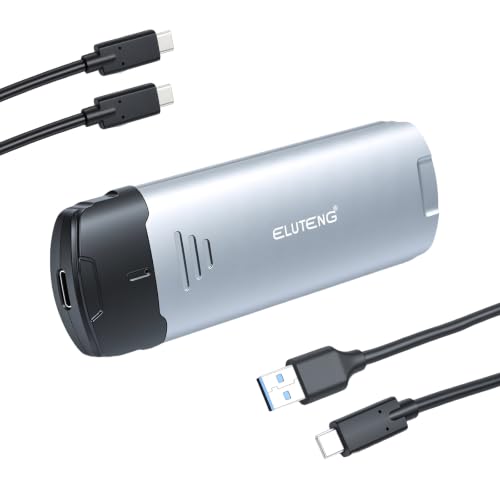
The ELUTENG enclosure supports USB 3.1 Gen2 interfaces with 10Gbps transfer speeds. It fits PCIe NVMe M Key SSDs in 2230, 2242, 2260, and 2280 sizes. The aluminum alloy body helps dissipate heat during use. You get a tool-free setup that works on Windows, Mac, and Linux. This grey option offers a compact and portable solution for expanding laptop storage or transporting files.
Pros
- USB 3.1 Gen2 interface delivers 10Gbps transfer rates
- Aluminum alloy construction aids heat dissipation
- Supports 2230, 2242, 2260, and 2280 form factors
- Tool-free installation with plug-and-play convenience
Cons
- Only available in grey or black colors
- Fixed to M.2 2280 form factor listing despite other support
Good fit if
- You need a portable drive for 2280 NVMe SSDs
- You want aluminum heat dissipation for sustained transfers
- You use Windows, Mac, or Linux systems
Skip if
- You require RGB lighting or display features
- You need SATA protocol support
- You prefer a transparent or unique color
Verdict: ELUTENG M.2 NVMe Enclosure USB 3.1 Gen2 provides reliable 10Gbps speeds in a compact aluminum chassis for users needing simple, tool-free external storage for standard 2280 drives.

Plugable Tool-Free M.2 NVMe SSD Enclosure
Best for: users needing multi-size M.2 support
- Max Transfer Speed
- 10Gbps
- Host Interface
- USB-C, USB4, Thunderbolt 3, TB4
- Drive Interface
- PCIe Gen 3/4 NVMe
- Supported Form Factors
- 2230, 2242, 2260, 2280
- Cooling System
- Aluminum case with heatsink fins
- Installation Style
- Tool-Free
View on Amazon: Plugable Tool-Free M.2 NVMe SSD Enclosure Affiliate link
This Plugable enclosure supports M.2 NVMe drives in 2230, 2242, 2260, and 2280 form factors. It delivers up to 10Gbps transfer speeds via USB-C, USB4, or Thunderbolt 3/4. The tool-free design and aluminum heatsink fins help you install drives quickly and manage heat. It works across Windows, macOS, Linux, and ChromeOS without drivers. You get a compact, travel-ready unit with flexible connectivity options.
Pros
- Tool-free installation for quick drive swaps
- Supports 2230, 2242, 2260, and 2280 sizes
- Aluminum case with heatsink fins for cooling
- Compatible with Thunderbolt 3, Thunderbolt 4, and USB4
Cons
- Limited to 10Gbps transfer speeds
- Heavier at 3.21 ounces compared to lighter alternatives
- Larger footprint at 7.87 inches in length
Good fit if
- You need support for multiple M.2 sizes
- You use Thunderbolt 3 or Thunderbolt 4 hosts
- You want a tool-free installation process
Skip if
- You require speeds higher than 10Gbps
- You prefer a more compact form factor
- You need SATA M.2 drive support
Verdict: Plugable Tool-Free NVMe Enclosure offers broad size compatibility and Thunderbolt support. It fits users who prioritize flexible connectivity and easy installation over maximum speed or minimal size.

StarTech Aluminum M.2 NVMe SSD Enclosure
Best for: Mac users needing versatile M.2 form factor support
- Max Transfer Speed
- 10Gbps
- Host Interface
- USB-C (USB 3.1 Gen 2), Thunderbolt 3
- Drive Interface
- PCIe NVMe M-Key
- Supported Form Factors
- 2230, 2242, 2260, 2280
- Cooling System
- Aluminum with ventilation holes
- Compatibility
- Mac
View on Amazon: StarTech Aluminum M.2 NVMe SSD Enclosure Affiliate link
This StarTech enclosure connects M.2 NVMe SSDs via USB-C at 10Gbps speeds. It features an aluminum housing with ventilation holes for heat dissipation. The design supports multiple form factors, including 2230, 2242, 2260, and 2280. It works with Windows, Mac, Linux, and Chrome OS. The unit includes a USB-C cable and a small screwdriver for installation. It is a solid choice for users needing reliable external storage.
Pros
- USB 3.1 Gen 2 interface delivers up to 10Gbps transfer speeds.
- Aluminum body with ventilation holes aids in heat management.
- Supports 2230, 2242, 2260, and 2280 M.2 drive sizes.
- Compatible with Mac, Windows, Linux, and Chrome OS systems.
Cons
- Maximum transfer speed is 10Gbps, which is slower than 40Gbps alternatives.
- Heavier build at 2.24 ounces compared to lighter plastic options.
- Fixed black color offers less aesthetic customization than transparent designs.
Good fit if
- You need broad operating system compatibility including Mac and Linux.
- You require support for various M.2 form factors like 2230 or 2280.
- You prioritize durable aluminum construction for heat dissipation.
Skip if
- You need transfer speeds faster than 10Gbps.
- You prefer a lightweight plastic enclosure over metal.
- You want a transparent design to view the drive.
Verdict: StarTech M.2 NVMe USB-C Enclosure provides reliable 10Gbps performance and broad OS support for users needing versatile form factor compatibility. It suits professionals who value aluminum durability and cross-platform utility over maximum speed or aesthetic transparency.

ORICO Transparent 10Gbps M.2 NVMe Enclosure
Best for: simple, tool-free NVMe storage on a budget
- Max Transfer Speed
- 10 Gbps
- Host Interface
- USB Type-C
- Drive Interface
- PCIe NVMe M-Key
- Supported Form Factors
- 2230, 2242, 2260, 2280
- Cooling System
- Aluminum alloy lines, thermal pad
- Installation Style
- Tool-free
View on Amazon: ORICO Transparent 10Gbps M.2 NVMe Enclosure Affiliate link
This transparent M.2 enclosure connects PCIe NVMe drives to your host system via a 10 Gbps USB 3.2 Gen 2 interface. It uses a tool-free sliding design that fits 2230, 2242, 2260, and 2280 form factor drives. With included Type-C and Type-A cables plus an aluminum heatsink plate, it suits you if you need a lightweight, flexible external drive adapter for moving data quickly across standard USB ports.
Pros
- Tool-free sliding mechanism for fast drive swaps
- Supports 2230, 2242, 2260, and 2280 NVMe SSDs
- Includes both USB-C to USB-C and USB-C to USB-A cables
- Up to 10 Gbps transfer speeds over USB 3.2 Gen 2
Cons
- Supports PCIe NVMe drives only, excluding SATA M.2 SSDs
- Lacks an integrated display screen for drive health metrics
- Included USB-A connection is limited to 5 Gbps
Good fit if
- You want a tool-free enclosure that fits multiple M.2 NVMe drive lengths.
- You need both USB-C and USB-A cables included in the box.
- You prefer a compact design with basic LED status monitoring.
Skip if
- You need an integrated display screen showing real-time drive diagnostics.
- You plan to use an M.2 SATA solid state drive.
Verdict: ORICO Transparent 10Gbps NVMe Enclosure delivers capable 10 Gbps transfer speeds and versatile cable options in an accessible tool-free chassis. It provides essential high-speed external NVMe connectivity without the added hardware complexity of a dedicated display screen.
Specifications side by side
| Spec | DOCKCASE Explorer NVMe Enclosure with Display | ICY DOCK M.2 NVMe USB-C Enclosure with Power Switch | ORICO Dual-Bay M.2 NVMe SSD Enclosure | ELUTENG M.2 NVMe Enclosure | Plugable Tool-Free M.2 NVMe SSD Enclosure | StarTech Aluminum M.2 NVMe SSD Enclosure | ORICO Transparent 10Gbps M.2 NVMe Enclosure |
|---|---|---|---|---|---|---|---|
| Max Transfer Speed | 10Gbps | 10Gbps | 10Gbps | 10Gbps | 10Gbps | 10Gbps | 10 Gbps |
| Host Interface | USB 3.2 Gen 2 Type-C | USB 3.2 Gen 2, Thunderbolt 3/4 | USB 3.2 Gen 2 Type-C | USB 3.1 Gen 2 USB-C | USB-C, USB4, Thunderbolt 3, TB4 | USB-C (USB 3.1 Gen 2), Thunderbolt 3 | USB Type-C |
| Drive Interface | M.2 NVMe (M-Key, B+M Key) | PCIe NVMe | PCIe NVMe M-Key, B&M Key | PCIe NVMe M-Key | PCIe Gen 3/4 NVMe | PCIe NVMe M-Key | PCIe NVMe M-Key |
| Supported Form Factors | M.2 2230, 2242, 2260, 2280 | 2230, 2242, 2260, 2280, 22110 | 2230, 2242, 2260, 2280 | 2230, 2242, 2260, 2280 | 2230, 2242, 2260, 2280 | 2230, 2242, 2260, 2280 | 2230, 2242, 2260, 2280 |
| Drive Bay Count | not stated | 1 bay | 2 bays | not stated | not stated | not stated | not stated |
| Cooling System | Graphite thermal pad | not stated | Aluminum fin, heat sinks, thermal pads | Aluminum alloy | Aluminum case with heatsink fins | Aluminum with ventilation holes | Aluminum alloy lines, thermal pad |
| Maximum Capacity | not stated | not stated | 2 x 4TB | not stated | not stated | not stated | not stated |
| Installation Style | not stated | not stated | Tool-free | Tool-free | Tool-Free | not stated | Tool-free |
| Interface | NVMe | NVMe | NVMe | NVMe | NVMe | NVMe | NVMe |
| Form Factor | M.2 2280 | M.2 2280 | M.2 2280 | M.2 2280 | M.2 2280 | M.2 2280 | M.2 2280 |
| Compatibility | not stated | not stated | not stated | not stated | not stated | Mac | not stated |
| Transfer Speed | 10Gbps | 10Gbps | 10Gbps | 10Gbps | 10Gbps | 10Gbps | 10Gbps |
| Features | UASP | not stated | Tool-Free | not stated | Tool-Free | not stated | not stated |
| Bay Count | not stated | not stated | Dual-Bay | not stated | not stated | not stated | not stated |
| Material | not stated | not stated | Aluminum | not stated | not stated | Aluminum | not stated |
| Weight | 5.29 ounces | 7.2 ounces | 3.53 ounces | not stated | 3.21 ounces | 2.24 ounces | 3.17 ounces |
| Dimensions | not stated | 5.91 × 2.48 × 0.47 inches | 4.41 × 2.95 × 0.67 inches | not stated | 7.87 × 3.54 × 1.18 inches | 4.3 × 1.6 × 0.5 inches | 4.25 × 1.34 × 0.47 inches |
| Color | Black | Black | Grey | Grey | Black | Black | Red |
| Model | 10SPLP-Black | MB861U31-1M2B | Dual M.2 NVMe+NVMe | not stated | USBC-NVME | M2E1BMU31C | TCM2-Red |
| Size | not stated | not stated | Dual M.2 NVMe+NVMe | not stated | not stated | 10Gbps NVMe | not stated |
If you prefer basic metal shells, you can review bykski b nvme ct m 2 SSD aluminum alternatives instead.
Frequently asked questions
Which NVMe enclosure is best for monitoring drive health without a screen?
The DOCKCASE Explorer Edition M.2 NVMe Enclosure is the top pick for this task. It combines 10Gbps transfer bandwidth with an informative diagnostic screen. This allows you direct visibility into drive telemetry. It also features hardware power loss protection to prevent write data loss during critical external storage tasks.
What is the best alternative for long 22110 M.2 NVMe drives?
The ICY DOCK M.2 NVMe USB-C Enclosure supports drive lengths from 2230 to 22110. It delivers 10Gbps transfer rates and includes a physical power switch. This makes it a solid choice when you need extended drive length support without the complexity of screen readouts.
Is there a dual-bay NVMe enclosure that does not require tools?
The ORICO Dual-Bay M.2 NVMe SSD Enclosure provides two independent 10Gbps NVMe slots. It features tool-free drive swapping and an aluminum heatsink for cooling. This is an effective dual-drive option when you do not need an integrated display screen for monitoring drive status.
Which NVMe enclosure is the most budget-friendly option?
The ELUTENG M2 NVMe Enclosure is the best budget choice in this list. It supports M.2 2280 form factors and delivers 10Gbps transfer speeds. It uses a grey casing and focuses on essential NVMe connectivity without additional features like displays or complex cooling systems.
Can I find a tool-free NVMe enclosure that is compact?
The Plugable Tool-Free M.2 NVMe SSD Enclosure offers tool-free installation for M.2 2280 drives. It provides 10Gbps transfer speeds via USB-C. Its dimensions are 3.54 inches wide and 1.18 inches high, making it a straightforward option for high-speed external NVMe connectivity.
Which NVMe enclosure is specifically compatible with Mac computers?
The StarTech Aluminum M.2 NVMe SSD Enclosure is listed as the best option for Mac. It features 10Gbps transfer speeds and an aluminum chassis. The enclosure is compact, measuring 1.6 inches wide and 4.3 inches long, while maintaining compatibility with macOS systems.
What is a simple transparent NVMe enclosure option?
The ORICO Transparent 10Gbps M.2 NVMe Enclosure delivers 10Gbps transfer speeds in an accessible tool-free chassis. It offers versatile cable options and a red casing. This model provides essential high-speed external NVMe connectivity without the added hardware complexity of a dedicated display screen.