Best MAIWO M.2 2280 SSD Enclosures: 4 Spec-Based Picks
As an Amazon Associate we earn from qualifying purchases. Links on this page are affiliate links.
Finding the best MAIWO M.2 2280 SSD enclosures requires checking the published specifications on each listing. We compared 4 models to help you pick the right hardware for your drive. The MAIWO Dual-Interface M.2 NVMe and SATA Enclosure leads because it supports both NVMe and SATA interfaces via its dual ports. This makes it ideal for users managing mixed drive types. You will also find options for budget buyers and those needing dual-bay expansion. This guide helps you decide which enclosure matches your specific connectivity and storage needs.
Quick picks
| # | Product | Best for | Price |
|---|---|---|---|
| 1 | MAIWO Dual-Interface M.2 NVMe and SATA Enclosure Best overall | Mixed NVMe and SATA drive users | Check price of MAIWO Dual-Interface M.2 NVMe and SATA Enclosure on Amazon |
| 2 | MAIWO Dual-Interface M.2 SATA SSD Enclosure Also great | SATA SSD users needing dual USB ports | Check price of MAIWO Dual-Interface M.2 SATA SSD Enclosure on Amazon |
| 3 | MAIWO Dual-Bay M.2 NVMe SSD Enclosure Best premium | dual-drive NVMe storage expansion | Check price of MAIWO Dual-Bay M.2 NVMe SSD Enclosure on Amazon |
| 4 | MAIWO M.2 SATA Enclosure USB-A Best budget | Legacy USB-A ports and SATA drives | Check price of MAIWO M.2 SATA Enclosure USB-A on Amazon |
The best fit for you
- You manage both NVMe and SATA drives MAIWO Dual-Interface M.2 NVMe and SATA Enclosure It supports both NVMe and SATA interfaces for mixed drive types.
- You need to connect two NVMe drives MAIWO Dual-Bay M.2 NVMe SSD Enclosure The dual-bay design lets you connect two NVMe SSDs at once.
- You only have legacy USB-A ports MAIWO M.2 SATA Enclosure USB-A It uses a USB-A host interface for older computer ports.
Our 4 picks

MAIWO Dual-Interface M.2 NVMe and SATA Enclosure
Best for: Mixed NVMe and SATA drive users
- Form Factor
- M.2 2280 (what this guide is about)
- Max Transfer Speed
- 10Gbps
- Host Interface
- USB 3.2 Gen 2, USB-A, USB-C
- Drive Interface
- M.2 NVMe, M.2 SATA (M/B+M Key)
- Supported Form Factors
- M.2 2230, 2242, 2260, 2280
- Cooling System
- Aluminum alloy
View on Amazon: MAIWO Dual-Interface M.2 NVMe and SATA Enclosure Affiliate link
The MAIWO K1683P2 supports both NVMe and SATA M.2 drives in 2230, 2242, 2260, and 2280 sizes. It offers dual USB-A and USB-C ports for flexible connectivity. Transfer speeds reach 10Gbps for NVMe and 6Gbps for SATA. The aluminum alloy body aids heat dissipation. A built-in LED indicator shows drive status. This model fits users needing broad drive compatibility and cable-free connections.
Pros
- Supports NVMe and SATA M.2 drives
- Includes both USB-A and USB-C interfaces
- Aluminum alloy construction for heat dissipation
- LED indicator for operational status
Cons
- Maximum capacity limited to 8TB
- Weight is 2.12 ounces
- No mention of included cables
Good fit if
- You need to use both NVMe and SATA M.2 drives
- You want a single enclosure for multiple M.2 sizes
- You require both USB-A and USB-C connectivity
Skip if
- You need support for capacities larger than 8TB
- You prefer a plastic housing for lighter weight
- You only need support for NVMe drives
Verdict: The MAIWO K1683P2 NVMe & SATA Enclosure is a practical choice for users who need to manage mixed drive types and sizes. Its dual interface ports and broad compatibility make it suitable for versatile storage needs.

MAIWO Dual-Interface M.2 SATA SSD Enclosure
Best for: SATA SSD users needing dual USB ports
- Form Factor
- M.2 2280 (what this guide is about)
- Max Transfer Speed
- 6Gbps
- Host Interface
- USB 3.1 Gen 2, USB-C, USB-A
- Drive Interface
- M.2 SATA B+M Key
- Supported Form Factors
- 2230, 2242, 2260, 2280
- Cooling System
- Aluminum alloy
View on Amazon: MAIWO Dual-Interface M.2 SATA SSD Enclosure Affiliate link
This MAIWO enclosure connects M.2 SATA drives via USB 3.1 Gen 2. It supports 6Gbps transfer speeds and fits 2230, 2242, 2260, and 2280 B+M key drives. The aluminum body helps dissipate heat. You get both USB-A and USB-C ports for broad device compatibility. It is a solid budget option for standard SATA SSDs.
Pros
- USB 3.1 Gen 2 interface supports up to 6Gbps speeds
- Aluminum alloy casing provides durability and heat dissipation
- Includes both USB-A and USB-C host connections
- Supports multiple form factors: 2230, 2242, 2260, and 2280
Cons
- Limited to SATA drives, not compatible with NVMe PCIe SSDs
- Maximum transfer speed of 6Gbps is slower than NVMe options
- No mention of included USB cable in specifications
Good fit if
- You need to connect a M.2 SATA SSD to a computer
- You require both USB-A and USB-C connectivity options
- You want a durable aluminum enclosure for portable storage
Skip if
- You own M.2 NVMe PCIe SSDs
- You need transfer speeds faster than 6Gbps
- You require support for B+M key NVMe drives
Verdict: MAIWO M.2 SATA Aluminum Enclosure is a practical choice for users with SATA drives who need flexible connectivity. It fits those prioritizing build quality and multi-port support over raw speed.
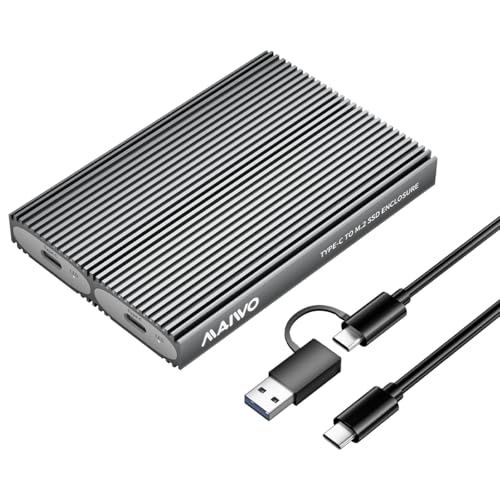
MAIWO Dual-Bay M.2 NVMe SSD Enclosure
Best for: dual-drive NVMe storage expansion
- Form Factor
- M.2 2280 (what this guide is about)
- Max Transfer Speed
- 10Gbps
- Host Interface
- USB 3.1 Gen 2 Type-C
- Drive Interface
- PCIe NVMe M-Key / B+M Key
- Supported Form Factors
- 2230, 2242, 2260, 2280
- Drive Bay Count
- 2 bays
View on Amazon: MAIWO Dual-Bay M.2 NVMe SSD Enclosure Affiliate link
This dual-bay enclosure houses two M.2 NVMe SSDs up to size 2280. You get a 10Gbps USB 3.1 Gen 2 Type-C interface supporting UASP, Trim, and transfer speeds exceeding 1000MB/s. Each bay supports up to 8TB for a 16TB maximum capacity. It suits you if you need compact, tool-free external storage for high-capacity NVMe drives.
Pros
- Dual independent M.2 slots supporting up to 16TB total capacity
- 10Gbps USB 3.1 Gen 2 interface with UASP and Trim support
- Tool-free drive installation requires no hardware or drivers
- Aluminum alloy casing with thermal pads and ventilation grooves
Cons
- Requires two cables to access both drives simultaneously, but includes only one cable
- Supports PCIe NVMe SSDs only, with no compatibility for M.2 SATA drives
Good fit if
- You need to connect high-capacity M.2 NVMe drives up to 8TB per bay.
- You want tool-free drive swapping for 2230, 2242, 2260, or 2280 SSDs.
- You require 10Gbps transfer speeds for large files or 4K video.
Skip if
- You need compatibility with M.2 SATA SSDs.
- You want to mount two drives at once through a single USB cable.
Verdict: MAIWO Dual-Bay M.2 NVMe Enclosure delivers 10Gbps transfer speeds and tool-free mounting for up to two 8TB NVMe drives. It fits users handling large data transfers across multiple drives who want dedicated PCIe NVMe hardware.

MAIWO M.2 SATA Enclosure USB-A
Best for: Legacy USB-A ports and SATA drives
- Form Factor
- M.2 2280 (what this guide is about)
- Max Transfer Speed
- 5Gbps
- Host Interface
- USB 3.0 Type-A
- Drive Interface
- M.2 SATA (B Key, M+B Key)
- Supported Form Factors
- 2230, 2242, 2260, 2280
- Cooling System
- Aluminum alloy
View on Amazon: MAIWO M.2 SATA Enclosure USB-A Affiliate link
This MAIWO enclosure connects M.2 SATA SSDs via a direct USB 3.0 Type-A port. It supports 2230, 2242, 2260, and 2280 sizes with B+M key interfaces. The aluminum alloy body aids heat dissipation during transfers up to 5Gbps. It offers tool-free installation and plug-and-play setup without drivers. You get a clean, cable-free connection for older desktops or laptops lacking USB-C.
Pros
- Direct USB 3.0 Type-A connectivity
- Aluminum alloy housing for heat dissipation
- Supports 2230, 2242, 2260, and 2280 sizes
- Tool-free installation with LED indicator
Cons
- Limited to SATA SSDs, not NVMe
- Max speed capped at 5Gbps
- Requires a USB Type-A port
Good fit if
- You need a cable-free connection for older computers
- You want to reuse existing M.2 SATA drives
- You prefer the simplicity of USB Type-A
Skip if
- You use NVMe SSDs exclusively
- Your device only has USB-C ports
- You need speeds faster than 5Gbps
Verdict: MAIWO M.2 SATA Enclosure USB-A provides a simple, direct interface for M.2 SATA drives on legacy systems. It suits users with USB Type-A ports who want to repurpose older SSDs without buying cables.
Specifications side by side
| Spec | MAIWO Dual-Interface M.2 NVMe and SATA Enclosure | MAIWO Dual-Interface M.2 SATA SSD Enclosure | MAIWO Dual-Bay M.2 NVMe SSD Enclosure | MAIWO M.2 SATA Enclosure USB-A |
|---|---|---|---|---|
| Max Transfer Speed | 10Gbps | 6Gbps | 10Gbps | 5Gbps |
| Host Interface | USB 3.2 Gen 2, USB-A, USB-C | USB 3.1 Gen 2, USB-C, USB-A | USB 3.1 Gen 2 Type-C | USB 3.0 Type-A |
| Drive Interface | M.2 NVMe, M.2 SATA (M/B+M Key) | M.2 SATA B+M Key | PCIe NVMe M-Key / B+M Key | M.2 SATA (B Key, M+B Key) |
| Supported Form Factors | M.2 2230, 2242, 2260, 2280 | 2230, 2242, 2260, 2280 | 2230, 2242, 2260, 2280 | 2230, 2242, 2260, 2280 |
| Drive Bay Count | not stated | not stated | 2 bays | not stated |
| Cooling System | Aluminum alloy | Aluminum alloy | Aluminum alloy body, thermal pads | Aluminum alloy |
| Maximum Capacity | 8TB | not stated | 16TB | not stated |
| Installation Style | not stated | not stated | Tool-Free | Tool-free |
| Interface | SATA III | SATA III | NVMe | SATA III |
| Form Factor | M.2 2280 | M.2 2280 | M.2 2280 | M.2 2280 |
| Transfer Speed | 10Gbps | not stated | 10Gbps | not stated |
| Features | not stated | UASP, TRIM | Tool-Free, UASP, TRIM | not stated |
| Bay Count | not stated | not stated | Dual-Bay | not stated |
| Material | Aluminum | Aluminum | not stated | Aluminum |
| Dimensions | 5.55 × 1.22 × 0.35 inches | not stated | 4.65 × 1.97 × 0.51 inches | not stated |
| Weight | 2.12 ounces | 2.12 ounces | not stated | 2.12 ounces |
| Color | Grey | black | Silver | Silver |
| Model | MAIWO K1683P2 | M.2 SATA 2280 | not stated | M.2 SATA 2230 2242 2260 2280 |
How to choose the right MAIWO enclosure
-
Match interface to your drive
You must verify the protocol compatibility before purchasing. The MAIWO Dual-Interface M.2 NVMe and SATA Enclosure supports both SATA III and NVMe protocols. This flexibility allows you to use either drive type without buying separate hardware. However, the MAIWO M.2 SATA Enclosure USB-A only works with SATA III drives. Using an NVMe drive in a SATA-only enclosure will fail. Always check the listed interface specification to ensure your specific M.2 2280 SSD is supported by the chosen model.
-
Check host port type
Your computer’s available ports determine which enclosure fits your setup. Most modern systems feature USB-C ports, which the MAIWO Dual-Interface M.2 NVMe and SATA Enclosure utilizes. If you are connecting to older hardware with only USB Type-A ports, you need a different solution. The MAIWO M.2 SATA Enclosure USB-A is designed specifically for this legacy requirement. Ensure the host interface matches your computer’s physical connectors to avoid needing additional adapters or cables for connection.
-
Consider transfer speed needs
Transfer speed limits the performance of your external storage. The MAIWO Dual-Interface M.2 NVMe and SATA Enclosure and the MAIWO Dual-Bay M.2 NVMe SSD Enclosure both list a transfer speed of 10Gbps. This limit applies regardless of whether your internal SSD is faster. The SATA-only models do not list a specific transfer speed, but they are bound by SATA III limits. If you require maximum throughput, choose an enclosure that explicitly states a higher speed rating compatible with your drive's capabilities.
-
Evaluate storage expansion needs
Determine if you need to connect one or multiple drives simultaneously. The MAIWO Dual-Bay M.2 NVMe SSD Enclosure features a dual-bay design, allowing you to install two NVMe SSDs at once. This is ideal for users needing significant expanded storage capacity in a single connection. Other models in the list support only a single drive. If you only need to access one drive, a single-bay enclosure is sufficient. If you need to manage two drives, the dual-bay option is the only choice among these models.
-
Review physical dimensions
Enclosure size affects portability and fit in your bag or desk setup. The MAIWO Dual-Interface M.2 NVMe and SATA Enclosure measures 5.55 inches in length. The MAIWO Dual-Bay M.2 NVMe SSD Enclosure is shorter at 4.65 inches but wider. The single-bay SATA models are generally more compact. Consider the width and height if you plan to store the enclosure in tight spaces. Check the listed dimensions to ensure the physical hardware fits your intended carrying case or mounting location without obstruction.
Frequently asked questions
Which MAIWO enclosure supports both NVMe and SATA drives?
The MAIWO K1683P2 supports both NVMe and SATA protocols. It uses a USB-C host interface with transfer speeds up to 10Gbps. This dual-interface design allows you to manage mixed drive types without needing separate hardware. It is an ideal choice for versatile storage needs.
Does the MAIWO Dual-Bay NVMe enclosure support tool-free installation?
Yes, the MAIWO Dual-Bay NVMe Enclosure features tool-free installation. It allows you to connect two NVMe SSDs simultaneously for expanded storage. The design prioritizes ease of use and high-speed data transfers for users who need to manage multiple drives efficiently.
What is the best MAIWO option for legacy USB-A ports?
The MAIWO M.2 SATA Enclosure USB-A is designed for legacy systems. It provides a direct interface for M.2 SATA drives on computers with USB Type-A ports. This model suits users who want to repurpose older SSDs without buying additional cables or adapters.
Are MAIWO M.2 enclosures made of metal?
Most listed MAIWO models use aluminum construction. The K1683P2, the budget SATA option, and the USB-A version all feature aluminum bodies. This material choice helps with heat dissipation and provides a durable housing for your M.2 2280 SSDs during regular use.
Can I use the budget SATA enclosure for NVMe drives?
No, the MAIWO M.2 SATA Aluminum Enclosure is strictly for SATA III drives. Using an NVMe drive in this enclosure will not work because the interface protocols are different. You must match the enclosure interface to your specific drive type to ensure functionality.
What are the dimensions of the MAIWO K1683P2 enclosure?
The MAIWO K1683P2 measures 5.55 inches in length, 1.22 inches in width, and 0.35 inches in height. It weighs 2.12 ounces. These compact dimensions make it easy to carry or integrate into tight workspaces while maintaining a sturdy aluminum build.
How fast is the transfer speed on the MAIWO dual-interface model?
The MAIWO K1683P2 offers transfer speeds up to 10Gbps. This speed is achieved through its USB-C host interface. It provides efficient data movement for both NVMe and SATA drives, making it a practical choice for users requiring reliable and swift file transfers.