MAIWO SSD Enclosures: 15 Picks Ranked by Specs
As an Amazon Associate we earn from qualifying purchases. Links on this page are affiliate links.
Finding the right MAIWO SSD enclosure depends on your drive form factor, interface, and transfer speed requirements. MAIWO offers aluminum stick adapters, compact square 2230 bodies, desktop docking stations, and multi-bay RAID cloners spanning 5Gbps SATA up to 40Gbps NVMe speeds.
The MAIWO Dual-Interface M.2 NVMe and SATA Enclosure leads the lineup because it enables cable-free drive swapping across USB-A and USB-C ports at up to 10Gbps. We compared 15 products based strictly on the specifications published on their listings so you can match the hardware to your storage needs.
Quick picks
Our 15 picks

MAIWO Dual-Interface M.2 NVMe and SATA Enclosure
Best for: cable-free drive swapping across multiple port types
- Max Transfer Speed
- 10Gbps
- Host Interface
- USB-A, USB-C
- Drive Interface
- NVMe & SATA (M-Key, B+M Key)
- Supported Form Factors
- 2230, 2242, 2260, 2280
- Cooling System
- Aluminum alloy
- Maximum Capacity
- 8TB
View on Amazon: MAIWO Dual-Interface M.2 NVMe and SATA Enclosure
This MAIWO enclosure houses both M.2 NVMe and M.2 SATA drives across four sizes: 2230, 2242, 2260, and 2280. You plug it directly into devices using its integrated USB-A or USB-C connectors without carrying a cable. It transfers data at up to 10Gbps with NVMe drives and 6Gbps with SATA drives. The aluminum body aids heat dissipation. You will find it practical if you regularly swap between USB-A and USB-C hosts.
Pros
- Dual integrated USB-A and USB-C plugs eliminate extra cables
- Dual-protocol support for both M.2 NVMe and M.2 SATA drives
- Fits 2230, 2242, 2260, and 2280 solid-state drive sizes
- Solid aluminum alloy housing facilitates heat dissipation
Cons
- Maximum throughput is capped at 10Gbps
- Direct-plug 5.55-inch length can crowd neighboring ports
Good fit if
- You need to read both M.2 NVMe and SATA solid-state drives.
- You switch frequently between USB-A and USB-C host devices.
- You want a direct-plug storage adapter without carrying separate cables.
Skip if
- You need speeds above 10Gbps for high-bandwidth NVMe tasks.
- You have tightly spaced USB ports where a 5.55-inch direct-plug device blocks access.
Verdict: MAIWO Dual-Interface M.2 NVMe and SATA Enclosure gives you cable-free connectivity for NVMe and SATA drives across USB-A and USB-C ports at up to 10Gbps. It provides broad hardware compatibility in an aluminum stick format.

MAIWO M.2 NVMe and SATA USB-C Enclosure
Best for: swapping between NVMe and SATA M.2 drives
- Max Transfer Speed
- 10Gbps
- Host Interface
- USB 3.1 Gen 2x1 Type-C
- Drive Interface
- PCIe NVMe (M-Key), SATA NGFF (B+M-Key)
- Supported Form Factors
- 2230, 2242, 2260, 2280
- Cooling System
- Aluminum alloy shell, thermal pads
- Maximum Capacity
- 8TB
This MAIWO enclosure houses both M.2 PCIe NVMe and M.2 SATA SSDs using an RTL9210B controller. You get transfer speeds up to 10Gbps over a USB 3.1 Gen 2x1 connection, along with TRIM and UASP support. The aluminum shell includes ventilation holes, silicone and aluminum thermal pads, and tool-free installation for drives up to 8TB. It suits you if you need a flexible drive reader for multiple M.2 form factors.
Pros
- Supports both M.2 NVMe (M-Key) and SATA (B+M-Key) SSDs
- 10Gbps transfer speed via RTL9210B with UASP and TRIM
- Tool-free installation with included thermal pads
- Supports 2230, 2242, 2260, and 2280 sizes up to 8TB
Cons
- Does not support M.2 SATA B-Key SSDs
- Caps at 10Gbps USB 3.1 Gen 2x1 transfer speeds
Good fit if
- You switch between M.2 NVMe and SATA drives often.
- You need tool-free installation for capacities up to 8TB.
- You want UASP and TRIM support over a 10Gbps USB-C connection.
Skip if
- You require speeds exceeding 10Gbps for faster NVMe SSDs.
- You need to use an M.2 SATA B-Key drive.
Verdict: MAIWO Dual-Protocol NVMe and SATA M.2 Enclosure delivers flexible 10Gbps drive access across multiple M.2 form factors without requiring tools. It offers practical multi-drive utility for NVMe and SATA SSDs up to 8TB.

MAIWO 20Gbps M.2 NVMe SSD Enclosure
Best for: users with USB 3.2 Gen 2x2 ports
- Max Transfer Speed
- 20Gbps
- Host Interface
- USB 3.2 Gen 2x2 Type-C
- Drive Interface
- PCIe NVMe M-Key
- Supported Form Factors
- 2280
- Cooling System
- Aluminum alloy shell, thermal pads
- Maximum Capacity
- 8TB
This MAIWO enclosure houses an M.2 NVMe SSD inside an aluminum finned shell. It uses an ASM2364 controller and a USB 3.2 Gen 2x2 Type-C interface to deliver up to 20Gbps transfer speeds. The drive bay accepts size 2280 M-Key drives up to 8TB. It suits you if your computer has a dedicated USB 3.2 Gen 2x2 port and you need high-speed external storage.
Pros
- Up to 20Gbps theoretical transfer speed over USB 3.2 Gen 2x2
- Supports NVMe drive capacities up to 8TB
- Finned aluminum alloy body includes two thermal pads
- Comes with USB-C to USB-C cable, screws, and screwdriver
Cons
- Supports only 2280 size drives and excludes smaller form factors
- Drops to 10Gbps speeds on USB4 and Thunderbolt 3 or 4 ports
- Incompatible with SATA M.2 drives
Good fit if
- You have a host computer equipped with a native USB 3.2 Gen 2x2 port.
- You use an M-Key M.2 NVMe drive in the standard 2280 form factor.
Skip if
- You plan to install a SATA-based M.2 SSD.
- You use smaller 2230, 2242, or 2260 size drives.
- You rely on Thunderbolt or USB4 ports and require speeds above 10Gbps.
Verdict: MAIWO 20Gbps M.2 NVMe SSD Enclosure delivers 20Gbps throughput for 2280 NVMe drives, provided your host system features a USB 3.2 Gen 2x2 connection.

MAIWO M.2 NVMe SSD Docking Station
Best for: single M.2 NVMe desktop data transfers
- Max Transfer Speed
- 10Gbps
- Host Interface
- USB-C
- Drive Interface
- PCIe NVMe M-Key
- Form Factor
- M.2
- Dimensions
- 2.36 × 2.36 × 0.55 inches
- Weight
- 1.41 ounces
This MAIWO docking station connects M.2 NVMe M-key SSDs through a USB-C interface. It provides data transfer speeds up to 10Gbps and supports both UASP and TRIM protocols for data backup and read-write tasks. With dimensions of approximately 2.36 by 2.36 inches and a weight of 0.088 pounds, it takes up minimal desk space. It suits you if you want a dedicated desktop reader for individual NVMe drives.
Pros
- Up to 10Gbps transfer speed via USB-C interface
- Supports both UASP and TRIM protocols
- Compact 2.36 by 2.36-inch footprint
- Lightweight build weighing 0.088 pounds
Cons
- Supports only M-key NVMe SSDs, not SATA drives
- Single-bay design without simultaneous multi-drive access
- Limits throughput to 10Gbps rather than 20Gbps or 40Gbps
Good fit if
- You need a dedicated 10Gbps USB-C dock for an M.2 NVMe M-key drive.
- You want a lightweight drive reader measuring under 2.4 inches wide.
- You require UASP and TRIM protocol support for backups.
Skip if
- You use SATA-based M.2 or B-key storage drives.
- You need multi-drive cloning or simultaneous multi-bay reading.
- You require 20Gbps or 40Gbps connection speeds.
Verdict: MAIWO M.2 NVMe SSD Docking Station provides a compact 10Gbps USB-C data station with UASP and TRIM support for single M-key NVMe drives.

MAIWO Dual-Bay 20Gbps NVMe RAID Enclosure
Best for: dual-drive NVMe RAID storage at 20Gbps
- Max Transfer Speed
- 20Gbps
- Host Interface
- USB 3.2 Gen 2x2 Type-C
- Drive Interface
- PCIe NVMe M-Key
- Supported Form Factors
- 2230, 2242, 2260, 2280
- Drive Bay Count
- 2 bays
- Cooling System
- Aluminum alloy case
The MAIWO Dual-Bay 20Gbps NVMe RAID Enclosure houses two M.2 NVMe SSDs up to 8TB each, delivering a total capacity of 16TB. You get a USB 3.2 Gen 2x2 interface reaching speeds up to 20Gbps, paired with hardware RAID 0, RAID 1, PM, and JBOD modes. Its aluminum shell provides passive cooling, and tool-free mounting simplifies drive swaps. It suits you if you need mirrored redundancy or fast striped storage.
Pros
- USB 3.2 Gen 2x2 interface supports transfer rates up to 20Gbps
- Hardware switch supports RAID 0, RAID 1, PM, and JBOD modes
- Accommodates two M.2 NVMe drives up to 16TB total capacity
- Tool-free drive installation inside an aluminum alloy chassis
- Includes independent 5V 3A power adapter and two USB cables
Cons
- Does not support M.2 SATA SSDs
- Requires the external 5V 3A power adapter to run
Good fit if
- You need hardware RAID 0 speed or RAID 1 data mirroring across two NVMe SSDs.
- You have a host system with USB 3.2 Gen 2x2 ports to achieve 20Gbps speeds.
- You want tool-free assembly for drives ranging from 2230 to 2280 form factors.
Skip if
- You intend to use M.2 SATA B+M key drives.
- You need a bus-powered enclosure that operates without an external power brick.
Verdict: MAIWO Dual-Bay 20Gbps NVMe RAID Enclosure delivers flexible two-drive array configurations and high-speed data transfers in a sturdy aluminum body. It gives you dependable multi-drive management when paired with USB 3.2 Gen 2x2 hardware.
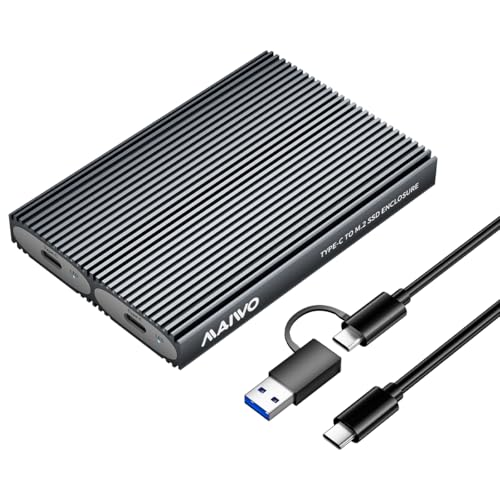
MAIWO Dual-Bay 10Gbps NVMe SSD Enclosure
Best for: dual NVMe storage without external power
- Max Transfer Speed
- 10Gbps
- Host Interface
- USB 3.1 Gen 2 Type-C
- Drive Interface
- PCIe NVMe (M Key, B+M Key)
- Supported Form Factors
- M.2 2230, 2242, 2260, 2280
- Drive Bay Count
- 2 bays
- Cooling System
- Aluminum alloy shell, thermal pad
This dual-bay enclosure holds two M.2 NVMe SSDs in sizes from 2230 to 2280. You get transfer speeds up to 10Gbps over a USB 3.1 Gen2 interface and support for up to 16TB total across both slots. It operates each drive independently without an external power adapter. This setup fits you if you want tool-free access to two NVMe drives in a single aluminum housing.
Pros
- Supports two M.2 NVMe drives up to 16TB total capacity
- 10Gbps USB 3.1 Gen2 interface with UASP support
- Tool-free drive installation for 2230, 2242, 2260, and 2280 sizes
- Aluminum alloy shell with silicone and aluminum thermal pads
Cons
- Requires two separate cables to access both drives simultaneously
- Comes with only one USB data cable in the box
- Does not support hardware drive cloning
Good fit if
- You need tool-free dual-slot storage for M.2 NVMe drives up to 8TB each.
- You want 10Gbps USB-C transfer speeds on Windows, macOS, Linux, or Android.
- You already have a second USB-C cable to read both drives at the same time.
Skip if
- You need a device with standalone offline cloning capabilities.
- You want to access two drives at once using a single cable connection.
- You need support for SATA-based M.2 SSDs.
Verdict: MAIWO Dual-Bay 10Gbps NVMe SSD Enclosure delivers tool-free dual-slot NVMe support with up to 16TB total capacity. Keep in mind you need two separate cables to access both bays at once.

MAIWO 40Gbps NVMe SSD Enclosure with Fan
Best for: high-speed USB4 setups needing active cooling
- Max Transfer Speed
- 40Gbps
- Host Interface
- USB4, Thunderbolt 4/3
- Drive Interface
- PCIe NVMe (M Key)
- Supported Form Factors
- 2280
- Cooling System
- Aluminium alloy shell, built-in fan
- Maximum Capacity
- 8TB
This external drive enclosure connects a single M.2 NVMe SSD using USB4 at transfer rates up to 40Gbps. It uses an ASM2464PD chipset, an aluminum alloy casing, and an integrated cooling fan to handle heat dissipation during heavy workloads. It supports storage capacities up to 8TB. It suits you if you need transfer speeds up to 3200 MB/s for standard 2280 form factor drives.
Pros
- Up to 40Gbps transfer speed over USB4 with ASM2464PD chipset
- Active cooling via built-in fan and aluminum alloy body
- Tool-free drive installation design
- Supports high-capacity NVMe drives up to 8TB
- Includes support for UASP, TRIM, and S.M.A.R.T.
Cons
- Supports only 2280 size M.2 drives
- Speed is capped at 20Gbps on Thunderbolt 3 connections
- Incompatible with SATA M.2 SSDs
Good fit if
- You have a 2280 M.2 NVMe drive and a USB4 or Thunderbolt 4 port.
- You need active fan cooling to prevent thermal throttling under load.
- You want tool-free drive installation for capacities up to 8TB.
Skip if
- You use smaller M.2 sizes such as 2230, 2242, or 2260.
- You need an enclosure that supports M.2 SATA drives.
Verdict: MAIWO 40Gbps NVMe SSD Enclosure with Fan delivers high-bandwidth USB4 performance with dedicated active cooling for standard 2280 drives. It is an optimal pick if your setup demands fast data rates without heat buildup.

MAIWO 4-Bay 40Gbps NVMe Cloner Enclosure
Best for: bulk NVMe cloning and multi-bay desktop storage
- Max Transfer Speed
- 40Gbps
- Host Interface
- USB4, Thunderbolt 4/3
- Supported Form Factors
- 2230, 2242, 2260, 2280
- Drive Bay Count
- 4 bays
- Cooling System
- Built-in cooling fan, aluminum alloy
- Maximum Capacity
- 32TB
This four-bay M.2 NVMe docking enclosure connects via a 40Gbps USB interface and accepts up to four drives for a maximum capacity of 32TB. You can access all four drives simultaneously, configure software RAID arrays, or run 1-to-3 drive clones without a host computer. An active cooling fan and a 12V 5A power supply manage thermal and power demands, making it a fit if you manage multi-drive storage or bulk cloning tasks.
Pros
- 40Gbps USB connection with Thunderbolt 3 and 4 backward compatibility
- Four M.2 NVMe bays supporting up to 32TB total capacity across 2230 to 2280 sizes
- Standalone 1-to-3 offline drive cloning without connecting to a host computer
- Active cooling setup with built-in fan, aluminum shell, and thermal pads
- Supports system RAID modes including RAID 0, 1, 5, and JBOD on Windows
Cons
- Requires the included external 12V 5A wall adapter for power
- Supports PCIe NVMe M.2 drives only with no SATA support
- Single-bay transmission speed is limited to 16Gbps via PCIe Gen4x1
Good fit if
- You need to duplicate one NVMe SSD to up to three target drives offline.
- You want a four-drive desktop enclosure with system RAID support.
- You need high-bandwidth 40Gbps connectivity for multiple NVMe drives.
Skip if
- You need to read or write M.2 SATA SSDs.
- You want a compact bus-powered enclosure that runs without a power brick.
Verdict: MAIWO 4-Bay 40Gbps NVMe Cloner Enclosure provides massive 32TB total capacity, multi-bay RAID capabilities, and standalone 1-to-3 cloning over high-bandwidth USB4. It is built specifically for desktop users handling intensive multi-drive transfers and drive duplication.

MAIWO Dual-Bay NVMe & SATA SSD Cloner
Best for: offline cloning between NVMe and SATA drives
- Max Transfer Speed
- 10Gbps
- Host Interface
- USB 3.2 Gen 2
- Drive Interface
- M.2 NVMe & SATA (M Key, B+M Key)
- Drive Bay Count
- Dual-Bay
- Features
- Offline Clone
- Dimensions
- 4 × 2.5 × 0.5 inches
This dual-bay enclosure from MAIWO lets you operate and clone both M.2 NVMe and M.2 SATA SSDs. It supports M Key and B+M Key drives and connects via a USB 3.2 Gen 2 interface with transfer speeds up to 10Gbps. Its integrated standalone cloning feature copies data across drives without software. Measuring 4 by 2.5 by 0.5 inches, it suits you if you need portable two-drive access and direct drive-to-drive duplication.
Pros
- Supports both M.2 NVMe and M.2 SATA SSD protocols
- Built-in offline cloning functionality copies data between drives
- USB 3.2 Gen 2 interface delivers transfer speeds up to 10Gbps
- Dual-bay layout accommodates M Key and B+M Key modules
Cons
- Peak data transfer speeds capped at 10Gbps
- No active cooling fan listed in hardware specifications
Good fit if
- You need to duplicate data between drives without installing software.
- You handle both NVMe and SATA M.2 drives regularly.
- You want a dual-bay drive reader with a compact 4-inch footprint.
Skip if
- You need 20Gbps or 40Gbps throughput for high-speed NVMe transfers.
- You require an enclosure that supports more than two drives simultaneously.
Verdict: MAIWO Dual-Bay NVMe & SATA SSD Cloner provides versatile two-drive management and direct drive duplication at 10Gbps speeds. It gives you a straightforward way to read or clone SATA and NVMe drives without requiring host software.

MAIWO Aluminum M.2 SATA SSD Enclosure
Best for: repurposing M.2 SATA drives up to 4TB
- Max Transfer Speed
- 5Gbps, up to 6Gbps
- Host Interface
- USB 3.2 Gen1 Type-C
- Supported Form Factors
- 2242, 2260, 2280
- Cooling System
- Aluminium alloy housing, thermal pad
- Maximum Capacity
- 4TB
- Installation Style
- Screws and screwdriver
This MAIWO enclosure adapts B+M Key M.2 SATA solid state drives into portable storage. It features an aluminum alloy housing, a 5Gbps JMS576 controller, and a USB 3.2 Gen 1 Type-C connection supporting drives up to 4TB. It works with 2242, 2260, and 2280 drive sizes across Windows, macOS, and Linux systems. You get a basic external enclosure suited for repurposing legacy SATA NGFF drives.
Pros
- Supports B+M Key M.2 SATA drives up to 4TB
- Aluminum alloy housing with silicone thermal pad
- Compatible with 2242, 2260, and 2280 drive lengths
- Includes screwdriver, mounting screws, and USB-C to USB-A cable
Cons
- Does not support M.2 PCIe NVMe drives
- Does not list compatibility for 2230 form factor drives
- Requires screw assembly rather than tool-free installation
Good fit if
- You need an external enclosure for a 2242, 2260, or 2280 M.2 SATA drive.
- You want an aluminum housing with an included silicone thermal pad.
Skip if
- You use an M.2 PCIe NVMe solid state drive.
- You need support for compact 2230 format drives.
Verdict: MAIWO Aluminum M.2 SATA SSD Enclosure delivers 5Gbps speeds and sturdy aluminum cooling for B+M Key SATA drives up to 4TB. It provides a reliable wired setup for repurposing older M.2 SATA storage across multiple operating systems.

MAIWO Dual-Interface M.2 SATA SSD Enclosure
Best for: repurposing M.2 SATA SSDs with dual USB
- Max Transfer Speed
- 6Gbps
- Host Interface
- USB 3.1 Gen 2, USB-C, USB-A
- Drive Interface
- M.2 SATA B+M Key
- Supported Form Factors
- 2230, 2242, 2260, 2280
- Cooling System
- Aluminum alloy
- Weight
- 2.12 ounces
This external enclosure adapts M.2 SATA solid-state drives using B+M keying across 2230, 2242, 2260, and 2280 form factors. You get up to 6Gbps transfer speeds over a USB 3.1 connection with dual USB-A and USB-C connectivity. Built from aluminum alloy with an integrated status LED, it keeps drives protected. It suits you if you need to repurpose an older SATA-based M.2 stick for cross-device file access without needing NVMe performance.
Pros
- Dual USB-A and USB-C host connectivity
- Supports 2230, 2242, 2260, and 2280 M.2 SATA form factors
- Aluminum alloy housing for heat dissipation
- Integrated LED drive status indicator
Cons
- Limited to M.2 SATA drives without NVMe support
- Capped at 6Gbps maximum interface transfer speeds
Good fit if
- You have a B+M key M.2 SATA drive in 2230, 2242, 2260, or 2280 sizing.
- You need direct compatibility across both USB-A and USB-C host ports.
Skip if
- You use a PCIe NVMe M-key SSD.
- You require transfer speeds higher than 6Gbps.
Verdict: MAIWO Dual-Interface M.2 SATA SSD Enclosure provides reliable aluminum housing and broad host connectivity for legacy B+M key SATA drives up to 6Gbps.
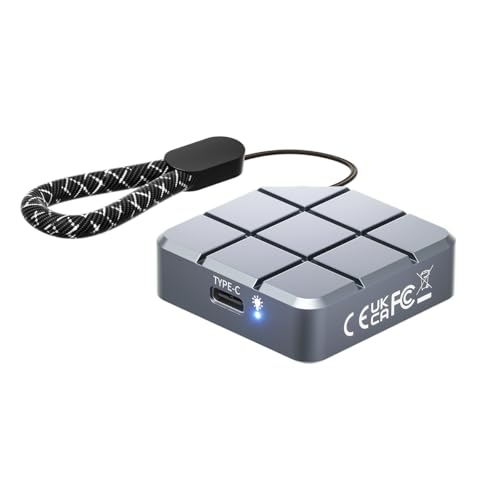
MAIWO 2230 M.2 NVMe SATA SSD Enclosure
Best for: compact M.2 2230 drives and ProRes recording
- Max Transfer Speed
- 10Gbps
- Host Interface
- USB-C 3.2 Gen2
- Drive Interface
- NVMe SATA (M-KEY, B+M KEY)
- Supported Form Factors
- M.2 2230
- Cooling System
- Aluminum
- Maximum Capacity
- 2TB
This pocket enclosure houses compact M.2 2230 solid-state drives using either NVMe or SATA interfaces. It connects via a 10Gbps USB-C 3.2 Gen2 interface and supports drives up to 2TB. The aluminum housing measures 1.77 by 1.77 inches and provides passive heat dissipation. You get a tool-free design that pairs directly with PCs, Macs, and compatible phones for direct iPhone ProRes video recording.
Pros
- Supports both M.2 NVMe and SATA protocols (M-Key and B+M Key)
- Up to 10Gbps transfer speed via USB-C 3.2 Gen2
- Compact 1.77 by 1.77-inch aluminum build
- Supports direct ProRes video recording with compatible phones
- Tool-free assembly
Cons
- Accepts only 2230 form factor drives
- Maximum supported drive capacity is 2TB
Good fit if
- You use a short M.2 2230 NVMe or SATA drive.
- You need an external drive for ProRes video recording on an iPhone 15 or 16 Pro.
- You want a pocket-sized 1.77-inch square aluminum enclosure.
Skip if
- You need to fit standard 2280, 2260, or 2242 form factor drives.
- You need drive capacities exceeding 2TB.
Verdict: MAIWO 2230 M.2 NVMe SATA SSD Enclosure delivers 10Gbps dual-protocol performance in a tiny square aluminum footprint tailored for 2230 drives. It functions as an ultralight portable drive for Macs, PCs, and camera workflows.

MAIWO 10Gbps Dual-Protocol M.2 Enclosure
Best for: swapping between NVMe and SATA M.2 drives
- Max Transfer Speed
- 10Gbps
- Host Interface
- USB 3.1 Gen2 Type-C
- Drive Interface
- PCIe NVMe NGFF SATA (M Key, B+M Key)
- Supported Form Factors
- 2230, 2242, 2260, 2280mm
- Cooling System
- Aluminum alloy shell, thermal pads
- Maximum Capacity
- 8TB
This portable aluminum enclosure accepts both M.2 NVMe and SATA drives across 2230, 2242, 2260, and 2280 sizes. It connects via a 10Gbps USB 3.1 Gen2 Type-C interface and supports capacities up to 8TB. Tool-free access lets you swap drives without screws, and the included dual-head cable provides direct USB-C and USB-A connectivity. It suits you if you handle both SATA and NVMe protocols across various host devices.
Pros
- Supports both NVMe M-Key and SATA B+M Key solid state drives
- USB 3.1 Gen2 Type-C interface delivers up to 10Gbps transfer speeds
- Tool-free design allows drive installation and swaps without hardware
- Accommodates four standard drive lengths from 2230 up to 2280
- Supports drive capacities up to 8TB
Cons
- Interface tops out at 10Gbps rather than 20Gbps or 40Gbps
- Single-bay design lacks hardware RAID or offline drive cloning
Good fit if
- You need to read both PCIe NVMe and NGFF SATA M.2 drives
- You want tool-free drive swaps across 2230 to 2280 form factors
- You need high-capacity external storage up to 8TB
Skip if
- You need speeds exceeding 10Gbps, such as 20Gbps or 40Gbps USB4
- You need a dual-bay enclosure for standalone cloning or RAID setups
Verdict: MAIWO 10Gbps Dual-Protocol M.2 Enclosure gives you versatile dual-protocol compatibility and screw-free installation up to 8TB. Its 10Gbps USB-C connection delivers practical transfer rates across standard NVMe and SATA drives.

MAIWO Dual-Bay 20Gbps NVMe RAID Enclosure
Best for: dual NVMe hardware RAID storage
- Max Transfer Speed
- 20Gbps
- Host Interface
- USB 3.2 Gen 2x2
- Drive Interface
- M.2 PCIe NVMe (M Key)
- Supported Form Factors
- 2230, 2242, 2260, 2280
- Drive Bay Count
- 2 bays
- Cooling System
- Built-in cooling fan, aluminum shell
This dual-bay enclosure pairs two M.2 NVMe SSDs with a 20Gbps USB 3.2 Gen 2x2 interface and JMS586R chipset. You get four hardware operational modes: RAID 0, RAID 1, JBOD, and PM. An integrated cooling fan, aluminum housing, and dedicated 5V 3A power adapter manage thermals and power draw across drives up to 16TB total. It suits you if you need mirrored data protection or high throughput across two drives.
Pros
- USB 3.2 Gen 2x2 interface with speeds up to 20Gbps
- Hardware RAID support for RAID 0, RAID 1, JBOD, and PM
- Active cooling with built-in fan and aluminum chassis
- Tool-free magnetic cover design
- Includes dedicated 5V 3A power adapter and two cables
Cons
- Does not support M.2 SATA SSDs
- Requires external power adapter for full dual-drive operation
- Included USB-C to USB-A cable limited to 10Gbps
Good fit if
- You need hardware RAID 0 or RAID 1 across two NVMe drives.
- You have a host device supporting 20Gbps USB 3.2 Gen 2x2.
- You need active cooling for sustained multi-terabyte data transfers.
Skip if
- You want to use M.2 SATA drives.
- You need a bus-powered enclosure that works without a wall outlet.
Verdict: MAIWO Dual-Bay 20Gbps NVMe RAID Enclosure delivers hardware RAID functionality and active fan cooling for two high-speed NVMe drives. It provides dependable sustained bandwidth when paired with a compatible 20Gbps USB port.

MAIWO Tool-Free M.2 SATA SSD Enclosure
Best for: repurposing M.2 SATA SSDs up to 22110
- Max Transfer Speed
- 5Gbps
- Host Interface
- USB 3.0
- Drive Interface
- SATA B+M Key
- Supported Form Factors
- 2230, 2242, 2260, 2280, 22110
- Installation Style
- Tool-free
- Dimensions
- 3 × 2 × 0.5 inches
This external enclosure adapts B+M Key M.2 SATA drives to a 5Gbps USB 3.0 connection. It accommodates five different drive lengths, ranging from 2230 up to 22110 form factors, inside a lightweight ABS plastic housing. Tool-free assembly allows you to swap SATA drives without extra hardware. It suits you if you need a lightweight, pocket-sized reader for repurposing older SATA-based M.2 storage without requiring NVMe speeds.
Pros
- Supports 2230, 2242, 2260, 2280, and 22110 M.2 drive sizes
- Tool-free drive installation requires no tools or drivers
- Weighs 0.7 ounces with a compact 3-by-2-inch footprint
- Delivers up to 5Gbps transfer rates over USB 3.0
Cons
- Supports SATA B+M Key drives only, not NVMe protocols
- Maximum transfer bandwidth capped at 5Gbps
- ABS plastic chassis instead of an aluminum heatsink body
Good fit if
- You have a B+M Key M.2 SATA SSD in any length from 2230 to 22110.
- You want an ultra-lightweight 0.7-ounce case with tool-free access.
- You need a simple 5Gbps USB 3.0 adapter for SATA storage drives.
Skip if
- You use an M-Key or PCIe NVMe solid state drive.
- You require transfer speeds higher than 5Gbps.
- You prefer an all-metal or aluminum enclosure.
Verdict: MAIWO M.2 SATA 5Gbps SSD Enclosure handles legacy SATA M.2 drives up to 22110 in length using a lightweight, tool-free ABS casing. It provides a simple 5Gbps portable solution for older SATA storage rather than high-speed NVMe drives.
Specifications side by side
| Spec | MAIWO Dual-Interface M.2 NVMe and SATA Enclosure | MAIWO M.2 NVMe and SATA USB-C Enclosure | MAIWO 20Gbps M.2 NVMe SSD Enclosure | MAIWO M.2 NVMe SSD Docking Station | MAIWO Dual-Bay 20Gbps NVMe RAID Enclosure | MAIWO Dual-Bay 10Gbps NVMe SSD Enclosure | MAIWO 40Gbps NVMe SSD Enclosure with Fan | MAIWO 4-Bay 40Gbps NVMe Cloner Enclosure | MAIWO Dual-Bay NVMe & SATA SSD Cloner | MAIWO Aluminum M.2 SATA SSD Enclosure | MAIWO Dual-Interface M.2 SATA SSD Enclosure | MAIWO 2230 M.2 NVMe SATA SSD Enclosure | MAIWO 10Gbps Dual-Protocol M.2 Enclosure | MAIWO Dual-Bay 20Gbps NVMe RAID Enclosure | MAIWO Tool-Free M.2 SATA SSD Enclosure |
|---|---|---|---|---|---|---|---|---|---|---|---|---|---|---|---|
| Max Transfer Speed | 10Gbps | 10Gbps | 20Gbps | 10Gbps | 20Gbps | 10Gbps | 40Gbps | 40Gbps | 10Gbps | 5Gbps, up to 6Gbps | 6Gbps | 10Gbps | 10Gbps | 20Gbps | 5Gbps |
| Host Interface | USB-A, USB-C | USB 3.1 Gen 2x1 Type-C | USB 3.2 Gen 2x2 Type-C | USB-C | USB 3.2 Gen 2x2 Type-C | USB 3.1 Gen 2 Type-C | USB4, Thunderbolt 4/3 | USB4, Thunderbolt 4/3 | USB 3.2 Gen 2 | USB 3.2 Gen1 Type-C | USB 3.1 Gen 2, USB-C, USB-A | USB-C 3.2 Gen2 | USB 3.1 Gen2 Type-C | USB 3.2 Gen 2x2 | USB 3.0 |
| Drive Interface | NVMe & SATA (M-Key, B+M Key) | PCIe NVMe (M-Key), SATA NGFF (B+M-Key) | PCIe NVMe M-Key | PCIe NVMe M-Key | PCIe NVMe M-Key | PCIe NVMe (M Key, B+M Key) | PCIe NVMe (M Key) | not specified | M.2 NVMe & SATA (M Key, B+M Key) | not specified | M.2 SATA B+M Key | NVMe SATA (M-KEY, B+M KEY) | PCIe NVMe NGFF SATA (M Key, B+M Key) | M.2 PCIe NVMe (M Key) | SATA B+M Key |
| Supported Form Factors | 2230, 2242, 2260, 2280 | 2230, 2242, 2260, 2280 | 2280 | not specified | 2230, 2242, 2260, 2280 | M.2 2230, 2242, 2260, 2280 | 2280 | 2230, 2242, 2260, 2280 | not specified | 2242, 2260, 2280 | 2230, 2242, 2260, 2280 | M.2 2230 | 2230, 2242, 2260, 2280mm | 2230, 2242, 2260, 2280 | 2230, 2242, 2260, 2280, 22110 |
| Drive Bay Count | not specified | not specified | not specified | not specified | 2 bays | 2 bays | not specified | 4 bays | Dual-Bay | not specified | not specified | not specified | not specified | 2 bays | not specified |
| Cooling System | Aluminum alloy | Aluminum alloy shell, thermal pads | Aluminum alloy shell, thermal pads | not specified | Aluminum alloy case | Aluminum alloy shell, thermal pad | Aluminium alloy shell, built-in fan | Built-in cooling fan, aluminum alloy | not specified | Aluminium alloy housing, thermal pad | Aluminum alloy | Aluminum | Aluminum alloy shell, thermal pads | Built-in cooling fan, aluminum shell | not specified |
| Maximum Capacity | 8TB | 8TB | 8TB | not specified | 16TB | 16TB | 8TB | 32TB | not specified | 4TB | not specified | 2TB | 8TB | 16TB | not specified |
| Installation Style | not specified | Tool Free | not specified | not specified | Tool-free | Tool Free | Tool Free | Tool-free | not specified | Screws and screwdriver | not specified | Tool-Free | Tool Free | Tool Free | Tool-free |
| Interface | SATA III | SATA III | NVMe | NVMe | NVMe | NVMe | NVMe | NVMe | SATA III | SATA III | SATA III | SATA III | SATA III | NVMe | SATA III |
| Form Factor | M.2 2280 | M.2 | M.2 | M.2 | M.2 | M.2 2242 | M.2 | M.2 | M.2 | M.2 | M.2 2280 | M.2 2230 | M.2 2242 | M.2 | M.2 |
| Cooling | not specified | not specified | not specified | not specified | not specified | not specified | Cooling Fan | Cooling Fan | not specified | not specified | not specified | not specified | not specified | Cooling Fan | not specified |
| Compatibility | not specified | not specified | not specified | not specified | not specified | not specified | not specified | not specified | not specified | not specified | not specified | Mac | not specified | not specified | not specified |
| Transfer Speed | 10Gbps | 10Gbps | 20Gbps | 10Gbps | 20Gbps | 10Gbps | 40Gbps | 40Gbps | not specified | not specified | not specified | 10Gbps | 10Gbps | 20Gbps | not specified |
| Features | not specified | Tool-Free | not specified | not specified | not specified | Tool-Free | Tool-Free | Offline Clone | Offline Clone | not specified | not specified | Tool-Free | Tool-Free | not specified | not specified |
| Bay Count | not specified | not specified | not specified | not specified | Dual-Bay | Dual-Bay | not specified | not specified | Dual-Bay | not specified | not specified | not specified | not specified | Dual-Bay | not specified |
| Material | Aluminum | not specified | Aluminum | not specified | not specified | not specified | not specified | not specified | not specified | Aluminum | Aluminum | Aluminum | not specified | Aluminum | not specified |
| Dimensions | 5.55 × 1.22 × 0.35 inches | 4.33 × 1.48 × 0.49 inches | 4.33 × 1.81 × 0.79 inches | 2.36 × 2.36 × 0.55 inches | 4.72 × 2.68 × 0.66 inches | 4.65 × 1.97 × 0.51 inches | 4.72 × 1.97 × 0.59 inches | 5.71 × 5.71 × 1.26 inches | 4 × 2.5 × 0.5 inches | 4.07 × 1.22 × 0.37 inches | not specified | 1.77 × 1.77 × 0.53 inches | 4.33 × 1.5 × 0.53 inches | 4.7 × 2.7 × 0.9 inches | 3 × 2 × 0.5 inches |
| Weight | 2.12 ounces | 1.76 ounces | 8.96 ounces | 1.41 ounces | 13.8 ounces | 3.53 ounces | 9.59 ounces | 7.05 ounces | not specified | 1.59 ounces | 2.12 ounces | not specified | 2.47 ounces | not specified | 0.7 ounces |
| Color | Grey | Blue | not specified | Black | not specified | Grey | not specified | not specified | Gray | not specified | black | Grey | Silver | Gray | Clear white |
| Model | MAIWO K1683P2 | 10Gbps NVMe/SATA Enclosure | 20Gbps - M.2 NVMe Enclosure | USB-C Port NVMe Dock | NVMe RAID Enclosure | 2 Bay - M.2 NVMe | 40Gbps NVMe Enclosure Built-in Fan | K2024P | K2023CL | K1688S | M.2 SATA 2280 | NVMe SATA 2230 Enclosure only | K1691 | 20Gbps NVMe RAID | not specified |
| Size | not specified | not specified | not specified | not specified | not specified | not specified | not specified | not specified | not specified | not specified | not specified | M.2 SSD Enclosure | not specified | not specified | not specified |
Comparing the MAIWO Enclosure Lineup
Single-drive models focus on interface protocols and transfer rates. Basic 5Gbps or 6Gbps units accommodate legacy SATA drives, while 10Gbps dual-protocol enclosures handle both SATA and NVMe. For higher throughput, 20Gbps and 40Gbps options maximize NVMe speeds. The MAIWO Dual-Interface M.2 NVMe and SATA Enclosure suits quick mobile drive swaps. The MAIWO 40Gbps NVMe SSD Enclosure with Fan fits sustained high-bandwidth transfers that require active cooling.
Multi-bay units prioritize capacity, RAID configurations, and standalone cloning. Dual-bay and four-bay enclosures support offline drive duplication without host systems. Choose the MAIWO Dual-Bay NVMe & SATA SSD Cloner for direct two-drive backups. Pick the MAIWO 4-Bay 40Gbps NVMe Cloner Enclosure if you need multi-drive RAID storage arrays and bulk cloning.
Where the MAIWO Range Fits
The MAIWO catalog suits you if you need dedicated M.2 drive enclosures ranging from pocket-sized square designs to multi-drive desktop units. Physical dimensions span from compact 1.77-inch square bodies for 2230 cards up to 5.71-inch multi-bay desktop boxes, alongside standard rectangular aluminum and ABS sticks. None of the listed models include RGB lighting or decorative illumination.
Gaps exist if you work with non-M.2 hardware. The range omits 2.5-inch and 3.5-inch drive bays entirely, focusing exclusively on M.2 form factors. You will also find no configurations exceeding four bays.
If you need a complete system rather than an external enclosure, you can review specifications for the best mini PCs with 500GB SSD.
How to Choose a MAIWO SSD Enclosure
-
Match Drive Protocol Interface
Check whether your drive uses SATA III or NVMe protocols before buying. Enclosures limited strictly to SATA III deliver transfer speeds around 5Gbps to 6Gbps and cannot read NVMe drives. If you manage multiple drive types, select a dual-protocol model. The MAIWO Dual-Interface M.2 NVMe and SATA Enclosure reads both technologies over a 10Gbps connection. Choosing the correct protocol ensures your computer recognizes the drive immediately without hardware mismatches.
-
Verify Host Port Speeds
Enclosure transfer speeds range from 5Gbps up to 40Gbps, but actual bandwidth depends on your computer ports. A 10Gbps enclosure matches standard USB 3.2 Gen 2 ports. To reach 20Gbps, your host system must supply a dedicated USB 3.2 Gen 2x2 connection. The MAIWO 20Gbps M.2 NVMe SSD Enclosure requires that specific interface to reach full speed. Check your computer specifications so you select an enclosure speed that your machine supports.
-
Confirm M.2 Drive Length
M.2 solid-state drives come in different physical lengths, ranging from 2230 up to 22110. Most standard desktop and laptop drives use the 2280 format. If you use a shorter drive from a handheld console, you need an enclosure tailored to smaller circuit boards. The MAIWO 2230 M.2 NVMe SATA SSD Enclosure accommodates only 30mm cards within its square frame. Verify your drive length before selecting a case so the board mounts securely inside the housing.
-
Choose Appropriate Thermal Cooling
High-speed NVMe drives generate heat during continuous reading and writing. Passive aluminum enclosures work well for casual transfers and general storage at 5Gbps or 10Gbps speeds. However, top-tier 40Gbps enclosures transfer data at extreme rates that can increase temperatures quickly. Selecting a model with an active cooling fan, such as the MAIWO 40Gbps NVMe SSD Enclosure with Fan, provides continuous airflow. Active cooling protects drives from heat-induced throttling during large sustained file transfers.
-
Evaluate Drive Bay Capacity
Single-bay enclosures are lightweight and portable for individual SSDs. If you manage multiple drives or require disk arrays, look at dual-bay and 4-bay alternatives. Multi-bay enclosures allow RAID configurations for data redundancy or consolidated storage. Certain multi-drive hardware, such as the MAIWO 4-Bay 40Gbps NVMe Cloner Enclosure, includes standalone offline cloning features to duplicate drives without operating system software. Assess your workflow to decide if multi-drive management outweighs portable single-drive designs.
-
Consider Tool-Free Drive Installation
Drive installation methods impact convenience if you swap storage regularly. Enclosures with screw-fastened casings take more time to open and require tools whenever you change hardware. If you frequently test SSDs or swap between cards, choose a tool-free design. The MAIWO M.2 NVMe and SATA USB-C Enclosure allows fast drive access without needing screws. For permanent external drives that stay put on your desk, traditional fixed aluminum shells offer durable structural support.
Frequently asked questions
Which MAIWO enclosure supports standalone drive duplication without a PC?
The MAIWO 4-Bay 40Gbps NVMe Cloner (K2024P) and the MAIWO Dual-Bay NVMe & SATA Cloner (K2023CL) perform offline cloning without host computer software. The K2024P enables 1-to-3 NVMe cloning alongside 32TB total capacity, while the K2023CL duplicates data directly between SATA and NVMe M.2 drives at up to 10Gbps speeds.
How do you achieve 20Gbps transfer speeds with a MAIWO SSD enclosure?
You need a host computer equipped with an active USB 3.2 Gen 2x2 port to achieve full 20Gbps speeds. MAIWO models like the 20Gbps M.2 NVMe Enclosure and the Dual-Bay 20Gbps NVMe RAID Enclosure provide the hardware bandwidth for this rate. Connecting them to standard 10Gbps USB-C ports limits throughput.
Does MAIWO make an enclosure specifically for M.2 2230 SSDs?
Yes, MAIWO offers the 2230 M.2 NVMe SATA SSD Enclosure designed specifically for miniature M.2 2230 form factor cards. This model features a compact 1.77-inch square aluminum body, tool-free installation, and 10Gbps dual-protocol transfer support. It connects directly over USB-C and provides compatibility with Mac and PC platforms.
Can MAIWO dual-bay enclosures access two drives using a single cable?
Not all dual-bay models share a single host cable connection. For instance, the MAIWO Dual-Bay 10Gbps NVMe SSD Enclosure requires two separate cables connected to your computer to access both bays at once. In contrast, hardware RAID models like the Dual-Bay 20Gbps NVMe RAID Enclosure manage two drives over one link.
Which MAIWO enclosures include active fan cooling?
MAIWO integrates cooling fans into high-bandwidth hardware like the 40Gbps NVMe SSD Enclosure, the Dual-Bay 20Gbps NVMe RAID Enclosure, and the 4-Bay 40Gbps NVMe Cloner (K2024P). These built-in fans move air across installed SSDs during intensive multi-drive tasks, preventing excessive thermal throttling during continuous high-speed data writes.
What is the maximum drive capacity supported by MAIWO SSD enclosures?
Single-drive dual-protocol models like the MAIWO K1691 and tool-free USB-C enclosure support up to 8TB drives, while dedicated SATA models like the K1688S support up to 4TB. Multi-bay enclosures expand limits further. The Dual-Bay 10Gbps unit accommodates up to 16TB, and the 4-Bay 40Gbps cloner handles up to 32TB total.
Can a dedicated MAIWO SATA enclosure read an NVMe SSD?
No, dedicated SATA models like the MAIWO Aluminum M.2 SATA Enclosure (K1688S) or Tool-Free M.2 SATA Enclosure only accommodate B+M Key SATA drives. They cannot read PCIe NVMe drives. If you need support for both formats, select a dual-protocol model such as the MAIWO Dual-Interface K1683P2 or K1691.