ASUS TUF Gaming A1 Rugged Review: Who It Fits and Who Should Skip It
As an Amazon Associate we earn from qualifying purchases. Links on this page are affiliate links.
This asus tuf gaming a1 external review covers a rugged M.2 SSD enclosure designed for durability and speed. It features a USB-C 3.2 Gen 2x1 interface that supports transfer rates up to 10 Gbps for NVMe drives. The unit also accepts slower SATA SSDs, capping speeds at 6 Gbps. You get military-grade toughness with IP68 water and dust resistance, plus MIL-STD-810H drop protection. The Q-Latch mechanism simplifies installation for 2242, 2260, and 2280 form factors. This enclosure bridges the gap between internal storage and portable access, offering a secure way to expand your device's capacity.
What stands out
- USB-C 3.2 Gen 2x1 interface for up to 10 Gbps transfer speeds.
- IP68 water and dust resistance for outdoor durability.
- MIL-STD-810H drop resistance certification for rugged use.
- Q-Latch mechanism for tool-free SSD installation.
Who it fits
Good fit for
This enclosure suits users who need reliable portable storage for gaming consoles or laptops. The 10 Gbps speed benefits those transferring large game files or video projects. Its rugged build is ideal for travelers or field workers who risk drops or exposure to elements. The wide compatibility with PS5 and various PC setups makes it a versatile choice. You will appreciate the easy Q-Latch design if you frequently swap drives between devices without dealing with tiny screws.
Who should skip it
You should look elsewhere if you require transfer speeds exceeding 10 Gbps. This model does not support the faster USB 3.2 Gen 2x2 or USB4 standards found in newer enclosures. It also lacks the bundled memory options available in other variations, so you must purchase an SSD separately. If you need higher throughput for professional video editing or massive data backups, a faster interface like the 20 Gbps or 40 Gbps options would serve you better.
Verdict: The ASUS TUF Gaming A1 is a durable, user-friendly enclosure for standard portable storage needs. It delivers solid 10 Gbps speeds in a rugged package that prioritizes longevity over maximum bandwidth.
Key specs explained for you
Host Interface: USB-C 3.2 Gen 2x1
This interface connects your enclosure to your computer via a USB-C cable. It supports data transfer rates up to 10 Gbps. You will see faster file copying times compared to older USB 3.0 ports. This speed matches the internal bandwidth of most modern NVMe drives. Ensure your host device has a compatible port to realize these transfer rates.
Max Transfer Speed: Up to 10 Gbps
This is the maximum theoretical data rate for the enclosure. It allows large files like games or video projects to move quickly. This speed is sufficient for most NVMe PCIe drives. It is double the speed of standard SATA connections. You get efficient performance for daily tasks without bottlenecking your drive's potential throughput.
Drive Interface: M.2 NVMe PCIe, SATA
You can install either NVMe or SATA M.2 SSDs inside. NVMe drives offer higher speeds, while SATA drives are often more affordable. This flexibility lets you use existing drives or choose new ones based on budget. It makes the enclosure a versatile tool for upgrading laptops or building portable storage solutions for different needs.
Supported Form Factors: 2242, 2260, 2280
The enclosure fits three common M.2 drive lengths. The 2280 size is standard for most desktop and laptop drives. The 2242 and 2260 sizes are common in consoles and compact devices. This wide support means you are not limited to one drive type. You can repurpose drives from various devices into a single portable external storage unit.
Installation Style: M.2 Q-Latch
The Q-Latch mechanism allows you to secure the SSD without tools. You simply slide the drive into place and lock it. This makes upgrades and replacements quick and easy. You avoid losing small screws or needing a screwdriver. It is a practical design feature that simplifies the DIY process for frequent drive changes.
Design and build quality
The ASUS TUF Gaming A1 enclosure is built for rugged use. According to the listing, it meets MIL-STD-810H drop resistance standards. It also carries an IP68 rating for water and dust protection. These specs suggest it can handle drops and wet environments better than standard plastic cases. You do not need to worry about minor spills or dusty outdoor setups.
The physical dimensions are 4.93 inches in length, 2.14 inches in width, and 0.52 inches in height. It weighs 8.78 ounces. This size fits standard M.2 drives in 2242, 2260, and 2280 form factors. The Q-latch mechanism simplifies installation. You can mount your SSD without using small screws. This feature reduces the risk of losing hardware during setup. The layout is straightforward, with a single USB-C port on the side for connection.
The finish is matte black, typical of the TUF Gaming line. It looks utilitarian rather than decorative. The materials appear durable, focusing on protection over aesthetics. You can carry it in a bag without fear of damage. The compact shape allows it to sit flat on a desk or tuck into a pocket. It is designed for users who move their storage between devices or work in harsh conditions. The build prioritizes longevity and ease of use for mobile professionals and gamers alike.
Setup and everyday use
You install your drive using the exclusive Q-latch mechanism. This design simplifies mounting an SSD into the enclosure. You do not need tools for this step. The unit supports M.2 NVMe PCIe and SATA SSDs. It fits 2242, 2260, and 2280 form factors. You can choose the size that matches your drive. The enclosure connects via a USB-C 3.2 Gen 2x1 interface. This port allows transfer speeds up to 10 Gbps for NVMe drives. SATA drives are limited to 6 Gbps. You use the bundled USB-C cable to connect to your devices. It works with PCs, laptops, mobile devices, and latest-gen gaming consoles like the PS5. The rugged build supports daily transport. The IP68 rating protects against water and dust. The MIL-STD-810H standard indicates drop resistance. You can carry it in a bag without worry. The compact dimensions fit in most pockets. The weight is 8.78 ounces. This makes it portable for travel. You can use it for quick file transfers or as extra storage for your console. The interface ensures compatibility with modern systems. You get reliable performance for everyday tasks. The setup is straightforward. You simply latch the drive in and plug it in. The design focuses on ease of use and durability. You do not need to worry about loose connections. The Q-latch keeps the drive secure. This enclosure is practical for users who move between devices. It handles the demands of regular use. The specs support a wide range of applications. You can rely on the connection stability. The build quality supports long-term use. You get a versatile tool for your storage needs.
Before you buy this enclosure
You need a separate M.2 SSD to use this enclosure. The listing confirms it supports NVMe PCIe and SATA drives in 2242, 2260, and 2280 sizes. Check your drive’s thickness and connector key to ensure it fits. You also need a USB-C port on your host device. While the cable is included, your laptop or console must support the USB-C standard for optimal speeds. This unit caps at 10 Gbps via USB-C 3.2 Gen 2x1. If you require faster transfer rates for large files, consider the TUF A2 or ProArt PA40 options listed here. Those models offer higher bandwidth. Keep the enclosure dry despite its IP68 rating. Regular cleaning of the Q-latch mechanism will ensure smooth SSD insertion. This rugged case suits users who prioritize durability over maximum speed.
Check before you buy
- Verify your M.2 SSD fits the 2242, 2260, or 2280 form factor
- Ensure your host device has a compatible USB-C port
- Confirm the drive is NVMe PCIe or SATA type
- Check if you need speeds higher than 10 Gbps
The product at a glance
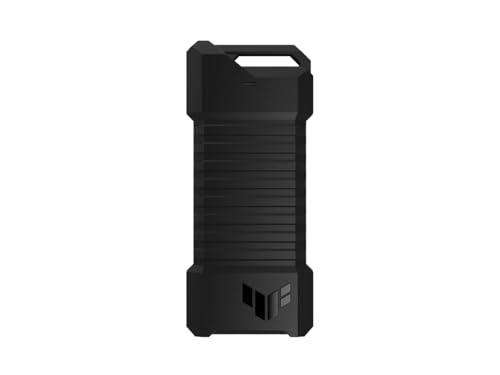
ASUS TUF Gaming A1 Rugged M.2 SSD Enclosure
Best for: Rugged portable storage with easy installation
- Max Transfer Speed
- Up to 10 Gbps
- Host Interface
- USB-C 3.2 Gen 2x1
- Drive Interface
- M.2 NVMe PCIe, SATA
- Supported Form Factors
- 2242, 2260, 2280
- Installation Style
- M.2 Q-Latch
- Compatibility
- PS5, Gaming
View on Amazon: ASUS TUF Gaming A1 Rugged M.2 SSD Enclosure Affiliate link
The ASUS TUF Gaming A1 is an external M.2 NVMe and SATA SSD enclosure with a USB-C 3.2 Gen 2x1 interface. It supports up to 10 Gbps transfer speeds and accepts 2242, 2260, and 2280 form factors. The Q-latch simplifies installation. It meets MIL-STD-810H drop resistance and IP68 water and dust standards. You get a durable drive for gaming or daily use.
Pros
- USB-C 3.2 Gen 2x1 interface for up to 10 Gbps speeds
- Supports M.2 NVMe PCIe and SATA SSDs in 2242, 2260, and 2280 sizes
- Exclusive Q-latch mechanism for easy SSD installation
- IP68 water and dust resistance and MIL-STD-810H drop resistance
Cons
- Max speed of 10 Gbps is lower than 20 Gbps or 40 Gbps alternatives
- Weight of 8.78 ounces adds noticeable bulk to portable setups
- No included SSD; you must purchase the drive separately
Good fit if
- You need a rugged, water-resistant enclosure for field use
- You want to use smaller 2242 or 2260 M.2 drives
- You prefer tool-free installation with the Q-latch system
Skip if
- You require transfer speeds exceeding 10 Gbps
- You want a pre-built solution with an SSD included
- You need a compact, lightweight enclosure for minimal carry weight
Verdict: ASUS TUF Gaming A1 NVMe Enclosure offers strong durability and easy installation for users who prioritize ruggedness over raw speed. It is a solid choice for those carrying drives in harsh environments.
Specifications side by side
| Spec | ASUS TUF Gaming A1 Rugged M.2 SSD Enclosure |
|---|---|
| Max Transfer Speed | Up to 10 Gbps |
| Host Interface | USB-C 3.2 Gen 2x1 |
| Drive Interface | M.2 NVMe PCIe, SATA |
| Supported Form Factors | 2242, 2260, 2280 |
| Installation Style | M.2 Q-Latch |
| Interface | SATA III |
| Form Factor | M.2 |
| Compatibility | PS5, Gaming |
| Transfer Speed | 10Gbps |
| Dimensions | 4.93 × 2.14 × 0.52 inches |
| Weight | 8.78 ounces |
| Size | TUF A1|up to 10Gbps |
| Color | A1|up to 10Gbps |
| Model | ESD-T1A/BLK/G/AS// |
Frequently asked questions
Does the ASUS TUF Gaming A1 support PS5?
Yes, the enclosure is compatible with PlayStation 5. Its design allows you to use it for expanding storage on the console. You can install an M.2 SSD inside to create a portable drive that works with the PS5. This makes it a practical option for gamers who need extra space on the go.
What is the maximum transfer speed of this enclosure?
The maximum transfer speed is 10 Gbps. This limit comes from its USB-C host interface, which matches USB 3.2 Gen 2x1 standards. While NVMe drives can often exceed this speed, the enclosure caps performance at 10 Gbps. You will still see significantly faster file transfers than with older USB 3.0 connections.
Can I use this enclosure with SATA SSDs?
Yes, the ASUS TUF Gaming A1 supports both NVMe PCIe and SATA M.2 SSDs. The product data lists SATA III as a supported interface. This means you can reuse older or slower SATA drives in this rugged enclosure. It provides a versatile solution for different types of internal drives without needing separate cases.
How durable is the TUF A1 enclosure?
The enclosure is built for rugged use with strong durability features. It meets MIL-STD-810H drop resistance standards, meaning it can withstand accidental falls. It also carries an IP68 rating for water and dust protection. These specifications suggest it can handle harsh environments and rough handling better than standard plastic enclosures.
What sizes of M.2 drives does it fit?
It fits 2242, 2260, and 2280 form factor drives. The Q-latch mechanism simplifies mounting these different lengths without tools. You just need to ensure your drive matches one of these sizes. The enclosure is designed to securely hold these common M.2 SSD dimensions for portable storage use.
Is the enclosure heavy for portable use?
The enclosure weighs 8.78 ounces. It measures 4.93 inches in length, 2.14 inches in width, and 0.52 inches in height. This weight and size make it substantial for a portable drive case. You can carry it easily, but it adds noticeable bulk compared to lighter, non-rugged alternatives.
Does it require any tools for installation?
No, you do not need tools to install your drive. The enclosure uses an exclusive Q-latch mechanism for mounting. This design simplifies the process by allowing you to secure the SSD by hand. You can install or swap drives quickly without searching for screwdrivers or other hardware.