ASUS ROG Strix Arion 10Gbps vs ASUS TUF Gaming A1 Rugged (2026): Key Differences
As an Amazon Associate we earn from qualifying purchases. Links on this page are affiliate links.
This asus rog strix arion 10gbps vs tuf gaming a1 rugged comparison highlights two distinct approaches to portable storage. Both enclosures use USB-C 3.2 Gen 2 to deliver up to 10 Gbps transfer speeds. The main difference lies in compatibility and durability. The Strix Arion focuses on NVMe drives with RGB lighting and a larger aluminum chassis. The TUF Gaming A1 supports both NVMe and SATA drives, offering military-grade toughness and a compact, latch-based design for easier installation.
Key differences
| Aspect | ASUS ROG Strix Arion 10Gbps NVMe Enclosure | ASUS TUF Gaming A1 Rugged M.2 SSD Enclosure |
|---|---|---|
| Drive Interface | NVMe PCIe only | NVMe PCIe or SATA |
| Supported Form Factors | 2230, 2242, 2260, 2280 | 2242, 2260, 2280 |
| Durability Rating | Aluminum alloy case | MIL-STD-810H drop resistant, IP68 water and dust resistant |
| Installation Mechanism | Standard mounting | M.2 Q-Latch |
| Lighting | ASUS Aura Sync RGB | Not listed |
Which one should you choose?
Choose ASUS ROG Strix Arion 10Gbps NVMe Enclosure if
- You need to use smaller 2230 or 2260 NVMe drives.
- You want RGB lighting that syncs with other ASUS Aura Sync products.
- You prefer a larger aluminum chassis for passive heat dissipation.
Choose ASUS TUF Gaming A1 Rugged M.2 SSD Enclosure if
- You need to use older SATA M.2 SSDs.
- You require a compact enclosure with military-grade drop and water resistance.
- You want a tool-free Q-Latch mechanism for quick drive installation.
Verdict: Choose the Strix Arion if you prioritize NVMe-only performance, support for smaller form factors, and aesthetic lighting. Pick the TUF Gaming A1 if you need versatility with SATA drives, rugged durability for outdoor use, or a more compact footprint.
Build, Compatibility and Cooling Specs
Durability and Protection
The TUF Gaming A1 Rugged is built for harsh environments. It meets MIL-STD-810H drop resistance standards and holds an IP68 rating for water and dust resistance. This makes it suitable for outdoor use or rough handling. The Strix Arion 10Gbps uses a standard aluminum alloy case. While it offers solid physical protection, it lacks the specific military-grade certifications and sealed ingress protection of the TUF model. If you need rugged reliability, the TUF A1 is the clear choice.
Drive Compatibility
Compatibility differs significantly between these two enclosures. The TUF Gaming A1 Rugged supports both NVMe PCIe and SATA M.2 SSDs. This dual interface support allows you to use older SATA drives or modern NVMe drives in the same enclosure. The Strix Arion 10Gbps is designed strictly for PCIe NVMe drives. It does not support SATA M.2 SSDs. If you plan to use a mix of drive types, the TUF A1 provides greater versatility and flexibility for your storage needs.
Installation Mechanism
Installing an SSD into the TUF Gaming A1 Rugged is designed to be user-friendly. It features an exclusive Q-latch mechanism that secures the drive without requiring screws. This simplifies the process and reduces the risk of losing small hardware components. The Strix Arion 10Gbps does not mention a tool-free latch system in its specifications. You likely need to rely on standard mounting methods or screws to secure the drive inside the aluminum case. The TUF A1 offers a more convenient installation experience.
Thermal Management
Both enclosures prioritize thermal performance, but they approach it differently. The Strix Arion 10Gbps uses a full aluminum alloy case combined with internal thermal pads to pull heat away from the M.2 drive. This passive cooling method is effective for sustained performance. The TUF Gaming A1 Rugged focuses on durability rather than explicit thermal materials in its listed specs. While the TUF case likely dissipates some heat, the Strix Arion provides a dedicated, spec-backed cooling solution for users concerned about drive temperatures.
Form Factor Support
The supported M.2 form factors vary slightly between the two models. The Strix Arion 10Gbps supports four sizes: 2230, 2242, 2260, and 2280. This includes the smaller 2230 size often used in modern laptops and handheld gaming devices. The TUF Gaming A1 Rugged supports 2242, 2260, and 2280. It does not list support for the 2230 form factor. If you own a compact 2230 NVMe drive, the Strix Arion is the only compatible option between these two enclosures.
Transfer Speed
Both enclosures offer identical maximum transfer speeds. The Strix Arion 10Gbps uses a USB Type-C 3.2 Gen 2 host interface to deliver up to 10 Gbps. The TUF Gaming A1 Rugged also uses a USB-C 3.2 Gen 2x1 interface, which provides the same up to 10 Gbps bandwidth. Neither enclosure offers faster speeds like 20 Gbps. For everyday file transfers, both will perform at the same maximum rate, limited by the USB 3.2 Gen 2 standard.
Choose the right enclosure for you
Users needing SATA drive support
The TUF Gaming A1 Rugged supports both NVMe PCIe and SATA M.2 drives. This dual interface capability allows you to use older SATA SSDs in addition to faster NVMe models. The Strix Arion only accepts NVMe drives, limiting your options. If you want flexibility to use different drive types, this enclosure is the better choice.
Gamers wanting RGB customization
The Strix Arion includes ASUS Aura Sync RGB lighting. You can adjust the color spectrum and sync effects with other Aura Sync products. This feature adds visual flair to your setup. The TUF Gaming A1 lacks any lighting options. If aesthetic customization is important to your workflow, the Strix Arion provides that visual control.
Those prioritizing easy installation
The TUF Gaming A1 Rugged features an exclusive Q-latch mechanism. This design makes mounting an SSD into the enclosure significantly easier. You do not need to fiddle with screws or small clips. The Strix Arion relies on a standard enclosure design. If you value a tool-free and straightforward installation process, the TUF Gaming A1 is superior.
The products compared

ASUS ROG Strix Arion 10Gbps NVMe Enclosure
Best for: Users needing 10 Gbps speeds and varied SSD sizes
- Max Transfer Speed
- Up to 10 Gbps
- Host Interface
- USB Type-C 3.2 Gen 2
- Drive Interface
- PCIe NVMe (M Key, B+M Key)
- Supported Form Factors
- 2230, 2242, 2260, 2280
- Cooling System
- Aluminum alloy case with thermal pads
- Dimensions
- 7.1 × 3.8 × 1.6 inches
View on Amazon: ASUS ROG Strix Arion 10Gbps NVMe Enclosure Affiliate link
This enclosure connects M.2 NVMe SSDs to your PC via USB-C 3.2 Gen 2. It supports transfer speeds up to 10 Gbps. The aluminum alloy case with thermal pads helps manage drive heat. You can use it with 2230, 2242, 2260, and 2280 form factors. It includes both USB-C and USB-A cables. The build is sturdy and designed for sustained performance.
Pros
- USB-C 3.2 Gen 2 interface for 10 Gbps speeds
- Aluminum alloy case with thermal pads for cooling
- Supports 2230, 2242, 2260, and 2280 form factors
- Includes USB-C to USB-A adapter cable
Cons
- Limited to 10 Gbps, not the faster 20 Gbps option
- Heavier and bulkier than slim-profile enclosures
- No included M.2 NVMe SSD
Good fit if
- You need fast 10 Gbps transfer rates
- You use various M.2 SSD sizes
- You want robust aluminum cooling
Skip if
- You require speeds faster than 10 Gbps
- You prefer a lightweight, pocket-sized drive
- You want an enclosure with built-in storage
Verdict: ASUS ROG Strix Arion 10Gbps NVMe Enclosure is a solid choice for users who prioritize thermal management and broad form factor support. It fits those who need reliable 10 Gbps performance without the bulk of a desktop solution.
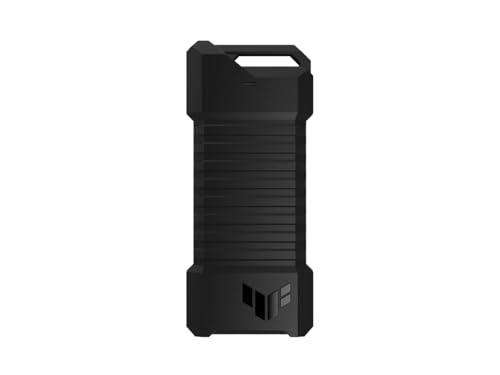
ASUS TUF Gaming A1 Rugged M.2 SSD Enclosure
Best for: Rugged, dual-interface external storage
- Max Transfer Speed
- Up to 10 Gbps
- Host Interface
- USB-C 3.2 Gen 2x1
- Drive Interface
- M.2 NVMe PCIe, SATA
- Supported Form Factors
- 2242, 2260, 2280
- Installation Style
- M.2 Q-Latch
- Compatibility
- PS5, Gaming
View on Amazon: ASUS TUF Gaming A1 Rugged M.2 SSD Enclosure Affiliate link
The ASUS TUF Gaming A1 enclosure supports both M.2 NVMe PCIe and SATA SSDs in 2242, 2260, and 2280 form factors. It uses a USB-C 3.2 Gen 2x1 host interface for transfer speeds up to 10 Gbps. The design includes a Q-latch for easy drive installation. It meets MIL-STD-810H drop resistance and IP68 water and dust standards. This rugged option suits users needing durable, versatile external storage.
Pros
- Supports M.2 NVMe PCIe and SATA SSDs
- USB-C 3.2 Gen 2x1 interface up to 10 Gbps
- Includes Q-latch mechanism for easy installation
- Meets MIL-STD-810H and IP68 durability standards
Cons
- Max transfer speed is 10 Gbps, lower than 20 Gbps or 40 Gbps alternatives
- Heavier at 8.78 ounces compared to lighter aluminum models
- Does not support PCIe Gen 5 drives
Good fit if
- You need an enclosure that works with both NVMe and SATA drives
- You require high durability for outdoor or rugged use
- You prefer a tool-free installation with the Q-latch system
Skip if
- You need transfer speeds faster than 10 Gbps
- You want a lightweight aluminum alloy design
- You only use NVMe drives and want a specialized slim profile
Verdict: The ASUS TUF Gaming A1 NVMe/SATA Enclosure is a rugged, versatile choice for users who need to connect both NVMe and SATA drives with high durability. It fits those who prioritize toughness and easy installation over maximum speed or minimal weight.
Specifications side by side
| Spec | ASUS ROG Strix Arion 10Gbps NVMe Enclosure | ASUS TUF Gaming A1 Rugged M.2 SSD Enclosure |
|---|---|---|
| Max Transfer Speed | Up to 10 Gbps | Up to 10 Gbps |
| Host Interface | USB Type-C 3.2 Gen 2 | USB-C 3.2 Gen 2x1 |
| Drive Interface | PCIe NVMe (M Key, B+M Key) | M.2 NVMe PCIe, SATA |
| Supported Form Factors | 2230, 2242, 2260, 2280 | 2242, 2260, 2280 |
| Cooling System | Aluminum alloy case with thermal pads | not stated |
| Installation Style | not stated | M.2 Q-Latch |
| Interface | NVMe | SATA III |
| Form Factor | M.2 2280 | M.2 |
| Compatibility | not stated | PS5, Gaming |
| Transfer Speed | 10Gbps | 10Gbps |
| Material | Aluminum | not stated |
| Dimensions | 7.1 × 3.8 × 1.6 inches | 4.93 × 2.14 × 0.52 inches |
| Weight | 3.46 ounces | 8.78 ounces |
| Size | Black|up to 10Gbps | TUF A1|up to 10Gbps |
| Color | Black | A1|up to 10Gbps |
| Model | ROG Strix Arion ESD-S1C | ESD-T1A/BLK/G/AS// |
Frequently asked questions
Does the ASUS ROG Strix Arion support SATA SSDs?
No, it does not. This enclosure is designed specifically for NVMe drives. You must use an NVMe M.2 SSD to get it to work. It does not support the older SATA interface, so check your drive type before purchasing this specific model.
What is the weight difference between the two enclosures?
The ASUS TUF Gaming A1 Rugged is significantly heavier. It weighs 8.78 ounces, while the Strix Arion weighs 3.46 ounces. The difference is over 5 ounces. The TUF model includes rugged protection features that add weight, whereas the Arion focuses on a lighter aluminum build.
Can the ASUS TUF Gaming A1 Rugged be used with a PS5?
Yes, it is compatible with the PS5. The product data lists PS5 compatibility as a key feature. You can install an M.2 SSD into this enclosure and use it for expanded storage on your console, provided the drive meets the system requirements.
What is the maximum transfer speed for both enclosures?
Both enclosures support a maximum transfer speed of 10 Gbps. They both utilize the USB-C host interface to achieve this bandwidth. This speed is determined by the USB controller and cable, not just the enclosure itself. Ensure you use a cable that supports 10 Gbps.
Which enclosure is smaller in size?
The ASUS ROG Strix Arion is larger in physical dimensions but lighter. It measures 7.1 inches in length and 3.8 inches in width. The TUF Gaming A1 Rugged is 4.93 inches long and 2.14 inches wide. The Arion is longer, but the TUF is more compact in width and height.
Does the ASUS ROG Strix Arion have water resistance?
The provided data does not mention water resistance for the Strix Arion. It is made of aluminum and focuses on thermal management. The TUF Gaming A1 Rugged explicitly holds an IP68 rating for water and dust resistance. The Arion lacks this specified rugged protection in the data.
What form factor do both enclosures support?
Both enclosures support the M.2 form factor. The Strix Arion specifically lists M.2 2280. The TUF Gaming A1 Rugged supports M.2 drives generally. You need an M.2 SSD to fit into either case. The 2280 size is the standard length for most modern M.2 drives.
What host interface do these enclosures use?
Both enclosures use a USB-C host interface. This allows you to connect them to modern laptops, desktops, and consoles. The USB-C port provides the data connection and power delivery. You will need a USB-C to USB-C cable for connection, which is typically included.