Addlink S70 Lite 1TB Gen3 NVMe SSD Review: Who It Fits and Who Should Skip It
As an Amazon Associate we earn from qualifying purchases. Links on this page are affiliate links.
In this addlink s70 lite 1tb nvme SSD review, we look at a storage drive built for standard M.2 slots. It uses a PCIe Gen3x4 interface to deliver sequential read speeds of up to 3,200 MB/s and write speeds up to 2,600 MB/s. This performance is roughly five times faster than SATA SSDs, making it suitable for fast boot times and quick game loading. The drive features 3D NAND flash and SLC caching to help maintain speed during heavy workloads. It comes in a standard 2280 form factor that fits most desktops and laptops.
What stands out
- Sequential read speeds up to 3,200 MB/s
- Sequential write speeds up to 2,600 MB/s
- Standard M.2 2280 form factor for broad compatibility
- SLC caching for sustained performance under load
- Low-power design that runs cool without a heatsink
Who it fits
Good fit for
You should consider this drive if you have a motherboard or laptop with an M.2 PCIe slot and want a reliable upgrade. It fits users who need fast boot times and quick large-file transfers without spending extra for high-end Gen4 speeds. The low-power design is particularly good for laptops, as it helps extend battery life. It is also a solid choice for gamers who want durability during long sessions. The 1TB capacity provides ample space for modern games and operating systems.
Who should skip it
You should skip this option if your system only supports SATA connections, as this drive requires an M.2 PCIe slot. It is also not ideal if you need the absolute fastest speeds available, as Gen4 drives can exceed these limits. Users who require specific software utilities or monitoring apps should check compatibility, as none are mentioned. If you need a drive with a built-in heatsink for passive cooling in a tight chassis, this model lacks that feature. Those needing more than 1TB in a single unit should look at higher capacity variants.
Verdict: The Addlink S70 Lite 1TB is a practical, spec-driven choice for users with Gen3 slots who value efficiency and proven performance. It delivers reliable speeds for everyday tasks and gaming without the premium cost of newer interfaces.
Addlink S70 Lite Key Specs
Storage Capacity: 1TB
This drive holds 1 terabyte of data. You get enough room for a large operating system, many applications, and a substantial game library. It is ideal if you need to store high-resolution photos or video projects without constantly managing file space. Compare this capacity with 512GB models if you have limited storage needs, or larger drives if you maintain a massive media collection. This size balances cost and utility for most desktop and laptop users.
Interface: PCIe Gen3x4
The drive connects via the PCIe Gen3x4 interface. This standard allows for faster data transfer between the SSD and your motherboard compared to older SATA connections. You benefit from quicker system boot times and faster loading of large files. While newer Gen4 drives exist, Gen3 remains widely supported in current desktop motherboards and laptops. Ensure your system has an available M.2 slot that supports this interface for optimal performance.
Max Read Speed: Up to 3200MB/s
Sequential read speeds reach up to 3,200 MB/s. This metric shows how fast the drive can retrieve large files, such as games or video edits. You will notice faster load times in demanding applications compared to SATA SSDs, which typically cap around 550 MB/s. This speed is sufficient for most gaming and general productivity tasks. It ensures smooth operation when accessing large datasets without significant waiting periods during file transfers.
Max Write Speed: 2600MB/s
Sequential write speeds reach up to 2,600 MB/s. This value indicates how quickly you can save or copy large files to the drive. You benefit from reduced wait times when exporting video projects or installing large game updates. This speed is significantly higher than standard SATA drives. It helps maintain system responsiveness during heavy write operations, making it suitable for users who frequently transfer substantial amounts of data.
Form Factor: M.2 2280
The drive uses the M.2 2280 form factor, measuring 80mm in length and 22mm in width. This is the standard size for most modern laptops and desktop motherboards. You can easily install it in compatible M.2 slots without needing extra brackets or cables. Check your motherboard specifications to confirm it supports this specific physical size. It is a compact solution that saves space inside your computer case compared to traditional 2.5-inch drives.
Physical Design and Build Quality
The drive follows a standard M.2 2280 form factor. According to the listing, it measures 3.2 inches in length, 0.8 inches in width, and 0.4 inches in height. This compact footprint allows it to fit into most modern desktop motherboards and laptops that feature an M.2 PCIe slot. The physical dimensions ensure compatibility with both Gen3 and Gen4 slots, giving you flexibility when upgrading older or newer systems.
It weighs just 0.7 ounces. This light weight is typical for internal solid-state drives, but it contributes to a low-power design that runs cool. You do not need to add a separate heatsink to manage temperatures during normal use. This efficiency helps reduce thermal throttling and can support better battery life in laptop configurations where power consumption matters.
The exterior finish is minimal, matching the S70 Lite style. There are no moving parts or external controls. The internal layout relies on 3D NAND flash and SLC caching to manage data flow. This combination supports sustained performance during long gaming sessions or heavy daily workloads. The simple, robust construction means you can install it with confidence, knowing the drive is built to handle standard internal mounting without requiring additional cooling solutions or complex setup procedures.
Setup and Everyday Use
Installing the Addlink S70 Lite is straightforward. The drive uses a standard M.2 2280 form factor. This means it fits into most modern desktop motherboards and laptops that have an available M.2 PCIe slot. You simply slide the drive into the slot and secure it with a screw. The listing notes compatibility with both Gen3 and Gen4 slots. This gives you flexibility if you upgrade your system later. The drive is thin, measuring 0.4 inches in height. This low profile helps it fit in tight spaces without interfering with other components. It does not require a heatsink for basic operation. The low-power design runs cool, which can help extend laptop battery life during heavy use. In daily use, the PCIe Gen3x4 interface delivers sequential read speeds of up to 3,200 MB/s. This is about five times faster than SATA SSDs. You will notice faster boot times and quicker loading for games and large applications. The write speed of 2,600 MB/s helps with rapid file transfers. The drive uses 3D NAND flash and SLC caching. This combination helps maintain performance during long gaming sessions or heavy workloads. The 1TB capacity provides ample space for your operating system, software, and media files. The drive is built for durability, supporting sustained performance under pressure. It is a practical choice for users who need reliable speed without complex setup requirements.
Before You Buy This Drive
Before you buy, check your motherboard’s M.2 slot. The drive uses a standard M.2 2280 form factor, which fits most desktops and laptops. It works in both PCIe Gen3 and Gen4 slots. If your slot is Gen3, you get the full speed. If it is Gen4, the drive still works but caps at its Gen3 limit. This is fine for many users. You do not need a heatsink. The low-power design runs cool without one. This helps keep your laptop battery life longer. Keep your system updated. Regular driver updates help maintain stability. This drive sits between fast Gen4 options and slower SATA drives. It offers a solid middle ground for standard builds. If you need extreme speed, look elsewhere. For general use, it fits well. Just ensure your BIOS supports NVMe drives. This simple check prevents boot issues. The 1TB size handles large files well. It is a practical choice for everyday tasks.
Check before you buy
- Verify your motherboard has an available M.2 PCIe slot.
- Confirm the slot supports NVMe protocol for booting.
- Check if you need a heatsink for your case.
- Ensure your BIOS is updated for NVMe support.
The product at a glance
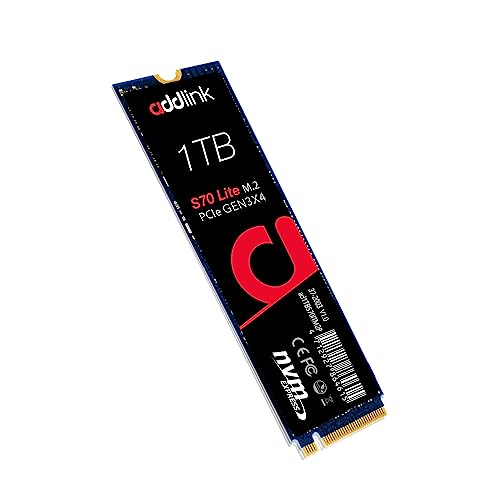
Addlink S70 Lite 1TB Gen3 NVMe SSD
Best for: budget-conscious gamers and general users
- Storage Capacity
- 1TB
- Interface
- PCIe Gen3x4
- Form Factor
- M.2 2280
- Max Read Speed
- Up to 3200MB/s
- Max Write Speed
- 2600MB/s
- Cache Type
- SLC caching
View on Amazon: Addlink S70 Lite 1TB Gen3 NVMe SSD Affiliate link
The Addlink S70 Lite 1TB NVMe SSD delivers sequential read speeds up to 3,200 MB/s and write speeds up to 2,600 MB/s. It uses PCIe Gen3x4 interface and M.2 2280 form factor. The drive features 3D NAND flash and SLC caching for sustained performance. Its low-power design runs cool without a heatsink. This SSD suits users needing fast boot times and efficient storage for gaming or daily workloads.
Pros
- Sequential read speeds up to 3,200 MB/s
- Sequential write speeds up to 2,600 MB/s
- Low-power design runs cool without a heatsink
- Backed by a 5-year limited warranty
Cons
- Limited to PCIe Gen3x4 interface speeds
- Uses SLC caching rather than dedicated DRAM cache
- Standard 1TB capacity may be small for heavy media libraries
Good fit if
- You need fast load times for gaming
- You want a cool-running drive for a laptop
- You are upgrading from a SATA SSD
Skip if
- You require PCIe Gen4 speeds
- You need maximum sustained write performance for large files
- You prefer drives with dedicated DRAM cache
Verdict: Addlink S70 Lite 1TB NVMe SSD is a practical choice for users who want faster speeds than SATA but do not need Gen4 performance. It fits gamers and general users who value efficiency and cool operation.
Specifications side by side
| Spec | Addlink S70 Lite 1TB Gen3 NVMe SSD |
|---|---|
| Storage Capacity | 1TB |
| Interface | PCIe Gen3x4 |
| Form Factor | M.2 2280 |
| Max Read Speed | Up to 3200MB/s |
| Max Write Speed | 2600MB/s |
| Cache Type | SLC caching |
| Compatibility | Laptop, Desktop, Gaming |
| NAND Type | 3D NAND |
| Size | 1TB |
| Dimensions | 3.2 × 0.8 × 0.4 inches |
| Weight | 0.7 ounces |
| Color | S70 Lite |
| Model | ad1TBS70M2P |
Frequently asked questions
Is the Addlink S70 Lite 1TB suitable for gaming?
Yes, it is a practical choice for gamers. The drive uses a PCIe 3.0 interface with sequential read speeds up to 3,200 MB/s. This offers faster load times than SATA drives. It fits users who value efficiency and cool operation without needing Gen4 performance.
Does this SSD work with laptops?
Yes, the drive is compatible with laptops. It uses a standard M.2 2280 form factor. This allows it to fit into most modern laptops with an available M.2 PCIe slot. You can install it by sliding it into the slot and securing it with a screw.
What type of NAND does the S70 Lite use?
The drive uses 3D NAND. This technology helps improve endurance and reliability compared to older planar NAND types. It supports the 1TB capacity needed for large operating systems and game libraries while maintaining efficient power usage.
Can I use this SSD in a desktop computer?
Yes, it is designed for desktop use as well. The M.2 2280 size fits most modern desktop motherboards. It works in both PCIe Gen3 and Gen4 slots. If your slot is Gen3, you get the full speed of up to 3,200 MB/s.
How much space does the Addlink S70 Lite provide?
It provides 1 terabyte of storage. This capacity holds a large operating system, many applications, and a substantial game library. It is ideal for storing high-resolution photos or video projects without running out of room quickly.
Is the drive heavy or bulky?
No, it is very lightweight and compact. The drive weighs only 0.7 ounces. Its dimensions are 3.2 inches long, 0.8 inches wide, and 0.4 inches high. This small footprint ensures it fits easily into tight spaces inside laptops or desktops.