10Gbps or 40Gbps SSD Docking Stations? Compared by Specs
As an Amazon Associate we earn from qualifying purchases. Links on this page are affiliate links.
You are comparing a 10Gbps vs 40Gbps SSD docking station to decide which interface suits your workflow. Both units provide external storage access, but they target different drive types and speeds. The first option uses USB-C to connect four 3.5-inch SATA drives. The second uses USB4/Thunderbolt 4 to handle dual M.2 NVMe drives. You need to match the port speed and drive form factor to your specific hardware.
Key differences
| Aspect | SABRENT 4-Bay 10Gbps USB-C Dock | ORICO 40Gbps Dual-Bay NVMe Cloner Dock |
|---|---|---|
| Transfer Speed | 10Gbps | 40Gbps |
| Supported Drive Types | 3.5-inch SATA HDD/SSD | M-Key NVMe |
| Bay Count | 4 | 2 |
| Host Interface | USB-C | USB-C (USB4/Thunderbolt 4) |
| Cooling Type | 92mm fan | Aluminum heatsinks, cooling fan |
Which one should you choose?
Choose SABRENT 4-Bay 10Gbps USB-C Dock if
- You need to store large amounts of data on 3.5-inch SATA drives.
- You require independent connections for four separate drives without RAID.
- You prefer a heavier, metal chassis with a dedicated large fan.
Choose ORICO 40Gbps Dual-Bay NVMe Cloner Dock if
- You work with M.2 NVMe SSDs and need high throughput.
- You want to clone drives offline without connecting to a computer.
- You prioritize a compact, lightweight design for portable use.
Verdict: The 10Gbps dock is the right choice for users managing bulk SATA storage with multiple drives. The 40Gbps dock suits professionals who need fast NVMe performance and cloning capabilities. Your decision depends entirely on whether you use 3.5-inch or M.2 form factors.
10Gbps vs 40Gbps Dock Specs
Transfer Speed
The ORICO dock offers a significant bandwidth advantage with its 40Gbps USB4.0 interface. This connection supports Thunderbolt 4 compatibility, allowing for theoretical transfer rates up to 3300 MB/s. The SABRENT dock relies on a standard 10Gbps USB 3.1 Gen 2 interface. While sufficient for many tasks, this speed limit is substantially lower than the ORICO option. If your workflow involves moving large files frequently, the higher bandwidth of the 40Gbps connection provides faster data movement compared to the 10Gbps alternative.
Drive Compatibility
These docks support fundamentally different drive types. The SABRENT unit is designed for 3.5-inch SATA HDDs and SSDs. It accommodates up to four drives, making it suitable for bulk mechanical storage. The ORICO dock is built exclusively for M.2 NVMe SSDs. It supports various form factors including 2230, 2242, 2260, and 2280 sizes. You must choose based on your drive inventory. If you use 3.5-inch drives, only the SABRENT model works. If you use M.2 NVMe sticks, only the ORICO model works.
Bay Capacity
Storage density differs between the two units. The SABRENT dock provides four independent bays. Each bay has its own ASMedia controller, ensuring stable connections for up to four drives simultaneously. This setup supports a maximum capacity of 80TB. The ORICO dock features a dual-bay design. It supports a maximum total capacity of 16TB across its two slots. If you need to manage multiple large drives at once, the four-bay SABRENT dock offers more physical slots and higher total capacity potential than the two-bay ORICO option.
Cloning Features
The ORICO dock includes a dedicated offline cloning function. You can duplicate NVMe drives by pressing a single button without connecting to a computer. This feature requires both drives to be NVMe-compatible. The SABRENT dock does not list any hardware cloning capabilities. It operates in JBOD mode, meaning each drive is accessed individually without hardware-level duplication features. If you frequently need to copy data between drives without a host PC, the ORICO dock provides this convenience, while the SABRENT dock lacks this specific function.
Cooling System
Both docks utilize active cooling to manage heat during operation. The SABRENT dock uses a 92mm fan housed within an aluminum and metal chassis. This system is designed for safe 24/7 operation. The ORICO dock employs a dual-independent cooling system. It features two separated aluminum alloy heatsinks with thermal silicone pads and a built-in cooling fan with a dual-ventilation design. Both solutions aim to prevent thermal throttling. The SABRENT approach focuses on a single large fan, while the ORICO design emphasizes distributed heatsinks and targeted airflow for M.2 components.
Which docking station fits your needs
You need to store large SATA drives
The SABRENT dock supports four 3.5-inch SATA drives, giving you up to 80TB of total storage. Each bay uses its own ASM1351 controller for stable, independent connections. This setup is ideal if you manage bulk data archives or require hot-swappable access to multiple mechanical or 2.5-inch SSDs without RAID complexity.
You clone NVMe drives frequently
The ORICO dock features one-button offline cloning, allowing you to duplicate NVMe drives without connecting to a computer. It supports M-Key NVMe SSDs in various sizes up to 16TB. This dedicated hardware cloning function saves time and eliminates the need for PC resources during duplication tasks.
You need fast data transfer speeds
With a 40Gbps USB4.0 interface and Thunderbolt 4 compatibility, this dock offers significantly higher bandwidth than 10Gbps alternatives. You can achieve transfer rates up to 3300 MB/s. This speed advantage is critical for workflows involving large files or frequent data movement between high-performance NVMe drives.
Quick picks
| # | Product | Best for | Price |
|---|---|---|---|
| 1 | SABRENT 4-Bay 10Gbps USB-C Dock | High-capacity multi-drive 3.5-inch SATA storage | Check price of SABRENT 4-Bay 10Gbps USB-C Dock on Amazon |
| 2 | ORICO 40Gbps Dual-Bay NVMe Cloner Dock | fast offline NVMe duplication | Check price of ORICO 40Gbps Dual-Bay NVMe Cloner Dock on Amazon |
The products compared
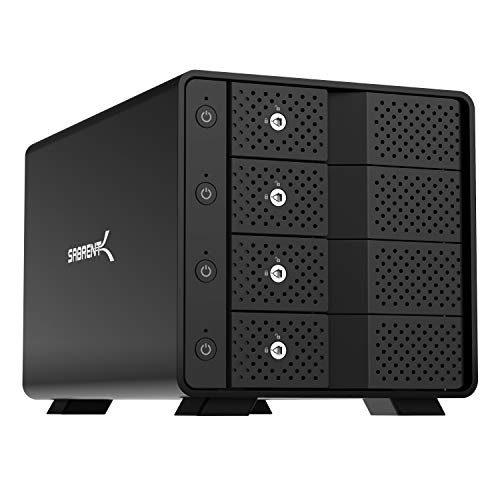
SABRENT 4-Bay 10Gbps USB-C Dock
Best for: High-capacity multi-drive 3.5-inch SATA storage
- Transfer Speed
- 10Gbps (what this guide is about)
- Supported Drive Types
- 3.5in SATA HDD/SSD
- Bay Count
- 4
- Maximum Capacity
- 80TB
- Cooling Type
- 92mm fan
- Interface
- SATA III
View on Amazon: SABRENT 4-Bay 10Gbps USB-C Dock Affiliate link
This dock gives you four tool-free bays for 3.5-inch SATA drives over a single 10Gbps USB-C connection. Each bay features a dedicated ASMedia controller, individual power switches, and active cooling from a built-in 92mm fan. It suits you if you need up to 80TB of direct-attached JBOD storage across multiple SATA hard drives or SSDs without hardware RAID.
Pros
- Dedicated ASMedia ASM1351 controller per drive bay
- Supports up to 80TB total capacity across four bays
- Integrated 92mm cooling fan with aluminum housing
- Individual power switches and key locks for each bay
Cons
- Operates at 10Gbps rather than 40Gbps speeds
- Restricted to 3.5-inch SATA drives with no M.2 NVMe support
- Mounts drives independently without built-in hardware RAID
Good fit if
- You need high-capacity storage up to 80TB using 3.5-inch SATA drives.
- You want independent power control and separate controllers for each drive.
Skip if
- You need 40Gbps transfer speeds for high-bandwidth NVMe workflows.
- You require onboard hardware RAID rather than standard JBOD disk management.
Verdict: SABRENT 4-Bay USB-C 10Gbps Docking Station fits storage-heavy setups requiring up to four individual 3.5-inch SATA drives managed independently over a 10Gbps connection.

ORICO 40Gbps Dual-Bay NVMe Cloner Dock
Best for: fast offline NVMe duplication
- Transfer Speed
- 40Gbps (what this guide is about)
- Supported Drive Types
- M-Key NVMe
- Bay Count
- 2
- Offline Cloning
- One-button offline cloning
- Supported M.2 Sizes
- 2230, 2242, 2260, 2280, 22110
- Maximum Capacity
- 16TB
View on Amazon: ORICO 40Gbps Dual-Bay NVMe Cloner Dock Affiliate link
This dock offers 40Gbps transfer speeds via USB4.0 with Thunderbolt 4 compatibility. It features one-button offline cloning for NVMe drives, duplicating 1TB in roughly 20 minutes. The dual-bay design supports M-Key NVMe SSDs up to 16TB in various sizes. A cooling fan and aluminum heatsinks manage heat during operation. It suits users needing fast, standalone duplication without a PC.
Pros
- 40Gbps transfer speeds with 3300/3000 MB/s rates
- One-button offline cloning without PC connection
- Dual independent cooling with fan and heatsinks
- Supports M-Key NVMe drives up to 16TB
Cons
- Bandwidth is shared when using both bays simultaneously
- Target disk capacity must exceed source disk for cloning
- Heatsinks are not standalone enclosures
Good fit if
- You need to clone NVMe drives without a computer
- You require transfer speeds faster than 10Gbps docks
- You work with multiple M.2 NVMe form factors
Skip if
- You only use SATA drives
- You need to clone drives where the target is smaller than the source
- You require standalone enclosure functionality for the heatsinks
Verdict: ORICO 40Gbps Dual-Bay NVMe Cloner delivers rapid duplication for professionals who need offline cloning capabilities. It fits users who prioritize speed and standalone operation over shared bandwidth flexibility.
Specifications side by side
| Spec | SABRENT 4-Bay 10Gbps USB-C Dock | ORICO 40Gbps Dual-Bay NVMe Cloner Dock |
|---|---|---|
| Transfer Speed | 10Gbps | 40Gbps |
| Supported Drive Types | 3.5in SATA HDD/SSD | M-Key NVMe |
| Bay Count | 4 | 2 |
| Offline Cloning | not stated | One-button offline cloning |
| Supported M.2 Sizes | not stated | 2230, 2242, 2260, 2280, 22110 |
| Maximum Capacity | 80TB | 16TB |
| Cooling Type | 92mm fan | Aluminum heatsinks, cooling fan |
| Interface | SATA III | NVMe |
| Form Factor | not stated | M.2 2280 |
| Features | not stated | Offline Clone |
| Material | Aluminum | not stated |
| Host Interface | USB-C | USB-C |
| Dimensions | 9.1 × 5.8 × 5.9 inches | 5.71 × 2.91 × 1.38 inches |
| Weight | 9 pounds | not stated |
| Size | 4 Bay | IT28N |
| Color | Black | Silver |
| Model | DS-SC4B | IT28N-C |
Frequently asked questions
Can a 10Gbps dock handle NVMe drives?
The SABRENT dock in this comparison is designed specifically for 3.5-inch SATA drives. It does not support NVMe M.2 SSDs. You must check the product specifications to confirm drive compatibility before purchasing. Using incompatible drives will prevent the dock from functioning correctly.
Does the 40Gbps dock support offline cloning?
Yes, the ORICO dock features offline cloning capabilities. This allows you to duplicate data between two NVMe drives without connecting the device to a computer. The process runs independently, which is useful for rapid duplication tasks where a host system is unavailable.
Which dock is better for large SATA storage?
The SABRENT dock is the better choice for large SATA storage. It supports four 3.5-inch drives, providing significant total capacity. Each bay operates independently, ensuring stable access to your data. The 40Gbps dock only supports M.2 NVMe drives, making it unsuitable for SATA.
Is the 40Gbps interface backward compatible?
The ORICO dock uses a USB-C host interface with 40Gbps bandwidth. While the dock itself targets high-speed NVMe drives, the USB-C connection is standard. You should verify your computer ports support the required speeds to achieve the maximum transfer rates listed in the specs.
How many drives can the SABRENT dock hold?
The SABRENT dock holds four drives simultaneously. It is a four-bay unit designed for 3.5-inch SATA storage. This configuration allows you to manage multiple large drives from a single connection point, which is ideal for users needing extensive local storage access.
Do I need a special cable for the 40Gbps dock?
The ORICO dock connects via a USB-C host interface. You should use a high-quality USB-C cable that supports the 40Gbps bandwidth. Using a lower-spec cable may limit your transfer speeds. Check your cable specifications to ensure it matches the dock's capabilities.