Looking Beyond the ZIKE USB4 40Gbps M.2 NVMe? 6 Alternatives Worth a Look
As an Amazon Associate we earn from qualifying purchases. Links on this page are affiliate links.
You might be looking for zike usb4 40gbps m 2 nvme SSD alternatives to find a better fit for your specific workflow. The ZIKE Z666 enclosure delivers strong 40Gbps performance for 2280 drives with a toolless design and integrated cable. Its aerospace-grade aluminum alloy shell provides effective cooling and protection against shocks. This makes it a solid choice for users with Thunderbolt or USB4 hosts who want a reliable, plug-and-play solution.
However, you might prefer a different spec, size, feature, or brand. Some users need active cooling fans for sustained performance, while others prioritize offline cloning capabilities or dual-bay expansion. Others may seek a more compact form factor for portable use on Macs or Windows PCs. We selected these alternatives because their specifications overlap with the original. Each option offers distinct advantages, such as broader OS compatibility, enhanced thermal management, or specialized features like RAID configurations. This list helps you compare practical differences to choose the right external NVMe enclosure for your needs.
Our top pick: ZIKE USB4 40Gbps M.2 NVMe Enclosure.
How Each Alternative Compares
ACASIS 40Gbps M.2 NVMe Enclosure
The ACASIS TBU405 matches the ZIKE’s 40Gbps transfer speed and supports the same M.2 2280 NVMe drives. It distinguishes itself with a smaller footprint, measuring 1.92 by 3.96 inches, which makes it easier to carry in a bag. Unlike the ZIKE’s integrated cable, this unit requires a separate connection. It lacks active cooling, relying on its slim aluminum shell for heat dissipation. You should choose this if you prioritize portability and broad compatibility with M1 or M2 Macs over the convenience of a built-in cable.
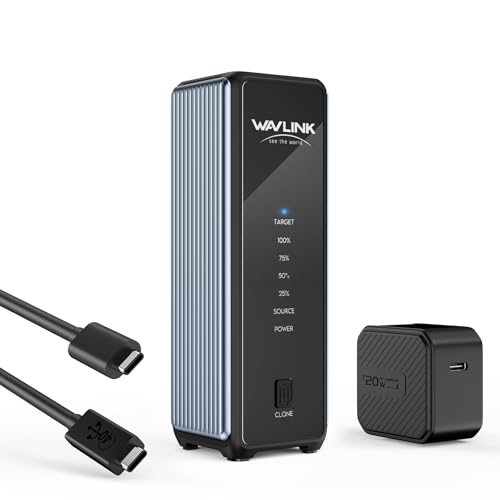
WAVLINK 40Gbps Dual-Bay NVMe Cloner
The WAVLINK 40Gbps Dual NVMe Cloner shifts focus from single-drive speed to dual-drive functionality. It supports two M.2 2280 drives simultaneously, offering offline cloning capabilities that the ZIKE does not provide. While it maintains 40Gbps speeds, its physical design is larger at 1.6 inches wide and 1.7 inches high. It includes an active cooling fan, which the ZIKE lacks, making it better for sustained workloads. Pick this if you need to clone drives quickly or expand storage capacity rather than just connecting a single drive.
VCOM 40Gbps USB4 M.2 NVMe SSD Enclosure
The VCOM 40Gbps USB4 Enclosure offers similar 40Gbps performance for M.2 2280 NVMe drives but uses a dedicated aluminum shell for thermal management. It is slightly narrower than the ZIKE at 2.08 inches wide. This model does not include a tool-free mechanism or an integrated cable, requiring you to handle installation and connections separately. It is a solid choice if you want reliable Intel controller performance in a compact, no-frills design. Choose this if you prefer a traditional enclosure over the ZIKE’s plug-and-play convenience.
ORICO 40Gbps Tool-Free M.2 NVMe SSD Enclosure
The ORICO TCM2-U4-BK provides 40Gbps speeds for M.2 2280 drives but adds an active cooling fan. This feature helps maintain performance during long transfers, addressing thermal throttling more effectively than the ZIKE’s passive aluminum design. It supports tool-free installation, similar to the ZIKE, but lacks an integrated cable. The unit weighs 3.17 ounces. You should select this if you frequently swap between different M.2 drive sizes and need robust thermal management. It is ideal for users who prioritize sustained speed over the ZIKE’s integrated cable convenience.
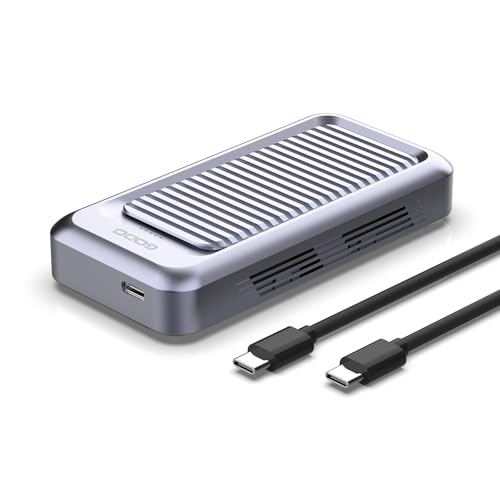
GODO Tool-Free 40Gbps M.2 NVMe Enclosure
The GODO USB401-NVMe offers 40Gbps transfer speeds for M.2 2280 drives with an emphasis on thermal management. It features an active cooling fan and a tool-free design, combining the ZIKE’s ease of use with better heat dissipation. The enclosure is available in black, white, or gray finishes. It does not include an integrated cable, requiring a separate connection. This model suits professionals who move large files frequently and need reliable heat removal. Choose this if you want the convenience of tool-free access without worrying about drive temperatures.
NEWQ Dual-Bay 20Gbps RAID NVMe Enclosure
The NEWQ NQ-RD-01 Dual-Bay Enclosure differs significantly by offering 20Gbps speeds instead of 40Gbps. It supports two M.2 2280 drives in a RAID configuration, providing data redundancy that the single-drive ZIKE cannot match. It includes offline cloning capabilities for quick data migration. The unit weighs 1.01 pounds, making it heavier and less portable than the ZIKE. You should pick this if you prioritize data safety and dual-drive expansion over peak transfer speeds. It is the right choice for users needing redundant storage solutions.
Quick picks
Our 7 picks

ZIKE USB4 40Gbps M.2 NVMe Enclosure
Best for: Thunderbolt 5 and USB4 hosts
- Max Transfer Speed
- 40Gbps
- Host Interface
- USB4, Thunderbolt 4
- Drive Interface
- PCIe NVMe M-Key
- Supported Form Factors
- 2280
- Cooling System
- Aluminum alloy housing
- Installation Style
- Tool-free
View on Amazon: ZIKE USB4 40Gbps M.2 NVMe Enclosure Affiliate link
The ZIKE Z666 is a toolless M.2 NVMe enclosure supporting USB4 and Thunderbolt 5 interfaces. It delivers read speeds up to 3.8 GB/s and write speeds up to 3.1 GB/s via a 40Gbps connection. The aluminum alloy body aids cooling and protection. It fits 2280 M-Key drives and includes an integrated cable. You should choose this if you need high-speed transfers for Mac or PC systems with Thunderbolt or USB4 ports.
Pros
- Supports USB4 and Thunderbolt 5 host interfaces
- Read speeds up to 3.8 GB/s
- Toolless installation design
- Integrated USB4 cable included
Cons
- Only supports 2280 form factor
- No active cooling fan listed
- Write speed capped at 3.1 GB/s
Good fit if
- You use a Mac or PC with Thunderbolt 4/5 or USB4 ports
- You need fast transfers for large files
- You prefer toolless drive installation
Skip if
- You use older USB 3.2 ports
- You need to fit M.2 2242 or 2260 drives
- You require an active cooling fan
Verdict: The ZIKE Z666 USB4 NVMe Enclosure offers strong 40Gbps performance for 2280 drives. It is a solid choice for users with Thunderbolt or USB4 hosts who want a toolless, cable-integrated solution.

ACASIS 40Gbps M.2 NVMe Enclosure
Best for: Portable external NVMe storage on Macs
- Max Transfer Speed
- 40Gbps
- Host Interface
- USB4, USB 3.2/3.1/3.0/2.0
- Drive Interface
- M.2 NVMe
- Supported Form Factors
- 2230, 2242, 2260, 2280
- Dimensions
- 3.96 × 1.92 × 0.6 inches
- Weight
- 5.61 ounces
View on Amazon: ACASIS 40Gbps M.2 NVMe Enclosure Affiliate link
The ACASIS TBU 405 is a compact M.2 NVMe enclosure supporting 40Gbps transfer speeds. It uses a JHL7440 certified chip for stable performance across USB4, 3.2, and older USB standards. The design fits 2230, 2242, 2260, and 2280 drives. It is compatible with macOS, Windows, and Linux systems, making it a versatile option for portable storage solutions.
Pros
- Supports 40Gbps transfer speeds via USB4
- JHL7440 certified chip for reliability
- Compatible with multiple drive sizes including 2280
- Works with macOS, Windows, and Linux
Cons
- No built-in cooling fan for thermal management
- Maximum read speeds around 2805 MB/s in tests
- Does not include the M.2 NVMe drive
Good fit if
- You need a compact enclosure for travel
- You use Apple Silicon Macs like M1 Pro
- You want broad USB backward compatibility
Skip if
- You require active cooling for sustained loads
- You need Thunderbolt certification
- You want a drive included in the box
Verdict: The ACASIS TBU 405 USB4 NVMe Enclosure is a solid choice for users prioritizing portability and broad OS compatibility over active cooling. It fits well in bags and works seamlessly with M1/M2 Macs and Windows PCs.
WAVLINK 40Gbps Dual-Bay NVMe Cloner
Best for: Dual drive expansion and offline cloning
- Max Transfer Speed
- 40Gbps
- Host Interface
- USB4
- Drive Interface
- PCIe NVMe (M-Key, B+M Key)
- Supported Form Factors
- 2230, 2242, 2260, 2280
- Drive Bay Count
- 2 bays
- Cooling System
- Active cooling fan, aluminum housing
View on Amazon: WAVLINK 40Gbps Dual-Bay NVMe Cloner Affiliate link
This WAVLINK enclosure supports two M.2 NVMe drives in a single 40Gbps USB4 chassis. It delivers read speeds up to 3300MB/s and write speeds up to 3000MB/s. The tool-free design accepts M-Key and B+M-Key SSDs in sizes 2230 through 2280. An active cooling fan and aluminum housing manage heat during heavy workloads. You can also clone data between drives with a one-click offline function.
Pros
- Dual 40Gbps USB4 bays for two NVMe drives
- One-click offline cloning feature
- Active cooling fan and aluminum alloy housing
- Supports M-Key and B+M-Key SSDs
Cons
- Lower max read speed than the 3811MB/s competitor
- Active cooling fan adds noise under load
- Target drive formats during offline cloning
Good fit if
- You need to clone an old SSD to a new one without a computer
- You require dual drive expansion for a MacBook or Windows laptop
- You want active cooling for sustained heavy workloads
Skip if
- You need the absolute highest sequential read speeds available
- You prefer a completely silent, fanless aluminum enclosure
- You only need a single drive bay
Verdict: WAVLINK 40Gbps Dual NVMe Cloner offers dual drive capacity and offline cloning for users who need to migrate data quickly. It suits those who prioritize active cooling and dual-bay expansion over peak single-drive transfer speeds.

VCOM 40Gbps USB4 M.2 NVMe SSD Enclosure
Best for: standard 2280 drives on Thunderbolt or USB4
- Max Transfer Speed
- Up to 40Gbps
- Host Interface
- USB4, Thunderbolt 3/4, USB 3.2/3.1/3.0
- Drive Interface
- NVMe M&B+M-Key
- Supported Form Factors
- 2280
- Cooling System
- Thermal pad, aluminum alloy shell
- Dimensions
- 3.94 × 2.08 × 0.53 inches
View on Amazon: VCOM 40Gbps USB4 M.2 NVMe SSD Enclosure Affiliate link
This aluminum enclosure pairs an Intel JHL7440 controller with a 40Gbps USB4 Type-C interface to deliver up to 2800MB/s read and 2500MB/s write speeds. It accepts standard M.2 2280 NVMe solid-state drives using M-Key or B+M-Key designs. If you need dedicated high-speed external storage for modern USB4 or Thunderbolt ports, this enclosure handles standard desktop and laptop backups efficiently.
Pros
- Intel JHL7440 controller supports 40Gbps data bandwidth
- Delivers rated read speeds up to 2800MB/s and writes up to 2500MB/s
- All-aluminum shell with included thermal pad for passive cooling
- Broad host support across USB4, Thunderbolt 3, and Thunderbolt 4
Cons
- Only accommodates M.2 2280 drives, excluding 2230, 2242, and 2260 sizes
- Incompatible with USB 2.0 and older legacy USB ports
- Requires a screwdriver for drive installation instead of a tool-free latch
Good fit if
- You use standard 2280 form-factor NVMe drives.
- You connect to USB4, Thunderbolt 3, or Thunderbolt 4 ports.
- You prefer a metal chassis paired with thermal pads for heat control.
Skip if
- You need to install shorter 2230, 2242, or 2260 M.2 cards.
- You must connect to older legacy USB 2.0 ports.
- You swap drives frequently and want a tool-free enclosure design.
Verdict: VCOM 40Gbps USB4 M.2 NVMe Enclosure gives you 40Gbps Intel controller performance inside a dedicated aluminum shell for standard 2280 drives. It suits users who prioritize high transfer rates over tool-free swapping or legacy USB 2.0 compatibility.

ORICO 40Gbps Tool-Free M.2 NVMe SSD Enclosure
Best for: Active cooling and multiple M.2 sizes
- Max Transfer Speed
- 40Gbps
- Host Interface
- USB4, Thunderbolt 4/3
- Drive Interface
- NVMe M-Key
- Supported Form Factors
- 2230/2242/2260/2280
- Cooling System
- Built-in silent fan
- Maximum Capacity
- 4TB
View on Amazon: ORICO 40Gbps Tool-Free M.2 NVMe SSD Enclosure Affiliate link
This ORICO enclosure supports USB4 and Thunderbolt 4 interfaces for up to 40Gbps throughput. It includes a built-in silent cooling fan to manage heat during sustained transfers. The tool-free design accepts M-Key NVMe drives in 2230, 2242, 2260, and 2280 sizes. You get a dual-port cable for 40Gbps and 10Gbps connections. It handles capacities up to 4TB across Windows, Mac, and Linux systems.
Pros
- Built-in silent cooling fan for active heat dissipation
- Supports 2230, 2242, 2260, and 2280 form factors
- Tool-free installation mechanism
- Includes dual-port cable with 40Gbps and 10Gbps options
Cons
- Requires power for the active cooling fan
- Heavier build at 3.17 ounces compared to passive enclosures
- Transparent shell design may show fingerprints
Good fit if
- You need active cooling for high-performance NVMe drives
- You use various M.2 lengths like 2230 or 2242
- You want a tool-free installation process
Skip if
- You prefer a completely passive aluminum enclosure
- You need a compact design for travel
- You want a simpler single-cable solution
Verdict: ORICO 40Gbps NVMe Enclosure with Fan offers robust thermal management for users prioritizing sustained performance. It is a practical choice for those who frequently swap between different M.2 drive sizes and need active cooling.
GODO Tool-Free 40Gbps M.2 NVMe Enclosure
Best for: Users needing active cooling for NVMe drives
- Max Transfer Speed
- 40Gbps
- Host Interface
- USB4.0 Type-C, Thunderbolt 4/3
- Drive Interface
- PCIe NVMe (M Key, B+M Key)
- Supported Form Factors
- M.2 2230, 2242, 2260, 2280
- Cooling System
- Aluminum alloy body with fan
- Maximum Capacity
- 4TB
View on Amazon: GODO Tool-Free 40Gbps M.2 NVMe Enclosure Affiliate link
The GODO USB401-NVMe enclosure supports 40Gbps speeds and connects via USB4.0 or Thunderbolt 3/4. It fits M.2 NVMe drives up to 4TB in 2230, 2242, 2260, and 2280 sizes. The aluminum body includes a built-in fan for cooling. You get tool-free installation and plug-and-play operation without drivers. It is a solid option for expanding storage on compatible laptops.
Pros
- Supports 40Gbps transfer speeds
- Built-in cooling fan with aluminum housing
- Tool-free installation for easy setup
- Compatible with Thunderbolt 3/4 and USB4
Cons
- Bulkier than standard aluminum enclosures due to the fan
- No included M.2 SSD drive
- Heavier than passive-only designs
Good fit if
- You need active cooling for sustained high speeds
- You use Thunderbolt 3 or USB4 devices
- You want tool-free drive installation
Skip if
- You prefer a ultra-compact passive design
- You require SATA M.2 support
- You need a drive included in the box
Verdict: The GODO USB401 NVMe Enclosure offers robust cooling and broad compatibility for users who prioritize thermal management. It fits professionals who move large files frequently and need reliable heat dissipation.

NEWQ Dual-Bay 20Gbps RAID NVMe Enclosure
Best for: data redundancy and offline cloning
- Max Transfer Speed
- 20Gbps
- Host Interface
- USB-C
- Drive Interface
- PCIe NVMe
- Supported Form Factors
- 2280
- Drive Bay Count
- 2 bays
- Cooling System
- Aluminum casing
View on Amazon: NEWQ Dual-Bay 20Gbps RAID NVMe Enclosure Affiliate link
This NEWQ enclosure supports two M.2 2280 NVMe drives with a 20Gbps interface. It offers RAID 0, RAID 1, JBOD, and offline clone modes for flexible storage management. The tool-free aluminum design aids heat dissipation. An auxiliary USB-C input ensures stability for high-capacity drives up to 16TB. It suits users needing data redundancy or expanded storage capacity.
Pros
- Dual-bay design for two M.2 2280 drives
- Supports RAID 0, RAID 1, JBOD, and Clone modes
- Tool-free installation for easy drive swapping
- Auxiliary USB-C input for high-capacity drive stability
Cons
- 20Gbps speed is half of the 40Gbps competitors
- No built-in active cooling fan
- Heavier at 1.01 pounds compared to single-bay units
Good fit if
- You need RAID 1 for automatic data backup
- You want to clone drives without a computer
- You require dual-drive storage expansion
Skip if
- You need maximum 40Gbps transfer speeds
- You prefer a lighter, single-drive setup
- You want active fan cooling for thermal management
Verdict: NEWQ Dual-Bay NVMe Enclosure delivers versatile RAID and cloning options for users prioritizing data safety over raw speed. It is the right choice if you need redundant storage or offline cloning capabilities.
Specifications side by side
| Spec | ZIKE USB4 40Gbps M.2 NVMe Enclosure | ACASIS 40Gbps M.2 NVMe Enclosure | WAVLINK 40Gbps Dual-Bay NVMe Cloner | VCOM 40Gbps USB4 M.2 NVMe SSD Enclosure | ORICO 40Gbps Tool-Free M.2 NVMe SSD Enclosure | GODO Tool-Free 40Gbps M.2 NVMe Enclosure | NEWQ Dual-Bay 20Gbps RAID NVMe Enclosure |
|---|---|---|---|---|---|---|---|
| Max Transfer Speed | 40Gbps | 40Gbps | 40Gbps | Up to 40Gbps | 40Gbps | 40Gbps | 20Gbps |
| Host Interface | USB4, Thunderbolt 4 | USB4, USB 3.2/3.1/3.0/2.0 | USB4 | USB4, Thunderbolt 3/4, USB 3.2/3.1/3.0 | USB4, Thunderbolt 4/3 | USB4.0 Type-C, Thunderbolt 4/3 | USB-C |
| Drive Interface | PCIe NVMe M-Key | M.2 NVMe | PCIe NVMe (M-Key, B+M Key) | NVMe M&B+M-Key | NVMe M-Key | PCIe NVMe (M Key, B+M Key) | PCIe NVMe |
| Supported Form Factors | 2280 | 2230, 2242, 2260, 2280 | 2230, 2242, 2260, 2280 | 2280 | 2230/2242/2260/2280 | M.2 2230, 2242, 2260, 2280 | 2280 |
| Drive Bay Count | not stated | not stated | 2 bays | not stated | not stated | not stated | 2 bays |
| Cooling System | Aluminum alloy housing | not stated | Active cooling fan, aluminum housing | Thermal pad, aluminum alloy shell | Built-in silent fan | Aluminum alloy body with fan | Aluminum casing |
| Maximum Capacity | not stated | not stated | 8TB per drive | not stated | 4TB | 4TB | 16TB |
| Installation Style | Tool-free | not stated | Tool-Free | not stated | Tool-Free | Tool-Free | Tool-free |
| Interface | NVMe | NVMe | NVMe | NVMe | NVMe | NVMe | NVMe |
| Form Factor | M.2 2280 | M.2 2280 | M.2 2280 | M.2 2280 | M.2 2280 | M.2 2280 | M.2 2280 |
| Cooling | not stated | not stated | Cooling Fan | not stated | Cooling Fan | not stated | not stated |
| Transfer Speed | 40Gbps | 40Gbps | 40Gbps | 40Gbps | 40Gbps | 40Gbps | 20Gbps |
| Features | Tool-Free | not stated | Tool-Free, Offline Clone | not stated | Tool-Free | Tool-Free | Offline Clone |
| Bay Count | not stated | not stated | not stated | not stated | not stated | not stated | Dual-Bay |
| Material | not stated | not stated | not stated | Aluminum | not stated | Aluminum | not stated |
| Dimensions | 4.41 × 2.63 × 0.71 inches | 3.96 × 1.92 × 0.6 inches | 1.6 × 1.6 × 1.7 inches | 3.94 × 2.08 × 0.53 inches | not stated | not stated | not stated |
| Weight | not stated | 5.61 ounces | 6.21 ounces | not stated | 3.17 ounces | not stated | 1.01 pounds |
| Color | Silver | not stated | Black | Black | Black | Black or White or Gray | Space Blue |
| Model | Z666 | TBU405 | 40Gbps Offline Cloning | 40Gbps M.2 NVMe | TCM2-U4-BK | USB401-NVMe | NQ-RD-01 |
| Size | not stated | TBU405 | not stated | not stated | not stated | not stated | not stated |
If you need passive cooling, joyjom nvme m 2 heatsink SSD alternatives provide different thickness measurements for compact installations.
Frequently asked questions
Which enclosure is best for Thunderbolt 5 hosts?
The ZIKE Z666 is the top pick for Thunderbolt 5 and USB4 hosts. It offers strong 40Gbps performance for standard 2280 NVMe drives. The design includes a toolless mechanism and an integrated cable for easy connection. Its silver aluminum shell measures 4.41 inches in length, providing a solid and compact solution for high-speed data transfer needs.
What is the most portable 40Gbps option?
The ACASIS TBU405 is ideal for portable external NVMe storage, especially on Macs. It features a compact footprint of 1.92 by 3.96 inches and weighs 5.61 ounces. This enclosure supports broad OS compatibility and works seamlessly with M1 and M2 Macs. It prioritizes portability and ease of carrying in a bag over active cooling features.
Which enclosure supports offline cloning?
The WAVLINK 40Gbps Dual NVMe Cloner supports offline cloning for quick data migration. It features a dual-bay design for two 2280 drives and includes an active cooling fan. This model suits users who need to duplicate drives without a computer. It prioritizes dual-drive expansion and thermal management over peak single-drive transfer speeds.
Is there an aluminum enclosure with an Intel controller?
The VCOM 40Gbps USB4 M.2 NVMe Enclosure uses an Intel controller for high transfer rates. It is housed in a dedicated aluminum shell for standard 2280 drives. This option suits users who prioritize raw speed over tool-free swapping or legacy USB compatibility. It measures 3.94 inches in length and comes in a black finish.
Which models include active cooling fans?
The WAVLINK, ORICO, and GODO enclosures all include active cooling fans for thermal management. The ORICO TCM2-U4-BK also supports tool-free installation for multiple M.2 sizes. The GODO USB401-NVMe offers robust heat dissipation for professionals moving large files. These models help sustain performance during heavy workloads by actively managing drive temperatures.
Are there dual-bay options for data redundancy?
The NEWQ Dual-Bay NVMe Enclosure offers versatile RAID and cloning options for data safety. It operates at 20Gbps and supports offline cloning. This model is designed for users who prioritize data redundancy over raw speed. It weighs 1.01 pounds and comes in a space blue color, providing a reliable solution for critical data storage needs.
Which enclosures are tool-free?
The ZIKE Z666, WAVLINK, ORICO, and GODO enclosures all feature tool-free designs. This allows for easy drive installation and removal without additional hardware. The ZIKE model also includes an integrated cable. The ORICO and GODO models add active cooling fans to their tool-free convenience, making them practical for frequent drive swaps.