Transcend 120GB M.2 2242 SATA or Transcend 128GB M.2 2242 SATA? Which Transcend Model to Buy
As an Amazon Associate we earn from qualifying purchases. Links on this page are affiliate links.
We compare the transcend 120gb mts420s m 2 sata vs 128gb mts430s m 2 sata. Both drives use the M.2 2242 form factor and SATA III interface. They share 3D TLC NAND flash and similar read speeds. The main difference lies in their cache technology and write performance. The MTS420S uses SLC caching, while the MTS430S adds a dedicated DRAM cache. This affects how each drive handles data during sustained writes.
Key differences
| Aspect | Transcend 120GB M.2 2242 SATA SSD | Transcend 128GB M.2 2242 SATA SSD |
|---|---|---|
| Storage Capacity | 120GB | 128GB |
| Cache Type | SLC Cache | DDR3 DRAM Cache and SLC caching |
| Max Write Speed | up to 500MB/sec | 350MB/s |
| Max Read Speed | up to 560MB/sec | Up to 560MB/s |
| Durability (TBW) | not listed | 70TB |
| Power Management | not listed | DevSleep support |
Which one should you choose?
Choose Transcend 120GB M.2 2242 SATA SSD if
- You need the highest possible sequential write speed for large file transfers.
- You prefer a drive with a simpler caching mechanism and do not require DRAM.
- You are upgrading an older system where the 120GB capacity is sufficient.
Choose Transcend 128GB M.2 2242 SATA SSD if
- You want better sustained performance and lower latency thanks to dedicated DRAM.
- You need a defined endurance rating of 70TB for critical data protection.
- You value battery life optimization through DevSleep support in laptops.
Verdict: Choose the MTS420S if your priority is peak sequential write speed and you do not need advanced cache management. Select the MTS430S if you require DRAM for consistent performance, higher endurance, and power-saving features. Both drives fit the same compact M.2 2242 slot.
Cache, Speed, and Capacity Comparison
Storage Capacity
You get 120GB of usable space with the Transcend MTS420S. The Transcend MTS430S offers 128GB. This 8GB difference is small but noticeable for tight workloads. If you store large files or run many applications, the extra room on the MTS430S helps. It provides a slightly larger buffer for system updates and temporary files. The MTS420S fits well if your needs are basic. However, the MTS430S gives you more breathing room. For most users, that extra capacity justifies the choice. It delays the need for immediate cleanup or external storage. The difference is minor but meaningful in daily use.
Cache Technology
The MTS430S includes a dedicated DDR3 DRAM cache alongside SLC caching. The MTS420S relies only on SLC caching. DRAM cache stores mapping tables, which speeds up random access tasks. This makes the MTS430S better for multitasking and heavy workloads. The MTS420S may slow down when handling many small files. DRAM reduces latency by keeping data location info in fast memory. Without it, the drive must look up locations on the flash chips. This adds time. If you use your laptop for office work or light editing, the MTS430S feels more responsive. The MTS420S is adequate for simple tasks but lacks this performance boost.
Sequential Write Speed
The MTS420S writes at up to 500MB/sec. The MTS430S writes at 350MB/sec. This is a significant difference for large file transfers. If you move big videos or game installations, the MTS420S finishes faster. The MTS430S prioritizes consistency over peak write speed due to its DRAM cache. DRAM helps with random reads but does not always boost sequential writes. For copying large single files, the MTS420S has the clear advantage. You will notice the speed gap during heavy data moves. For everyday boot times or app loading, both are fast enough. The write speed matters most for bulk data handling.
Sequential Read Speed
Both drives offer up to 560MB/sec for sequential reads. This is the maximum speed allowed by the SATA III interface. You will see similar performance when loading operating systems or opening large games. Neither drive can exceed this limit on SATA connections. The read speed ensures quick access to frequently used data. Since both hit the same ceiling, there is no performance gap here. You get the same fast boot times and application launches. The interface bottleneck affects both equally. You do not need to choose based on read speed. Both models deliver identical results for typical reading tasks.
Data Endurance
The MTS430S lists a Total Bytes Written (TBW) rating of 70TB. The MTS420S does not list a TBW value in the provided data. TBW indicates how much data you can write before the drive wears out. A 70TB rating suggests the MTS430S is built for longer-term reliability. It can handle more heavy write cycles. If you edit videos or run databases, higher endurance matters. The MTS420S may have lower endurance, but the lack of data makes it hard to compare directly. For most general users, 70TB is more than enough. The MTS430S provides a clear durability metric that the MTS420S lacks.
Power Efficiency
The MTS430S supports SATA Device Sleep (DevSleep) mode. This feature powers down the drive when idle to save battery life. The MTS420S does not list DevSleep support. If you use a laptop, DevSleep extends battery time between charges. The drive wakes up instantly when needed. This is useful for users who value portability and battery life. The MTS420S may consume more power during idle periods. For desktop users, this difference is less critical. For mobile users, the MTS430S offers better energy management. It helps keep your device running longer on a single charge.
Which Transcend M.2 2242 SSD fits you
Users needing maximum sequential write speed
The Transcend MTS420S delivers a higher maximum write speed of up to 500MB/sec compared to the 350MB/sec limit of the MTS430S. This makes it a better choice if you frequently transfer large files or need faster sustained write performance for your specific workflow. The SLC cache helps maintain this speed during bursts.
Buyers prioritizing data stability and cache
The MTS430S includes a dedicated DDR3 DRAM cache alongside SLC caching. This combination reduces data access latency and improves overall drive responsiveness. It also features LDPC error correction and a 70TB TBW rating, offering enhanced data integrity and longevity for systems where consistent performance and reliability are critical for daily operations.
Those wanting slightly more storage space
You get 128GB of usable space with the MTS430S, which is 8GB more than the 120GB capacity of the MTS420S. While the difference is modest, that extra room can help manage tight workloads or store additional small files without filling up the drive as quickly, providing a slight buffer for your data.
The products compared
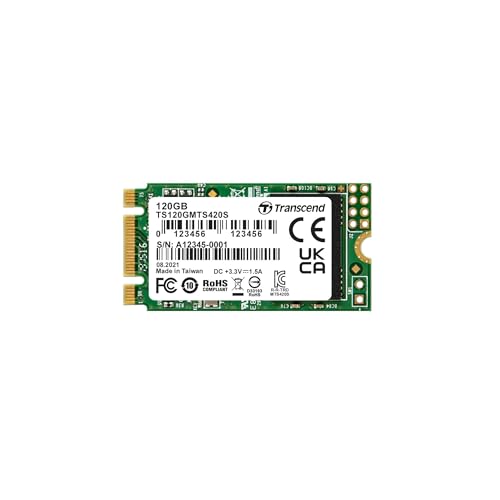
Transcend 120GB M.2 2242 SATA SSD
Best for: Compact systems needing reliable SATA storage
- Storage Capacity
- 120GB
- Interface
- SATA III 6GB/s
- Max Read Speed
- 560MB/sec
- Max Write Speed
- 500MB/sec
- Cache Type
- SLC Cache
- Form Factor
- M.2 2242
View on Amazon: Transcend 120GB M.2 2242 SATA SSD Affiliate link
This 120GB M.2 2242 SSD uses a SATA III interface for standard compatibility. It delivers read speeds up to 560MB/sec and write speeds up to 500MB/sec. The drive uses SLC cache to manage data efficiently. It is designed for compact systems requiring the 2242 form factor. You get a 3-year warranty for reliability. This model suits users needing a small, reliable storage upgrade for legacy or space-constrained devices.
Pros
- Read speeds up to 560MB/sec
- Write speeds up to 500MB/sec
- SLC cache for performance management
- Compact M.2 2242 form factor
Cons
- Lower 120GB capacity compared to the 128GB alternative
- No DRAM cache, relying only on SLC cache
- SATA III interface limits maximum bandwidth
Good fit if
- You need a small M.2 2242 drive for compact builds
- You require SATA III compatibility for older systems
- You prioritize SLC cache stability over raw capacity
Skip if
- You need higher capacities like 250GB or more
- You want NVMe speeds for faster data transfer
- You prefer DRAM cache for sustained heavy writes
Verdict: Transcend 120GB M.2 2242 SATA SSD fits users needing a compact, reliable SATA drive with SLC caching for specific 2242 slots. It is ideal for space-constrained systems where capacity is secondary to form factor.

Transcend 128GB M.2 2242 SATA SSD
Best for: space-constrained laptops and mini-PCs
- Storage Capacity
- 128GB
- Interface
- SATA III 6Gb/s
- Max Read Speed
- 560MB/s
- Max Write Speed
- 350MB/s
- Cache Type
- DDR3 DRAM, SLC Cache
- Form Factor
- M.2 2242
View on Amazon: Transcend 128GB M.2 2242 SATA SSD Affiliate link
This Transcend drive is a 128GB M.2 2242 SATA III SSD designed for tight spaces. It features a dedicated DDR3 DRAM cache and SLC caching for stable performance. You get sequential read speeds up to 560MB/s and write speeds up to 350MB/s. The 3D TLC NAND offers a 70TB total bytes written rating. It fits ultrabooks and mini-PCs where standard 2280 drives will not.
Pros
- Dedicated DDR3 DRAM cache reduces latency
- M.2 2242 form factor saves space
- 560MB/s sequential read speed
- 70TB total bytes written rating
Cons
- Only 128GB storage capacity
- SATA III interface limits max speed
- Not compatible with NVMe or PCIe slots
Good fit if
- You need an SSD for a space-constrained mini-PC or NUC
- You require DRAM cache for better sustained performance
- You are upgrading an older laptop with an M.2 2242 slot
Skip if
- You need NVMe PCIe connectivity for higher speeds
- You require more than 128GB of storage
- You are building a desktop with standard M.2 2280 slots
Verdict: Transcend 128GB M.2 2242 SATA SSD is a solid choice for users with space-limited devices who value DRAM caching for stability. It delivers reliable SATA speeds in a compact package suitable for thin-and-light laptops.
Specifications side by side
| Spec | Transcend 120GB M.2 2242 SATA SSD | Transcend 128GB M.2 2242 SATA SSD |
|---|---|---|
| Storage Capacity | 120GB | 128GB |
| Interface | SATA III 6GB/s | SATA III 6Gb/s |
| Max Read Speed | 560MB/sec | 560MB/s |
| Max Write Speed | 500MB/sec | 350MB/s |
| Cache Type | SLC Cache | DDR3 DRAM, SLC Cache |
| Form Factor | M.2 2242 | M.2 2242 |
| Compatibility | Laptop, Desktop | Laptop, Desktop |
| Size | 120GB | 128GB |
| Dimensions | 0.87 × 0.15 × 3.15 inches | 1.65 × 0.87 × 0.14 inches |
| Color | Multicoloured | Green |
| Model | TS120GMTS420S | TS128GMTS430S |
Frequently asked questions
Does the Transcend 120GB M.2 2242 SATA SSD use DRAM cache?
No. This model uses SLC caching instead of a dedicated DRAM chip. SLC caching creates a high-speed buffer using a portion of the TLC NAND flash. This approach helps maintain speed for short bursts of data but may slow down during sustained large file transfers compared to drives with DRAM.
Which Transcend 2242 SSD has better write speeds?
The Transcend 120GB M.2 2242 SATA SSD offers faster sequential write speeds. It reaches up to 500MB/sec. The 128GB M.2 2242 SATA SSD caps at 350MB/sec. If you frequently move large files, the higher write limit on the 120GB model provides a noticeable performance advantage.
Is the Transcend 128GB M.2 2242 SATA SSD good for laptops?
Yes. It is designed for space-constrained laptops and mini-PCs. The drive features a DRAM cache for improved stability and consistent performance. Its compact M.2 2242 form factor fits easily into thin-and-light devices where larger drives do not fit.
What is the physical size difference between the two drives?
Both share the M.2 2242 form factor, but their dimensions vary slightly. The 120GB model measures 3.15 inches in length. The 128GB model is shorter at 1.65 inches. Check your device’s slot clearance to ensure the specific physical length fits your system properly.
Do both drives support the SATA III interface?
Yes. Both the 120GB and 128GB models use the SATA III interface. This ensures compatibility with most motherboards that have an M.2 slot supporting SATA protocols. You will get standard SATA III read and write speeds on either drive.
Which drive is better for compact systems needing reliability?
The Transcend 120GB M.2 2242 SATA SSD is ideal for compact systems. It provides reliable SATA storage in a small package. The SLC caching helps with specific workloads. It is best suited for users where the 2242 form factor is required over extra capacity.